
Obtain WeChat Merchant ID
In this tutorial, you can obtain your WeChat merchant ID in the following ways:
Step 1: After completing the authorization process in the previous step, open a new browser tab and log in to the authorized WeChat Official Account on the WeChat Public Platform (Login URL: https://mp.weixin.qq.com/).
Step 2: Click on [WeChat Pay] in the left sidebar.
● If your Official Account has already enabled the WeChat Pay function, you can view the merchant ID and relevant transaction information.
● If not, you need to apply for activation on this page.
● For users who have just enabled the WeChat Pay function, it takes about 1 day for the merchant information to be generated.
Step 3: Record the merchant ID for future use.
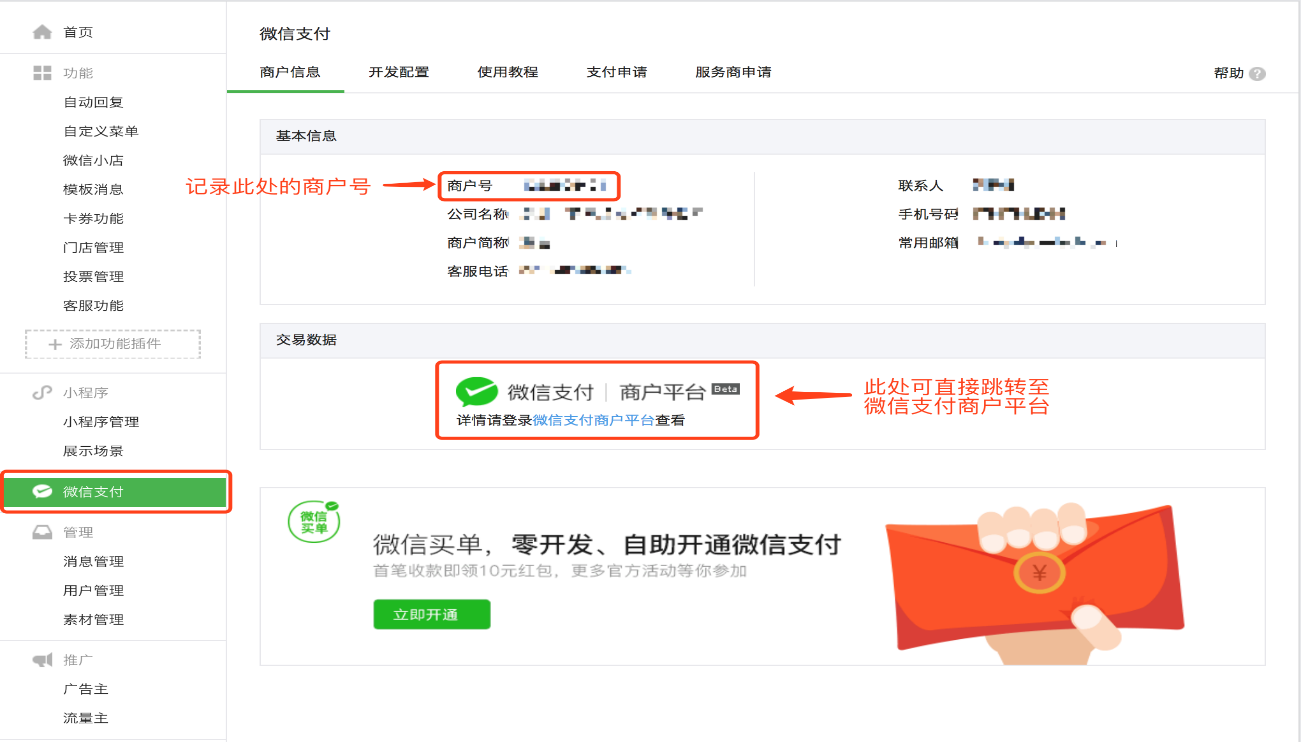
Step 4: Click on [WeChat Pay | Merchant Platform] under [Transaction Data] to navigate to the WeChat Pay Merchant Platform for the next steps.
No comments to display
No comments to display