# Evaluation Management

# How many times can students leave reviews after purchasing products?

<div data-elink-language-switch="1" id="bkmrk-%E4%B8%AD%E6%96%87" style="border:1px solid #d6d9de;border-radius:6px;padding:10px 12px;margin:0 0 18px 0;background:#f8fafc;font-size:14px;">[中文](/books/d34ab/page/4f4ad)</div><span style="color:rgb(51,51,51);font-family:'Helvetica Neue For Number', '-apple-system', 'PingFang SC', 'Microsoft YaHei', '微软雅黑', BlinkMacSystemFont, 'Hiragino Sans GB', SimSun, '宋体', sans-serif;background-color:rgb(255,255,255);font-size:15px;">Each time a learner purchases a product, they can leave a review for that product.</span>

# In what order are product reviews displayed?

<div data-elink-language-switch="1" id="bkmrk-%E4%B8%AD%E6%96%87" style="border:1px solid #d6d9de;border-radius:6px;padding:10px 12px;margin:0 0 18px 0;background:#f8fafc;font-size:14px;">[中文](/books/d34ab/page/28380)</div><span style="color:rgb(51,51,51);font-family:'Helvetica Neue For Number', '-apple-system', 'PingFang SC', 'Microsoft YaHei', '微软雅黑', BlinkMacSystemFont, 'Hiragino Sans GB', SimSun, '宋体', sans-serif;background-color:rgb(255,255,255);font-size:15px;">The display logic of physical product reviews is in reverse chronological order.</span>

# How many times can merchants reply to reviews?

<div data-elink-language-switch="1" id="bkmrk-%E4%B8%AD%E6%96%87" style="border:1px solid #d6d9de;border-radius:6px;padding:10px 12px;margin:0 0 18px 0;background:#f8fafc;font-size:14px;">[中文](/books/d34ab/page/58238)</div><span style="color:rgb(51,51,51);font-family:'Helvetica Neue For Number', '-apple-system', 'PingFang SC', 'Microsoft YaHei', '微软雅黑', BlinkMacSystemFont, 'Hiragino Sans GB', SimSun, '宋体', sans-serif;background-color:rgb(255,255,255);font-size:15px;"> Currently, each comment only supports one reply.</span>

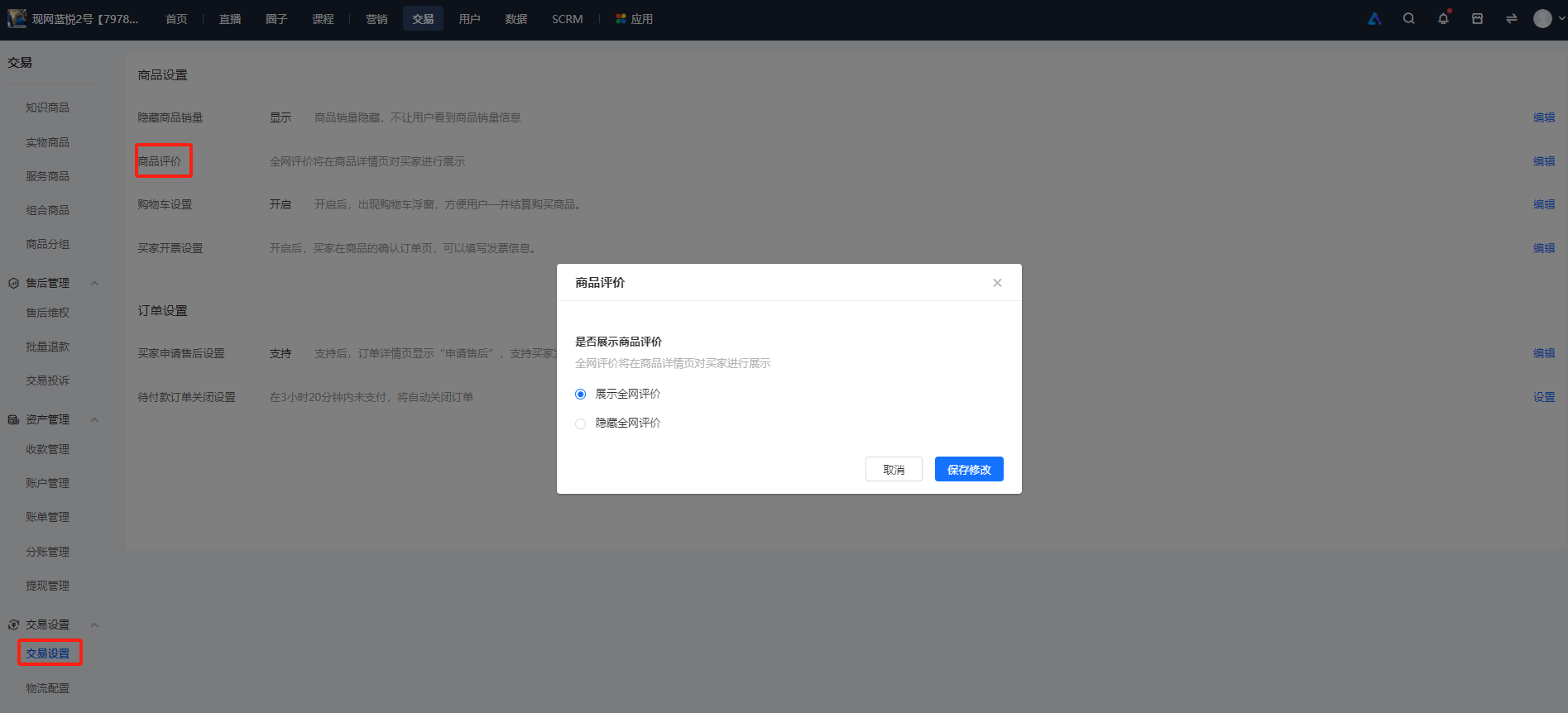
# Where can I set the switch for reviews of physical products?

<div data-elink-language-switch="1" id="bkmrk-%E4%B8%AD%E6%96%87" style="border:1px solid #d6d9de;border-radius:6px;padding:10px 12px;margin:0 0 18px 0;background:#f8fafc;font-size:14px;">[中文](/books/d34ab/page/598b3)</div><span style="color:rgb(51,51,51);background-color:rgb(255,255,255);"></span>

<span style="color:rgb(51,51,51);background:rgb(255,255,255);letter-spacing:0pt;vertical-align:baseline;font-size:15px;">Enter the Online Store management backend, find \[Transactions\] - \[Transaction Settings\]. In the \[Product Settings\] module, find \[Product Reviews\], click to set it up and enable the display.</span>

![image.png](https://wechatapppro-1252524126.file.myqcloud.com/help_document/image/ueditor/54567900_1700207658.png ".png")