User list
- How often is user data updated?
- Is the calculation method for cumulative users that each time a user clicks in counts as one?
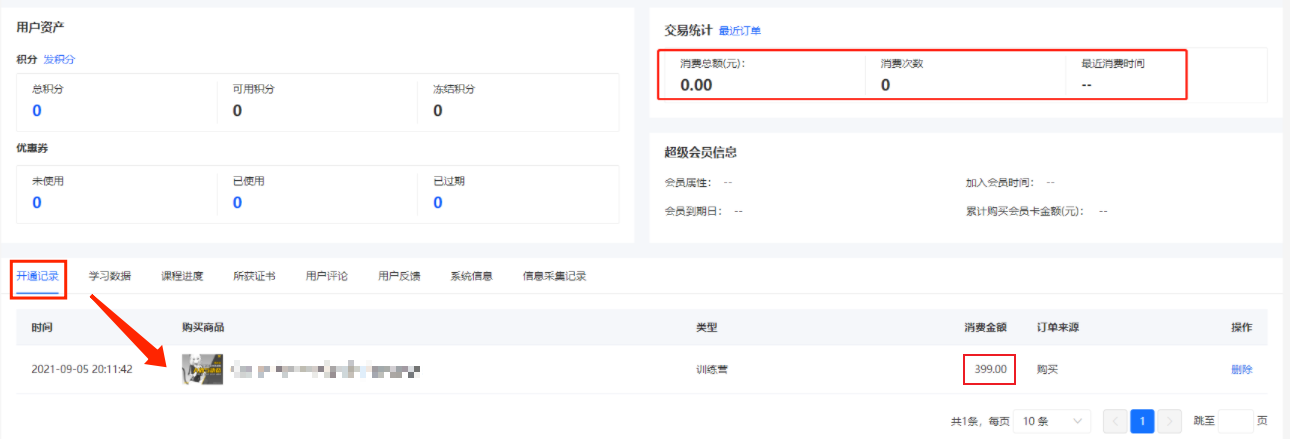
- How to delete the activation records?
- How can students synchronize their purchased courses across multiple platforms?
- What causes the incorrect statistical data of trainees' transactions?
How often is user data updated?
To ensure system stability, user data is updated every 5 - 15 minutes. If there are issues such as inconsistent consumption data or inability to filter by assigned tags, it may be because the data has not been updated yet. Please try again later.
Is the calculation method for cumulative users that each time a user clicks in counts as one?
The cumulative number of users is calculated based on the number of unique users. If a user enters the Online Store multiple times, it will only be counted once.
How to delete the activation records?
In the details of the user list, you can view all the course activation records of the user. If you need to delete a specific activation record of a user, please click [Users] - [User Management] - [User List], search for the WeChat nickname to find the user's record, click on their avatar. In the activation records, you can see the courses they have activated. Click the [Delete] button. Since deleting the record will prevent the user from accessing the course content again, please proceed with caution.
How can students synchronize their purchased courses across multiple platforms?
I. Function Introduction
Students can study courses from the same merchant's Online Store on both the WeChat and QQ platforms after binding the same mobile phone number on the 'WeChat version' and 'QQ version' of the store.
II. Scenario Example
1. Student A of a merchant has been purchasing and studying courses in the [WeChat Store];
2. Later, the merchant opened a [QQ Store]. After entering the [QQ Store], A couldn't see the courses purchased on WeChat;
3. A wanted to study the courses from the [WeChat Store] on QQ, so A bound the mobile phone number 166xxxxxxxx used in the WeChat Store in the [QQ Store];
4. After successful binding, A can see the purchased courses in both the WeChat and QQ stores;
Scenario Diagram:

III. Operation Path
Merchant's H5 Store → Personal Center → Account Settings → Mobile Phone Number
IV. Operation Process
Step 1 Log in to the store and enter the 'My' page or the pop - up window for binding a mobile phone number;
 or
or 
Step 2 Enter the account settings, find the entry for binding a mobile phone number, and click on it to pop up the window for binding a mobile phone number;


Step 3 In the situation described in [II. Scenario Example], an account merging page will pop up. Agree to merge the accounts; cancel to skip the merging.
**Note:Commission pending settlement is not supported for now. You can suggest that users wait for the commission settlement to complete before merging accounts;

V. Supplementary Explanation
1. Under what circumstances will 'account merging' occur when binding a mobile phone number, and when will it not?
① 'Account merging' occurs
If a student binds the same mobile phone number in the WeChat Store and the QQ Store, 'account merging' will occur;

(Diagram of account changes during 'account merging')
② 'Account merging' does not occur
If a student binds the same mobile phone number in two WeChat (or two QQ) accounts, the two accounts cannot be merged;
In this case, if A binds B's mobile phone number, B's mobile phone number will be unbound and bound to A;

(Diagram of account changes during 'binding/modifying a mobile phone number')
What causes the incorrect statistical data of trainees' transactions?
The transaction statistics on the user details page are calculated based on orders, while the activation records represent the course entitlements the user possesses.
If there are course activation records for a user that are not reflected in the transaction statistics, it means the user has merged the course entitlements through account consolidation.