# Data monitoring
# Frequently Asked Questions about Conversation Content Archiving
[中文](/books/dc912/page/f8c1f)
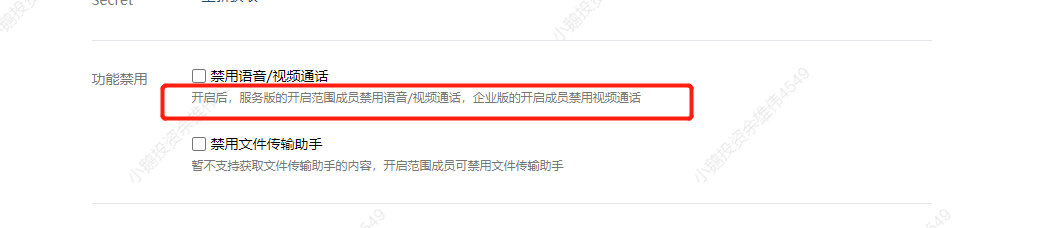
**Q1:What types of messages are restricted from being archived by the conversation archiving feature?**
Answer: The conversation archiving feature does not archive 'video calls' or the message content in the 'File Transfer Assistant'. Customers can disable these two functions in the Enterprise WeChat backend.
**Q2: If \[elink SCRM\] expires, but the conversation content archiving service has not expired, will the conversations still be archived?**
Answer:Conversations will not be archived. The product page will prompt the customer that if they do not renew the service, the conversation content will not be pulled for archiving, leaving the decision to the customer. During the non - renewal period, the unarchived conversation content cannot be retrieved (Enterprise WeChat only allows pulling conversation content from the last three days).
**Q3: \[**elink SCRM**\] expires and is not renewed. How will the previously archived conversation content be handled?**
Answer: \[elink SCRM\] will continue to store the archived content for the customer. If the customer needs it, they can continue to view it.
**Q4: Is a refund available for the conversation content archiving service?**
Answer: Refunds are not available after the paid purchase of the conversation content archiving service. This is stated in the contract signed when purchasing the conversation archiving feature.
**Q5: How can I apply for a trial of the conversation content archiving service?**
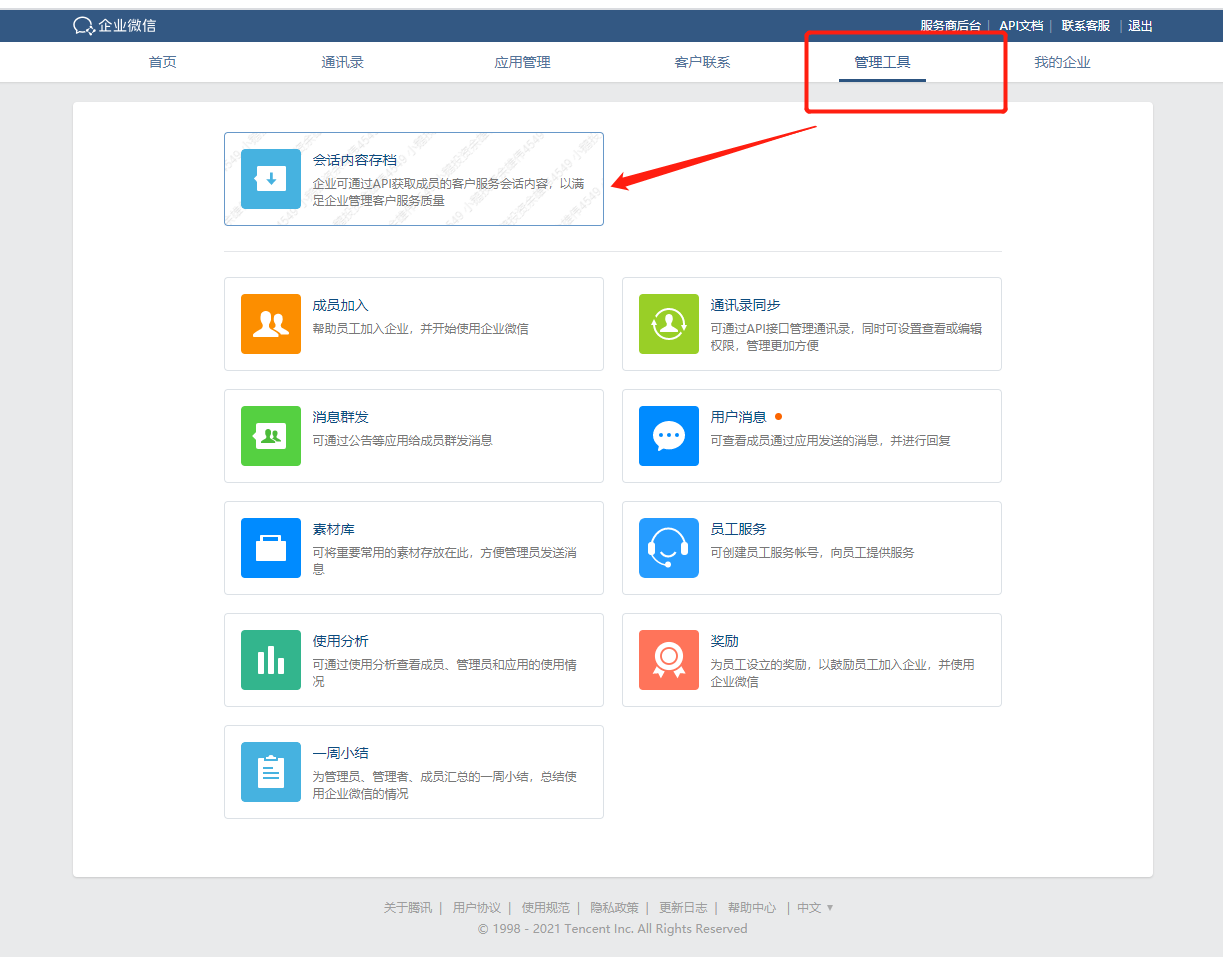
Answer: 1. Enter the Enterprise WeChat backend: https://work.weixin.qq.com/
2. Click \[Management Tools\] - \[Conversation Content Archiving\]
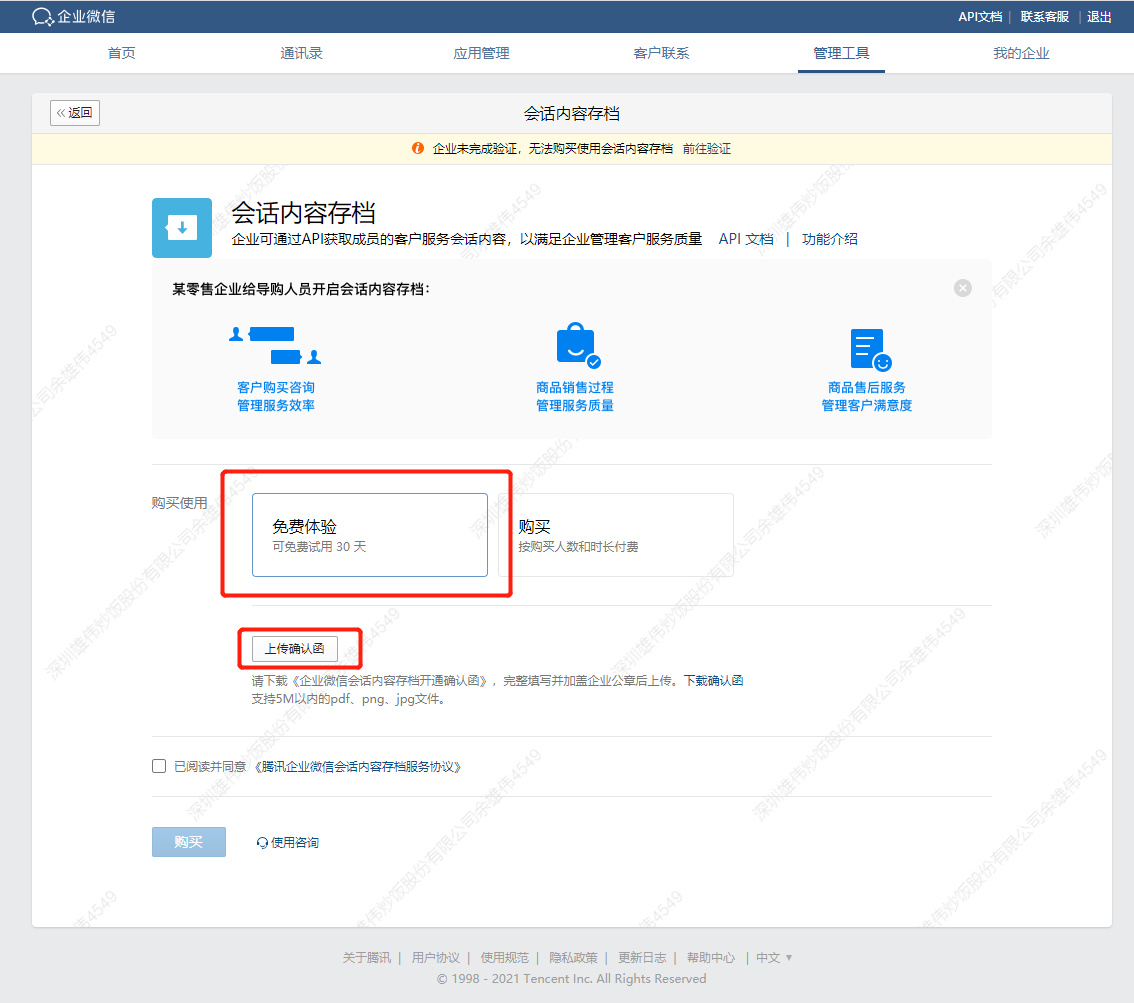
3. Click 'Free Trial' and upload the 'Confirmation Letter' (the confirmation letter must be stamped with the company seal).
4. After waiting for the official review of Enterprise WeChat, you will obtain the conversation archiving secret and get the conversation content after configuration in \[elink SCRM\].
**Q6: What types of messages are currently archived by the conversation content archiving service?**
Answer: The message types currently archived by the conversation content archiving feature include: text, images, recalled messages (only the status is displayed), approved conversation chat content, voice, video, files, links, Mini Program messages, mixed messages, and archived audio messages (i.e., voice chats).
**Q7: Can merchants who have previously used the conversation archiving service now use elink Enterprise WeChat Assistant?**
Answer: If merchants have previously purchased a 'Conversation Archiving' account in the Enterprise WeChat backend on their own, as long as the usage period of the conversation archiving service has not expired and elink Enterprise WeChat Assistant is still within the normal usage period, they can configure and use it normally.
**Q8: Can multiple public keys be set for the conversation archiving service? How does the logic work?**
Answer: The Enterprise WeChat backend only supports setting one public key. The public key is provided on the conversation archiving settings page of elink Enterprise WeChat Assistant. Merchants can fill in the public key in the Enterprise WeChat conversation archiving backend. Each time the public key is updated, the version number in the Enterprise WeChat backend will increase by 1. This version number needs to be filled back into the elink Enterprise WeChat Assistant backend.