# Private domain mini-program

# Goose Live Mini Program

# Elink Live Streaming Usage Tutorial

<div data-elink-language-switch="1" id="bkmrk-%E4%B8%AD%E6%96%87" style="border:1px solid #d6d9de;border-radius:6px;padding:10px 12px;margin:0 0 18px 0;background:#f8fafc;font-size:14px;">[中文](/books/18d80/page/c0c7c)</div><span style="font-size:17px;">**Related documents:**</span>

[Usage tutorial for full - screen interaction in elink Live](https://helpcenter.xiaoe-tech.com/#/problem/detail?document_id=doc_62a6f65e2e84a_rqt7k "鹅直播全屏互动使用教程")

[Usage tutorial for background playback in elink Live](https://admin.xiaoe-tech.com/helpCenter/problem?first_id=600&second_id=1191&document_id=doc_62a708f32ee0d_yEHK3 "鹅直播后台播放使用教程")

[Usage tutorial for setting group to - do items in elink Live](https://helpcenter.xiaoe-tech.com/#/problem/detail?document_id=doc_62a70a99b583d_u7s4z "鹅直播设置群待办使用教程")

[How to obtain the path to configure the elink Live Mini Program?](https://helpcenter.xiaoe-tech.com/#/problem/detail?document_id=doc_6497ee6a4f28c_SmiHR "如何获取配置鹅直播小程序的路径？")

<span style="font-size:17px;">**I. Function introduction**</span>

<span style="font-size:15px;">The elink Live Mini Program is a live - streaming efficiency tool. It supports one - click live streaming, allows students to watch live broadcasts, and enables the creation of live streams. It also has functions such as appointment reminders, providing users with a better live - streaming experience. (Merchants and students can use it directly without application<span style="font-size:15px;text-indent:32px;">and no technical service fees are charged for the time being.)</span></span>

<span style="font-size:17px;">**II. Purpose of use**</span>

<span style="font-size:15px;">Enable instructors to start live streams and students to watch live broadcasts in the Mini Program, lower the threshold for starting/watching live streams, and at the same time enhance the live - streaming experience, helping merchants conduct live streams more conveniently.</span>

<span style="font-size:17px;">**III. Usage scenarios**</span>

**<span style="font-size:15px;">Scenario 1:</span><span style="font-size:15px;">\[Merchants start live streams quickly\]</span>**<span style="text-indent:2em;font-size:15px;">After merchants with existing stores create a live stream, if instructors want to start the live stream on the mobile side, they can use the \[elink Live Mini Program\] to start the live stream with one click, saving the cumbersome process.</span>

**<span style="font-size:15px;">Scenario 2: \[Students watch live broadcasts\]</span>**<span style="text-indent:2em;font-size:15px;">Currently, when students watch live broadcasts, there are problems such as difficulty in finding the h5 entrance and difficulty in saving. By using the \[elink Live Mini Program\], students can view all the live broadcasts they need to participate in without worrying about not being able to find the live stream.</span>

**<span style="font-size:15px;">Scenario 3: \[Individual users experience quickly\]</span>**<span style="text-indent:2em;font-size:15px;">Merchants who do not have a store and want to purchase elink - related products can use the \[elink Live Mini Program\] to quickly create a live stream for experience.</span>

<span style="font-size:17px;">**IV. Operation paths**</span>

**Path 1 (Created in the Online Store):**

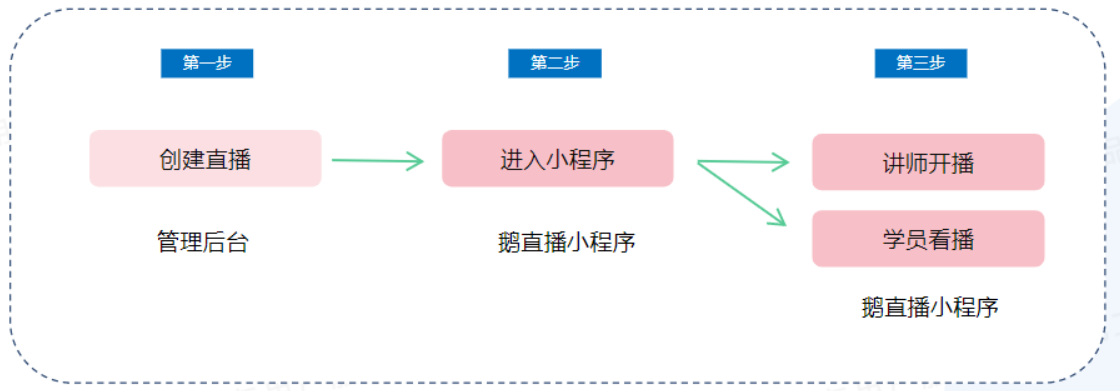
**<span style="font-size:15px;">Store live stream:</span>**<span style="font-size:15px;">Create a live stream (on the PC management console) - Go to the live stream - Select \[elink Live Mini Program\] for the lecture - Start the live stream;</span>

**<span style="font-size:15px;">Students watch the live stream:</span>**<span style="font-size:15px;">Scan the QR code/Click the link/Search - Enter the \[elink Live Mini Program\] - Enter the live - streaming room - Watch the live stream;</span>

![01.png](https://wechatapppro-1252524126.file.myqcloud.com/help_document/image/ueditor/44557000_1699410999.png ".png")

<span style="font-size:15px;">  
</span>

**<span style="font-size:15px;">Path 2 (Created in the Mini Program):</span>**

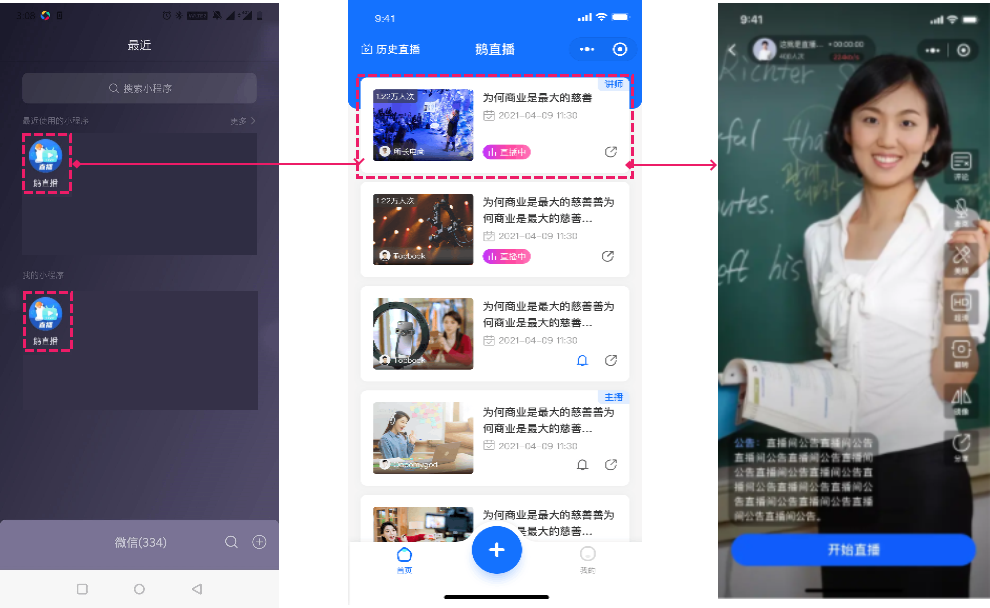
**<span style="font-size:15px;">Create a personal live stream:</span>**<span style="font-size:15px;">Enter the \[elink Live Mini Program\] - Create a live stream - Start the live stream.</span>

<span style="font-size:15px;">![企业微信截图_16287591753463.png](https://wechatapppro-1252524126.file.myqcloud.com/help_document/image/ueditor/59408100_1699410999.png ".png")</span>

<span style="font-size:17px;">**V. Usage tutorials**</span>

**<span style="font-size:15px;">(1) Tutorial for store live streams</span>**

**Step 1: Create a live - streaming room and select the Mini Program to start the live stream**

**1. Enter the \[Live - streaming settings\]**

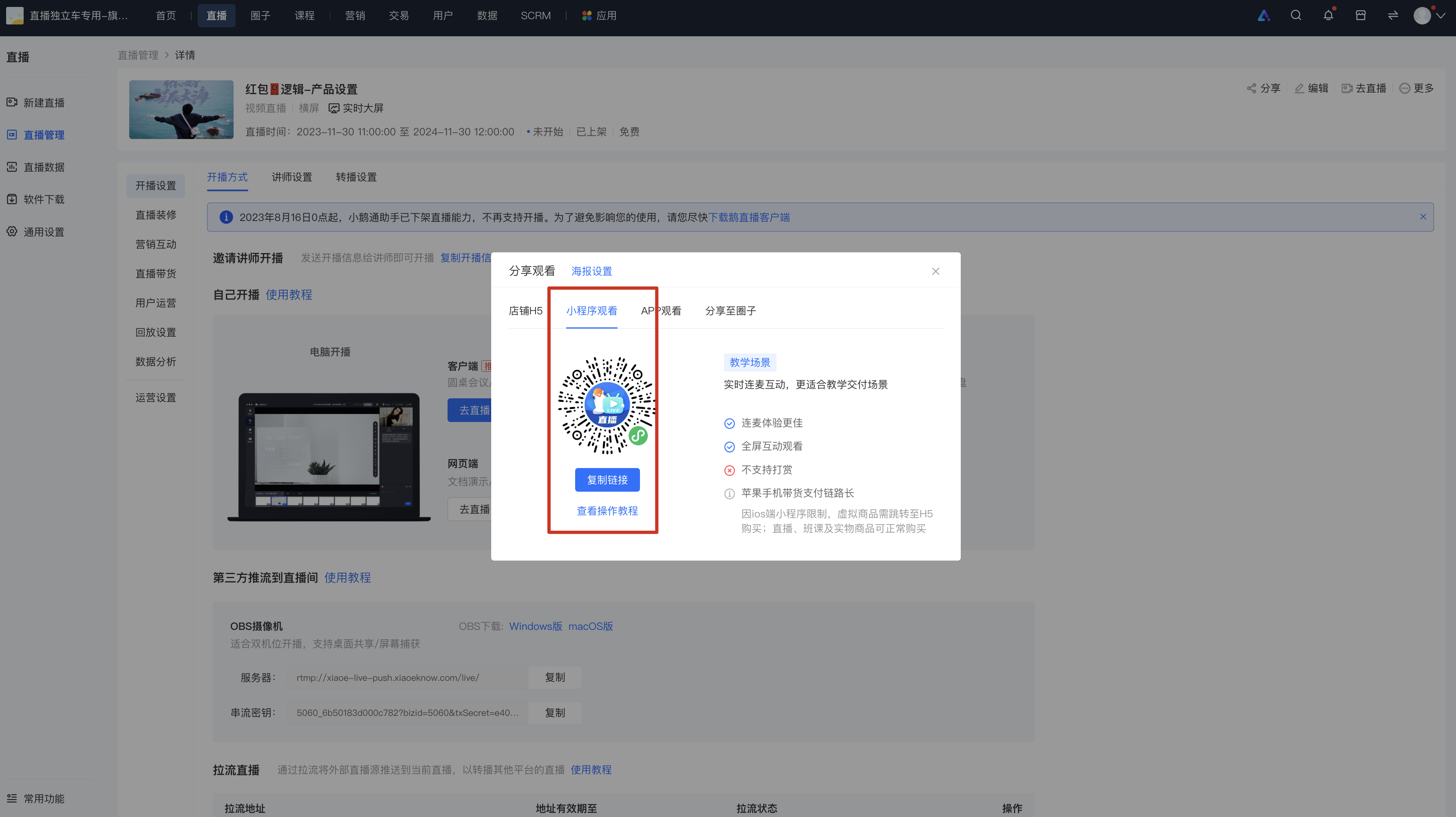
1\) Enter the merchant management background, select \[Live stream\] - \[New live stream\], fill in the information to complete the creation of the live - streaming room, and enter the live - streaming room details page;

2\) Find \[Go to the live stream\] in \[More\] of the target live - streaming room that has been created, and click to enter the \[Live - streaming settings\].
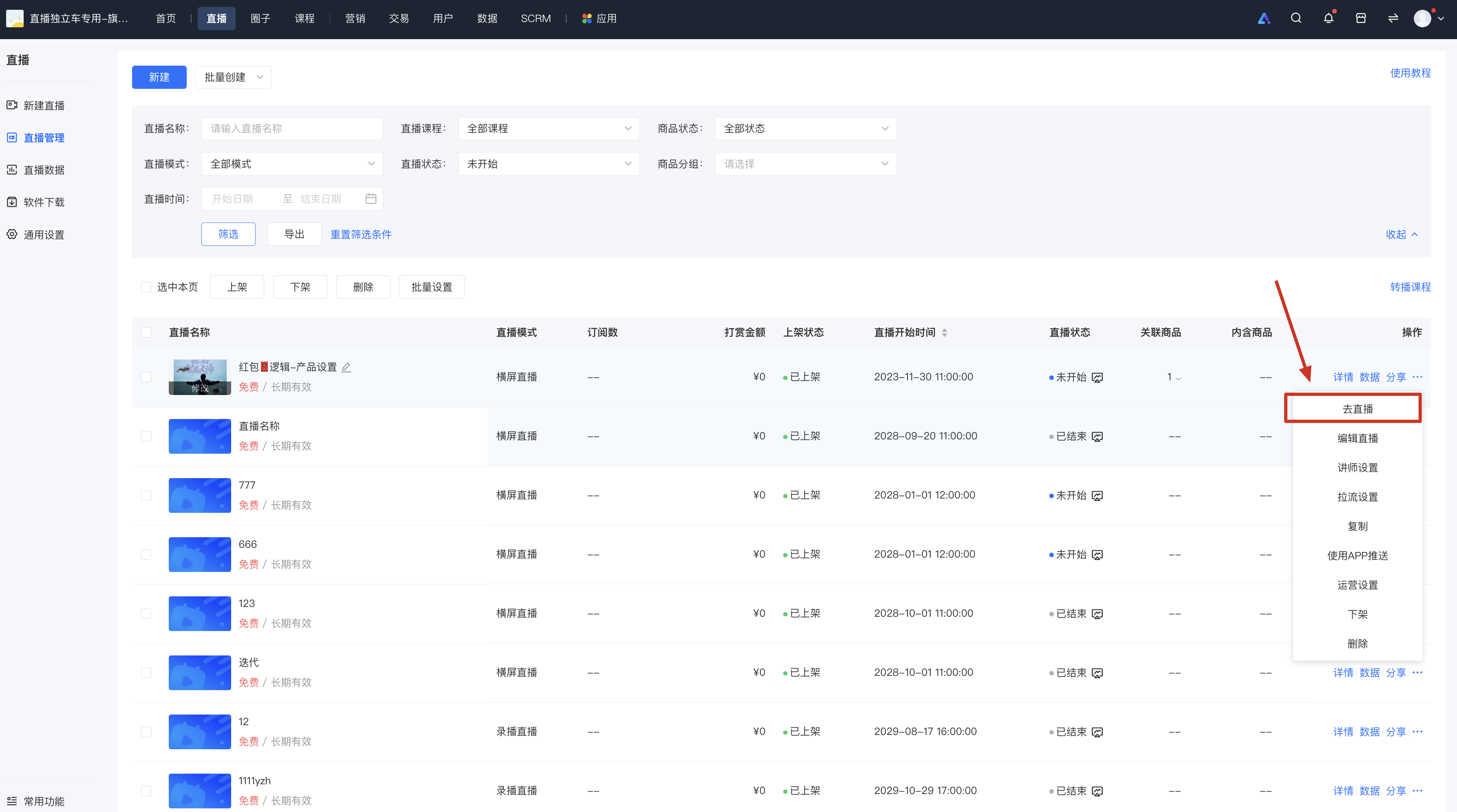
![image.png](https://wechatapppro-1252524126.file.myqcloud.com/help_document/image/ueditor/54157500_1699411140.png ".png")

**2. Select \[Go to the live stream\] of the \[elink Live Mini Program\]**

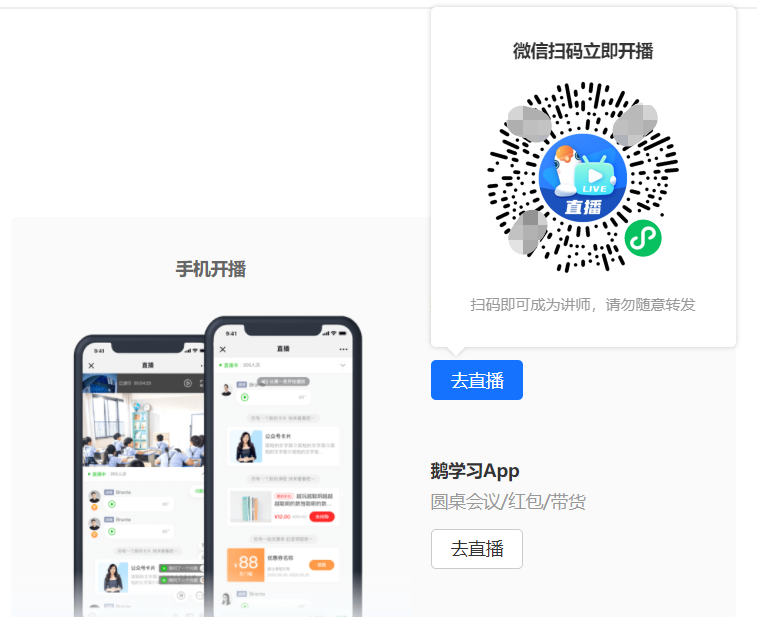
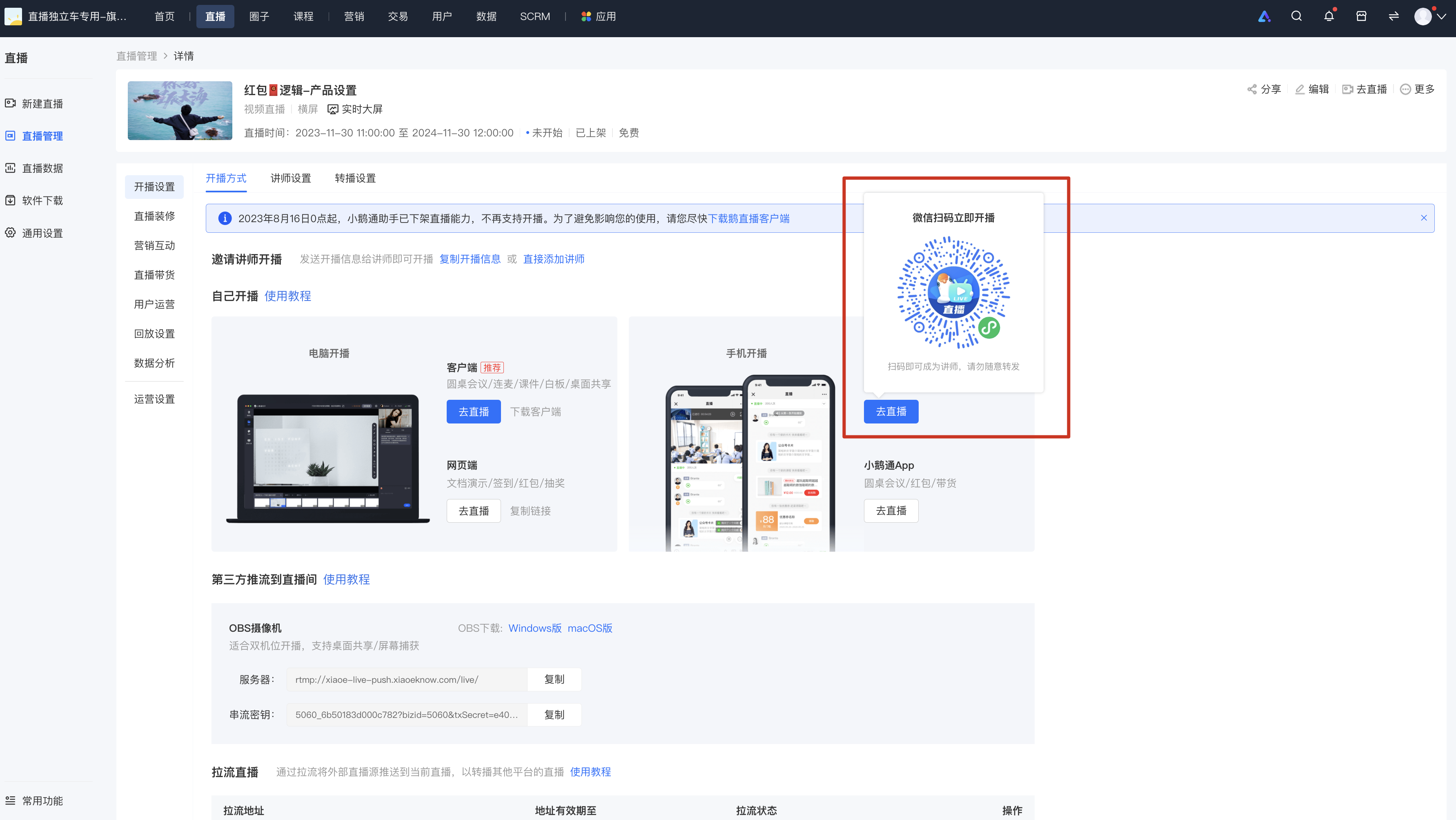
After entering \[Live - streaming settings\] - \[Live - streaming method\], click the \[Go to the live stream\] button under the \[Start live stream on mobile\] module, and scan the code with your mobile WeChat to enter the live - streaming room and automatically become the instructor.
![image.png](https://wechatapppro-1252524126.file.myqcloud.com/help_document/image/ueditor/84037800_1699411226.png ".png")

\*The QR code can be shared with friends. After friends scan the code, they will automatically become the instructor of the live - streaming room.  
  
**Step 2: Start the live stream**

<span style="font-size:15px;">After the instructor enters the live - streaming room, click \[Start live stream\] to start the live - streaming push.</span>

**<span style="font-size:15px;">1. Enter through the QR code:</span>**

![29.png](https://wechatapppro-1252524126.file.myqcloud.com/help_document/image/ueditor/2265100_1699411000.png ".png")

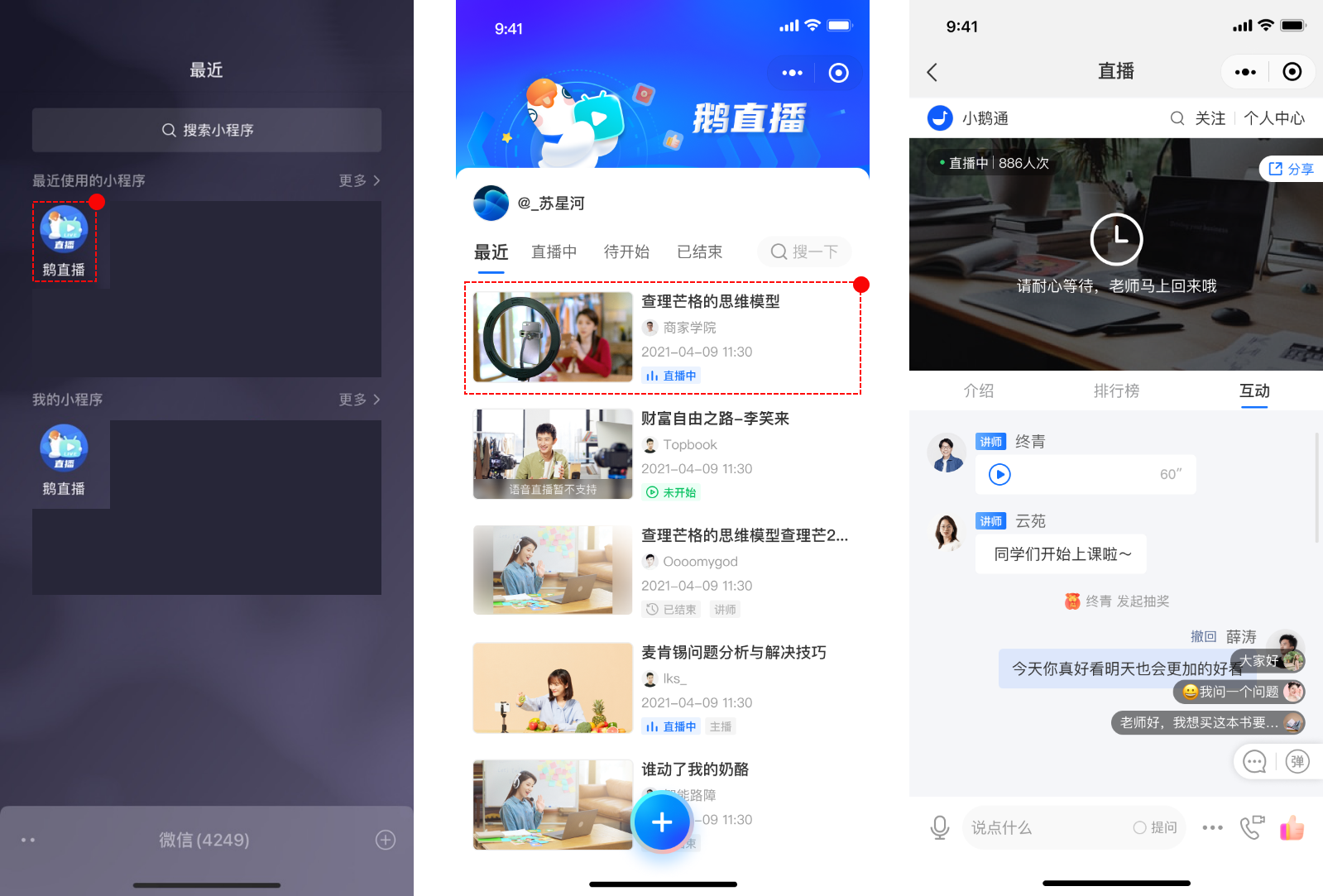
**<span style="font-size:15px;">2. Enter by searching for "elink Live Mini Program" on WeChat:</span>**

<span style="font-size:15px;">![03.png](https://wechatapppro-1252524126.file.myqcloud.com/help_document/image/ueditor/18840800_1699411000.png ".png")</span>

**<span style="font-size:15px;">(2) Tutorial for students to watch live broadcasts</span>**

**<span style="font-size:15px;"><span style="font-size:15px;">1. Enter the live - streaming room</span>through the link:</span>**

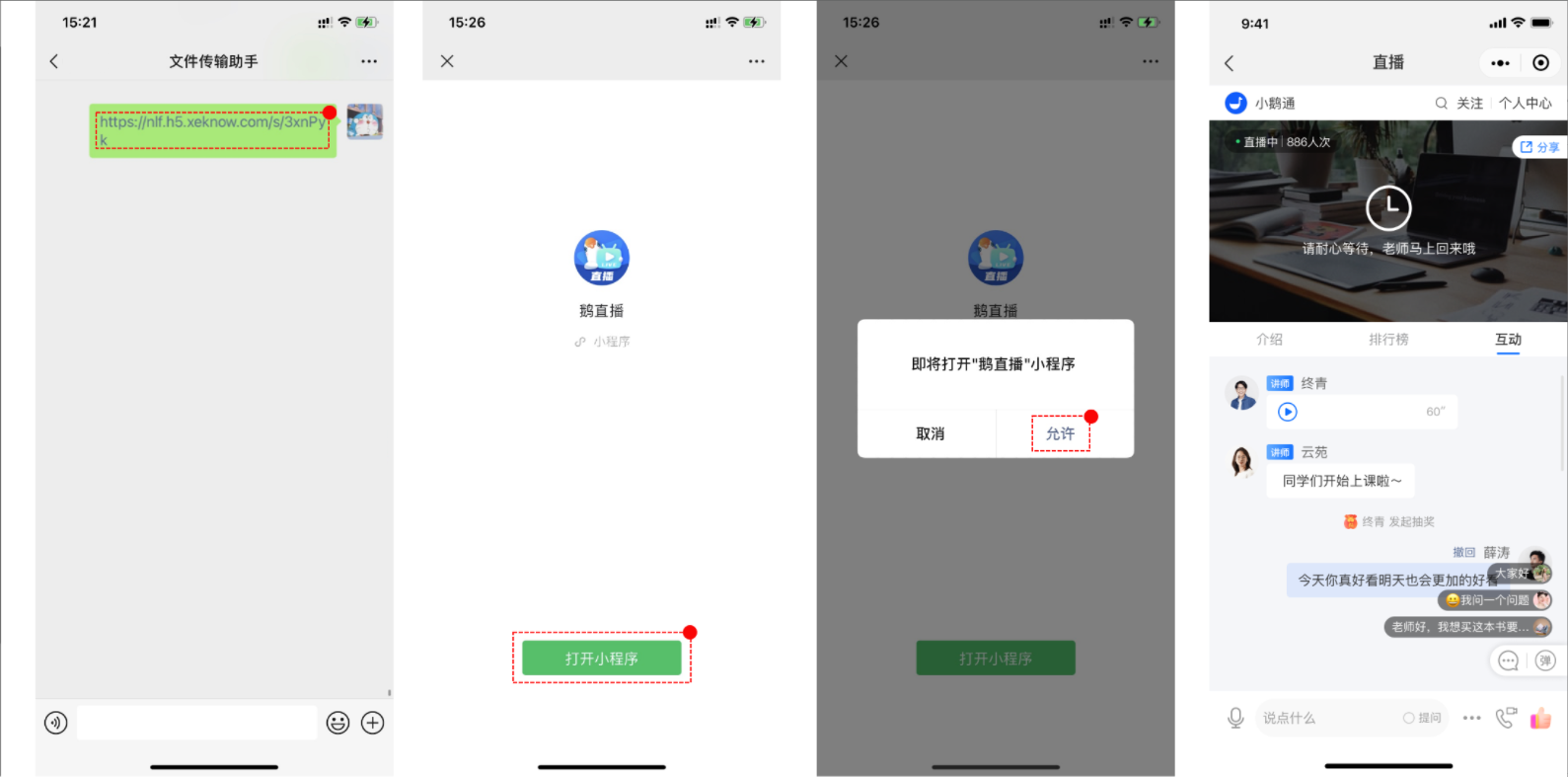
![image.png](https://wechatapppro-1252524126.file.myqcloud.com/help_document/image/ueditor/80902600_1699411261.png ".png")

![22-2.png](https://wechatapppro-1252524126.file.myqcloud.com/help_document/image/ueditor/64069600_1699411000.png ".png")

**<span style="font-size:15px;">  
</span>**

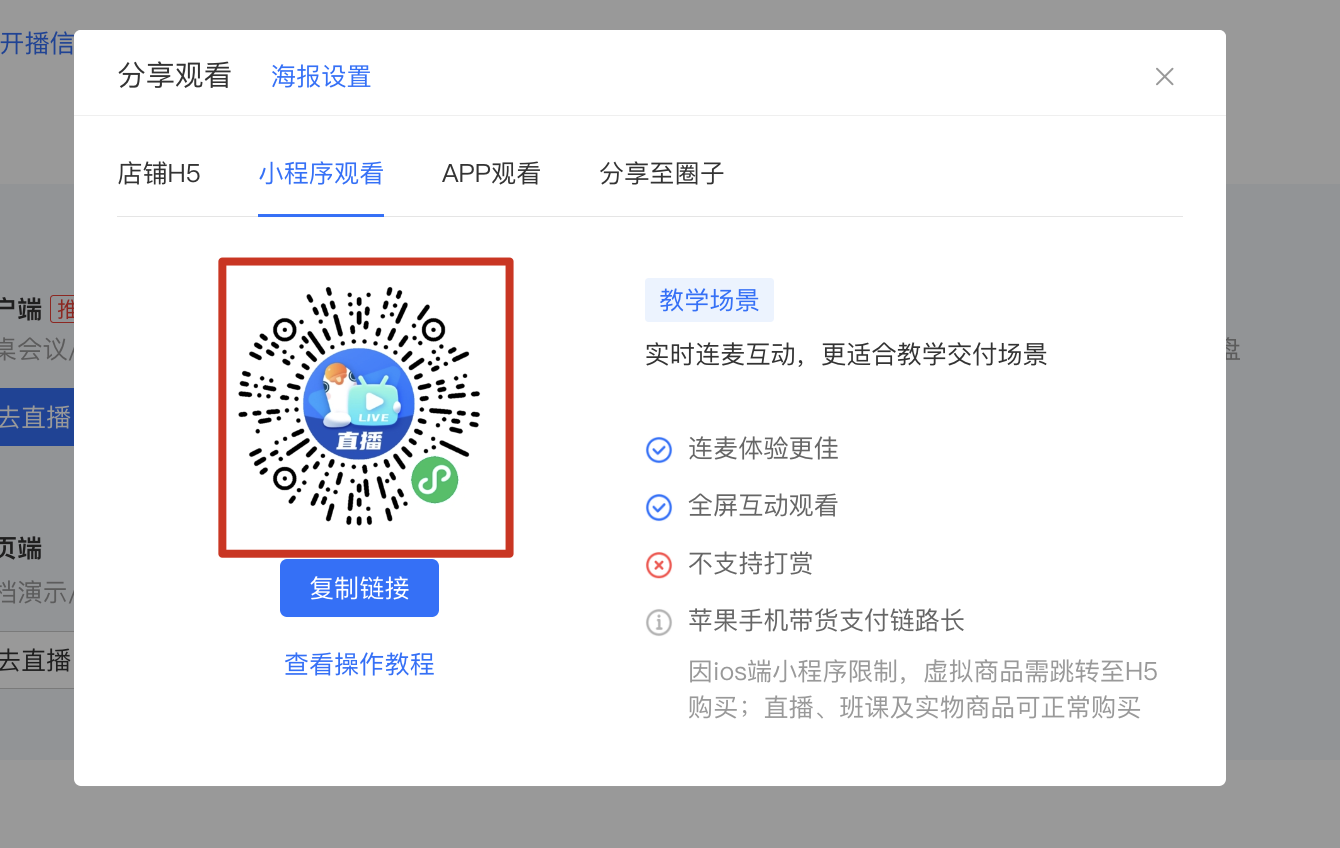
**<span style="font-size:15px;">2. Enter the live - streaming room through the QR code:</span>**

![image.png](https://wechatapppro-1252524126.file.myqcloud.com/help_document/image/ueditor/75280300_1699411261.png ".png")

**<span style="font-size:15px;">3. Enter by searching for the elink Live Mini Program on WeChat:</span>**

![24.png](https://wechatapppro-1252524126.file.myqcloud.com/help_document/image/ueditor/23450700_1699411001.png ".png")

**<span style="font-size:15px;">  
</span>**

**<span style="font-size:15px;">(3) Tutorial for individual users to start live streams</span>**

**1. Individual users start live streams**

(1) Start the live stream immediately

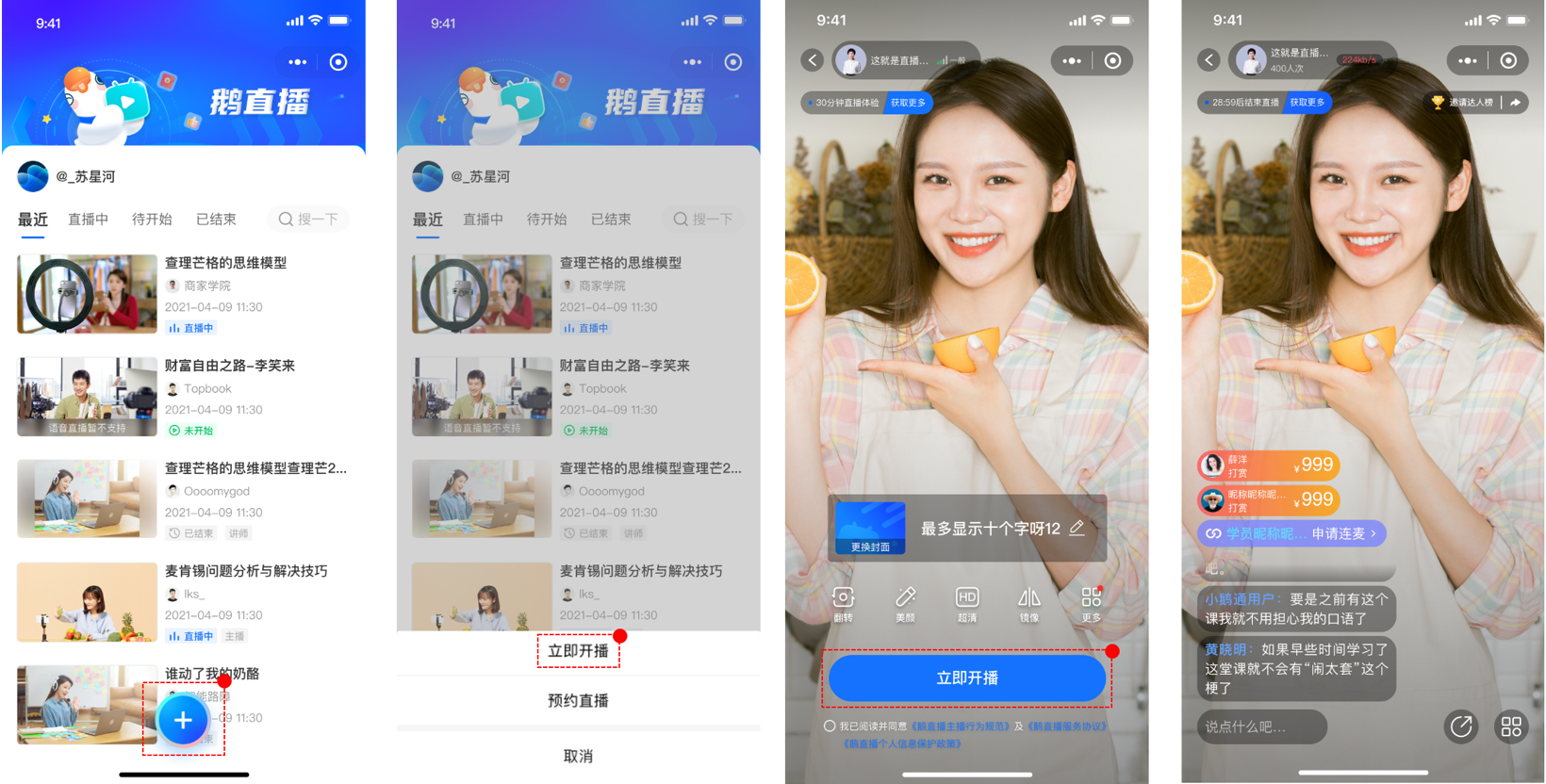
Enter the home page of the \[elink Live Mini Program\], click "+", a selection pop - up window will appear. Select \[Start live stream immediately\], fill in the relevant information, and then click \[Start live stream immediately\] to start the live stream.
![25-1.png](https://wechatapppro-1252524126.file.myqcloud.com/help_document/image/ueditor/70441200_1699411001.png ".png")

**(2) Schedule the live stream**

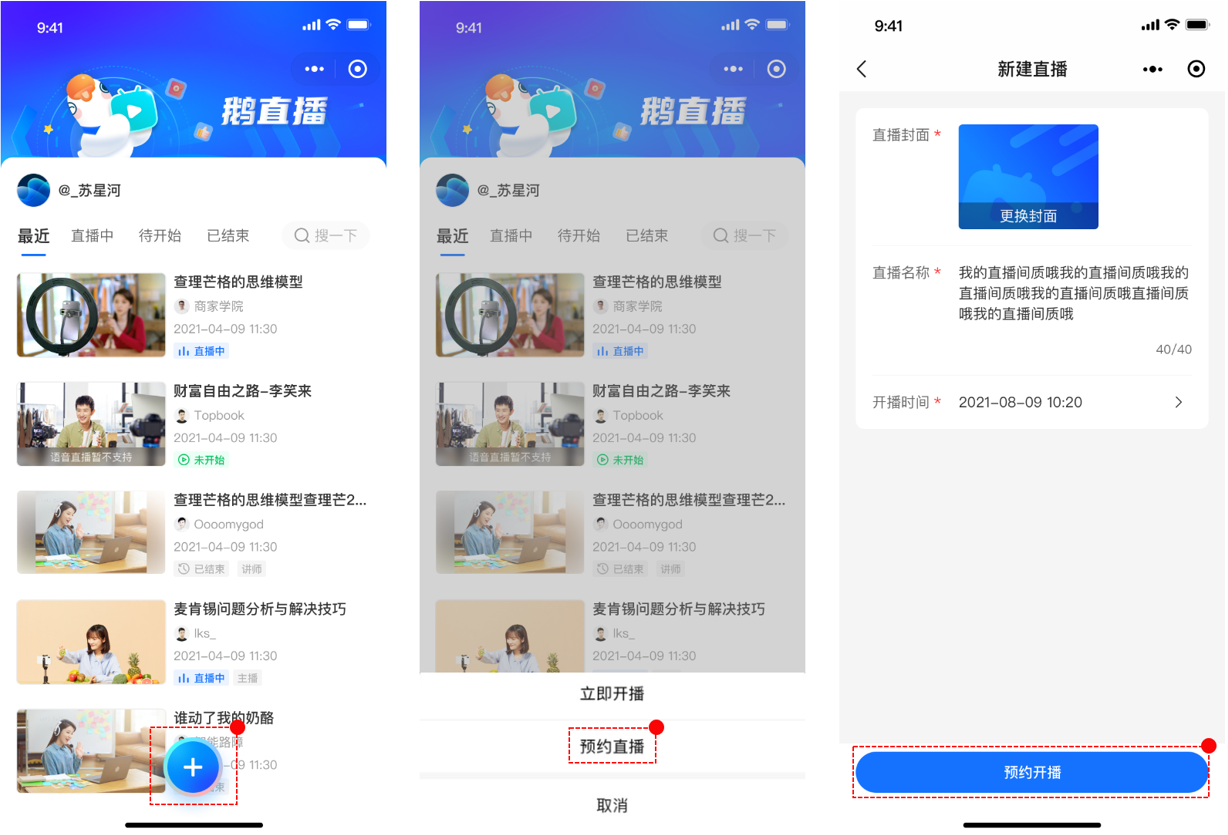
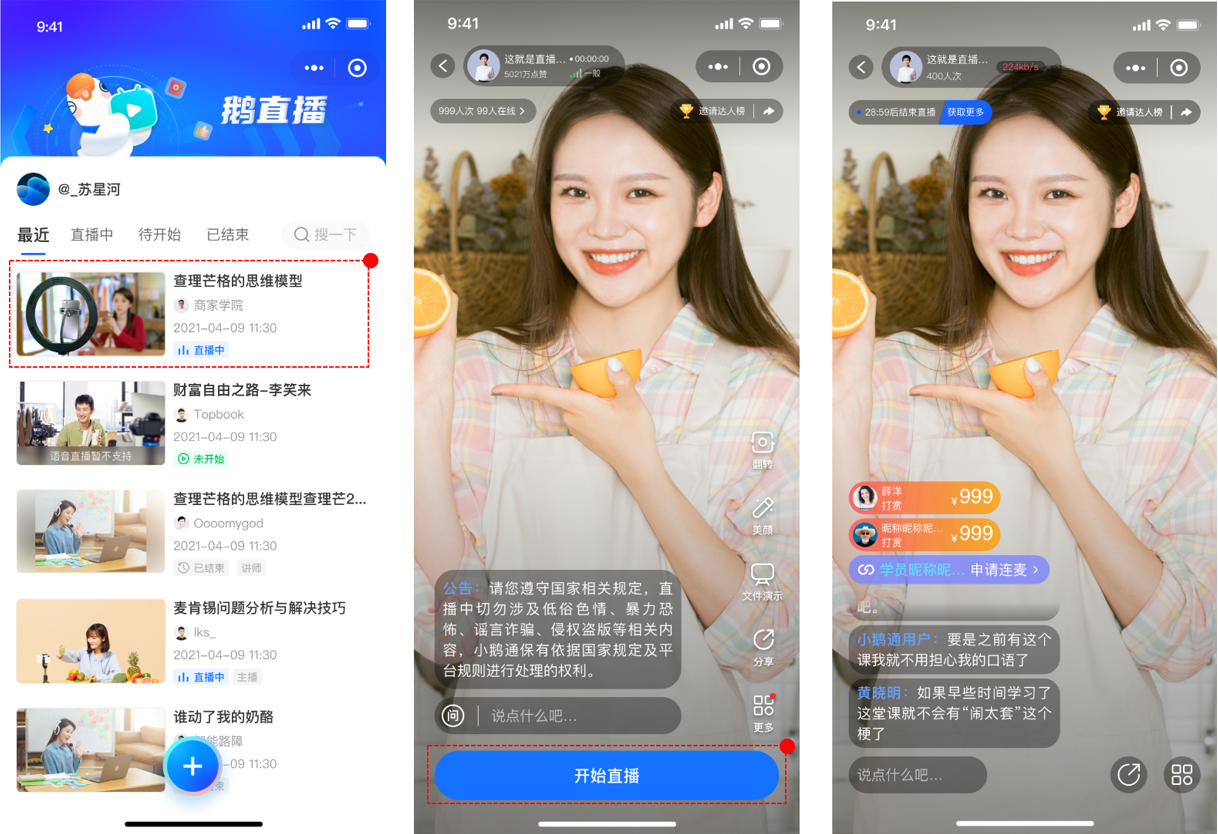
Enter the home page of the \[elink Live Mini Program\], click "+", a selection pop - up window will appear. Select \[Schedule live stream\], fill in the relevant information, and then click \[Schedule live stream\]. You will automatically return to the home page. Find the live - streaming room and click to enter the live - streaming start page. Click \[Start live stream\] to start the live stream.
![25-2.png](https://wechatapppro-1252524126.file.myqcloud.com/help_document/image/ueditor/3753200_1699411002.png ".png")

![25-3.png](https://wechatapppro-1252524126.file.myqcloud.com/help_document/image/ueditor/50515700_1699411002.png ".png")

**2. Share the personal live stream with students**

**(1) Share when starting the live stream immediately**

After you start the live stream, click the share button in the live - streaming room to share the live - streaming room with friends.
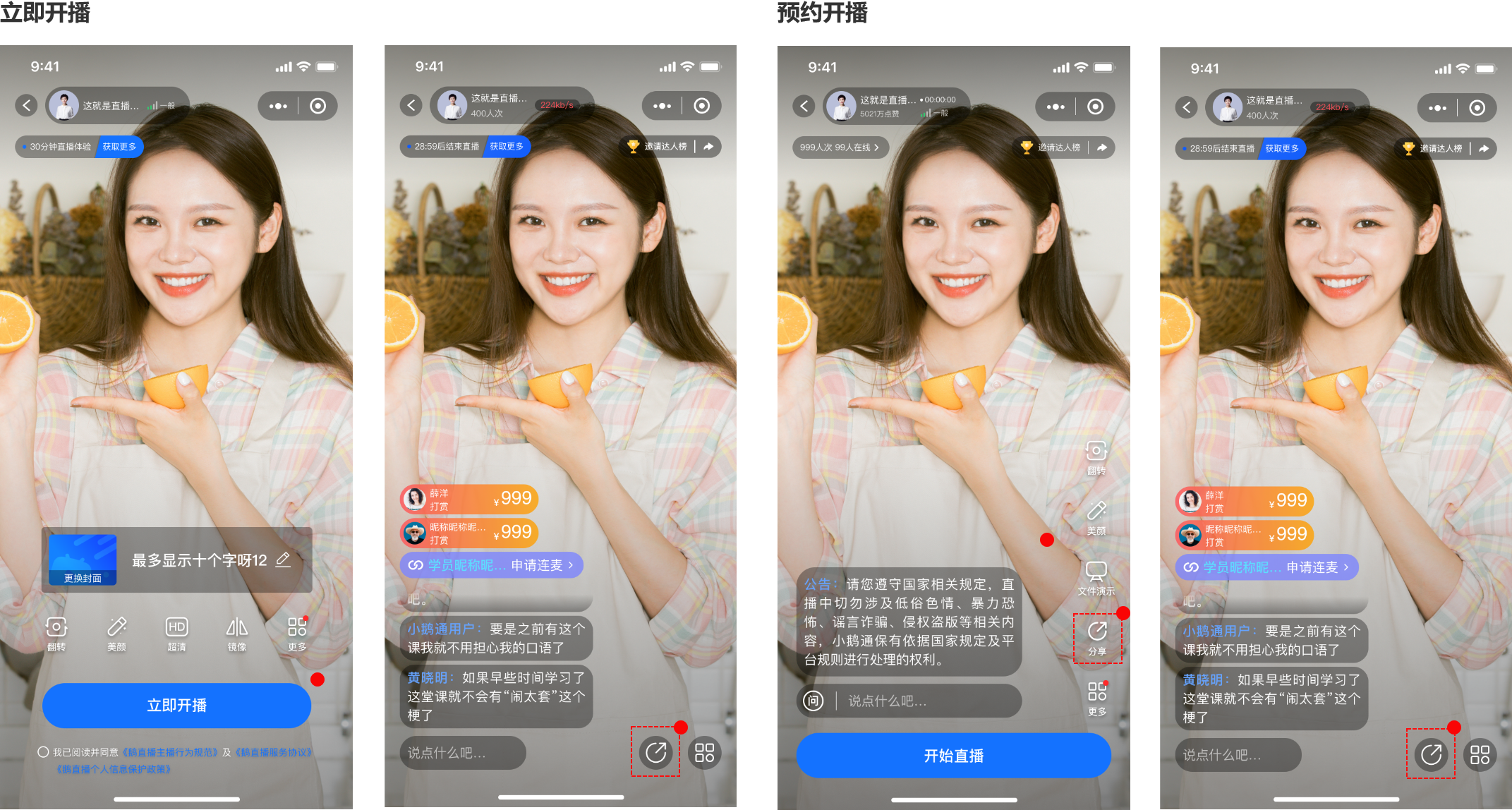
**(2) Share when scheduling the live stream**

After you create the live - streaming room, click the share button in the live - streaming room to share the live - streaming room with friends.

![26.png](https://wechatapppro-1252524126.file.myqcloud.com/help_document/image/ueditor/612800_1699411003.png ".png")

# Elink Live Streaming Background Play Usage Tutorial

<div data-elink-language-switch="1" id="bkmrk-%E4%B8%AD%E6%96%87" style="border:1px solid #d6d9de;border-radius:6px;padding:10px 12px;margin:0 0 18px 0;background:#f8fafc;font-size:14px;">[中文](/books/18d80/page/428fc)</div>**<span style="font-family:'微软雅黑', 'Helvetica Neue', Helvetica, 'PingFang SC', 'Microsoft YaHei', 'Source Han Sans SC', 'Noto Sans CJK SC', 'WenQuanYi Micro Hei', 'Helvetica Neue', Helvetica, 'PingFang SC', 'Microsoft YaHei', 'Source Han Sans SC', 'Noto Sans CJK SC', 'WenQuanYi Micro Hei', sans-serif;font-weight:700;background:rgb(255,255,255);letter-spacing:0pt;vertical-align:baseline;font-size:17px;">I. Feature Introduction</span><span style="font-size:15px;"><span style="font-family:'微软雅黑', 'Helvetica Neue', Helvetica, 'PingFang SC', 'Microsoft YaHei', 'Source Han Sans SC', 'Noto Sans CJK SC', 'WenQuanYi Micro Hei', 'Helvetica Neue', Helvetica, 'PingFang SC', 'Microsoft YaHei', 'Source Han Sans SC', 'Noto Sans CJK SC', 'WenQuanYi Micro Hei', sans-serif;font-weight:700;background:rgb(255,255,255);letter-spacing:0pt;vertical-align:baseline;"></span></span>**<span style="font-size:15px;"><span style="font-family:'Helvetica Neue', Helvetica, 'PingFang SC', 'Microsoft YaHei', 'Source Han Sans SC', 'Noto Sans CJK SC', 'WenQuanYi Micro Hei', sans-serif;color:rgb(51,51,51);background-image:initial;background-position:initial;background-size:initial;background-repeat:initial;background-attachment:initial;letter-spacing:0pt;vertical-align:baseline;"></span></span>

<span style="font-family:'Helvetica Neue', Helvetica, 'PingFang SC', 'Microsoft YaHei', 'Source Han Sans SC', 'Noto Sans CJK SC', 'WenQuanYi Micro Hei', sans-serif;color:rgb(51,51,51);background-image:initial;background-position:initial;background-size:initial;background-repeat:initial;background-attachment:initial;letter-spacing:0pt;vertical-align:baseline;font-size:15px;">The eLink Live Mini Program allows users to continue playing live broadcasts or live replay even when the Mini Program is sent to the background.</span>

<span style="font-size:17px;">**<span style="font-family:'微软雅黑', 'Helvetica Neue', Helvetica, 'PingFang SC', 'Microsoft YaHei', 'Source Han Sans SC', 'Noto Sans CJK SC', 'WenQuanYi Micro Hei', 'Helvetica Neue', Helvetica, 'PingFang SC', 'Microsoft YaHei', 'Source Han Sans SC', 'Noto Sans CJK SC', 'WenQuanYi Micro Hei', sans-serif;font-weight:700;background:rgb(255,255,255);letter-spacing:0pt;vertical-align:baseline;">II. Purpose of Use</span>**<span style="font-family:'微软雅黑', 'Helvetica Neue', Helvetica, 'PingFang SC', 'Microsoft YaHei', 'Source Han Sans SC', 'Noto Sans CJK SC', 'WenQuanYi Micro Hei', 'Helvetica Neue', Helvetica, 'PingFang SC', 'Microsoft YaHei', 'Source Han Sans SC', 'Noto Sans CJK SC', 'WenQuanYi Micro Hei', sans-serif;font-weight:700;background:rgb(255,255,255);letter-spacing:0pt;vertical-align:baseline;"></span></span><span style="font-size:11pt;font-family:'Helvetica Neue', Helvetica, 'PingFang SC', 'Microsoft YaHei', 'Source Han Sans SC', 'Noto Sans CJK SC', 'WenQuanYi Micro Hei', sans-serif;color:rgb(51,51,51);background-image:initial;background-position:initial;background-size:initial;background-repeat:initial;background-attachment:initial;letter-spacing:0pt;vertical-align:baseline;"></span>

<span style="font-size:15px;"><span style="font-size:11pt;font-family:'Helvetica Neue', Helvetica, 'PingFang SC', 'Microsoft YaHei', 'Source Han Sans SC', 'Noto Sans CJK SC', 'WenQuanYi Micro Hei', 'Helvetica Neue', Helvetica, 'PingFang SC', 'Microsoft YaHei', 'Source Han Sans SC', 'Noto Sans CJK SC', 'WenQuanYi Micro Hei', sans-serif;color:rgb(51,51,51);background-image:initial;background-position:initial;background-size:initial;background-repeat:initial;background-attachment:initial;letter-spacing:0pt;vertical-align:baseline;">Reduce the bounce rate of the live broadcast room and increase users' stay time in the live broadcast.</span><span style="font-size:11pt;font-family:'Helvetica Neue', Helvetica, 'PingFang SC', 'Microsoft YaHei', 'Source Han Sans SC', 'Noto Sans CJK SC', 'WenQuanYi Micro Hei', sans-serif;color:rgb(51,51,51);background-image:initial;background-position:initial;background-size:initial;background-repeat:initial;background-attachment:initial;letter-spacing:0pt;vertical-align:baseline;"></span></span>

<span style="font-size:17px;">**<span style="font-family:'微软雅黑', 'Helvetica Neue', Helvetica, 'PingFang SC', 'Microsoft YaHei', 'Source Han Sans SC', 'Noto Sans CJK SC', 'WenQuanYi Micro Hei', 'Helvetica Neue', Helvetica, 'PingFang SC', 'Microsoft YaHei', 'Source Han Sans SC', 'Noto Sans CJK SC', 'WenQuanYi Micro Hei', sans-serif;font-weight:700;color:rgb(53,53,53);background:rgb(255,255,255);letter-spacing:0pt;vertical-align:baseline;">III. Use Scenarios</span>**</span>

<span style="font-family:'Helvetica Neue', Helvetica, 'PingFang SC', 'Microsoft YaHei', 'Source Han Sans SC', 'Noto Sans CJK SC', 'WenQuanYi Micro Hei', sans-serif;color:rgb(51,51,51);background-image:initial;background-position:initial;background-size:initial;background-repeat:initial;background-attachment:initial;letter-spacing:0pt;vertical-align:baseline;font-size:15px;">Switch the live broadcast room to play in the background, enabling users to listen to the live broadcast while replying to WeChat messages or using other mobile apps.</span>

<span style="font-size:15px;"><span style="font-size:10pt;font-family:'微软雅黑', 'Helvetica Neue', Helvetica, 'PingFang SC', 'Microsoft YaHei', 'Source Han Sans SC', 'Noto Sans CJK SC', 'WenQuanYi Micro Hei', 'Helvetica Neue', Helvetica, 'PingFang SC', 'Microsoft YaHei', 'Source Han Sans SC', 'Noto Sans CJK SC', 'WenQuanYi Micro Hei', sans-serif;color:rgb(38,38,38);background:rgb(255,255,255);letter-spacing:0pt;vertical-align:baseline;"> </span><span style="font-size:11pt;font-family:'Helvetica Neue', Helvetica, 'PingFang SC', 'Microsoft YaHei', 'Source Han Sans SC', 'Noto Sans CJK SC', 'WenQuanYi Micro Hei', sans-serif;color:rgb(51,51,51);background-image:initial;background-position:initial;background-size:initial;background-repeat:initial;background-attachment:initial;letter-spacing:0pt;vertical-align:baseline;"></span></span>

**<span style="font-family:'微软雅黑', 'Helvetica Neue', Helvetica, 'PingFang SC', 'Microsoft YaHei', 'Source Han Sans SC', 'Noto Sans CJK SC', 'WenQuanYi Micro Hei', 'Helvetica Neue', Helvetica, 'PingFang SC', 'Microsoft YaHei', 'Source Han Sans SC', 'Noto Sans CJK SC', 'WenQuanYi Micro Hei', sans-serif;font-weight:700;color:rgb(53,53,53);background:rgb(255,255,255);letter-spacing:0pt;vertical-align:baseline;font-size:17px;">IV. Usage Tutorial</span>**

<span style="background:rgb(255,255,255);letter-spacing:0pt;vertical-align:baseline;font-size:15px;">1. Users enter the eLink Live broadcast room.</span>

<span style="font-size:15px;"><span style="font-size:11.25pt;font-family:'微软雅黑', 'Helvetica Neue', Helvetica, 'PingFang SC', 'Microsoft YaHei', 'Source Han Sans SC', 'Noto Sans CJK SC', 'WenQuanYi Micro Hei', 'Helvetica Neue', Helvetica, 'PingFang SC', 'Microsoft YaHei', 'Source Han Sans SC', 'Noto Sans CJK SC', 'WenQuanYi Micro Hei', sans-serif;color:rgb(38,38,38);background:rgb(255,255,255);letter-spacing:0pt;vertical-align:baseline;">2. Click the background icon in the video area. The audio will continue to play even after exiting the Mini Program. (If you want to switch back to the video mode, click the button at the end of the screen to switch back to the video.)</span><span style="font-size:11pt;background-image:initial;background-position:initial;background-size:initial;background-repeat:initial;background-attachment:initial;letter-spacing:0pt;vertical-align:baseline;"></span></span>

<span style="display:inline-block;overflow:hidden;width:181px;height:396px;font-size:15px;"> </span><span class="image-wrapper" style="display:inline-block;overflow:hidden;width:181px;height:396px;">![mty4odg1mdq5ndexodu2mq_7607_v6daygf-1-9g_ueu_1655111214](https://wechatapppro-1252524126.file.myqcloud.com/help_document/image/ueditor/48391300_1655113913.cn/mty4odg1mdq5ndexodu2mq_7607_v6daygf-1-9g_ueu_1655111214) </span> <span class="image-wrapper" style="display:inline-block;overflow:hidden;width:179px;height:396px;"> ![mty4odg1mdq5ndexodu2mq_970585_7bc9jurxwypnza8t_1655111228](https://wechatapppro-1252524126.file.myqcloud.com/help_document/image/ueditor/13333900_1655113914.cn/mty4odg1mdq5ndexodu2mq_970585_7bc9jurxwypnza8t_1655111228) </span><span style="font-size:11pt;font-family:'Helvetica Neue', Helvetica, 'PingFang SC', 'Microsoft YaHei', 'Source Han Sans SC', 'Noto Sans CJK SC', 'WenQuanYi Micro Hei', sans-serif;color:rgb(51,51,51);background-image:initial;background-position:initial;background-size:initial;background-repeat:initial;background-attachment:initial;letter-spacing:0pt;vertical-align:baseline;"></span>

# Tutorial on Using Full-screen Interaction in elink Live

<div data-elink-language-switch="1" id="bkmrk-%E4%B8%AD%E6%96%87" style="border:1px solid #d6d9de;border-radius:6px;padding:10px 12px;margin:0 0 18px 0;background:#f8fafc;font-size:14px;">[中文](/books/18d80/page/04511)</div><span style="font-size:17px;">**<span style="font-family:'微软雅黑', 'Helvetica Neue', Helvetica, 'PingFang SC', 'Microsoft YaHei', 'Source Han Sans SC', 'Noto Sans CJK SC', 'WenQuanYi Micro Hei', sans-serif;color:rgb(0,0,0);background-image:initial;background-position:initial;background-size:initial;background-repeat:initial;background-attachment:initial;letter-spacing:0pt;vertical-align:baseline;">I. Feature Introduction</span>**</span>

<span style="font-size:15px;"><span style="font-size:12pt;font-family:'微软雅黑', 'Helvetica Neue', Helvetica, 'PingFang SC', 'Microsoft YaHei', 'Source Han Sans SC', 'Noto Sans CJK SC', 'WenQuanYi Micro Hei', sans-serif;color:rgb(0,0,0);background-image:initial;background-position:initial;background-size:initial;background-repeat:initial;background-attachment:initial;letter-spacing:0pt;vertical-align:baseline;"></span><span style="font-family:'微软雅黑', 'Helvetica Neue', Helvetica, 'PingFang SC', 'Microsoft YaHei', 'Source Han Sans SC', 'Noto Sans CJK SC', 'WenQuanYi Micro Hei', sans-serif;letter-spacing:0pt;font-size:15px;">Supports interaction with students/instructors while watching in full - screen mode, enhancing the viewing experience and the atmosphere in the live - streaming room</span></span>

<span style="font-family:'微软雅黑', 'Helvetica Neue', Helvetica, 'PingFang SC', 'Microsoft YaHei', 'Source Han Sans SC', 'Noto Sans CJK SC', 'WenQuanYi Micro Hei', sans-serif;background-image:initial;background-position:initial;background-size:initial;background-repeat:initial;background-attachment:initial;letter-spacing:0pt;vertical-align:baseline;font-size:15px;"></span>

<span style="font-size:17px;">**<span style="font-family:'微软雅黑', 'Helvetica Neue', Helvetica, 'PingFang SC', 'Microsoft YaHei', 'Source Han Sans SC', 'Noto Sans CJK SC', 'WenQuanYi Micro Hei', sans-serif;color:rgb(0,0,0);background-image:initial;background-position:initial;background-size:initial;background-repeat:initial;background-attachment:initial;letter-spacing:0pt;vertical-align:baseline;">II. Purpose of Use</span>**</span>

<span style="background-image:initial;background-position:initial;background-size:initial;background-repeat:initial;background-attachment:initial;letter-spacing:0pt;vertical-align:baseline;font-size:15px;">1. Improve the viewing experience</span>

<span style="letter-spacing:0pt;font-size:15px;">2. Enhance the atmosphere in the live - streaming room</span>

<span style="background-image:initial;background-position:initial;background-size:initial;background-repeat:initial;background-attachment:initial;letter-spacing:0pt;vertical-align:baseline;font-size:15px;"></span>

<span style="font-size:17px;">**<span style="font-family:'微软雅黑', 'Helvetica Neue', Helvetica, 'PingFang SC', 'Microsoft YaHei', 'Source Han Sans SC', 'Noto Sans CJK SC', 'WenQuanYi Micro Hei', sans-serif;background-image:initial;background-position:initial;background-size:initial;background-repeat:initial;background-attachment:initial;letter-spacing:0pt;vertical-align:baseline;">III. Use Scenarios</span>**</span>

<span style="font-size:15px;"><span style="font-size:12pt;font-family:'微软雅黑', 'Helvetica Neue', Helvetica, 'PingFang SC', 'Microsoft YaHei', 'Source Han Sans SC', 'Noto Sans CJK SC', 'WenQuanYi Micro Hei', sans-serif;background-image:initial;background-position:initial;background-size:initial;background-repeat:initial;background-attachment:initial;letter-spacing:0pt;vertical-align:baseline;"></span><span style="color:rgb(38,38,38);font-family:'微软雅黑', 'Helvetica Neue', Helvetica, 'PingFang SC', 'Microsoft YaHei', 'Source Han Sans SC', 'Noto Sans CJK SC', 'WenQuanYi Micro Hei', sans-serif;letter-spacing:0pt;font-size:15px;">Scenario 1: Excellent full - screen viewing effect for live - streaming with courseware. Interact with the teacher/other students while watching the live - stream</span></span>

<span style="color:rgb(38,38,38);font-family:'微软雅黑', 'Helvetica Neue', Helvetica, 'PingFang SC', 'Microsoft YaHei', 'Source Han Sans SC', 'Noto Sans CJK SC', 'WenQuanYi Micro Hei', sans-serif;letter-spacing:0pt;font-size:15px;">Scenario 2: Full - screen viewing during live commerce to enhance the atmosphere in the live - streaming room and assist merchants in sales</span>

<span style="font-family:'微软雅黑', 'Helvetica Neue', Helvetica, 'PingFang SC', 'Microsoft YaHei', 'Source Han Sans SC', 'Noto Sans CJK SC', 'WenQuanYi Micro Hei', sans-serif;color:rgb(38,38,38);background-image:initial;background-position:initial;background-size:initial;background-repeat:initial;background-attachment:initial;letter-spacing:0pt;vertical-align:baseline;font-size:15px;">  
</span>

<span style="font-size:17px;">**<span style="font-family:'微软雅黑', 'Helvetica Neue', Helvetica, 'PingFang SC', 'Microsoft YaHei', 'Source Han Sans SC', 'Noto Sans CJK SC', 'WenQuanYi Micro Hei', sans-serif;background-image:initial;background-position:initial;background-size:initial;background-repeat:initial;background-attachment:initial;letter-spacing:0pt;vertical-align:baseline;">IV. Operation Path</span>**</span><span style="font-size:15px;">**<span style="font-size:15px;font-family:'微软雅黑', 'Helvetica Neue', Helvetica, 'PingFang SC', 'Microsoft YaHei', 'Source Han Sans SC', 'Noto Sans CJK SC', 'WenQuanYi Micro Hei', sans-serif;background-image:initial;background-position:initial;background-size:initial;background-repeat:initial;background-attachment:initial;letter-spacing:0pt;vertical-align:baseline;"></span><span style="font-size:15px;font-family:'微软雅黑', 'Helvetica Neue', Helvetica, 'PingFang SC', 'Microsoft YaHei', 'Source Han Sans SC', 'Noto Sans CJK SC', 'WenQuanYi Micro Hei', sans-serif;background-image:initial;background-position:initial;background-size:initial;background-repeat:initial;background-attachment:initial;letter-spacing:0pt;vertical-align:baseline;"></span>**</span>

<span style="font-family:'微软雅黑', 'Helvetica Neue', Helvetica, 'PingFang SC', 'Microsoft YaHei', 'Source Han Sans SC', 'Noto Sans CJK SC', 'WenQuanYi Micro Hei', sans-serif;color:rgb(38,38,38);background-image:initial;background-position:initial;background-size:initial;background-repeat:initial;background-attachment:initial;letter-spacing:0pt;vertical-align:baseline;font-size:15px;">Instructor/Student End: eLink Live → Click 'Full - screen' in the video area → Watch in full - screen mode</span>

<span style="font-family:'微软雅黑', 'Helvetica Neue', Helvetica, 'PingFang SC', 'Microsoft YaHei', 'Source Han Sans SC', 'Noto Sans CJK SC', 'WenQuanYi Micro Hei', sans-serif;color:rgb(38,38,38);background-image:initial;background-position:initial;background-size:initial;background-repeat:initial;background-attachment:initial;letter-spacing:0pt;vertical-align:baseline;font-size:15px;">Instructor/Student End: H5 Live - streaming Room → Click the 'Full - screen Interaction' button → Jump to eLink Live → Watch in full - screen mode</span>

<span style="font-size:10pt;font-family:'微软雅黑', 'Helvetica Neue', Helvetica, 'PingFang SC', 'Microsoft YaHei', 'Source Han Sans SC', 'Noto Sans CJK SC', 'WenQuanYi Micro Hei', sans-serif;color:rgb(38,38,38);background-image:initial;background-position:initial;background-size:initial;background-repeat:initial;background-attachment:initial;letter-spacing:0pt;vertical-align:baseline;"></span>

**<span style="font-family:'微软雅黑', 'Helvetica Neue', Helvetica, 'PingFang SC', 'Microsoft YaHei', 'Source Han Sans SC', 'Noto Sans CJK SC', 'WenQuanYi Micro Hei', sans-serif;background-image:initial;background-position:initial;background-size:initial;background-repeat:initial;background-attachment:initial;letter-spacing:0pt;vertical-align:baseline;font-size:17px;">V. Usage Tutorial</span>**

**<span style="font-family:'微软雅黑', 'Helvetica Neue', Helvetica, 'PingFang SC', 'Microsoft YaHei', 'Source Han Sans SC', 'Noto Sans CJK SC', 'WenQuanYi Micro Hei', sans-serif;background-image:initial;background-position:initial;background-size:initial;background-repeat:initial;background-attachment:initial;letter-spacing:0pt;vertical-align:baseline;font-size:17px;">  
</span>**

<span style="font-family:'微软雅黑', 'Helvetica Neue', Helvetica, 'PingFang SC', 'Microsoft YaHei', 'Source Han Sans SC', 'Noto Sans CJK SC', 'WenQuanYi Micro Hei', sans-serif;background-image:initial;background-position:initial;background-size:initial;background-repeat:initial;background-attachment:initial;letter-spacing:0pt;vertical-align:baseline;font-size:15px;"></span>![1.png](https://wechatapppro-1252524126.file.myqcloud.com/help_document/image/ueditor/81698000_1655108820.png ".png")

<span style="font-size:15px;"></span>

<span style="font-family:'微软雅黑', 'Helvetica Neue', Helvetica, 'PingFang SC', 'Microsoft YaHei', 'Source Han Sans SC', 'Noto Sans CJK SC', 'WenQuanYi Micro Hei', sans-serif;background-image:initial;background-position:initial;background-size:initial;background-repeat:initial;background-attachment:initial;letter-spacing:0pt;vertical-align:baseline;font-size:15px;">1. Enter the H5 live - streaming room → Click 'Full - screen Interaction' → Jump to eLink Live in full - screen mode</span>

<span style="font-size:10pt;font-family:'微软雅黑', 'Helvetica Neue', Helvetica, 'PingFang SC', 'Microsoft YaHei', 'Source Han Sans SC', 'Noto Sans CJK SC', 'WenQuanYi Micro Hei', sans-serif;background-image:initial;background-position:initial;background-size:initial;background-repeat:initial;background-attachment:initial;letter-spacing:0pt;vertical-align:baseline;">![2(1).png](https://wechatapppro-1252524126.file.myqcloud.com/help_document/image/ueditor/57942000_1655109176.png ".png")</span>

<span style="font-size:10pt;font-family:'微软雅黑', 'Helvetica Neue', Helvetica, 'PingFang SC', 'Microsoft YaHei', 'Source Han Sans SC', 'Noto Sans CJK SC', 'WenQuanYi Micro Hei', sans-serif;background-image:initial;background-position:initial;background-size:initial;background-repeat:initial;background-attachment:initial;letter-spacing:0pt;vertical-align:baseline;">  
</span>

<span style="font-size:10pt;font-family:'微软雅黑', 'Helvetica Neue', Helvetica, 'PingFang SC', 'Microsoft YaHei', 'Source Han Sans SC', 'Noto Sans CJK SC', 'WenQuanYi Micro Hei', sans-serif;background-image:initial;background-position:initial;background-size:initial;background-repeat:initial;background-attachment:initial;letter-spacing:0pt;vertical-align:baseline;"></span>

<span style="font-family:'微软雅黑', 'Helvetica Neue', Helvetica, 'PingFang SC', 'Microsoft YaHei', 'Source Han Sans SC', 'Noto Sans CJK SC', 'WenQuanYi Micro Hei', sans-serif;background-image:initial;background-position:initial;background-size:initial;background-repeat:initial;background-attachment:initial;letter-spacing:0pt;vertical-align:baseline;font-size:15px;">2. Enter the eLink Live live - streaming room → Click 'Full - screen' in the video area → Watch in full - screen mode</span>

![3(1).png](https://wechatapppro-1252524126.file.myqcloud.com/help_document/image/ueditor/38065500_1655109195.png ".png")

# Tutorial on Using Group To-dos in elink Live Settings

<div data-elink-language-switch="1" id="bkmrk-%E4%B8%AD%E6%96%87" style="border:1px solid #d6d9de;border-radius:6px;padding:10px 12px;margin:0 0 18px 0;background:#f8fafc;font-size:14px;">[中文](/books/18d80/page/d9d4f)</div>**<span style="font-family:'微软雅黑', 'Helvetica Neue', Helvetica, 'PingFang SC', 'Microsoft YaHei', 'Source Han Sans SC', 'Noto Sans CJK SC', 'WenQuanYi Micro Hei', 'Helvetica Neue', Helvetica, 'PingFang SC', 'Microsoft YaHei', 'Source Han Sans SC', 'Noto Sans CJK SC', 'WenQuanYi Micro Hei', sans-serif;font-weight:700;background:rgb(255,255,255);letter-spacing:0pt;vertical-align:baseline;font-size:17px;">I. Feature Introduction</span><span style="font-size:15px;"><span style="font-family:'微软雅黑', 'Helvetica Neue', Helvetica, 'PingFang SC', 'Microsoft YaHei', 'Source Han Sans SC', 'Noto Sans CJK SC', 'WenQuanYi Micro Hei', 'Helvetica Neue', Helvetica, 'PingFang SC', 'Microsoft YaHei', 'Source Han Sans SC', 'Noto Sans CJK SC', 'WenQuanYi Micro Hei', sans-serif;font-weight:700;background:rgb(255,255,255);letter-spacing:0pt;vertical-align:baseline;"></span></span>**<span style="font-size:15px;"><span style="font-family:'Helvetica Neue', Helvetica, 'PingFang SC', 'Microsoft YaHei', 'Source Han Sans SC', 'Noto Sans CJK SC', 'WenQuanYi Micro Hei', sans-serif;color:rgb(51,51,51);background-image:initial;background-position:initial;background-size:initial;background-repeat:initial;background-attachment:initial;letter-spacing:0pt;vertical-align:baseline;"></span></span>

<span style="font-size:11pt;font-family:'Helvetica Neue', Helvetica, 'PingFang SC', 'Microsoft YaHei', 'Source Han Sans SC', 'Noto Sans CJK SC', 'WenQuanYi Micro Hei', sans-serif;color:rgb(51,51,51);background-image:initial;background-position:initial;background-size:initial;background-repeat:initial;background-attachment:initial;letter-spacing:0pt;vertical-align:baseline;">WeChat group administrators can set a Mini Program as a group task.</span>

<span style="font-size:17px;">**<span style="font-family:'微软雅黑', 'Helvetica Neue', Helvetica, 'PingFang SC', 'Microsoft YaHei', 'Source Han Sans SC', 'Noto Sans CJK SC', 'WenQuanYi Micro Hei', 'Helvetica Neue', Helvetica, 'PingFang SC', 'Microsoft YaHei', 'Source Han Sans SC', 'Noto Sans CJK SC', 'WenQuanYi Micro Hei', sans-serif;font-weight:700;background:rgb(255,255,255);letter-spacing:0pt;vertical-align:baseline;">II. Purpose of Use</span>**<span style="font-family:'微软雅黑', 'Helvetica Neue', Helvetica, 'PingFang SC', 'Microsoft YaHei', 'Source Han Sans SC', 'Noto Sans CJK SC', 'WenQuanYi Micro Hei', 'Helvetica Neue', Helvetica, 'PingFang SC', 'Microsoft YaHei', 'Source Han Sans SC', 'Noto Sans CJK SC', 'WenQuanYi Micro Hei', sans-serif;font-weight:700;background:rgb(255,255,255);letter-spacing:0pt;vertical-align:baseline;"></span></span><span style="font-size:11pt;font-family:'Helvetica Neue', Helvetica, 'PingFang SC', 'Microsoft YaHei', 'Source Han Sans SC', 'Noto Sans CJK SC', 'WenQuanYi Micro Hei', sans-serif;color:rgb(51,51,51);background-image:initial;background-position:initial;background-size:initial;background-repeat:initial;background-attachment:initial;letter-spacing:0pt;vertical-align:baseline;"></span>

<span style="font-size:11pt;font-family:'Helvetica Neue', Helvetica, 'PingFang SC', 'Microsoft YaHei', 'Source Han Sans SC', 'Noto Sans CJK SC', 'WenQuanYi Micro Hei', sans-serif;color:rgb(51,51,51);background-image:initial;background-position:initial;background-size:initial;background-repeat:initial;background-attachment:initial;letter-spacing:0pt;vertical-align:baseline;">Pin the Mini Program entry to the message area to ensure the check-in rate of the Mini Program card.</span>

<span style="font-size:17px;">**<span style="font-family:'微软雅黑', 'Helvetica Neue', Helvetica, 'PingFang SC', 'Microsoft YaHei', 'Source Han Sans SC', 'Noto Sans CJK SC', 'WenQuanYi Micro Hei', 'Helvetica Neue', Helvetica, 'PingFang SC', 'Microsoft YaHei', 'Source Han Sans SC', 'Noto Sans CJK SC', 'WenQuanYi Micro Hei', sans-serif;font-weight:700;color:rgb(53,53,53);background:rgb(255,255,255);letter-spacing:0pt;vertical-align:baseline;">III. Use Scenarios</span>**</span>

<span style="font-size:11pt;font-family:'Helvetica Neue', Helvetica, 'PingFang SC', 'Microsoft YaHei', 'Source Han Sans SC', 'Noto Sans CJK SC', 'WenQuanYi Micro Hei', sans-serif;color:rgb(51,51,51);background-image:initial;background-position:initial;background-size:initial;background-repeat:initial;background-attachment:initial;letter-spacing:0pt;vertical-align:baseline;">If a merchant has its own WeChat communities, the administrator can set the live streaming room of elink Live as a group task for the corresponding community, pinning the live streaming room entry so that it won't be buried by other messages.</span>

<span style="font-size:15px;"><span style="font-size:10pt;font-family:'微软雅黑', 'Helvetica Neue', Helvetica, 'PingFang SC', 'Microsoft YaHei', 'Source Han Sans SC', 'Noto Sans CJK SC', 'WenQuanYi Micro Hei', 'Helvetica Neue', Helvetica, 'PingFang SC', 'Microsoft YaHei', 'Source Han Sans SC', 'Noto Sans CJK SC', 'WenQuanYi Micro Hei', sans-serif;color:rgb(38,38,38);background:rgb(255,255,255);letter-spacing:0pt;vertical-align:baseline;"> </span><span style="font-size:11pt;font-family:'Helvetica Neue', Helvetica, 'PingFang SC', 'Microsoft YaHei', 'Source Han Sans SC', 'Noto Sans CJK SC', 'WenQuanYi Micro Hei', sans-serif;color:rgb(51,51,51);background-image:initial;background-position:initial;background-size:initial;background-repeat:initial;background-attachment:initial;letter-spacing:0pt;vertical-align:baseline;"></span></span>

<span style="font-size:17px;">**<span style="font-family:'微软雅黑', 'Helvetica Neue', Helvetica, 'PingFang SC', 'Microsoft YaHei', 'Source Han Sans SC', 'Noto Sans CJK SC', 'WenQuanYi Micro Hei', 'Helvetica Neue', Helvetica, 'PingFang SC', 'Microsoft YaHei', 'Source Han Sans SC', 'Noto Sans CJK SC', 'WenQuanYi Micro Hei', sans-serif;font-weight:700;color:rgb(53,53,53);background:rgb(255,255,255);letter-spacing:0pt;vertical-align:baseline;">IV. Usage Tutorial</span>**</span>

<span style="font-size:11.25pt;background:rgb(255,255,255);letter-spacing:0pt;vertical-align:baseline;">1. Users enter the elink Live streaming room and click \[ ... \] in the upper - right corner to share the live streaming room card to the group chat.</span>

<span style="display:inline-block;overflow:hidden;width:140px;height:308px;font-size:15px;"> ![mty4odg1mdq5ndexodu2mq_273187_jrqktsrnezklshyn_1655112071](https://wechatapppro-1252524126.file.myqcloud.com/help_document/image/ueditor/17011700_1655114253.cn/mty4odg1mdq5ndexodu2mq_273187_jrqktsrnezklshyn_1655112071)</span>

<span style="font-size:11pt;background-image:initial;background-position:initial;background-size:initial;background-repeat:initial;background-attachment:initial;letter-spacing:0pt;vertical-align:baseline;">2. The group administrator sets the shared live streaming room card in the group chat as a group task.</span>

<span style="display:inline-block;overflow:hidden;width:137px;height:295px;font-size:15px;"> ![mty4odg1mdq5ndexodu2mq_653861_mhhovlkhkgbrkow8_1655112111](https://wechatapppro-1252524126.file.myqcloud.com/help_document/image/ueditor/71370500_1655114253.cn/mty4odg1mdq5ndexodu2mq_653861_mhhovlkhkgbrkow8_1655112111) </span><span style="font-size:15px;"> <span class="image-wrapper" style="font-size:15px;display:inline-block;overflow:hidden;width:147px;height:298px;"> ![mty4odg1mdq5ndexodu2mq_739502__e7jf9v410vtkxww_1655112120](https://wechatapppro-1252524126.file.myqcloud.com/help_document/image/ueditor/20096600_1655114254.cn/mty4odg1mdq5ndexodu2mq_739502__e7jf9v410vtkxww_1655112120)</span></span>

<span style="background-image:initial;background-position:initial;background-size:initial;background-repeat:initial;background-attachment:initial;letter-spacing:0pt;vertical-align:baseline;font-size:15px;">3. The Mini Program entry will be pinned above the discussion area of all group chat users to ensure that all group members can see it. The 'Complete' button will only appear after users click to enter the Mini Program. Clicking 'Complete' will make the group task disappear.</span><span style="font-size:11pt;background-image:initial;background-position:initial;background-size:initial;background-repeat:initial;background-attachment:initial;letter-spacing:0pt;vertical-align:baseline;"></span>

<span class="image-wrapper" style="display:inline-block;overflow:hidden;width:133px;height:298px;"> ![mty4odg1mdq5ndexodu2mq_384119_v5_znsj7uqwbfy2n_1655112303](https://wechatapppro-1252524126.file.myqcloud.com/help_document/image/ueditor/70617900_1655114254.cn/mty4odg1mdq5ndexodu2mq_384119_v5_znsj7uqwbfy2n_1655112303) </span> <span class="image-wrapper" style="display:inline-block;overflow:hidden;width:138px;height:299px;"> ![mty4odg1mdq5ndexodu2mq_75885_3y4sjx6dwyuv1qmy_1655112384](https://wechatapppro-1252524126.file.myqcloud.com/help_document/image/ueditor/23642700_1655114255.cn/mty4odg1mdq5ndexodu2mq_75885_3y4sjx6dwyuv1qmy_1655112384) </span><span style="font-size:11pt;font-family:'Helvetica Neue', Helvetica, 'PingFang SC', 'Microsoft YaHei', 'Source Han Sans SC', 'Noto Sans CJK SC', 'WenQuanYi Micro Hei', sans-serif;color:rgb(51,51,51);background-image:initial;background-position:initial;background-size:initial;background-repeat:initial;background-attachment:initial;letter-spacing:0pt;vertical-align:baseline;"></span>