Tutorial on Using Affiliate Marketer Groups
I. Function Introduction
Supports creating groups for promoters. Different promoters can be added to different groups, and different promotion products and commission ratios can be set for different groups.
II. Purpose of Use
(1) Assist merchants in flexibly setting the promotion products and commission ratios for each promotion team;
(2) Distinguish different promotion teams based on attributes to ensure the privacy of team information (such as commission ratios).
III. Use Scenarios
Scenario 1: An educational institution hopes to set different ratios according to different types of promoters (such as course consultants, parents, and influencers). For example, for the same course, the promotion ratio for course consultants is 20%, and the promotion ratio for parents is 30%.
Scenario 2: A training institution has two types of promoters: channel partners and individual distributors. It only wants channel partners to promote Product A and does not want individual distributors to see it.
IV. Operation Path
Merchant side: Desktop management console → Marketing → Marketing strategies → Promoters
Student side: WeChat H5 store → Learning center → View data

V. Usage Tutorial
Step 1: Create a promoter group
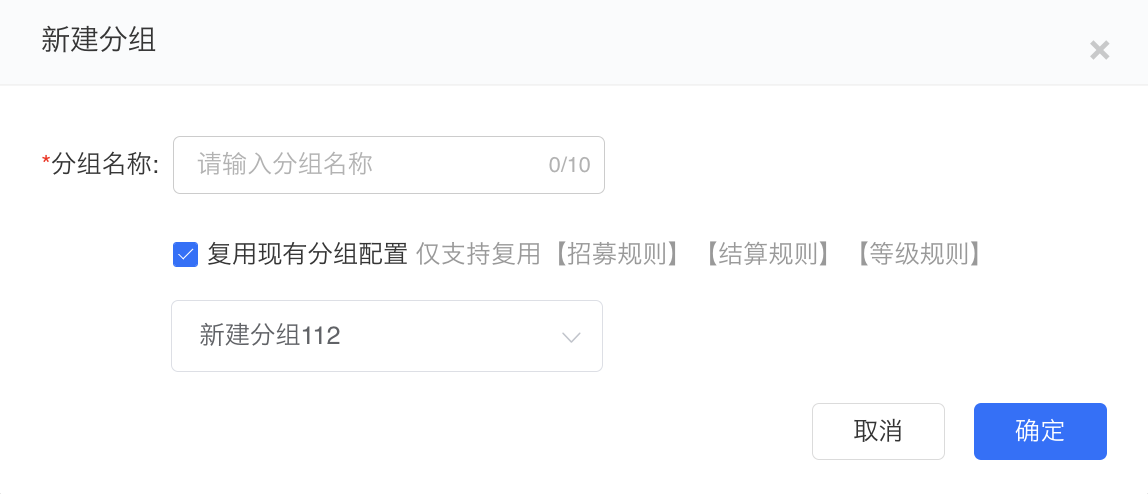
1. Enter the desktop management background, click [Marketing] - [Promoters], and click to enter the promoter function. Then click [New group] on the left side of the promoter list.

2. Enter the group name and choose whether to reuse the existing group configuration as needed. It supports directly reusing the recruitment rules and commission settlement settings (including the reward distribution method and self - purchase commission settings).
**Note: Promotion products and tools do not support reuse for now. You need to add them separately after creating a new group.
Step 2: Configure group promotion products
1. Click [...], [Rule settings], or directly select a group and then click [Promotion products/tools] to enter the promotion product list. Click [Add products] to pop up the product selection window.

2. Merchants can select the created products as promotion products as needed. After selection, click [Next] to configure the corresponding product ratios.

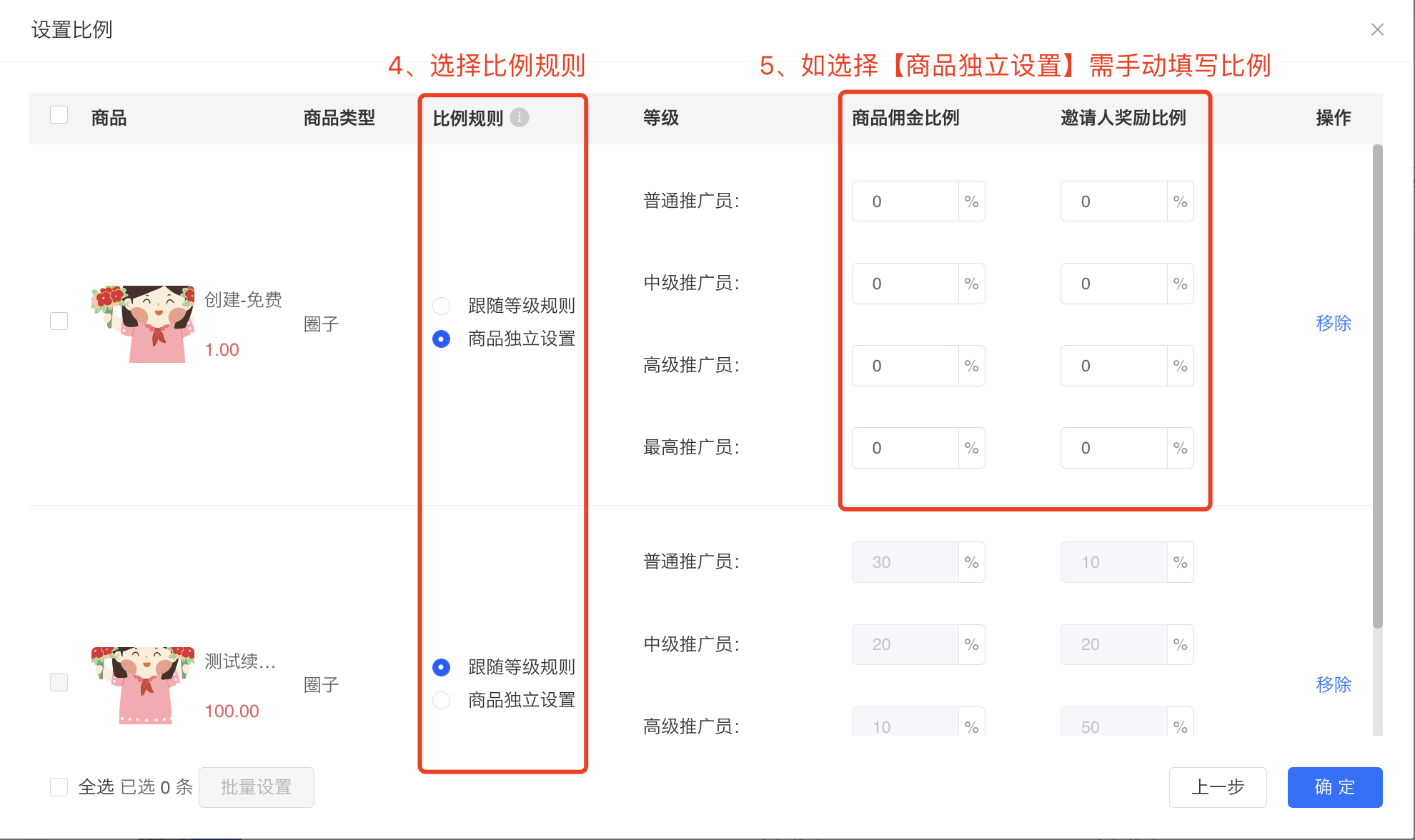
**Note:The ratio settings need to follow the following rules: (The split - payment priority refers to the priority of WeChat Pay distributing the actual payment amount of an order to different accounts (merchants, subordinate promoters, and superior promoters).)
(1) When the promotion product is a virtual product and the price ≤ 200 yuan, the sum of the promotion reward ratio and the invitation reward ratio needs to be ≤ 100%. There will be a verification when setting the same group, and no verification will be done between different groups. The split - payment priority is: subordinate promoters → superior promoters → merchants.
If the superior and subordinate promoters are in different groups, and the sum of the promotion reward ratio of the subordinate promoter and the invitation reward ratio of the superior promoter > 100%, then the split - payment will be made according to the split - payment priority (subordinate promoters → superior promoters → merchants). In this case, there may not be enough remaining amount in the split - payment to distribute the invitation reward according to the superior promoter's invitation reward ratio (if there is a remaining amount, the system will still give the remaining amount to the superior promoter).
● Example: Promoter A is the superior promoter of Promoter B. A is in Group A, and B is in Group B. The invitation reward ratio of Group A is 40%, and the promotion reward ratio of Group B is 70%. When B's customer purchases a 100 - yuan promotion product, the system will first distribute a 70 - yuan commission to Promoter B according to the 70% ratio, leaving 30 yuan. Although it is not enough to pay Promoter A's invitation reward (100 * 40% = 40 yuan), 30 yuan will still be distributed to A, so A will get a 30 - yuan commission.

(2) When the promoted product is a virtual product and the price > 200 yuan, the sum of the promotion reward ratio and the invitation reward ratio must be ≤ 60%. There will be a verification when setting the same group, and no verification will be made between different groups. The profit-sharing priority is: Merchant → Subordinate promoter → Superior promoter.
If the superior and subordinate promoters are in different groups, and the sum of the subordinate's promotion reward ratio and the superior's invitation reward ratio > 60%, profit-sharing will be carried out according to the profit-sharing priority (Merchant → Subordinate promoter → Superior promoter). In this case, the remaining amount in the profit-sharing may be insufficient to pay the superior promoter's invitation reward (if there is a remaining amount, the system will still give the remaining amount to the superior promoter).
● Example: Promoter A is the superior promoter of Promoter B. A is in Group A, and B is in Group B. The invitation reward ratio of Group A is 20%, and the promotion reward ratio and invitation reward ratio of Group B are 50% and 10% respectively. After B's customer purchases a promoted product and actually pays 300 yuan, the system will first share the profit with the merchant according to the ratio of (1 - 50% - 10)%, that is, 120 yuan. Then, it will distribute the commission to Promoter B according to the promotion ratio of 50%, that is, B will receive 150 yuan. At this time, there is only 30 yuan left. Although it is insufficient to pay Promoter A's invitation reward (300 * 20% = 60 yuan), it will still be distributed to A, so A will receive a commission of 30 yuan.

(3) When the promoted product is a physical product, the sum of the promotion reward ratio and the invitation reward ratio of the same group must be ≤ 60%. No verification will be made between different groups. The profit-sharing priority is: Merchant → Subordinate promoter → Superior promoter.
If the superior and subordinate promoters are in different groups, it is the same as (2).
● Example: See the example in (2).
Step 3: Configure group recruitment rules and commission settlement rules
After creating a group, you can set recruitment rules and commission settlement settings for the group.

1. Set recruitment rules
Merchants can choose whether to recruit promoters for this group as needed, and support two recruitment methods: self-application and inviting subordinates.
(1) Enable self-application: Users can select this group when applying.
(2) Enable inviting subordinates: Promoters in this group can invite subordinates.

2. Set commission settlement rules
(1) Reward distribution method: It only takes effect for promoters in the current group. You can set the promotion commission to be distributed immediately after the transaction is completed or N days after the transaction is completed (the maximum setting is 90 days).
(2) Commission for self-purchase by promoters: It only takes effect for promoters in the current group. You can set it to be distributed after the transaction is completed or N days after the transaction is completed. After enabling, promoters in this group can receive commissions for self-purchase.

Step 4: Add promoters to the group
Method 1: Manually add/change groups(Management background)
1. Go to the promoter list page, click [More] - [Modify group] on the right side of the promoter to be grouped.

2. Select the group to be assigned to.

Method 2: Users can independently select a group to join when applying(The group recruitment needs to be enabled)
When the merchant sets the group to enable "self-application", users can select this group to join when applying.
