# Product recommendation

# What is the product recommendation function?

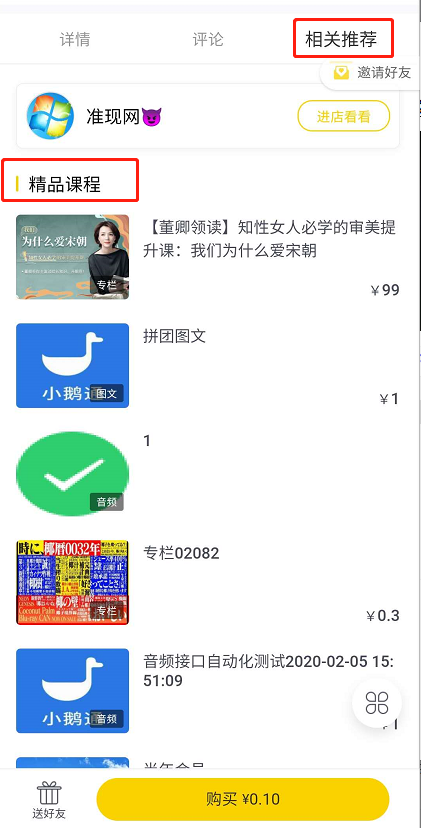
<div data-elink-language-switch="1" id="bkmrk-%E4%B8%AD%E6%96%87" style="border:1px solid #d6d9de;border-radius:6px;padding:10px 12px;margin:0 0 18px 0;background:#f8fafc;font-size:14px;">[中文](/books/2b24d/page/cd006)</div><span style="font-family:'Microsoft YaHei', '微软雅黑';white-space:pre-wrap;background-color:rgb(255,255,255);font-size:14px;">After merchants enable the product recommendation feature, the \[Featured Courses\] module will be displayed below on the product detail page, showcasing the products added by the merchant. Users can click on these products to jump to the corresponding product detail pages for selection and purchase.</span>

# What are the use cases for product recommendations?

<div data-elink-language-switch="1" id="bkmrk-%E4%B8%AD%E6%96%87" style="border:1px solid #d6d9de;border-radius:6px;padding:10px 12px;margin:0 0 18px 0;background:#f8fafc;font-size:14px;">[中文](/books/2b24d/page/00ec5)</div><span style="font-family:'Microsoft YaHei', '微软雅黑';white-space:pre-wrap;background-color:rgb(255,255,255);font-size:14px;">During the operation process, merchants can use this feature to configure the courses they want to promote as recommended products. These products will receive higher exposure and clicks in the \[Related Recommendations\] - \[Featured Courses\] module on the product detail page, guiding users to purchase more products. This helps merchants improve conversion rates and extend users' browsing time in the store.</span>

# Is there a limit to the number of products that can be added for product recommendation?

<div data-elink-language-switch="1" id="bkmrk-%E4%B8%AD%E6%96%87" style="border:1px solid #d6d9de;border-radius:6px;padding:10px 12px;margin:0 0 18px 0;background:#f8fafc;font-size:14px;">[中文](/books/2b24d/page/17d63-x6F)</div><span style="font-family:'Microsoft YaHei', '微软雅黑';white-space:pre-wrap;background-color:rgb(255,255,255);font-size:14px;">There is no upper limit for adding quantities, and you can add items freely according to your own needs. However, in the \[Featured Recommendations\] section on the product details page for users, a maximum of 6 products can be displayed.</span>

# What are the display rules for recommended products?

<div data-elink-language-switch="1" id="bkmrk-%E4%B8%AD%E6%96%87" style="border:1px solid #d6d9de;border-radius:6px;padding:10px 12px;margin:0 0 18px 0;background:#f8fafc;font-size:14px;">[中文](/books/2b24d/page/9b70e)</div><span style="font-family:'Microsoft YaHei', '微软雅黑';white-space:pre-wrap;background-color:rgb(255,255,255);font-size:14px;">Randomly recommend 6 products from the recommended product list. The recommended products on different product detail pages vary.</span>

# What operations can recommended product merchants perform?

<div data-elink-language-switch="1" id="bkmrk-%E4%B8%AD%E6%96%87" style="border:1px solid #d6d9de;border-radius:6px;padding:10px 12px;margin:0 0 18px 0;background:#f8fafc;font-size:14px;">[中文](/books/2b24d/page/bbcbf)</div><span style="font-family:'Microsoft YaHei', '微软雅黑';white-space:pre-wrap;background-color:rgb(255,255,255);font-size:14px;">Merchants can centrally manage recommended products through the recommendation list, including adding and removing products.</span>

# Where will the courses participating in product recommendations be displayed?

<div data-elink-language-switch="1" id="bkmrk-%E4%B8%AD%E6%96%87" style="border:1px solid #d6d9de;border-radius:6px;padding:10px 12px;margin:0 0 18px 0;background:#f8fafc;font-size:14px;">[中文](/books/2b24d/page/6c988)</div><span style="font-family:'Microsoft YaHei', '微软雅黑';white-space:pre-wrap;background-color:rgb(255,255,255);font-size:14px;">Courses participating in product recommendations will be displayed in the \[Related Recommendations\] - \[Featured Courses\] module on the course details page, showing the products added by the merchant.</span>

# Which courses can be added to the product recommendations?

<div data-elink-language-switch="1" id="bkmrk-%E4%B8%AD%E6%96%87" style="border:1px solid #d6d9de;border-radius:6px;padding:10px 12px;margin:0 0 18px 0;background:#f8fafc;font-size:14px;">[中文](/books/2b24d/page/6f492)</div><span style="color:rgb(53,53,53);background:rgb(255,255,255);letter-spacing:0pt;vertical-align:baseline;font-size:15px;">Available products for addition include columns, large columns, memberships, articles, audio, videos, live broadcasts, affiliate products, camps, physical products, valuable coupons, offline courses, lesson packages, class courses, and AI interactive courses.</span>

# Where is the entrance to the product recommendation function?

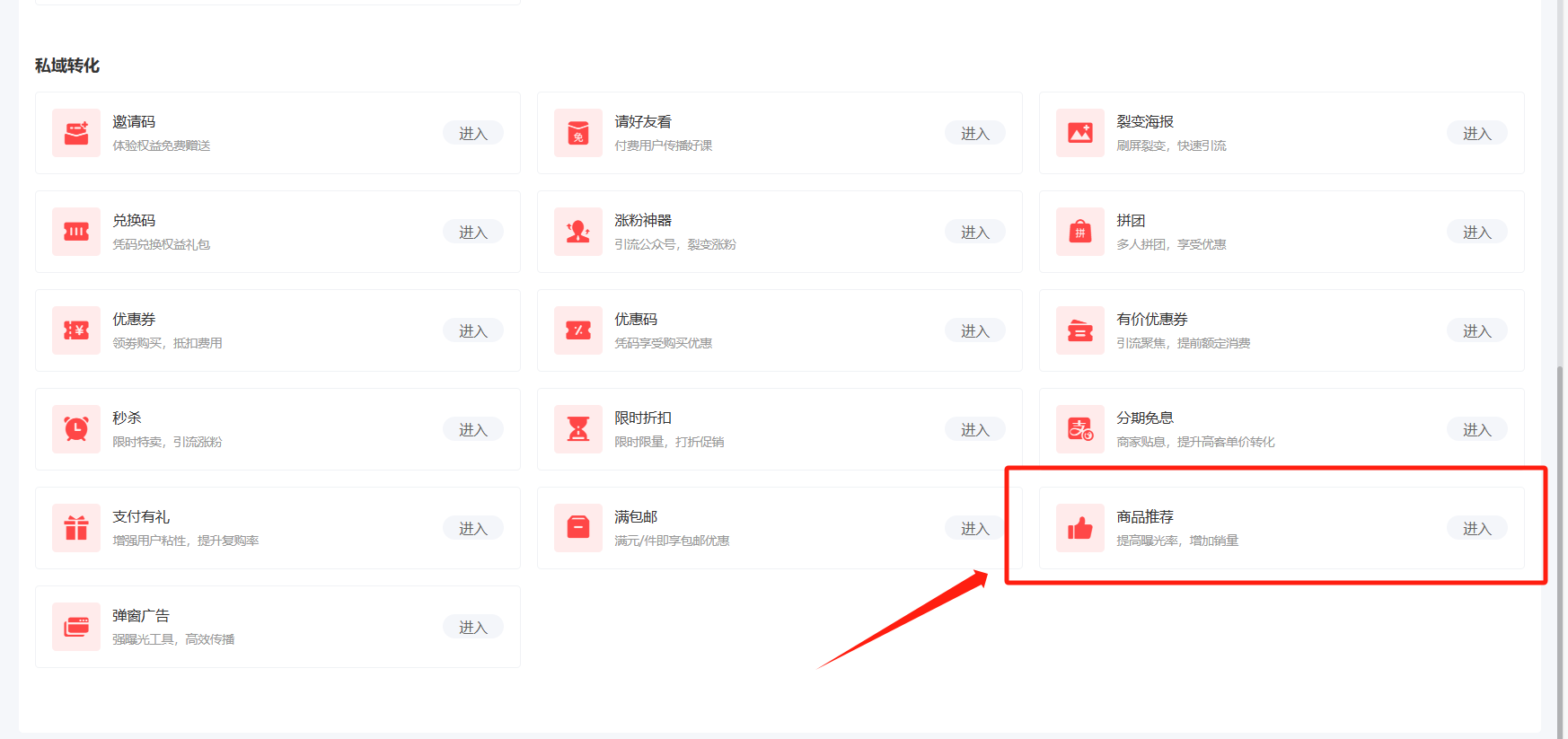
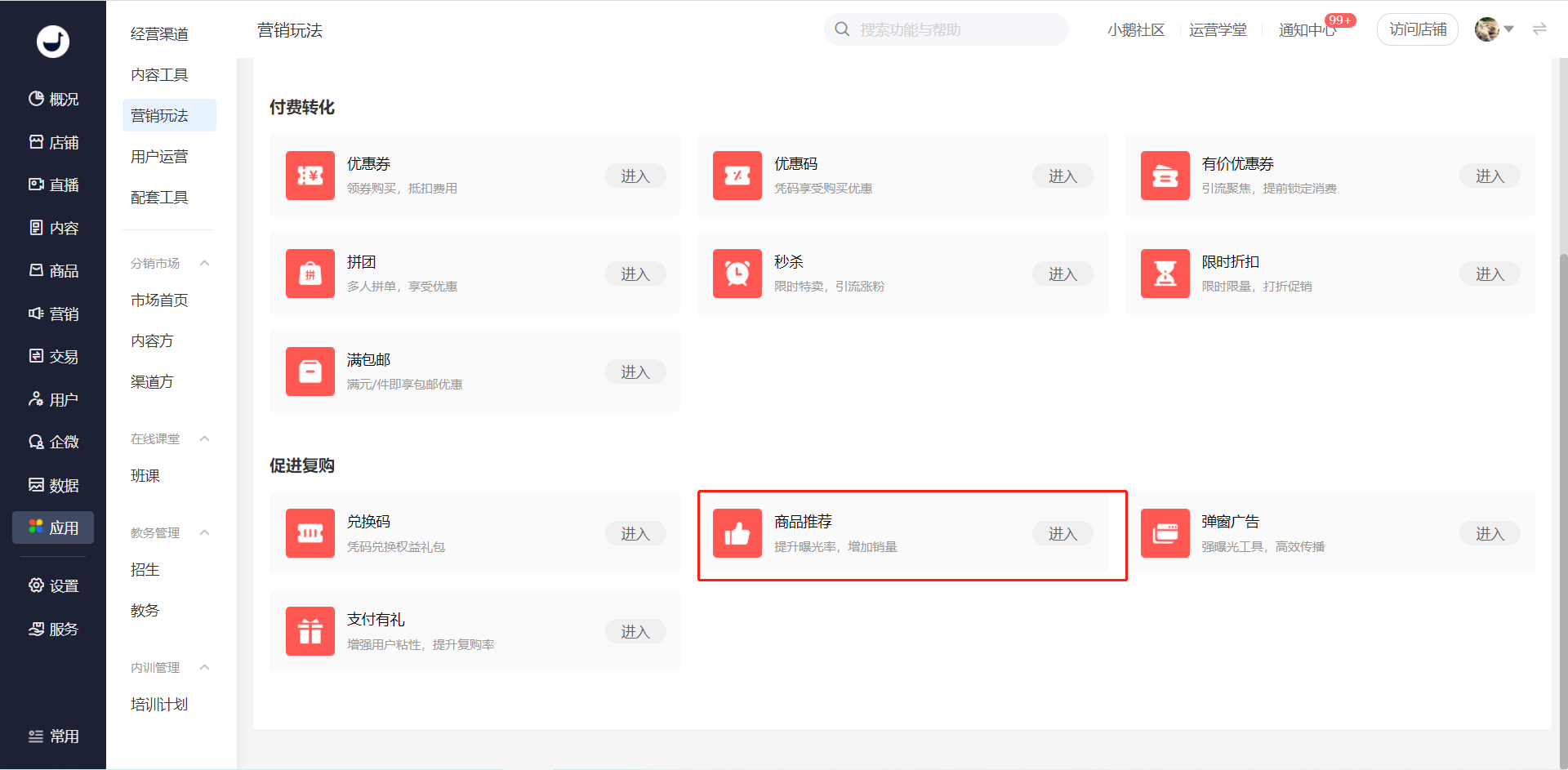
<div data-elink-language-switch="1" id="bkmrk-%E4%B8%AD%E6%96%87" style="border:1px solid #d6d9de;border-radius:6px;padding:10px 12px;margin:0 0 18px 0;background:#f8fafc;font-size:14px;">[中文](/books/2b24d/page/86139)</div><span style="white-space:pre-wrap;background-color:rgb(255,255,255);"></span><span style="background-color:rgb(255,255,255);color:rgb(53,53,53);font-size:15px;letter-spacing:0pt;">Log in to the elink management backend - \[Marketing\] - \[Marketing Campaigns\] - \[Product Recommendations\] to add the products you want to recommend.</span>

<span style="color:rgb(51,51,51);background-image:initial;background-position:initial;background-size:initial;background-repeat:initial;background-attachment:initial;letter-spacing:0pt;vertical-align:baseline;"></span>

<span style="white-space:pre-wrap;background-color:rgb(255,255,255);">![image.png](https://wechatapppro-1252524126.file.myqcloud.com/help_document/image/ueditor/98259800_1699867127.png ".png")</span>

# How to add recommended products to the product recommendation feature?

<div data-elink-language-switch="1" id="bkmrk-%E4%B8%AD%E6%96%87" style="border:1px solid #d6d9de;border-radius:6px;padding:10px 12px;margin:0 0 18px 0;background:#f8fafc;font-size:14px;">[中文](/books/2b24d/page/f7177)</div><span style="font-family:'Microsoft YaHei', '微软雅黑';white-space:pre-wrap;background-color:rgb(255,255,255);font-size:14px;">In the module of 【Marketing Center】-【Product Recommendations】-【Add Recommended Products】, customers can directly add products from the product list page to the recommendation list. The products that can be added include columns, major columns, memberships, articles, audios, videos, live streams, affiliate products, and camps.</span>

# Product Recommendation Usage Tutorial

<div data-elink-language-switch="1" id="bkmrk-%E4%B8%AD%E6%96%87" style="border:1px solid #d6d9de;border-radius:6px;padding:10px 12px;margin:0 0 18px 0;background:#f8fafc;font-size:14px;">[中文](/books/2b24d/page/2f557)</div>**I. Function Introduction**

<span style="font-size:15px;">【Product Recommendation】 is a tool that helps merchants increase the exposure of specified products. After setting it up, when customers view product details, they can see the products you want to promote, increasing product visits and conversion rates.</span>

**<span style="font-size:14px;">  
</span>**

<span style="font-size:17px;">**II. Purpose of Use**</span>

<span style="font-size:15px;">Increase product exposure and revenue.</span>

**<span style="font-size:14px;">  
</span>**

<span style="font-size:17px;">**III. Use Scenarios**</span>

<span style="font-size:14px;">Scenario 1:</span>

<span style="font-size:14px;">A merchant has newly launched a batch of courses and wants to increase their exposure beyond community media and the store homepage. So, the merchant uses Product Recommendation to guide users to purchase more products, thereby helping to improve conversion rates and extend users' browsing time in the store.</span>

**<span style="font-size:14px;">  
</span>**

<span style="font-size:17px;">**IV. Operation Path**</span>

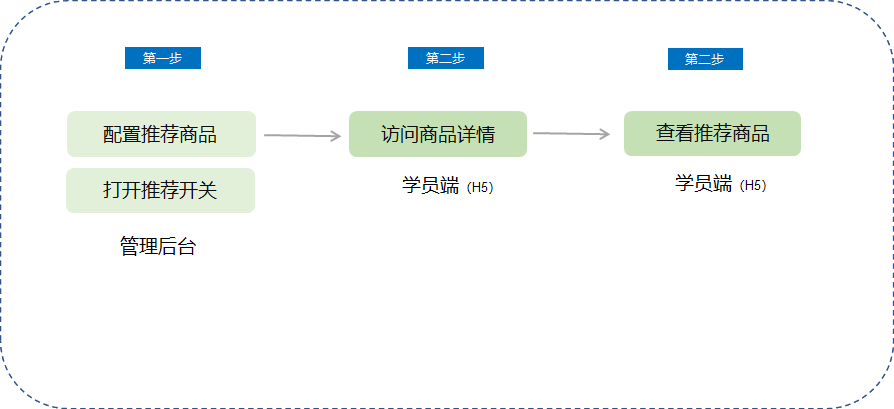
<span style="font-size:14px;">Merchant side: Merchant's computer management console → Marketing → Marketing Tactics → Product Recommendation</span>

<span style="font-size:14px;">Student side: Visit the product detail page → Related Recommendations → Featured Courses</span>

**<span style="font-size:14px;">  
</span>**

<span style="font-size:17px;">**V. Usage Tutorial**</span>

![1.png](https://wechatapppro-1252524126.file.myqcloud.com/help_document/image/ueditor/52249000_1699867066.png ".png")

<span style="font-size:14px;">1. Enter the elink management console, click 【Marketing】 on the left, and you can find 【Product Recommendation】 in 【Marketing Tactics】.</span>

![image.png](https://wechatapppro-1252524126.file.myqcloud.com/help_document/image/ueditor/35259300_1699867097.png ".png")

<span style="font-size:14px;">  
</span>

<span style="font-size:14px;">2. Add/Manage Recommended Products</span>

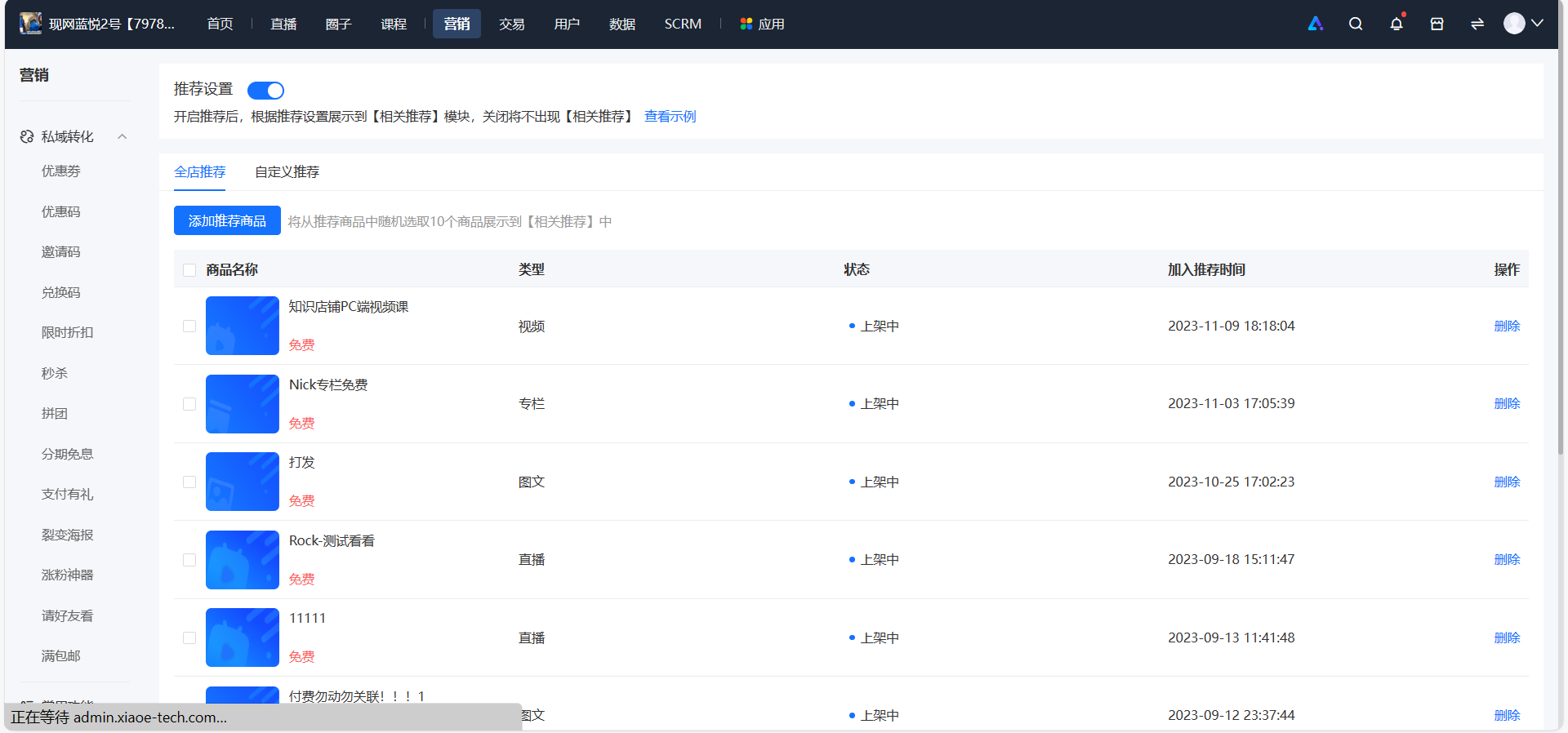
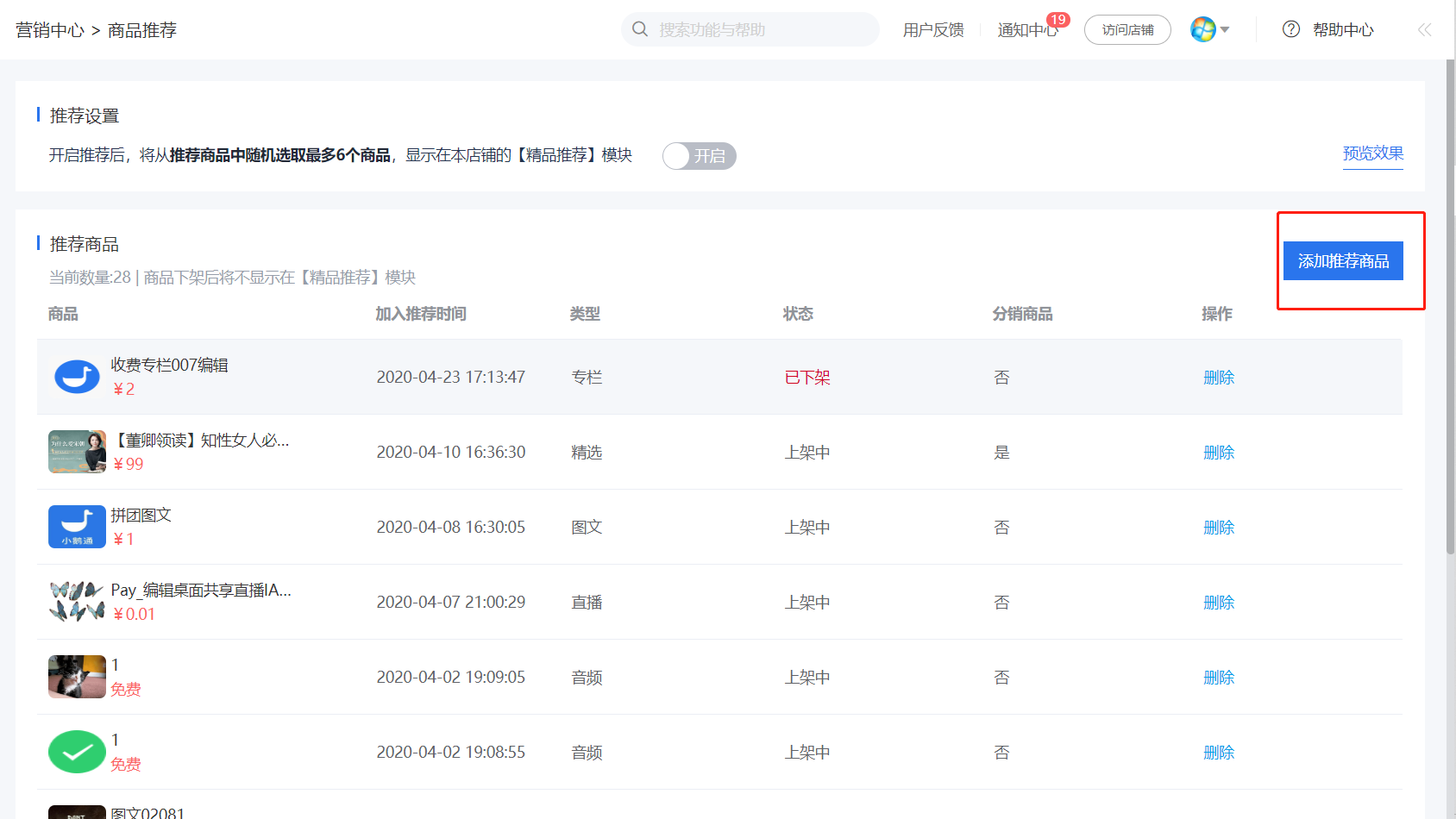
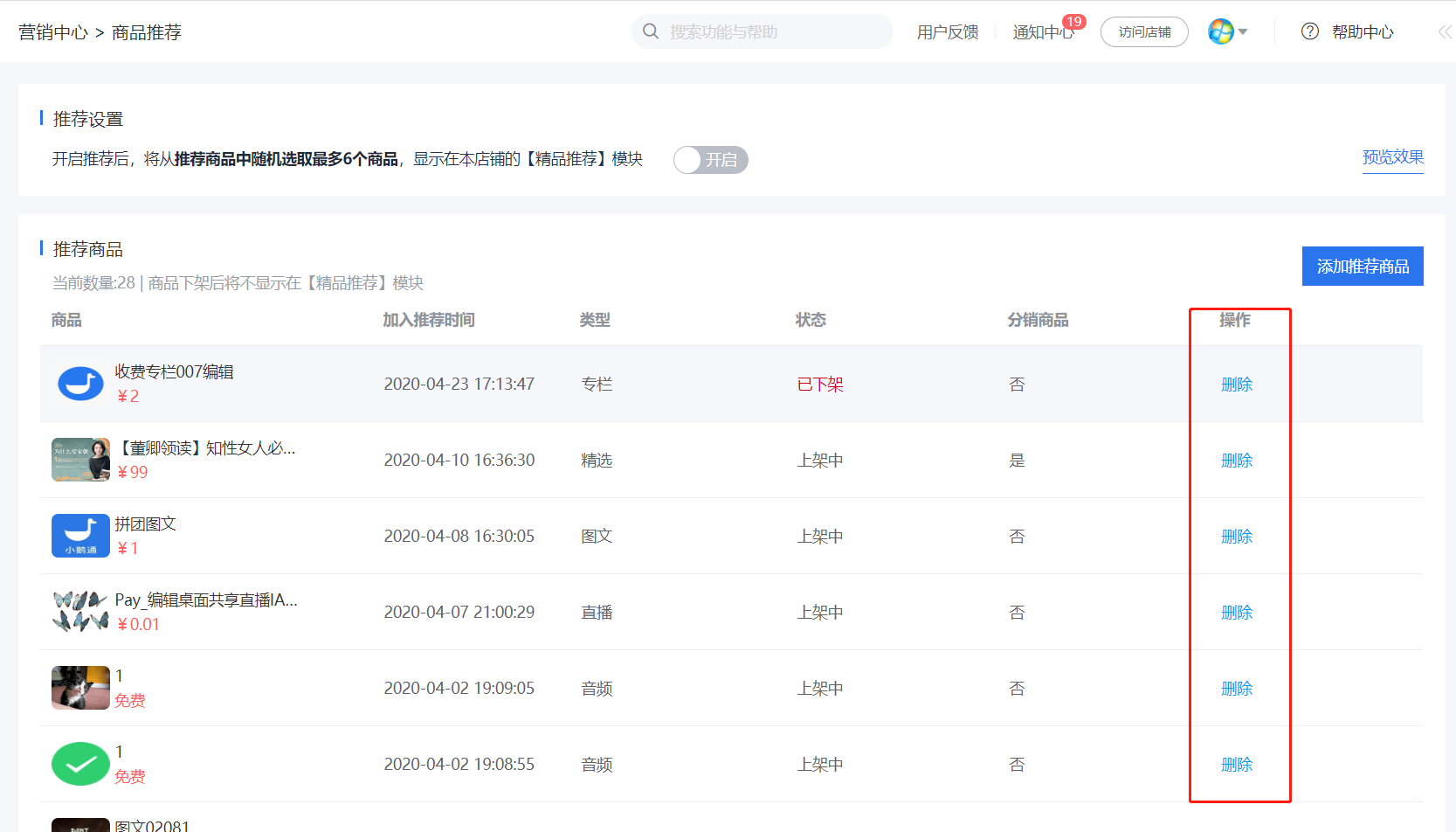
<span style="font-size:14px;">Customers can centrally manage recommended products through the recommendation list, including adding and deleting products.</span>

<span style="font-size:14px;">Scope of recommended products: Customers can recommend all knowledge products in the store.</span><span style="font-size:14px;">Products that have been taken off the shelves or hidden will not be displayed.</span>

<span style="font-size:14px;">2.1 Add Recommended Products</span>

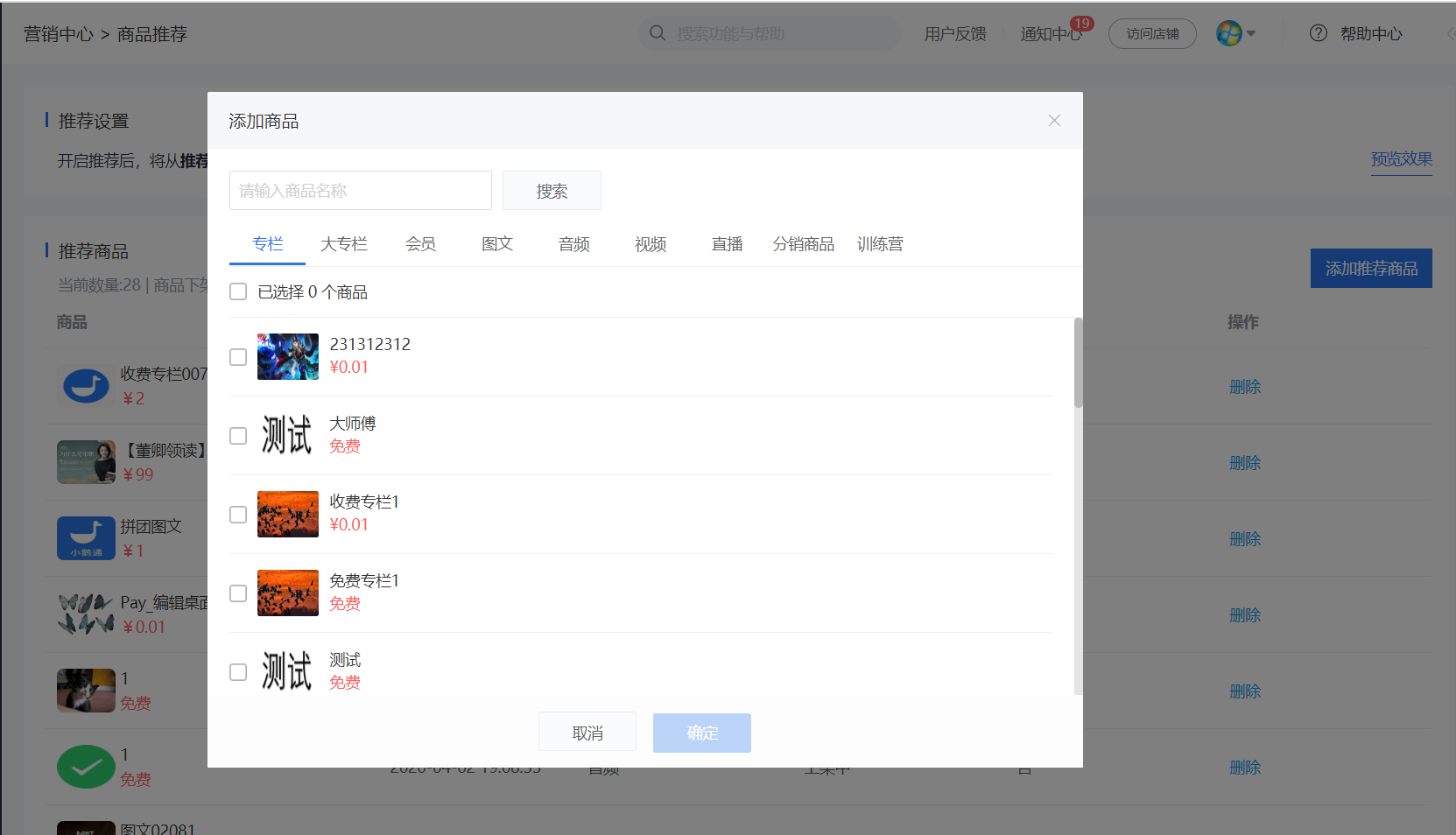
<span style="font-size:14px;">Click the 【Add Recommended Products】 button, and you can select and add knowledge products from the current store in the product pop - up window. There is no upper limit on the number of products to add, and customers can add them freely according to their needs.</span>

<span style="font-size:14px;">Number of products displayed: In the 【Featured Recommendations】 module on the C - end product detail page, a maximum of 6 products can be displayed.</span>

<span style="font-size:14px;">Recommendation rule: Random recommendation. 6 products are randomly recommended from the recommended product list. The recommended product content is different on different product detail pages.</span>

![3.png](https://wechatapppro-1252524126.file.myqcloud.com/help_document/image/ueditor/72808000_1699867066.png ".png")

![4.png](https://wechatapppro-1252524126.file.myqcloud.com/help_document/image/ueditor/96256900_1699867066.png ".png")

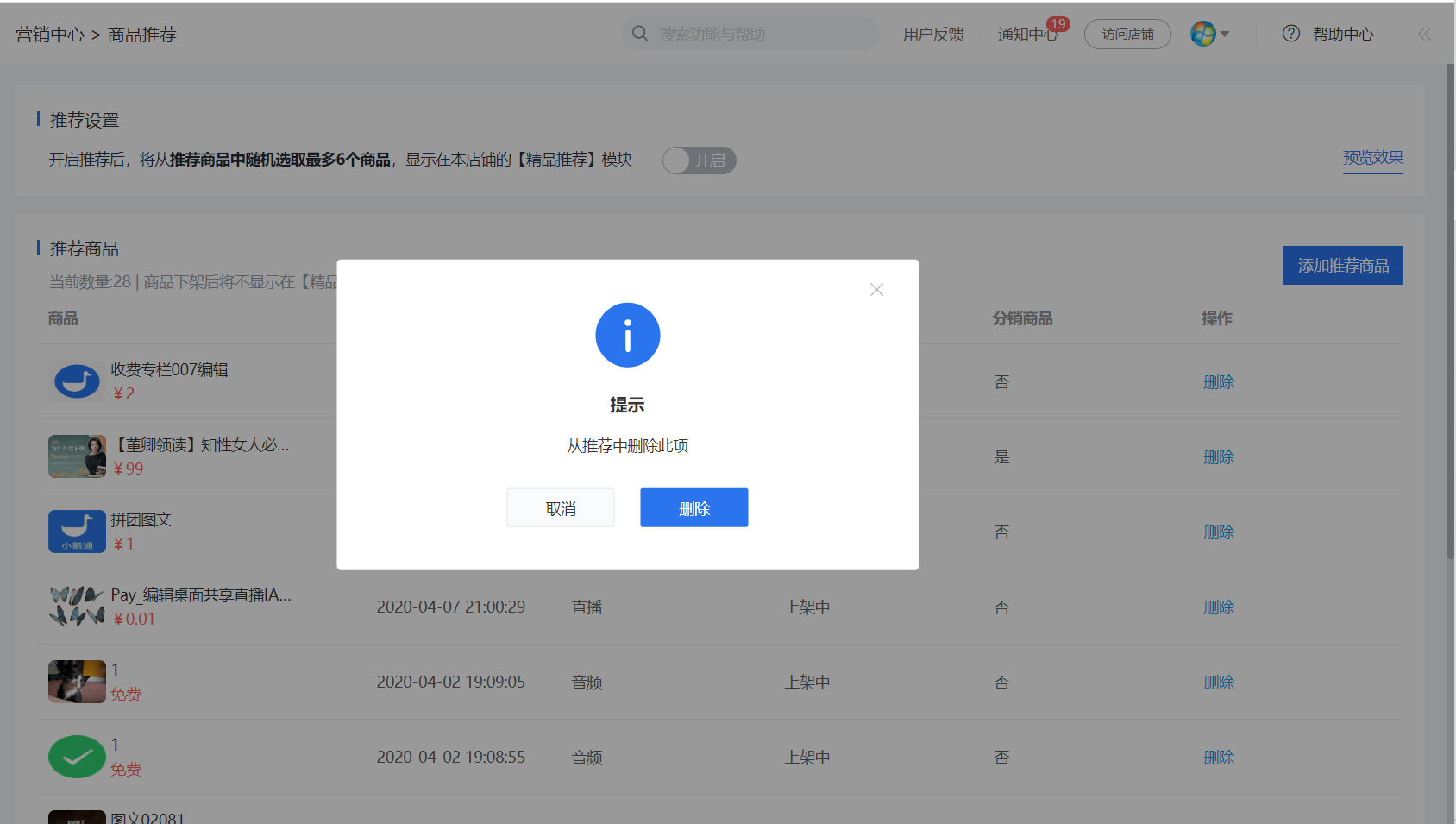
<span style="font-size:14px;">2.2 Delete Recommended Products</span>

<span style="font-size:14px;">Click the 【Delete】 button in the product list to complete the deletion.</span>

![5.png](https://wechatapppro-1252524126.file.myqcloud.com/help_document/image/ueditor/18496300_1699867067.png ".png")

![5.1.png](https://wechatapppro-1252524126.file.myqcloud.com/help_document/image/ueditor/34787500_1699867067.png ".png")

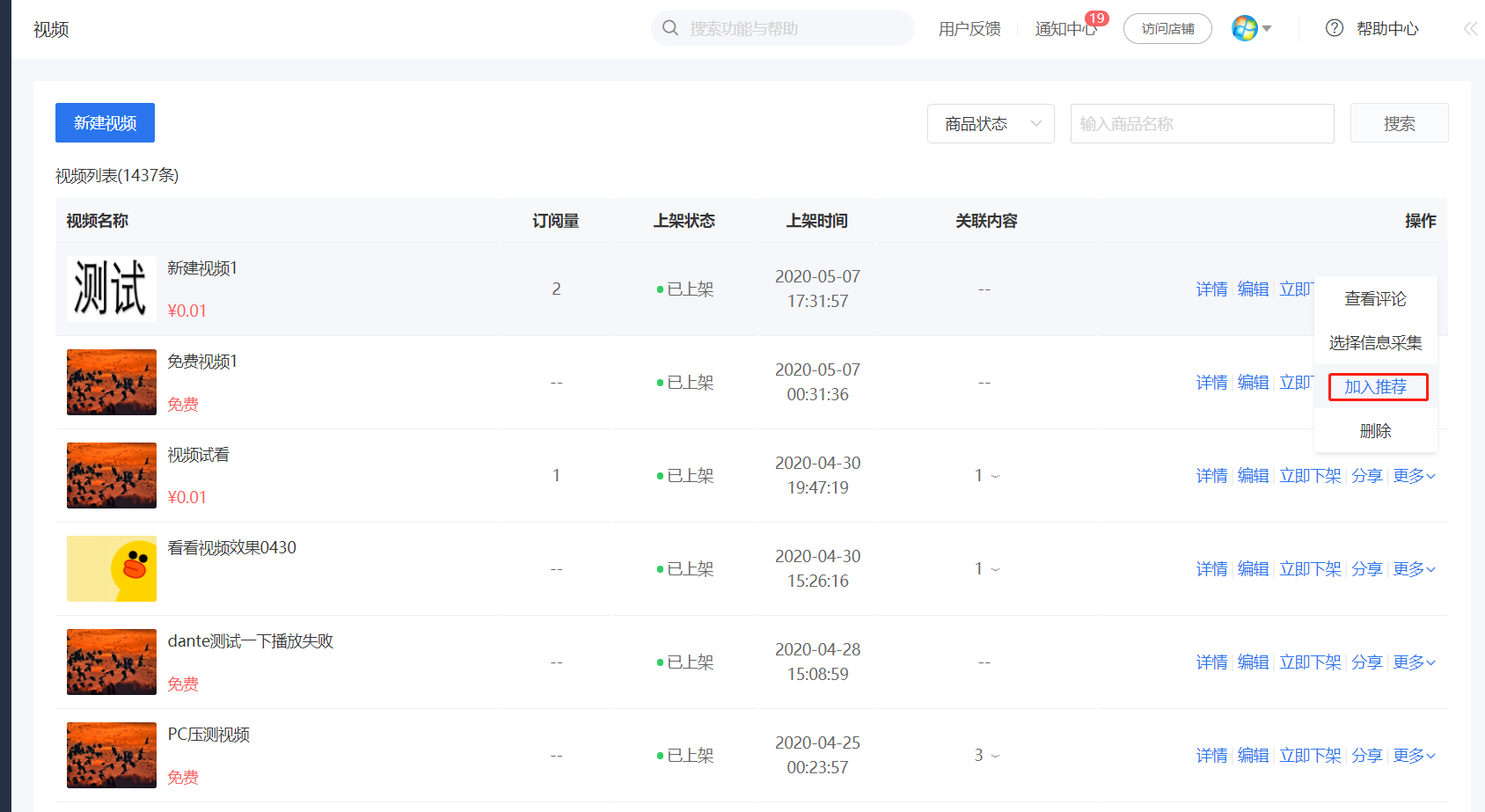
<span style="font-size:14px;">3. Other entry for product recommendation settings: Add products to the recommendation list directly from the product list</span>

<span style="font-size:14px;">3.1 In the 【Knowledge Products】 module, customers can directly add products from the product list page to the recommendation list. The entry is as follows:</span>

![6.png](https://wechatapppro-1252524126.file.myqcloud.com/help_document/image/ueditor/49715700_1699867067.png ".png")

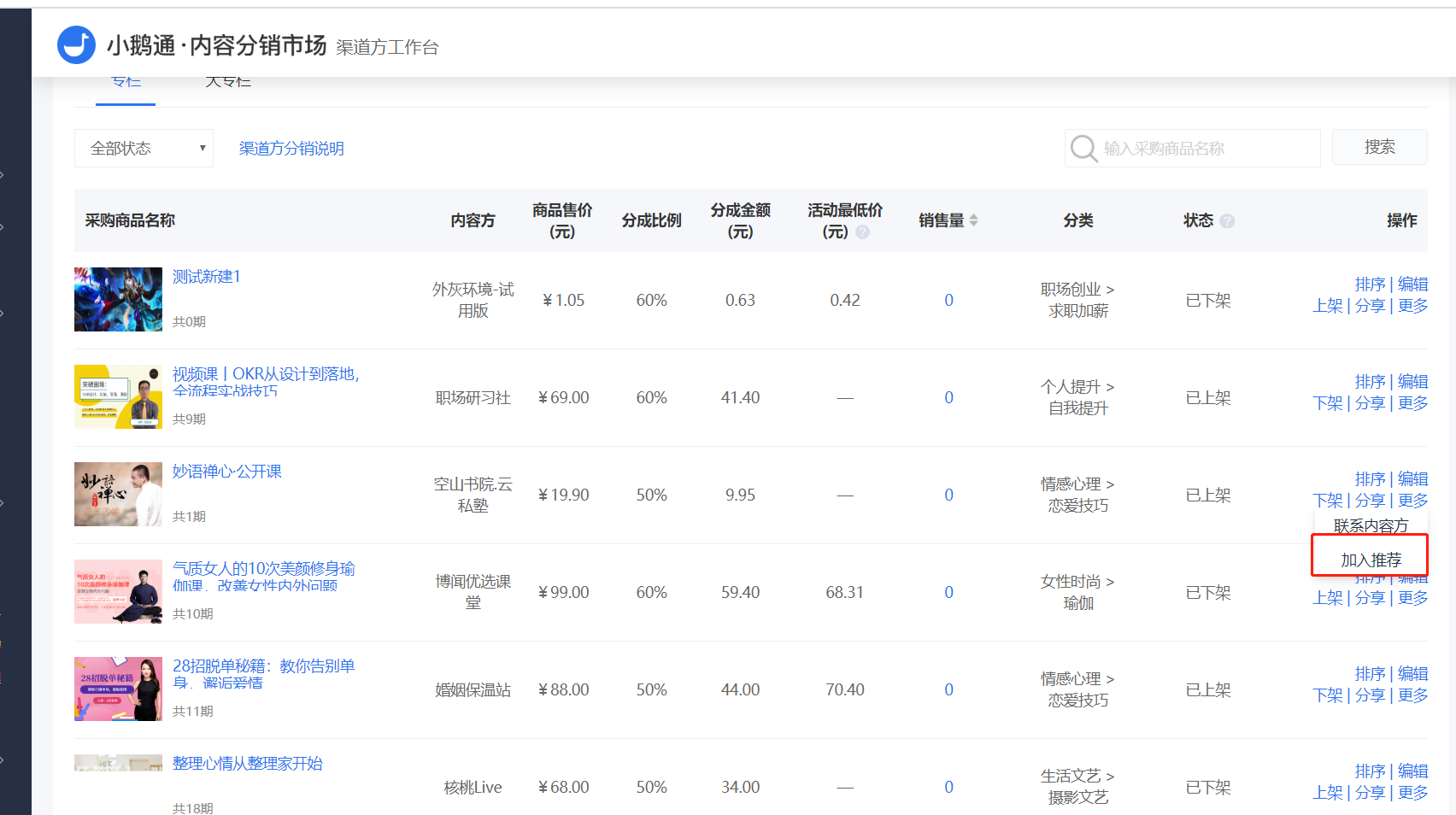
<span style="font-size:14px;">3.2 In the 【Content Market】 module, customers can add distributed products from the content list of the channel provider. The entry is as follows:</span>

![7.png](https://wechatapppro-1252524126.file.myqcloud.com/help_document/image/ueditor/72089100_1699867067.png ".png")

<span style="font-size:14px;">Reminder: The above two recommendation operations can only be used after the 【Recommendation Settings】 button is turned on.</span>

<span style="font-size:14px;">  
</span>

<span style="font-size:14px;"></span>

<span style="font-size:14px;">4. Recommendation Settings - Switch</span>

<span style="font-size:14px;">After customers turn on the 【Recommendation Settings】 switch, the 【Featured Recommendations】 product recommendation component will be displayed below the product detail page of the H5 store for users to view.</span>

![2.png](https://wechatapppro-1252524126.file.myqcloud.com/help_document/image/ueditor/88616500_1699867067.png ".png")

<span style="font-size:14px;">  
</span>

<span style="font-size:14px;"></span>

**<span style="font-size:17px;">VI. C - end Effect</span>**

<span style="font-size:14px;">The recommendation module is displayed in the related course recommendations - Featured Courses.</span>

![9.png](https://wechatapppro-1252524126.file.myqcloud.com/help_document/image/ueditor/8661000_1699867068.png ".png")

<span style="font-size:14px;">  
</span>