# Tutorial on Creating and Using Voice Live Streaming

<div data-elink-language-switch="1" id="bkmrk-%E4%B8%AD%E6%96%87" style="border:1px solid #d6d9de;border-radius:6px;padding:10px 12px;margin:0 0 18px 0;background:#f8fafc;font-size:14px;">[中文](/books/091d5/page/fe9fc)</div><section id="bkmrk-i.-function-introduc"><span style="font-size:17px;">**I. Function Introduction**</span><span style="font-size:14px;">  
</span>

<span style="font-size:14px;">Voice live streaming is a type of live streaming that allows for the real-time transmission of a large amount of voice, text, and images, as well as the display of PPT courseware.</span>

**<span style="font-size:17px;">II. Purpose of Use</span>**

<span style="font-size:14px;">Merchants can use voice for live lectures.</span>

**<span style="font-size:17px;">III. Use Scenarios</span>**

<span style="font-size:14px;">Suitable for live streaming types that do not require a camera or real-time video interaction.</span>

<span style="font-size:18px;">**IV. Operation Path**</span>

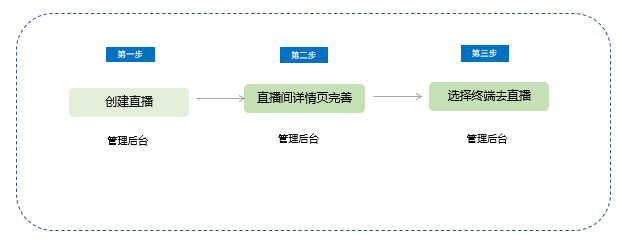
**<span style="font-size:14px;">Merchant side:</span>**<span style="font-size:14px;">Create a live stream → Complete the details page of the live streaming room → Select a terminal to start the live stream</span>

<span style="font-size:14px;">![1.jpg](https://wechatapppro-1252524126.file.myqcloud.com/help_document/image/ueditor/41049500_1699238079.jpg ".jpg")</span>

<span style="font-size:17px;">**V. Usage Tutorial**</span>

<span style="font-size:14px;">**Step 1: Create a voice live stream**</span>

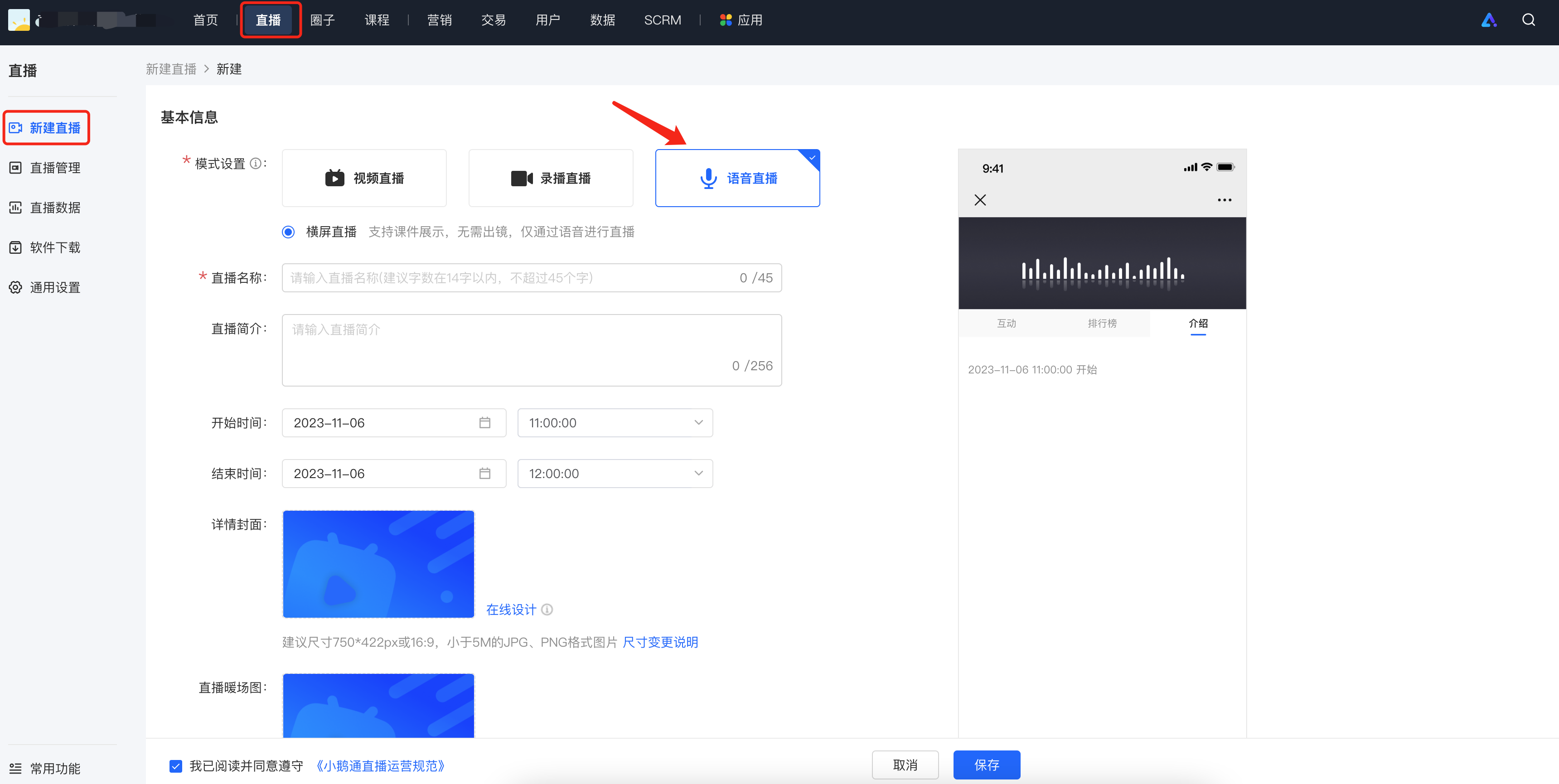
<span style="font-size:14px;">1. Log in to the elink management console, and sequentially select \[Live Streaming\] - \[New Live Stream\]. On the live stream creation page, select the \[Voice Live Streaming\] type.</span>

![image.png](https://wechatapppro-1252524126.file.myqcloud.com/help_document/image/ueditor/88256400_1699238158.png ".png")

<span style="font-size:14px;">  
</span>

<span style="font-size:14px;">2. On the new live stream creation page, fill in the relevant information.</span>

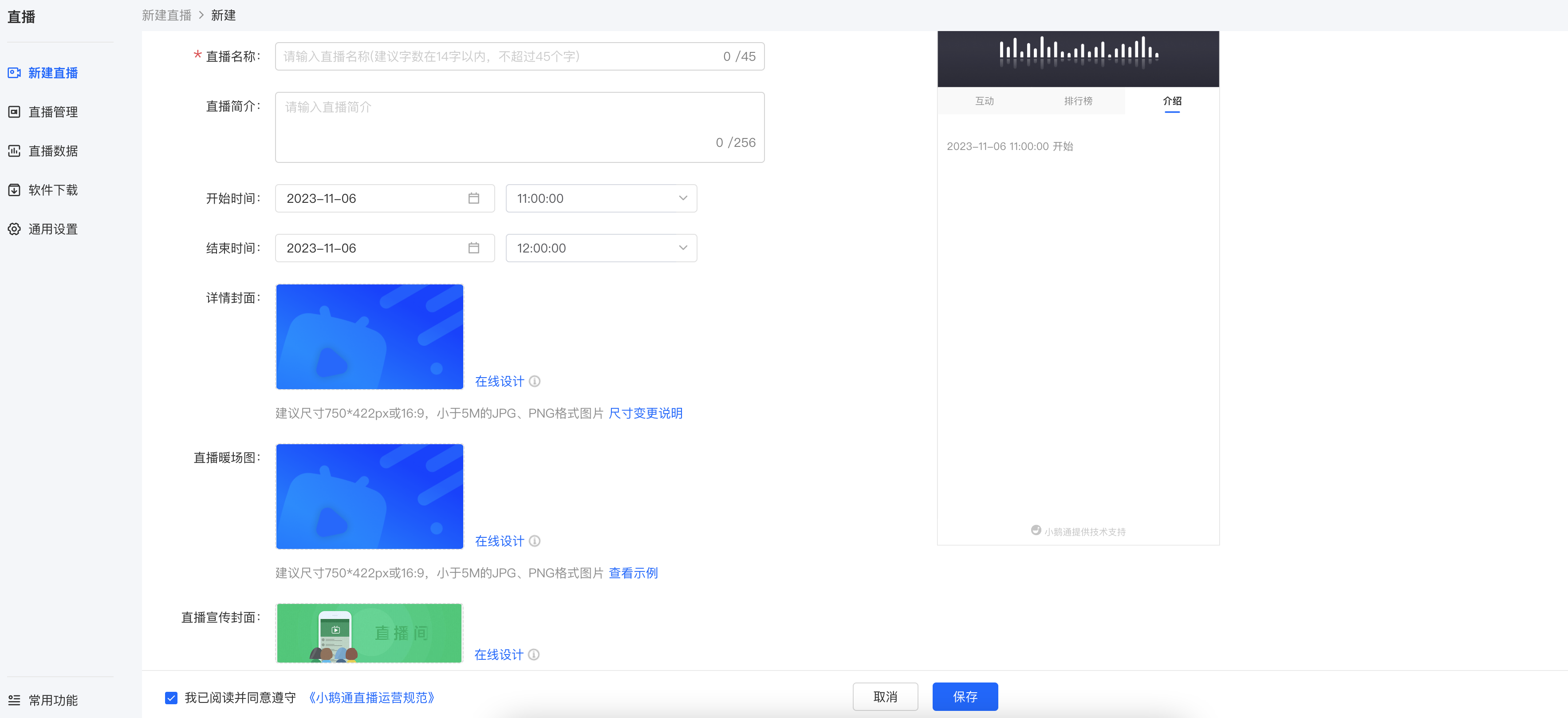
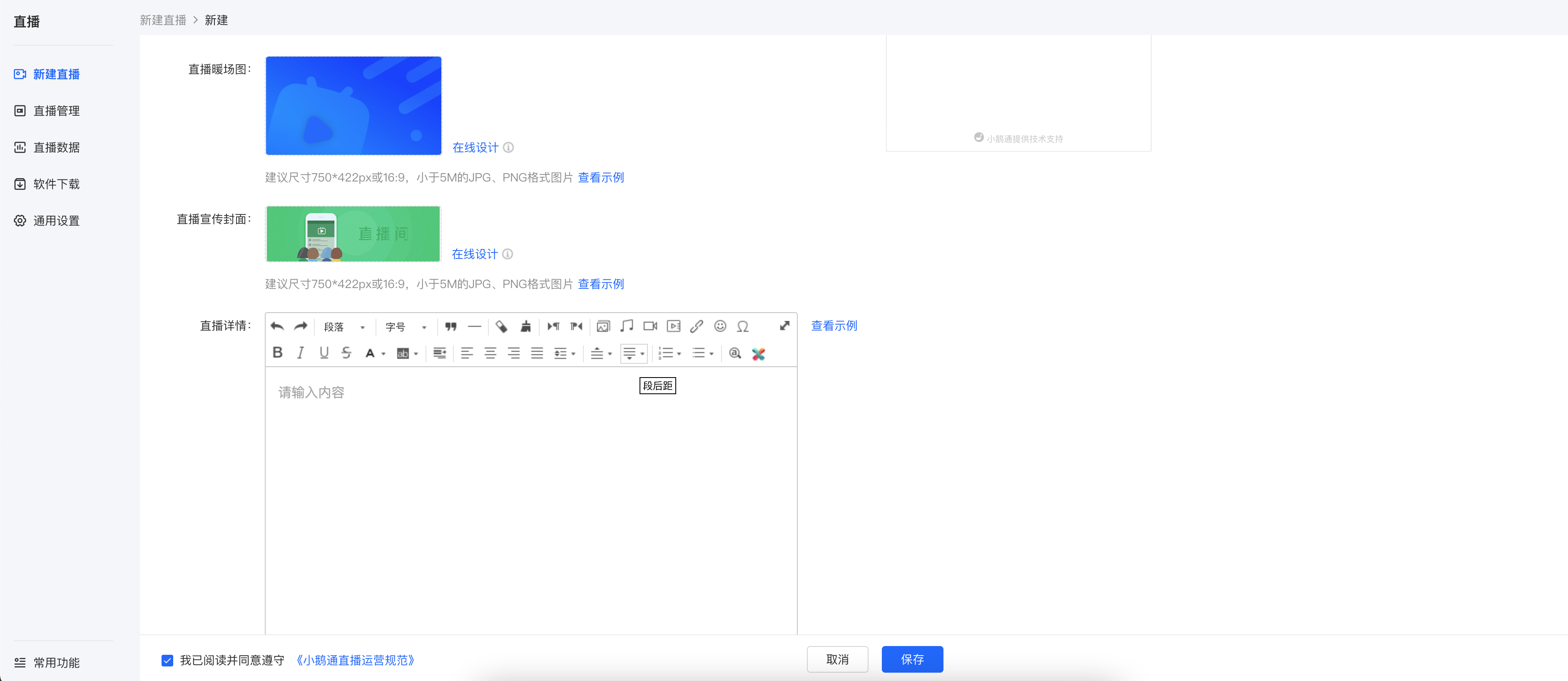
**<span style="font-size:14px;">(1) Basic information:</span>**<span style="font-size:14px;">Live stream name, live stream description, live stream time, detailed cover image, pre - live warm - up image, live stream promotion cover image, live stream details, instructor settings</span>

**<span style="font-size:14px;">\[Detailed cover image\]</span>**<span style="font-size:14px;">It is the image displayed when users purchase the live stream course;</span>

**<span style="font-size:14px;">\[Pre - live warm - up image\]</span>**<span style="font-size:14px;">It is the image displayed in the video area before the live stream starts;</span>

![image.png](https://wechatapppro-1252524126.file.myqcloud.com/help_document/image/ueditor/13619100_1699238185.png ".png")

<span style="font-size:14px;">  
</span>

**<span style="font-size:14px;">\[Live stream promotion cover image\]</span>**<span style="font-size:14px;">It is the entrance to the live stream on the home page of the online store;</span>

![image.png](https://wechatapppro-1252524126.file.myqcloud.com/help_document/image/ueditor/98668200_1699238249.png ".png")

<span style="font-size:14px;">  
</span>

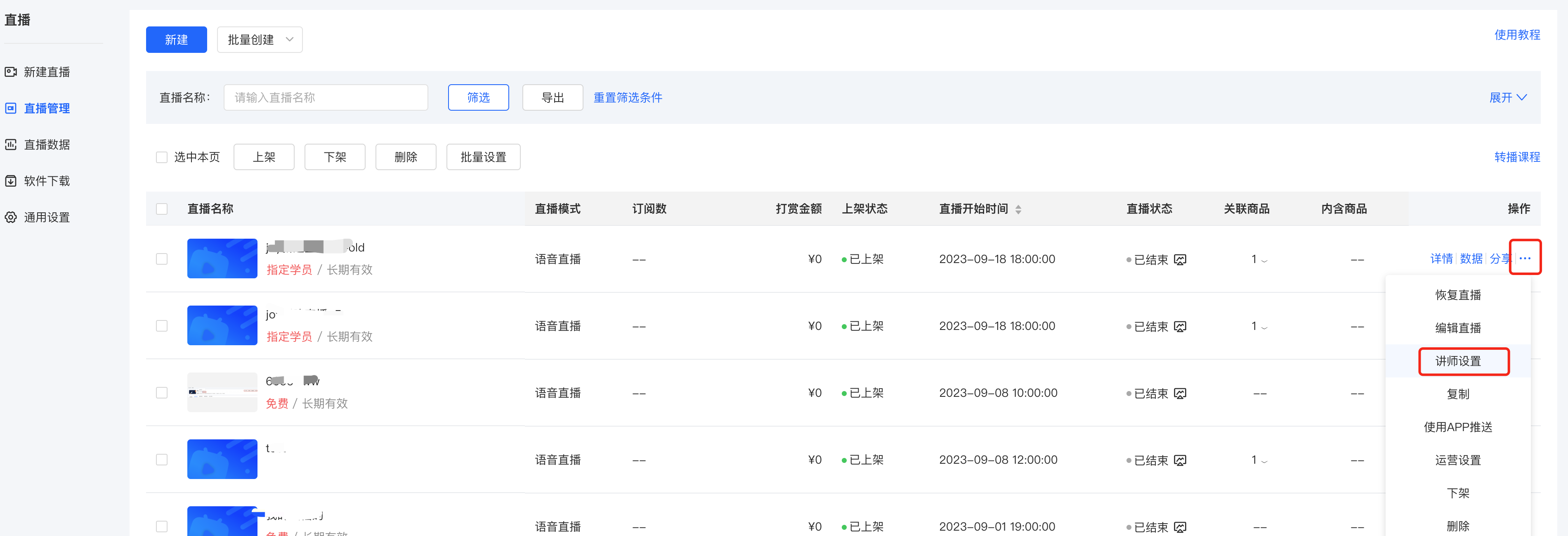
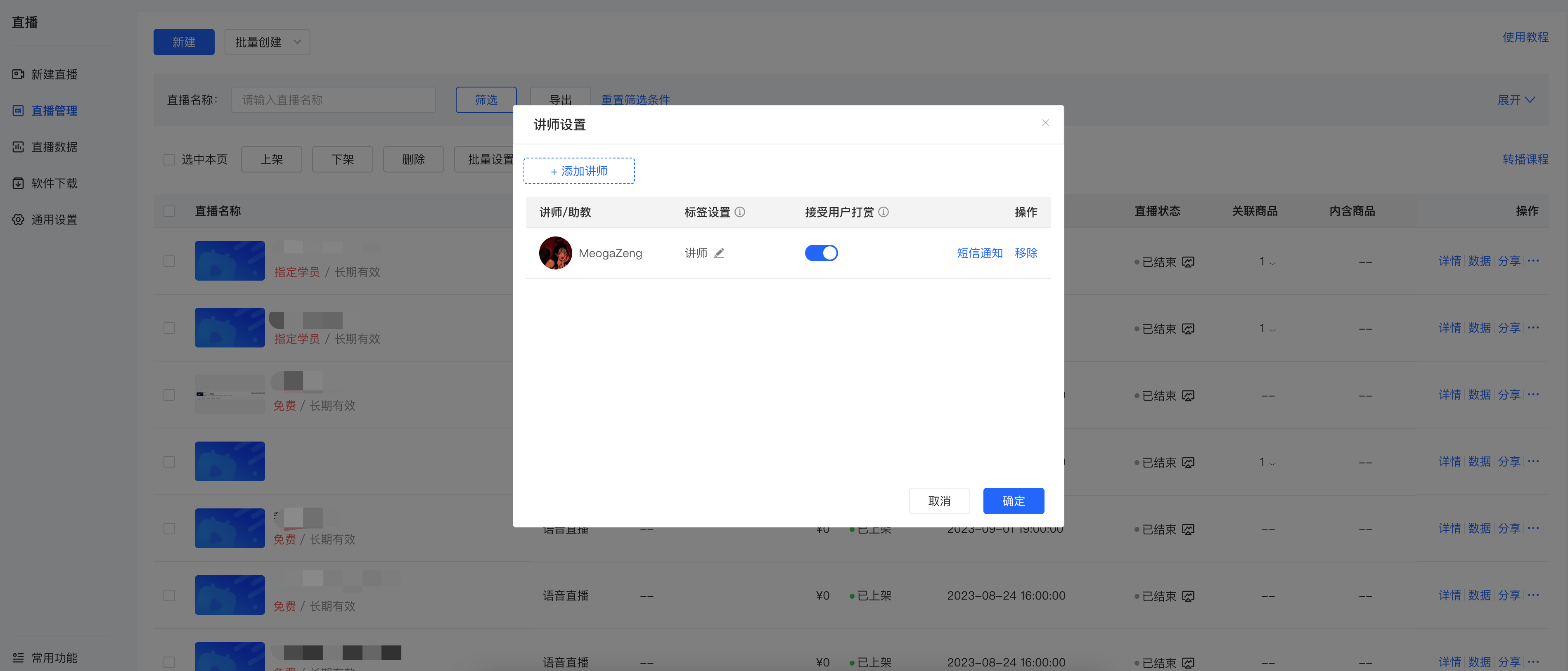
**<span style="font-size:14px;">\[Instructor settings\]</span>**<span style="font-size:14px;">You can click to add an instructor.</span>

![image.png](https://wechatapppro-1252524126.file.myqcloud.com/help_document/image/ueditor/79957500_1699238323.png ".png")

![image.png](https://wechatapppro-1252524126.file.myqcloud.com/help_document/image/ueditor/23519100_1699238362.png ".png")

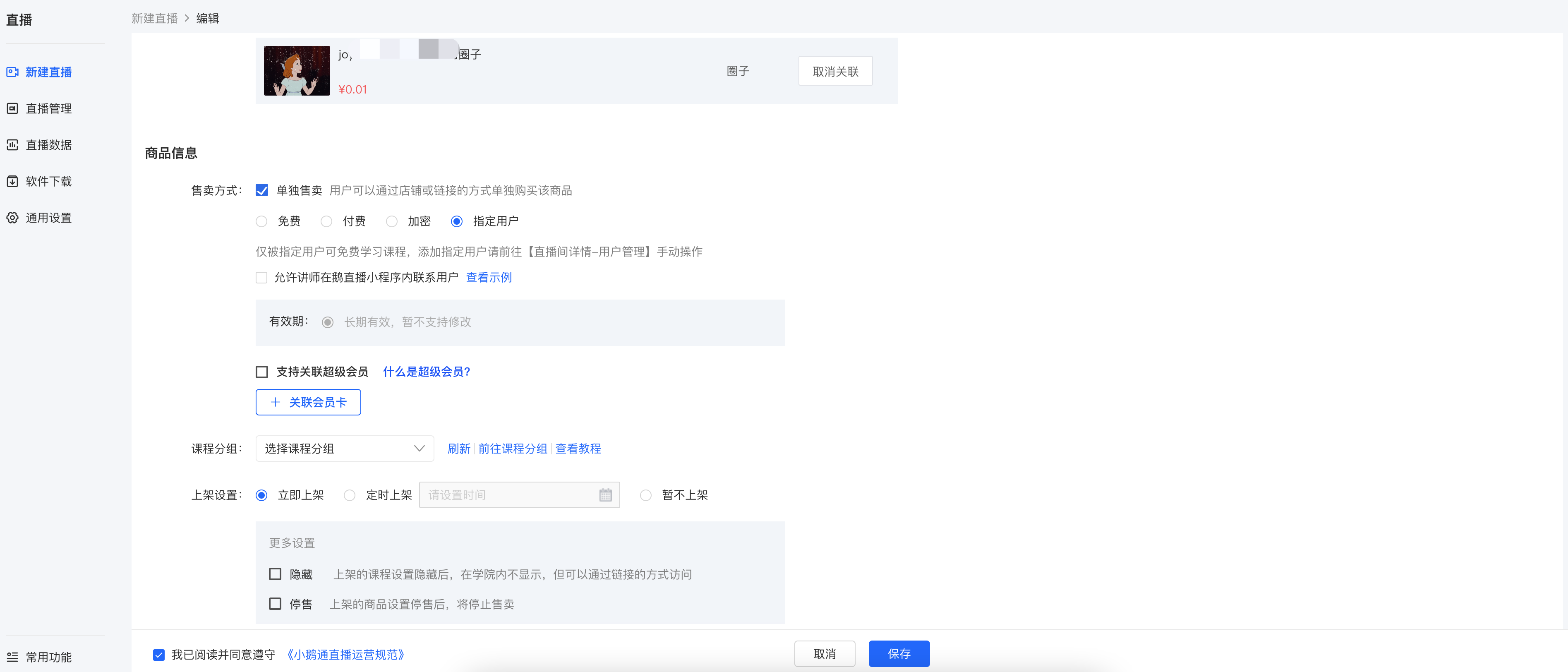
**<span style="font-size:14px;">(3) Product information:</span>**<span style="font-size:14px;">Sales method, product grouping (There is no sales method setting after selecting the internal training mode)</span>

<span style="font-size:14px;">![image.png](https://wechatapppro-1252524126.file.myqcloud.com/help_document/image/ueditor/19947600_1699238385.png ".png")</span>

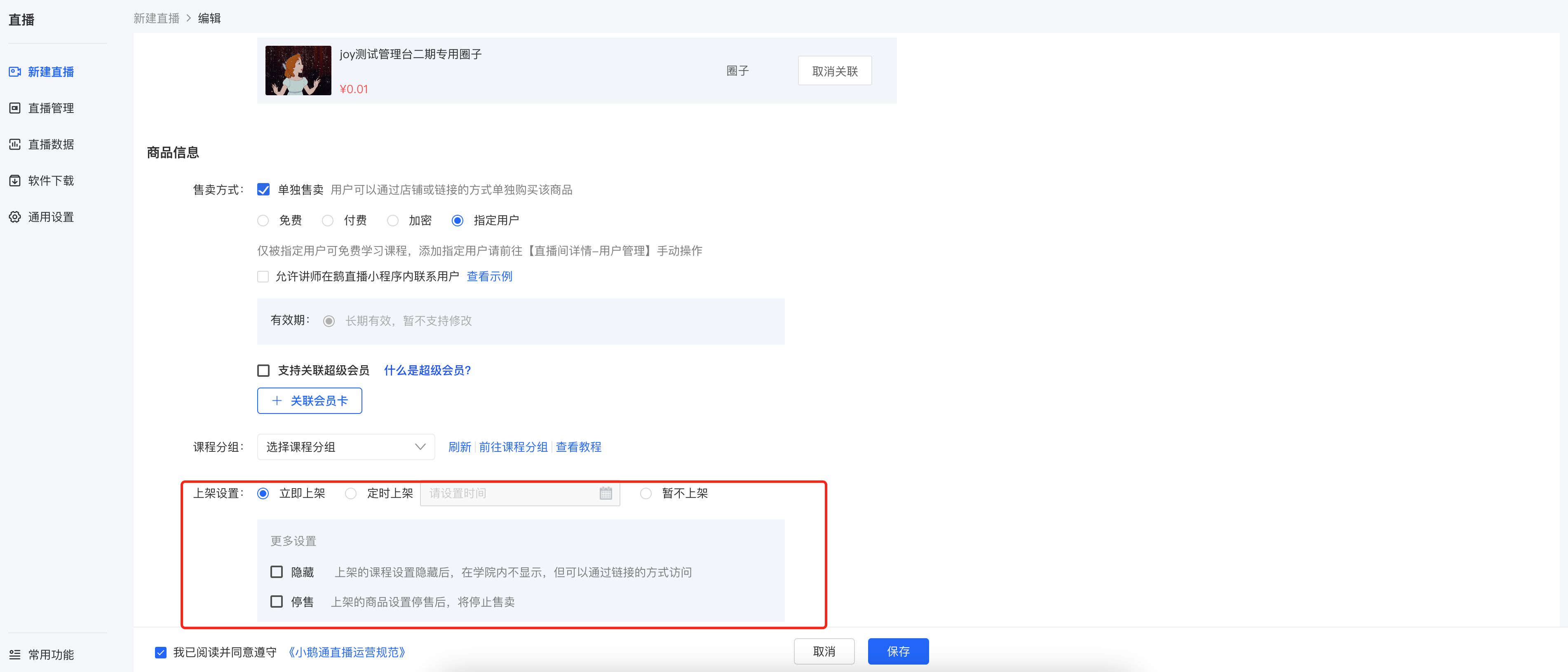
**<span style="font-size:14px;">(4) Listing settings:</span>**<span style="font-size:14px;">List immediately, list at a scheduled time, or do not list for the time being; in addition, you can also hide or stop selling the product.</span>

![image.png](https://wechatapppro-1252524126.file.myqcloud.com/help_document/image/ueditor/32977200_1699238426.png ".png")

<span style="font-size:14px;">After clicking Save, you can click \[More Settings\] to set up live stream interaction, traffic diversion, etc.</span>

<span style="font-size:14px;">**Step 2: Complete the details page of the live streaming room**</span>

**<span style="font-size:14px;">1. Live stream start settings:</span>**<span style="font-size:14px;">Live stream start method, instructor settings</span>

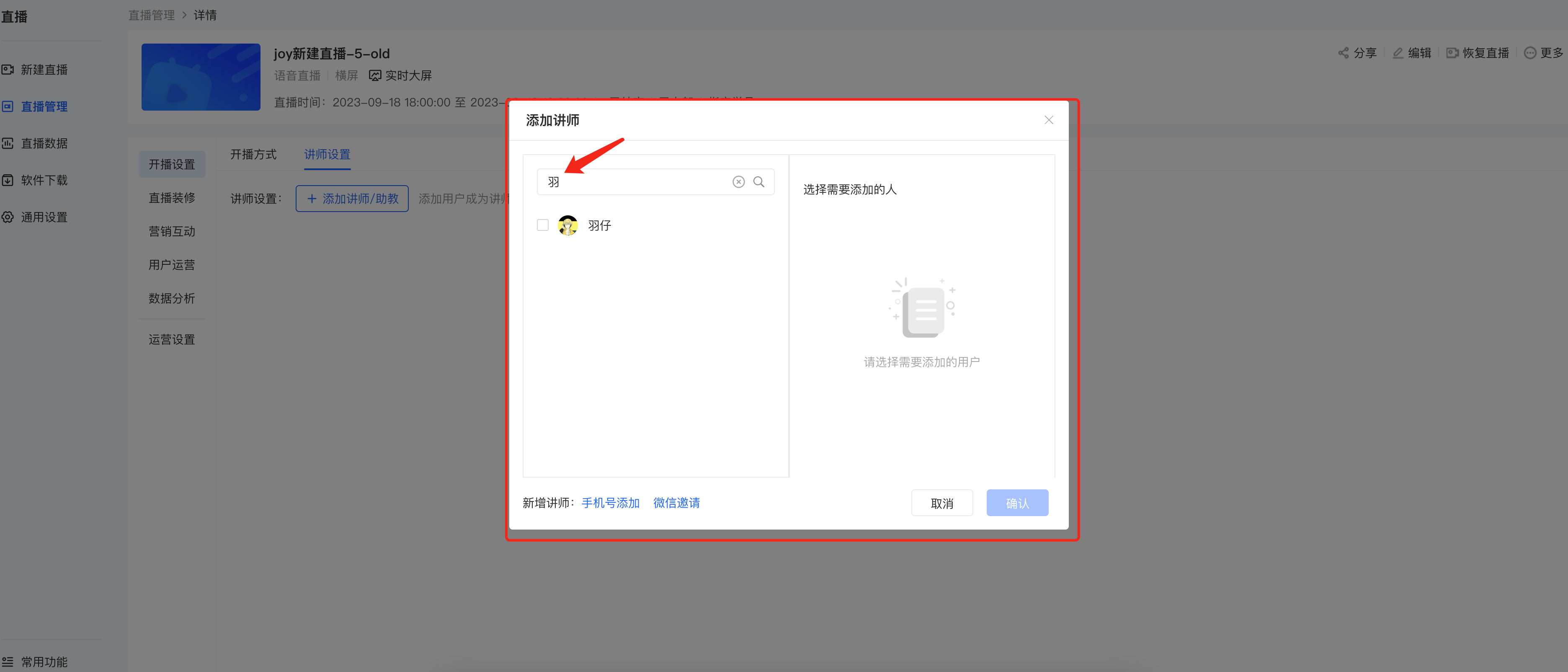
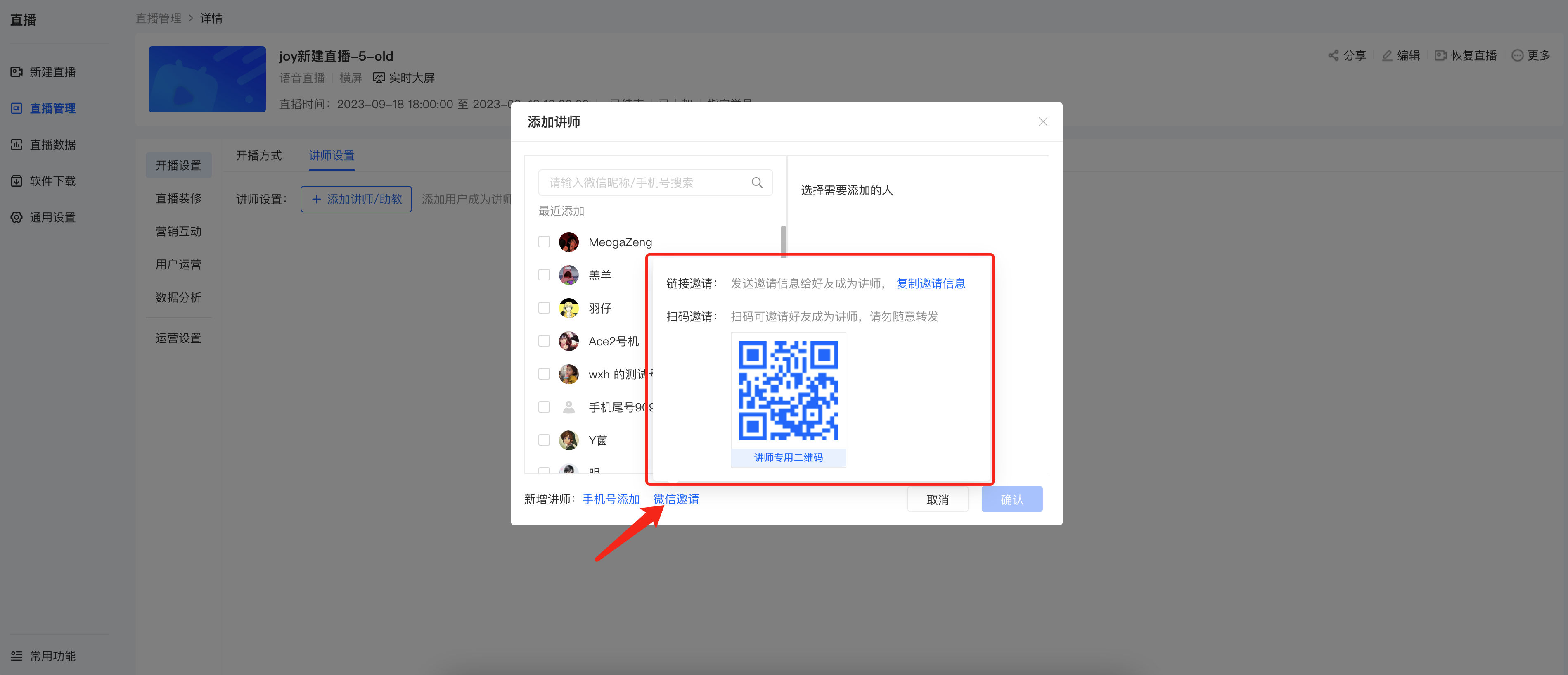
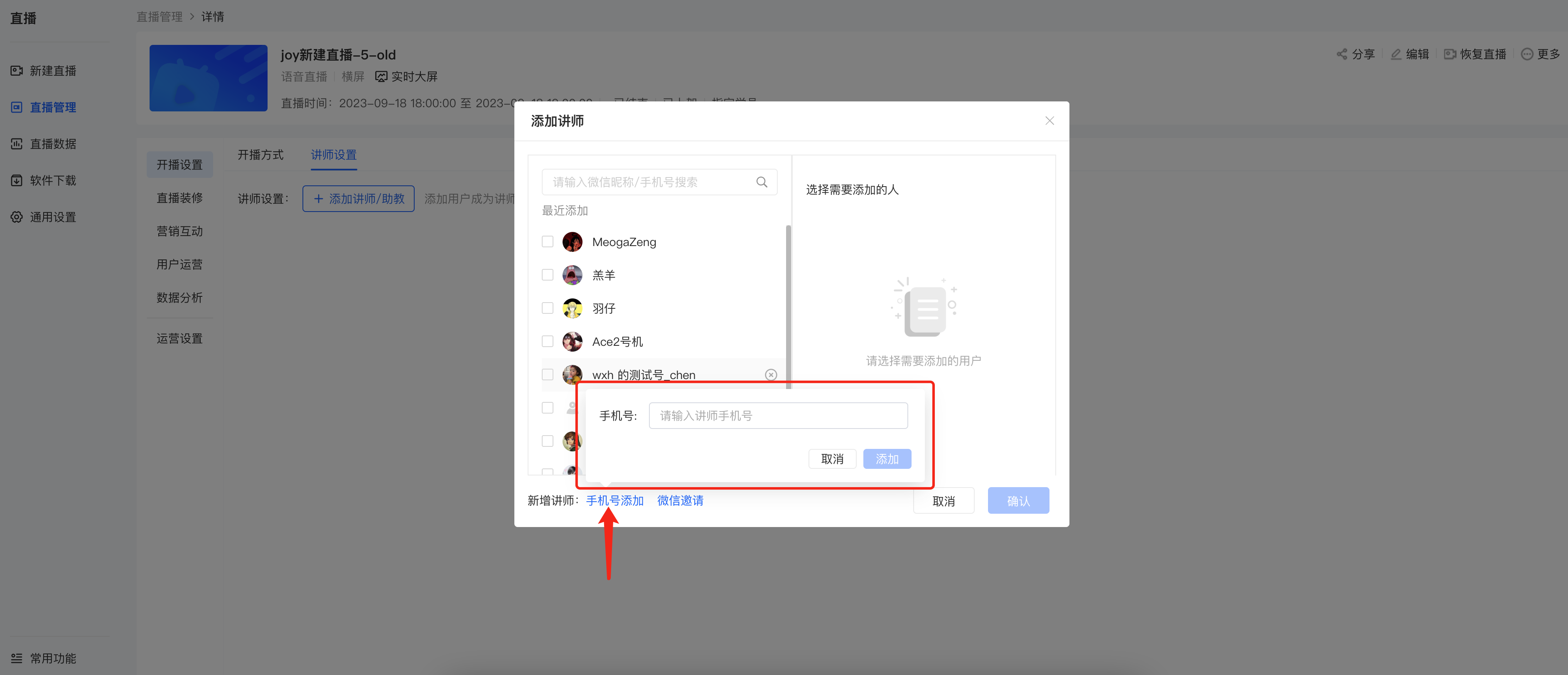
**<span style="font-size:14px;">(1) Instructor settings:</span>**<span style="font-size:14px;">There are 3 ways to add instructors or teaching assistants</span>

![image.png](https://wechatapppro-1252524126.file.myqcloud.com/help_document/image/ueditor/38774500_1699238565.png ".png")

<span style="font-size:14px;">  
</span>

**<span style="font-size:14px;">● Method 1:</span>**<span style="font-size:14px;">Search for users who have visited the store through the search box and select them to become instructors</span>

![image.png](https://wechatapppro-1252524126.file.myqcloud.com/help_document/image/ueditor/33291400_1699238601.png ".png")

<span style="font-size:14px;"></span>

<span style="font-size:14px;">  
</span>

<span style="font-size:14px;">●**Method 2:**Invite friends to become instructors via WeChat QR code</span>

![image.png](https://wechatapppro-1252524126.file.myqcloud.com/help_document/image/ueditor/49022800_1699238627.png ".png")

<span style="font-size:14px;">  
</span>

<span style="font-size:14px;"></span>

**<span style="font-size:11pt;background-image:initial;background-position:initial;background-size:initial;background-repeat:initial;background-attachment:initial;letter-spacing:0pt;vertical-align:baseline;"><span style="font-size:14px;">● </span>Method 3</span><span style="font-size:11pt;background-image:initial;background-position:initial;background-size:initial;background-repeat:initial;background-attachment:initial;letter-spacing:0pt;vertical-align:baseline;">:</span>**<span style="font-size:11pt;background-image:initial;background-position:initial;background-size:initial;background-repeat:initial;background-attachment:initial;letter-spacing:0pt;vertical-align:baseline;">Add by mobile phone number</span><span style="font-size:11pt;background-image:initial;background-position:initial;background-size:initial;background-repeat:initial;background-attachment:initial;letter-spacing:0pt;vertical-align:baseline;"></span>

![image.png](https://wechatapppro-1252524126.file.myqcloud.com/help_document/image/ueditor/72798900_1699238651.png ".png")<span style="font-size:14px;"></span>

<span style="font-size:10.5pt;font-family:'Helvetica Neue', Helvetica, 'PingFang SC', 'Microsoft YaHei', 'Source Han Sans SC', 'Noto Sans CJK SC', 'WenQuanYi Micro Hei', sans-serif;background-image:initial;background-position:initial;background-size:initial;background-repeat:initial;background-attachment:initial;letter-spacing:0pt;vertical-align:baseline;">  
</span>

<span style="font-size:10.5pt;font-family:'Helvetica Neue', Helvetica, 'PingFang SC', 'Microsoft YaHei', 'Source Han Sans SC', 'Noto Sans CJK SC', 'WenQuanYi Micro Hei', sans-serif;background-image:initial;background-position:initial;background-size:initial;background-repeat:initial;background-attachment:initial;letter-spacing:0pt;vertical-align:baseline;">After inviting instructors, you can modify the instructor's name notes, set whether to accept user rewards, and also remove instructors.</span><span style="font-size:11pt;font-family:'Helvetica Neue', Helvetica, 'PingFang SC', 'Microsoft YaHei', 'Source Han Sans SC', 'Noto Sans CJK SC', 'WenQuanYi Micro Hei', sans-serif;color:rgb(51,51,51);background-image:initial;background-position:initial;background-size:initial;background-repeat:initial;background-attachment:initial;letter-spacing:0pt;vertical-align:baseline;"></span>

<span style="font-size:14px;">![image.png](https://wechatapppro-1252524126.file.myqcloud.com/help_document/image/ueditor/5851700_1699238083.png ".png")</span>

**<span style="font-size:14px;">  
</span>**

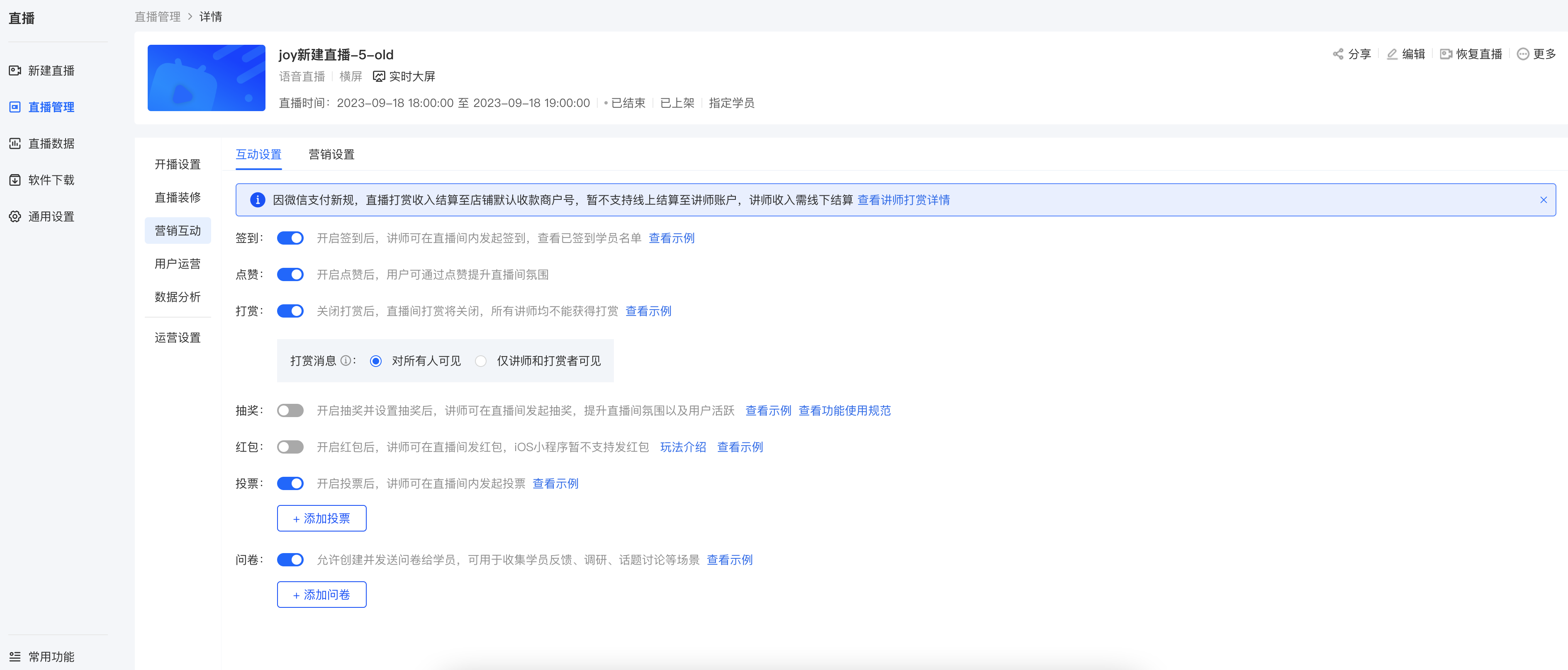
**<span style="font-size:14px;">(2) Marketing interaction:</span>**<span style="font-size:14px;"><span style="font-family:'PingFang SC', 'Microsoft YaHei', '黑体', '宋体', sans-serif;font-size:14px;white-space:pre-line;background-color:rgb(250,250,250);">Settings such as sign - in, likes, rewards, lucky draws, red envelopes, votes, and questionnaires can be set up</span></span><span style="background-color:rgb(250,250,250);font-family:'PingFang SC', 'Microsoft YaHei', '黑体', '宋体', sans-serif;font-size:14px;">and other settings</span>

<span style="font-size:14px;"><span style="font-family:'PingFang SC', 'Microsoft YaHei', '黑体', '宋体', sans-serif;font-size:14px;white-space:pre-line;background-color:rgb(250,250,250);">![image.png](https://wechatapppro-1252524126.file.myqcloud.com/help_document/image/ueditor/63060900_1699238768.png ".png")</span></span>

<span style="font-size:14px;"></span>

**<span style="font-size:10.5pt;font-family:'Helvetica Neue', Helvetica, 'PingFang SC', 'Microsoft YaHei', 'Source Han Sans SC', 'Noto Sans CJK SC', 'WenQuanYi Micro Hei', sans-serif;background-image:initial;background-position:initial;background-size:initial;background-repeat:initial;background-attachment:initial;letter-spacing:0pt;vertical-align:baseline;">  
</span>**

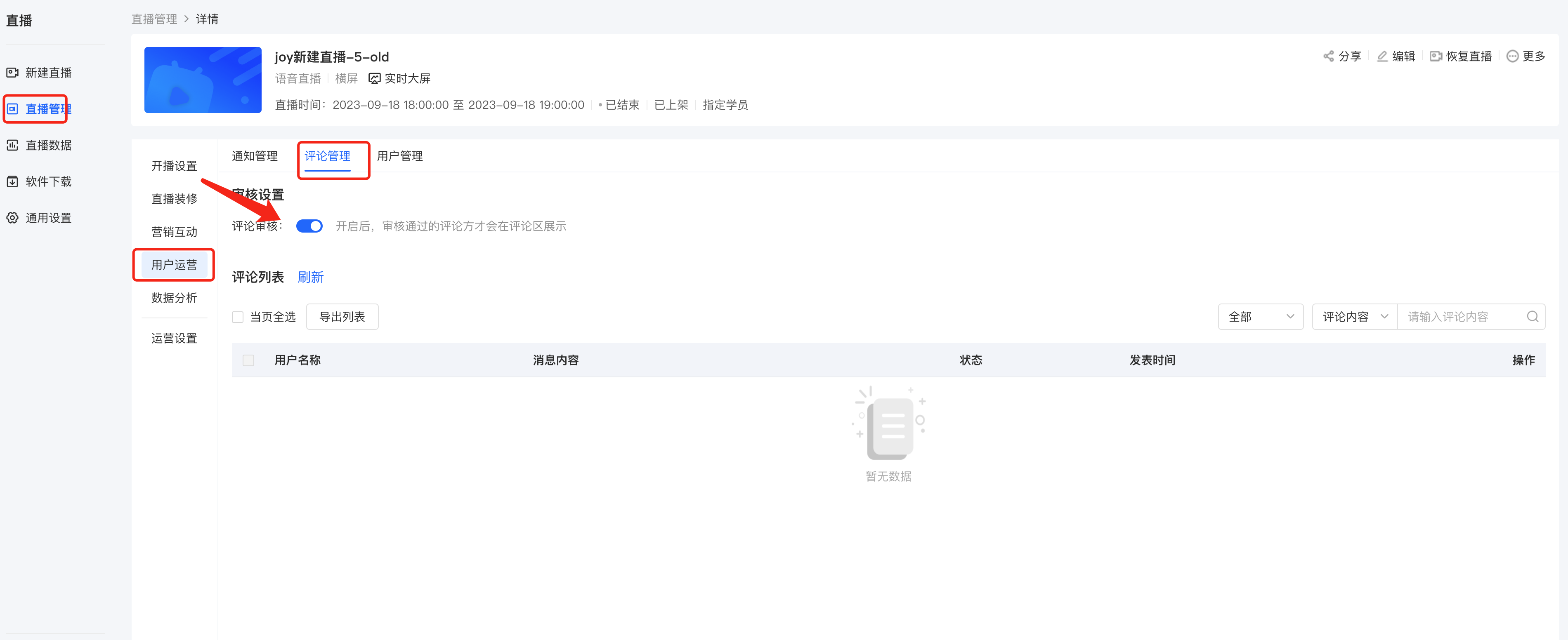
**<span style="font-size:10.5pt;font-family:'Helvetica Neue', Helvetica, 'PingFang SC', 'Microsoft YaHei', 'Source Han Sans SC', 'Noto Sans CJK SC', 'WenQuanYi Micro Hei', sans-serif;background-image:initial;background-position:initial;background-size:initial;background-repeat:initial;background-attachment:initial;letter-spacing:0pt;vertical-align:baseline;"> (3) Comment review:</span>**<span style="font-size:10.5pt;font-family:'Helvetica Neue', Helvetica, 'PingFang SC', 'Microsoft YaHei', 'Source Han Sans SC', 'Noto Sans CJK SC', 'WenQuanYi Micro Hei', sans-serif;background-image:initial;background-position:initial;background-size:initial;background-repeat:initial;background-attachment:initial;letter-spacing:0pt;vertical-align:baseline;">You can review user comments before publishing them</span><span style="font-size:10.5pt;font-family:'Helvetica Neue', Helvetica, 'PingFang SC', 'Microsoft YaHei', 'Source Han Sans SC', 'Noto Sans CJK SC', 'WenQuanYi Micro Hei', sans-serif;background-image:initial;background-position:initial;background-size:initial;background-repeat:initial;background-attachment:initial;letter-spacing:0pt;vertical-align:baseline;"></span>

![image.png](https://wechatapppro-1252524126.file.myqcloud.com/help_document/image/ueditor/65113400_1699238794.png ".png")<span style="font-size:14px;"></span>

<span style="font-family:'Helvetica Neue', Helvetica, 'PingFang SC', 'Microsoft YaHei', 'Source Han Sans SC', 'Noto Sans CJK SC', 'WenQuanYi Micro Hei', sans-serif;font-size:10.5pt;letter-spacing:0pt;">  
</span>

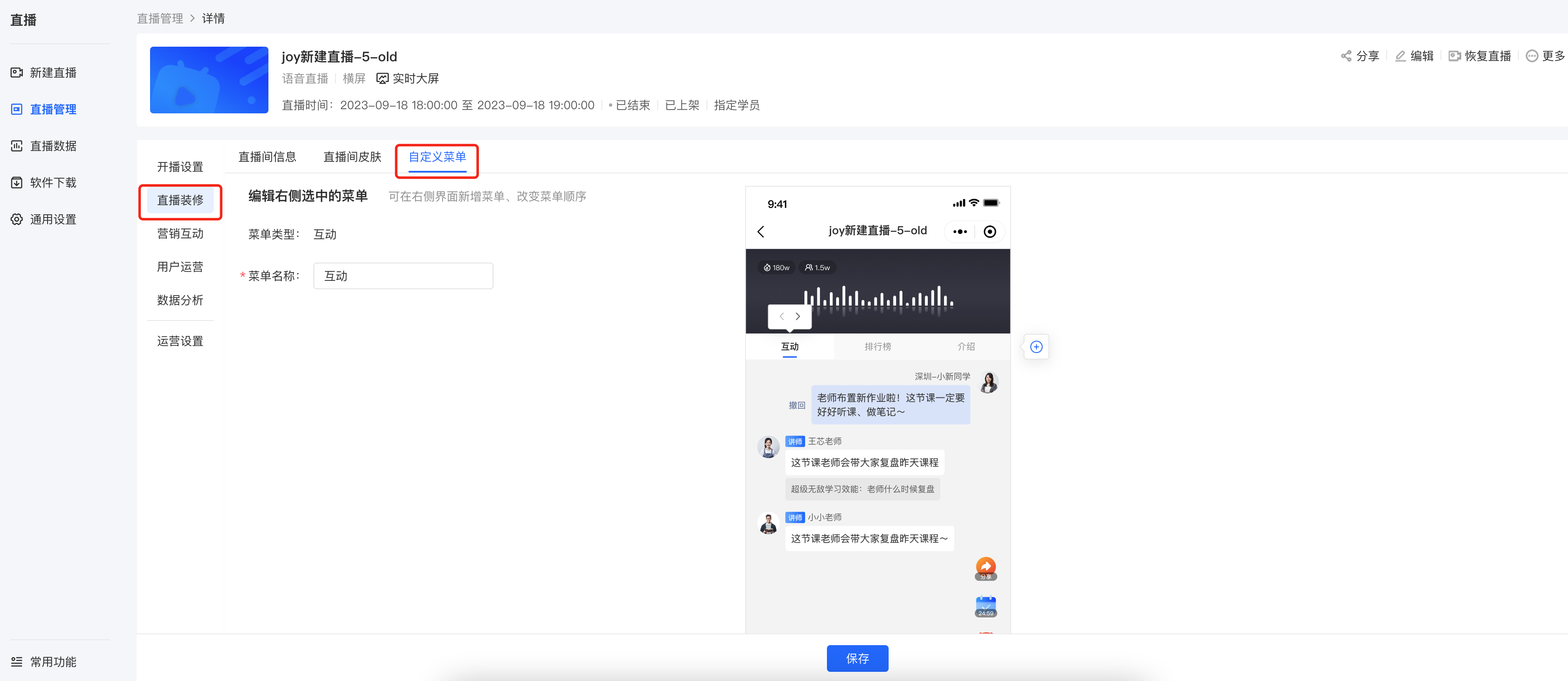
**<span style="font-family:'Helvetica Neue', Helvetica, 'PingFang SC', 'Microsoft YaHei', 'Source Han Sans SC', 'Noto Sans CJK SC', 'WenQuanYi Micro Hei', sans-serif;font-size:10.5pt;letter-spacing:0pt;">(4) Custom menu:</span>**<span style="font-family:'Helvetica Neue', Helvetica, 'PingFang SC', 'Microsoft YaHei', 'Source Han Sans SC', 'Noto Sans CJK SC', 'WenQuanYi Micro Hei', sans-serif;font-size:10.5pt;letter-spacing:0pt;">You can rename the menu and adjust the order</span>

<span style="font-size:10.5pt;font-family:'Helvetica Neue', Helvetica, 'PingFang SC', 'Microsoft YaHei', 'Source Han Sans SC', 'Noto Sans CJK SC', 'WenQuanYi Micro Hei', sans-serif;background-image:initial;background-position:initial;background-size:initial;background-repeat:initial;background-attachment:initial;letter-spacing:0pt;vertical-align:baseline;"></span>

![image.png](https://wechatapppro-1252524126.file.myqcloud.com/help_document/image/ueditor/11707200_1699239010.png ".png")<span style="font-size:14px;"></span>

<span style="font-size:14px;">  
</span>

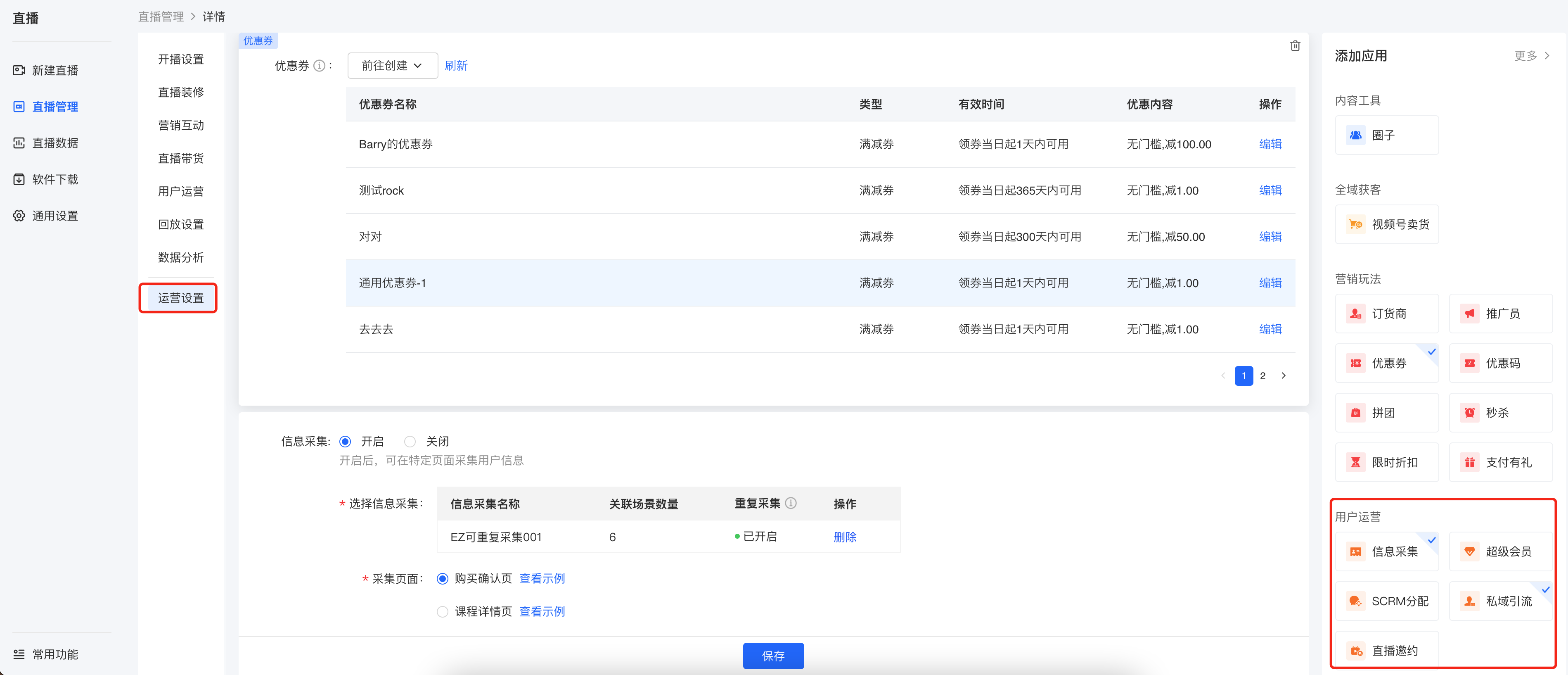
**<span style="font-size:14px;">2. Operation settings:</span>**<span style="font-size:14px;">Include settings such as information collection, notification settings, and private domain traffic diversion</span>

![image.png](https://wechatapppro-1252524126.file.myqcloud.com/help_document/image/ueditor/49450200_1699239166.png ".png")

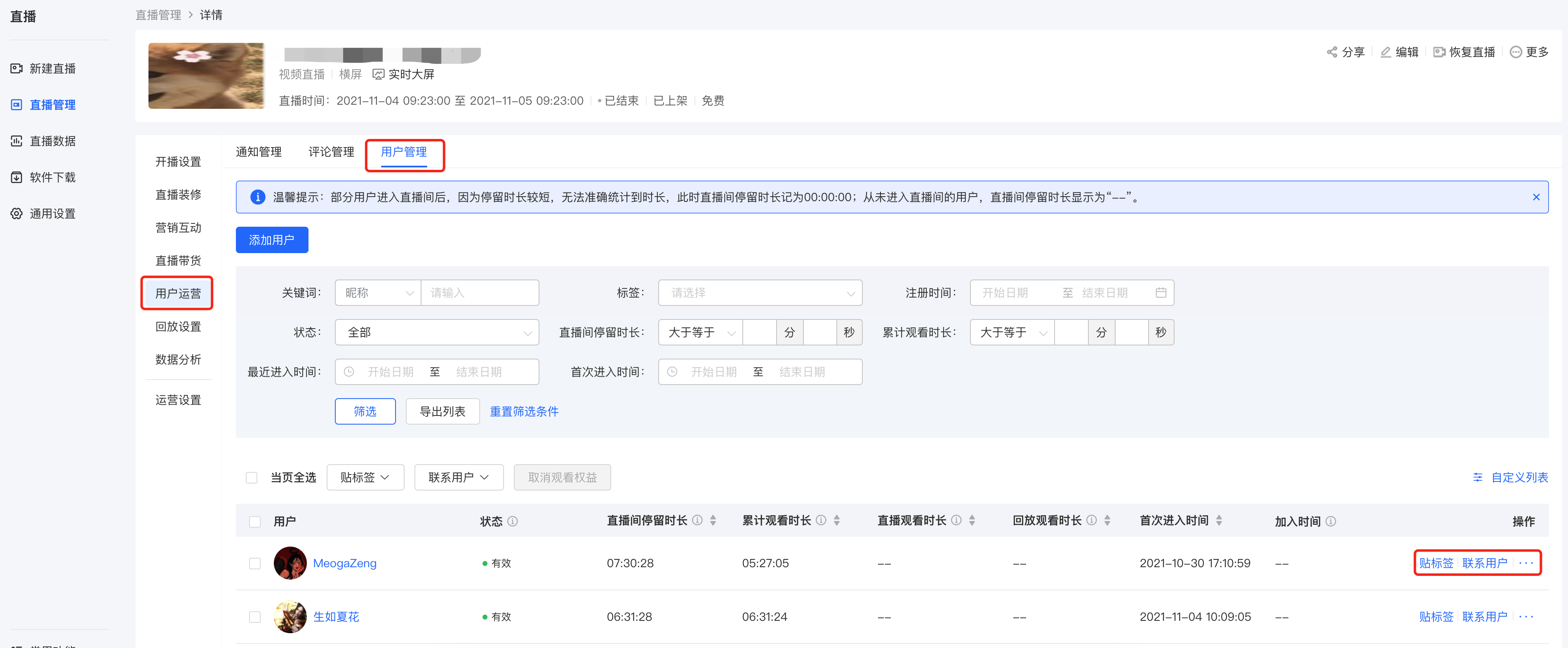
**<span style="font-size:14px;">3. Student settings:</span>**<span style="font-size:14px;">You can manually add students or perform operational actions on existing students of the course.</span>

![image.png](https://wechatapppro-1252524126.file.myqcloud.com/help_document/image/ueditor/47634900_1699239074.png ".png")

**<span style="font-size:14px;">Currently, there are 3 ways to manually add students:</span>**

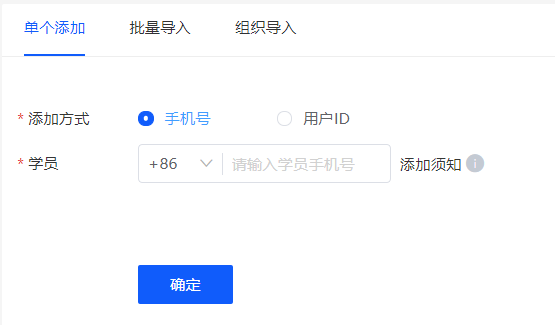
**<span style="font-size:14px;">● Single addition:</span>**<span style="font-size:14px;">Enter the student's mobile phone number or user ID</span>

**<span style="font-size:14px;">● Batch import:</span>**<span style="font-size:14px;">Upload a file according to the template</span>

**<span style="font-size:14px;">● Organization import:</span>**<span style="font-size:14px;">Import organizational users</span>

![image.png](https://wechatapppro-1252524126.file.myqcloud.com/help_document/image/ueditor/91764200_1699238083.png ".png")

**<span style="font-size:14px;">  
</span>**

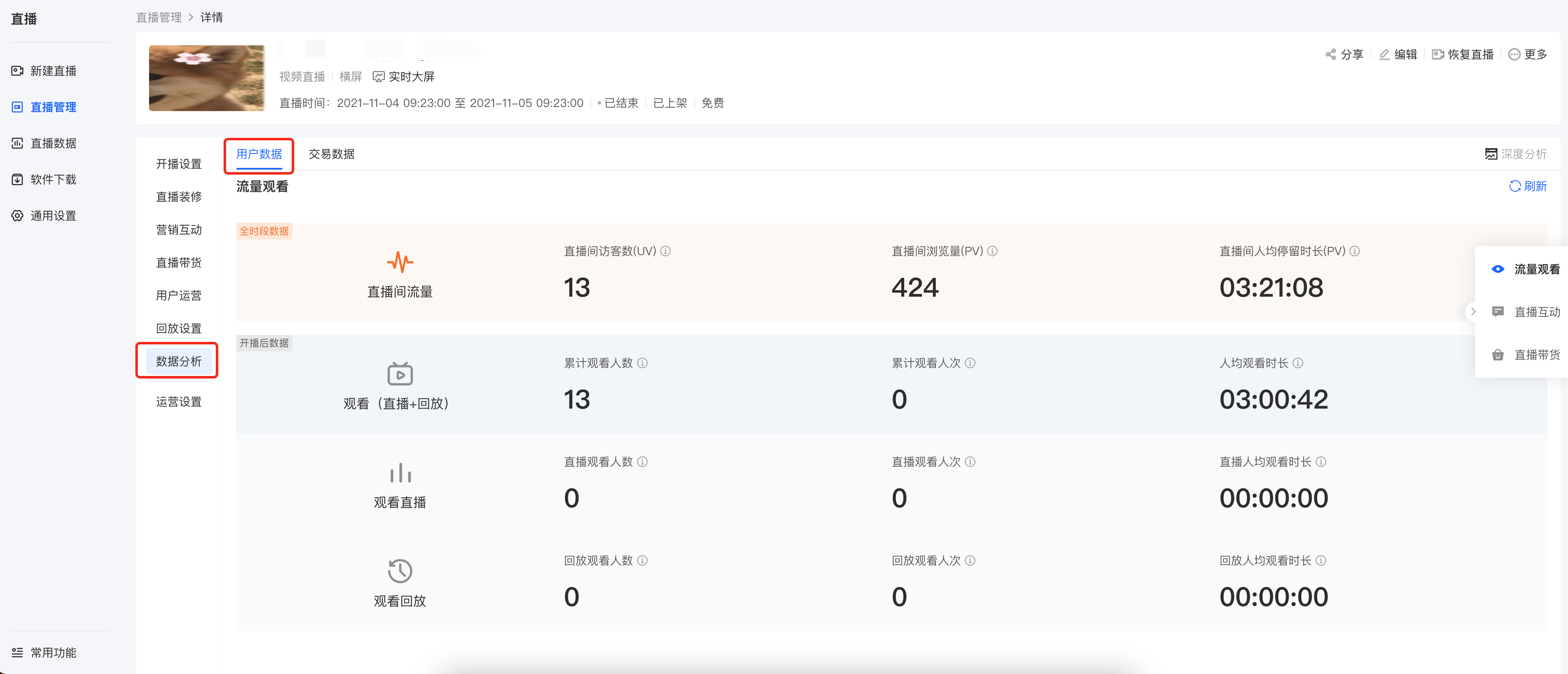
**<span style="font-size:14px;">4. Data analysis:</span>**<span style="font-size:14px;">Include live stream traffic data, student learning data, and live stream interaction data</span>

<span style="font-size:14px;">![image.png](https://wechatapppro-1252524126.file.myqcloud.com/help_document/image/ueditor/86591100_1699239096.png ".png")</span>

<span style="font-size:14px;">  
</span>

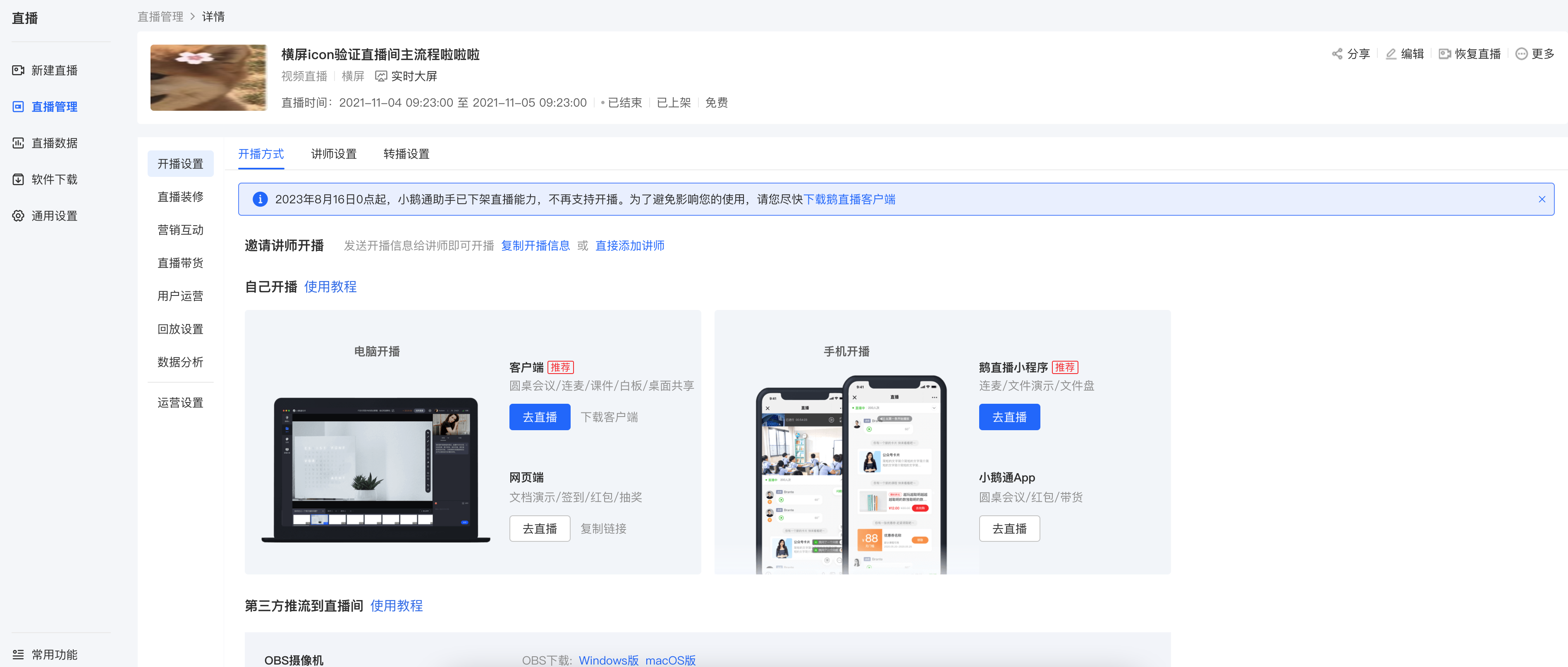
<span style="font-size:14px;">**Step 3: Select a live stream terminal and start the live stream**</span>

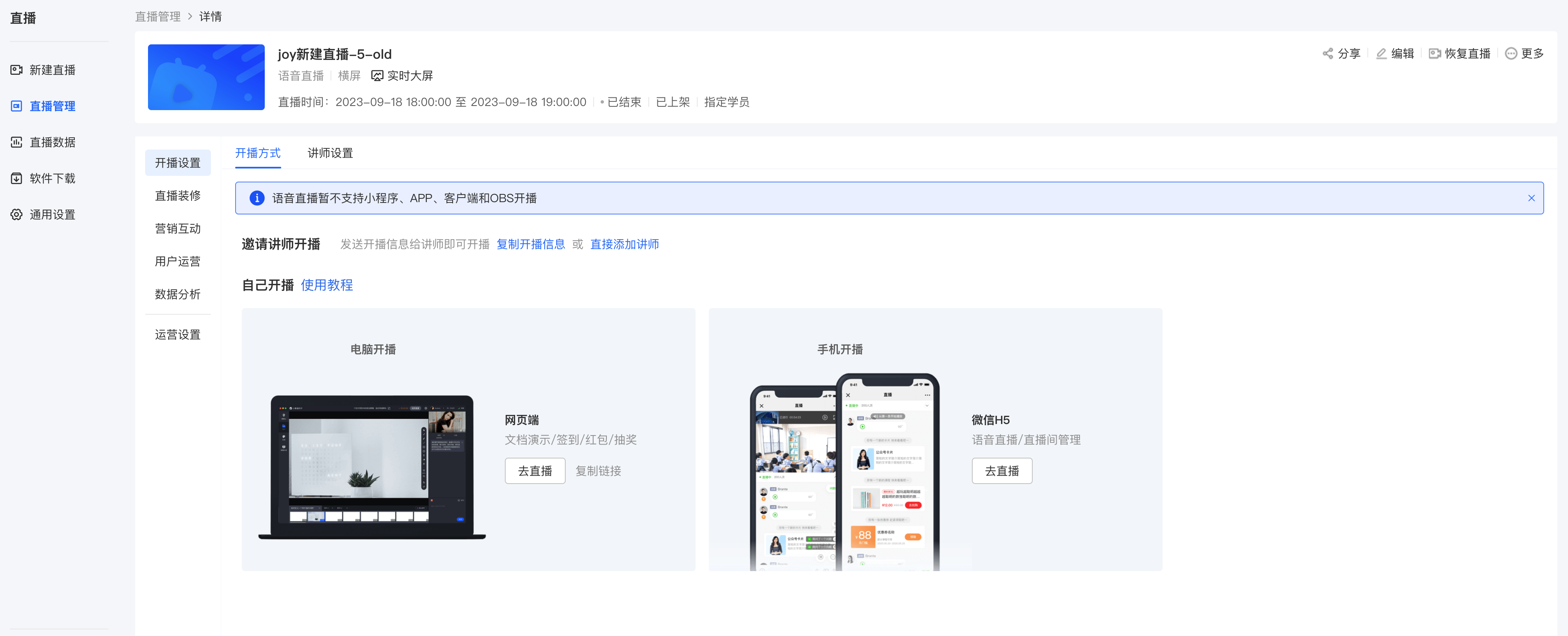
<span style="font-size:14px;">Click**\[Live stream start method\]**and select a suitable terminal for the live stream. Currently, voice live streaming supports lectures via mobile H5 and the computer web - based platform.</span>

![image.png](https://wechatapppro-1252524126.file.myqcloud.com/help_document/image/ueditor/3205100_1699239167.png ".png")

</section>