【OBS】How to download the video streamed by OBS?
During the use of OBS, merchants can use the OBS software to record the video during the streaming process. After the recording is completed, they can view and use it.
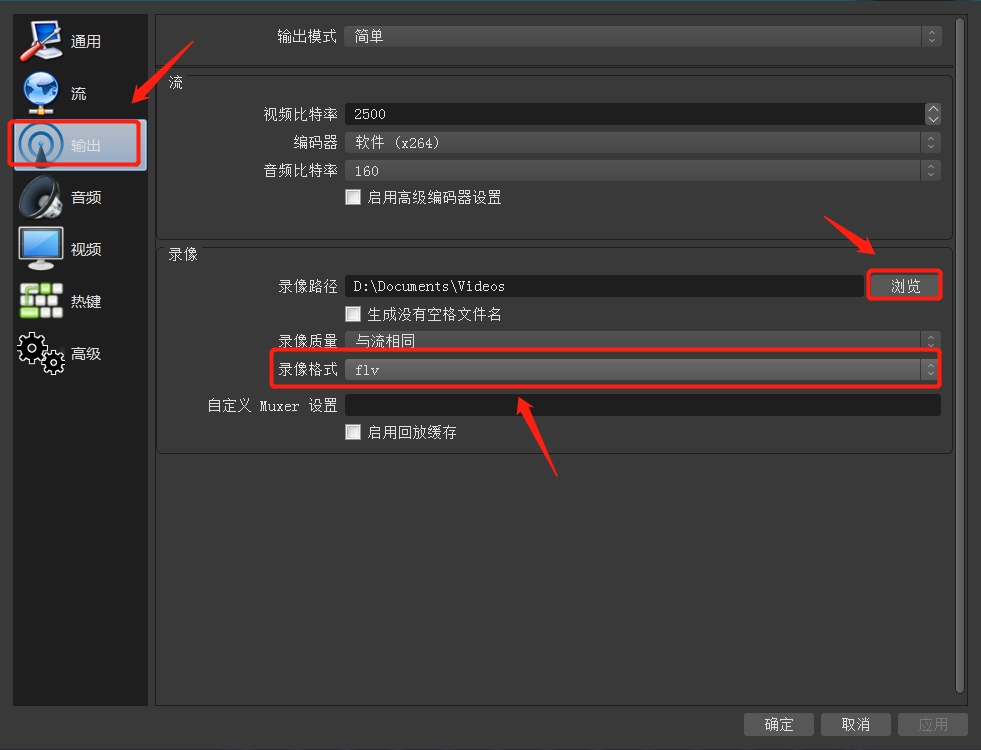
1. Select the save location and format for the recorded video:
1) Open the OBS software, click the settings button in the lower right corner, and enter the settings page.
2) Select 'Output' in the left - hand function bar on the settings page, and click 'Recording' on the output page.
3) You can click the 'Browse' button after the recording path to modify the save path for the recording.
4) You can click the recording format to switch the video format of the recording.
2. Steps for recording a video: After starting the streaming, click the 'Start Recording' button to start recording the video. When ending the streaming, click 'Stop Recording' to complete the recording of the live - stream video. After the recording is completed, users can open the folder where the video is saved to view the recorded video.
