# Relay broadcast

# Where can I obtain the streaming push address from a third-party platform?

<div data-elink-language-switch="1" id="bkmrk-%E4%B8%AD%E6%96%87" style="border:1px solid #d6d9de;border-radius:6px;padding:10px 12px;margin:0 0 18px 0;background:#f8fafc;font-size:14px;">[中文](/books/091d5/page/2723d)</div><span style="font-size:14px;"> Obtain directly from the third-party platform's backend or consult the third-party platform's customer service. For details, please refer to the documentation:[Tutorial on Live Streaming Relay to Third-Party Platforms](https://helpcenter.xiaoe-tech.com/#/problem/detail?document_id=doc_5f6c4d59a1a00_Cu4yM "直播转播到第三方平台教程")</span>

# What should I do if adding or modifying the streaming push address during a live stream does not take effect?

<div data-elink-language-switch="1" id="bkmrk-%E4%B8%AD%E6%96%87" style="border:1px solid #d6d9de;border-radius:6px;padding:10px 12px;margin:0 0 18px 0;background:#f8fafc;font-size:14px;">[中文](/books/091d5/page/c74d9)</div><span style="font-size:14px;">Limited by Tencent Cloud technology, after adding or modifying, you need to pause the live stream for 5 minutes and then restart it for the changes to take effect. It is recommended to configure the streaming push address 5 minutes before the live stream starts.</span>

# Which online stores can authorize live rebroadcasting?

<div data-elink-language-switch="1" id="bkmrk-%E4%B8%AD%E6%96%87" style="border:1px solid #d6d9de;border-radius:6px;padding:10px 12px;margin:0 0 18px 0;background:#f8fafc;font-size:14px;">[中文](/books/091d5/page/496e0)</div><span style="font-size:14px;">Currently, only the trial version, professional version, and flagship version are supported. The basic version is not supported.</span>

# Which online stores can accept live rebroadcasting?

<div data-elink-language-switch="1" id="bkmrk-%E4%B8%AD%E6%96%87" style="border:1px solid #d6d9de;border-radius:6px;padding:10px 12px;margin:0 0 18px 0;background:#f8fafc;font-size:14px;">[中文](/books/091d5/page/32072)</div><span style="font-size:14px;">All versions of the online store can accept live rebroadcasts</span>

# Third-party streaming to the elink live streaming room

<div data-elink-language-switch="1" id="bkmrk-%E4%B8%AD%E6%96%87" style="border:1px solid #d6d9de;border-radius:6px;padding:10px 12px;margin:0 0 18px 0;background:#f8fafc;font-size:14px;">[中文](/books/091d5/page/d1f25-eEH)</div><span style="font-size:17px;">**I. Function Introduction**</span>

<span style="font-size:15px;">This function allows merchants to push the live - streaming footage from other platforms to the elink live - streaming room, where the live - streaming footage will be synchronously displayed.</span>

<span style="font-size:17px;">**II. Purpose of Use**</span>

<span style="font-size:15px;">With this function, merchants can re - broadcast third - party live - streaming content to the store's live - streaming room, which can quickly expand the store's influence. Learners can also watch more diverse non - store content.</span>

<span style="font-size:17px;">**III. Use Scenarios**</span>

<span style="font-size:15px;">Through cooperation, merchants can push third - party live - streaming content to the store's live - streaming room and make it available to learners for free or at a charge. This can not only expand the store's influence but also provide learners with more diverse content.</span>

<span style="font-size:17px;">**IV. Operation Paths**</span>

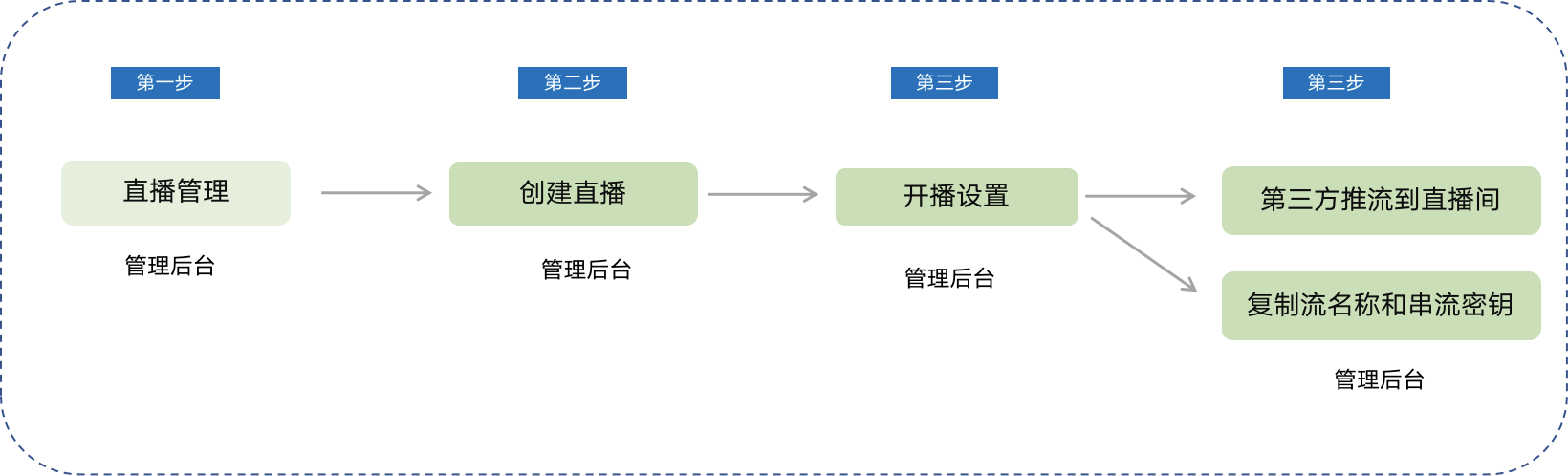
<span style="font-size:15px;">Path 1: Merchant side: Management console → Create live - streaming → Live - streaming settings → Third - party push to the live - streaming room → Copy the stream name and streaming key</span>

![image.png](https://wechatapppro-1252524126.file.myqcloud.com/help_document/image/ueditor/27050200_1716456569.png ".png")

<span style="font-size:15px;">Path 2: Copy the stream name and streaming key and paste them into the third - party's push - stream address settings (see the usage tutorial for details).</span>
<span style="font-size:17px;">**V. Usage Tutorial**</span>

**<span style="font-size:15px;">Step 1: Create a live - streaming session.</span>**<span style="font-size:15px;">Find the corresponding stream name and streaming key for the live - streaming room.</span>

<span style="font-size:15px;">Users can find \[Third - party push to the live - streaming room\] in the live - streaming details &gt; Live - streaming settings &gt; Live - streaming method of the 'Created' live - streaming sessions.</span>![image.png](https://wechatapppro-1252524126.file.myqcloud.com/help_document/image/ueditor/37895900_1716456569.png ".png")
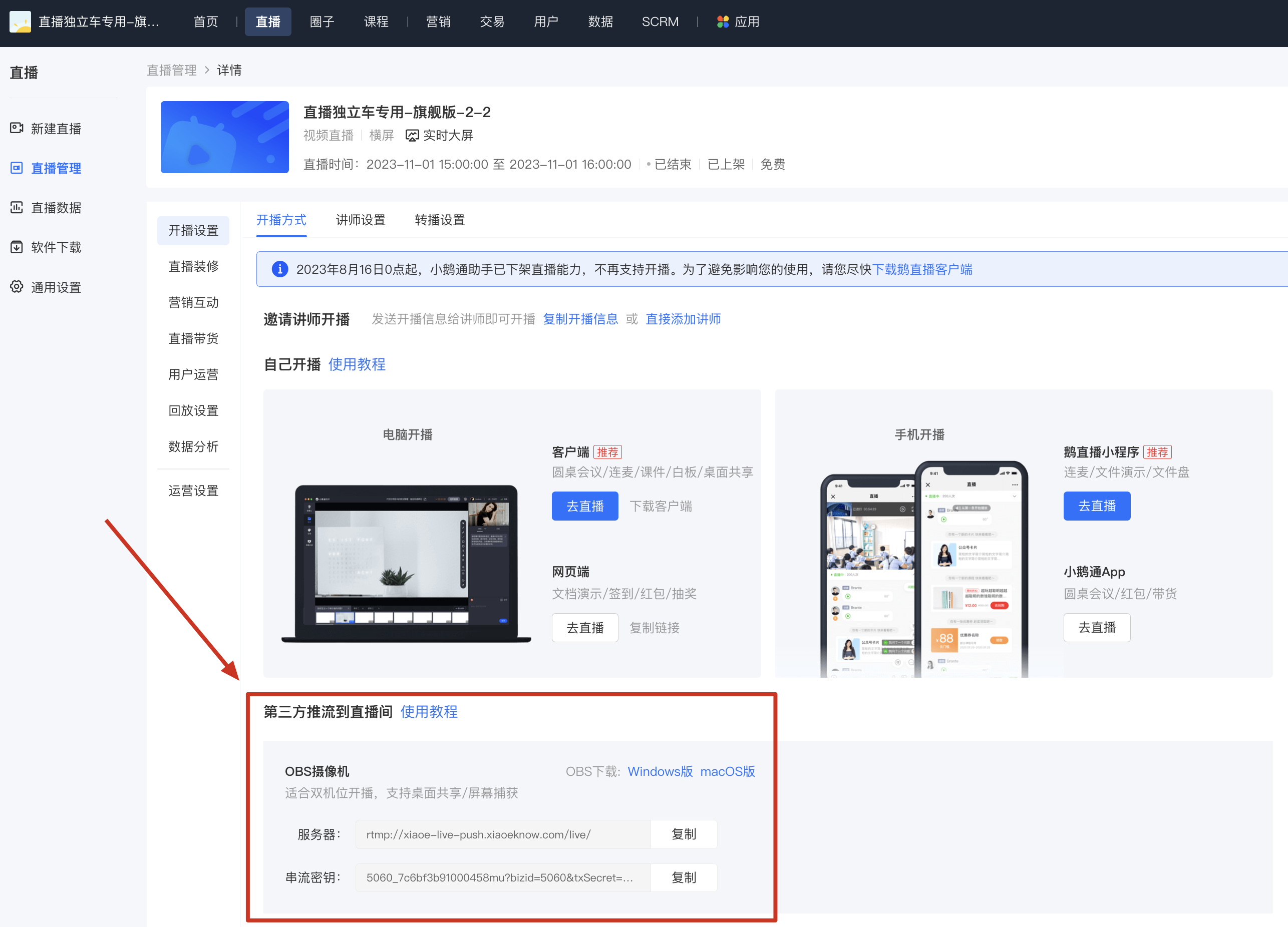
**<span style="font-size:15px;">Step 2: Copy the stream name and streaming key.</span>**

<span style="font-size:15px;">Note: The stream name and streaming key here need to comply with the requirements of the third - party platform for filling in the push - stream address. If there is only one line in the 'input box', the server URL and the streaming key need to be copied together.</span>

**<span style="font-size:15px;">Step 3: Push the stream to the third - party live - streaming room.</span>**

**<span style="font-size:15px;text-decoration:none;">(1) OBS Operation</span>**

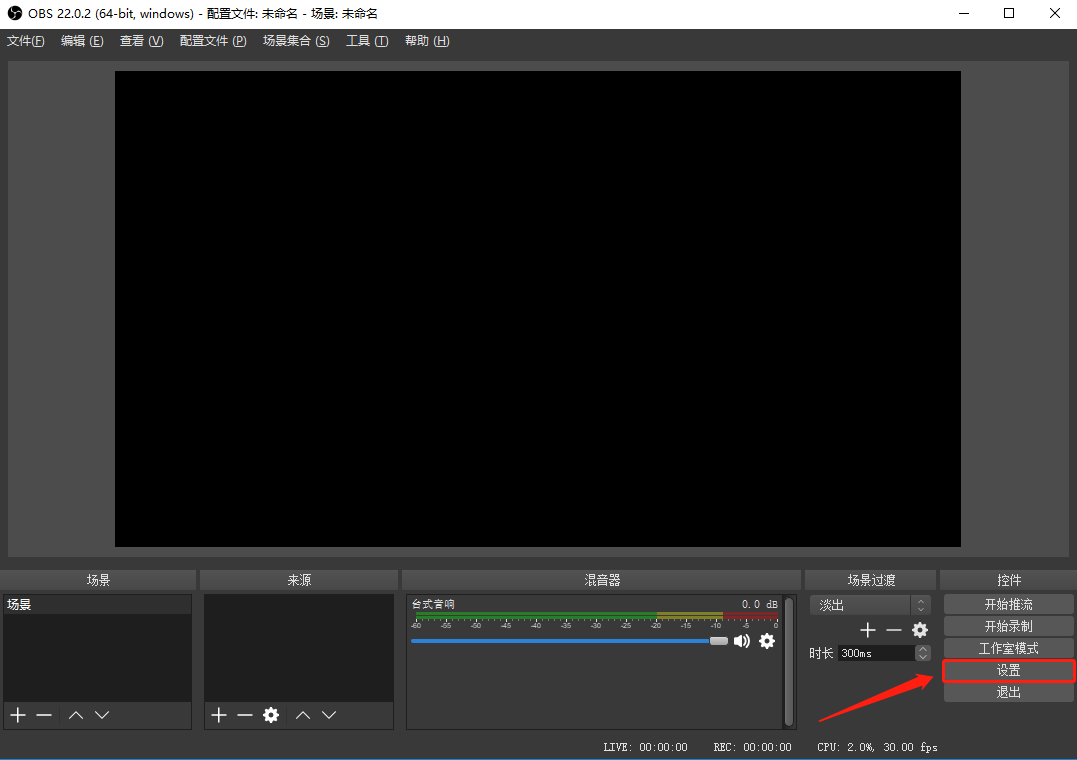
**<span style="font-size:15px;">1. Open the main interface of the OBS client and click \[Settings\].</span>**

<span style="font-size:15px;">![image (2).png](https://wechatapppro-1252524126.file.myqcloud.com/help_document/image/ueditor/55641400_1716456569.png ".png")</span>

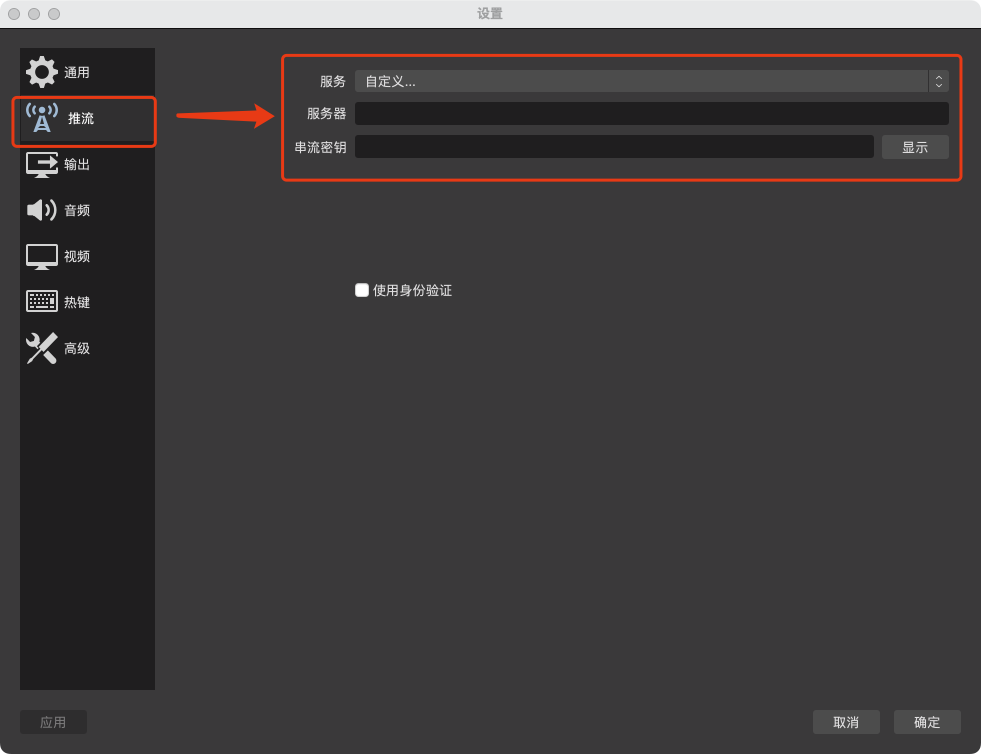
**<span style="font-size:15px;">2. Select 'Streaming' in the left - hand function bar and choose 'Custom streaming server' as the service type. Paste the server URL and streaming key copied from the elink management console into the corresponding positions in OBS respectively.</span>**

![image.png](https://wechatapppro-1252524126.file.myqcloud.com/help_document/image/ueditor/63745800_1716456569.png ".png")

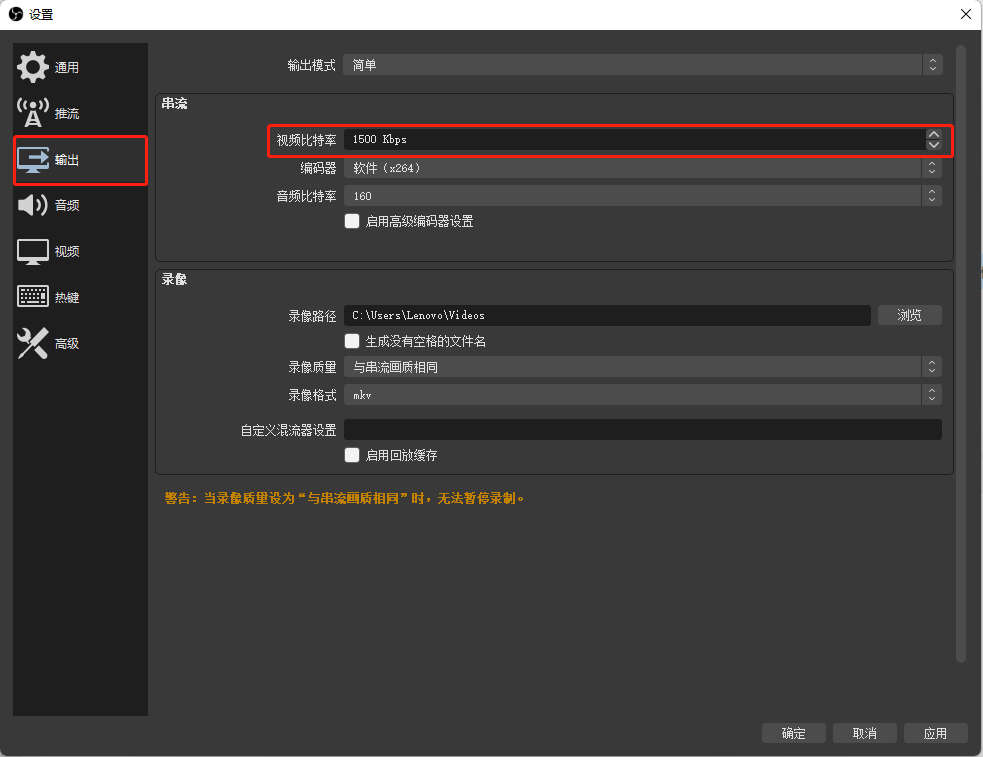
###### **<span style="font-size:15px;">3. Set the output bitrate (video bitrate). It is recommended to set it between 1000Kbps and 3200Kbps, which can be adjusted as needed:</span><span style="font-size:16px;background-size:initial;background-repeat:initial;background-attachment:initial;letter-spacing:0pt;vertical-align:baseline;"></span>**

<span class="image-wrapper" style="display:inline-block;overflow:hidden;width:601px;height:463px;"> ![mty4odg1mteymzk5mdk1oa_443820_8k6ohul6z3vx00oh_1670221880](https://wechatapppro-1252524126.file.myqcloud.com/help_document/image/ueditor/71238000_1716456569.cn/mty4odg1mteymzk5mdk1oa_443820_8k6ohul6z3vx00oh_1670221880)</span>

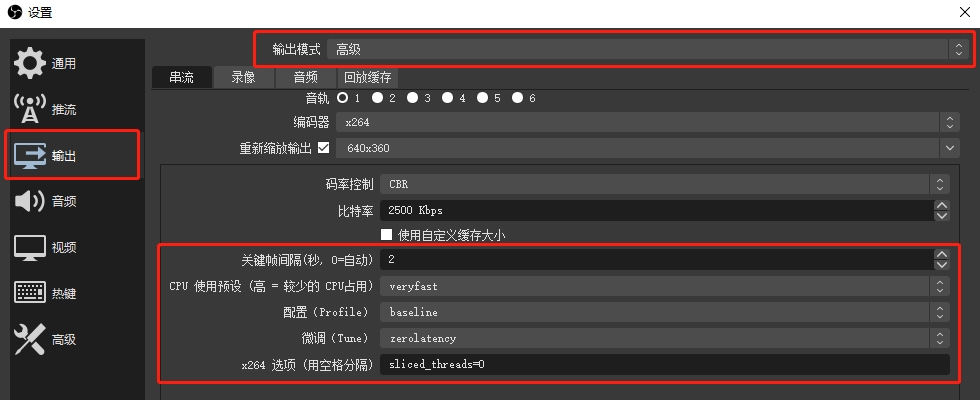
<span style="font-size:15px;">Generally, the standard live - streaming latency is about 15 seconds, and the ultra - low live - streaming latency is within 4 seconds.</span><span style="font-size:15px;text-decoration:underline;color:rgb(255,0,0);">**If there is abnormal latency in the OBS push - stream, it is recommended to modify the settings in the red - framed area to reduce the latency:**</span>

<span style="font-size:15px;">![image.png](https://wechatapppro-1252524126.file.myqcloud.com/help_document/image/ueditor/78461500_1716456569.png ".png")</span>

<span style="font-size:15px;">1. Key - frame interval: 2s  
2\. Profile configuration: baseline  
3\. CPU preset: veryfast  
4\. Fine - tune tune: zerolatency  
5\. It is recommended to use x264 as the encoder, and the x264 option: sliced\_threads = 0  
  
</span><span style="font-size:15px;color:rgb(255,0,0);text-decoration:underline;">**Note: If ultra - low latency is enabled for the live - streaming but the actual viewing latency is still 15 seconds, it is usually because the ultra - low latency viewing guarantee strategy is triggered. To ensure normal viewing for users, those who cannot play the low - latency live - streaming due to network or device issues will be automatically switched to the standard live - streaming mode.</span>

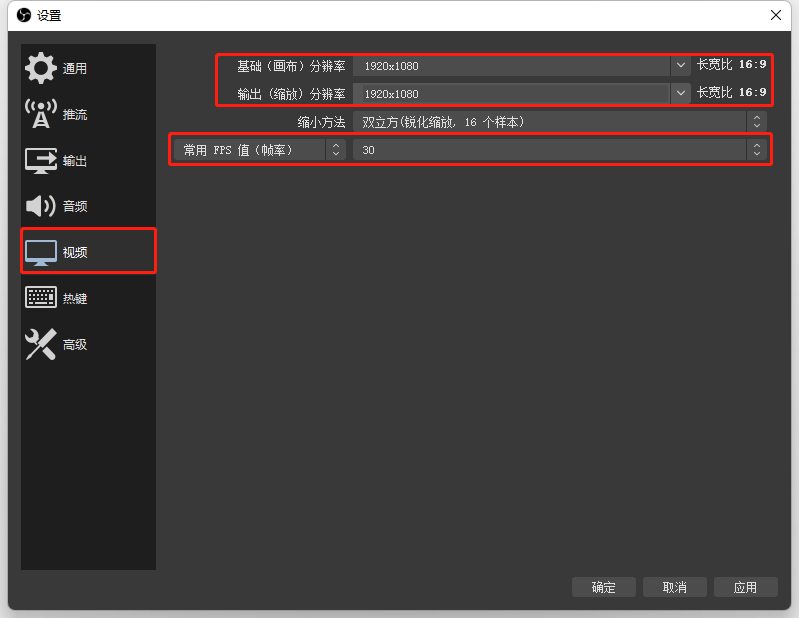
###### **<span style="font-size:15px;">4. Set the canvas resolution and the frame rate to 30.</span>**

###### <span style="font-size:15px;color:rgb(127,127,127);">Note: For horizontal - screen live - streaming, a resolution of 1920x1080 with an aspect ratio of 16:9 is recommended; for vertical - screen live - streaming, a resolution of 900x1600 with an aspect ratio of 9:16 is recommended.</span>

<span class="image-wrapper" style="display:inline-block;overflow:hidden;width:601px;height:465px;"> ![mty4odg1mteymzk5mdk1oa_874868_bhjrdcsowma3frhy_1669605287](https://wechatapppro-1252524126.file.myqcloud.com/help_document/image/ueditor/85531000_1716456569.cn/mty4odg1mteymzk5mdk1oa_874868_bhjrdcsowma3frhy_1669605287)</span>

**<span style="font-size:15px;">5. After adjusting the relevant settings, click 'OK'. After clicking 'Start streaming' on the OBS interface, the elink live - streaming room will synchronously display the footage.</span>**

<span style="font-size:15px;">Note: For other OBS tutorials, please refer to[<span style="font-size:15px;color:rgb(84,141,212);">《OBS Tutorial Collection》</span>](https://helpcenter.xiaoe-tech.com/#/problem/detail?document_id=doc_63f71e27300a4_EdJ2E)at the link</span>**<span style="font-size:15px;">:</span><span style="font-size:15px;">  
</span>**

<span style="font-size:15px;">**<span style="text-decoration:none;">  
</span>**</span>

<span style="font-size:15px;">**<span style="text-decoration:none;">  
</span>**</span>

<span style="font-size:15px;">**<span style="text-decoration:none;">(2) Kuaishou Live Companion</span>**</span>

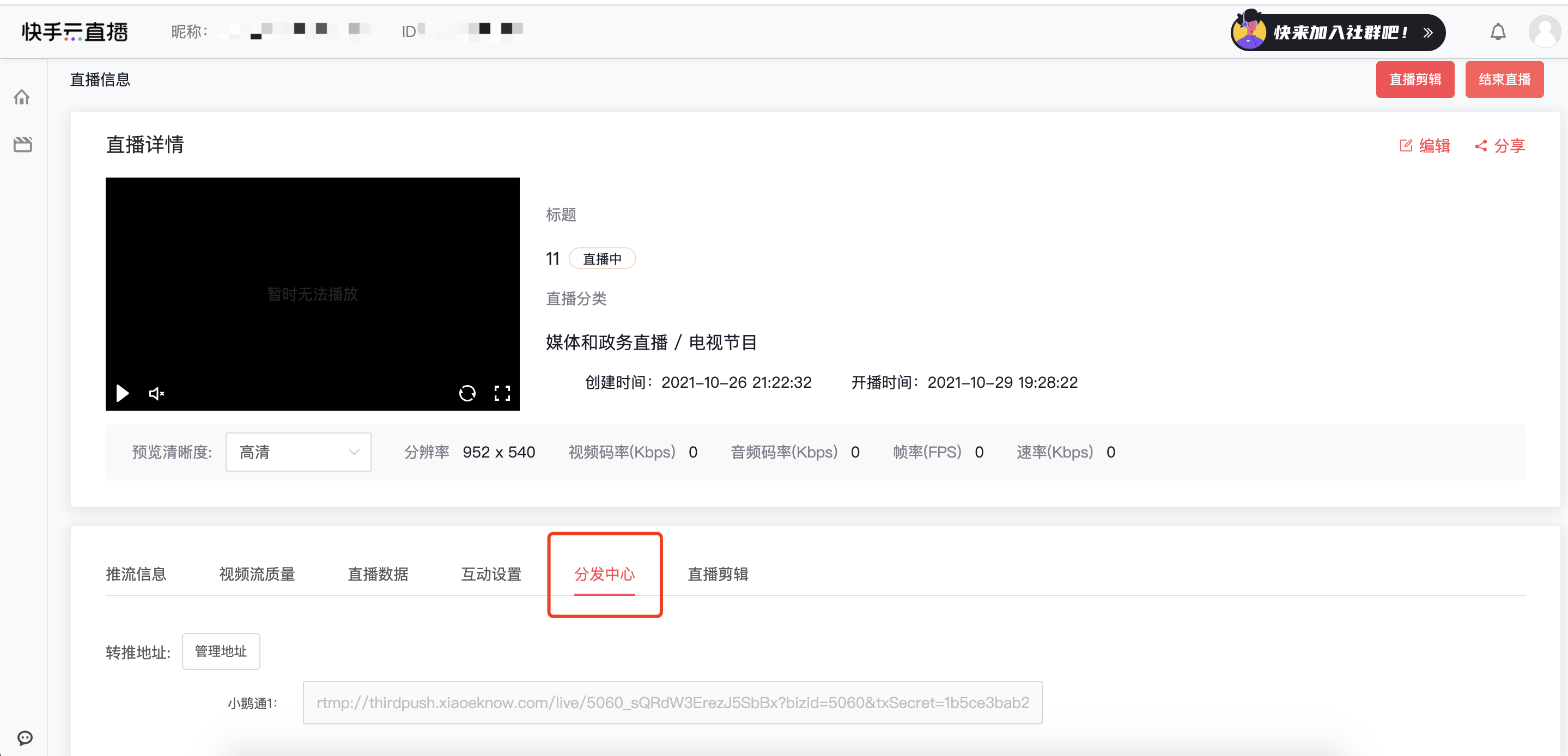
**<span style="font-size:15px;">1. Open the Kuaishou Cloud Live web - based backend. After creating a live - streaming session, find \[Distribution Center\] on the details page.</span>**

<span style="font-size:15px;">![image (5).png](https://wechatapppro-1252524126.file.myqcloud.com/help_document/image/ueditor/94188200_1716456569.png ".png")</span>

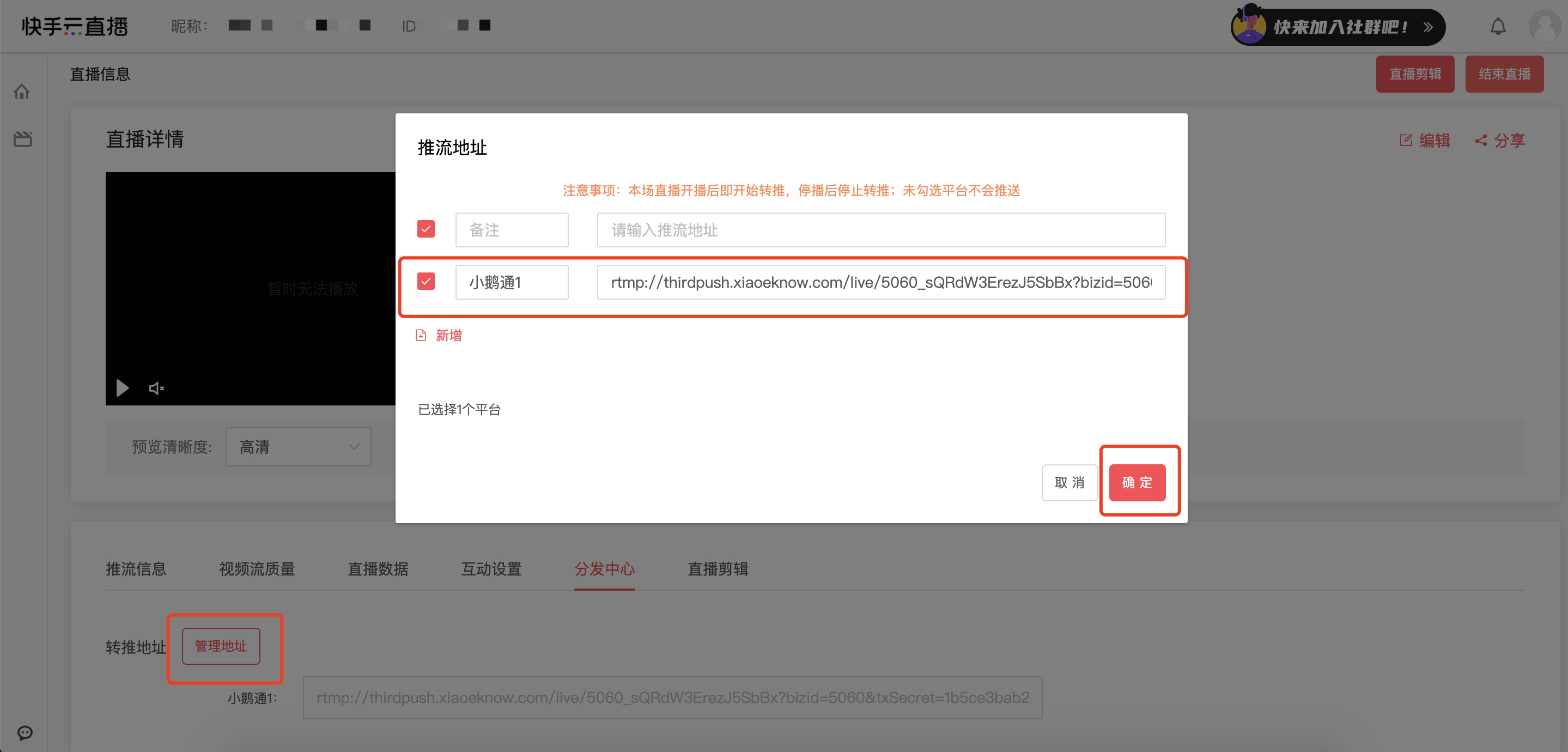
**<span style="font-size:15px;">2. Find the 'Manage address' button on the page. Combine and copy the server URL and streaming key copied from the elink management console into the push - stream address, and click the 'OK' button to save. After starting the push - stream, the elink live - streaming room will synchronously display the footage.</span>**

![image (6).png](https://wechatapppro-1252524126.file.myqcloud.com/help_document/image/ueditor/20605500_1716456570.png ".png")

<span style="font-size:15px;">Note: For Kuaishou Cloud Live push - streaming, the stream needs to be pushed/pulled from other platforms to the Kuaishou live - streaming room first, and then redirected to the elink live - streaming room through the Distribution Center.</span>

**VI. Notes**

<span style="font-size:15px;">1. When using the third - party push - stream method, there is no need to click 'Start live - streaming' on the elink assistant/GoLive client.</span>

<span style="font-size:15px;"><span style="color:rgb(53,53,53);font-family:PingFangSC, 'Microsoft Yahei', Helvetica, Tahoma, Arial, 'Hiragino Sans GB', 'Hiragino Sans GB W3', STXihei, STHeiti, Heiti, SimSun, sans-serif;background-color:rgb(255,255,255);">Currently, only<span style="color:rgb(53,53,53);font-family:PingFangSC, 'Microsoft Yahei', Helvetica, Tahoma, Arial, 'Hiragino Sans GB', 'Hiragino Sans GB W3', STXihei, STHeiti, Heiti, SimSun, sans-serif;font-size:15px;background-color:rgb(255,255,255);">simultaneously</span>supports the push - stream content from one terminal. When two or more devices push the stream simultaneously, only the content from the device that starts the live - streaming first will be displayed.</span></span>

<span style="font-size:15px;color:rgb(53,53,53);font-family:PingFangSC, 'Microsoft Yahei', Helvetica, Tahoma, Arial, 'Hiragino Sans GB', 'Hiragino Sans GB W3', STXihei, STHeiti, Heiti, SimSun, sans-serif;background-color:rgb(255,255,255);">  
</span>

**VII. Frequently Asked Questions**

<span style="font-size:11pt;">Q: The elink assistant cannot find the OBS camera option?</span>

<span style="font-size:11pt;">A: Please use the latest version of the OBS client and click 'Start virtual camera' to find it.</span>

<span style="font-size:12.75pt;">  
</span>

<span style="font-size:12.75pt;"></span>

<span style="font-size:11pt;">Q: How to monitor the quality of the OBS push - stream?</span>

<span>A:<span>[How to monitor the quality of the push - stream when using OBS for live - streaming?](https://helpcenter.xiaoe-tech.com/#/problem/detail?document_id=doc_638ee87753ca1_2rTTp "使用OBS直播时如何监测推流质量？")</span></span>

<span>Q: How to conduct vertical - screen PPT live - streaming?</span>

<span>A: The vertical - screen live - streaming mode can be combined with OBS to achieve vertical - screen PPT live - streaming.</span>[Usage tutorial for vertical - screen PPT live - streaming configuration](https://helpcenter.xiaoe-tech.com/#/problem/detail?document_id=doc_60053e5e75285_3sw3D "竖屏PPT直播配置使用教程")

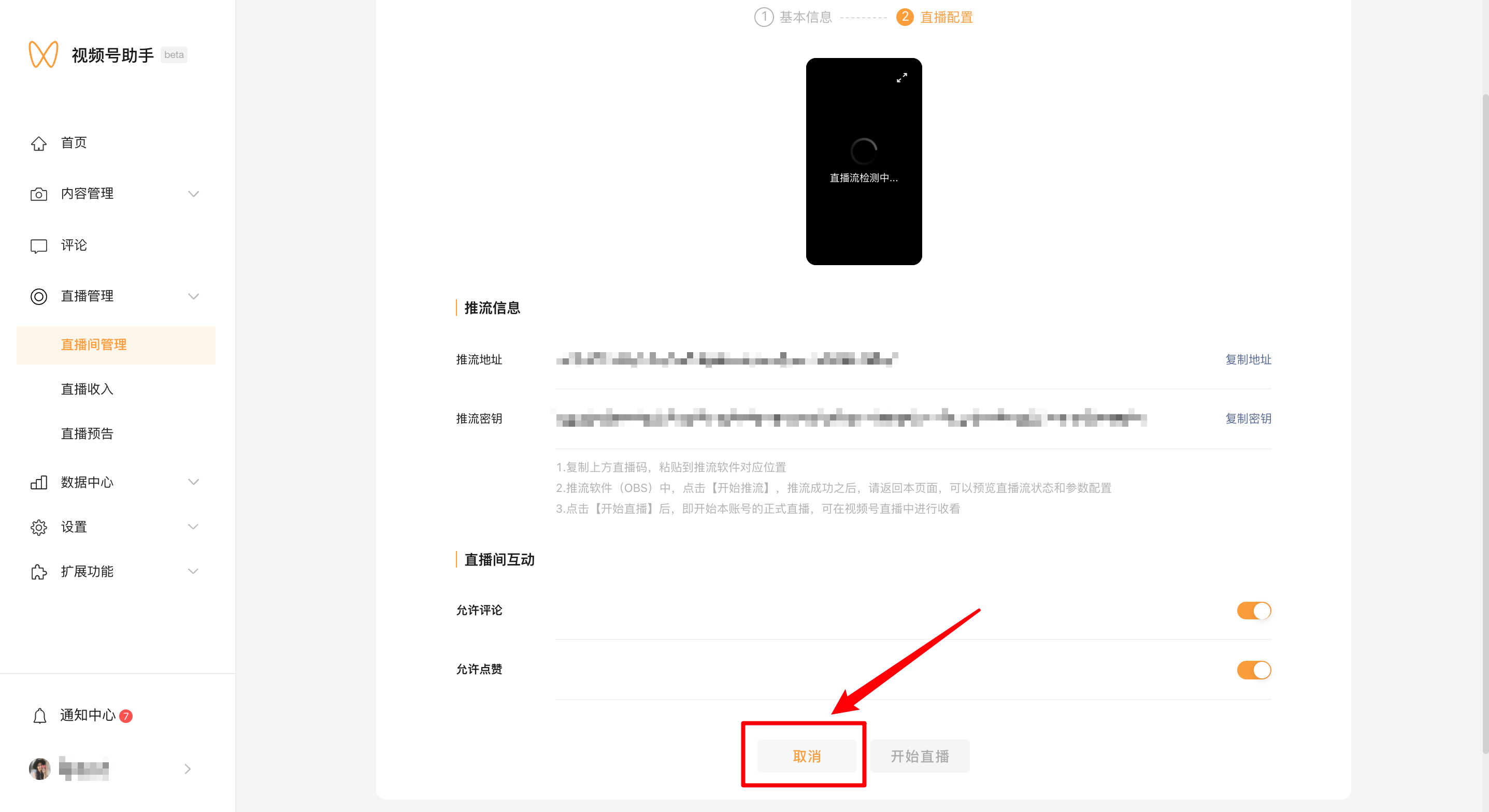
# What should I do if the live streaming push URL for Channels fails to work?

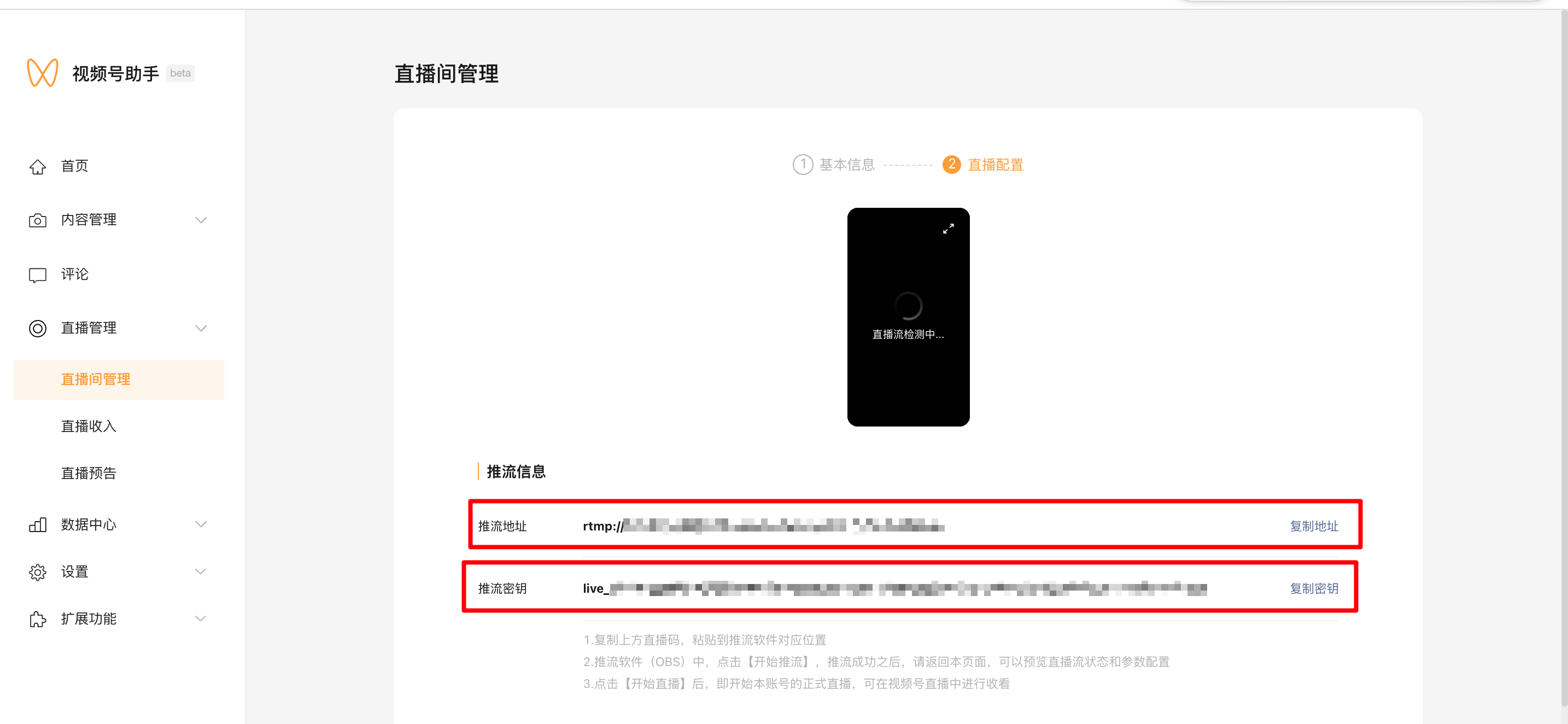
<div data-elink-language-switch="1" id="bkmrk-%E4%B8%AD%E6%96%87" style="border:1px solid #d6d9de;border-radius:6px;padding:10px 12px;margin:0 0 18px 0;background:#f8fafc;font-size:14px;">[中文](/books/091d5/page/7eabe)</div><span style="font-size:15px;">Merchants need to recreate a Channels live streaming room and obtain the streaming push address. The specific operations are as follows:</span>
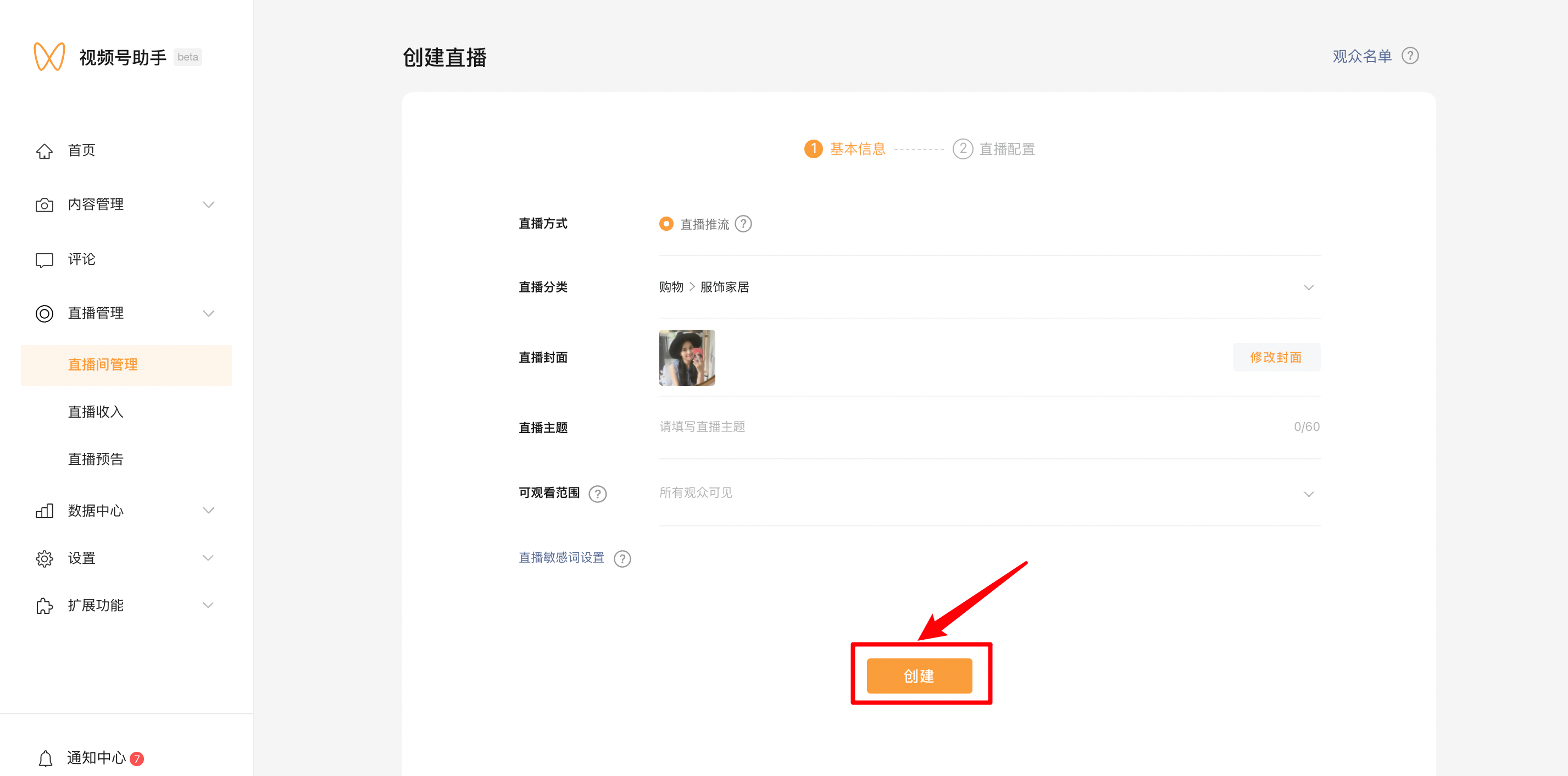
<span style="font-size:15px;">1. Cancel the current live streaming room.</span>

<span style="font-size:15px;">![00.png](https://wechatapppro-1252524126.file.myqcloud.com/help_document/image/ueditor/2740100_1699362235.png ".png")</span>

<span style="font-size:15px;">2. Recreate the live stream and obtain the streaming push address.</span>

![02.png](https://wechatapppro-1252524126.file.myqcloud.com/help_document/image/ueditor/39552000_1699362235.png ".png")

![03.png](https://wechatapppro-1252524126.file.myqcloud.com/help_document/image/ueditor/65474800_1699362235.png ".png")

<span style="font-size:15px;">3. Replace the streaming push address with the latest one.</span>

<span style="font-size:15px;">![image.png](https://wechatapppro-1252524126.file.myqcloud.com/help_document/image/ueditor/55932300_1699362235.png ".png")</span>

# What should I do if students can't watch the live rebroadcast on Channels?

<div data-elink-language-switch="1" id="bkmrk-%E4%B8%AD%E6%96%87" style="border:1px solid #d6d9de;border-radius:6px;padding:10px 12px;margin:0 0 18px 0;background:#f8fafc;font-size:14px;">[中文](/books/091d5/page/3def1)</div><span style="font-size:15px;">There are two solutions:</span>

<span style="font-size:15px;">1. Check if the student is included in the visibility scope of the Channels. If not, adjust the visibility scope.</span>

<span style="font-size:15px;">![01.png](https://wechatapppro-1252524126.file.myqcloud.com/help_document/image/ueditor/90878000_1643360899.png ".png")</span>

<span style="font-size:15px;">2. If live streaming cannot be pushed, recreate the Channels live streaming room and obtain the streaming push address ([Click to view the specific operations](https://admin.xiaoe-tech.com/helpCenter/problem?first_id=600&second_id=345&document_id=doc_61dffdadaa99c_E41EF)). </span>

# How to rebroadcast a live stream to Bilibili

<div data-elink-language-switch="1" id="bkmrk-%E4%B8%AD%E6%96%87" style="border:1px solid #d6d9de;border-radius:6px;padding:10px 12px;margin:0 0 18px 0;background:#f8fafc;font-size:14px;">[中文](/books/091d5/page/bilibili)</div><span style="font-size:16px;font-family:'Microsoft YaHei', '微软雅黑', Roboto, 'Microsoft YaHei', '微软雅黑', PingFang, 'PingFang SC', '苹方', '苹方-简', Roboto, 'system-ui', '-apple-system', BlinkMacSystemFont, 'Segoe UI', Roboto, 'Helvetica Neue', Helvetica, sans-serif, 'Apple Color Emoji', 'Segoe UI Emoji', 'Segoe UI Symbol', 'Noto Color emoji', 'Helvetica Neue', Helvetica, 'PingFang SC', 'Microsoft YaHei', 'Source Han Sans SC', 'Noto Sans CJK SC', 'WenQuanYi Micro Hei', sans-serif;color:rgb(53,53,53);background:rgb(255,255,255);letter-spacing:0px;vertical-align:baseline;">Merchants can use the rebroadcast function on elink to synchronize their live - streaming content to Bilibili, thereby increasing the content reuse rate and traffic reach rate.</span>

### <span style="font-size:24px;"><span style="font-family:'微软雅黑';">I. </span><span style="font-family:'Microsoft YaHei', '微软雅黑', Roboto, 'Microsoft YaHei', '微软雅黑', PingFang, 'PingFang SC', '苹方', '苹方-简', Roboto, 'system-ui', '-apple-system', BlinkMacSystemFont, 'Segoe UI', Roboto, 'Helvetica Neue', Helvetica, sans-serif, 'Apple Color Emoji', 'Segoe UI Emoji', 'Segoe UI Symbol', 'Noto Color emoji', 'Helvetica Neue', Helvetica, 'PingFang SC', 'Microsoft YaHei', 'Source Han Sans SC', 'Noto Sans CJK SC', 'WenQuanYi Micro Hei', sans-serif;color:rgb(26,26,26);letter-spacing:0px;vertical-align:baseline;">Step 1: Obtain the Bilibili streaming address</span></span>

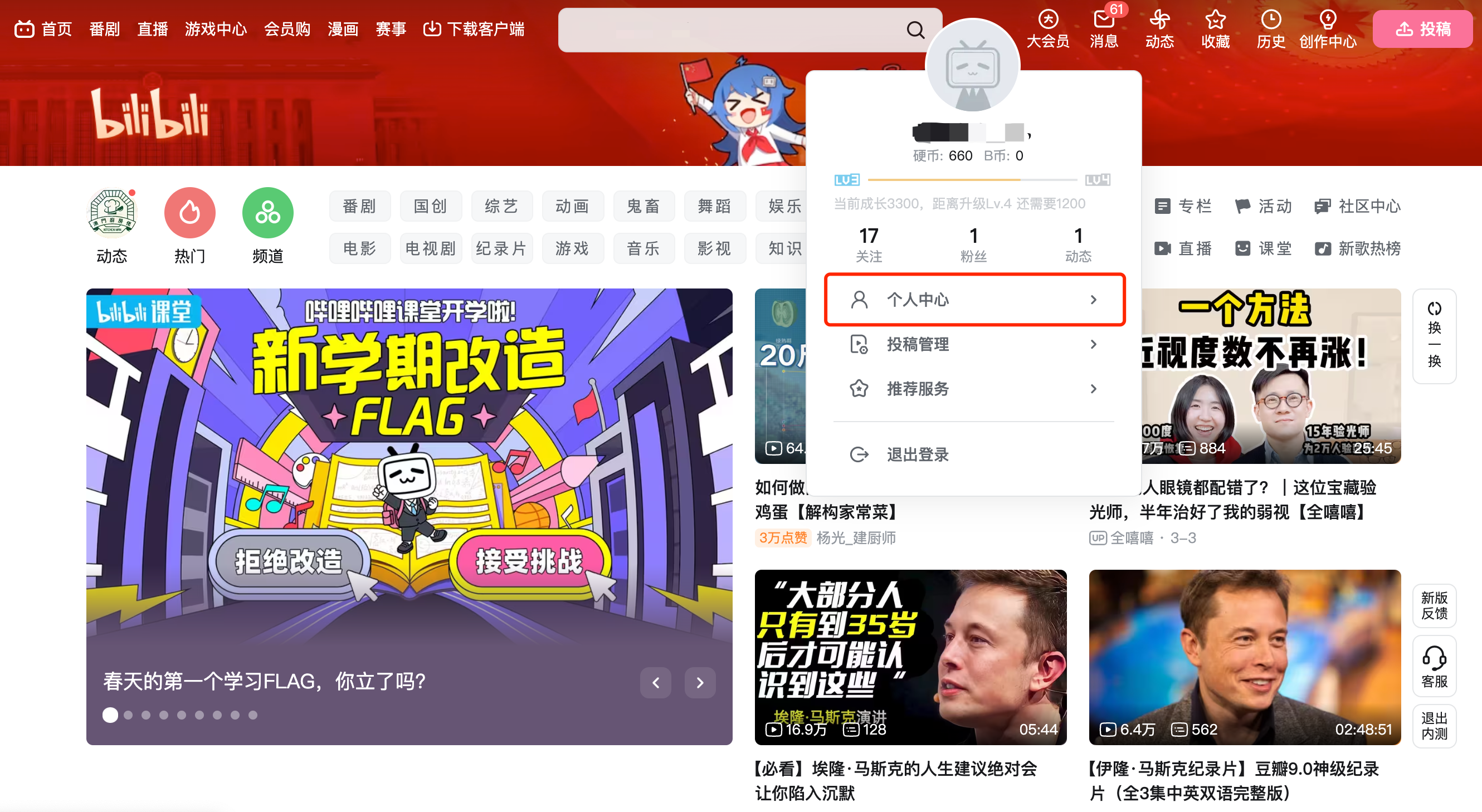
<span style="font-size:16px;"><span style="font-family:'微软雅黑';">1. </span><span style="font-family:'Microsoft Yahei', '微软雅黑', arial, '宋体', 'Helvetica Neue', Helvetica, 'PingFang SC', 'Microsoft YaHei', 'Source Han Sans SC', 'Noto Sans CJK SC', 'WenQuanYi Micro Hei', 'Microsoft YaHei', '微软雅黑', PingFang, 'PingFang SC', '苹方', '苹方-简', SimSun, 'Songti SC', '宋体', '宋体-简', 'SimSun_GB2312', '宋体_GB2312', PingFang, 'PingFang SC', '苹方', '苹方-简', 'Microsoft YaHei', '微软雅黑', 'system-ui', '-apple-system', BlinkMacSystemFont, 'Segoe UI', Roboto, 'Helvetica Neue', Helvetica, sans-serif, 'Apple Color Emoji', 'Segoe UI Emoji', 'Segoe UI Symbol', 'Noto Color emoji', 'Helvetica Neue', Helvetica, 'PingFang SC', 'Microsoft YaHei', 'Source Han Sans SC', 'Noto Sans CJK SC', 'WenQuanYi Micro Hei', sans-serif;color:rgb(51,51,51);background:rgb(255,255,255);letter-spacing:0px;vertical-align:baseline;">Log in to Bilibili</span></span>[<span style="font-family:'system-ui', '-apple-system', BlinkMacSystemFont, 'Segoe UI', Roboto, 'Helvetica Neue', Helvetica, sans-serif, 'Apple Color Emoji', 'Segoe UI Emoji', 'Segoe UI Symbol', 'Noto Color emoji', 'Helvetica Neue', Helvetica, 'PingFang SC', 'Microsoft YaHei', 'Source Han Sans SC', 'Noto Sans CJK SC', 'WenQuanYi Micro Hei', sans-serif;color:rgb(30,111,255);letter-spacing:0px;vertical-align:baseline;font-size:16px;">https://www.bilibili.com/</span>](https://www.bilibili.com/)<span style="font-family:'Microsoft Yahei', '微软雅黑', arial, '宋体', 'Helvetica Neue', Helvetica, 'PingFang SC', 'Microsoft YaHei', 'Source Han Sans SC', 'Noto Sans CJK SC', 'WenQuanYi Micro Hei', 'Microsoft YaHei', '微软雅黑', PingFang, 'PingFang SC', '苹方', '苹方-简', SimSun, 'Songti SC', '宋体', '宋体-简', 'SimSun_GB2312', '宋体_GB2312', PingFang, 'PingFang SC', '苹方', '苹方-简', 'Microsoft YaHei', '微软雅黑', 'system-ui', '-apple-system', BlinkMacSystemFont, 'Segoe UI', Roboto, 'Helvetica Neue', Helvetica, sans-serif, 'Apple Color Emoji', 'Segoe UI Emoji', 'Segoe UI Symbol', 'Noto Color emoji', 'Helvetica Neue', Helvetica, 'PingFang SC', 'Microsoft YaHei', 'Source Han Sans SC', 'Noto Sans CJK SC', 'WenQuanYi Micro Hei', sans-serif;color:rgb(51,51,51);background:rgb(255,255,255);letter-spacing:0px;vertical-align:baseline;font-size:16px;">Click on your avatar to enter your personal center</span>

<span style="display:inline-block;overflow:hidden;width:604.733px;height:331.467px;">![mty4odg1mdq5mzg4mtq5nw_873037_kwzso5ltk7yhjt8r_1678238879](https://wechatapppro-1252524126.file.myqcloud.com/help_document/image/ueditor/96599600_1699358776.cn/mty4odg1mdq5mzg4mtq5nw_873037_kwzso5ltk7yhjt8r_1678238879)</span>

<span style="display:inline-block;overflow:hidden;width:604.733px;height:624.453px;">![mty4odg1mdq5mzg4mtq5nw_209313_ajf-waovcudfq3ko_1678702209](https://wechatapppro-1252524126.file.myqcloud.com/help_document/image/ueditor/37991000_1699358777.cn/mty4odg1mdq5mzg4mtq5nw_209313_ajf-waovcudfq3ko_1678702209)</span>

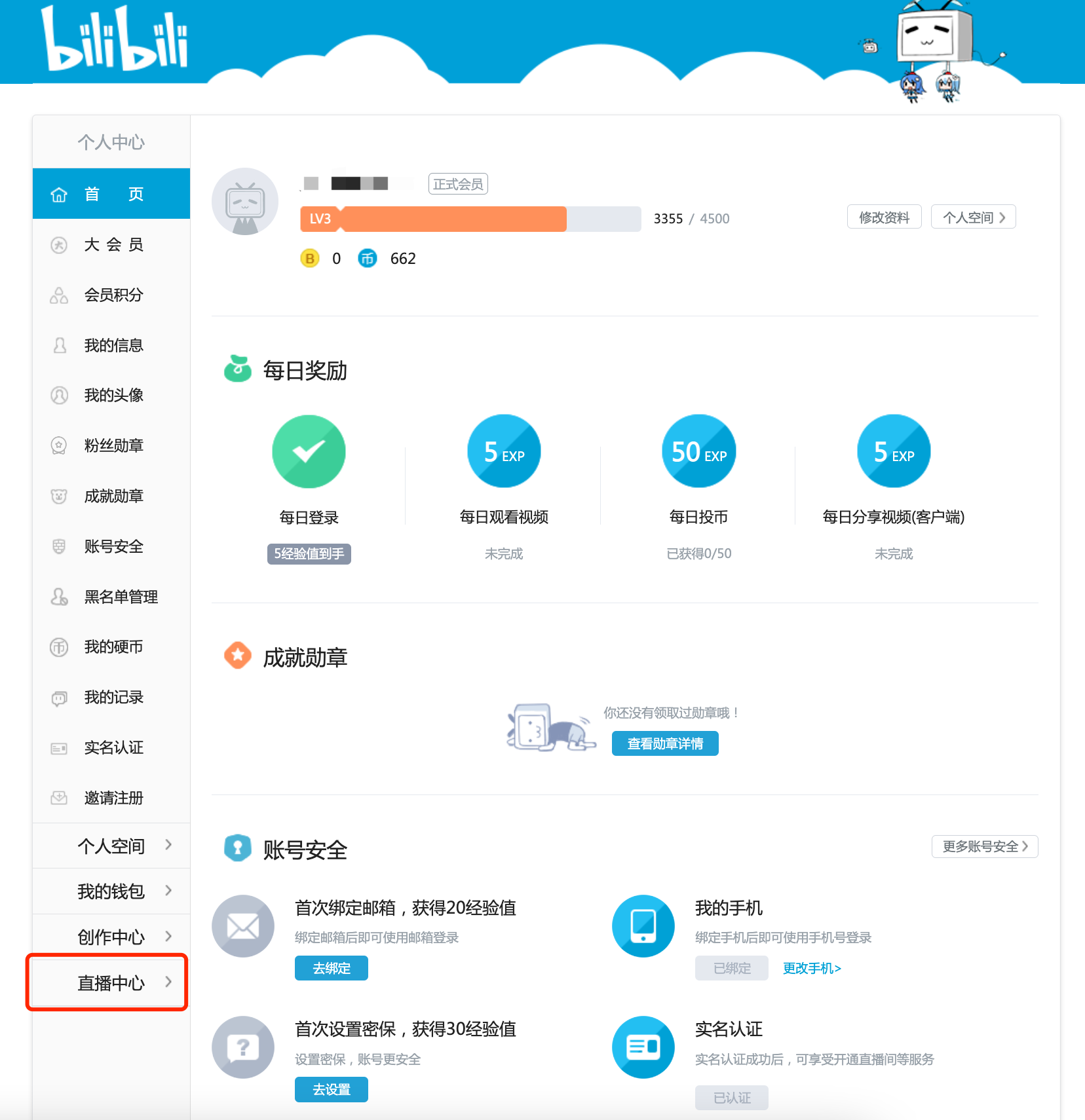
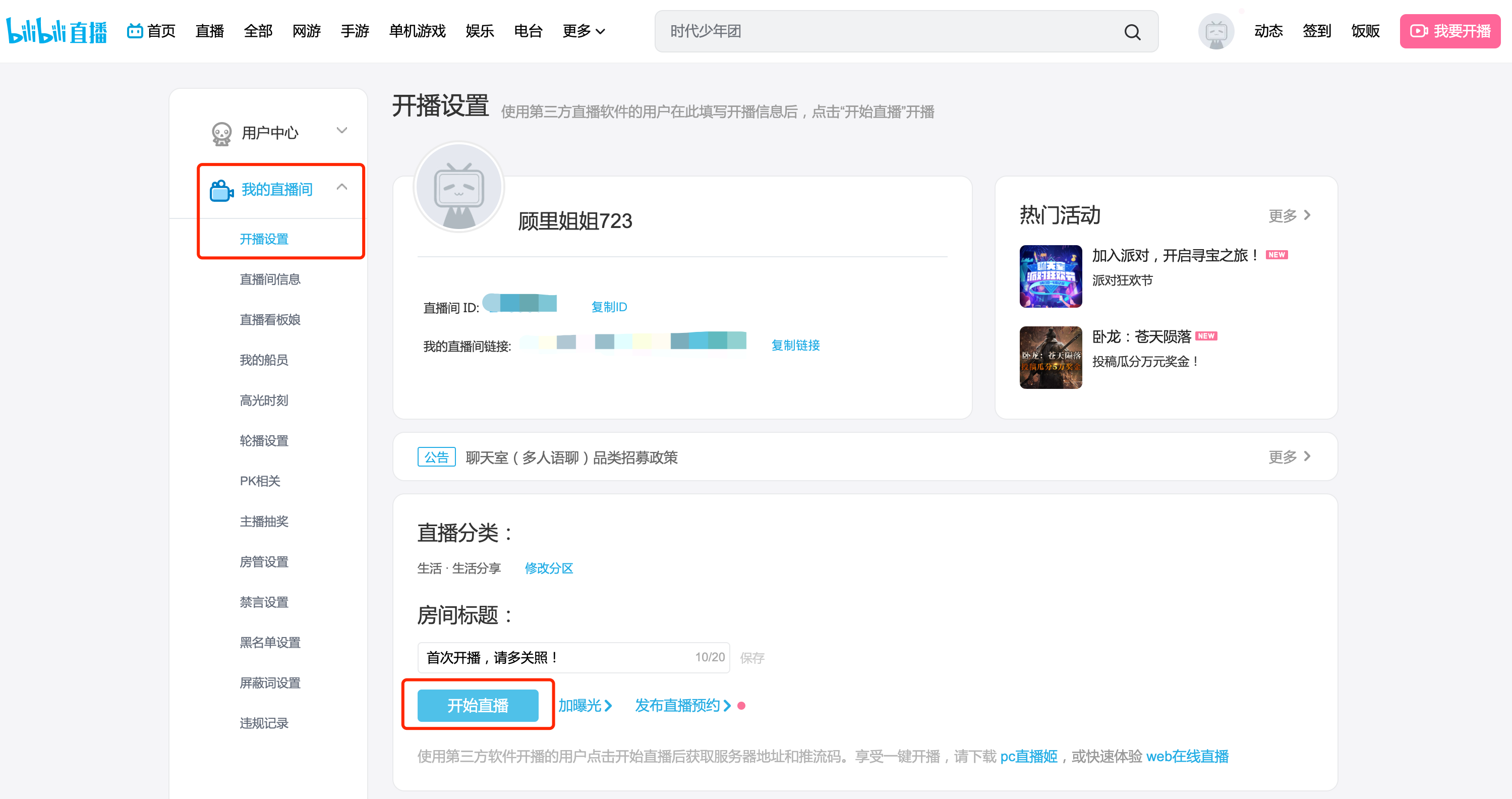
<span style="font-size:16px;"><span style="font-family:'微软雅黑';">2. </span><span style="font-family:PingFangSC, 'Microsoft Yahei', Helvetica, Tahoma, Arial, 'Hiragino Sans GB', 'Hiragino Sans GB W3', STXihei, STHeiti, Heiti, SimSun, 'Hiragino Sans GB', '冬青黑简体中文', PingFang, 'PingFang SC', '苹方', '苹方-简', 'Microsoft YaHei', '微软雅黑', STHeiti, '华文黑体', PingFang, 'PingFang SC', '苹方', '苹方-简', 'Microsoft YaHei', '微软雅黑', SimSun, 'Songti SC', '宋体', '宋体-简', 'SimSun_GB2312', '宋体_GB2312', 'system-ui', '-apple-system', BlinkMacSystemFont, 'Segoe UI', Roboto, 'Helvetica Neue', Helvetica, sans-serif, 'Apple Color Emoji', 'Segoe UI Emoji', 'Segoe UI Symbol', 'Noto Color emoji', 'Helvetica Neue', Helvetica, 'PingFang SC', 'Microsoft YaHei', 'Source Han Sans SC', 'Noto Sans CJK SC', 'WenQuanYi Micro Hei', sans-serif;color:rgb(53,53,53);background:rgb(255,255,255);letter-spacing:0px;vertical-align:baseline;">Click \[My Live Room - Live Streaming Settings\] on the left - hand navigation menu to enter your live - streaming room</span></span>

<span style="display:inline-block;overflow:hidden;width:604.733px;height:319.512px;">![mty4odg1mdq5mzg4mtq5nw_421742_aqdlhvshzztkvfx5_1678702290](https://wechatapppro-1252524126.file.myqcloud.com/help_document/image/ueditor/63987100_1699358777.cn/mty4odg1mdq5mzg4mtq5nw_421742_aqdlhvshzztkvfx5_1678702290)</span>

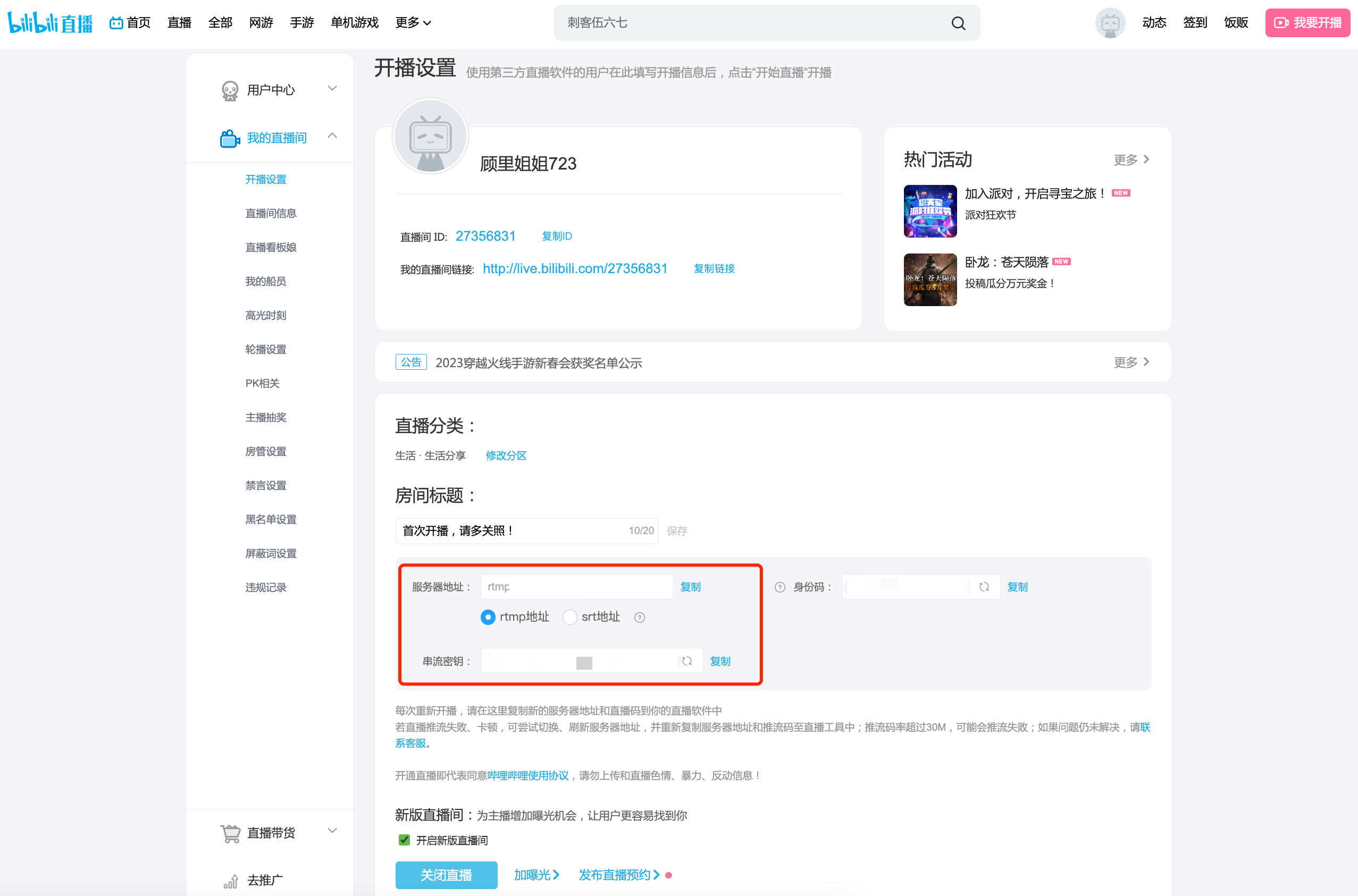
<span style="font-size:16px;"><span style="font-family:'微软雅黑';">3. </span><span style="font-family:PingFangSC, 'Microsoft Yahei', Helvetica, Tahoma, Arial, 'Hiragino Sans GB', 'Hiragino Sans GB W3', STXihei, STHeiti, Heiti, SimSun, 'Hiragino Sans GB', '冬青黑简体中文', PingFang, 'PingFang SC', '苹方', '苹方-简', 'Microsoft YaHei', '微软雅黑', STHeiti, '华文黑体', PingFang, 'PingFang SC', '苹方', '苹方-简', 'Microsoft YaHei', '微软雅黑', SimSun, 'Songti SC', '宋体', '宋体-简', 'SimSun_GB2312', '宋体_GB2312', 'system-ui', '-apple-system', BlinkMacSystemFont, 'Segoe UI', Roboto, 'Helvetica Neue', Helvetica, sans-serif, 'Apple Color Emoji', 'Segoe UI Emoji', 'Segoe UI Symbol', 'Noto Color emoji', 'Helvetica Neue', Helvetica, 'PingFang SC', 'Microsoft YaHei', 'Source Han Sans SC', 'Noto Sans CJK SC', 'WenQuanYi Micro Hei', sans-serif;color:rgb(53,53,53);background:rgb(255,255,255);letter-spacing:0px;vertical-align:baseline;">Set the title and category of the live - streaming room. After clicking the 'Start Live Streaming' button, copy the streaming address and key.</span></span>

<span style="display:inline-block;overflow:hidden;width:604.733px;height:399.209px;">![mty4odg1mdq5mzg4mtq5nw_162609_ppdsvzvb-ab5uoz9_1678778318](https://wechatapppro-1252524126.file.myqcloud.com/help_document/image/ueditor/40992200_1699358778.cn/mty4odg1mdq5mzg4mtq5nw_162609_ppdsvzvb-ab5uoz9_1678778318)</span>

### <span style="font-size:16px;"><span style="font-family:'微软雅黑';"> </span><span style="color:rgb(247,150,70);font-size:16px;">\*Note: If<span style="color:rgb(247,150,70);font-family:'system-ui', '-apple-system', BlinkMacSystemFont, 'Segoe UI', Roboto, 'Helvetica Neue', Helvetica, sans-serif, 'Apple Color Emoji', 'Segoe UI Emoji', 'Segoe UI Symbol', 'Noto Color emoji', 'Helvetica Neue', Helvetica, 'PingFang SC', 'Microsoft YaHei', 'Source Han Sans SC', 'Noto Sans CJK SC', 'WenQuanYi Micro Hei', sans-serif;letter-spacing:0px;vertical-align:baseline;">the streaming address starts with the format 'rtmp://txy......', it is an invalid streaming address. Please check if the VPN on your computer is enabled. If it is enabled, please turn it off and then re - obtain the streaming address.<span style="color:rgb(247,150,70);font-family:'system-ui', '-apple-system', 'system-ui', 'Segoe UI', Roboto, 'Helvetica Neue', Helvetica, sans-serif, 'Apple Color Emoji', 'Segoe UI Emoji', 'Segoe UI Symbol', 'Noto Color emoji', 'Helvetica Neue', Helvetica, 'PingFang SC', 'Microsoft YaHei', 'Source Han Sans SC', 'Noto Sans CJK SC', 'WenQuanYi Micro Hei', sans-serif;text-indent:-22.4px;">If it is not enabled, please try switching the hotspot, browser, or device. If the format of the streaming address remains unchanged after the attempt, please consult Bilibili's official customer service.</span></span></span></span>

### <span style="font-size:24px;"><span style="font-family:'微软雅黑';">II. </span><span style="font-family:'Microsoft YaHei', '微软雅黑', Roboto, 'Microsoft YaHei', '微软雅黑', PingFang, 'PingFang SC', '苹方', '苹方-简', Roboto, 'system-ui', '-apple-system', BlinkMacSystemFont, 'Segoe UI', Roboto, 'Helvetica Neue', Helvetica, sans-serif, 'Apple Color Emoji', 'Segoe UI Emoji', 'Segoe UI Symbol', 'Noto Color emoji', 'Helvetica Neue', Helvetica, 'PingFang SC', 'Microsoft YaHei', 'Source Han Sans SC', 'Noto Sans CJK SC', 'WenQuanYi Micro Hei', sans-serif;color:rgb(26,26,26);letter-spacing:0px;vertical-align:baseline;">Step 2: Fill in the elink management background</span></span>

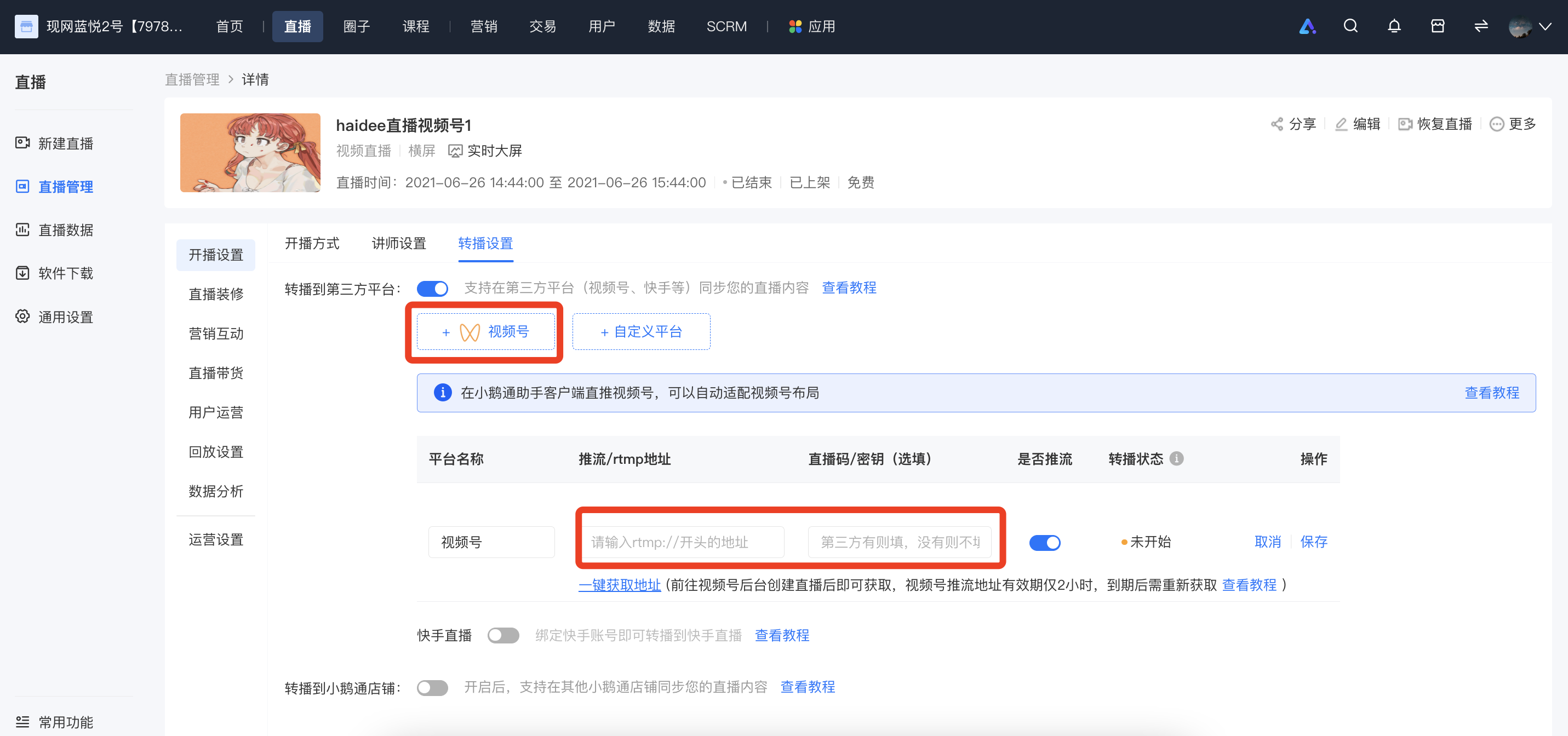
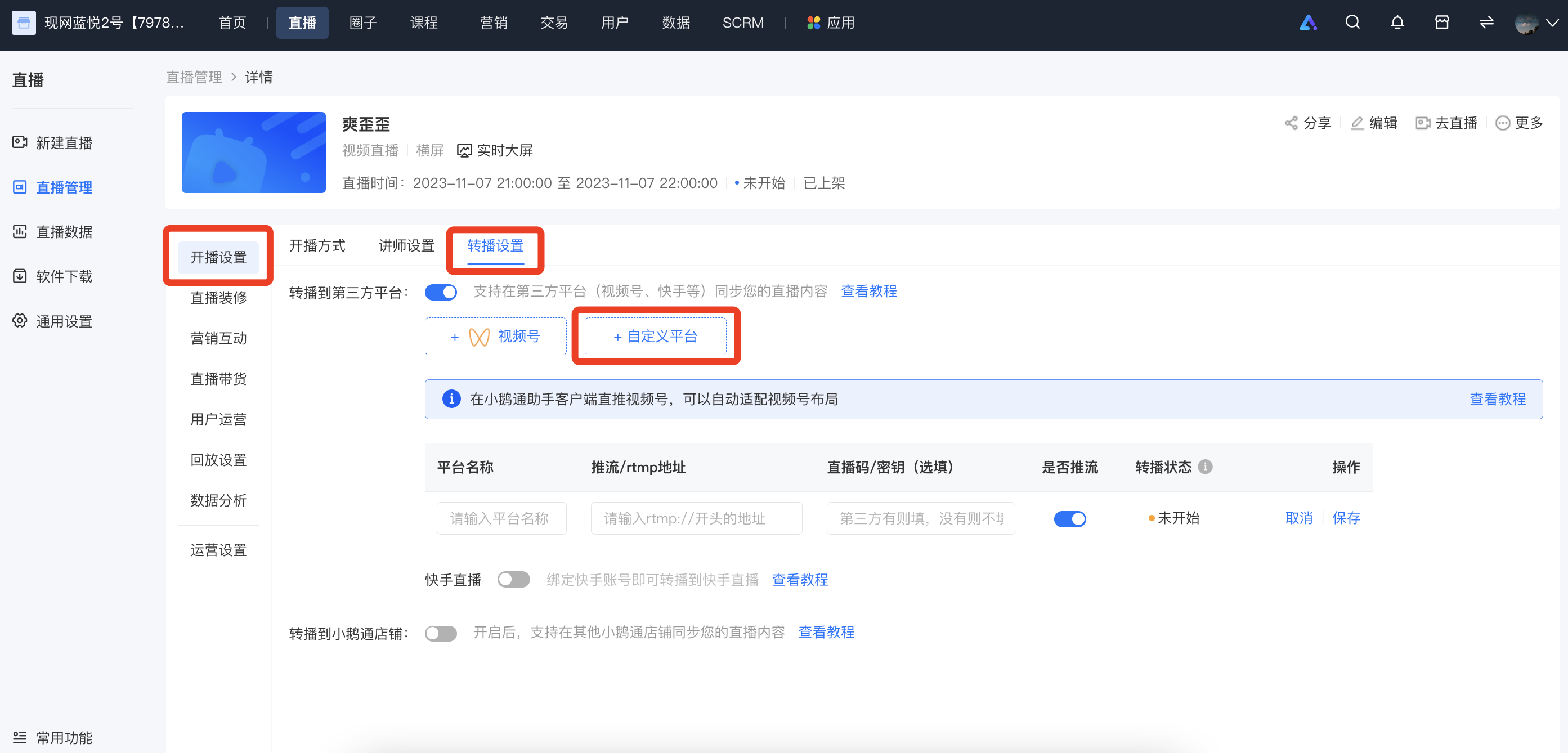
<span style="font-family:'Microsoft YaHei', '微软雅黑', Roboto, 'Microsoft YaHei', '微软雅黑', PingFang, 'PingFang SC', '苹方', '苹方-简', Roboto, 'system-ui', '-apple-system', BlinkMacSystemFont, 'Segoe UI', Roboto, 'Helvetica Neue', Helvetica, sans-serif, 'Apple Color Emoji', 'Segoe UI Emoji', 'Segoe UI Symbol', 'Noto Color emoji', 'Helvetica Neue', Helvetica, 'PingFang SC', 'Microsoft YaHei', 'Source Han Sans SC', 'Noto Sans CJK SC', 'WenQuanYi Micro Hei', sans-serif;color:rgb(51,51,51);letter-spacing:0px;vertical-align:baseline;font-size:16px;">Log in to the elink management background, select the live - streaming room you want to rebroadcast, enter \[Details Page - Live Streaming Settings - Rebroadcast Settings - Rebroadcast to Third - Party Platform - Custom Platform\], fill in the name of the rebroadcast platform, the streaming address, and the key, and then click 'Save'.</span>

<span style="display:inline-block;overflow:hidden;width:604.733px;height:270.09px;">![image.png](https://wechatapppro-1252524126.file.myqcloud.com/help_document/image/ueditor/44702000_1699358776.png ".png")</span>

### <span style="font-size:24px;"><span style="font-family:'微软雅黑';">III. </span><span style="font-family:'Microsoft YaHei', '微软雅黑', Roboto, 'Microsoft YaHei', '微软雅黑', PingFang, 'PingFang SC', '苹方', '苹方-简', Roboto, 'system-ui', '-apple-system', BlinkMacSystemFont, 'Segoe UI', Roboto, 'Helvetica Neue', Helvetica, sans-serif, 'Apple Color Emoji', 'Segoe UI Emoji', 'Segoe UI Symbol', 'Noto Color emoji', 'Helvetica Neue', Helvetica, 'PingFang SC', 'Microsoft YaHei', 'Source Han Sans SC', 'Noto Sans CJK SC', 'WenQuanYi Micro Hei', sans-serif;color:rgb(26,26,26);letter-spacing:0px;vertical-align:baseline;">Step 3: Start live streaming</span></span>

<span style="font-size:24px;"><span style="font-family:'Microsoft YaHei', '微软雅黑', Roboto, 'Microsoft YaHei', '微软雅黑', PingFang, 'PingFang SC', '苹方', '苹方-简', Roboto, 'system-ui', '-apple-system', BlinkMacSystemFont, 'Segoe UI', Roboto, 'Helvetica Neue', Helvetica, sans-serif, 'Apple Color Emoji', 'Segoe UI Emoji', 'Segoe UI Symbol', 'Noto Color emoji', 'Helvetica Neue', Helvetica, 'PingFang SC', 'Microsoft YaHei', 'Source Han Sans SC', 'Noto Sans CJK SC', 'WenQuanYi Micro Hei', sans-serif;color:rgb(26,26,26);letter-spacing:0px;vertical-align:baseline;"></span></span>

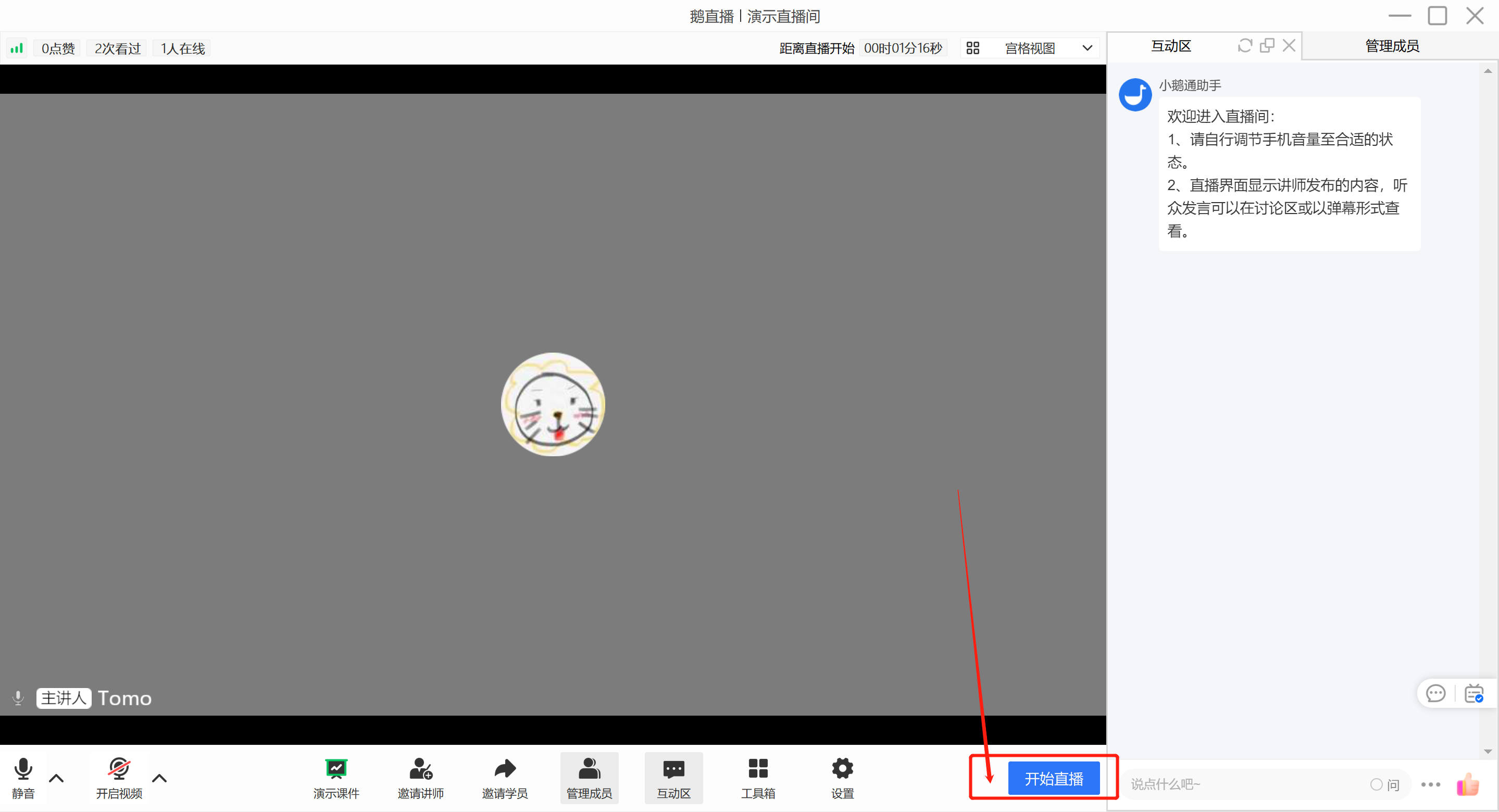
<span style="font-size:15px;font-family:'system-ui', '-apple-system', BlinkMacSystemFont, 'Segoe UI', Roboto, 'Helvetica Neue', Helvetica, sans-serif, 'Apple Color Emoji', 'Segoe UI Emoji', 'Segoe UI Symbol', 'Noto Color emoji', 'Helvetica Neue', Helvetica, 'PingFang SC', 'Microsoft YaHei', 'Source Han Sans SC', 'Noto Sans CJK SC', 'WenQuanYi Micro Hei', sans-serif;color:rgb(51,51,51);letter-spacing:0px;vertical-align:baseline;">Go to the eLive client or the elink live - streaming terminal to start live streaming. Different live - streaming modes are applicable to different live - streaming terminals:</span>

<span style="font-size:15px;font-family:'system-ui', '-apple-system', BlinkMacSystemFont, 'Segoe UI', Roboto, 'Helvetica Neue', Helvetica, sans-serif, 'Apple Color Emoji', 'Segoe UI Emoji', 'Segoe UI Symbol', 'Noto Color emoji', 'Helvetica Neue', Helvetica, 'PingFang SC', 'Microsoft YaHei', 'Source Han Sans SC', 'Noto Sans CJK SC', 'WenQuanYi Micro Hei', sans-serif;color:rgb(51,51,51);letter-spacing:0px;vertical-align:baseline;">- Landscape live streaming: Computer (<span>eLive client,</span>elink Assistant client, web version), Mobile phone (eLive Mini Program)</span>

<span style="font-size:15px;font-family:'system-ui', '-apple-system', BlinkMacSystemFont, 'Segoe UI', Roboto, 'Helvetica Neue', Helvetica, sans-serif, 'Apple Color Emoji', 'Segoe UI Emoji', 'Segoe UI Symbol', 'Noto Color emoji', 'Helvetica Neue', Helvetica, 'PingFang SC', 'Microsoft YaHei', 'Source Han Sans SC', 'Noto Sans CJK SC', 'WenQuanYi Micro Hei', sans-serif;color:rgb(51,51,51);letter-spacing:0px;vertical-align:baseline;">- Portrait live streaming: Mobile phone (eLive Mini Program)</span>

<span style="font-size:15px;font-family:'system-ui', '-apple-system', BlinkMacSystemFont, 'Segoe UI', Roboto, 'Helvetica Neue', Helvetica, sans-serif, 'Apple Color Emoji', 'Segoe UI Emoji', 'Segoe UI Symbol', 'Noto Color emoji', 'Helvetica Neue', Helvetica, 'PingFang SC', 'Microsoft YaHei', 'Source Han Sans SC', 'Noto Sans CJK SC', 'WenQuanYi Micro Hei', sans-serif;color:rgb(51,51,51);letter-spacing:0px;vertical-align:baseline;">- Recorded live streaming: Computer (web version), Mobile phone (H5)</span>

<span style="display:inline-block;overflow:hidden;width:604.733px;height:353.969px;">![image.png](https://wechatapppro-1252524126.file.myqcloud.com/help_document/image/ueditor/68709800_1699358778.png ".png")</span>

<span style="display:inline-block;overflow:hidden;width:604.733px;height:353.969px;">![mty4odg1mdq5mzg4mtq5nw_274548_xfgengnvd2vscykn_1677749946](https://wechatapppro-1252524126.file.myqcloud.com/help_document/image/ueditor/21562600_1699358779.cn/mty4odg1mdq5mzg4mtq5nw_274548_xfgengnvd2vscykn_1677749946)</span>

### <span style="font-size:24px;"><span style="font-family:'微软雅黑';">IV. </span><span style="font-family:'Microsoft YaHei', '微软雅黑', Roboto, 'Microsoft YaHei', '微软雅黑', PingFang, 'PingFang SC', '苹方', '苹方-简', Roboto, 'system-ui', '-apple-system', BlinkMacSystemFont, 'Segoe UI', Roboto, 'Helvetica Neue', Helvetica, sans-serif, 'Apple Color Emoji', 'Segoe UI Emoji', 'Segoe UI Symbol', 'Noto Color emoji', 'Helvetica Neue', Helvetica, 'PingFang SC', 'Microsoft YaHei', 'Source Han Sans SC', 'Noto Sans CJK SC', 'WenQuanYi Micro Hei', sans-serif;color:rgb(26,26,26);letter-spacing:0px;vertical-align:baseline;">Frequently Asked Questions</span></span>

### <span style="font-size:18px;">1. After starting the live stream<span style="font-family:'system-ui', '-apple-system', BlinkMacSystemFont, 'Segoe UI', Roboto, 'Helvetica Neue', Helvetica, sans-serif, 'Apple Color Emoji', 'Segoe UI Emoji', 'Segoe UI Symbol', 'Noto Color emoji', 'Helvetica Neue', Helvetica, 'PingFang SC', 'Microsoft YaHei', 'Source Han Sans SC', 'Noto Sans CJK SC', 'WenQuanYi Micro Hei', sans-serif;color:rgb(26,26,26);letter-spacing:0px;vertical-align:baseline;">Why can't I see the picture on Bilibili?</span></span>

<span style="font-size:16px;"><span style="font-family:'微软雅黑';">1) </span><span style="font-family:'system-ui', '-apple-system', BlinkMacSystemFont, 'Segoe UI', Roboto, 'Helvetica Neue', Helvetica, sans-serif, 'Apple Color Emoji', 'Segoe UI Emoji', 'Segoe UI Symbol', 'Noto Color emoji', 'Helvetica Neue', Helvetica, 'PingFang SC', 'Microsoft YaHei', 'Source Han Sans SC', 'Noto Sans CJK SC', 'WenQuanYi Micro Hei', sans-serif;letter-spacing:0px;vertical-align:baseline;">Check if the streaming address and key have expired. If they have expired, you need to go to Bilibili to re - obtain them and then fill them in the elink management background.</span></span>

<span style="font-size:16px;"><span style="font-size:16px;font-family:'微软雅黑';">2) </span><span style="font-size:13px;font-family:'Microsoft YaHei', '微软雅黑', Roboto, 'Microsoft YaHei', '微软雅黑', PingFang, 'PingFang SC', '苹方', '苹方-简', Roboto, 'system-ui', '-apple-system', BlinkMacSystemFont, 'Segoe UI', Roboto, 'Helvetica Neue', Helvetica, sans-serif, 'Apple Color Emoji', 'Segoe UI Emoji', 'Segoe UI Symbol', 'Noto Color emoji', 'Helvetica Neue', Helvetica, 'PingFang SC', 'Microsoft YaHei', 'Source Han Sans SC', 'Noto Sans CJK SC', 'WenQuanYi Micro Hei', sans-serif;background:rgb(255,255,255);letter-spacing:0px;vertical-align:baseline;">If</span><span style="font-size:15px;font-family:'system-ui', '-apple-system', BlinkMacSystemFont, 'Segoe UI', Roboto, 'Helvetica Neue', Helvetica, sans-serif, 'Apple Color Emoji', 'Segoe UI Emoji', 'Segoe UI Symbol', 'Noto Color emoji', 'Helvetica Neue', Helvetica, 'PingFang SC', 'Microsoft YaHei', 'Source Han Sans SC', 'Noto Sans CJK SC', 'WenQuanYi Micro Hei', sans-serif;letter-spacing:0px;vertical-align:baseline;">the streaming address starts with the format 'rtmp://txy......', it is an invalid streaming address. Please check if the VPN on your computer is enabled. If it is enabled, please turn it off and then re - obtain the streaming address.</span></span><span style="font-family:'system-ui', '-apple-system', BlinkMacSystemFont, 'Segoe UI', Roboto, 'Helvetica Neue', Helvetica, sans-serif, 'Apple Color Emoji', 'Segoe UI Emoji', 'Segoe UI Symbol', 'Noto Color emoji', 'Helvetica Neue', Helvetica, 'PingFang SC', 'Microsoft YaHei', 'Source Han Sans SC', 'Noto Sans CJK SC', 'WenQuanYi Micro Hei', sans-serif;font-size:11pt;letter-spacing:0pt;text-indent:-16.8pt;">If it is not enabled, please try switching the hotspot, browser, or device. If the format of the streaming address remains unchanged after the attempt, please consult Bilibili's official customer service.</span>

<span style="font-size:16px;"><span style="font-size:15px;font-family:'system-ui', '-apple-system', BlinkMacSystemFont, 'Segoe UI', Roboto, 'Helvetica Neue', Helvetica, sans-serif, 'Apple Color Emoji', 'Segoe UI Emoji', 'Segoe UI Symbol', 'Noto Color emoji', 'Helvetica Neue', Helvetica, 'PingFang SC', 'Microsoft YaHei', 'Source Han Sans SC', 'Noto Sans CJK SC', 'WenQuanYi Micro Hei', sans-serif;letter-spacing:0px;vertical-align:baseline;"></span></span>

###### <span style="font-size:18px;"><span style="font-family:'微软雅黑';">2. </span><span style="font-family:'system-ui', '-apple-system', BlinkMacSystemFont, 'Segoe UI', Roboto, 'Helvetica Neue', Helvetica, sans-serif, 'Apple Color Emoji', 'Segoe UI Emoji', 'Segoe UI Symbol', 'Noto Color emoji', 'Helvetica Neue', Helvetica, 'PingFang SC', 'Microsoft YaHei', 'Source Han Sans SC', 'Noto Sans CJK SC', 'WenQuanYi Micro Hei', sans-serif;color:rgb(26,26,26);letter-spacing:0px;vertical-align:baseline;">Do I still need to start the live stream on Bilibili after starting it on elink?</span></span>

<span style="font-family:'system-ui', '-apple-system', BlinkMacSystemFont, 'Segoe UI', Roboto, 'Helvetica Neue', Helvetica, sans-serif, 'Apple Color Emoji', 'Segoe UI Emoji', 'Segoe UI Symbol', 'Noto Color emoji', 'Helvetica Neue', Helvetica, 'PingFang SC', 'Microsoft YaHei', 'Source Han Sans SC', 'Noto Sans CJK SC', 'WenQuanYi Micro Hei', sans-serif;color:rgb(51,51,51);letter-spacing:0px;vertical-align:baseline;font-size:16px;">No. Under normal circumstances, you can see the streaming picture in the Bilibili room after starting the live stream on elink.</span>

<span style="font-size:24px;font-family:'Microsoft YaHei', '微软雅黑', Roboto, 'Microsoft YaHei', '微软雅黑', PingFang, 'PingFang SC', '苹方', '苹方-简', Roboto, 'system-ui', '-apple-system', BlinkMacSystemFont, 'Segoe UI', Roboto, 'Helvetica Neue', Helvetica, sans-serif, 'Apple Color Emoji', 'Segoe UI Emoji', 'Segoe UI Symbol', 'Noto Color emoji', 'Helvetica Neue', Helvetica, 'PingFang SC', 'Microsoft YaHei', 'Source Han Sans SC', 'Noto Sans CJK SC', 'WenQuanYi Micro Hei', sans-serif;color:rgb(26,26,26);letter-spacing:0px;vertical-align:baseline;">  
</span>

# How to rebroadcast a live stream to Weibo

<div data-elink-language-switch="1" id="bkmrk-%E4%B8%AD%E6%96%87" style="border:1px solid #d6d9de;border-radius:6px;padding:10px 12px;margin:0 0 18px 0;background:#f8fafc;font-size:14px;">[中文](/books/091d5/page/9778d)</div><span style="font-size:15px;font-family:'Microsoft YaHei', '微软雅黑', Roboto, 'Microsoft YaHei', '微软雅黑', PingFang, 'PingFang SC', '苹方', '苹方-简', Roboto, 'system-ui', '-apple-system', BlinkMacSystemFont, 'Segoe UI', Roboto, 'Helvetica Neue', Helvetica, sans-serif, 'Apple Color Emoji', 'Segoe UI Emoji', 'Segoe UI Symbol', 'Noto Color emoji', 'Helvetica Neue', Helvetica, 'PingFang SC', 'Microsoft YaHei', 'Source Han Sans SC', 'Noto Sans CJK SC', 'WenQuanYi Micro Hei', sans-serif;color:rgb(53,53,53);background:rgb(255,255,255);letter-spacing:0;vertical-align:baseline;">Merchants can use the rebroadcasting function in elink to synchronize the live content they broadcast on elink to</span><span style="font-size:15px;font-family:'Microsoft YaHei', '微软雅黑', Roboto, 'Microsoft YaHei', '微软雅黑', PingFang, 'PingFang SC', '苹方', '苹方-简', Roboto, 'system-ui', '-apple-system', BlinkMacSystemFont, 'Segoe UI', Roboto, 'Helvetica Neue', Helvetica, sans-serif, 'Apple Color Emoji', 'Segoe UI Emoji', 'Segoe UI Symbol', 'Noto Color emoji', 'Helvetica Neue', Helvetica, 'PingFang SC', 'Microsoft YaHei', 'Source Han Sans SC', 'Noto Sans CJK SC', 'WenQuanYi Micro Hei', sans-serif;color:rgb(53,53,53);background:rgb(255,255,255);letter-spacing:0;vertical-align:baseline;">Weibo</span><span style="font-size:15px;font-family:'Microsoft YaHei', '微软雅黑', Roboto, 'Microsoft YaHei', '微软雅黑', PingFang, 'PingFang SC', '苹方', '苹方-简', Roboto, 'system-ui', '-apple-system', BlinkMacSystemFont, 'Segoe UI', Roboto, 'Helvetica Neue', Helvetica, sans-serif, 'Apple Color Emoji', 'Segoe UI Emoji', 'Segoe UI Symbol', 'Noto Color emoji', 'Helvetica Neue', Helvetica, 'PingFang SC', 'Microsoft YaHei', 'Source Han Sans SC', 'Noto Sans CJK SC', 'WenQuanYi Micro Hei', sans-serif;color:rgb(53,53,53);background:rgb(255,255,255);letter-spacing:0;vertical-align:baseline;">, thereby improving the content reuse rate and traffic reach rate</span><span style="font-size:13px;font-family:'Microsoft YaHei', '微软雅黑', Roboto, 'Microsoft YaHei', '微软雅黑', PingFang, 'PingFang SC', '苹方', '苹方-简', Roboto, 'system-ui', '-apple-system', BlinkMacSystemFont, 'Segoe UI', Roboto, 'Helvetica Neue', Helvetica, sans-serif, 'Apple Color Emoji', 'Segoe UI Emoji', 'Segoe UI Symbol', 'Noto Color emoji', 'Helvetica Neue', Helvetica, 'PingFang SC', 'Microsoft YaHei', 'Source Han Sans SC', 'Noto Sans CJK SC', 'WenQuanYi Micro Hei', sans-serif;color:rgb(53,53,53);background:rgb(255,255,255);letter-spacing:0;vertical-align:baseline;">.</span>

### <span style="font-size:24px;"><span style="font-family:'微软雅黑';">I. </span><span style="font-family:'Microsoft YaHei', '微软雅黑', Roboto, 'Microsoft YaHei', '微软雅黑', PingFang, 'PingFang SC', '苹方', '苹方-简', Roboto, 'system-ui', '-apple-system', BlinkMacSystemFont, 'Segoe UI', Roboto, 'Helvetica Neue', Helvetica, sans-serif, 'Apple Color Emoji', 'Segoe UI Emoji', 'Segoe UI Symbol', 'Noto Color emoji', 'Helvetica Neue', Helvetica, 'PingFang SC', 'Microsoft YaHei', 'Source Han Sans SC', 'Noto Sans CJK SC', 'WenQuanYi Micro Hei', sans-serif;color:rgb(26,26,26);letter-spacing:0px;vertical-align:baseline;">Step 1: Obtain the Weibo streaming address</span></span>

<span style="font-family:'微软雅黑';">1. </span><span style="font-size:15px;font-family:'Microsoft Yahei', '微软雅黑', arial, '宋体', 'Helvetica Neue', Helvetica, 'PingFang SC', 'Microsoft YaHei', 'Source Han Sans SC', 'Noto Sans CJK SC', 'WenQuanYi Micro Hei', 'Microsoft YaHei', '微软雅黑', PingFang, 'PingFang SC', '苹方', '苹方-简', SimSun, 'Songti SC', '宋体', '宋体-简', 'SimSun_GB2312', '宋体_GB2312', PingFang, 'PingFang SC', '苹方', '苹方-简', 'Microsoft YaHei', '微软雅黑', 'system-ui', '-apple-system', BlinkMacSystemFont, 'Segoe UI', Roboto, 'Helvetica Neue', Helvetica, sans-serif, 'Apple Color Emoji', 'Segoe UI Emoji', 'Segoe UI Symbol', 'Noto Color emoji', 'Helvetica Neue', Helvetica, 'PingFang SC', 'Microsoft YaHei', 'Source Han Sans SC', 'Noto Sans CJK SC', 'WenQuanYi Micro Hei', sans-serif;color:rgb(51,51,51);background:rgb(255,255,255);letter-spacing:0;vertical-align:baseline;">Visit and log in to the Weibo management backend</span>[<span style="font-size:15px;font-family:'system-ui', '-apple-system', BlinkMacSystemFont, 'Segoe UI', Roboto, 'Helvetica Neue', Helvetica, sans-serif, 'Apple Color Emoji', 'Segoe UI Emoji', 'Segoe UI Symbol', 'Noto Color emoji', 'Helvetica Neue', Helvetica, 'PingFang SC', 'Microsoft YaHei', 'Source Han Sans SC', 'Noto Sans CJK SC', 'WenQuanYi Micro Hei', sans-serif;color:rgb(30,111,255);letter-spacing:0;vertical-align:baseline;">http://t.cn/A6Uoeoga</span>](http://t.cn/A6Uoeoga)

<span style="display:inline-block;overflow:hidden;width:604.733px;height:283.845px;">![mty4odg1mdq5mzg4mtq5nw_179888_p55tqeca3s5qensq_1678415966](https://wechatapppro-1252524126.file.myqcloud.com/help_document/image/ueditor/32123500_1699360100.cn/mty4odg1mdq5mzg4mtq5nw_179888_p55tqeca3s5qensq_1678415966)</span>

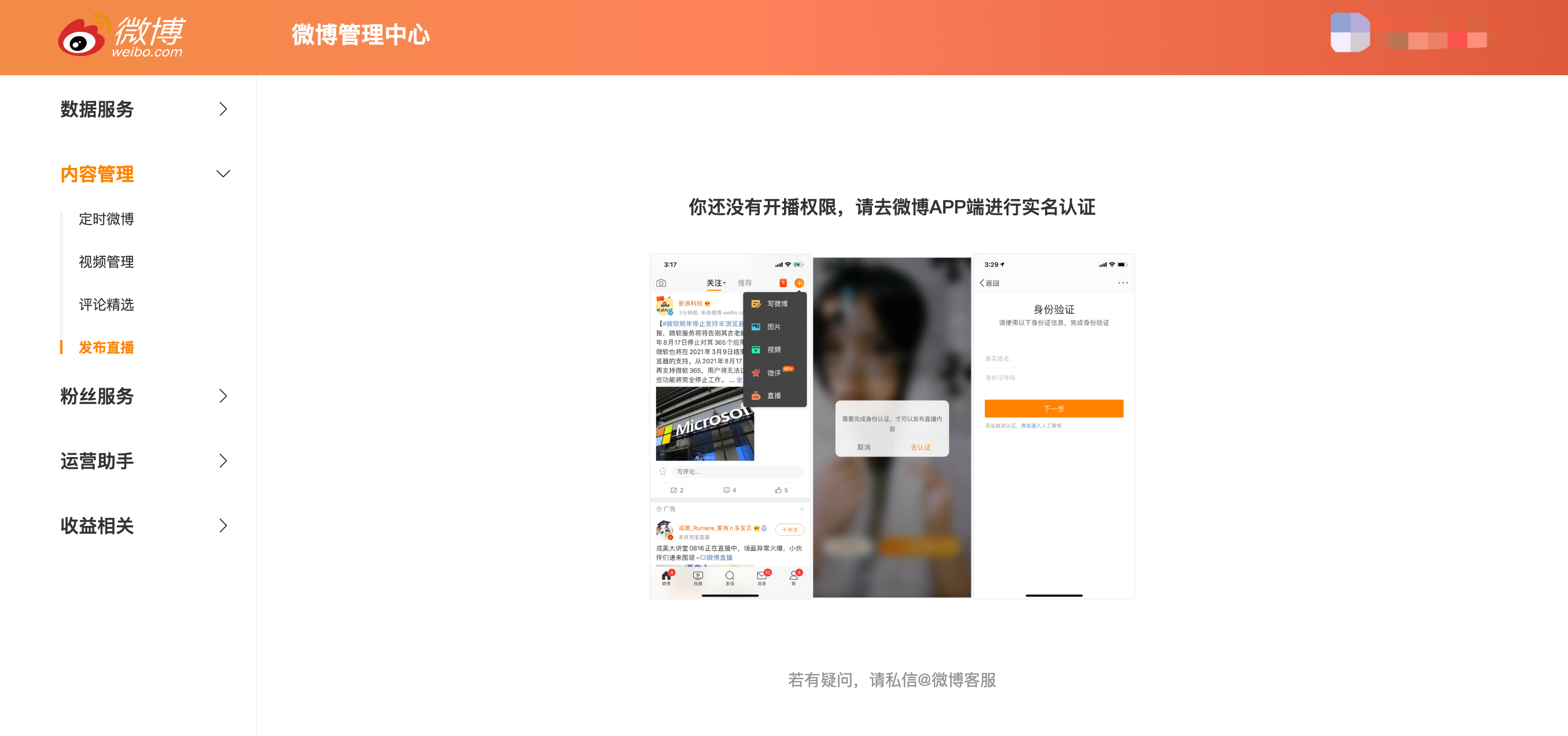
<span style="font-family:'Microsoft YaHei', '微软雅黑', Roboto, 'Microsoft YaHei', '微软雅黑', PingFang, 'PingFang SC', '苹方', '苹方-简', Roboto, 'system-ui', '-apple-system', BlinkMacSystemFont, 'Segoe UI', Roboto, 'Helvetica Neue', Helvetica, sans-serif, 'Apple Color Emoji', 'Segoe UI Emoji', 'Segoe UI Symbol', 'Noto Color emoji', 'Helvetica Neue', Helvetica, 'PingFang SC', 'Microsoft YaHei', 'Source Han Sans SC', 'Noto Sans CJK SC', 'WenQuanYi Micro Hei', sans-serif;color:rgb(53,53,53);background:rgb(255,255,255);letter-spacing:0px;vertical-align:baseline;font-size:16px;">If your account is not real - name verified, you need to complete the verification on the Weibo app before you can start a live broadcast</span>

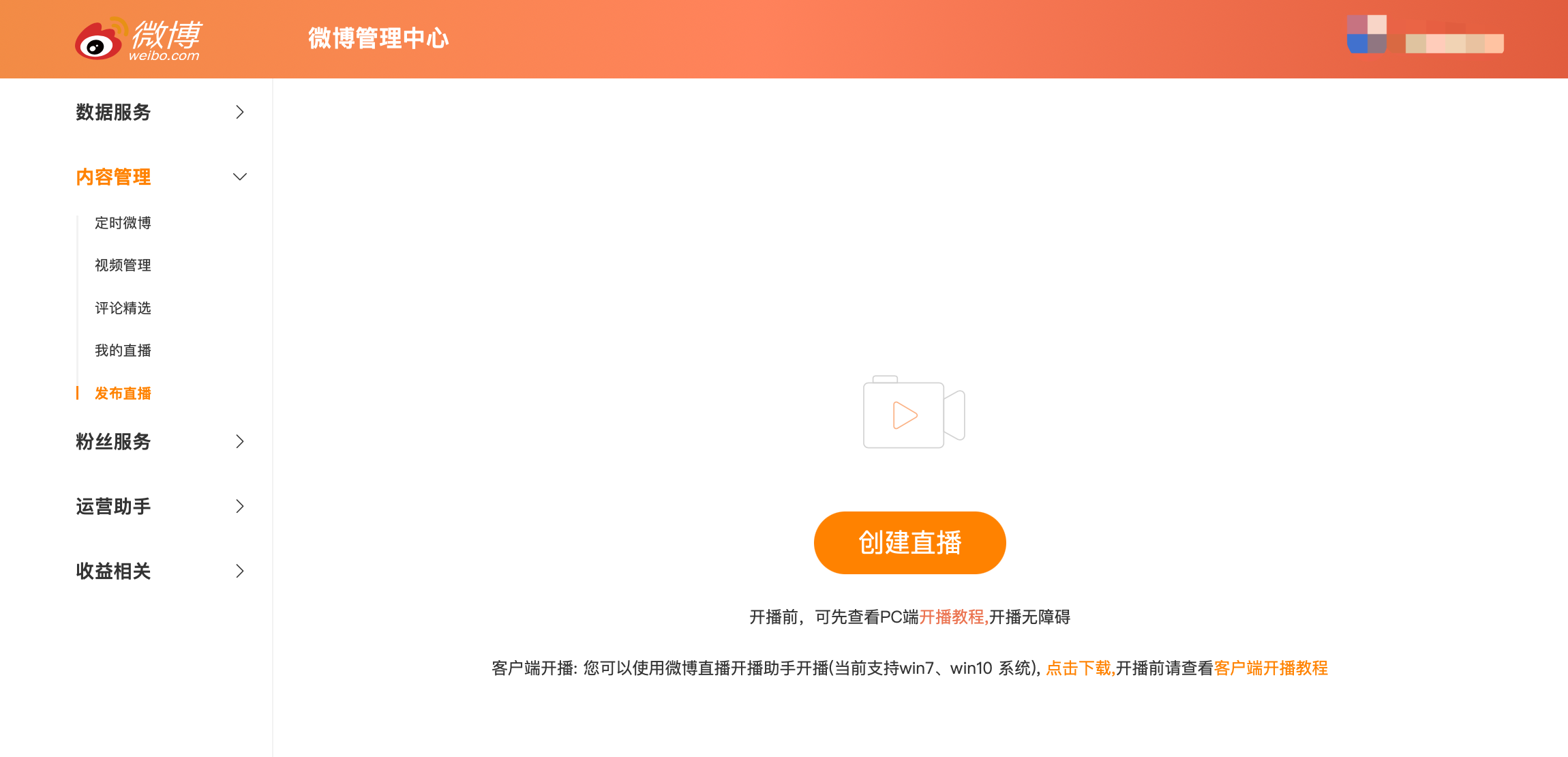
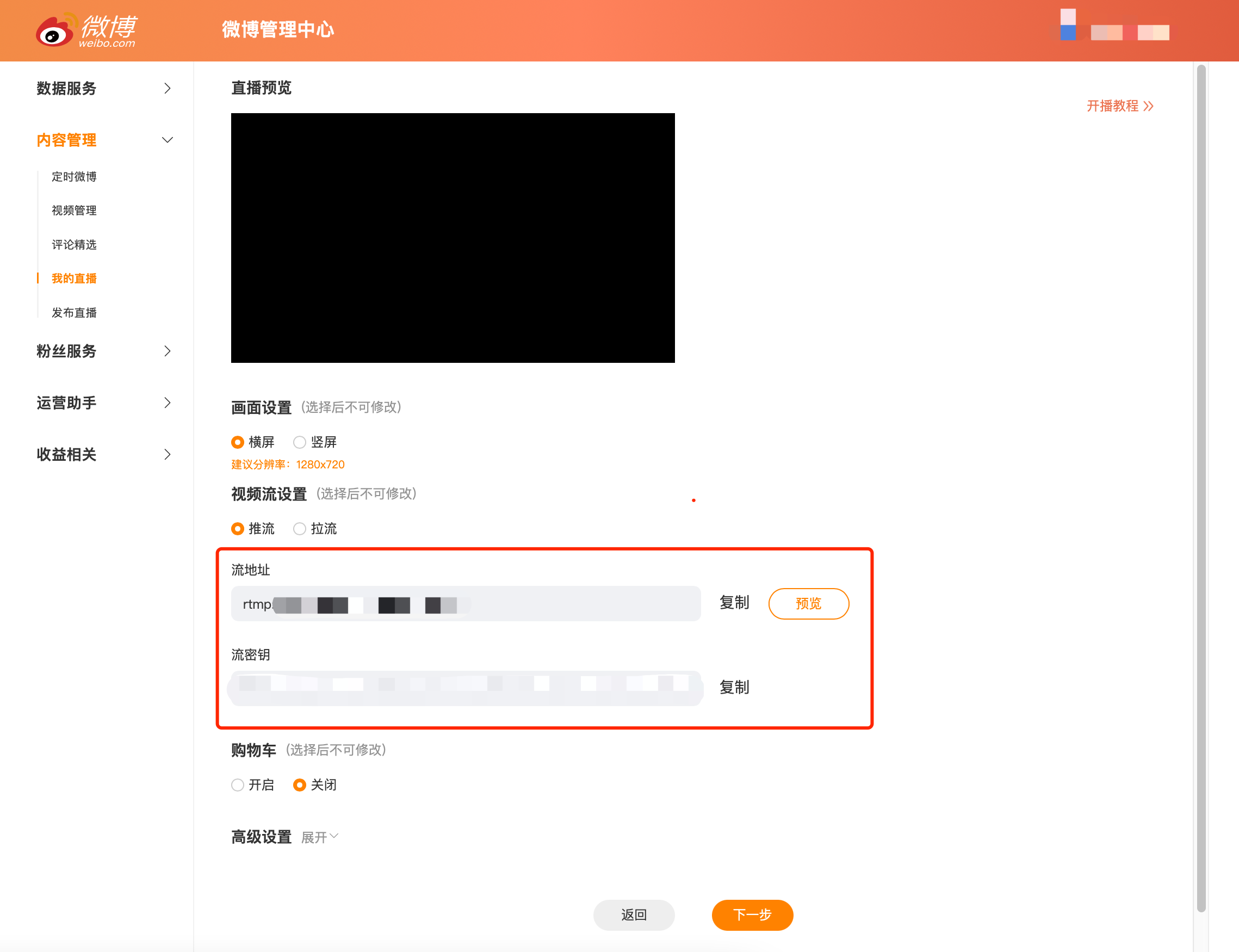
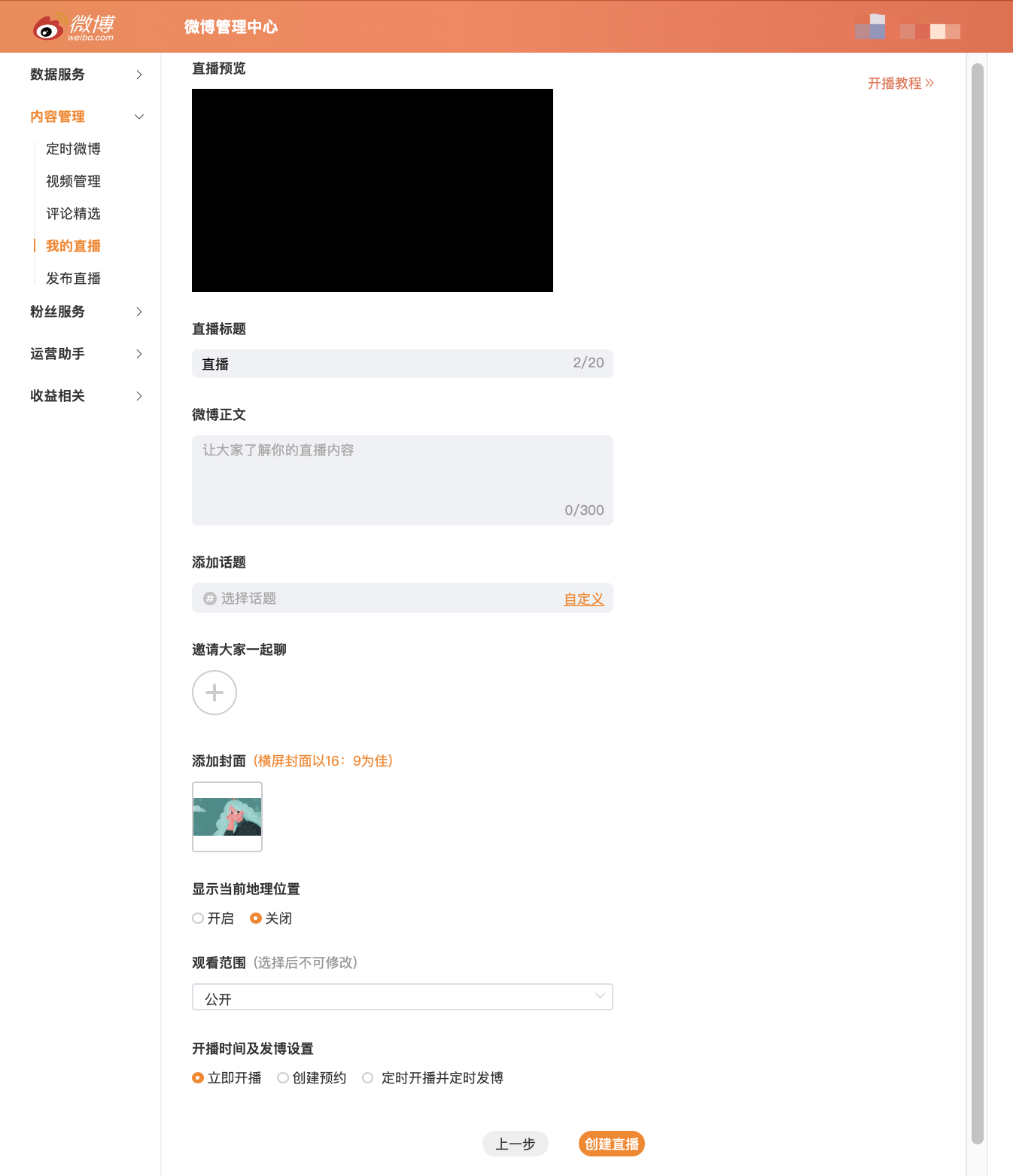
<span style="font-family:'微软雅黑';">2. </span><span style="font-size:15px;font-family:'system-ui', '-apple-system', BlinkMacSystemFont, 'Segoe UI', Roboto, 'Helvetica Neue', Helvetica, sans-serif, 'Apple Color Emoji', 'Segoe UI Emoji', 'Segoe UI Symbol', 'Noto Color emoji', 'Helvetica Neue', Helvetica, 'PingFang SC', 'Microsoft YaHei', 'Source Han Sans SC', 'Noto Sans CJK SC', 'WenQuanYi Micro Hei', sans-serif;color:rgb(51,51,51);letter-spacing:0;vertical-align:baseline;">Select “Content Management - Publish Live” in the left - hand navigation bar, click “Create Live”, and copy the stream address and stream key</span>

<span style="display:inline-block;overflow:hidden;width:604.733px;height:291.85px;">![mty4odg1mdq5mzg4mtq5nw_956066_csp9u4ptyfd6__wq_1678416285](https://wechatapppro-1252524126.file.myqcloud.com/help_document/image/ueditor/63688600_1699360100.cn/mty4odg1mdq5mzg4mtq5nw_956066_csp9u4ptyfd6__wq_1678416285)</span>

<span style="display:inline-block;overflow:hidden;width:604.733px;height:464.567px;">![mty4odg1mdq5mzg4mtq5nw_381882_kqv8d5rrlbaaayoy_1678416605](https://wechatapppro-1252524126.file.myqcloud.com/help_document/image/ueditor/96669400_1699360100.cn/mty4odg1mdq5mzg4mtq5nw_381882_kqv8d5rrlbaaayoy_1678416605)</span>

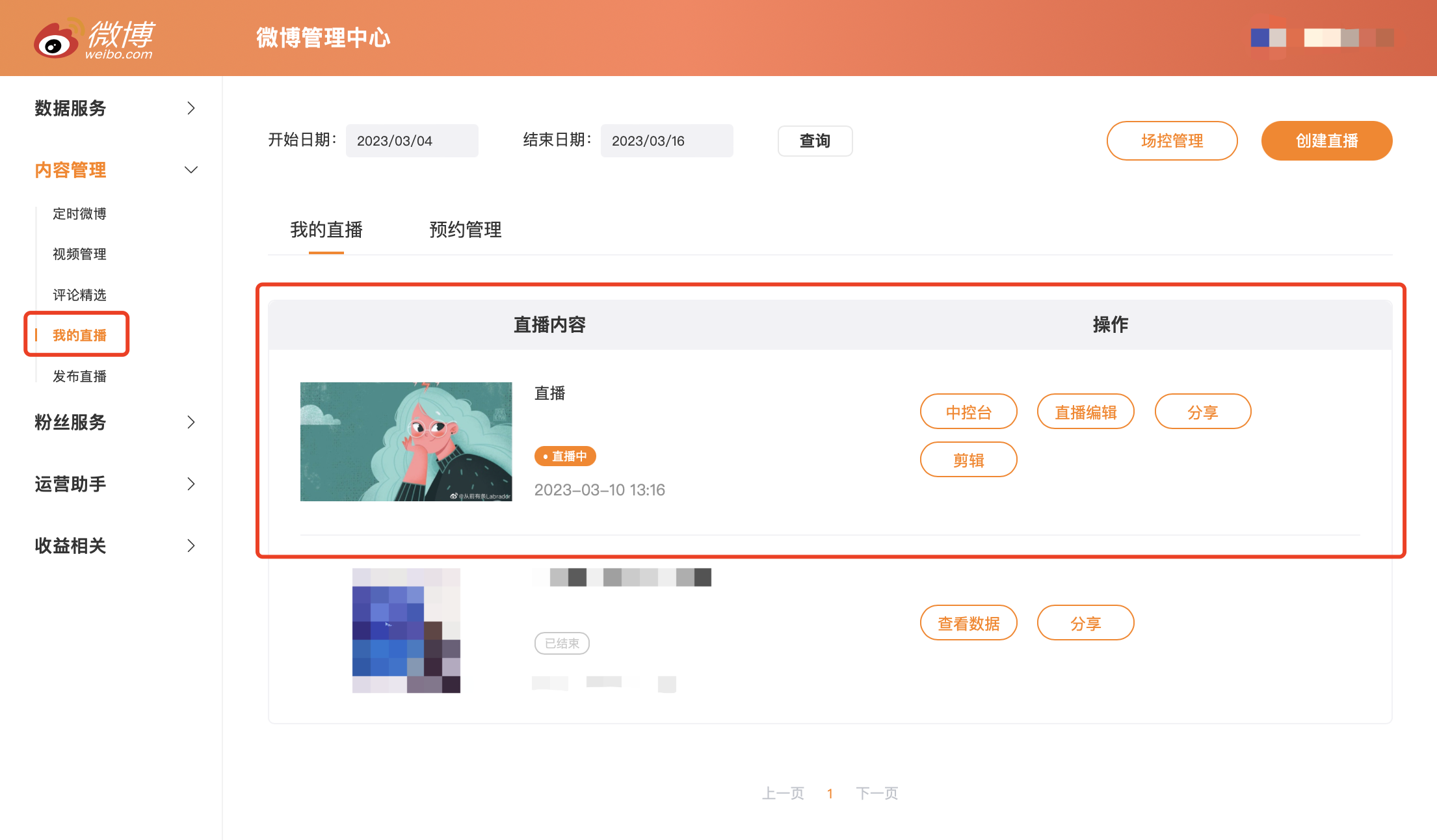
<span style="font-family:'微软雅黑';">3. </span><span style="font-size:15px;font-family:'system-ui', '-apple-system', BlinkMacSystemFont, 'Segoe UI', Roboto, 'Helvetica Neue', Helvetica, sans-serif, 'Apple Color Emoji', 'Segoe UI Emoji', 'Segoe UI Symbol', 'Noto Color emoji', 'Helvetica Neue', Helvetica, 'PingFang SC', 'Microsoft YaHei', 'Source Han Sans SC', 'Noto Sans CJK SC', 'WenQuanYi Micro Hei', sans-serif;color:rgb(51,51,51);letter-spacing:0;vertical-align:baseline;">After completion, click “Next” to set the live broadcast information. Once completed, the live broadcast will be successfully created. You can manage the live broadcast in “My Live Broadcasts”.</span>

<span style="display:inline-block;overflow:hidden;width:604.733px;height:701.778px;">![mty4odg1mdq5mzg4mtq5nw_954135_7nlouovc5sqfzev1_1678425404](https://wechatapppro-1252524126.file.myqcloud.com/help_document/image/ueditor/20756200_1699360101.cn/mty4odg1mdq5mzg4mtq5nw_954135_7nlouovc5sqfzev1_1678425404)</span>

<span style="display:inline-block;overflow:hidden;width:604.733px;height:353.536px;">![mty4odg1mdq5mzg4mtq5nw_315787_3r48gvlowzh6yjlq_1678425555](https://wechatapppro-1252524126.file.myqcloud.com/help_document/image/ueditor/41366300_1699360101.cn/mty4odg1mdq5mzg4mtq5nw_315787_3r48gvlowzh6yjlq_1678425555)</span>

<span style="font-family:'system-ui', '-apple-system', BlinkMacSystemFont, 'Segoe UI', Roboto, 'Helvetica Neue', Helvetica, sans-serif, 'Apple Color Emoji', 'Segoe UI Emoji', 'Segoe UI Symbol', 'Noto Color emoji', 'Helvetica Neue', Helvetica, 'PingFang SC', 'Microsoft YaHei', 'Source Han Sans SC', 'Noto Sans CJK SC', 'WenQuanYi Micro Hei', sans-serif;color:rgb(51,51,51);letter-spacing:0px;vertical-align:baseline;font-size:16px;">For more information on starting a live broadcast on Weibo, please refer to the official tutorial:</span>[<span style="font-family:'system-ui', '-apple-system', BlinkMacSystemFont, 'Segoe UI', Roboto, 'Helvetica Neue', Helvetica, sans-serif, 'Apple Color Emoji', 'Segoe UI Emoji', 'Segoe UI Symbol', 'Noto Color emoji', 'Helvetica Neue', Helvetica, 'PingFang SC', 'Microsoft YaHei', 'Source Han Sans SC', 'Noto Sans CJK SC', 'WenQuanYi Micro Hei', sans-serif;color:rgb(30,111,255);letter-spacing:0px;vertical-align:baseline;font-size:16px;">https://weibo.com/l/wblive/act/k2mw80kz3kw0</span>](https://weibo.com/l/wblive/act/k2mw80kz3kw0)

### <span style="font-size:24px;"><span style="font-family:'微软雅黑';">II. </span><span style="font-family:'Microsoft YaHei', '微软雅黑', Roboto, 'Microsoft YaHei', '微软雅黑', PingFang, 'PingFang SC', '苹方', '苹方-简', Roboto, 'system-ui', '-apple-system', BlinkMacSystemFont, 'Segoe UI', Roboto, 'Helvetica Neue', Helvetica, sans-serif, 'Apple Color Emoji', 'Segoe UI Emoji', 'Segoe UI Symbol', 'Noto Color emoji', 'Helvetica Neue', Helvetica, 'PingFang SC', 'Microsoft YaHei', 'Source Han Sans SC', 'Noto Sans CJK SC', 'WenQuanYi Micro Hei', sans-serif;color:rgb(26,26,26);letter-spacing:0px;vertical-align:baseline;">Step 2: Fill in the elink management backend</span></span>

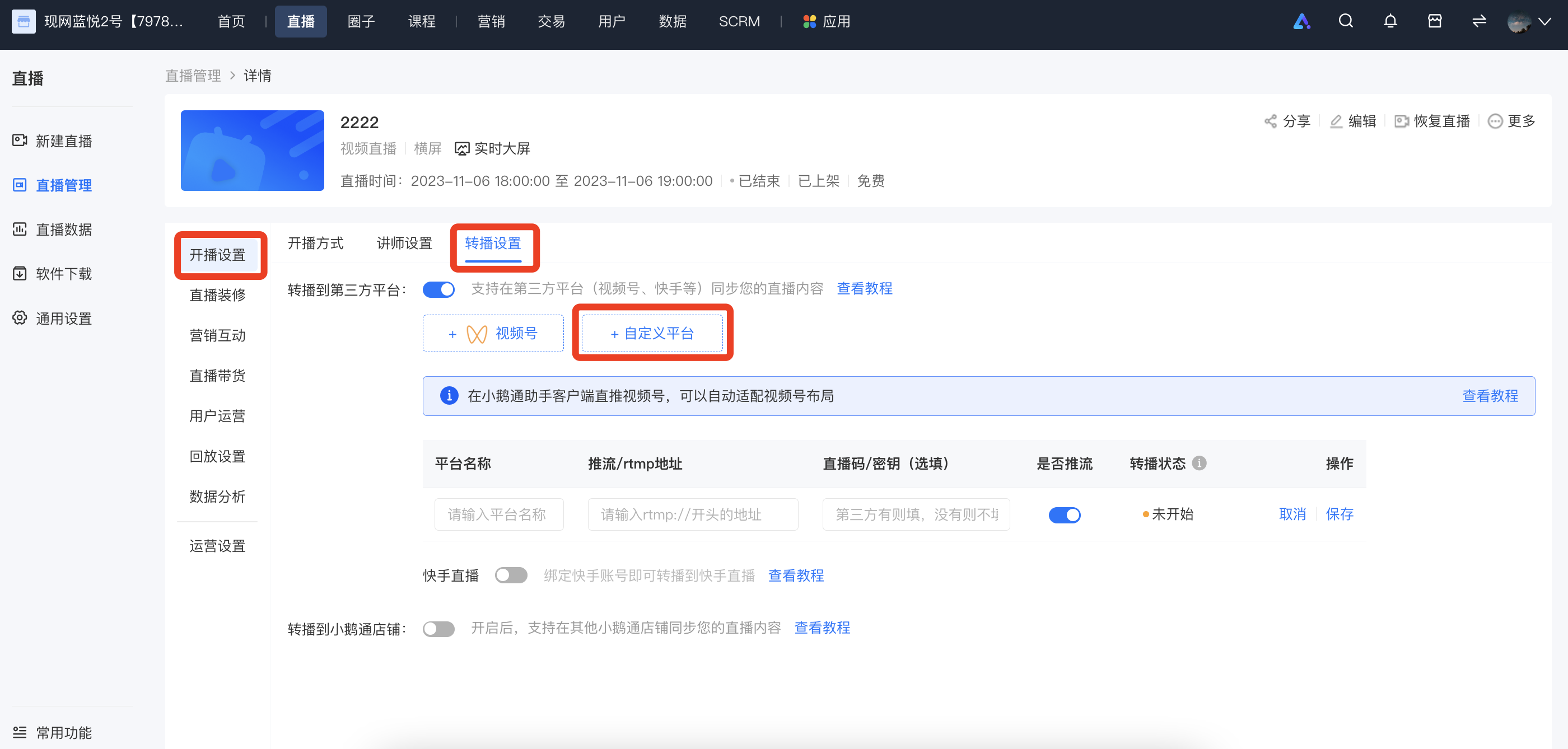
<span style="font-family:'Microsoft YaHei', '微软雅黑', Roboto, 'Microsoft YaHei', '微软雅黑', PingFang, 'PingFang SC', '苹方', '苹方-简', Roboto, 'system-ui', '-apple-system', BlinkMacSystemFont, 'Segoe UI', Roboto, 'Helvetica Neue', Helvetica, sans-serif, 'Apple Color Emoji', 'Segoe UI Emoji', 'Segoe UI Symbol', 'Noto Color emoji', 'Helvetica Neue', Helvetica, 'PingFang SC', 'Microsoft YaHei', 'Source Han Sans SC', 'Noto Sans CJK SC', 'WenQuanYi Micro Hei', sans-serif;color:rgb(51,51,51);letter-spacing:0px;vertical-align:baseline;font-size:16px;">Log in to the elink management backend, select the live - broadcast room you want to rebroadcast, go to \[Details Page - Live - broadcast Settings - Rebroadcast Settings - Rebroadcast to Third - party Platforms - Custom Platform\], fill in the name of the rebroadcasting platform, the streaming address, and the key, and then click “Save”.</span>

<span style="display:inline-block;overflow:hidden;width:604.733px;height:254.004px;">![企业微信截图_13cfa839-695f-422e-8517-12927715e204.png](https://wechatapppro-1252524126.file.myqcloud.com/help_document/image/ueditor/70421200_1699360100.png ".png")</span>

### <span style="font-size:24px;"><span style="font-family:'微软雅黑';">III. </span><span style="font-family:'Microsoft YaHei', '微软雅黑', Roboto, 'Microsoft YaHei', '微软雅黑', PingFang, 'PingFang SC', '苹方', '苹方-简', Roboto, 'system-ui', '-apple-system', BlinkMacSystemFont, 'Segoe UI', Roboto, 'Helvetica Neue', Helvetica, sans-serif, 'Apple Color Emoji', 'Segoe UI Emoji', 'Segoe UI Symbol', 'Noto Color emoji', 'Helvetica Neue', Helvetica, 'PingFang SC', 'Microsoft YaHei', 'Source Han Sans SC', 'Noto Sans CJK SC', 'WenQuanYi Micro Hei', sans-serif;color:rgb(26,26,26);letter-spacing:0px;vertical-align:baseline;">Step 3: Start the live broadcast</span></span>

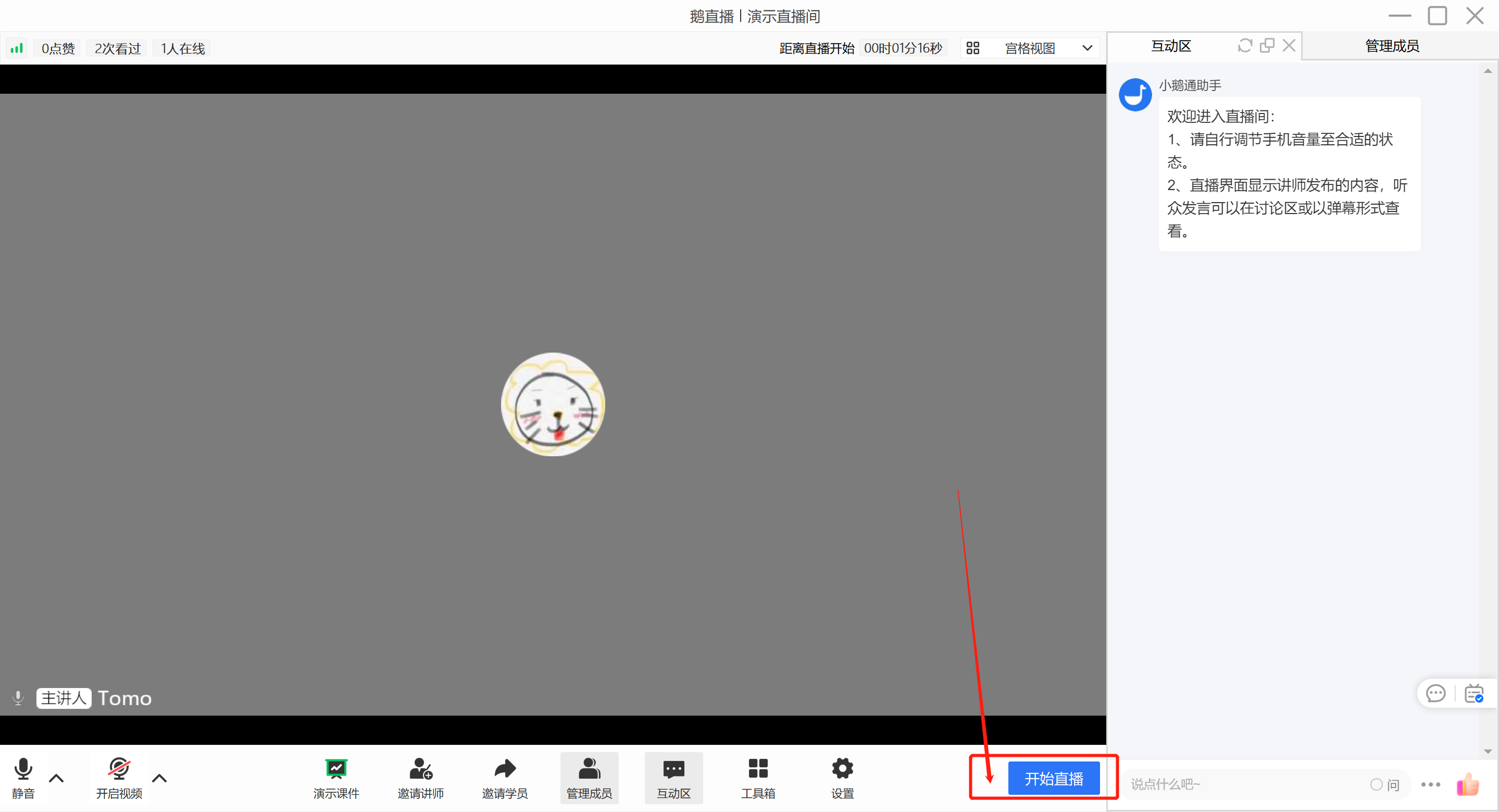
<span style="font-size:15px;font-family:'system-ui', '-apple-system', BlinkMacSystemFont, 'Segoe UI', Roboto, 'Helvetica Neue', Helvetica, sans-serif, 'Apple Color Emoji', 'Segoe UI Emoji', 'Segoe UI Symbol', 'Noto Color emoji', 'Helvetica Neue', Helvetica, 'PingFang SC', 'Microsoft YaHei', 'Source Han Sans SC', 'Noto Sans CJK SC', 'WenQuanYi Micro Hei', sans-serif;color:rgb(51,51,51);letter-spacing:0;vertical-align:baseline;">Go to the eLive client/elink live - broadcast terminal to start the live broadcast. Different live - broadcast modes are applicable to different live - broadcast terminals:</span>

<span style="font-size:15px;font-family:'system-ui', '-apple-system', BlinkMacSystemFont, 'Segoe UI', Roboto, 'Helvetica Neue', Helvetica, sans-serif, 'Apple Color Emoji', 'Segoe UI Emoji', 'Segoe UI Symbol', 'Noto Color emoji', 'Helvetica Neue', Helvetica, 'PingFang SC', 'Microsoft YaHei', 'Source Han Sans SC', 'Noto Sans CJK SC', 'WenQuanYi Micro Hei', sans-serif;color:rgb(51,51,51);letter-spacing:0;vertical-align:baseline;">- Landscape live broadcast: Computer (<span style="color:rgb(51,51,51);font-family:'system-ui', '-apple-system', BlinkMacSystemFont, 'Segoe UI', Roboto, 'Helvetica Neue', Helvetica, sans-serif, 'Apple Color Emoji', 'Segoe UI Emoji', 'Segoe UI Symbol', 'Noto Color emoji', 'Helvetica Neue', Helvetica, 'PingFang SC', 'Microsoft YaHei', 'Source Han Sans SC', 'Noto Sans CJK SC', 'WenQuanYi Micro Hei', sans-serif;font-size:15px;">eLive client,</span>elink Assistant client, web version), mobile phone (eLive Mini Program)</span>

<span style="font-size:15px;font-family:'system-ui', '-apple-system', BlinkMacSystemFont, 'Segoe UI', Roboto, 'Helvetica Neue', Helvetica, sans-serif, 'Apple Color Emoji', 'Segoe UI Emoji', 'Segoe UI Symbol', 'Noto Color emoji', 'Helvetica Neue', Helvetica, 'PingFang SC', 'Microsoft YaHei', 'Source Han Sans SC', 'Noto Sans CJK SC', 'WenQuanYi Micro Hei', sans-serif;color:rgb(51,51,51);letter-spacing:0;vertical-align:baseline;">- Portrait live broadcast: Mobile phone (eLive Mini Program)</span>

<span style="font-size:15px;font-family:'system-ui', '-apple-system', BlinkMacSystemFont, 'Segoe UI', Roboto, 'Helvetica Neue', Helvetica, sans-serif, 'Apple Color Emoji', 'Segoe UI Emoji', 'Segoe UI Symbol', 'Noto Color emoji', 'Helvetica Neue', Helvetica, 'PingFang SC', 'Microsoft YaHei', 'Source Han Sans SC', 'Noto Sans CJK SC', 'WenQuanYi Micro Hei', sans-serif;color:rgb(51,51,51);letter-spacing:0;vertical-align:baseline;">- Recorded live broadcast: Computer (web version), mobile phone (H5)</span>

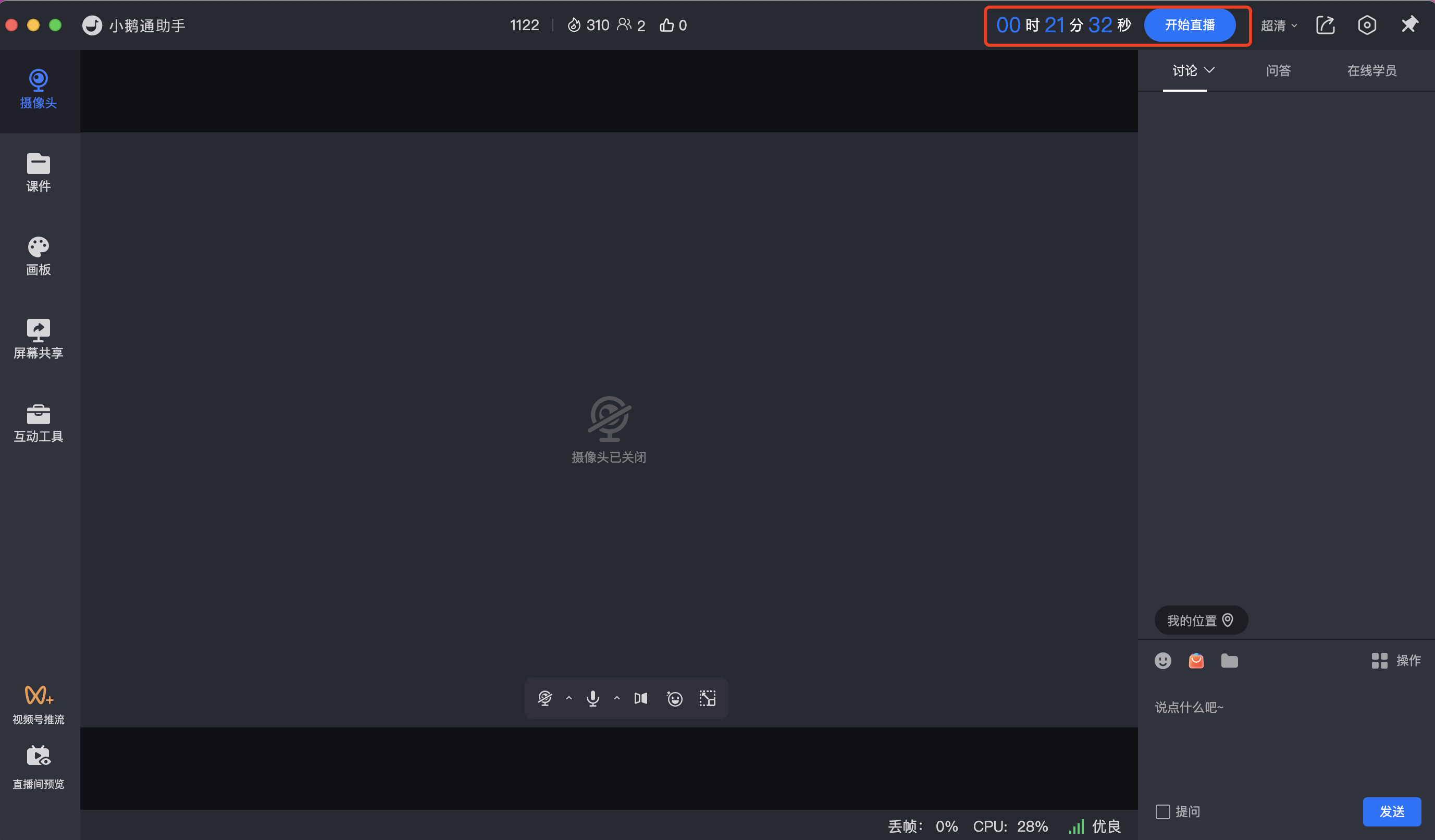
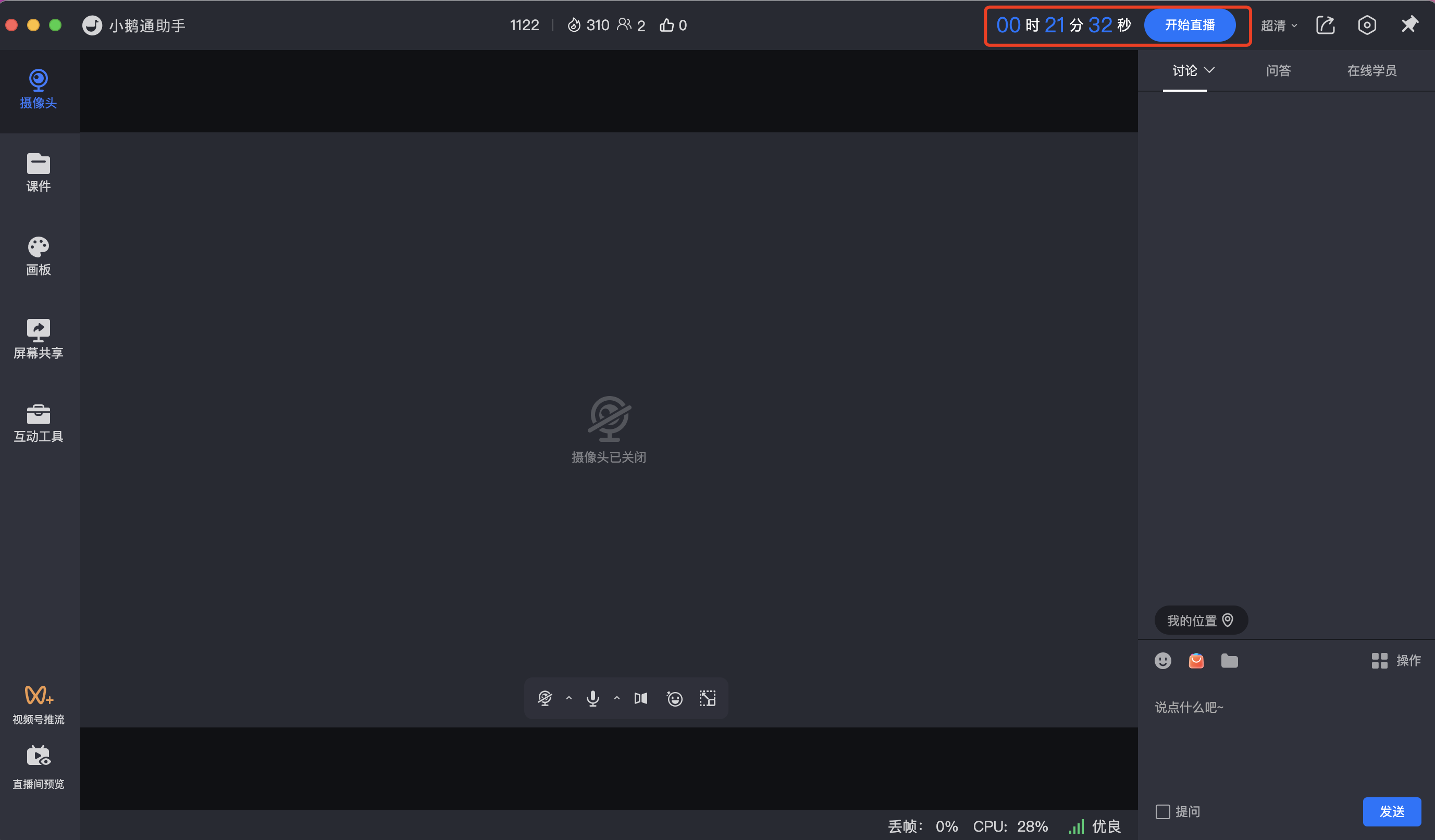
<span style="font-size:15px;font-family:'system-ui', '-apple-system', BlinkMacSystemFont, 'Segoe UI', Roboto, 'Helvetica Neue', Helvetica, sans-serif, 'Apple Color Emoji', 'Segoe UI Emoji', 'Segoe UI Symbol', 'Noto Color emoji', 'Helvetica Neue', Helvetica, 'PingFang SC', 'Microsoft YaHei', 'Source Han Sans SC', 'Noto Sans CJK SC', 'WenQuanYi Micro Hei', sans-serif;color:rgb(51,51,51);letter-spacing:0;vertical-align:baseline;"><span style="color:rgb(51,51,51);font-family:'system-ui', '-apple-system', BlinkMacSystemFont, 'Segoe UI', Roboto, 'Helvetica Neue', Helvetica, sans-serif, 'Apple Color Emoji', 'Segoe UI Emoji', 'Segoe UI Symbol', 'Noto Color emoji', 'Helvetica Neue', Helvetica, 'PingFang SC', 'Microsoft YaHei', 'Source Han Sans SC', 'Noto Sans CJK SC', 'WenQuanYi Micro Hei', sans-serif;font-size:15px;text-align:center;">(Schematic diagram of the eLive client)</span></span>

<span style="display:inline-block;overflow:hidden;width:604.733px;height:353.969px;">![image.png](https://wechatapppro-1252524126.file.myqcloud.com/help_document/image/ueditor/69705100_1699360101.png ".png")</span>

<span style="display:inline-block;overflow:hidden;width:604.733px;height:353.969px;">![mty4odg1mdq5mzg4mtq5nw_274548_xfgengnvd2vscykn_1677749946](https://wechatapppro-1252524126.file.myqcloud.com/help_document/image/ueditor/97836600_1699360101.cn/mty4odg1mdq5mzg4mtq5nw_274548_xfgengnvd2vscykn_1677749946)</span>

<span style="color:rgb(51,51,51);font-family:'system-ui', '-apple-system', BlinkMacSystemFont, 'Segoe UI', Roboto, 'Helvetica Neue', Helvetica, sans-serif, 'Apple Color Emoji', 'Segoe UI Emoji', 'Segoe UI Symbol', 'Noto Color emoji', 'Helvetica Neue', Helvetica, 'PingFang SC', 'Microsoft YaHei', 'Source Han Sans SC', 'Noto Sans CJK SC', 'WenQuanYi Micro Hei', sans-serif;font-size:15px;text-align:center;">(Schematic diagram of the elink Assistant)</span>