# Live Streaming Management and Operation

# Where is the entry for live streaming data?

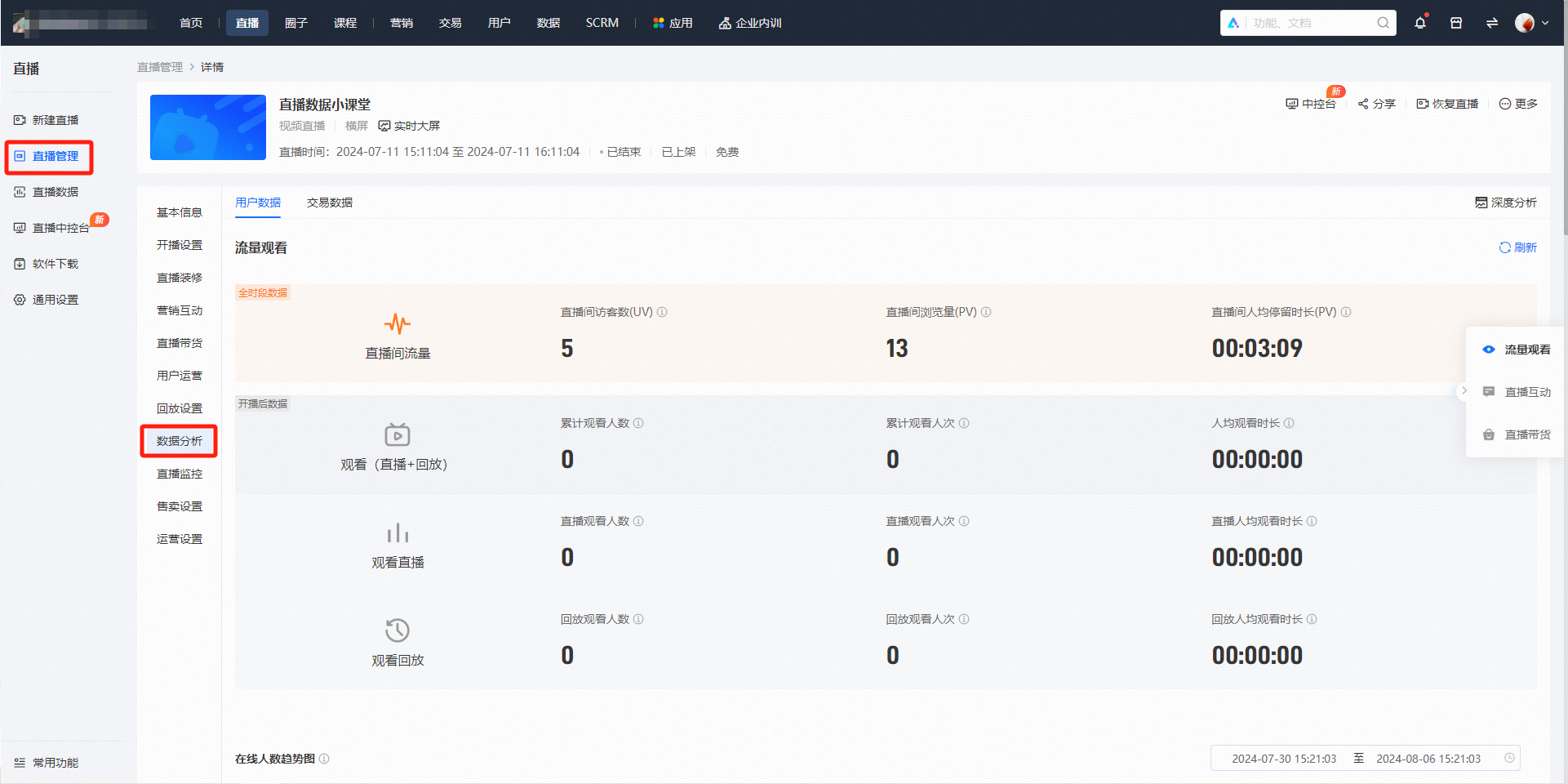
<div data-elink-language-switch="1" id="bkmrk-%E4%B8%AD%E6%96%87" style="border:1px solid #d6d9de;border-radius:6px;padding:10px 12px;margin:0 0 18px 0;background:#f8fafc;font-size:14px;">[中文](/books/091d5/page/74db1)</div><span style="font-size:14px;">Enter the live streaming list page. In the 'Details' section of the operation bar, click 'Data Analysis' to enter the data statistics page.</span>

# Will instructors and teaching assistants be counted in the live streaming data when they enter the live streaming room?

<div data-elink-language-switch="1" id="bkmrk-%E4%B8%AD%E6%96%87" style="border:1px solid #d6d9de;border-radius:6px;padding:10px 12px;margin:0 0 18px 0;background:#f8fafc;font-size:14px;">[中文](/books/091d5/page/37a74)</div><span style="font-size:14px;">All users entering the live streaming room will be counted in the live streaming data.</span>

# What data can be collected for live courses in data analysis?

<div data-elink-language-switch="1" id="bkmrk-%E4%B8%AD%E6%96%87" style="border:1px solid #d6d9de;border-radius:6px;padding:10px 12px;margin:0 0 18px 0;background:#f8fafc;font-size:14px;">[中文](/books/091d5/page/1068c)</div>**<span style="font-size:15px;color:rgb(51,51,51);letter-spacing:0;vertical-align:baseline;">Live streaming session data</span>**<span style="font-size:15px;color:rgb(51,51,51);letter-spacing:0;vertical-align:baseline;">: It can help review user interaction and stay duration during the session, facilitating subsequent adjustment of operational strategies.</span>

<span style="font-size:15px;color:rgb(51,51,51);letter-spacing:0;vertical-align:baseline;">Query path: Live streaming management &gt; Data &gt; Data analysis</span>

<span style="display:inline-block;overflow:hidden;width:604.733px;height:302.209px;">![image/png](https://wechatapppro-1252524126.file.myqcloud.com/help_center_ooo/image/help_center_ooo/zuyyjxlzi56fu0.png "unknow.png")</span>

<span style="display:inline-block;overflow:hidden;width:604.733px;height:302.209px;">![image/png](https://wechatapppro-1252524126.file.myqcloud.com/help_center_ooo/image/help_center_ooo/po5n6slzi56fxi.png "unknow.png")</span><span style="font-size:15px;color:rgb(51,51,51);letter-spacing:0;vertical-align:baseline;">Data content:</span>

<span style="font-family:Wingdings;"><span style="font-size:15px;color:rgb(51,51,51);letter-spacing:0;vertical-align:baseline;">●<span style="font-family:'Times New Roman';"> </span></span></span><span style="font-size:15px;color:rgb(51,51,51);letter-spacing:0;vertical-align:baseline;">Traffic viewing: Supports segmented viewing of UV, PV, and stay duration for both live streaming and playback scenarios.</span>

<span style="font-family:Wingdings;"><span style="font-size:15px;color:rgb(51,51,51);letter-spacing:0;vertical-align:baseline;">○<span style="font-family:'Times New Roman';"> </span></span></span><span style="font-size:15px;color:rgb(51,51,51);letter-spacing:0;vertical-align:baseline;">For example, some merchants found that there was still a 20% increase in traffic after the live streaming ended. Analysis showed that this was due to students reviewing the playback and some new students. In response, the merchants set a playback password. Students need to share the link on their WeChat Moments and send a screenshot to obtain the password for viewing the playback, thereby retaining a lot of targeted traffic.</span>

<span style="display:inline-block;overflow:hidden;width:605px;height:302.342px;">![image/png](https://wechatapppro-1252524126.file.myqcloud.com/help_center_ooo/image/help_center_ooo/wnorqtlzi56ftc.png "unknow.png")</span>

<span style="font-family:Wingdings;"><span style="font-size:15px;color:rgb(51,51,51);letter-spacing:0;vertical-align:baseline;">●<span style="font-family:'Times New Roman';"> </span></span></span><span style="font-size:15px;color:rgb(51,51,51);letter-spacing:0;vertical-align:baseline;">Live streaming interaction: Supports viewing the performance of all marketing tools, including the influencer invitation leaderboard, share - to - win rewards, reservation, sign - in, tipping, red envelopes, lucky draws, voting, and questionnaires. All data supports one - click export. When exporting, you can freely select the specific user information you need to accurately improve the user profile.</span>

<span style="display:inline-block;overflow:hidden;width:704px;height:351.817px;">![image/png](https://wechatapppro-1252524126.file.myqcloud.com/help_center_ooo/image/help_center_ooo/jis3e6lzi56fuv.png "unknow.png")</span>

<span style="display:inline-block;overflow:hidden;width:604.733px;height:302.209px;">![image/png](https://wechatapppro-1252524126.file.myqcloud.com/help_center_ooo/image/help_center_ooo/vx0rprlzi56fxg.png "unknow.png")</span>

<span style="font-family:Wingdings;"><span style="font-size:15px;color:rgb(51,51,51);letter-spacing:0;vertical-align:baseline;">●<span style="font-family:'Times New Roman';"> </span></span></span><span style="font-size:15px;color:rgb(51,51,51);letter-spacing:0;vertical-align:baseline;">Live commerce: Supports viewing the sales efficiency of promoted products and coupons.</span>

<span style="font-family:Wingdings;"><span style="font-size:15px;color:rgb(51,51,51);letter-spacing:0;vertical-align:baseline;">○<span style="font-family:'Times New Roman';"> </span></span></span><span style="font-size:15px;color:rgb(51,51,51);letter-spacing:0;vertical-align:baseline;">Combined with data such as the trend chart of online viewers and live streaming viewing details, it can targetedly improve the quality of live streaming. For example, analyze which time period has the most users and what kind of dialogue or live streaming format is more popular among the audience.</span>

<span style="font-family:Wingdings;"><span style="font-size:15px;color:rgb(51,51,51);letter-spacing:0;vertical-align:baseline;">○<span style="font-family:'Times New Roman';"> </span></span></span><span style="font-size:15px;color:rgb(51,51,51);letter-spacing:0;vertical-align:baseline;">After the live streaming ends, the sales data of products can be summarized. This not only optimizes the product selection strategy but also allows popular products to be restocked for secondary sales. The number of product purchasers and the number of product views represent the conversion rate of the product. If the conversion rate is low, you can consider whether the selected products differ from the user profile and fail to attract users to purchase, or whether the cost - performance ratio of the unit price is not attractive enough to users, and update the product marketing activities.</span>

<span style="display:inline-block;overflow:hidden;width:703.263px;height:351.448px;">![image/png](https://wechatapppro-1252524126.file.myqcloud.com/help_center_ooo/image/help_center_ooo/o1se3glzi56ftl.png "unknow.png")</span>

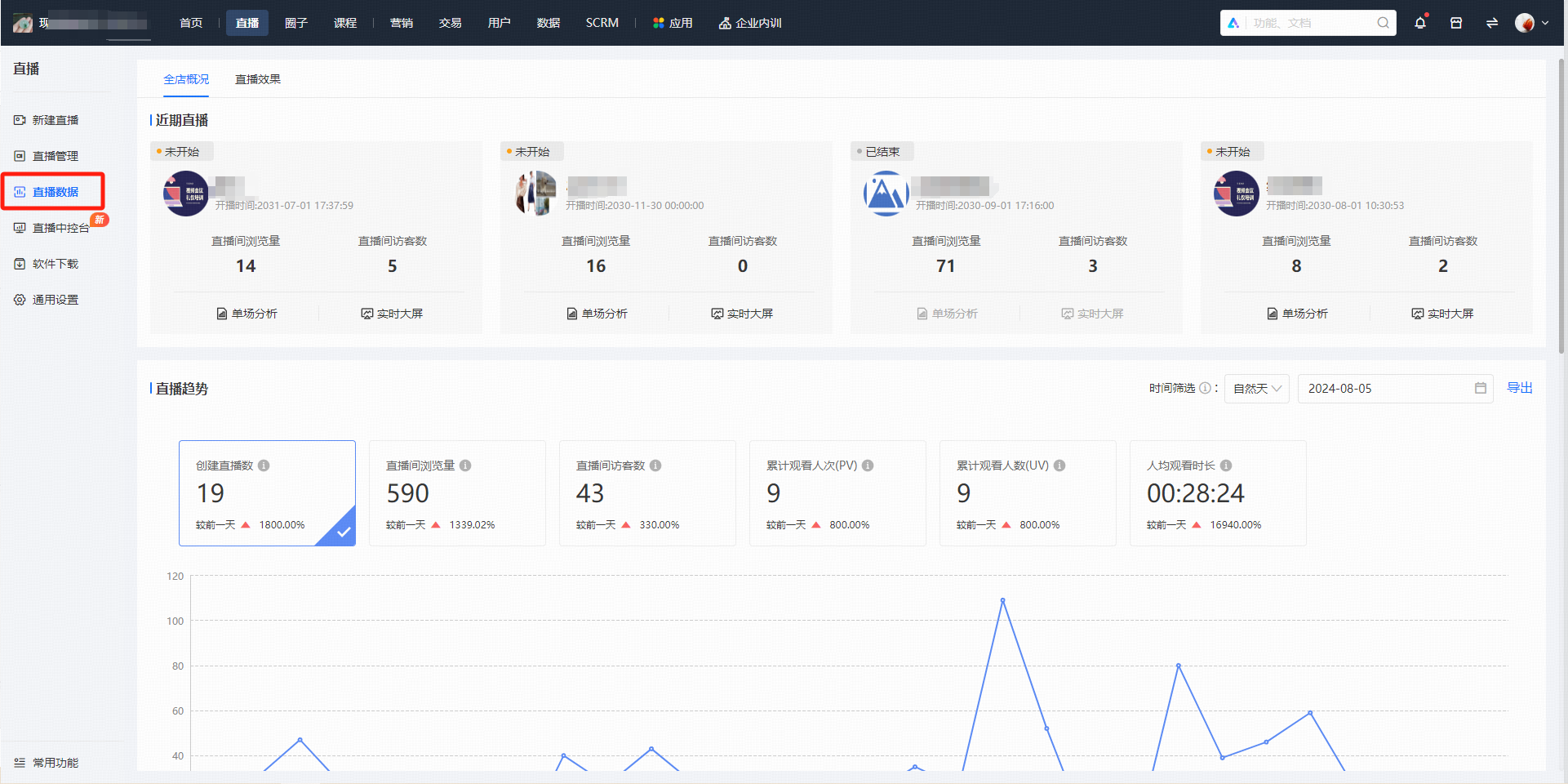
**<span style="font-size:15px;color:rgb(51,51,51);letter-spacing:0;vertical-align:baseline;">Live streaming scenario data</span>**<span style="font-size:15px;color:rgb(51,51,51);letter-spacing:0;vertical-align:baseline;">: It can compare the data performance of multiple live streaming sessions and adjust and optimize session strategies.</span>

<span style="font-size:15px;color:rgb(51,51,51);letter-spacing:0;vertical-align:baseline;">Query path: Live streaming data</span>

<span style="display:inline-block;overflow:hidden;width:604.733px;height:302.209px;">![image/png](https://wechatapppro-1252524126.file.myqcloud.com/help_center_ooo/image/help_center_ooo/6p5pmhlzi56fuq.png "unknow.png")</span>

<span style="font-size:15px;color:rgb(51,51,51);letter-spacing:0;vertical-align:baseline;">Data content:</span>

<span style="font-family:Wingdings;"><span style="font-size:15px;color:rgb(51,51,51);letter-spacing:0;vertical-align:baseline;">●<span style="font-family:'Times New Roman';"> </span></span></span><span style="font-size:15px;color:rgb(51,51,51);letter-spacing:0;vertical-align:baseline;">Live streaming trends: Supports filtering by natural days, natural weeks, natural months, and specific dates to meet the needs of data review at different granularities.</span>

<span style="font-family:Wingdings;"><span style="font-size:15px;color:rgb(51,51,51);letter-spacing:0;vertical-align:baseline;">●<span style="font-family:'Times New Roman';"> </span></span></span><span style="font-size:15px;color:rgb(51,51,51);letter-spacing:0;vertical-align:baseline;">Live streaming best - and - worst list: Intuitively shows users' preferences. Combined with session data, it can specifically analyze the audience profile, understand the user structure, and directionally adjust the live streaming content.</span>

<span style="display:inline-block;overflow:hidden;width:653.237px;height:326.448px;">![image/png](https://wechatapppro-1252524126.file.myqcloud.com/help_center_ooo/image/help_center_ooo/enkk53lzi56fxh.png "unknow.png")</span>

<span style="display:inline-block;overflow:hidden;width:699px;height:349.318px;">![image/png](https://wechatapppro-1252524126.file.myqcloud.com/help_center_ooo/image/help_center_ooo/bd54ealzi56ftk.png "unknow.png")</span>

# How are the live streaming data statistics calculated after the live streaming duration is edited?

<div data-elink-language-switch="1" id="bkmrk-%E4%B8%AD%E6%96%87" style="border:1px solid #d6d9de;border-radius:6px;padding:10px 12px;margin:0 0 18px 0;background:#f8fafc;font-size:14px;">[中文](/books/091d5/page/00411)</div><span style="color:rgb(53,53,53);background:rgb(255,255,255);letter-spacing:0pt;vertical-align:baseline;font-size:15px;">无论原有直播当前处于什么直播状态，数据将按照直播间实际直播时间统计。</span>

# Does the live streaming data statistics include the entry method of users through the PC?

<div data-elink-language-switch="1" id="bkmrk-%E4%B8%AD%E6%96%87" style="border:1px solid #d6d9de;border-radius:6px;padding:10px 12px;margin:0 0 18px 0;background:#f8fafc;font-size:14px;">[中文](/books/091d5/page/pc)</div><span style="font-size:15px;"><span style="font-family:PingFangSC, 'Microsoft Yahei', Helvetica, Tahoma, Arial, 'Hiragino Sans GB', 'Hiragino Sans GB W3', STXihei, STHeiti, Heiti, SimSun, 'Helvetica Neue', Helvetica, 'PingFang SC', 'Microsoft YaHei', 'Source Han Sans SC', 'Noto Sans CJK SC', 'WenQuanYi Micro Hei', sans-serif;color:rgb(53,53,53);background:rgb(255,255,255);letter-spacing:0pt;vertical-align:baseline;"></span></span>

Users who enter the live streaming room through WeChat H5 or the PC version can be counted.

Currently, Mini Program versions below 3.0 do not support data statistics.

<span style="font-size:15px;"></span>

# How is the data on the number of online viewers in the live streaming room calculated?

<div data-elink-language-switch="1" id="bkmrk-%E4%B8%AD%E6%96%87" style="border:1px solid #d6d9de;border-radius:6px;padding:10px 12px;margin:0 0 18px 0;background:#f8fafc;font-size:14px;">[中文](/books/091d5/page/ed3d2)</div><span style="font-size:14px;">The total number of trainees who have entered the live streaming room since the creation of the live stream (updated every 2 minutes)</span>

# Can I view the time when students first entered the live streaming room and the duration of their viewing in the live streaming data?

<div data-elink-language-switch="1" id="bkmrk-%E4%B8%AD%E6%96%87" style="border:1px solid #d6d9de;border-radius:6px;padding:10px 12px;margin:0 0 18px 0;background:#f8fafc;font-size:14px;">[中文](/books/091d5/page/d1f25)</div><span style="font-size:14px;">Yes, you can view the time when the corresponding trainees first entered the live streaming room and the total viewing duration in the \[Live Streaming Viewing Details\] under \[Details - Data Analysis - User Data\].</span>

# How to display the newly created live stream on the homepage?

<div data-elink-language-switch="1" id="bkmrk-%E4%B8%AD%E6%96%87" style="border:1px solid #d6d9de;border-radius:6px;padding:10px 12px;margin:0 0 18px 0;background:#f8fafc;font-size:14px;">[中文](/books/091d5/page/f2217)</div><span style="font-size:14px;">1. After creating a new live stream, select 'Publish'. Then, click to build the store homepage in \[Store Management &gt; Mobile &gt; Store Homepage\].</span>

<span style="font-size:14px;">2. Click \[Course Component &gt; Live Stream\] to add a live stream template. Select the corresponding live stream in \[Live Stream Source &gt; Manual Selection\] on the right, and it will be displayed on the homepage.</span>

<span style="font-size:14px;">\* Note: \[Default Rule\] means that the first two latest live streams are displayed by default. Currently, live streams are sorted by live stream status and start time, in the order of \[Ongoing Live Streams\] - \[Upcoming Live Streams\] - \[Ended Live Streams\].</span>

# Can I see the real number of viewers in the live streaming room?

<div data-elink-language-switch="1" id="bkmrk-%E4%B8%AD%E6%96%87" style="border:1px solid #d6d9de;border-radius:6px;padding:10px 12px;margin:0 0 18px 0;background:#f8fafc;font-size:14px;">[中文](/books/091d5/page/39461)</div><span style="font-size:14px;">Yes, you can enter the live streaming list in the backend and click \[Details &gt; Data Analysis\] to view the live streaming data.</span><span style="font-size:14px;">Among them, the cumulative number of online viewers (UV) is the actual number of unique viewers in the live streaming room.</span>

# If a promoter shares a poster to invite users to enter the live streaming room, will it be reflected in the Invited Influencer Ranking?

<div data-elink-language-switch="1" id="bkmrk-%E4%B8%AD%E6%96%87" style="border:1px solid #d6d9de;border-radius:6px;padding:10px 12px;margin:0 0 18px 0;background:#f8fafc;font-size:14px;">[中文](/books/091d5/page/6ecbd)</div><span style="font-size:14px;">Yes, students who enter the live streaming room through the promoter's poster will also be counted in the number of invitees on the influencer leaderboard.</span>

# After entering the live course, why does the invitation card button sometimes appear and sometimes not?

<div data-elink-language-switch="1" id="bkmrk-%E4%B8%AD%E6%96%87" style="border:1px solid #d6d9de;border-radius:6px;padding:10px 12px;margin:0 0 18px 0;background:#f8fafc;font-size:14px;">[中文](/books/091d5/page/e46de)</div><span style="font-size:14px;">The button to invite friends is displayed on the details page and will not be shown after entering the live stream or replay.</span>

# If a paid live stream is changed to require an encryption method to enter, do users who have already purchased need to enter a password?

<div data-elink-language-switch="1" id="bkmrk-%E4%B8%AD%E6%96%87" style="border:1px solid #d6d9de;border-radius:6px;padding:10px 12px;margin:0 0 18px 0;background:#f8fafc;font-size:14px;">[中文](/books/091d5/page/9a115)</div><span style="font-size:14px;">No, users who have purchased this live stream can enter without entering the password again.</span>

# Can the replay video be replaced after the live stream ends?

<div data-elink-language-switch="1" id="bkmrk-%E4%B8%AD%E6%96%87" style="border:1px solid #d6d9de;border-radius:6px;padding:10px 12px;margin:0 0 18px 0;background:#f8fafc;font-size:14px;">[中文](/books/091d5/page/92c8c)</div><span style="font-family:'Microsoft YaHei', '微软雅黑';white-space:pre-wrap;background-color:rgb(255,255,255);font-size:14px;">Yes, after the live video broadcast ends, you can edit and save the live replay content in the background, and then set the edited video as a new replay.</span>

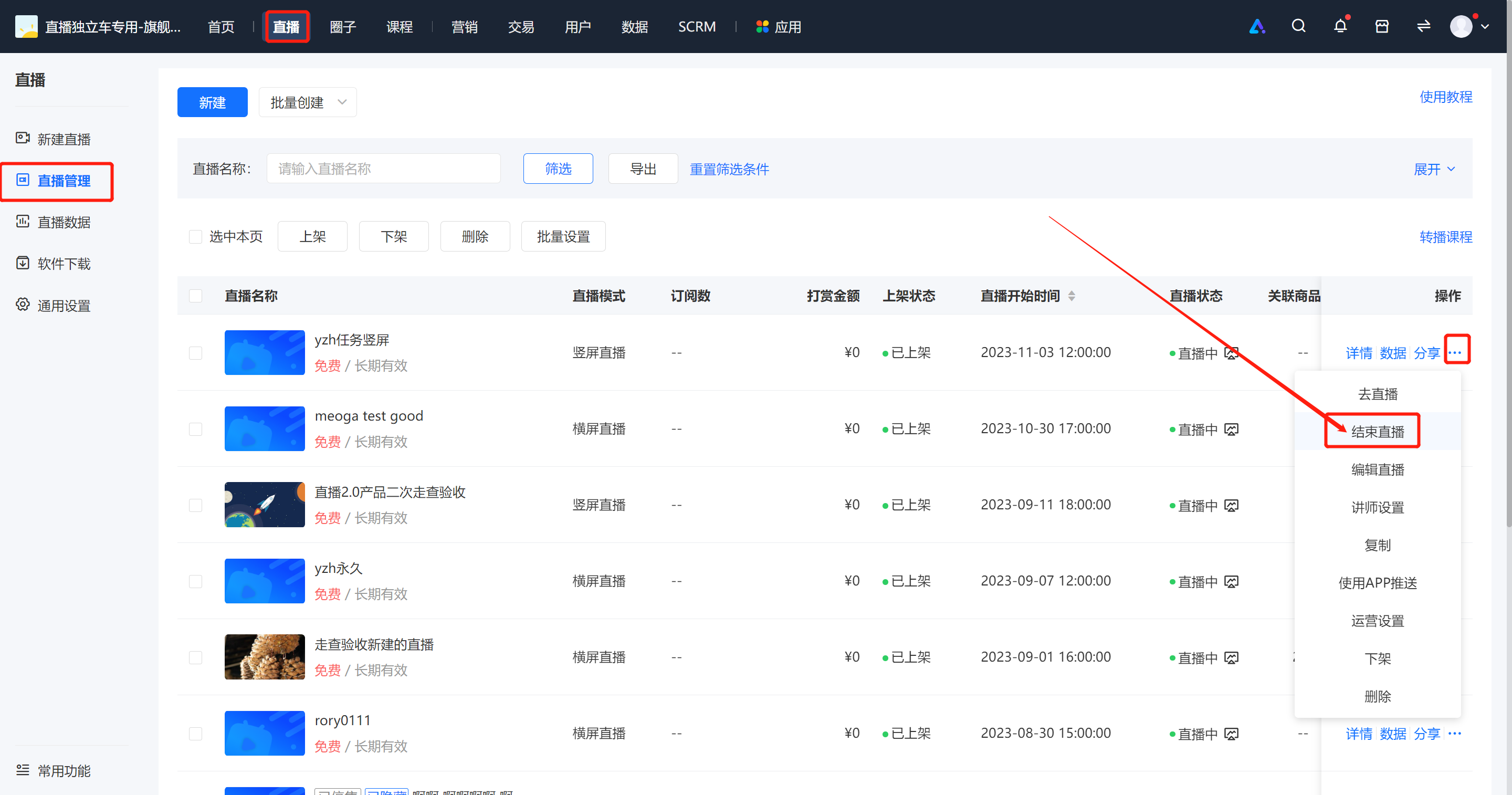
# What should I do if the live streaming time exceeds the scheduled duration?

<div data-elink-language-switch="1" id="bkmrk-%E4%B8%AD%E6%96%87" style="border:1px solid #d6d9de;border-radius:6px;padding:10px 12px;margin:0 0 18px 0;background:#f8fafc;font-size:14px;">[中文](/books/091d5/page/02e74)</div><span style="font-size:14px;"><span style="margin:0px;padding:0px;font-family:'Microsoft YaHei', '微软雅黑';white-space:pre-wrap;">Scenario 1: If your live streaming duration exceeds the set time, don't worry. As long as the network remains stable, you can continue the live stream.  
</span><span style="margin:0px;padding:0px;font-family:'Microsoft YaHei', '微软雅黑';white-space:pre-wrap;color:rgb(255,0,0);">Note: In a video live stream, if the lecturer's teaching time has exceeded the current scheduled end time, to ensure the lecturer can proceed smoothly, it is recommended to appropriately extend the live streaming time before the scheduled end time to guarantee the smooth progress of the live stream.  
</span><span style="margin:0px;padding:0px;font-family:'Microsoft YaHei', '微软雅黑';white-space:pre-wrap;"></span></span>

<span style="font-size:14px;"><span style="margin:0px;padding:0px;font-family:'Microsoft YaHei', '微软雅黑';white-space:pre-wrap;"><span style="font-family:'Microsoft YaHei', '微软雅黑';font-size:14px;white-space:pre-wrap;">Scenario 2:</span>If your live streaming duration is less than the set time, you can manually end the current live stream by going to \[Live Streaming - Live Stream Management - Live Stream List - More - End Live Stream\].</span></span>

<span style="font-size:14px;"><span style="margin:0px;padding:0px;font-family:'Microsoft YaHei', '微软雅黑';white-space:pre-wrap;">![image.png](https://wechatapppro-1252524126.file.myqcloud.com/help_document/image/ueditor/28943200_1699252136.png ".png")</span></span>

# How can users watch the live replay in the C-end live streaming room?

<div data-elink-language-switch="1" id="bkmrk-%E4%B8%AD%E6%96%87" style="border:1px solid #d6d9de;border-radius:6px;padding:10px 12px;margin:0 0 18px 0;background:#f8fafc;font-size:14px;">[中文](/books/091d5/page/c)</div><span style="font-family:'Microsoft YaHei', '微软雅黑';white-space:pre-wrap;background-color:rgb(255,255,255);font-size:14px;">Five minutes after the live stream ends, users can directly watch the live replay via the original live stream link.</span>

# Content Management

<div data-elink-language-switch="1" id="bkmrk-%E4%B8%AD%E6%96%87" style="border:1px solid #d6d9de;border-radius:6px;padding:10px 12px;margin:0 0 18px 0;background:#f8fafc;font-size:14px;">[中文](/books/091d5/page/eccbc)</div>**<span style="font-family:'宋体';font-size:17px;"><span style="font-family:Cambria;">I.</span><span style="font-family:'微软雅黑', sans-serif;">Function Introduction</span></span>**

<span style="font-size:14px;"><span style="color:rgb(38,38,38);font-family:'微软雅黑', sans-serif;">After the live stream ends, for merchants who have enabled the replay feature and wish to share the content of voice live streams, we offer replay,</span><span style="font-family:'微软雅黑', sans-serif, serif;">+</span><span style="font-family:'微软雅黑', sans-serif;">editing</span><span style="font-family:'微软雅黑', sans-serif, serif;">+</span><span style="font-family:'微软雅黑', sans-serif;">download functions for video live streams, and a voice export function for voice live streams. This facilitates merchants in secondary management and reuse of their live stream content.</span></span>

**<span style="font-family:'宋体';font-size:17px;"><span style="font-family:Cambria;">II.</span><span style="font-family:'微软雅黑', sans-serif;">Purpose of Use</span></span>**

<span style="font-size:14px;font-family:'宋体';">For video live stream merchants, once the replay is enabled, learners can replay the live stream repeatedly, enhancing the learning effect. Replay editing also helps merchants remove irrelevant footage from the live stream. Meanwhile, merchants can download the replay for secondary use.</span>

<span style="font-family:'宋体';font-size:14px;">For voice live stream merchants, after exporting the audio, they can create new audio courses, which is convenient for secondary use or further promotion.</span>

**<span style="font-family:'宋体';font-size:17px;"><span style="font-family:Cambria;">III.</span><span style="font-family:'微软雅黑', sans-serif;">Operation Path</span></span>**

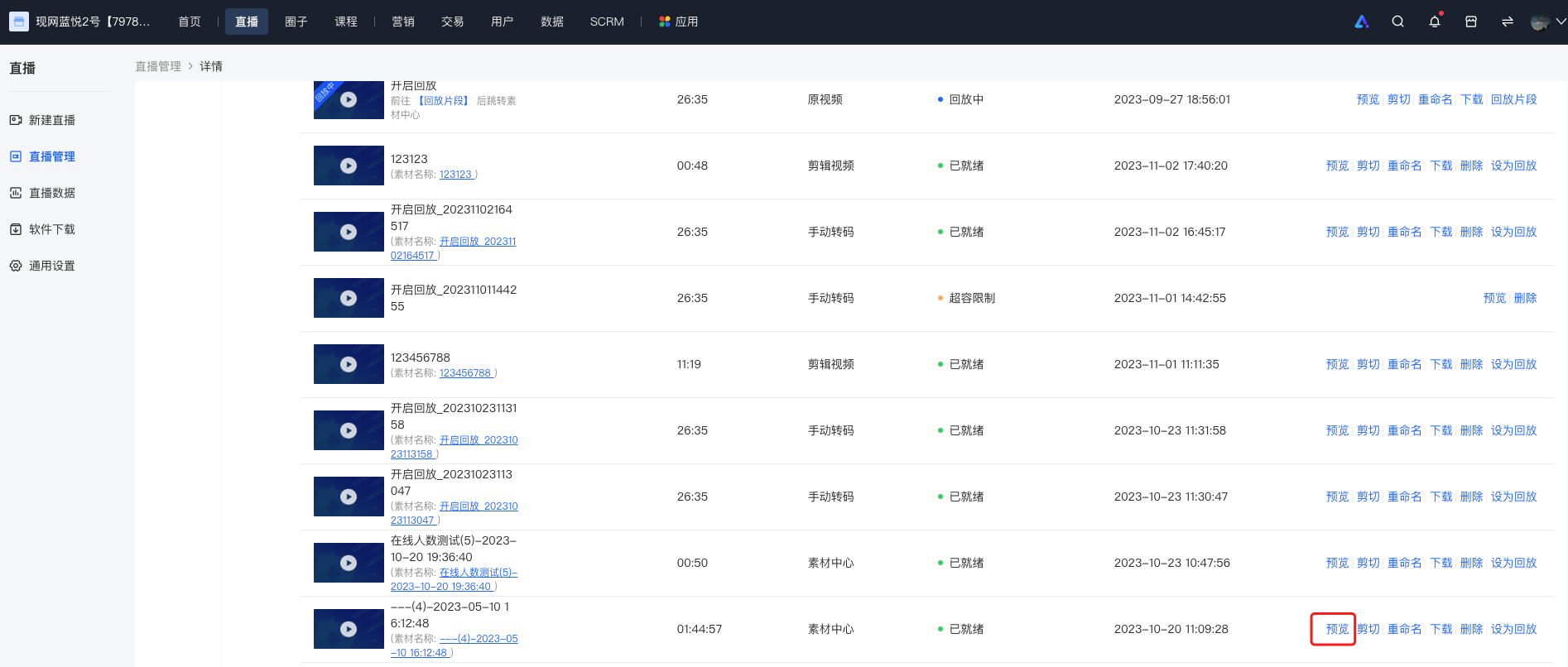
<span style="color:rgb(38,38,38);font-size:14px;font-family:'宋体';">Video Live Stream:</span><span style="color:rgb(38,38,38);font-family:'宋体';font-size:14px;text-indent:2em;">Merchant backend → Live Stream → Details → Replay Settings → Live Stream Editing or Download</span>

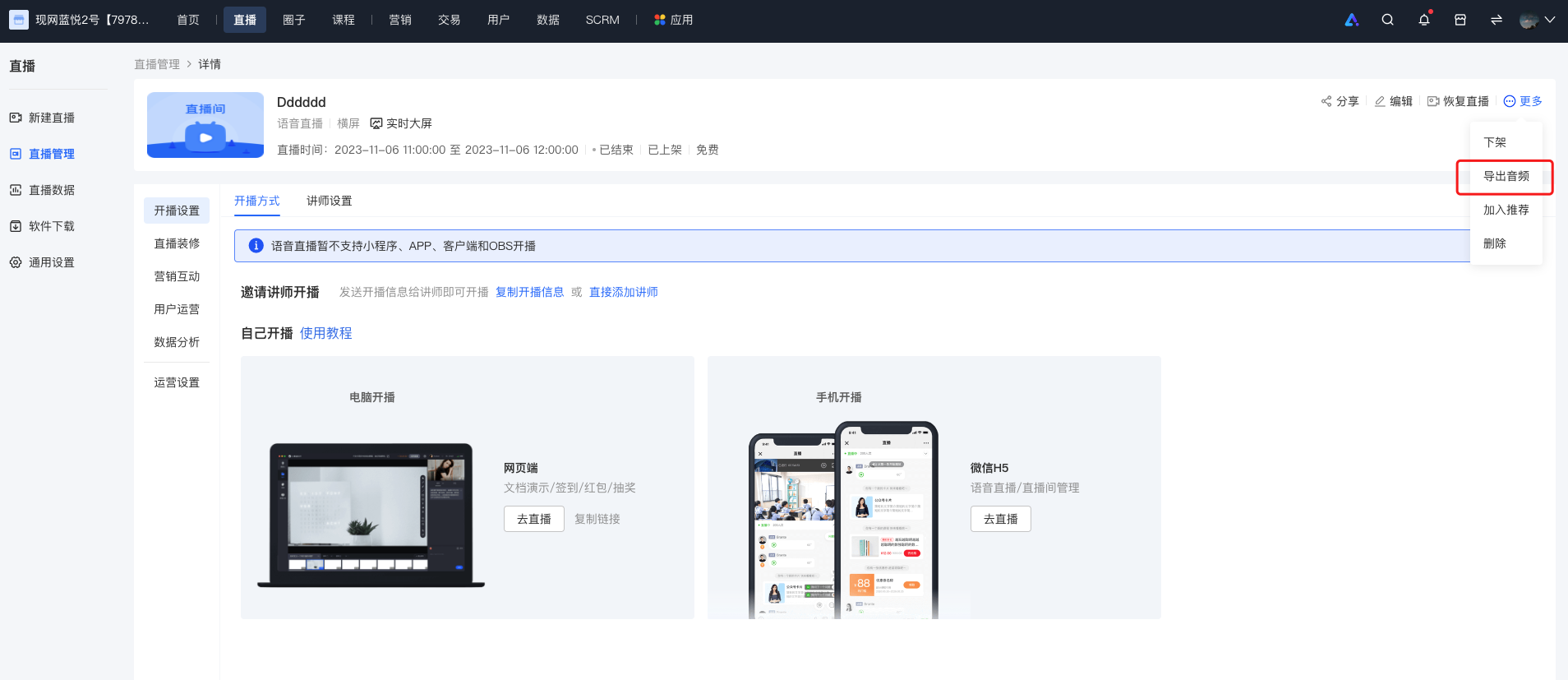
<span style="color:rgb(38,38,38);font-size:14px;font-family:'宋体';">Voice Live Stream:</span><span style="color:rgb(38,38,38);font-family:'宋体';font-size:14px;text-indent:2em;">Merchant side: Merchant backend → Live Stream → Details → Export Audio</span>

**<span style="font-family:'宋体';font-size:17px;">IV. Usage Tutorial</span>**

<span style="font-size:14px;"><span style="font-family:Cambria, serif;">1.</span><span style="font-family:Cambria;">Video Live Stream</span></span>

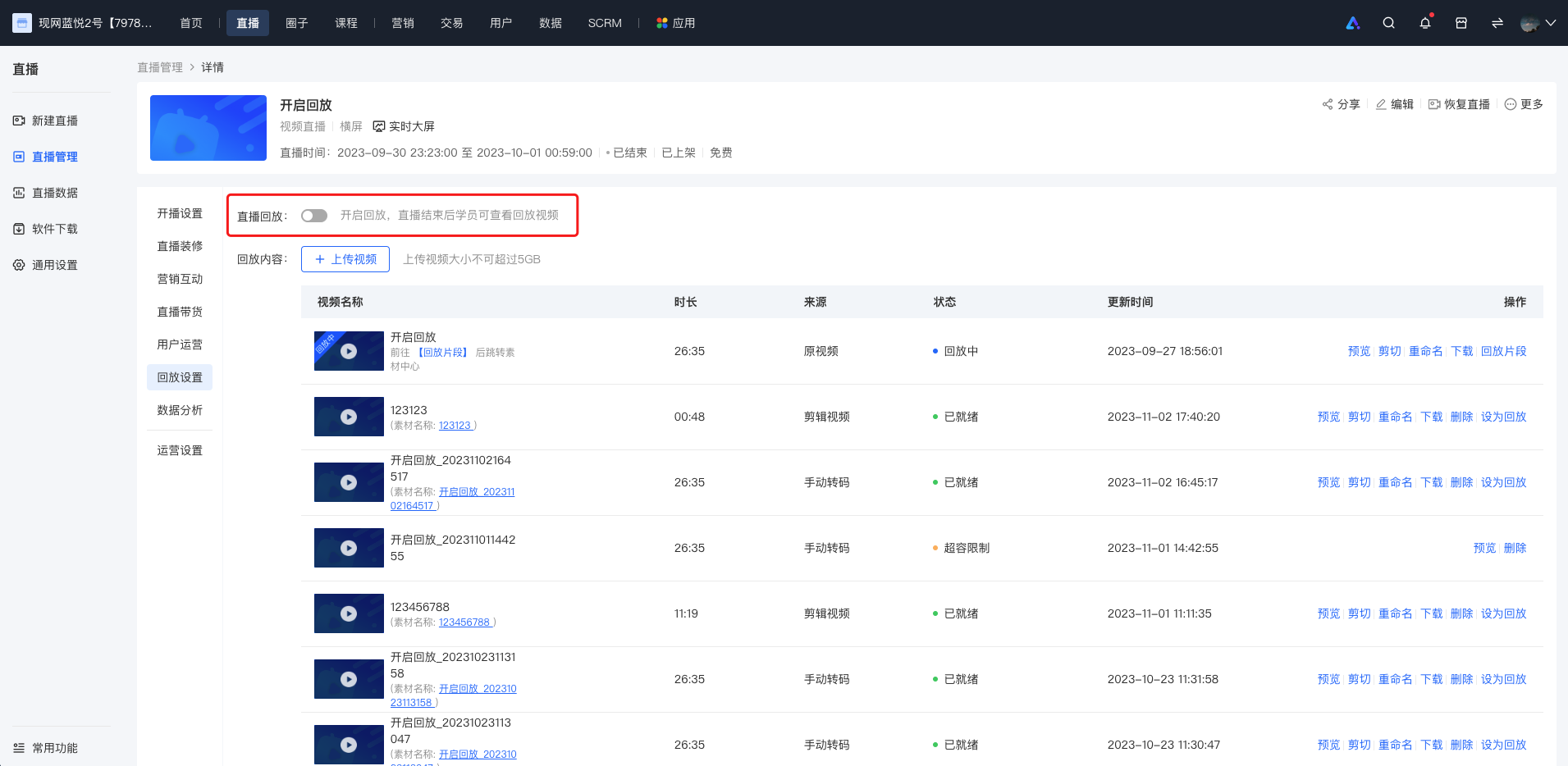
<span style="font-size:14px;font-family:'宋体';"><span style="color:rgb(38,38,38);font-family:'微软雅黑', sans-serif;">Enter the 「Live Stream Details」, turn on the 「Live Stream Replay」. After turning it off,</span><span style="font-family:'微软雅黑';">the live stream</span><span style="color:rgb(38,38,38);font-family:'微软雅黑', sans-serif;">course page will not display the live stream replay video.</span></span>

![image.png](https://wechatapppro-1252524126.file.myqcloud.com/help_document/image/ueditor/64560600_1699259526.png ".png")

<span style="font-size:14px;font-family:'宋体';">  
</span>

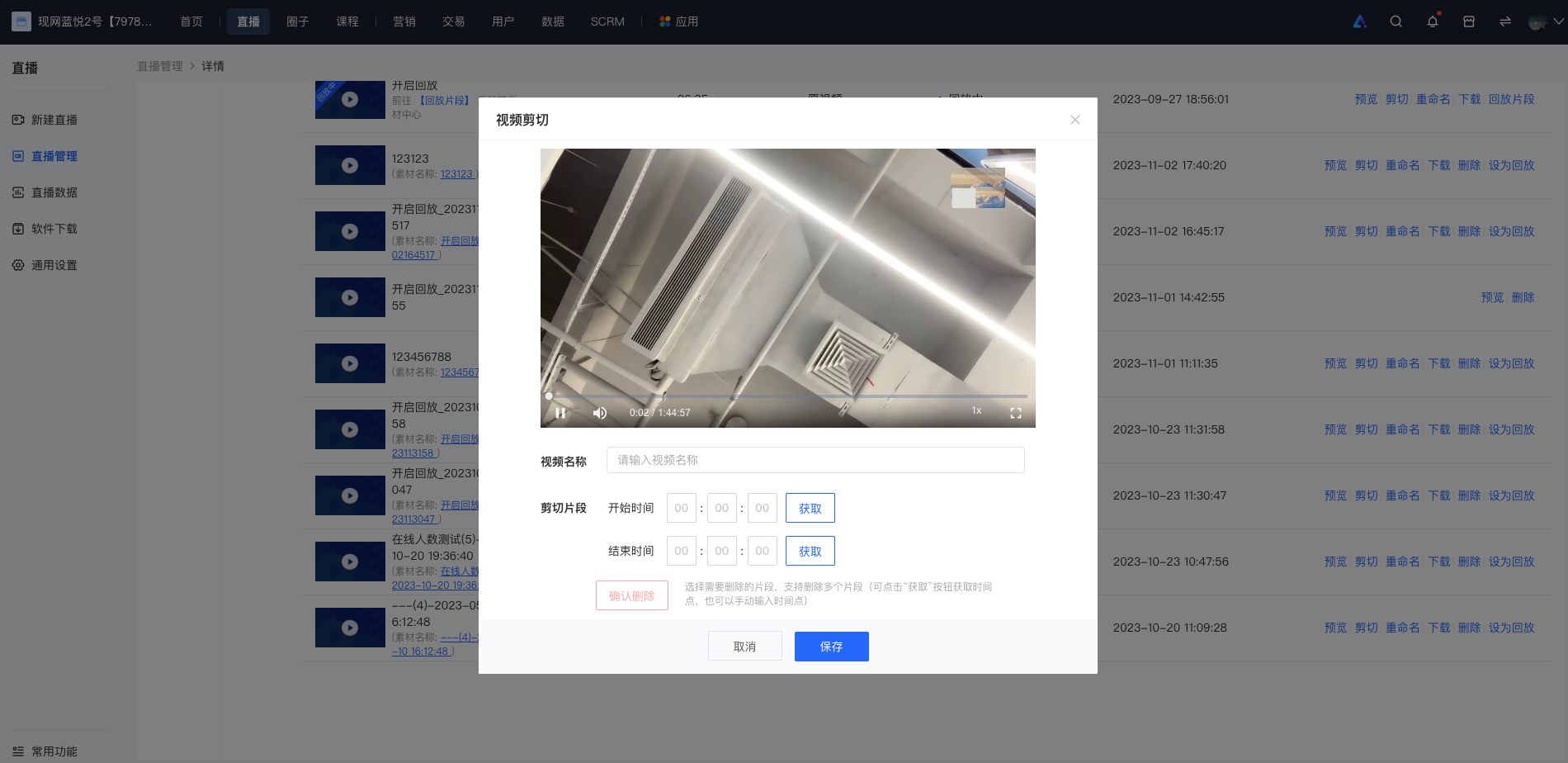
<span style="font-size:14px;font-family:'宋体';">After the original video is transcoded, you can edit the original video in the operation section.</span>

![image.png](https://wechatapppro-1252524126.file.myqcloud.com/help_document/image/ueditor/42875900_1699259643.png ".png")

**<span style="font-size:14px;"><span style="font-family:'微软雅黑';">Editing Method</span><span style="font-family:'微软雅黑', serif;">1</span><span style="font-family:'微软雅黑';">:</span></span>**<span style="font-size:14px;"><span style="font-family:'微软雅黑';">Click “Get” to obtain the time point of the currently playing video. After selecting the start and end times, you can delete the segment.</span></span>

**<span style="font-size:14px;"><span style="font-family:'微软雅黑';">Editing Method</span><span style="font-family:'微软雅黑', serif;">2</span><span style="font-family:'微软雅黑';">:</span></span>**<span style="font-size:14px;"><span style="font-family:'微软雅黑';">Manually enter the start and end time points. After entering, click “Delete Segment” to delete it.</span></span>

<span style="font-size:14px;font-family:'宋体';">Multiple segments can be deleted during video segment editing. Click “Save” to save the edited video.</span>

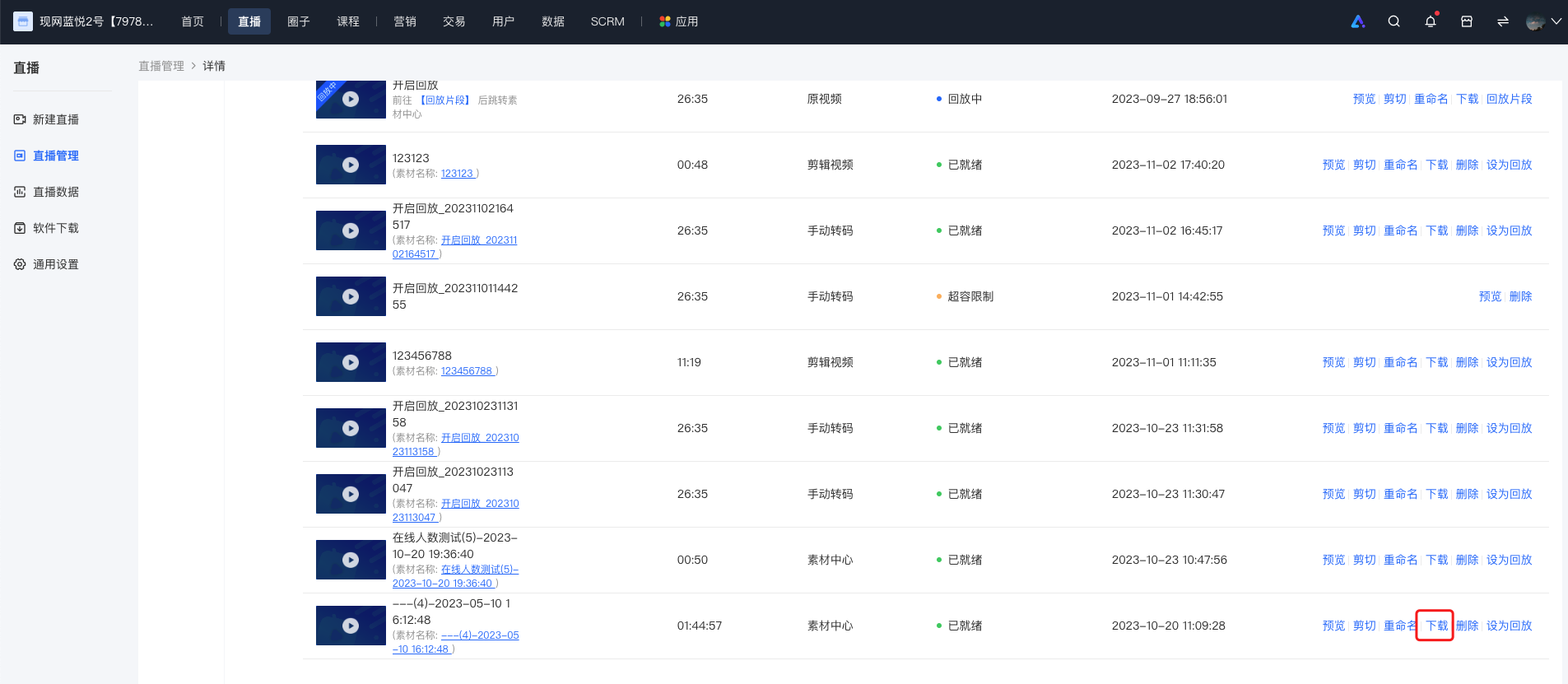
**<span style="font-size:14px;"><span style="font-family:'微软雅黑';">Preview: Click “Preview” to preview the edited video</span><span style="font-family:'微软雅黑', serif;">/</span><span style="font-family:'宋体';"><span style="font-family:'微软雅黑';">the original video.</span><span style="color:rgb(73,73,73);font-family:'-apple-system', BlinkMacSystemFo;">Click “Download” to download the</span></span></span>**

<span style="font-size:14px;"><span style="font-family:'宋体';"><span style="color:rgb(73,73,73);font-family:'-apple-system', BlinkMacSystemFo;">![image.png](https://wechatapppro-1252524126.file.myqcloud.com/help_document/image/ueditor/99071500_1699259666.png ".png")</span></span></span>

<span style="font-size:14px;"><span style="font-family:'微软雅黑';">  
</span></span>

<span style="font-size:14px;"><span style="font-family:'微软雅黑';">Click “Download” to download</span><span style="font-family:'微软雅黑', serif;">m3u8</span><span style="font-family:'微软雅黑';">format live stream video.</span></span>

<span style="font-size:14px;"><span style="font-family:'微软雅黑';">![image.png](https://wechatapppro-1252524126.file.myqcloud.com/help_document/image/ueditor/65808800_1699259753.png ".png")</span></span>

<span style="font-size:14px;"><span style="font-family:'微软雅黑', serif;">  
</span></span>

<span style="font-size:14px;"><span style="font-family:'微软雅黑', serif;">2.</span><span style="font-family:'微软雅黑';">Voice Live Stream</span></span>

<span style="font-size:14px;font-family:'宋体';">Enter the 「Voice Details」 of the voice live stream, click “More” in the upper - right corner and select 「Export Audio」 to complete the audio export.</span><span style="font-size:14px;"> </span><span style="font-size:14px;font-family:'宋体';"></span>

<span style="font-size:14px;font-family:'宋体';">![image.png](https://wechatapppro-1252524126.file.myqcloud.com/help_document/image/ueditor/60892600_1699259753.png ".png")</span>

# Data description of live commerce user management

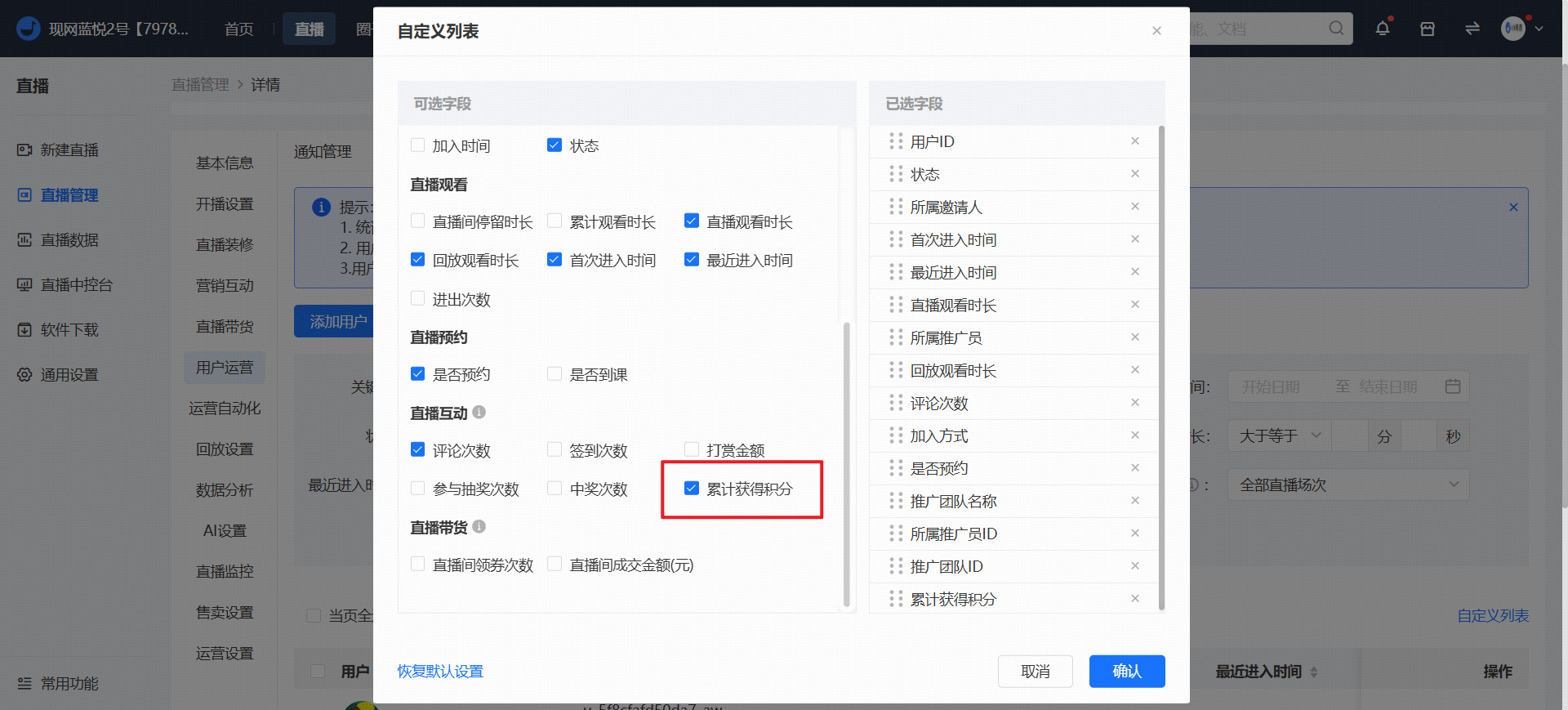
<div data-elink-language-switch="1" id="bkmrk-%E4%B8%AD%E6%96%87" style="border:1px solid #d6d9de;border-radius:6px;padding:10px 12px;margin:0 0 18px 0;background:#f8fafc;font-size:14px;">[中文](/books/091d5/page/e836d-sS8)</div>**1. In \[Live Details - User Operations - User Management\], the "<span style="color:rgb(192,0,0);">Cumulative Points Earned</span>" includes which types of points?**

![image/png](https://wechatapppro-1252524126.file.myqcloud.com/help_center_ooo/image/help_center_ooo/ru7345m49ow3i9.png "image.png")

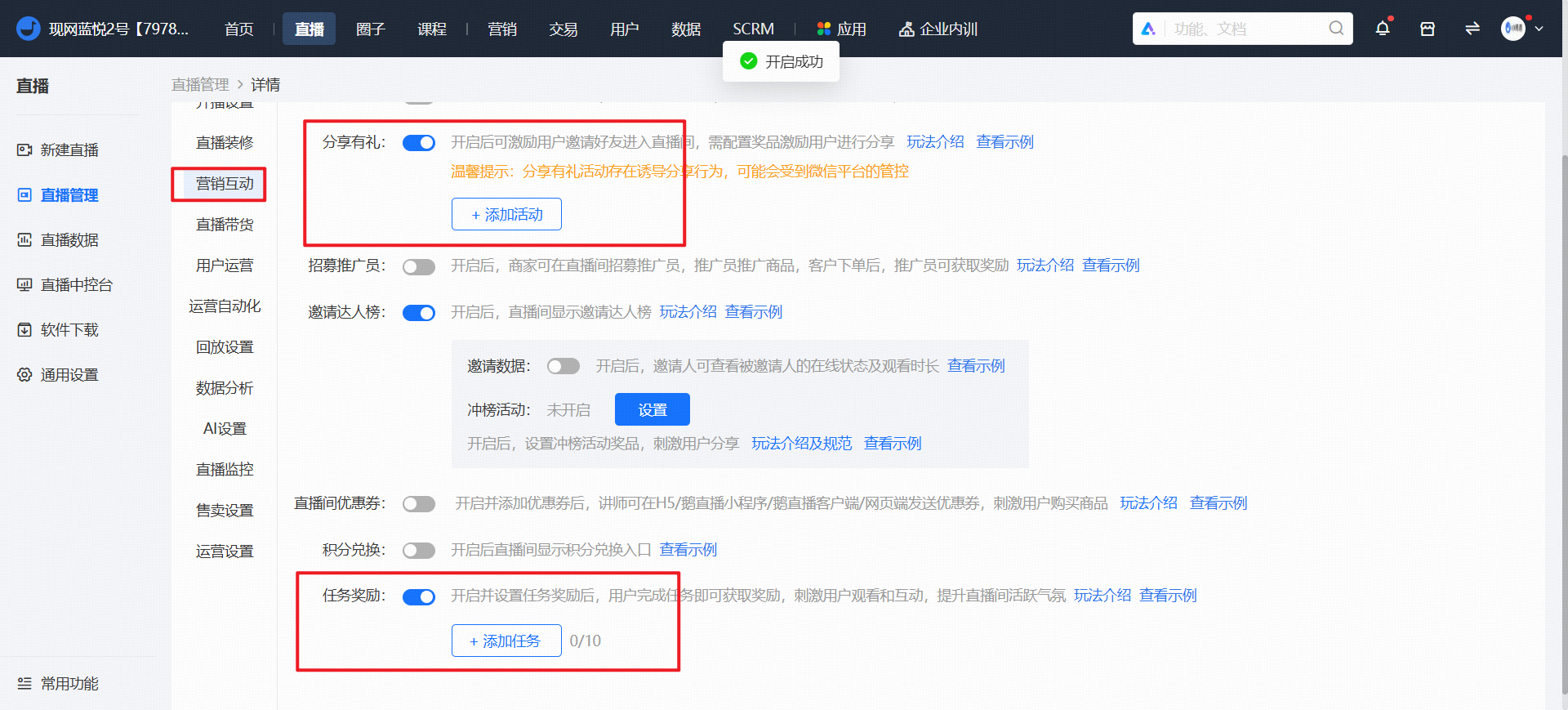
**Data Clarification:**This data refers to the total cumulative points earned by users in this live - streaming room, including<span style="background-color:rgb(253,234,218);">Points won from lucky draws</span>,<span style="background-color:rgb(253,234,218);">Points rewards from tasks</span>,<span style="background-color:rgb(253,234,218);">Claimed point red envelopes</span>and<span style="background-color:rgb(253,234,218);">Points rewards from participating in share - to - win campaigns.</span>

<span style="font-weight:bolder;">Note:</span>This data - the cumulative points earned during the live stream - is counted starting from 00:00 on August 9, 2024. Points earned by users in the live - streaming room before this time will not be included in the statistics.

Appendix: The following circled point - issuing functions will be included in the statistics
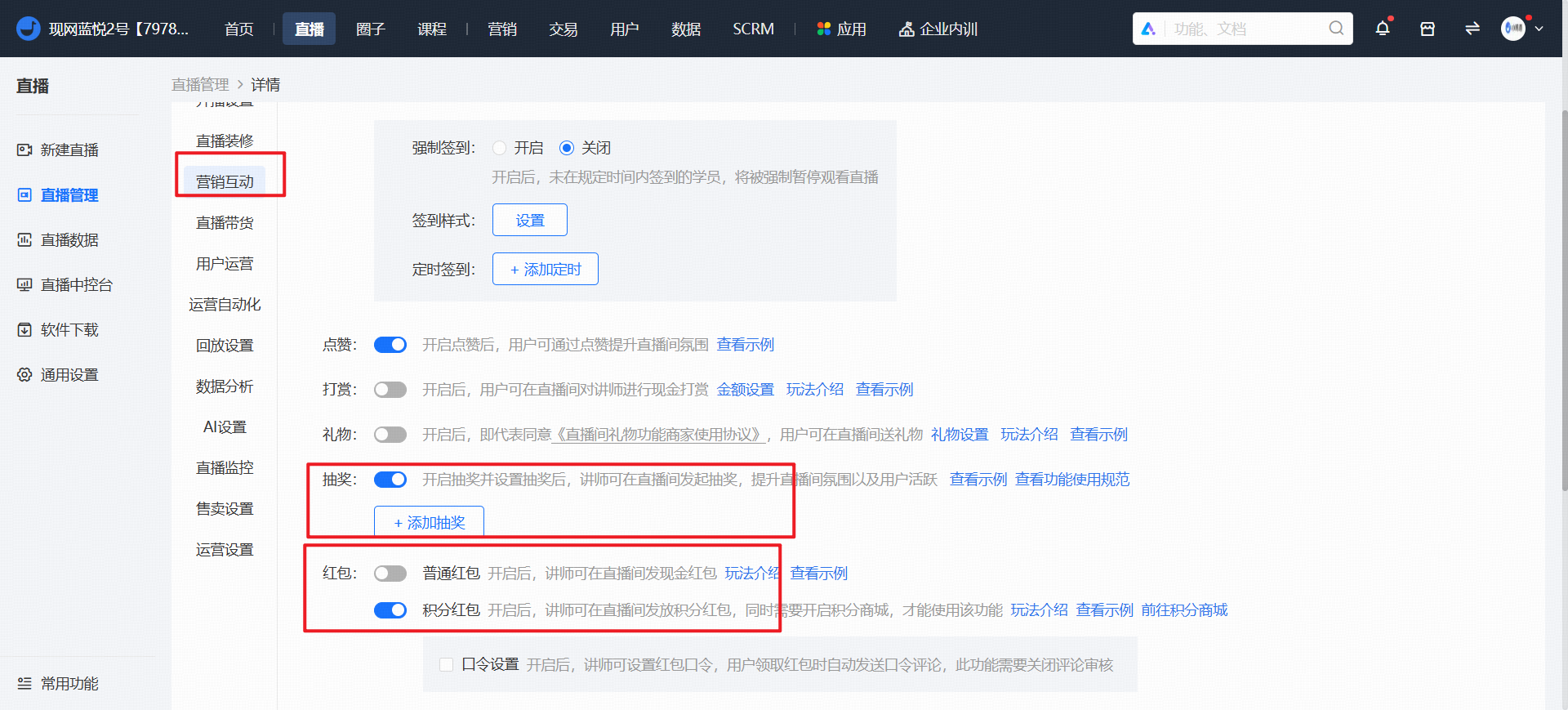
<span style="background-color:rgb(253,234,218);">![image/png](https://wechatapppro-1252524126.file.myqcloud.com/help_center_ooo/image/help_center_ooo/no6qn1m49plea1.png "image.png")</span>

<span style="background-color:rgb(253,234,218);">![image/png](https://wechatapppro-1252524126.file.myqcloud.com/help_center_ooo/image/help_center_ooo/sx2pq9m49pm4e2.png "image.png")</span>