# Where can I set the store logo?

<div data-elink-language-switch="1" id="bkmrk-%E4%B8%AD%E6%96%87" style="border:1px solid #d6d9de;border-radius:6px;padding:10px 12px;margin:0 0 18px 0;background:#f8fafc;font-size:14px;">[中文](/books/877a9/page/logo)</div><span style="white-space:pre-wrap;background-color:rgb(255,255,255);"></span>

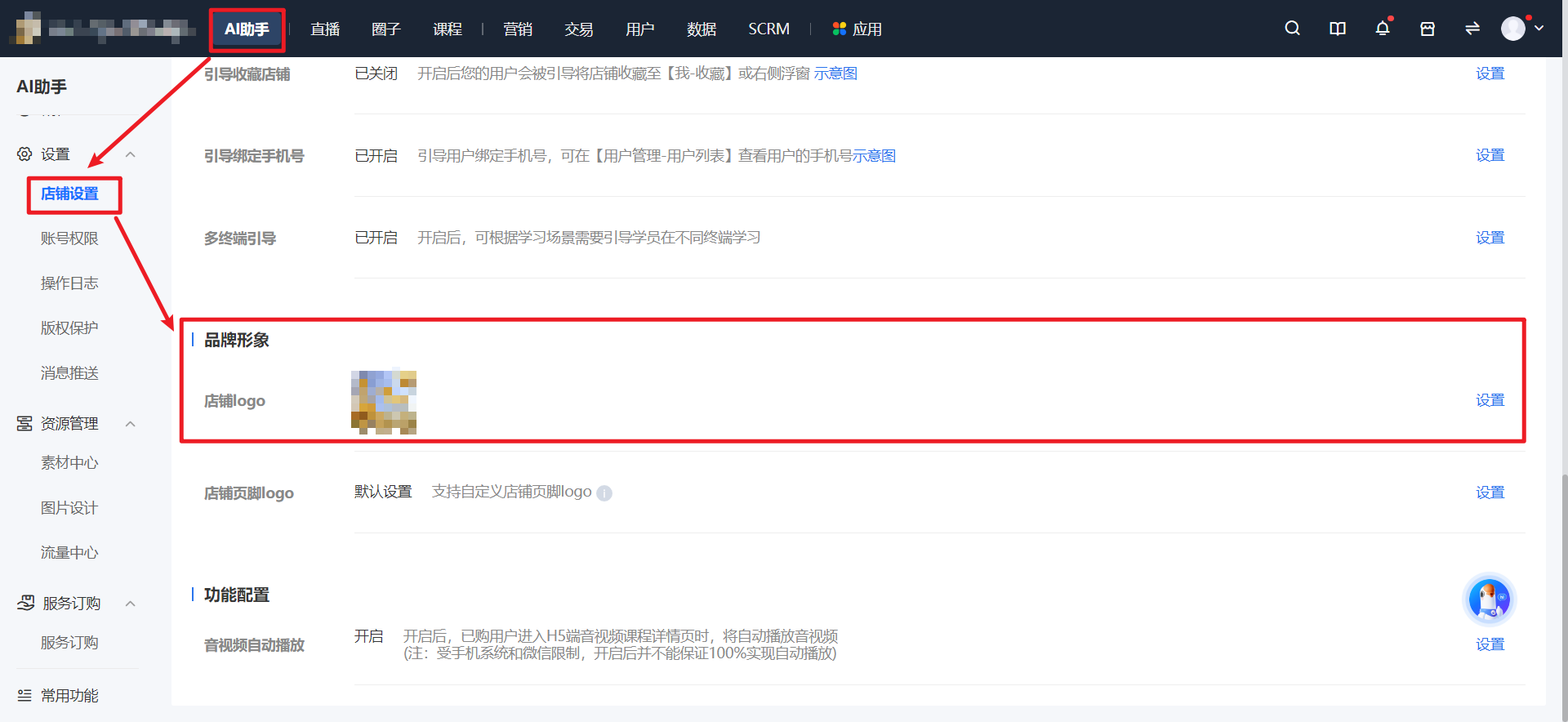
<span style="color:rgb(53,53,53);background:rgb(255,255,255);letter-spacing:0pt;vertical-align:baseline;font-size:15px;">After clicking on \[AI Assistant\] at the top of the management console, click \[Settings\] - \[Store Settings\] - \[Brand Image\] - \[Store Logo\] on the left to make the settings.</span>

<span style="white-space:pre-wrap;background-color:rgb(255,255,255);">![image.png](https://wechatapppro-1252524126.file.myqcloud.com/help_document/image/ueditor/14074700_1695008223.png ".png")</span>