# Head and Branch Store Management

# Branch Store Management

# Tutorial on Using the Head and Branch Store Management System

<div data-elink-language-switch="1" id="bkmrk-%E4%B8%AD%E6%96%87" style="border:1px solid #d6d9de;border-radius:6px;padding:10px 12px;margin:0 0 18px 0;background:#f8fafc;font-size:14px;">[中文](/books/41f1f/page/6da90)</div><span style="font-size:17px;">**I. Function Introduction**</span>

<span style="font-size:15px;">The Headquarter-Branch Management module is a one-stop solution provided by elink for institutional headquarters for course distribution to branches and branch management.</span>

<span style="font-size:17px;">**II. Purpose of Use**</span>

<span style="font-size:15px;">It is suitable for the headquarters of various institutions to output courses, empower with content, manage data, etc. for branches/schools, franchise stores/schools, and channels, promoting the formation of a good cooperative relationship between the headquarters and branches.</span>

<span style="font-size:17px;">**III. Use Scenarios**</span>

<span style="font-size:15px;">A chain education institution A. Most of its branch campuses have opened stores on elink and have been using them. The headquarters wants to uniformly manage and distribute courses to both the branch campuses that have already opened elink stores and those that have not.</span>

<span style="font-size:15px;">Education institution A can bind the relationship between the opened branch campus stores and the headquarters store through an agreement. The headquarters initiates the application, and the branch campuses authorize it to establish the headquarter-branch relationship. After that, the headquarters can distribute unified courses to the branches and manage the data of the branches.</span>

<span style="font-size:15px;">For branch campuses that have not opened elink stores, different versions of stores can be opened according to the needs of the branch campuses first, and then the association operation can be carried out to establish the relationship.</span>

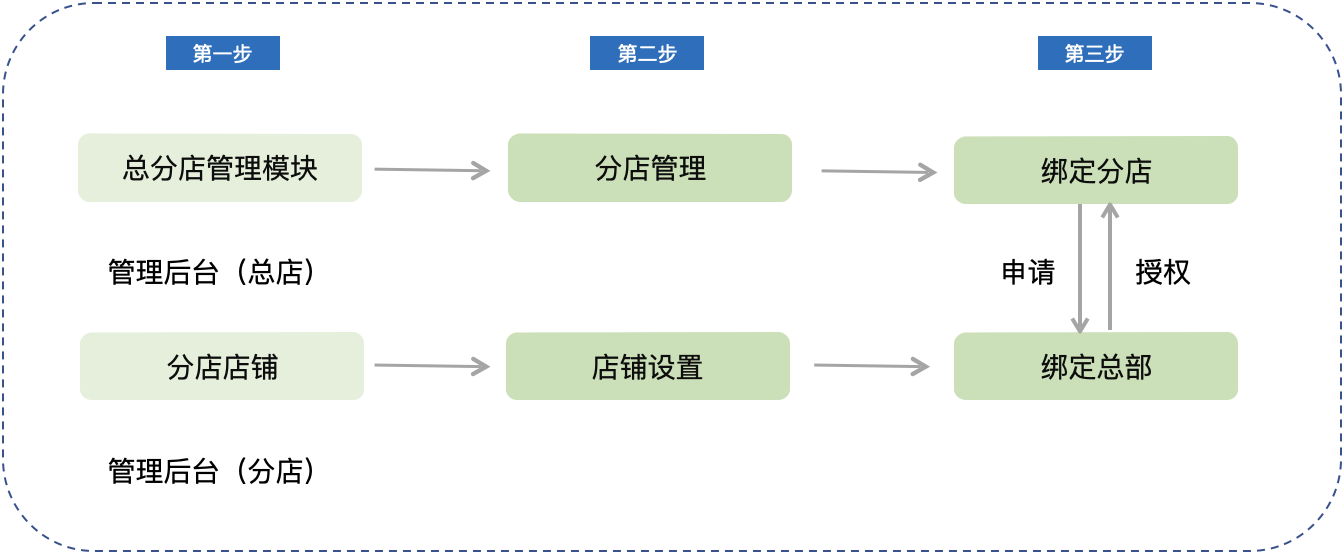
<span style="font-size:17px;">**IV. Operation Path**</span>

<span style="font-size:15px;">**<span style="font-size:17px;">![1.png](https://wechatapppro-1252524126.file.myqcloud.com/help_document/image/ueditor/22727000_1699607673.png ".png")</span>**</span>

<span style="font-size:15px;">\[Merchant End\]</span>

<span style="font-size:15px;">Headquarters: Merchant background of the headquarters store → Applications → More scenarios → Headquarter-Branch Management → Branch Management → Bind Branches → Initiate Application</span>

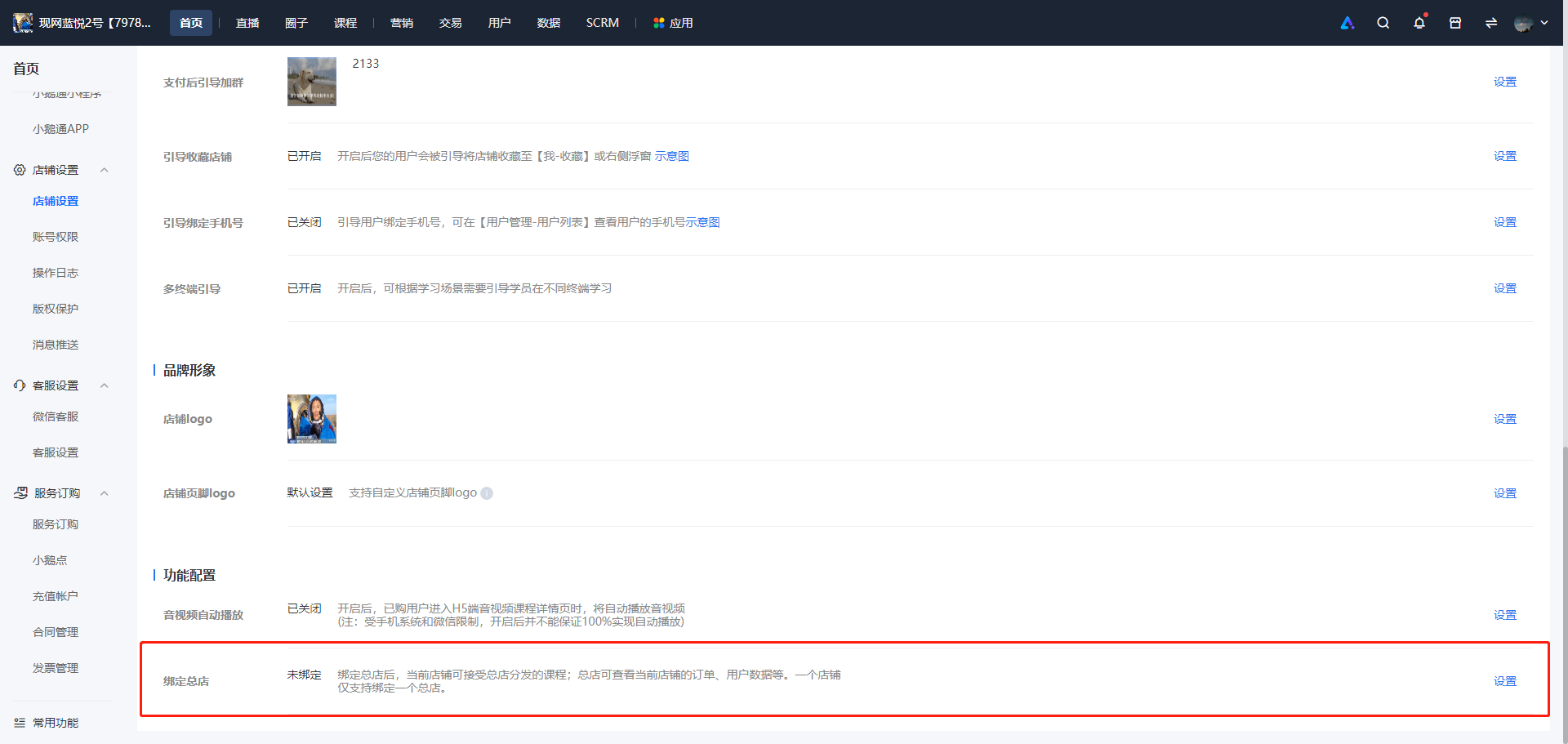
<span style="font-size:15px;">Branches: Merchant background of the branch store → Store Settings → Bind Headquarters → Agree to Authorization</span>

**<span style="font-size:17px;">V. Usage Tutorial</span>**

<span style="font-size:15px;">Specific Steps:</span>

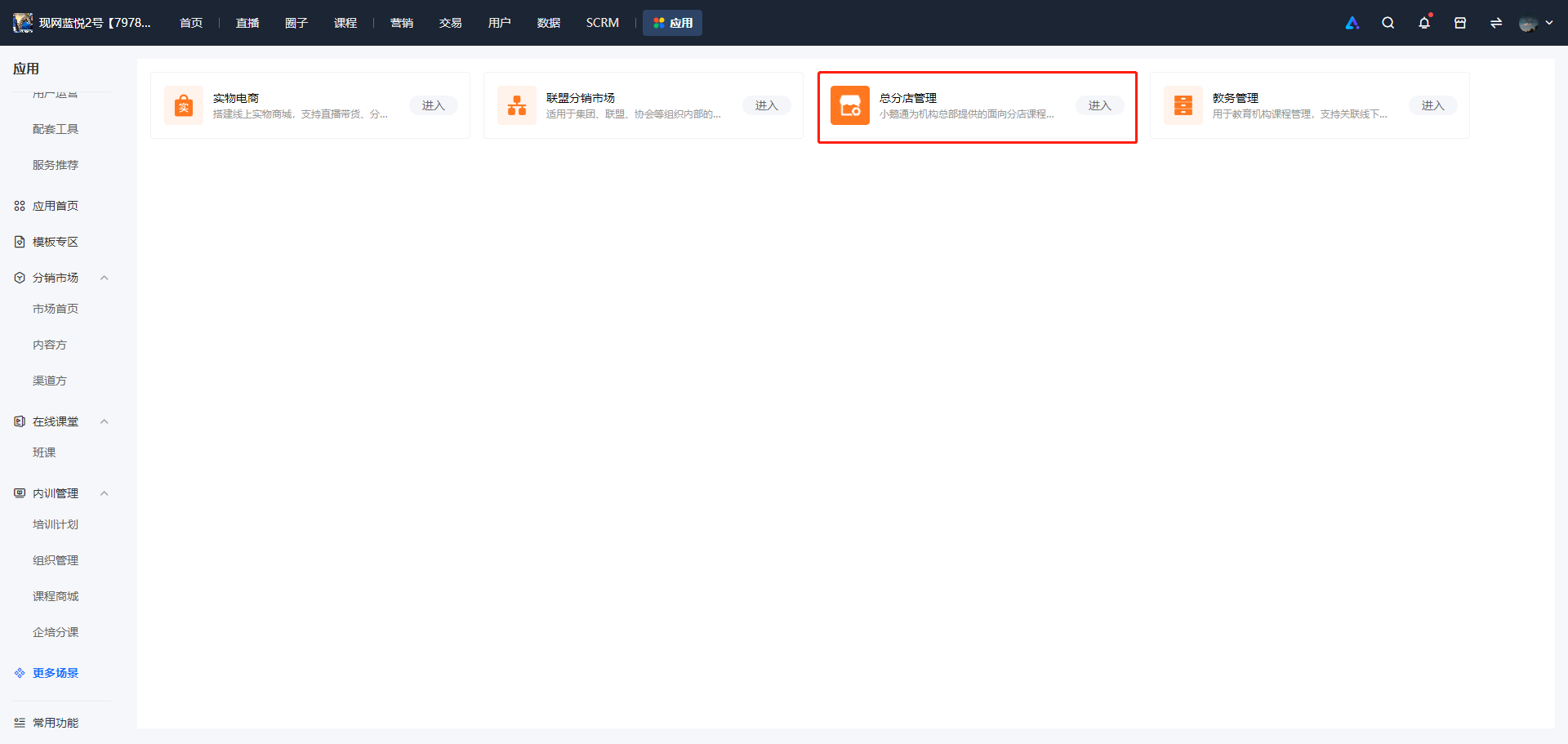
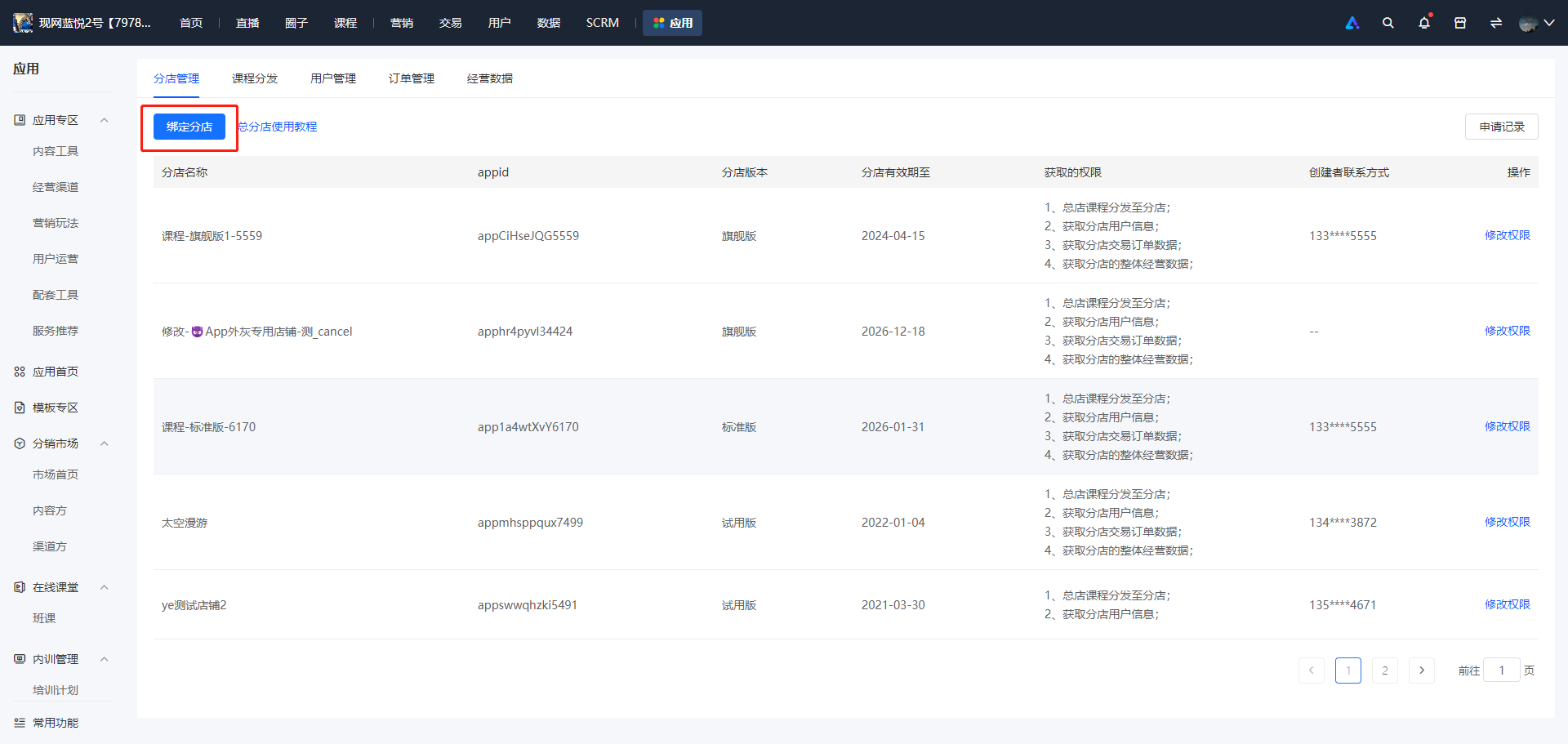
<span style="font-size:15px;">1. Log in to the elink merchant management background, and select \[Applications\] - \[More scenarios\] - \[Headquarter-Branch Management\] - \[Branch Management\] - \[Bind Branches\] in sequence.</span>

![image.png](https://wechatapppro-1252524126.file.myqcloud.com/help_document/image/ueditor/82984800_1699607673.png ".png")

![image.png](https://wechatapppro-1252524126.file.myqcloud.com/help_document/image/ueditor/10881800_1699607712.png ".png")

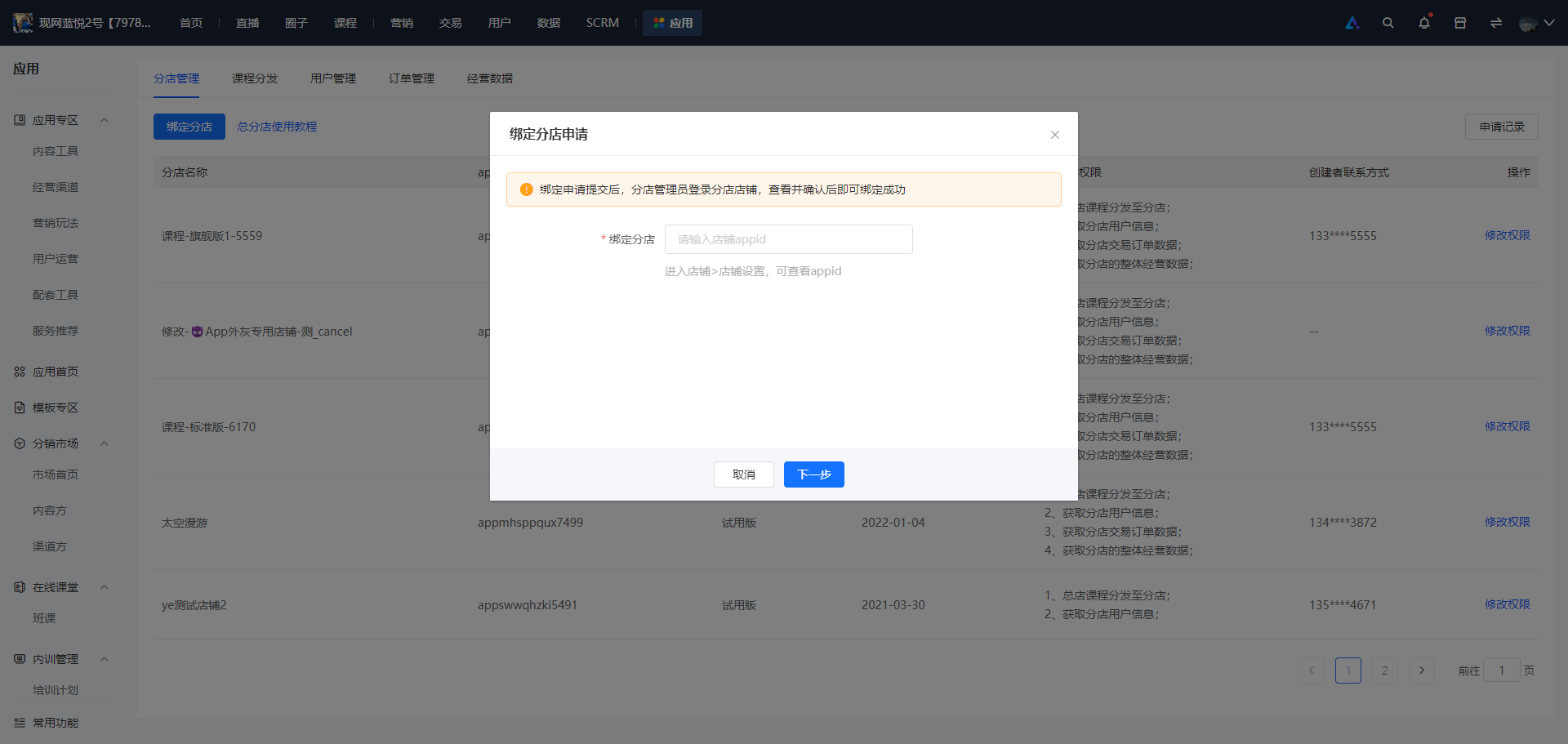
<span style="font-size:15px;">2. Enter the appid of the branch to be bound. If you don't know the appid of the branch, you can check it in the branch - Store Settings.</span>

![image.png](https://wechatapppro-1252524126.file.myqcloud.com/help_document/image/ueditor/98703600_1699607810.png ".png")x

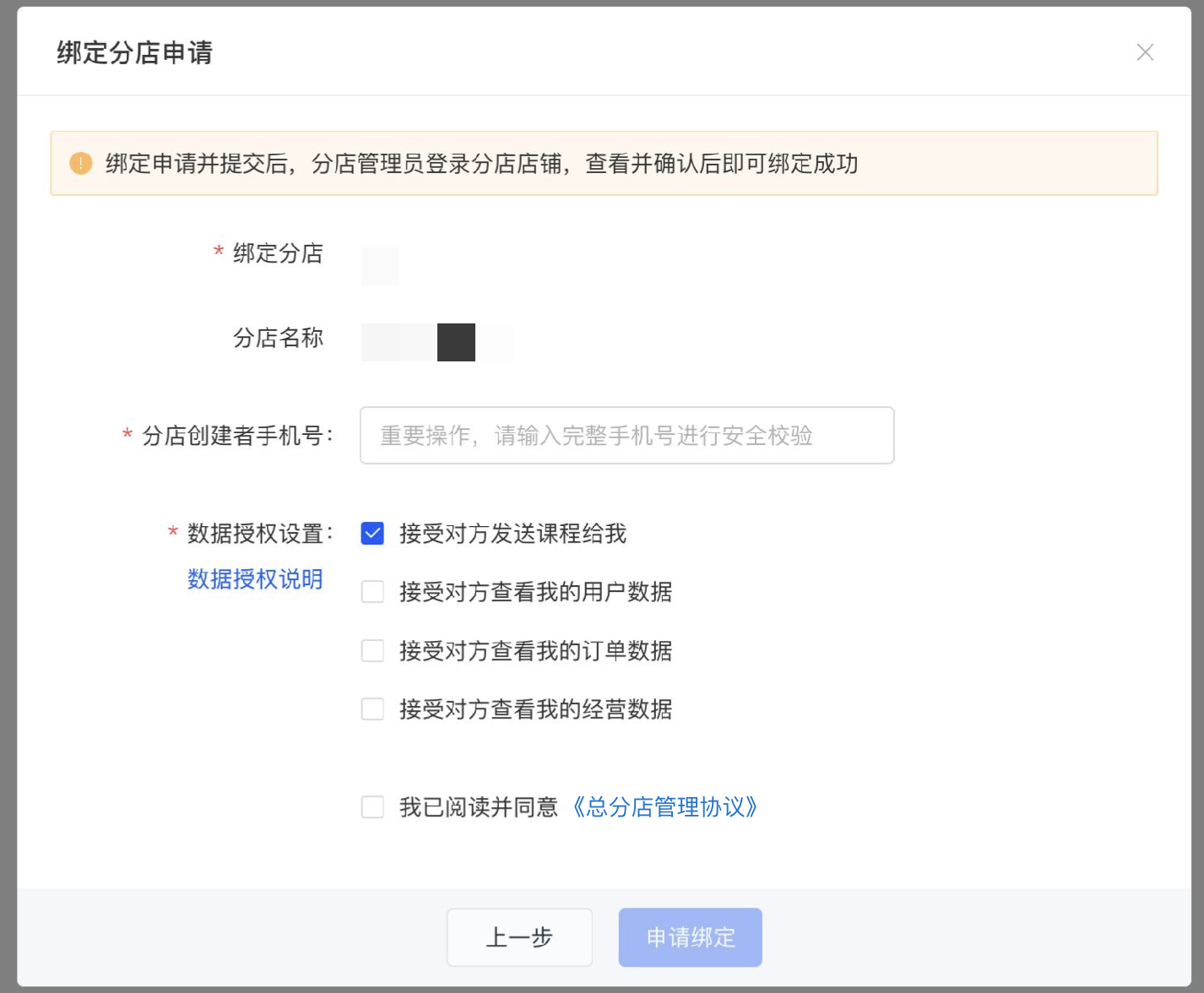
<span style="font-size:15px;">3. Click Next. The headquarters needs to select the permissions it wants to obtain, including \[Course Distribution\], \[User Data\], \[Order Data\], and \[Business Data\]. At the same time, for security reasons, the mobile phone number of the branch creator needs to be verified.</span>

![5.png](https://wechatapppro-1252524126.file.myqcloud.com/help_document/image/ueditor/88440100_1699607674.png ".png")

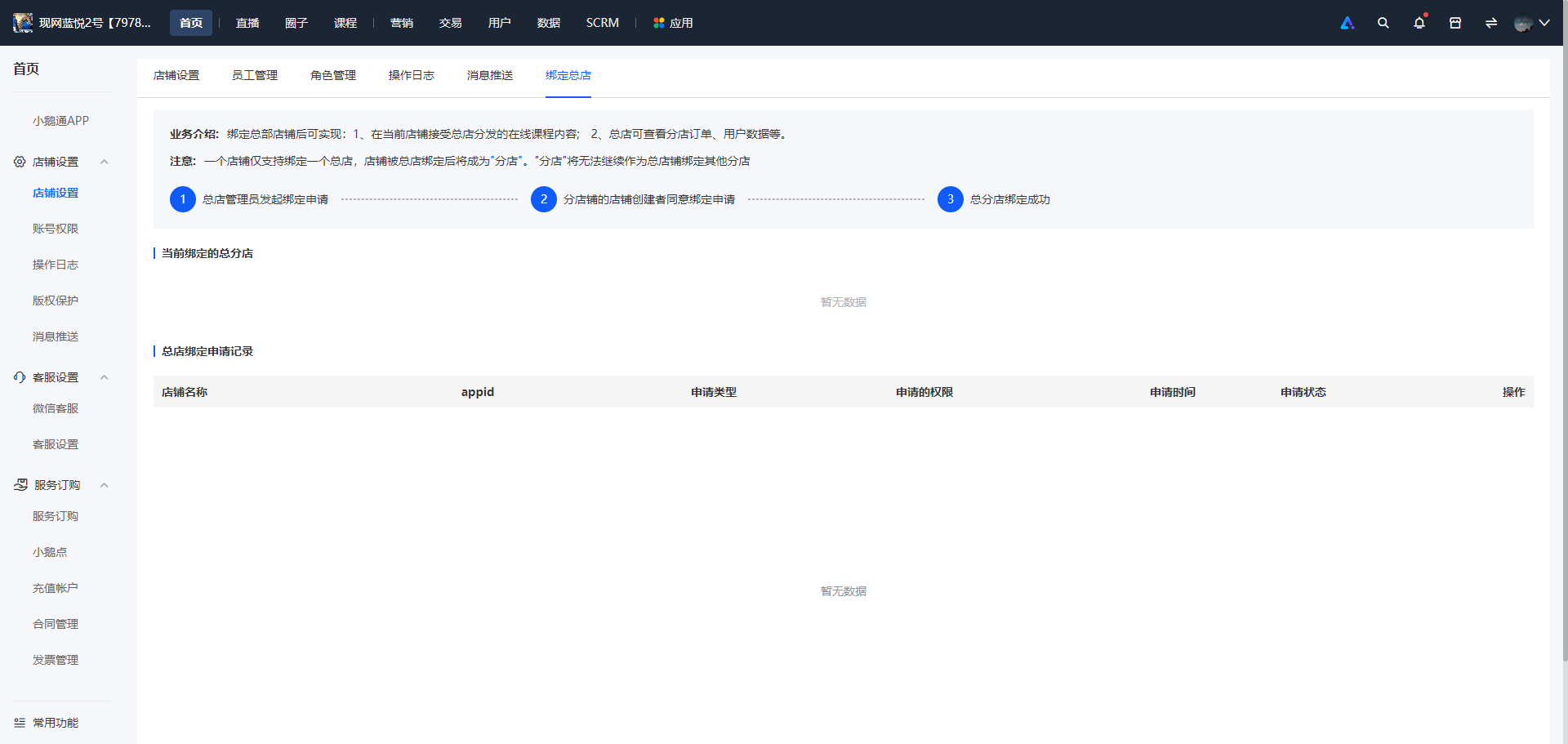
<span style="font-size:15px;">4. After the headquarters completes the process of applying for binding, the branch manager needs to go to the branch store to view and agree to the application. The branch manager logs in to the merchant background of the branch store, selects \[Homepage\] - \[Store Settings\] - \[Bind Headquarters\] in sequence, and clicks 'Receive' in the application record list.</span>

<span style="font-size:15px;">![image.png](https://wechatapppro-1252524126.file.myqcloud.com/help_document/image/ueditor/77346200_1699607931.png ".png")</span>

![image.png](https://wechatapppro-1252524126.file.myqcloud.com/help_document/image/ueditor/65749000_1699607864.png ".png")

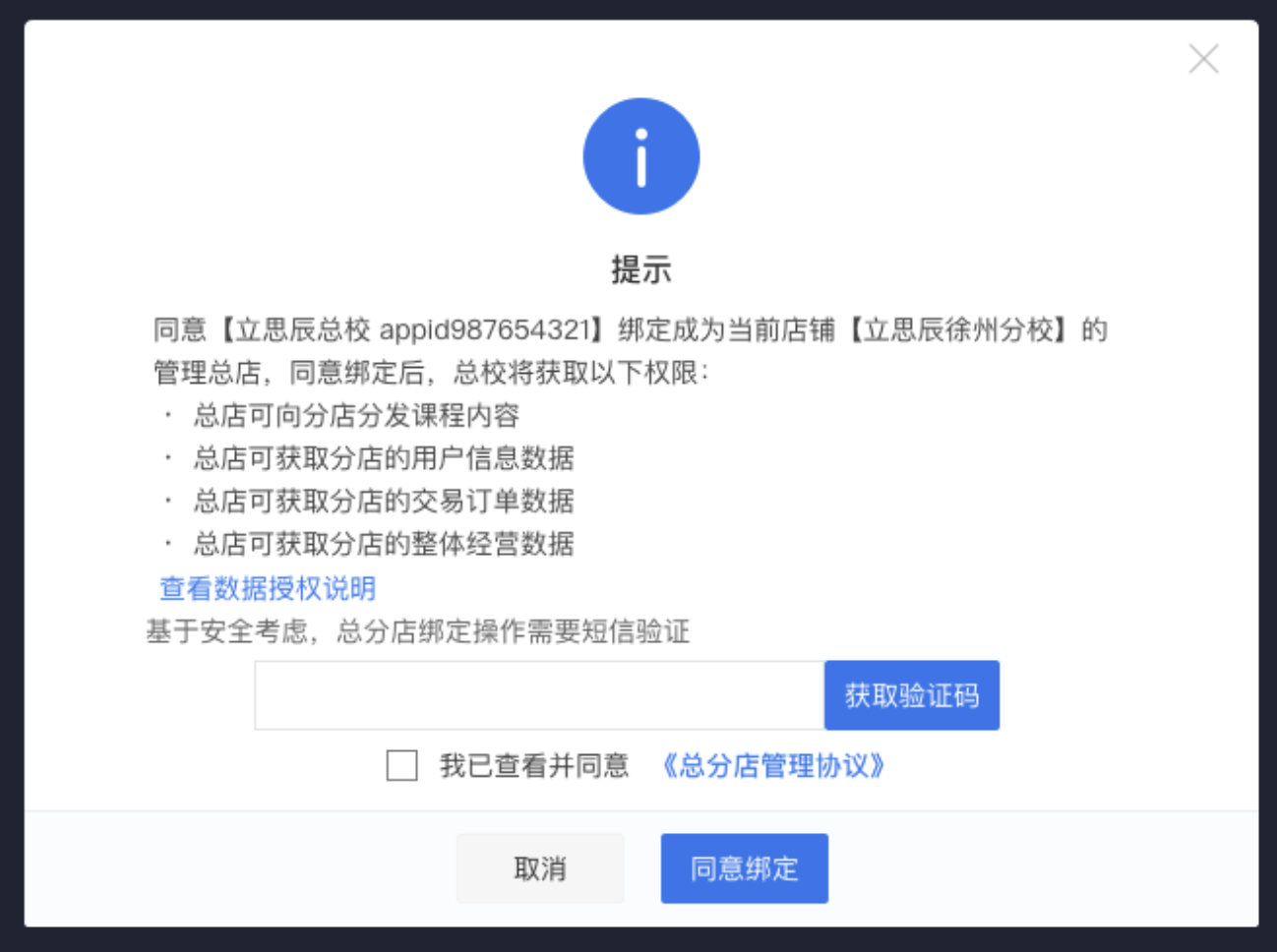
<span style="font-size:15px;">5. The branch can see the permissions that the headquarters wants to obtain in the pop-up window. Before agreeing, the branch needs to verify by SMS and select the 'Headquarter-Branch Management Agreement'. After the above operations are completed, click 'Agree to Bind', and the headquarter-branch relationship is established.</span>

![7.png](https://wechatapppro-1252524126.file.myqcloud.com/help_document/image/ueditor/82701000_1699607675.png ".png")

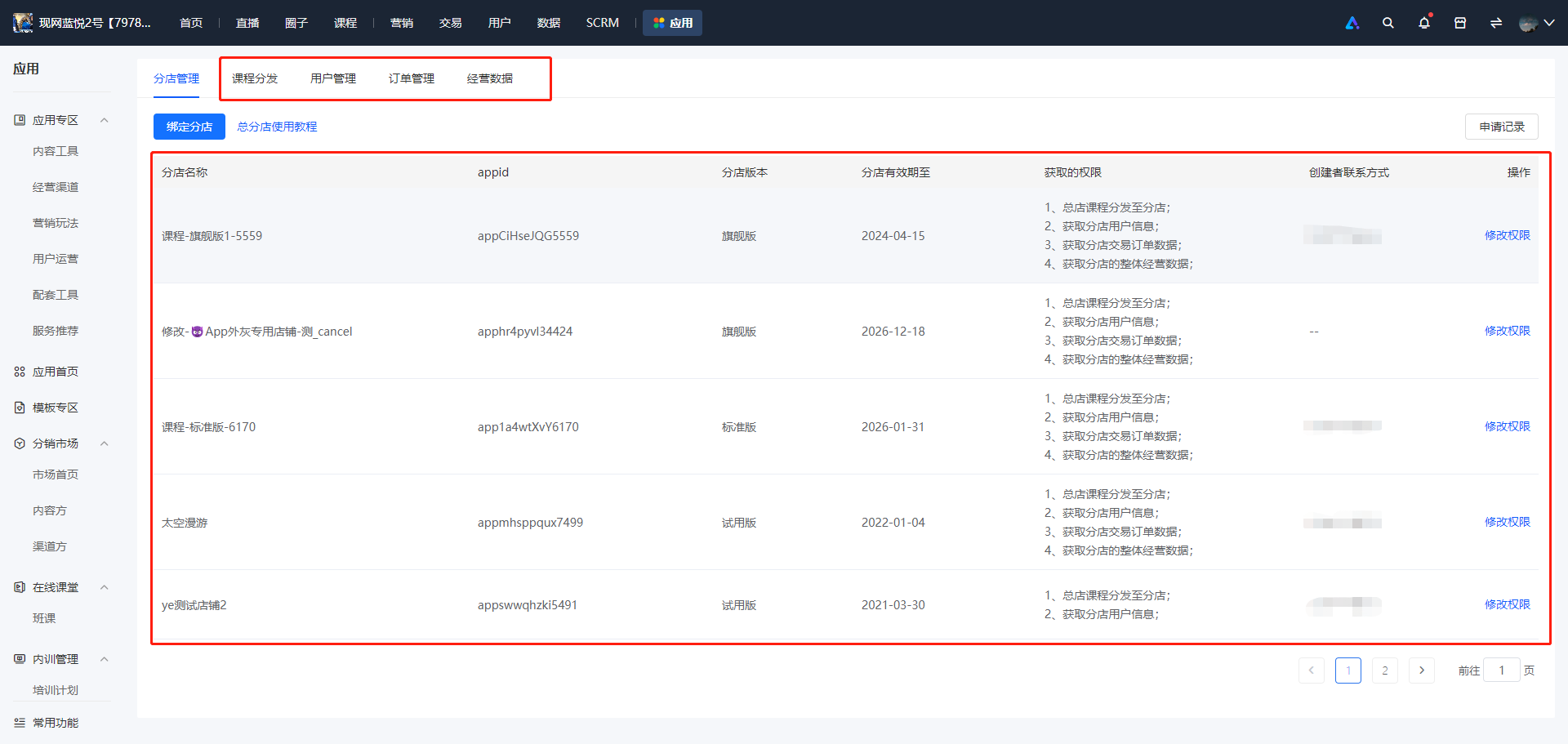
<span style="font-size:15px;">6. After the headquarter-branch relationship is established, the headquarters can see the bound branches and the authorized permissions in the branch management. According to the authorized permissions, management and operations can be carried out in course distribution, user management, order management, and business data.</span>

<span style="font-size:15px;">● If the headquarters wants to modify the authorized permissions of a bound branch, it can perform the operation of modifying permissions.</span>

<span style="font-size:15px;">● If the headquarters wants to view the historical binding application records, click the application records to view.</span>

![image.png](https://wechatapppro-1252524126.file.myqcloud.com/help_document/image/ueditor/29623600_1699607931.png ".png")

**<span style="font-size:17px;">VI. Frequently Asked Questions</span>**

<span style="font-size:15px;">1. Which version can use the Headquarter-Branch Management module?</span>

<span style="font-size:15px;">Answer: The Headquarter-Branch Management module is only supported in the flagship version, that is,<span style="font-size:15px;color:rgb(255,0,0);">the store version of the headquarters must be the flagship version.</span>If the version does not meet the requirements, please upgrade the version to the flagship version first to use it for free.</span>

<span style="font-size:15px;">2. Are there any restrictions on the version of the branches?</span>

<span style="font-size:15px;">Answer: There are no restrictions on the version of the branches. It can be the flagship version, the professional version, the ordinary version, or even the trial version.</span>

<span style="font-size:15px;">3. After becoming a headquarters, can it still become a branch of other headquarters?</span>

<span style="font-size:15px;">Answer: It is not supported. Once it becomes a headquarters, it cannot become a branch again. Please operate with caution.</span>

<span style="font-size:15px;">4. After becoming a branch, can it still become a branch of other headquarters?</span>

<span style="font-size:15px;">Answer: It is not supported temporarily. Currently, once it becomes a branch of a certain headquarters, it cannot become a branch of other headquarters again. Please operate with caution.</span>

<span style="font-size:15px;">5. Can the headquarters unbind the bound branches?</span>

<span style="font-size:15px;">Answer: The unbinding operation is not supported temporarily. The unbinding operation will be added later.</span>

<span style="font-size:15px;">6. Do functions such as offline courses and educational administration support the headquarter-branch model?</span>

<span style="font-size:15px;">Answer: The headquarter-branch model is not supported for functions such as offline courses and educational administration in this phase. Support will be added gradually later.</span>

# Explanation of data permissions for head and branch stores

<div data-elink-language-switch="1" id="bkmrk-%E4%B8%AD%E6%96%87" style="border:1px solid #d6d9de;border-radius:6px;padding:10px 12px;margin:0 0 18px 0;background:#f8fafc;font-size:14px;">[中文](/books/41f1f/page/e7b24)</div><span style="font-size:14px;">1. After authorizing the course distribution function, which courses will the branch stores receive?</span>

<span style="font-size:14px;">Answer: The branch stores will receive the course content specified for distribution by the main store.</span>

<span style="font-size:14px;">2. After authorizing user data, which user data of the branch stores can the main store view?</span>

<span style="font-size:14px;">Answer: After the binding relationship between the main store and the branch stores is established, the main store can view the data of users who visit the branch stores.</span>

<span style="font-size:14px;">3. After authorizing order data, which order data of the branch stores can the main store view?</span>

<span style="font-size:14px;">Answer: After the binding relationship between the main store and the branch stores is established, the main store can view the new order data generated by the branch stores.</span>

<span style="font-size:14px;">4. After authorizing business operation data, which business operation data of the branch stores can the main store view?</span>

<span style="font-size:14px;">Answer: The main store can view the general overview of the business operation data of the branch stores since their establishment.</span>

# Which version supports the Headquarter and Branch Management module?

<div data-elink-language-switch="1" id="bkmrk-%E4%B8%AD%E6%96%87" style="border:1px solid #d6d9de;border-radius:6px;padding:10px 12px;margin:0 0 18px 0;background:#f8fafc;font-size:14px;">[中文](/books/41f1f/page/91889)</div>The head and branch store management module is only available for the flagship version. That is, the store version at the headquarters must be the flagship version. If the version does not meet the requirements, please upgrade to the flagship version first to use it for free.

# What are the limitations of the branch store version?

<div data-elink-language-switch="1" id="bkmrk-%E4%B8%AD%E6%96%87" style="border:1px solid #d6d9de;border-radius:6px;padding:10px 12px;margin:0 0 18px 0;background:#f8fafc;font-size:14px;">[中文](/books/41f1f/page/43ec5)</div>There is no restriction on the branch store version. It can be the flagship version, professional version, basic version, or even the trial version.

# After becoming a main store, can it still become a branch of other main stores?

<div data-elink-language-switch="1" id="bkmrk-%E4%B8%AD%E6%96%87" style="border:1px solid #d6d9de;border-radius:6px;padding:10px 12px;margin:0 0 18px 0;background:#f8fafc;font-size:14px;">[中文](/books/41f1f/page/e836d)</div>No, once a store becomes the main store, it cannot become a branch of other stores. Please operate with caution!

# Can the head store unbind the affiliated stores that have already been bound?

<div data-elink-language-switch="1" id="bkmrk-%E4%B8%AD%E6%96%87" style="border:1px solid #d6d9de;border-radius:6px;padding:10px 12px;margin:0 0 18px 0;background:#f8fafc;font-size:14px;">[中文](/books/41f1f/page/0336d)</div>Unbinding operations are not supported at the moment.

# Do functions such as offline courses and educational administration support the headquarter-branch model?

<div data-elink-language-switch="1" id="bkmrk-%E4%B8%AD%E6%96%87" style="border:1px solid #d6d9de;border-radius:6px;padding:10px 12px;margin:0 0 18px 0;background:#f8fafc;font-size:14px;">[中文](/books/41f1f/page/7d04b)</div>Not supported in this period.

# After becoming a branch store of a main store, can it still become a branch store of other main stores?

<div data-elink-language-switch="1" id="bkmrk-%E4%B8%AD%E6%96%87" style="border:1px solid #d6d9de;border-radius:6px;padding:10px 12px;margin:0 0 18px 0;background:#f8fafc;font-size:14px;">[中文](/books/41f1f/page/6ecbd)</div>Temporarily not supported. Once a store becomes a branch of a certain head store, it cannot become a branch of other head stores. Please operate with caution!

# Course distribution

# For courses distributed by the head store, which course content can or cannot be modified by the branch stores?

<div data-elink-language-switch="1" id="bkmrk-%E4%B8%AD%E6%96%87" style="border:1px solid #d6d9de;border-radius:6px;padding:10px 12px;margin:0 0 18px 0;background:#f8fafc;font-size:14px;">[中文](/books/41f1f/page/a5e00)</div><span style="font-family:PingFangSC, 'Microsoft Yahei', Helvetica, Tahoma, Arial, 'Hiragino Sans GB', 'Hiragino Sans GB W3', STXihei, STHeiti, Heiti, SimSun, 'Helvetica Neue', Helvetica, 'PingFang SC', 'Microsoft YaHei', 'Source Han Sans SC', 'Noto Sans CJK SC', 'WenQuanYi Micro Hei', sans-serif;color:rgb(53,53,53);background:rgb(255,255,255);letter-spacing:0pt;vertical-align:baseline;font-size:15px;">If the editable mode is selected during distribution, all content can be modified.</span>

<span style="font-family:PingFangSC, 'Microsoft Yahei', Helvetica, Tahoma, Arial, 'Hiragino Sans GB', 'Hiragino Sans GB W3', STXihei, STHeiti, Heiti, SimSun, 'Helvetica Neue', Helvetica, 'PingFang SC', 'Microsoft YaHei', 'Source Han Sans SC', 'Noto Sans CJK SC', 'WenQuanYi Micro Hei', sans-serif;color:rgb(53,53,53);background:rgb(255,255,255);letter-spacing:0pt;vertical-align:baseline;font-size:15px;">If the non - editable mode is selected during distribution, the specific rules are as follows:</span>

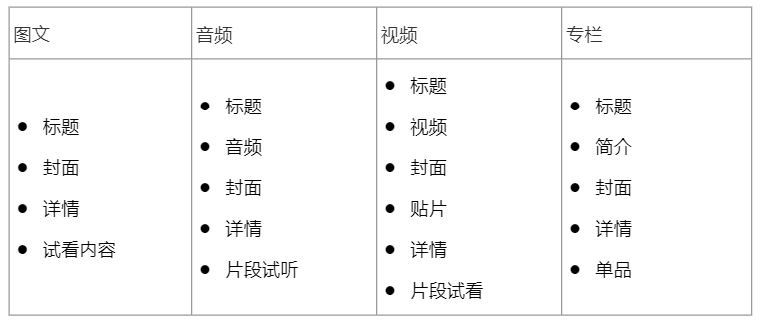
<span style="font-size:15px;"><span style="font-size:10.5pt;font-family:PingFangSC, 'Microsoft Yahei', Helvetica, Tahoma, Arial, 'Hiragino Sans GB', 'Hiragino Sans GB W3', STXihei, STHeiti, Heiti, SimSun, 'Helvetica Neue', Helvetica, 'PingFang SC', 'Microsoft YaHei', 'Source Han Sans SC', 'Noto Sans CJK SC', 'WenQuanYi Micro Hei', sans-serif;color:rgb(53,53,53);background:rgb(255,255,255);letter-spacing:0pt;vertical-align:baseline;">1) Branches cannot modify: basic information such as name, cover, content, and course mode;</span><span style="font-size:11pt;font-family:'Helvetica Neue', Helvetica, 'PingFang SC', 'Microsoft YaHei', 'Source Han Sans SC', 'Noto Sans CJK SC', 'WenQuanYi Micro Hei', sans-serif;color:rgb(51,51,51);background-image:initial;background-position:initial;background-size:initial;background-repeat:initial;background-attachment:initial;letter-spacing:0pt;vertical-align:baseline;"></span></span>

<span style="font-size:15px;"><span style="font-size:10.5pt;font-family:PingFangSC, 'Microsoft Yahei', Helvetica, Tahoma, Arial, 'Hiragino Sans GB', 'Hiragino Sans GB W3', STXihei, STHeiti, Heiti, SimSun, 'Helvetica Neue', Helvetica, 'PingFang SC', 'Microsoft YaHei', 'Source Han Sans SC', 'Noto Sans CJK SC', 'WenQuanYi Micro Hei', sans-serif;color:rgb(53,53,53);background:rgb(255,255,255);letter-spacing:0pt;vertical-align:baseline;">2) Branches can modify: price, listing and delisting, students, and operation settings;</span><span style="font-size:11pt;font-family:'Helvetica Neue', Helvetica, 'PingFang SC', 'Microsoft YaHei', 'Source Han Sans SC', 'Noto Sans CJK SC', 'WenQuanYi Micro Hei', sans-serif;color:rgb(51,51,51);background-image:initial;background-position:initial;background-size:initial;background-repeat:initial;background-attachment:initial;letter-spacing:0pt;vertical-align:baseline;"></span></span>

<span style="font-size:15px;"><span style="font-size:10.5pt;font-family:PingFangSC, 'Microsoft Yahei', Helvetica, Tahoma, Arial, 'Hiragino Sans GB', 'Hiragino Sans GB W3', STXihei, STHeiti, Heiti, SimSun, 'Helvetica Neue', Helvetica, 'PingFang SC', 'Microsoft YaHei', 'Source Han Sans SC', 'Noto Sans CJK SC', 'WenQuanYi Micro Hei', sans-serif;color:rgb(53,53,53);background:rgb(255,255,255);letter-spacing:0pt;vertical-align:baseline;">3) The information that branches cannot modify shall be consistent with that of the head store, i.e., when the head store makes modifications, the branches will be updated synchronously;</span><span style="font-size:11pt;font-family:'Helvetica Neue', Helvetica, 'PingFang SC', 'Microsoft YaHei', 'Source Han Sans SC', 'Noto Sans CJK SC', 'WenQuanYi Micro Hei', sans-serif;color:rgb(51,51,51);background-image:initial;background-position:initial;background-size:initial;background-repeat:initial;background-attachment:initial;letter-spacing:0pt;vertical-align:baseline;"></span></span>

<span style="font-size:15px;"><span style="font-size:10.5pt;font-family:PingFangSC, 'Microsoft Yahei', Helvetica, Tahoma, Arial, 'Hiragino Sans GB', 'Hiragino Sans GB W3', STXihei, STHeiti, Heiti, SimSun, 'Helvetica Neue', Helvetica, 'PingFang SC', 'Microsoft YaHei', 'Source Han Sans SC', 'Noto Sans CJK SC', 'WenQuanYi Micro Hei', sans-serif;color:rgb(53,53,53);background:rgb(255,255,255);letter-spacing:0pt;vertical-align:baseline;">The specific information that cannot be modified is shown in the following table:</span><span style="font-size:11pt;font-family:'Helvetica Neue', Helvetica, 'PingFang SC', 'Microsoft YaHei', 'Source Han Sans SC', 'Noto Sans CJK SC', 'WenQuanYi Micro Hei', sans-serif;color:rgb(51,51,51);background-image:initial;background-position:initial;background-size:initial;background-repeat:initial;background-attachment:initial;letter-spacing:0pt;vertical-align:baseline;"></span></span>

<span style="font-size:10.5pt;font-family:PingFangSC, 'Microsoft Yahei', Helvetica, Tahoma, Arial, 'Hiragino Sans GB', 'Hiragino Sans GB W3', STXihei, STHeiti, Heiti, SimSun, 'Helvetica Neue', Helvetica, 'PingFang SC', 'Microsoft YaHei', 'Source Han Sans SC', 'Noto Sans CJK SC', 'WenQuanYi Micro Hei', sans-serif;color:rgb(53,53,53);background:rgb(255,255,255);letter-spacing:0pt;vertical-align:baseline;">![1.png](https://wechatapppro-1252524126.file.myqcloud.com/help_document/image/ueditor/32013900_1640106805.png ".png")</span>

# The main store has already distributed Course B to Branch Store A. Can it continue to distribute Course B to Branch Store A?

<div data-elink-language-switch="1" id="bkmrk-%E4%B8%AD%E6%96%87" style="border:1px solid #d6d9de;border-radius:6px;padding:10px 12px;margin:0 0 18px 0;background:#f8fafc;font-size:14px;">[中文](/books/41f1f/page/abab)</div>Currently, only one distribution of the same course to the same branch store is supported. Even if you attempt to distribute it again later, it will not take effect.

# Can branch stores use marketing tools and learning assistance tools for the distributed courses?

<div data-elink-language-switch="1" id="bkmrk-%E4%B8%AD%E6%96%87" style="border:1px solid #d6d9de;border-radius:6px;padding:10px 12px;margin:0 0 18px 0;background:#f8fafc;font-size:14px;">[中文](/books/41f1f/page/7f39f)</div>The distributed courses support the use of marketing tools and learning assistance tools, just like self-built courses.

# Can branch stores associate the distributed courses with self-built columns, memberships, and camps?

<div data-elink-language-switch="1" id="bkmrk-%E4%B8%AD%E6%96%87" style="border:1px solid #d6d9de;border-radius:6px;padding:10px 12px;margin:0 0 18px 0;background:#f8fafc;font-size:14px;">[中文](/books/41f1f/page/c7e12)</div>Currently, it does not support associating distributed courses with self-built courses.

# What types of courses does course distribution support?

<div data-elink-language-switch="1" id="bkmrk-%E4%B8%AD%E6%96%87" style="border:1px solid #d6d9de;border-radius:6px;padding:10px 12px;margin:0 0 18px 0;background:#f8fafc;font-size:14px;">[中文](/books/41f1f/page/115f8)</div><span style="font-size:15px;"><span style="font-family:PingFangSC, 'Microsoft Yahei', Helvetica, Tahoma, Arial, 'Hiragino Sans GB', 'Hiragino Sans GB W3', STXihei, STHeiti, Heiti, SimSun, 'Helvetica Neue', Helvetica, 'PingFang SC', 'Microsoft YaHei', 'Source Han Sans SC', 'Noto Sans CJK SC', 'WenQuanYi Micro Hei', sans-serif;color:rgb(53,53,53);background:rgb(255,255,255);letter-spacing:0pt;vertical-align:baseline;">Currently, only the distribution of text and images, audio, videos, and course series is supported. Course series that include live broadcasts, e-books, and AI interactive courses are not yet supported for distribution.</span></span>

# Can the head store withdraw the courses after successful distribution?

<div data-elink-language-switch="1" id="bkmrk-%E4%B8%AD%E6%96%87" style="border:1px solid #d6d9de;border-radius:6px;padding:10px 12px;margin:0 0 18px 0;background:#f8fafc;font-size:14px;">[中文](/books/41f1f/page/fc490)</div><span style="font-size:15px;">The main store can recall the successfully distributed courses. Click to enter the distribution record, and you can operate to recall the courses~</span>

# User management

# What user data can be viewed in user management?

<div data-elink-language-switch="1" id="bkmrk-%E4%B8%AD%E6%96%87" style="border:1px solid #d6d9de;border-radius:6px;padding:10px 12px;margin:0 0 18px 0;background:#f8fafc;font-size:14px;">[中文](/books/41f1f/page/d09bf)</div>After the branch store authorizes the head office with user management permissions, the head office can view the user data of the authorized branch store in the user management module. Currently, it supports viewing data such as user details and information collection.

# Can all user data be viewed in the user management of the head office and its branches?

<div data-elink-language-switch="1" id="bkmrk-%E4%B8%AD%E6%96%87" style="border:1px solid #d6d9de;border-radius:6px;padding:10px 12px;margin:0 0 18px 0;background:#f8fafc;font-size:14px;">[中文](/books/41f1f/page/9461c)</div>Since the definition of the head and branch stores module is that the head store manages the branch stores, the headquarters can only view the user data of the branch stores in the Head and Branch Stores - User Management. The headquarters' own data can be viewed in the user list of its own store.

# Order Management

# What order data can be viewed in order management?

<div data-elink-language-switch="1" id="bkmrk-%E4%B8%AD%E6%96%87" style="border:1px solid #d6d9de;border-radius:6px;padding:10px 12px;margin:0 0 18px 0;background:#f8fafc;font-size:14px;">[中文](/books/41f1f/page/92c8c)</div>After the branch store authorizes the head store with order management permissions, the head store can view the branch store's order data in the order management module. Currently, it supports viewing the branch store's online orders (excluding affiliate marketing for courses orders) and offline order data.

# Can I view all order data in the order management of the head and branch stores?

<div data-elink-language-switch="1" id="bkmrk-%E4%B8%AD%E6%96%87" style="border:1px solid #d6d9de;border-radius:6px;padding:10px 12px;margin:0 0 18px 0;background:#f8fafc;font-size:14px;">[中文](/books/41f1f/page/75887)</div>Since the definition of the head - branch store module is that the head store manages the branch stores, the headquarters can only view the order data of the branch stores in the Head - Branch Store - Order Management. The data of the headquarters itself should be viewed in the order management of the headquarters' own store.

# Operating data

# Which business data of the branch stores can the head store view?

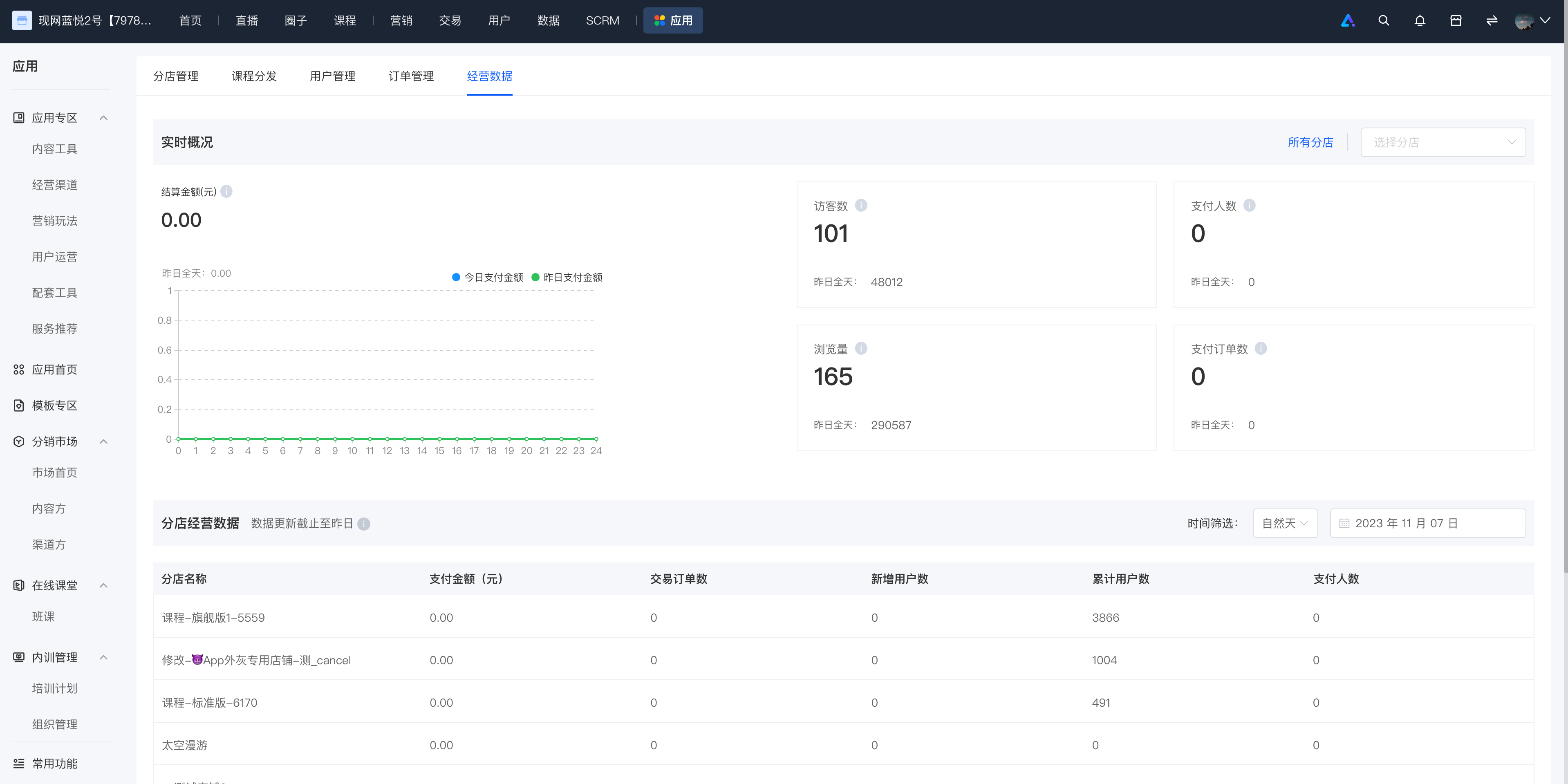
<div data-elink-language-switch="1" id="bkmrk-%E4%B8%AD%E6%96%87" style="border:1px solid #d6d9de;border-radius:6px;padding:10px 12px;margin:0 0 18px 0;background:#f8fafc;font-size:14px;">[中文](/books/41f1f/page/06138)</div><span style="font-size:15px;"><span style="font-family:'Helvetica Neue', Helvetica, 'PingFang SC', 'Microsoft YaHei', 'Source Han Sans SC', 'Noto Sans CJK SC', 'WenQuanYi Micro Hei', sans-serif;background-image:initial;background-position:initial;background-size:initial;background-repeat:initial;background-attachment:initial;letter-spacing:0pt;vertical-align:baseline;">Currently, the business data is divided into two sections:</span><span style="font-family:'Helvetica Neue', Helvetica, 'PingFang SC', 'Microsoft YaHei', 'Source Han Sans SC', 'Noto Sans CJK SC', 'WenQuanYi Micro Hei', sans-serif;color:rgb(51,51,51);background-image:initial;background-position:initial;background-size:initial;background-repeat:initial;background-attachment:initial;letter-spacing:0pt;vertical-align:baseline;"></span></span>

<span style="font-size:15px;"><span style="font-size:11pt;font-family:'Helvetica Neue', Helvetica, 'PingFang SC', 'Microsoft YaHei', 'Source Han Sans SC', 'Noto Sans CJK SC', 'WenQuanYi Micro Hei', sans-serif;background-image:initial;background-position:initial;background-size:initial;background-repeat:initial;background-attachment:initial;letter-spacing:0pt;vertical-align:baseline;">1. Real-time overview data panel;</span><span style="font-size:11pt;font-family:'Helvetica Neue', Helvetica, 'PingFang SC', 'Microsoft YaHei', 'Source Han Sans SC', 'Noto Sans CJK SC', 'WenQuanYi Micro Hei', sans-serif;color:rgb(51,51,51);background-image:initial;background-position:initial;background-size:initial;background-repeat:initial;background-attachment:initial;letter-spacing:0pt;vertical-align:baseline;"></span></span>

<span style="font-family:'Helvetica Neue', Helvetica, 'PingFang SC', 'Microsoft YaHei', 'Source Han Sans SC', 'Noto Sans CJK SC', 'WenQuanYi Micro Hei', sans-serif;background-image:initial;background-position:initial;background-size:initial;background-repeat:initial;background-attachment:initial;letter-spacing:0pt;vertical-align:baseline;font-size:15px;">2. List of business data for branch stores.</span>

![image.png](https://wechatapppro-1252524126.file.myqcloud.com/help_document/image/ueditor/34155100_1699444755.png ".png")

# How can the head store view the business data of its branch stores?

<div data-elink-language-switch="1" id="bkmrk-%E4%B8%AD%E6%96%87" style="border:1px solid #d6d9de;border-radius:6px;padding:10px 12px;margin:0 0 18px 0;background:#f8fafc;font-size:14px;">[中文](/books/41f1f/page/ef575)</div>After the head store submits an application and the branch stores grant authorization, the head store can view the business data of all authorized branch stores in the Head and Branch Stores - Business Data module. By default, the aggregated data of all branch stores is displayed, and you can select a single store for viewing.