# Data
# Data Overview
# How to set the data viewing permissions for the overview page?
[中文](/books/9be40/page/b6d76)
Store data on the overview page of the merchant management backend can be directly viewed by the store creator upon login. However, store employees (sub-accounts) need to have the relevant permissions enabled to view it.
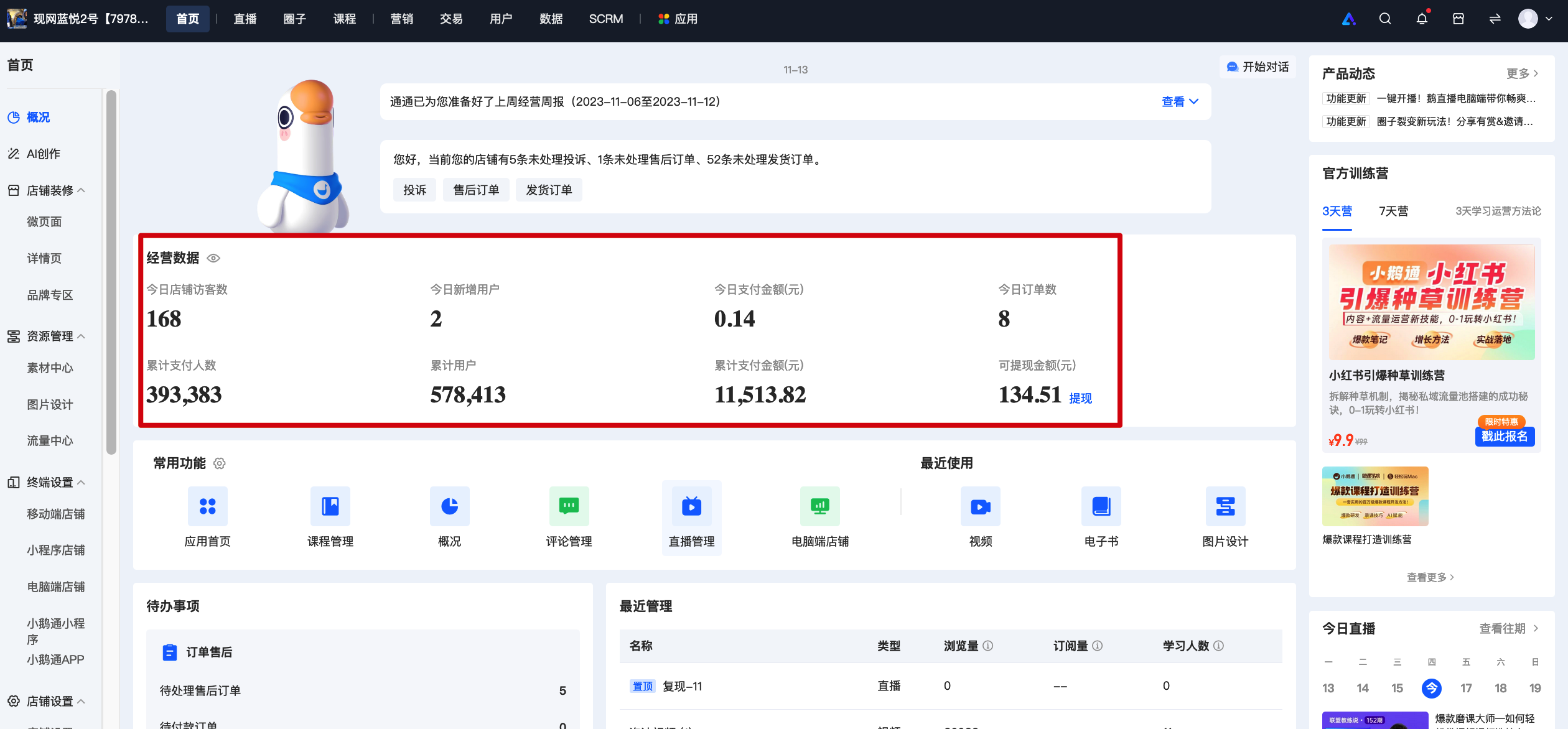
When the accounthas no relevant permissions, the corresponding data will display 'No permission. Please contact the administrator to apply' and appear in gray.
The steps to enable permissions are as follows:
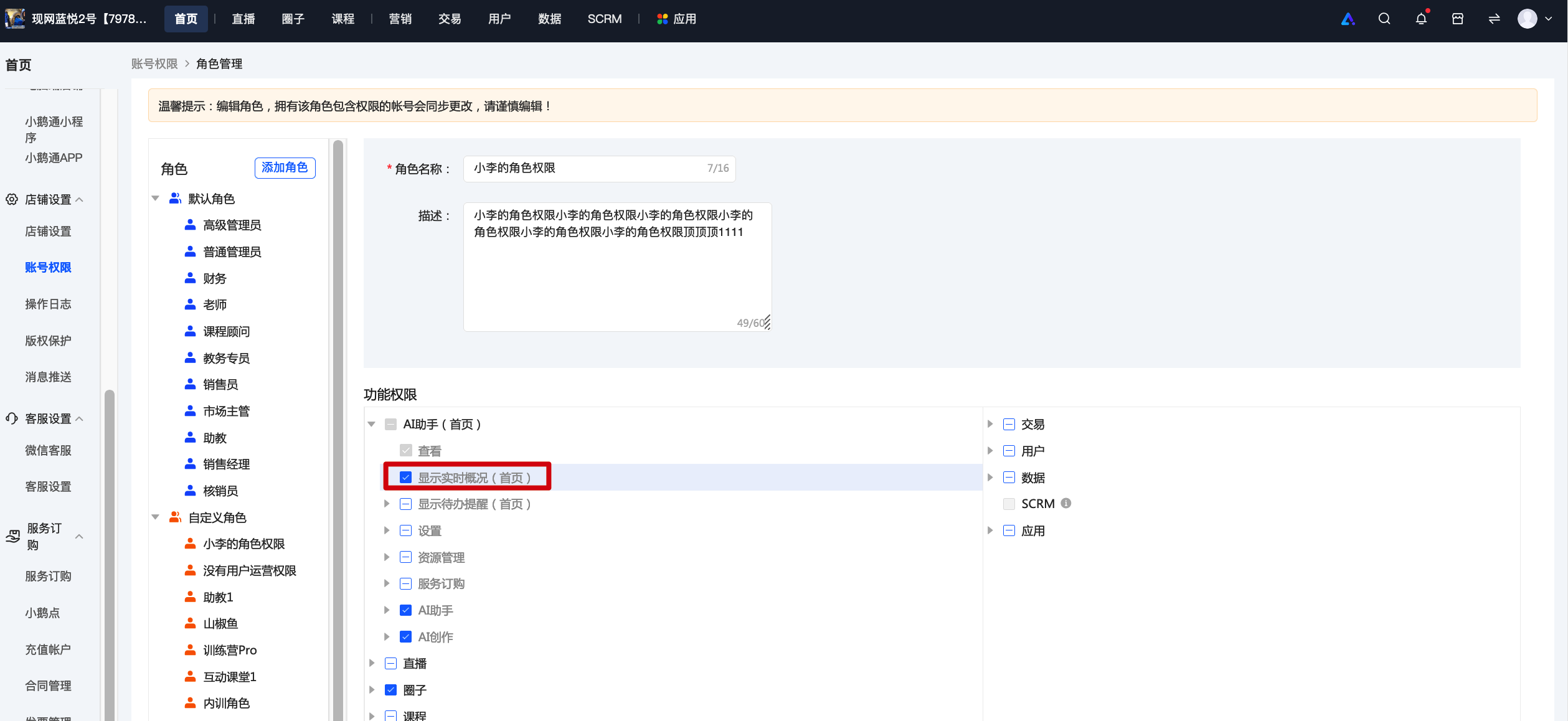
1. Click \[Settings\] - \[Account Permissions\]. You can set sub-account permissions on the new creation or editing page.
2. Check the 'Homepage - Display Real-time Overview' permission and assign it to the sub-account to view the corresponding data.
# What does an active user on the user dashboard refer to?
[中文](/books/9be40/page/e46de)
Hello, it refers to the number of users who have visited the store within the selected time period
# What does a paid user on the user dashboard refer to?
[中文](/books/9be40/page/6512b)
Hello, it refers to the number of users who have successfully made payments within the selected time period. Multiple payments made by one person are counted as one (all successfully paid orders are calculated, refunds are not excluded, and orders imported via API are not included in the selection).
# Tutorial on Using Data Overview
[中文](/books/9be40/page/b1d10)
**I. Feature Introduction**
The data overview feature supports monitoring the overall operational status of the online store, including real-time data and recent trends of core indicators such as visits and orders. It also reflects the store's operational performance of the previous day through the core indicators on the four dashboards: Traffic, Conversion, Products, and Users.
**II. Purpose of Use**
1. Monitor real-time visit and order completion data of the day to promptly assess the effectiveness of daily operational strategies.
2. Grasp the overall changes in the key business indicators of the store and quickly identify trends in terms of traffic, conversion, products, and users.
**III. Use Scenarios**
Scenario 1: A merchant conducts a promotion on a certain day. The operation team checks the changes in visit and order indicators at the 1st, 3rd, 6th, and 12th hours after the promotion starts to evaluate whether the promotion meets the expectations and adjust the promotion strategy promptly.
Scenario 2: Every morning, the operation team reviews the previous day's operational performance. They obtain the previous day's core data and its 30 - day trend through the operation window. If the data is below expectations, they can quickly identify issues using the Traffic, Transaction, Products, and Users dashboards to adjust the day's operational plan.
**IV. Operation Path**
Merchant side: Merchant backend → Data → Data Overview
**V. Usage Tutorial**
**Real - time Overview (Management Backend)**
Check the real - time cumulative income (settlement amount) of the day and compare it with the cumulative income of the same period on the previous day. Continuously monitor the core indicators of the day at regular intervals.

(Real - time Overview Dashboard)
**Operation Window (Store Management Console)**
1. Core Indicators
Check the core indicators of a natural day (default: the previous day), along with their daily and weekly comparisons. You can also compare the 30 - day indicator trends to understand the changes in the store's business performance.

(Core Indicators Dashboard)
2. Traffic Dashboard
Check the page views, number of visitors, and their daily and weekly comparisons on the selected day. Also, view the 24 - hour traffic trend of the selected day.

(Traffic Dashboard)
3. Conversion Dashboard
Check the visitor - order conversion rate and visitor - payment conversion rate on the selected day, along with their daily and weekly comparisons.

(Conversion Dashboard)
4. Products Dashboard
Check the top 5 products in terms of the number of visitors and the number of paying users on the selected day to identify the main traffic - driving and conversion - generating products of the day.

(Products Dashboard)
5. Users Dashboard
Check the cumulative, new, and active numbers of store users and paying users on the selected day and their 30 - day trends.
Check the contribution ratios of new and old paying users to the settlement amount and the number of settled users.
Check the repurchase rate of customers in the week and month of the selected day.

(Users Dashboard)
**VI. Notes**
1. Explanation of data indicator definitions:

# User analysis
# In the user overview: meanings of new users, active users, cumulative users, paying users, and cumulative paying users
[中文](/books/9be40/page/812b4)
New users: The number of users who registered in the online store within the selected time period (consistent with the filtering in the user list).
Active users: The number of users who visited the online store within the selected time period (e.g., the number of users who visited the online store in January).
Cumulative users: As of the selected time, the total number of users in the online store (including imported users, consistent with the users in the user list).
Paid users: The number of users who completed successful settlements within the selected time period. Multiple settlements by one user are counted as one. (Calculate the users of all successfully paid orders, without excluding refunds. Orders imported via API are not included in the filtering).
Cumulative paid users: As of the selected time, the total number of users in the online store who completed successful settlements. (Calculate all successfully paid orders, without excluding refunds. Orders imported via API are not included in the filtering).
# What does the number of store visitors in the trend chart refer to?
[中文](/books/9be40/page/a97da)
Data trends of new users, active users, cumulative users, paying users, and cumulative paying users within the selected time frame
# What are the meanings of various data indicators among paying users?
[中文](/books/9be40/page/138bb)
Number of users:
New paying users - Number of users: The number of users who have never made a payment in the store before the selected time and made their first settlement in the store within the selected time.
Existing paying users - Number of users: The number of users who made a settlement in the store within the selected time and whose first settlement was before the selected time. (All successfully paid orders are counted, refunds are not excluded, and orders imported via API are not included in the selection.)
Proportion of users:
New paying users - Proportion of users: Within the selected time, the number of new paying users divided by the total number of paying users.
Existing paying users - Proportion of users: Within the selected time, the number of existing paying users divided by the total number of paying users.
Average order value:
All paying users - Average order value: Within the selected time, the settlement amount of all paying users divided by the number of users.
New paying users - Average order value: Within the selected time, the settlement amount of new paying users divided by the number of new paying users.
Existing paying users - Average order value: Within the selected time, the settlement amount of existing paying users divided by the number of existing paying users.
Settlement amount:
All paying users - Settlement amount (yuan): The sum of the settlement amounts of all paying users within the selected time.
New paying users - Settlement amount (yuan): The sum of the settlement amounts of new paying users within the selected time.
Existing paying users - Settlement amount (yuan): The sum of the amounts of successfully settled orders of existing paying users within the selected time.(All successfully paid orders are counted, refunds are not excluded, and orders imported via API are not included in the selection.)
Settlement conversion rate:
All paying users - Visit - Settlement conversion rate: Within the selected time, the number of all paying users divided by the number of store visitors.
New paying users - Visit - Settlement conversion rate: Within the selected time, the number of new paying users divided by the number of store visitors with no purchase history.
Existing paying users - Visit - Settlement conversion rate: Within the selected time, the number of existing paying users divided by the number of paying users who have visited the store.
# What does the weekly repurchase rate refer to?
[中文](/books/9be40/page/48aed)
Weekly repurchase rate: During the week of the selected date, the number of users who made a payment in the store before this week and also made a payment this week / the total number of paying users this week
# What does the payment trend chart for new and existing users refer to?
[中文](/books/9be40/page/8f855)
Within the selected time frame, merchants can choose the corresponding statistical data on the number of users, average order value, settlement amount, and visit-to-settlement conversion rate.
# User analysis usage tutorial
[中文](/books/9be40/page/46ba9)
**I. Function Introduction**
User analysis helps merchants understand the growth, activity, and conversion of store users, and adjust user operation strategies in a timely manner.
**II. Purpose of Use**
Merchants monitor the core indicator data of store users and adjust user operation strategies such as traffic acquisition, activation, conversion, retention, and repurchase in a timely manner.
**III. Use Scenarios**
Scenario 1: A merchant has recently been conducting promotion and new - user acquisition on multiple channels and wants to monitor the growth and activity of store users during this period. They can observe the user growth and activity through the User Overview and Trends dashboard in User Analysis.
Scenario 2: A merchant wants to know the current situation of paying users in the store and hopes to formulate user operation strategies to activate them and increase the repurchase rate of paying users. They can monitor the data of paying users through the Paying Users dashboard in User Analysis.
**IV. Operation Path**
Merchant side: Merchant backend → Data → User Analysis
**V. Usage Tutorial**
1. User Overview and Trends Dashboard
Displays the core indicator data and changes of users within the selected time range, reflecting the trends of user growth, activity, and payment conversion. Specific indicators include the number of new users, the number of active users, the cumulative number of users, the number of paying users, and the cumulative number of paying users.

(Management backend)
2. Paying Users Dashboard
Displays the detailed data of paying users within the selected time range, compares the number of new and old paying users, the proportion of users, the average customer price, the settlement amount, the conversion rate, and their changes, and statistics the weekly repurchase rate and its changing trend of customers.


(Management backend)
**VI. Indicator Explanation**

# Transaction analysis
# Tutorial on Using Transaction Analysis
[中文](/books/9be40/page/6512b-POO)
**I. Function Introduction**
Transaction analysis provides access, order placement, payment conversion, and conversion rates at each stage related to store transactions. It also supports viewing the proportion of new and old paying users and the distribution of order amounts, etc.
**II. Purpose of Use**
By analyzing the conversion rates of visitors, identify the main loss stages in the user conversion path, and compare the trends of core transaction indicators to evaluate the effectiveness of operational measures.
By analyzing new and old paying users and their corresponding payment amounts, determine the user group that contributes the most to revenue, and help decide whether the focus of user operations should be on attracting new users or retaining old users.
By analyzing the order distribution, understand the price preferences of store users to assist in pricing.
**III. Use Scenarios**
Scenario 1: A merchant has poor conversion results after attracting traffic. They want to know if users visited the products but didn't place an order, or if they placed an order but didn't pay. Through the transaction conversion funnel, they can find the main loss stages of users. If the visitor - order conversion rate is low, it means the products are not attractive enough, and the product description or cover image on the product detail page can be optimized. If the order - payment conversion rate is low, messages can be sent to users who placed an order but didn't pay through user segmentation, or coupons can be provided to stimulate conversion.
Scenario 2: The operations team needs to determine the focus of the current operational strategy. By checking the composition of new and old users, they find that the store's revenue mainly comes from old users. So they focus on retaining old users and improving the quality of new users in the recent period.
**IV. Operation Path**
Merchant side: Merchant backend → Data → Transaction analysis
**V. Usage Tutorial**
1. Transaction Overview
Through the conversion funnel, you can see the conversion rates of the store from access to order placement to payment.
(Transaction overview dashboard)
2. Transaction Composition
In the transaction composition module, you can see the composition of new and old users in the store. The transactions of old paying users represent repeat purchases.
The order distribution can show the price preferences of store users to assist in pricing.

(Transaction composition dashboard)
**VI. Notes**
1. Explanation of data indicator definitions:

2. Export instructions:
Explanation of the export function:
Time granularity refers to the statistical granularity of each indicator. You can choose one value per day, one value per week, or one value per month. If it is an indicator related to the number of users, deduplication will be done on a daily, weekly, or monthly basis.

(Export time selection box)
# Product analysis
# Tutorial on Using Product Analysis
[中文](/books/9be40/page/eddea)
**I. Function Introduction**
Product analysis helps merchants comprehensively understand the operational status of on - sale products, including data on product listing, visits, sales, and specific conversion effectiveness. This enables them to promptly adjust the operational strategies for products in their stores.
**II. Purpose of Use**
Merchants can understand the operational data of on - sale products and promptly adjust product operational strategies.
**III. Usage Scenarios**
Scenario 1: A merchant plans to designate high - traffic and high - sales products as star products, increase promotional investment, and build the store's reputation. They can monitor the visit and sales effectiveness through the product ranking in product analysis to quickly identify relevant products.
Scenario 2: A merchant wants to conduct detailed single - product data observation to increase the sales of high - traffic but low - conversion products and low - traffic but high - conversion products. They can view the visit and conversion data of each product through product effectiveness. By clicking on the trend chart, they can view detailed indicator trends and explore relevant optimization directions.
**IV. Operation Path**
Merchant side: Merchant backend → Data → Product analysis
**V. Usage Tutorial**
1\. Product Overview
The number of paid products listed in the store at the current time (excluding out - of - stock products).
2. Product Ranking
Displays the top 5 products in terms of the number of product visitors and paid users within the selected date range.

3. Product Effectiveness
a. Product Effectiveness: Displays the visit volume, number of visitors, subscription volume, paid users, payment amount, and conversion rate of the selected product within the selected time range. Supports sorting by the above 6 indicators and data export.

b. Product Data Details: Click on the details of product effectiveness to enter the product data details page. Displays the sales data and data trends, as well as usage data and data trends of the product. Sales data includes pre - sale visit volume, pre - sale number of visitors, number of paid users, payment amount (in yuan), conversion rate, and subscription volume. Usage data includes the browsing volume of subscribed users, number of browsing users, number of comments, and number of commenting users.


(Product Data Details Page)
**VI. Indicator Explanation**
1.Explanation of data indicator definitions

2.Explanation of the export function
Time granularity refers to the statistical granularity of eachindicator. You can choose one value per day, one value per week, or one value per month. For indicators related to the number of users, deduplication will be performed according to days, weeks, or months accordingly.

(Export Time Selection Box)
**
**
# Definition and explanation of data indicators for single product analysis
[中文](/books/9be40/page/cb70a)
**\*\*Note:**The data metrics for single product analysis only include pre-sales data. That is, if a user already has the rights and interests of a particular product/course, their current access behavior will not be included in the data metrics for single product analysis.

# Download Center
# Tutorial on Using the Download Center
[中文](/books/9be40/page/98f13)
**I. Function Overview**
By establishing a download center on the merchant management console, achieve unified management and success rate monitoring of file exports from the merchant management console. Make the exported files traceable and the download records queryable. Meanwhile, optimize the query and search experience, implement access control for download management, and prevent the leakage of important data.
Note: 'Task applicants' can view and download the files they initiated, but cannot download files initiated by others; 'Senior administrators/Administrators' can view and download all files.
**II. Use Scenarios**
During the use of the management console, merchants need to export business - generated information and data, such as live - streaming viewing data and user lists. Merchants can directly initiate a download on the corresponding scenario page. For files with a large number of data entries, the generation time is long, and the download cannot be completed in real - time. In this case, the file needs to be generated first, and then downloaded from the unified download center after the generation is completed.
In addition, when merchants need to find information about downloaded files, they can use the download center to redownload historical files, delete them, and query operation records.
**III. Operation Paths**
● Direct download: Each business scenario - Select export conditions - Export - Initiate browser download - Download the file
● Asynchronous download: Each business scenario - Select export conditions - Export - Generate the file in the background - Enter the download center - Download the file
● Query: Enter the download center - Query the records of download applications - Enter the operation log - Query the operation records of downloaded files
● Redownload/Delete: Enter the download center - Search for the data file to be redownloaded/deleted - Download/Delete
**IV. Usage Tutorial**
**Step 1: Enter the download center**
1. Enter the store management background, find \[Data Center - Download Center\], and click to enter.

**Step 2: Download information or data**
On each page that supports data download or information export (except the material center), screen as needed and click 'Export'. A download task will be initiated, and a download record will be generated in the download center.
\*\*Take live - streaming data as a specific example:
1. Enter the live - streaming list page, select the live - streaming course for which you need to view the data, and enter the course details page - Data analysis:

2. Select the category of live - streaming data you need to view.

3. Find the data you need to download, select the screening dimension, and click \[Export List\] to initiate a download request.
When the data volume is small, the file can be generated directly and downloaded via the browser; when the data volume is large, the system will perform an asynchronous export operation. After the file is generated, a prompt will be displayed at the top. At this time, you can click 'Go immediately' to go to the download center page to download the file.

4. After initiating a download request, a prompt will be displayed in the upper - right corner. At this time, you can click \[Go immediately\] to jump to the download center page to download the file.

5. Go to the download center and click \[Download\] to download the document locally. You can redownload the file within 30 days.

**V. Function Introduction of the Download Center**
1. Query download history:
You can query the historical records of download applications by each user in the download center and screen and search by applicant, application time, and file name.

2. Query download progress:
You can query the execution progress (processing, successful, failed, withdrawn) of each download task in the download center. The task applicant can download the tasks he initiated that are in the completed state multiple times. If a task in the processing state cannot be completed within 24 hours, it will change to the failed state.
3. Prohibit download:
Administrators can prohibit the download of all task data packets in the completed state. After the download is prohibited, the data packets cannot be downloaded again, but the task records are still retained. If no action is taken, the data packets will be automatically deleted after 30 days.


4. Users with access rights to the operation log can click on the download record to jump to the operation log page and query the records of each download and deletion of the task.

# Live broadcast analysis
# Tutorial on Using Live Streaming Analytics
[中文](/books/9be40/page/9b04d)
**I. Feature Introduction**
The Data Center - Live Streaming Analysis provides six store-wide live streaming indicators and their trends, such as the number of live streams created daily in the store and the total views of live streaming rooms, and supports viewing six types of live streaming rankings to help identify live streams with excellent and poor performance.
**II. Purpose of Use**
Monitor the daily creation and launch of live streams in the store. Meanwhile, understand the live streaming performance and its changes through data such as the traffic and viewing duration of live streaming rooms.
**III. Use Scenarios**
Scenario 1: During monthly reviews, the operation team needs to summarize the overall live streaming launch situation and performance of the store this month to determine the effectiveness of operation strategies.
Scenario 2: When optimizing live streams, view the live streaming rankings to conduct in - depth reviews of high - performing live streams, identify operational highlights, and apply them to live streams that need improvement.
Scenario 3: During monthly or annual inventories, the operation team can find the number of live streams and live streaming performance during the corresponding period and conduct an inventory compared with the store's previous performance.
**IV. Operation Path**
Merchant side: Merchant background → Data Center → Live Streaming Analysis;
**V. Usage Tutorial**
1. Live Streaming Trends
View the number of live streams created, the views of live streaming rooms, the number of visitors to live streaming rooms, the cumulative number of views (PV), the cumulative number of viewers (UV), the average viewing duration per person, and their month - on - month and trends within the selected time range:

2. Live Streaming Rankings
Click to switch between different rankings to view the overall live streaming rankings of the store:

**VI. Notes**
1. Explanation of data indicator definitions:

2. Export instructions:
Time granularity refers to the statistical granularity of each indicator. You can choose to count the data daily, weekly, or monthly. If an indicator involves the number of users (e.g., cumulative number of viewers), deduplication will be performed on a daily, weekly, or monthly basis.
# Meanings of various data indicators in single live stream analysis
[中文](/books/9be40/page/a516a)

# Tutorial on Using Single Live Stream Analysis
[中文](/books/9be40/page/9778d)
**I. Function Introduction**
Through analysis capabilities such as real-time data, user profiles, comment word cloud analysis, and live commerce analysis, conduct in-depth diagnosis of a single live stream, helping to improve live stream efficiency. Even beginners can easily analyze the live stream results.
**II. Purpose of Use**
Not satisfied with the live stream results and hoping to find directions and basis for improving live stream efficiency and optimizing the live stream room.
**III. Use Scenarios**
Scenario 1: After the live stream ends, the lecturer or the operation staff needs to conduct a review of the live stream results. They can view data such as the conversion funnel, audience profiles, and real-time live stream trends to understand the live stream results and areas for optimization.
Scenario 2: When finding that the interaction between the audience and the lecturer in the live stream room is not enthusiastic, you can view the comment word cloud to understand the key points of the audience's comments and the topics they are interested in. You can also view the audience profiles to understand the composition of the audience in the live stream room. For example, when there are many new users, you can try a simpler and more straightforward way of live stream presentation.
Scenario 3: During a live commerce stream, you can monitor the purchase situation by checking the product red - black list in a timely manner and select the products to introduce with emphasis.
**IV. Operation Path**

**V. Usage Tutorial**
**Step 1:**Click on any of the following entries to enter the corresponding single live stream analysis page.
① Enter from the live stream details.


② Enter from the data center.


**Step 2:**View the detailed analysis to find the operation points.


**VI. Benefit Explanation**
The single live stream analysis function is an advanced data analysis function exclusive to the flagship version. Merchants without the flagship version can click to try it out and experience the single live stream analysis function for 7 days.
**VII. Data Indicator Explanation**
[Click to view the detailed list of explanations for the single live stream analysis data indicators.](https://admin.xiaoe-tech.com/helpCenter/problem?first_id=600&second_id=1237&document_id=doc_620f78f2710d5_kMaxn)