# 交易

# 订单管理

# 订单是否支持筛选导出？

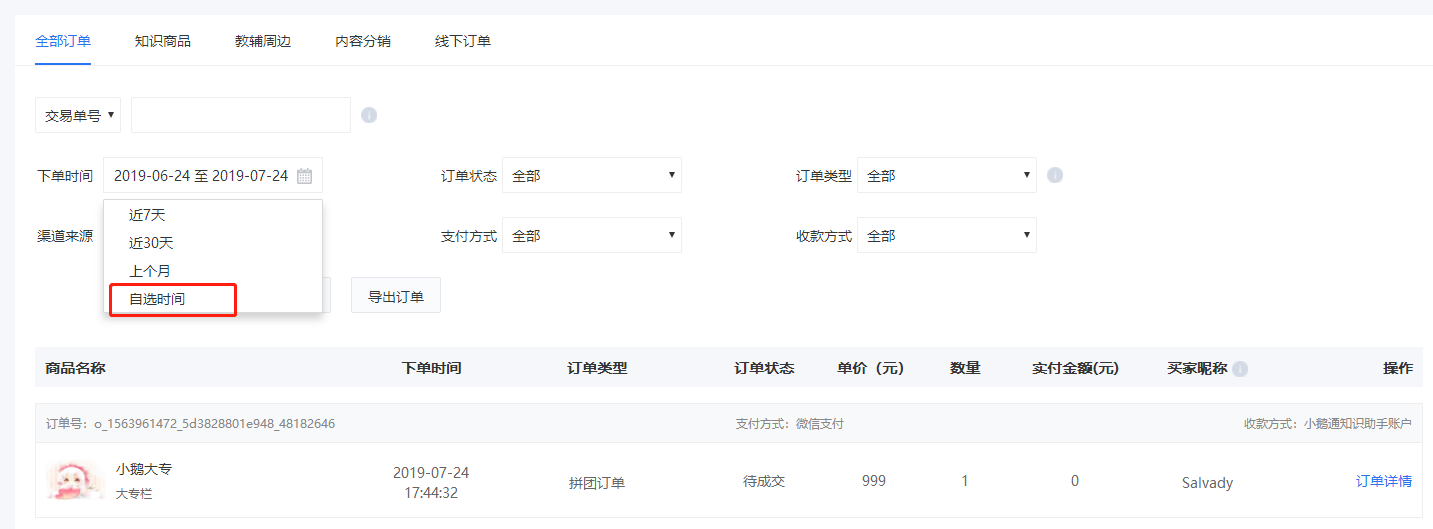
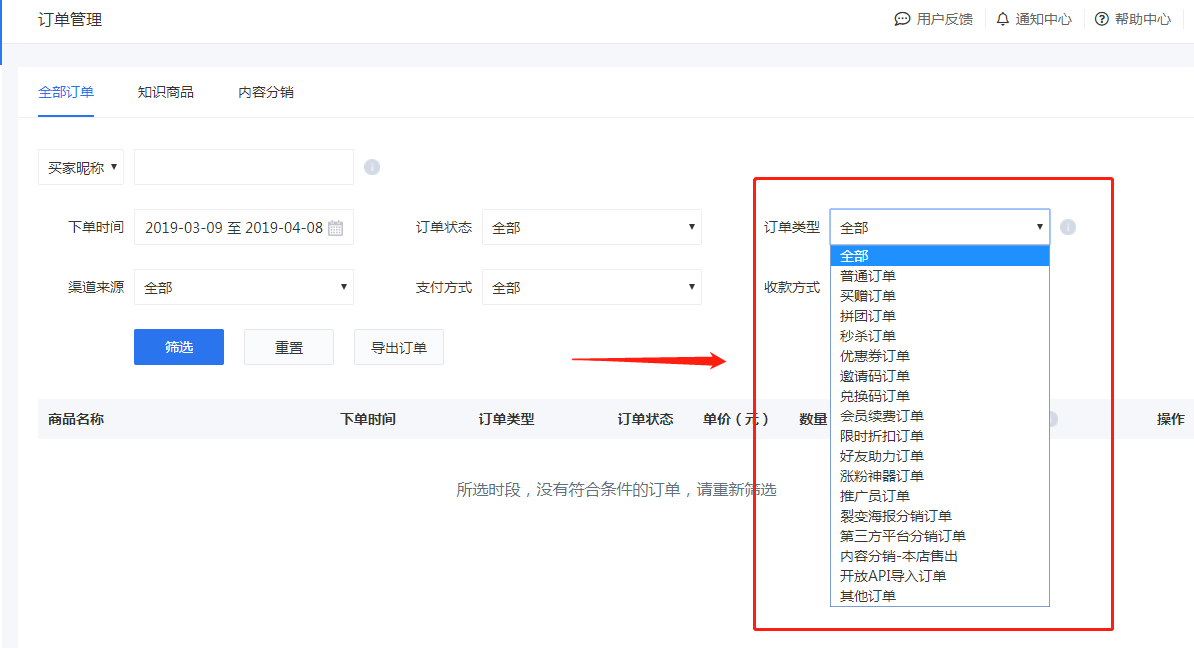
<div data-elink-language-switch="1" id="bkmrk-english" style="border:1px solid #d6d9de;border-radius:6px;padding:10px 12px;margin:0 0 18px 0;background:#f8fafc;font-size:14px;">[English](/books/transaction/page/does-the-system-support-filtering-and-exporting-orders)</div>支持的。可在【管理台】-【交易管理】-【订单管理】选择所需条件后进行筛选查询后导出查看。
 ![98492100_1554964586.png%21thumbnail](https://wechatapppro-1252524126.file.myqcloud.com/help_document/image/ueditor/98492100_1554964586.png%21thumbnail)

# 如何查询昨日订单收入？

<div data-elink-language-switch="1" id="bkmrk-english" style="border:1px solid #d6d9de;border-radius:6px;padding:10px 12px;margin:0 0 18px 0;background:#f8fafc;font-size:14px;">[English](/books/transaction/page/how-to-query-yesterdays-order-revenue)</div>进入【管理台】-【交易管理】-【订单管理】-【下单时间】，将【下单时间】设置为昨天的日期，点击【筛选】即可看到订单信息，您也可以设置更多订单查询的条件（订单状态、渠道来源、订单状态、订单类型等）

 ![blob.png](https://wechatapppro-1252524126.file.myqcloud.com/help_document/image/ueditor/25484500_1566893217.png ".png")

# 用户购买课程支持哪些支付方式？

<div data-elink-language-switch="1" id="bkmrk-english" style="border:1px solid #d6d9de;border-radius:6px;padding:10px 12px;margin:0 0 18px 0;background:#f8fafc;font-size:14px;">[English](/books/transaction/page/what-digital-payment-methods-manual-adjustment-required-are-supported-for-users-to-purchase-courses)</div><span style="font-size:14px;">目前支持：</span><span style="font-size:14px;text-decoration:underline;">微信支付</span><span style="font-size:14px;">和</span><span style="font-size:14px;text-decoration:underline;">支付宝支付</span><span style="font-size:14px;text-decoration:none;"> </span><span style="font-size:14px;">两种方式</span>

# #N/A

<div data-elink-language-switch="1" id="bkmrk-english" style="border:1px solid #d6d9de;border-radius:6px;padding:10px 12px;margin:0 0 18px 0;background:#f8fafc;font-size:14px;">[English](/books/transaction/page/how-to-receive-new-order-notifications-via-the-app)</div>\#N/A

# 哪些订单支持退款？

<div data-elink-language-switch="1" id="bkmrk-english" style="border:1px solid #d6d9de;border-radius:6px;padding:10px 12px;margin:0 0 18px 0;background:#f8fafc;font-size:14px;">[English](/books/transaction/page/which-orders-are-eligible-for-refund)</div><span style="font-family:'微软雅黑', sans-serif;font-size:16px;">可退款订单类型：</span>

<span style="font-size:16px;"></span>

<span style="font-size:16px;"></span>

<table id="bkmrk-%E8%AE%A2%E5%8D%95%E7%B1%BB%E5%9E%8B%E5%8F%AF%E5%90%A6%E9%80%80%E6%AC%BE%E5%A4%87%E6%B3%A8%E6%99%AE%E9%80%9A%E8%AE%A2%E5%8D%95%EF%BC%88%E6%9A%82%E4%B8%8D%E5%8C%85%E6%8B%AC%E7%A4%BE"><tbody><tr class="firstRow" style="height:23px;"><td style="width:278px;border-color:#000000;background:rgb(110,170,215);padding:0px 7px;"><span style="font-family:'microsoft yahei', sans-serif;color:#FFFFFF;">订单类型</span>

</td><td style="width:201px;border-top-color:#000000;border-right-color:#000000;border-bottom-color:#000000;border-left:none;background:rgb(110,170,215);padding:0px 7px;"><span style="font-family:'microsoft yahei', sans-serif;color:#FFFFFF;">可否退款</span>

</td><td style="width:200px;border-top-color:#000000;border-right-color:#000000;border-bottom-color:#000000;border-left:none;background:rgb(110,170,215);padding:0px 7px;"><span style="font-family:'microsoft yahei', sans-serif;color:#FFFFFF;">备注</span>

</td></tr><tr style="height:58px;"><td style="width:278px;border-right-color:#000000;border-bottom-color:#000000;border-left-color:#000000;border-top:none;padding:0px 7px;"><span style="font-family:'microsoft yahei', sans-serif;">普通订单（**暂不包括**社群模块的打卡、小社群、付费问答、活动管理、直播打赏订单）</span>

</td><td style="width:201px;border-top:none;border-left:none;border-bottom-color:#000000;border-right-color:#000000;padding:0px 7px;"><span style="font-family:'microsoft yahei', sans-serif;">√</span>

</td><td style="width:200px;border-top:none;border-left:none;border-bottom-color:#000000;border-right-color:#000000;padding:0px 7px;"><span style="font-family:'microsoft yahei', sans-serif;">超级会员属于普通订单，支持退款。</span>

</td></tr><tr style="height:23px;"><td style="width:278px;border-right-color:#000000;border-bottom-color:#000000;border-left-color:#000000;border-top:none;padding:0px 7px;"><span style="font-family:'microsoft yahei', sans-serif;">买赠订单</span>

</td><td style="width:201px;border-top:none;border-left:none;border-bottom-color:#000000;border-right-color:#000000;padding:0px 7px;"><span style="font-family:'microsoft yahei', sans-serif;">√</span>

</td><td style="width:200px;border-top:none;border-left:none;border-bottom-color:#000000;border-right-color:#000000;padding:0px 7px;"><span style="font-family:'microsoft yahei', sans-serif;">赠出和未赠出的课程权限均解除</span>

</td></tr><tr style="height:23px;"><td style="width:278px;border-right-color:#000000;border-bottom-color:#000000;border-left-color:#000000;border-top:none;padding:0px 7px;"><span style="font-family:'microsoft yahei', sans-serif;">拼团订单</span>

</td><td style="width:201px;border-top:none;border-left:none;border-bottom-color:#000000;border-right-color:#000000;padding:0px 7px;"><span style="font-family:'microsoft yahei', sans-serif;">√</span>

</td><td style="width:200px;border-top:none;border-left:none;border-bottom-color:#000000;border-right-color:#000000;padding:0px 7px;">  
</td></tr><tr style="height:23px;"><td style="width:278px;border-right-color:#000000;border-bottom-color:#000000;border-left-color:#000000;border-top:none;padding:0px 7px;"><span style="font-family:'microsoft yahei', sans-serif;">秒杀订单</span>

</td><td style="width:201px;border-top:none;border-left:none;border-bottom-color:#000000;border-right-color:#000000;padding:0px 7px;"><span style="font-family:'microsoft yahei', sans-serif;">√</span>

</td><td style="width:200px;border-top:none;border-left:none;border-bottom-color:#000000;border-right-color:#000000;padding:0px 7px;"><span style="font-family:'microsoft yahei', sans-serif;">库存会返回</span>

</td></tr><tr style="height:29px;"><td style="width:278px;border-right-color:#000000;border-bottom-color:#000000;border-left-color:#000000;border-top:none;padding:0px 7px;"><span style="font-family:'microsoft yahei', sans-serif;">优惠券订单</span>

</td><td style="width:201px;border-top:none;border-left:none;border-bottom-color:#000000;border-right-color:#000000;padding:0px 7px;"><span style="font-family:'microsoft yahei', sans-serif;">√</span>

</td><td style="width:200px;border-top:none;border-left:none;border-bottom-color:#000000;border-right-color:#000000;padding:0px 7px;"><span style="font-family:'microsoft yahei', sans-serif;">优惠券会返还，使用数据会恢复</span>

</td></tr><tr style="height:23px;"><td style="width:278px;border-right-color:#000000;border-bottom-color:#000000;border-left-color:#000000;border-top:none;padding:0px 7px;"><span style="font-family:'microsoft yahei', sans-serif;">邀请码订单</span>

</td><td style="width:201px;border-top:none;border-left:none;border-bottom-color:#000000;border-right-color:#000000;padding:0px 7px;"><span style="font-family:'microsoft yahei', sans-serif;">-</span>

</td><td style="width:200px;border-top:none;border-left:none;border-bottom-color:#000000;border-right-color:#000000;padding:0px 7px;">  
</td></tr><tr style="height:23px;"><td style="width:278px;border-right-color:#000000;border-bottom-color:#000000;border-left-color:#000000;border-top:none;padding:0px 7px;"><span style="font-family:'microsoft yahei', sans-serif;">兑换码订单</span>

</td><td style="width:201px;border-top:none;border-left:none;border-bottom-color:#000000;border-right-color:#000000;padding:0px 7px;"><span style="font-family:'microsoft yahei', sans-serif;">-</span>

</td><td style="width:200px;border-top:none;border-left:none;border-bottom-color:#000000;border-right-color:#000000;padding:0px 7px;">  
</td></tr><tr style="height:23px;"><td style="width:278px;border-right-color:#000000;border-bottom-color:#000000;border-left-color:#000000;border-top:none;padding:0px 7px;"><span style="font-family:'microsoft yahei', sans-serif;">会员续费订单</span>

</td><td style="width:201px;border-top:none;border-left:none;border-bottom-color:#000000;border-right-color:#000000;padding:0px 7px;"><span style="font-family:'microsoft yahei', sans-serif;">√</span>

</td><td style="width:200px;border-top:none;border-left:none;border-bottom-color:#000000;border-right-color:#000000;padding:0px 7px;">  
</td></tr><tr style="height:23px;"><td style="width:278px;border-right-color:#000000;border-bottom-color:#000000;border-left-color:#000000;border-top:none;padding:0px 7px;"><span style="font-family:'microsoft yahei', sans-serif;">限时折扣订单</span>

</td><td style="width:201px;border-top:none;border-left:none;border-bottom-color:#000000;border-right-color:#000000;padding:0px 7px;"><span style="font-family:'microsoft yahei', sans-serif;">√</span>

</td><td style="width:200px;border-top:none;border-left:none;border-bottom-color:#000000;border-right-color:#000000;padding:0px 7px;"><span style="font-family:'microsoft yahei', sans-serif;">库存会返回</span>

</td></tr><tr style="height:23px;"><td style="width:278px;border-right-color:#000000;border-bottom-color:#000000;border-left-color:#000000;border-top:none;padding:0px 7px;"><span style="font-family:'microsoft yahei', sans-serif;">好友助力订单</span>

</td><td style="width:201px;border-top:none;border-left:none;border-bottom-color:#000000;border-right-color:#000000;padding:0px 7px;"><span style="font-family:'microsoft yahei', sans-serif;">-</span>

</td><td style="width:200px;border-top:none;border-left:none;border-bottom-color:#000000;border-right-color:#000000;padding:0px 7px;">  
</td></tr><tr style="height:29px;"><td style="width:278px;border-right-color:#000000;border-bottom-color:#000000;border-left-color:#000000;border-top:none;padding:0px 7px;"><span style="font-family:'microsoft yahei', sans-serif;">涨粉神器订单</span>

</td><td style="width:201px;border-top:none;border-left:none;border-bottom-color:#000000;border-right-color:#000000;padding:0px 7px;"><span style="font-family:'microsoft yahei', sans-serif;">-</span>

</td><td style="width:200px;border-top:none;border-left:none;border-bottom-color:#000000;border-right-color:#000000;padding:0px 7px;">  
</td></tr></tbody></table>

<span style="font-size:16px;"></span>

<span style="font-size:16px;font-family:'微软雅黑', sans-serif;">\*推广员订单、分销订单、实物商品订单均不支持退款</span>

# 订单退款后资产管理部分会同步数据吗？

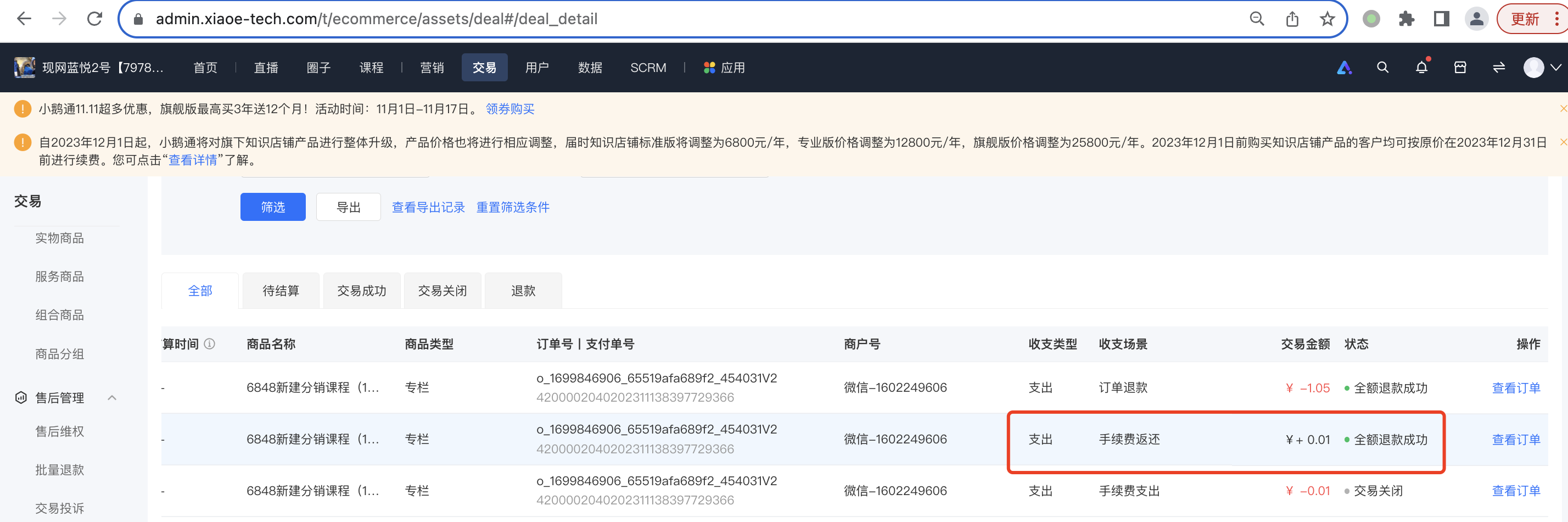
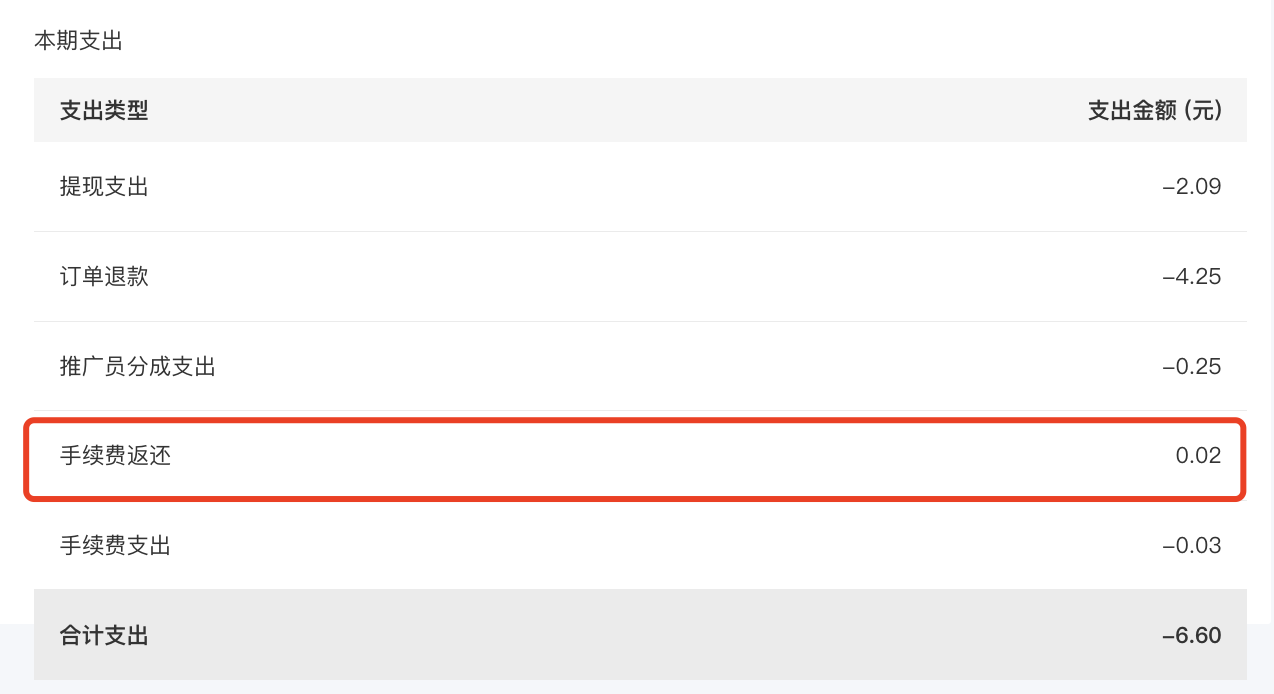
<div data-elink-language-switch="1" id="bkmrk-english" style="border:1px solid #d6d9de;border-radius:6px;padding:10px 12px;margin:0 0 18px 0;background:#f8fafc;font-size:14px;">[English](/books/transaction/page/will-the-asset-management-section-synchronize-data-after-an-order-refund)</div><span style="font-family:'微软雅黑', sans-serif;color:#000000;font-size:16px;">资产管理中会扣除退款部分，并返还微信支付手续费。</span>

![image.png](https://wechatapppro-1252524126.file.myqcloud.com/help_document/image/ueditor/4815700_1699857523.png ".png")

<span style="font-family:'微软雅黑', sans-serif;color:#000000;font-size:16px;">账单汇总也会一并统计：</span>

![image.png](https://wechatapppro-1252524126.file.myqcloud.com/help_document/image/ueditor/67064300_1699857522.png ".png")

# 订单退款状态有哪些？

<div data-elink-language-switch="1" id="bkmrk-english" style="border:1px solid #d6d9de;border-radius:6px;padding:10px 12px;margin:0 0 18px 0;background:#f8fafc;font-size:14px;">[English](/books/transaction/page/what-are-the-order-refund-statuses)</div><span style="font-family:'微软雅黑', sans-serif;color:#000000;font-size:16px;">一共有三种状态，分别是：退款中，退款成功，退款失败。</span>

# 删除订购关系和退款操作之间是否有冲突？

<div data-elink-language-switch="1" id="bkmrk-english" style="border:1px solid #d6d9de;border-radius:6px;padding:10px 12px;margin:0 0 18px 0;background:#f8fafc;font-size:14px;">[English](/books/transaction/page/is-there-a-conflict-between-deleting-the-subscription-relationship-and-refunding)</div><span style="font-family:'微软雅黑', sans-serif;color:#000000;font-size:16px;">已删除订购关系的订单，支持退款。</span>

# 是否限制退款金额？

<div data-elink-language-switch="1" id="bkmrk-english" style="border:1px solid #d6d9de;border-radius:6px;padding:10px 12px;margin:0 0 18px 0;background:#f8fafc;font-size:14px;">[English](/books/transaction/page/is-there-a-limit-on-the-refund-amount)</div>不限制。

# 退款操作后会影响到哪部分的数据？

<div data-elink-language-switch="1" id="bkmrk-english" style="border:1px solid #d6d9de;border-radius:6px;padding:10px 12px;margin:0 0 18px 0;background:#f8fafc;font-size:14px;">[English](/books/transaction/page/which-parts-of-the-data-will-be-affected-after-the-refund-operation)</div><span style="font-family:'微软雅黑', sans-serif;font-size:14px;">数据分析模块数据不包含退款数据；营销中的优惠券库存、商品库存会还原。</span>

# 待付款订单关闭时间是多久？

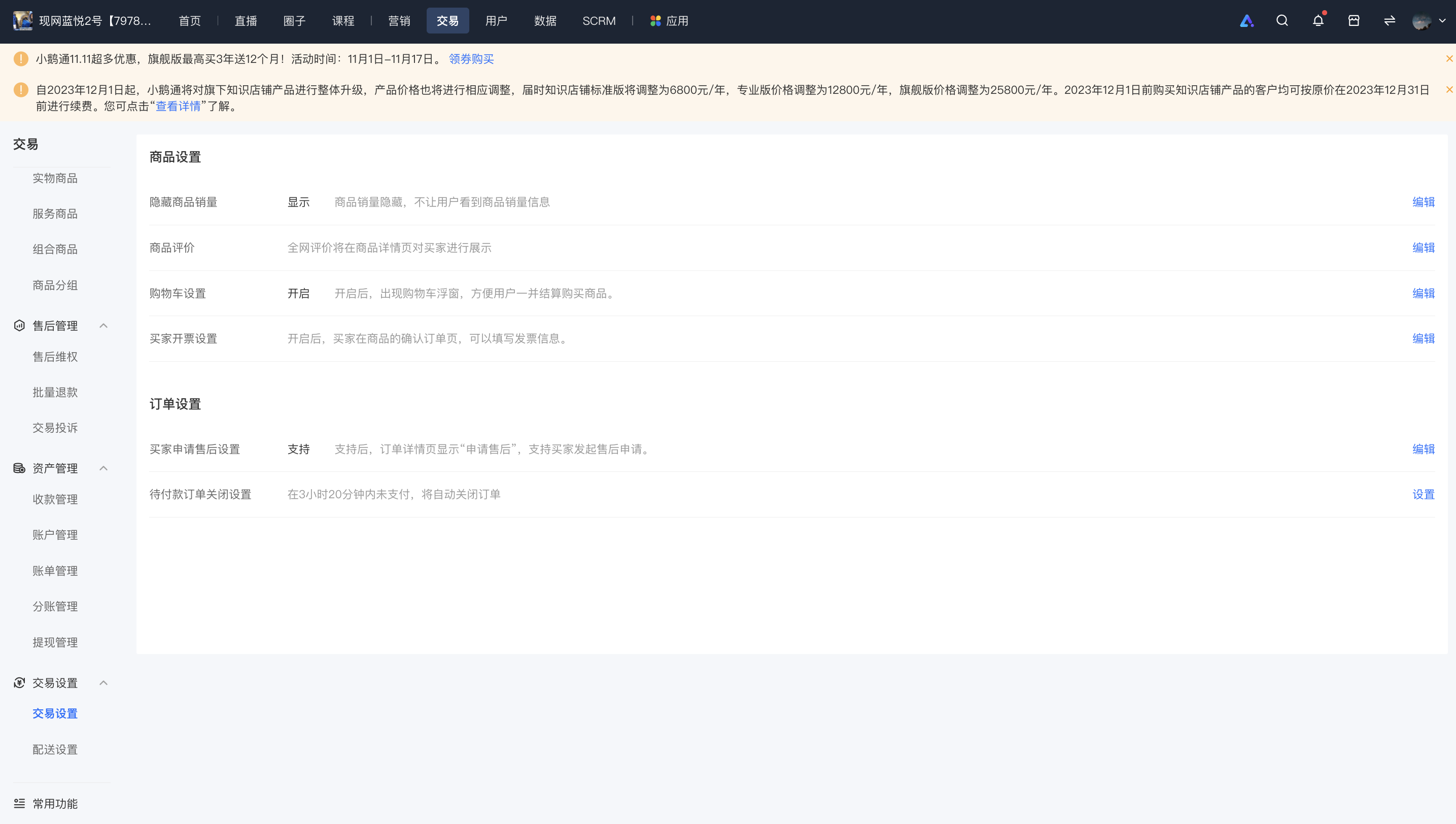
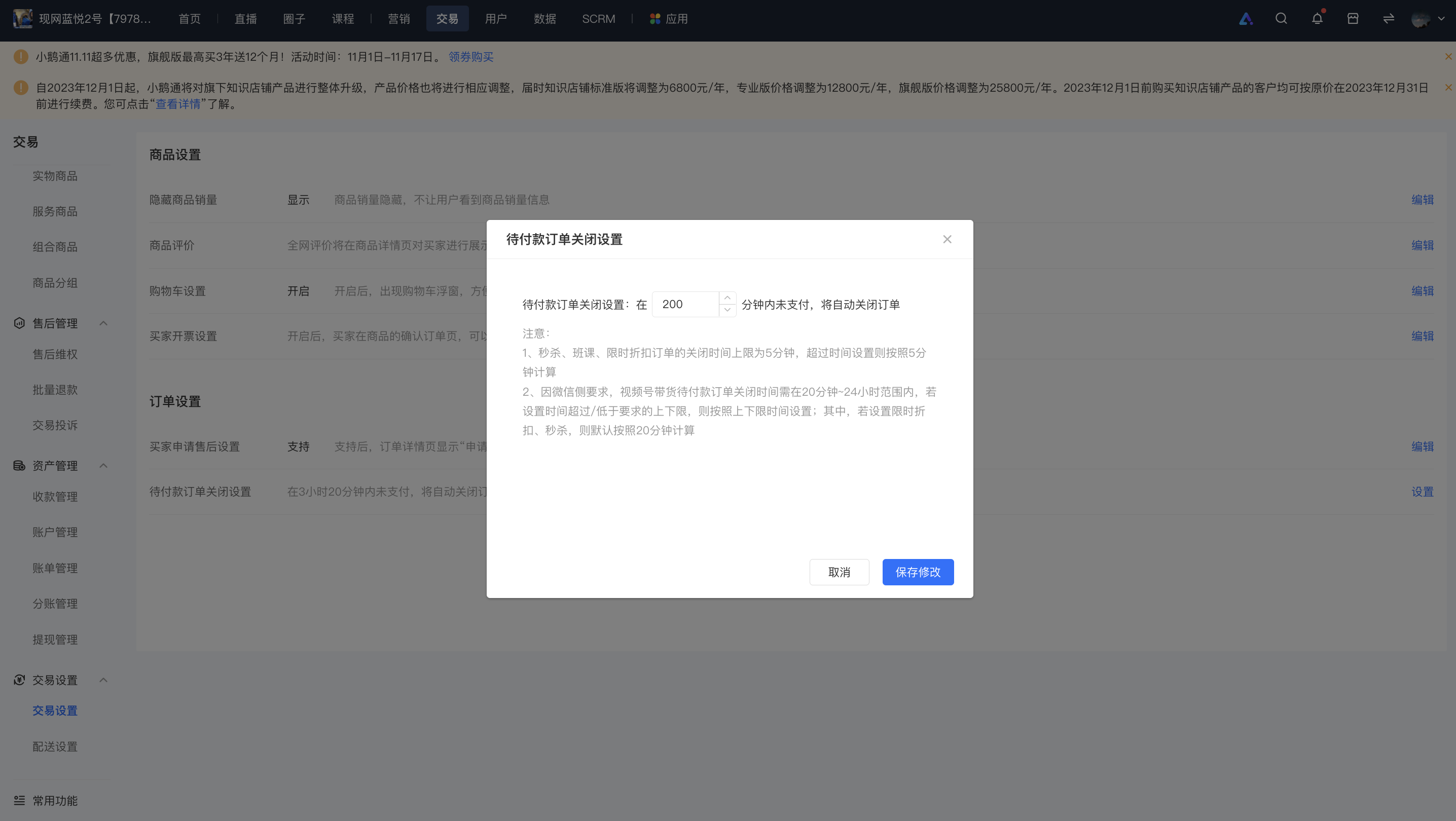
<div data-elink-language-switch="1" id="bkmrk-english" style="border:1px solid #d6d9de;border-radius:6px;padding:10px 12px;margin:0 0 18px 0;background:#f8fafc;font-size:14px;">[English](/books/transaction/page/what-is-the-closing-time-for-pending-payment-orders)</div>待付款订单关闭时间默认为120分钟；支持自定义设置，设置区间为1-1440分钟（1440分钟=24小时）。

注：<span class="payTime-tip">秒杀、班课、限时折扣订单的关闭时间当前为5分钟，超过时间设置则按照5分钟计算。 </span>

操作路径：商家管理后台-交易-交易设置-待付款订单关闭设置

![image.png](https://wechatapppro-1252524126.file.myqcloud.com/help_document/image/ueditor/57742000_1699609923.png ".png")

![image.png](https://wechatapppro-1252524126.file.myqcloud.com/help_document/image/ueditor/58138500_1699609923.png ".png")

# 订单管理导出的文件中为什么没有union_id？

<div data-elink-language-switch="1" id="bkmrk-english" style="border:1px solid #d6d9de;border-radius:6px;padding:10px 12px;margin:0 0 18px 0;background:#f8fafc;font-size:14px;">[English](/books/transaction/page/why-is-there-no-union-id-in-the-file-exported-from-order-management)</div><span style="font-size:15px;">可能有以下3种原因：</span>

**<span style="font-size:15px;">1、公众号没有绑定到微信开放平台。</span>**

<span style="font-size:15px;">union\_id是基于微信开放平台的，用户拥有union\_id的前提是商家授权给小鹅通的公众号绑定到了微信开放平台账号下。</span>

<span style="font-size:15px;">  
</span>

**<span style="font-size:15px;">2、公众号已经绑定到了微信开放平台，但是用户是在授权公众号给小鹅通之前注册的。</span>**

<span style="font-size:15px;">这种属于老用户的情况，用户的union\_id是需要通过微信登录才能获取到的。这种情况下只需要用户重新登录一次店铺，进行过一次授权登录流程就会补全union\_id。</span>

<span style="font-size:15px;">  
</span>

**<span style="font-size:15px;">3、公众号先授权给小鹅通，过了一段时间再绑定到微信开放平台上。用户在这个时间窗口注册的。</span>**

<span style="font-size:15px;">受到微信登录规则的约束，以及用户使用体验，这部分用户的union\_id不会自动补全。</span>

<span style="font-size:15px;">如果确认符合这种情况，商家可在小鹅通管理台，解绑服务号和小程序。重新授权服务号/小程序后，用户在微信内再次访问H5/小程序即可自动补全union\_id。</span>

# 小鹅通可以上传哪些物流公司的单号？

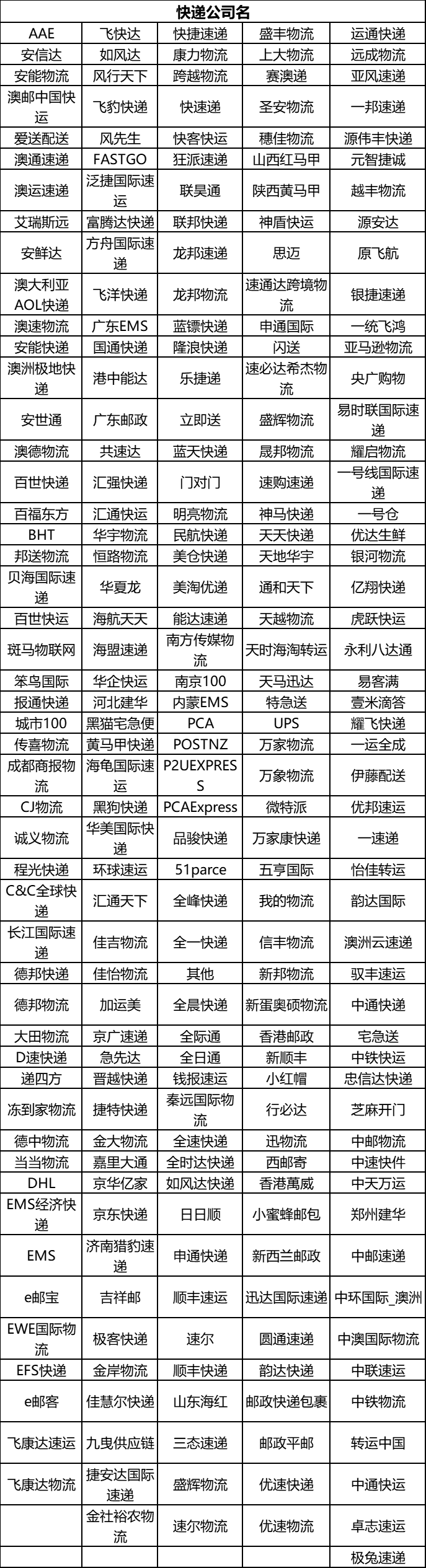
<div data-elink-language-switch="1" id="bkmrk-english" style="border:1px solid #d6d9de;border-radius:6px;padding:10px 12px;margin:0 0 18px 0;background:#f8fafc;font-size:14px;">[English](/books/transaction/page/which-logistics-companies-tracking-numbers-can-be-uploaded-on-elink)</div><span style="font-size:15px;">目前已对接中通快递、百世快递、顺丰快递等250个快递公司。清单如下：</span>

<span style="font-size:15px;">![企业微信截图_16454145287559.png](https://wechatapppro-1252524126.file.myqcloud.com/help_document/image/ueditor/1393800_1699864667.png ".png")</span>

<span style="font-size:15px;">  
</span>

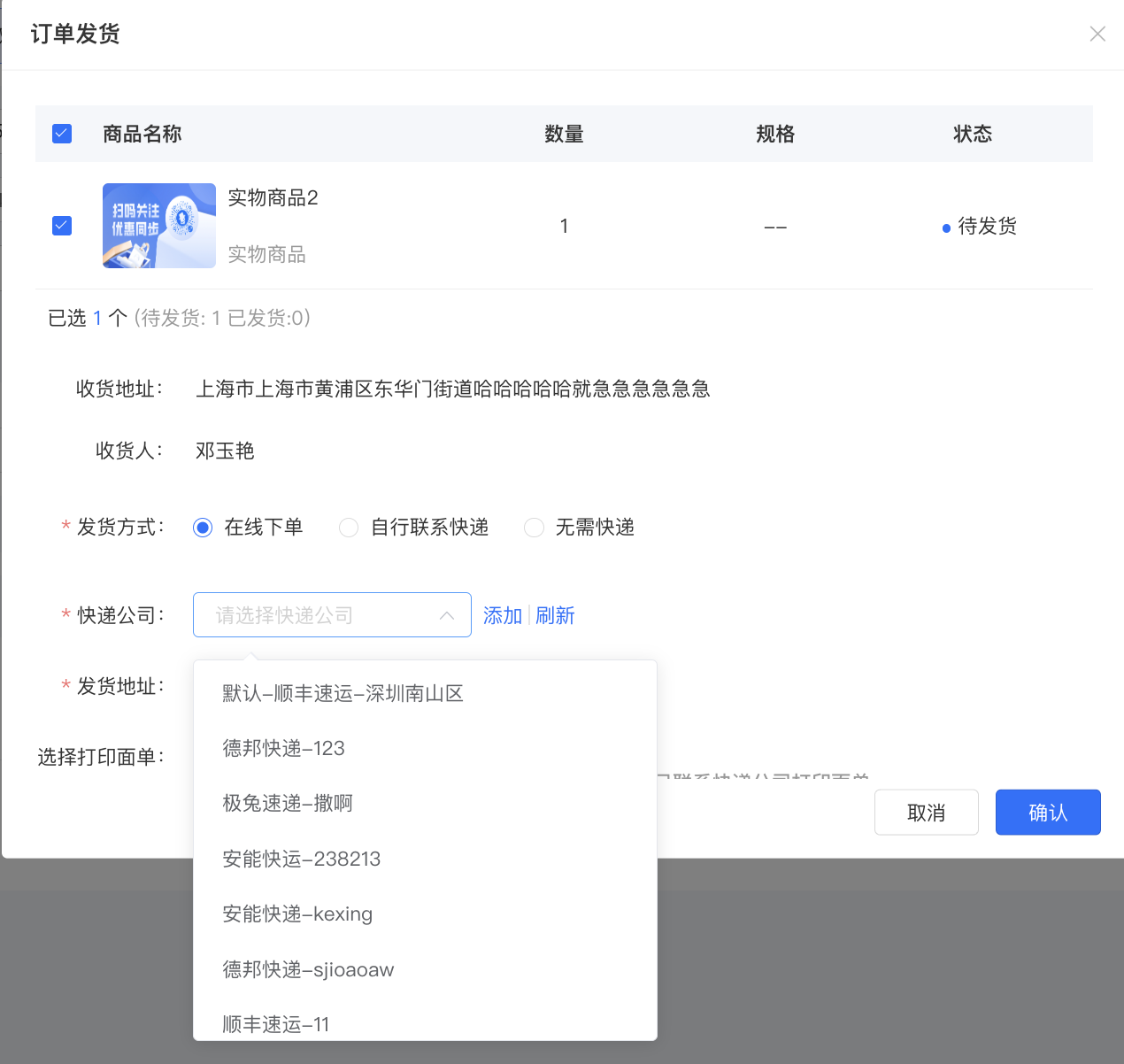
<span style="font-size:15px;">具体物流公司名称可通过订单 - 订单查询，点击订单发货，选择自行联系快递，查看或搜索快递公司，选择与自己使用的物流公司对应的快递名称即可。</span>

![image.png](https://wechatapppro-1252524126.file.myqcloud.com/help_document/image/ueditor/72584500_1699864666.png ".png")

**<span style="font-size:15px;">\*\*注：</span>**<span style="font-size:15px;">在使用【批量手动发货】时，下载模板中的快递公司名称需与上述对接快递公司名称对应，否则将会出现快递公司名称错误的提示。</span>

# 批量发货使用教程

<div data-elink-language-switch="1" id="bkmrk-english" style="border:1px solid #d6d9de;border-radius:6px;padding:10px 12px;margin:0 0 18px 0;background:#f8fafc;font-size:14px;">[English](/books/transaction/page/tutorial-on-using-batch-shipment)</div><span style="font-size:17px;">**一、 功能介绍**</span>

<span style="font-size:15px;">店铺批量发货的功能，支持查看批量处理进度、结果以及发货失败的原因，一次性处理更大量发货的订单，同时速度也更快，帮助商家提升发货操作效率。</span>

<span style="font-size:17px;">**二、 使用目的**</span>

<span style="font-size:15px;">优化操作体验，提升商家操作效率。商家使用批量发货可以实现课程带货、实物商品发货的操作。</span>

<span style="font-size:17px;">**三、 使用场景**</span>

<span style="font-size:15px;">小毛的店铺每天订单量能很多，同时需要处理多次发货。为了提高发货效率，小毛将带有快递单号的发货订单，用批量发货一键上传发货模板一分钟即可一次完成数百到五千单的发货。上传后支持查看批量处理进度以及结果，并针对失败的订单重新修改，再次提交修改发货。</span>

<span style="font-size:17px;">**四、 操作路径**</span>

<span style="font-size:15px;">商家端：订单管理 →批量发货→上传发货表格→完成发货查看详情；</span>

<span style="font-size:15px;">![image.png](https://wechatapppro-1252524126.file.myqcloud.com/help_document/image/ueditor/88896400_1699861439.png ".png")</span>

<span style="font-size:17px;">**五、 使用教程**</span>

<span style="font-size:15px;">1、点击订单管理→批量发货；</span>

![image.png](https://wechatapppro-1252524126.file.myqcloud.com/help_document/image/ueditor/69437700_1699861516.png ".png")

<span style="font-size:15px;">2、进入批量发货列表→点击批量发货→下载模板</span>

<span style="font-size:15px;">![image.png](https://wechatapppro-1252524126.file.myqcloud.com/help_document/image/ueditor/24818100_1699861589.png ".png")</span>

<span style="font-size:15px;">  
</span>

<span style="color:rgb(255,0,0);">**<span style="font-size:15px;">\*\*注意：</span>**</span>

<span style="font-size:15px;">\*最大支持5000条记录（支持 csv、xlsx，文件大小请控制在 5MB 以内）</span>

<span style="font-size:15px;">\*请仔细填写物流公司及快递单号；</span>

<span style="font-size:15px;">3、可下载模板，按照模板内格式及要求填写，物流公司按照表格中罗列快递公司名称填写，目前批量发货支持课程带货、实物商品：</span>

<span style="font-size:15px;">![image (3).png](https://wechatapppro-1252524126.file.myqcloud.com/help_document/image/ueditor/19688400_1699861440.png ".png")</span>

<span style="font-size:15px;">  
</span>

<span style="font-size:15px;">![image (4).png](https://wechatapppro-1252524126.file.myqcloud.com/help_document/image/ueditor/36964900_1699861440.png ".png")</span>

<span style="font-size:15px;">  
</span>

**<span style="font-size:15px;">\*\*注：</span>**<span style="font-size:15px;">物流公司名称需要填写对应物流公司的全称，填写不完整会发货失败。</span>

<span style="font-size:15px;">例如：中通快递填写为中通、zt、中通包裹等是不符合要求。</span>

<span style="font-size:15px;">4、上传文件后就可以看到刚刚的发货记录：发货总数几单、成功了几单，也可以下载记录查看具体的失败；</span>

<span style="font-size:15px;">![image.png](https://wechatapppro-1252524126.file.myqcloud.com/help_document/image/ueditor/36648400_1699861589.png ".png")</span>

<span style="font-size:15px;">5、此时出现全部失败或部分失败的情况可以点击【修改】按钮对本批次物流信息更新；</span>

<span style="font-size:15px;"></span>

<span style="font-size:15px;">  
</span>

**<span style="font-size:15px;">\*\*注意：</span>**<span style="font-size:15px;">修改为提交更新的表格信息，将会对已上传的表格覆盖。</span>

# 自提发货操作指引

<div data-elink-language-switch="1" id="bkmrk-english" style="border:1px solid #d6d9de;border-radius:6px;padding:10px 12px;margin:0 0 18px 0;background:#f8fafc;font-size:14px;">[English](/books/transaction/page/operation-guide-for-self-pickup-delivery)</div><span style="font-size:15px;font-weight:bold;color:rgb(51,51,51);letter-spacing:0;vertical-align:baseline;">一、 </span> <span style="font-size:15px;font-weight:bold;color:rgb(51,51,51);letter-spacing:0;vertical-align:baseline;">功能介绍</span>

<span style="font-size:15px;color:rgb(51,51,51);letter-spacing:0;vertical-align:baseline;">总部可以通过此功能，进行订单发货，记录发往门店的商品的快递单号，以及该订单的物流轨迹，商家可在B端查看物流状态，用户可在C端查看商品运输状态。注意</span><span style="font-size:15px;color:rgb(51,51,51);letter-spacing:0;vertical-align:baseline;">：商家需自行联系快递下单，统计快递单号等信息。</span>

<span style="font-size:15px;font-weight:bold;color:rgb(51,51,51);letter-spacing:0;vertical-align:baseline;">二、 </span> <span style="font-size:15px;font-weight:bold;color:rgb(51,51,51);letter-spacing:0;vertical-align:baseline;">使用目的</span>

<span style="font-size:15px;color:rgb(51,51,51);letter-spacing:0;vertical-align:baseline;">为用户展示商品到店情况，当订单是“待提货”状态时，用户可前往提货。</span>

<span style="font-size:15px;font-weight:bold;color:rgb(51,51,51);letter-spacing:0;vertical-align:baseline;">三、 </span> <span style="font-size:15px;font-weight:bold;color:rgb(51,51,51);letter-spacing:0;vertical-align:baseline;">使用场景</span>

<span style="font-size:15px;color:rgb(51,51,51);letter-spacing:0;vertical-align:baseline;">小敏的店铺有很多线下门店，总部会将商品发往不同的门店，但是商品运输需要一定的时间，用户不知道商品是否到店，并且如果商品已发往门店，用户申请了退款，小敏不知道这笔订单此时是否在运输状态，因此通过自提备货的订单可以支持查看物流状态，商家可以在B端处理运输中申请退款的订单，用户可以在C端根据商品运输状态决定何时提货。</span>

<span style="font-size:15px;font-weight:bold;color:rgb(51,51,51);letter-spacing:0;vertical-align:baseline;">四、 </span> <span style="font-size:15px;font-weight:bold;color:rgb(51,51,51);letter-spacing:0;vertical-align:baseline;">操作路径</span>

<span style="font-size:15px;color:rgb(51,51,51);letter-spacing:0;vertical-align:baseline;">下载模板，并填写信息——B端进行发货——单击发货或批量导入</span>![image/png](https://wechatapppro-1252524126.file.myqcloud.com/help_center_ooo/image/help_center_ooo/oqht93lzhrs68c.png "flowchart8.png")

<span style="font-style:unset;letter-spacing:0px;text-decoration-line:unset;word-spacing:normal;font-size:15px;font-weight:bold;color:rgb(51,51,51);vertical-align:baseline;">  
</span>

<span style="font-style:unset;letter-spacing:0px;text-decoration-line:unset;word-spacing:normal;font-size:15px;font-weight:bold;color:rgb(51,51,51);vertical-align:baseline;">五、 </span><span style="color:unset;font-style:unset;font-weight:unset;text-decoration-line:unset;word-spacing:normal;"> </span><span style="font-style:unset;letter-spacing:0px;text-decoration-line:unset;word-spacing:normal;font-size:15px;font-weight:bold;color:rgb(51,51,51);vertical-align:baseline;">使用教程</span>

**<span style="font-size:15px;color:rgb(51,51,51);letter-spacing:0;vertical-align:baseline;">1、 </span> <span style="font-size:15px;color:rgb(51,51,51);letter-spacing:0;vertical-align:baseline;">单笔订单发货</span>**

<span style="font-size:15px;color:rgb(51,51,51);letter-spacing:0;vertical-align:baseline;">1.1</span>

<span style="font-size:15px;color:rgb(51,51,51);letter-spacing:0;vertical-align:baseline;">交易-自提发货-发货</span>

<span style="display:inline-block;overflow:hidden;width:548px;height:274px;">![image/png](https://wechatapppro-1252524126.file.myqcloud.com/help_center_ooo/image/help_center_ooo/guokqvlzhrdyzr.png "image.png")</span>

<span style="font-size:15px;color:rgb(51,51,51);letter-spacing:0;vertical-align:baseline;">1.2</span>

<span style="font-size:15px;color:rgb(51,51,51);letter-spacing:0;vertical-align:baseline;">填写物流信息-确认</span>

<span style="display:inline-block;overflow:hidden;width:548px;height:274px;">![image/png](https://wechatapppro-1252524126.file.myqcloud.com/help_center_ooo/image/help_center_ooo/vj9g1alzhreloh.png "image.png")</span>

<span style="font-size:15px;color:rgb(51,51,51);letter-spacing:0;vertical-align:baseline;">1.3</span>

<span style="font-size:15px;color:rgb(51,51,51);letter-spacing:0;vertical-align:baseline;">操作发货后的订单展示在【已发货】下</span>

<span style="display:inline-block;overflow:hidden;width:548px;height:274px;">![image/png](https://wechatapppro-1252524126.file.myqcloud.com/help_center_ooo/image/help_center_ooo/r89w4ilzhrf4hw.png "image.png")</span>

**<span style="font-size:15px;color:rgb(51,51,51);letter-spacing:0;vertical-align:baseline;">2、</span><span style="font-size:15px;color:rgb(51,51,51);letter-spacing:0;vertical-align:baseline;">批量发货</span>**

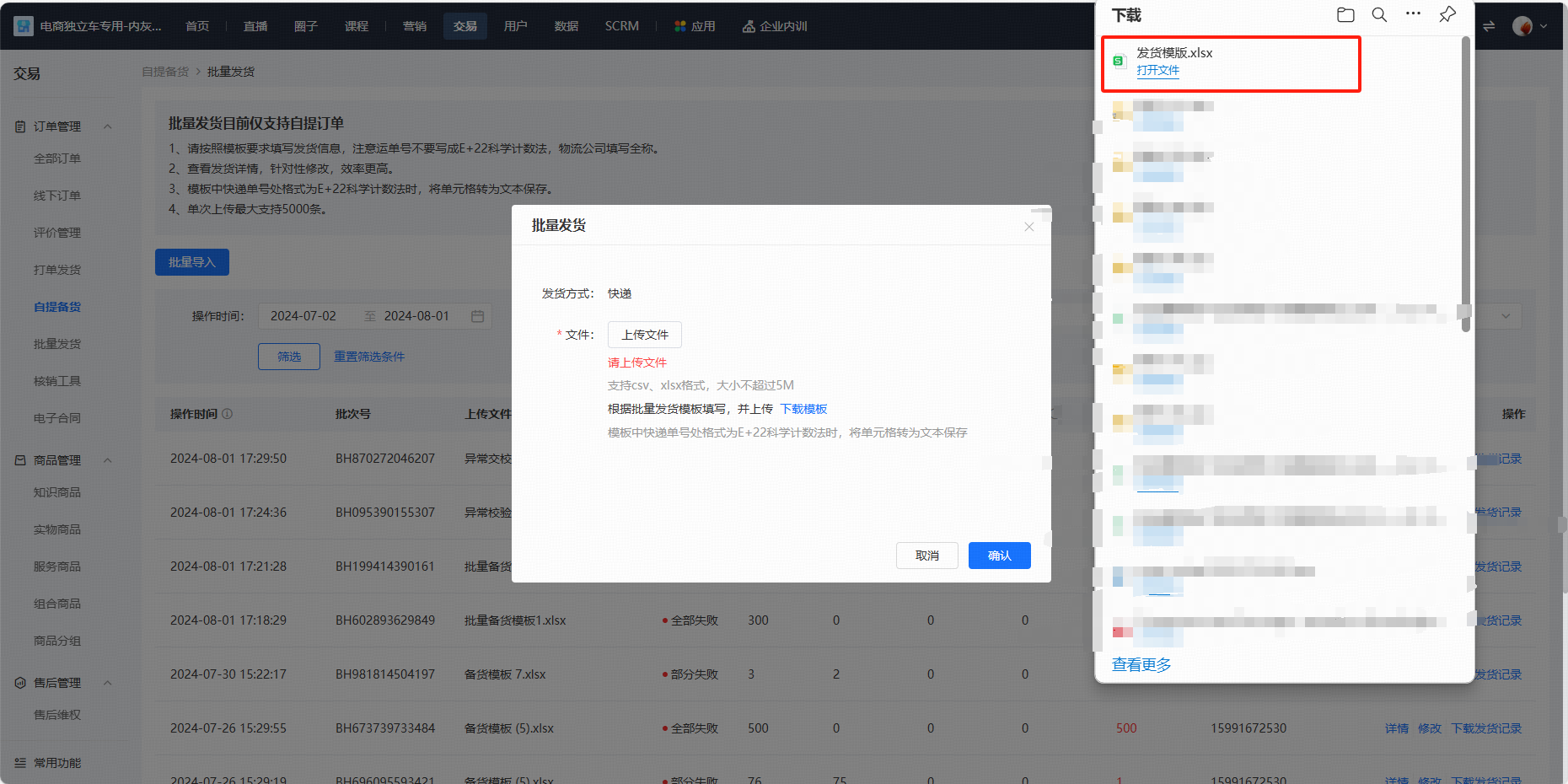
<span style="font-size:15px;color:rgb(51,51,51);letter-spacing:0;vertical-align:baseline;">2.1下载发货模板</span>

<span style="font-size:15px;color:rgb(51,51,51);letter-spacing:0;vertical-align:baseline;">交易-自提发货-批量发货-批量导入-下载模板</span>

<span style="display:inline-block;overflow:hidden;width:548px;height:274px;">![image/png](https://wechatapppro-1252524126.file.myqcloud.com/help_center_ooo/image/help_center_ooo/vqk8ohlzhrfy6s.png "image.png")</span>

<span style="display:inline-block;overflow:hidden;width:548px;height:274px;">![image/png](https://wechatapppro-1252524126.file.myqcloud.com/help_center_ooo/image/help_center_ooo/lt78m7lzhrh3qe.png "image.png")</span>

<span style="display:inline-block;overflow:hidden;width:548px;height:274px;">![image/png](https://wechatapppro-1252524126.file.myqcloud.com/help_center_ooo/image/help_center_ooo/cz64a2lzb3cunc.png "image.png")</span>

<span style="font-size:15px;color:rgb(51,51,51);letter-spacing:0;vertical-align:baseline;">2.2导出待发货自提订单列表</span>

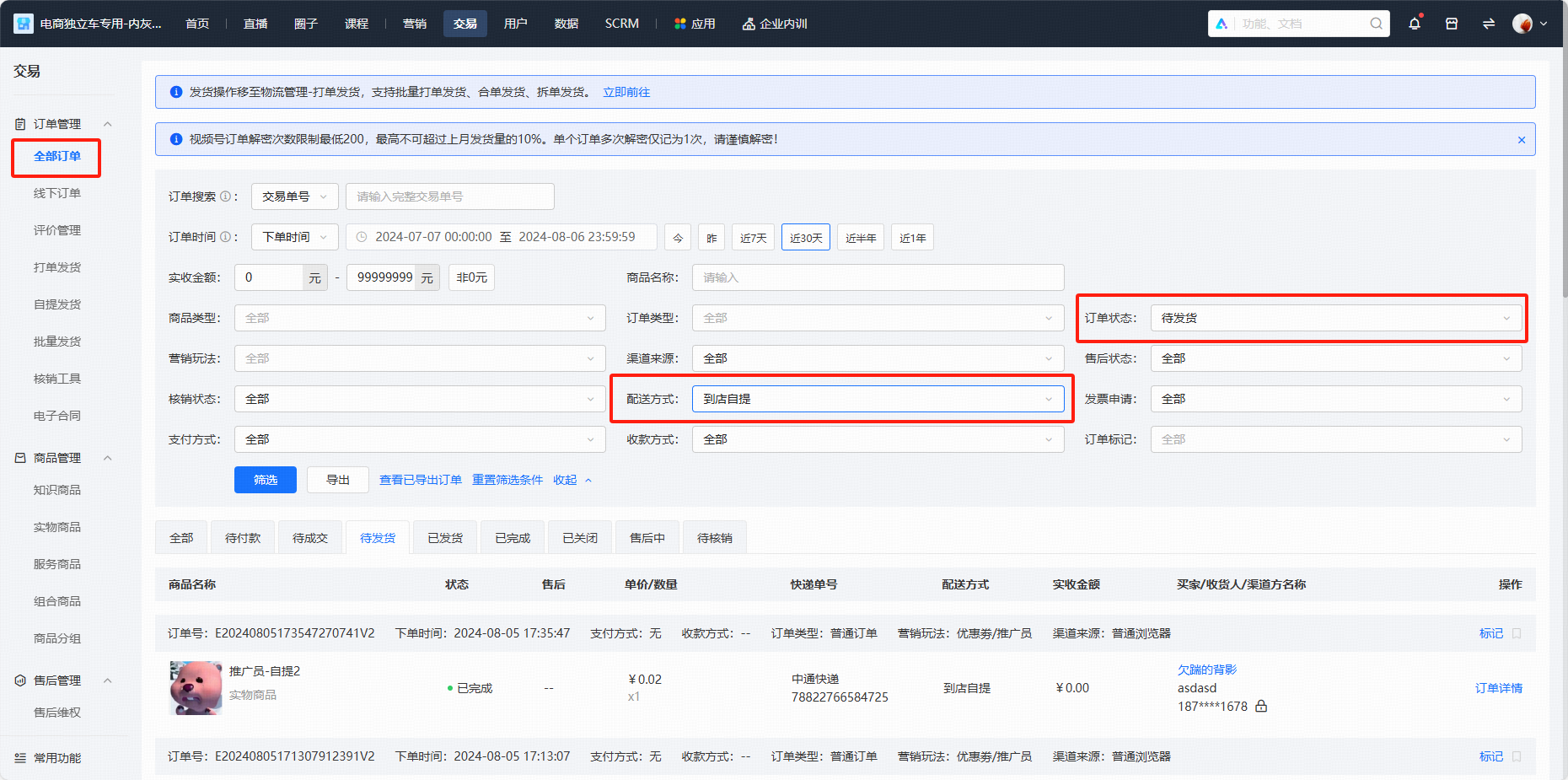
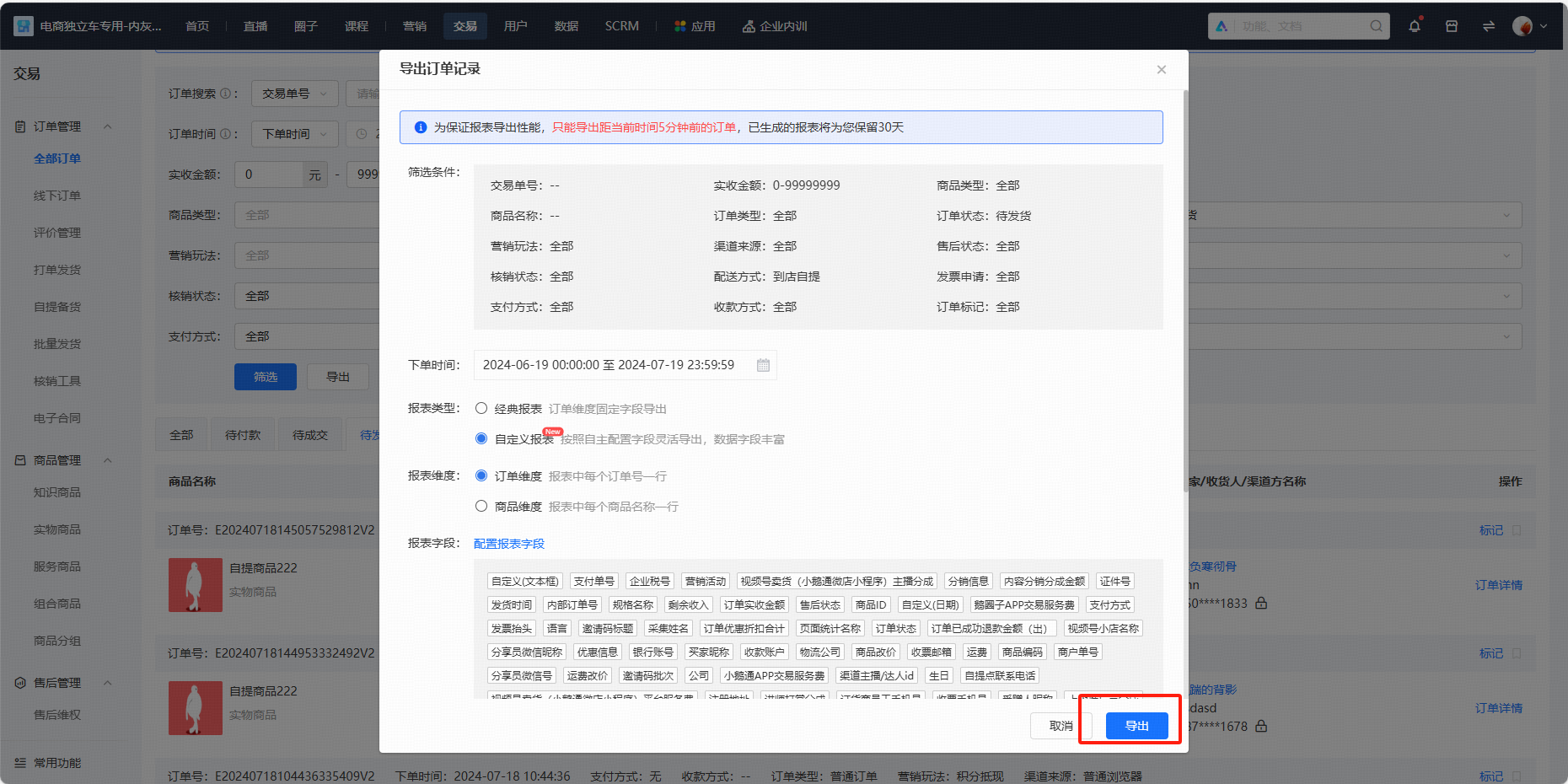
<span style="font-size:15px;color:rgb(51,51,51);letter-spacing:0;vertical-align:baseline;">交易-全部订单-筛选【待发货】【到店自提】-导出-导出</span>

<span style="display:inline-block;overflow:hidden;width:548px;height:274px;">![image/png](https://wechatapppro-1252524126.file.myqcloud.com/help_center_ooo/image/help_center_ooo/6e5ud2lzhrikkg.png "image.png")</span>

<span style="display:inline-block;overflow:hidden;width:548px;height:274px;">![image/png](https://wechatapppro-1252524126.file.myqcloud.com/help_center_ooo/image/help_center_ooo/21izbllys5qn24.png "unknow.png")</span>

<span style="font-size:15px;color:rgb(51,51,51);letter-spacing:0;vertical-align:baseline;">2.3按照模版填写信息</span>

<span style="font-size:15px;color:rgb(51,51,51);letter-spacing:0;vertical-align:baseline;">在订单导出表格复制内部订单号-粘贴至发货模板订单号处-填写快递公司、单号-保存</span>

<span style="display:inline-block;overflow:hidden;width:548px;height:215.49px;">![image/png](https://wechatapppro-1252524126.file.myqcloud.com/help_center_ooo/image/help_center_ooo/g9k0lflys5qn38.png "unknow.png")</span>

<span style="display:inline-block;overflow:hidden;width:548px;height:223.764px;">![image/png](https://wechatapppro-1252524126.file.myqcloud.com/help_center_ooo/image/help_center_ooo/bx2344lys5qn2h.png "unknow.png")</span>

<span style="font-size:15px;color:rgb(51,51,51);letter-spacing:0;vertical-align:baseline;">2.4B端提交表格</span>

<span style="font-size:15px;color:rgb(51,51,51);letter-spacing:0;vertical-align:baseline;">批量发货-批量导入-上传文件-确认</span>

<span style="display:inline-block;overflow:hidden;width:548px;height:274px;">![image/png](https://wechatapppro-1252524126.file.myqcloud.com/help_center_ooo/image/help_center_ooo/za0lfylzb3eqio.png "image.png")</span>

<span style="font-size:15px;color:rgb(51,51,51);letter-spacing:0;vertical-align:baseline;">2.5查看操作记录</span>

<span style="font-size:15px;color:rgb(51,51,51);letter-spacing:0;vertical-align:baseline;">交易-自提发货-批量发货（可查看操作结果）</span>

<span style="display:inline-block;overflow:hidden;width:882px;height:441px;">![image/png](https://wechatapppro-1252524126.file.myqcloud.com/help_center_ooo/image/help_center_ooo/dmy0vylzhrkkn3.png "image.png")</span>

<span style="font-size:15px;color:rgb(51,51,51);letter-spacing:0;vertical-align:baseline;">点击详情（查看具体原因描述）</span>

<span style="display:inline-block;overflow:hidden;width:882px;height:441px;">![image/png](https://wechatapppro-1252524126.file.myqcloud.com/help_center_ooo/image/help_center_ooo/3yjq09lzhrlbpm.png "image.png")</span>

<span style="font-size:15px;color:rgb(51,51,51);letter-spacing:0;vertical-align:baseline;">点击下载发货记录（查看具体订单操作结果）</span>

<span style="display:inline-block;overflow:hidden;width:882px;height:413.497px;">![image/png](https://wechatapppro-1252524126.file.myqcloud.com/help_center_ooo/image/help_center_ooo/ytu5c5lys5qn1r.png "unknow.png")</span>

**<span style="font-size:15px;color:rgb(51,51,51);letter-spacing:0;vertical-align:baseline;">3、</span><span style="font-size:15px;color:rgb(51,51,51);letter-spacing:0;vertical-align:baseline;">处理退款</span>**

<span style="font-size:15px;color:rgb(51,51,51);letter-spacing:0;vertical-align:baseline;">3.1交易-售后维权-筛选售后状态-可根据发货状态处理退款</span>

<span style="display:inline-block;overflow:hidden;width:1020px;height:510px;">![image/png](https://wechatapppro-1252524126.file.myqcloud.com/help_center_ooo/image/help_center_ooo/5qkg0alys5qn3e.png "unknow.png")</span>

<span style="font-size:15px;font-weight:bold;color:rgb(51,51,51);letter-spacing:0;vertical-align:baseline;"> 六、注意事项</span>

<span style="font-style:unset;font-weight:unset;letter-spacing:0px;text-decoration-line:unset;word-spacing:normal;font-size:15px;color:rgb(51,51,51);vertical-align:baseline;">1、 </span><span style="color:unset;font-style:unset;font-weight:unset;text-decoration-line:unset;word-spacing:normal;"> </span><span style="font-style:unset;font-weight:unset;letter-spacing:0px;text-decoration-line:unset;word-spacing:normal;font-size:15px;color:rgb(51,51,51);vertical-align:baseline;">请上传正确的物流公司和快递单号，并且不可重复发货；</span>

<span style="font-style:unset;font-weight:unset;letter-spacing:0px;text-decoration-line:unset;word-spacing:normal;font-size:15px;color:rgb(51,51,51);vertical-align:baseline;">2、 </span><span style="color:unset;font-style:unset;font-weight:unset;text-decoration-line:unset;word-spacing:normal;"> </span><span style="font-style:unset;font-weight:unset;letter-spacing:0px;text-decoration-line:unset;word-spacing:normal;font-size:15px;color:rgb(51,51,51);vertical-align:baseline;">订单核销前都支持修改物流信息；</span>

<span style="font-style:unset;font-weight:unset;letter-spacing:0px;text-decoration-line:unset;word-spacing:normal;font-size:15px;color:rgb(51,51,51);vertical-align:baseline;">3、 </span><span style="color:unset;font-style:unset;font-weight:unset;text-decoration-line:unset;word-spacing:normal;"> </span><span style="font-style:unset;font-weight:unset;letter-spacing:0px;text-decoration-line:unset;word-spacing:normal;font-size:15px;color:rgb(51,51,51);vertical-align:baseline;">若订单存在售后情况，不可操作发货，正在发货的订单也会操作失败；</span>

<span style="font-style:unset;font-weight:unset;letter-spacing:0px;text-decoration-line:unset;word-spacing:normal;font-size:15px;color:rgb(51,51,51);vertical-align:baseline;">4、 </span><span style="color:unset;font-style:unset;font-weight:unset;text-decoration-line:unset;word-spacing:normal;"> 自提发</span><span style="font-style:unset;font-weight:unset;letter-spacing:0px;text-decoration-line:unset;word-spacing:normal;font-size:15px;color:rgb(51,51,51);vertical-align:baseline;">货功能支持发送短信至用户端，请及时充值短信推送账户，若账户余额不足，该笔订单仍可发货，但将不会进行短信推送；</span>

# 付款成功消息提醒使用教程

<div data-elink-language-switch="1" id="bkmrk-english" style="border:1px solid #d6d9de;border-radius:6px;padding:10px 12px;margin:0 0 18px 0;background:#f8fafc;font-size:14px;">[English](/books/transaction/page/tutorial-on-using-payment-success-message-reminders)</div><span style="font-size:17px;">**一、 功能介绍**</span>

<span style="font-size:15px;">用户支付成功后，会通过付款成功消息提醒，用户打开模板消息/短信，可以通过链接跳转订单详情页。</span>

<span style="font-size:17px;">**二、 使用目的**</span>

<span style="font-size:15px;">用户可以通过付款成功消息，找到对应订单，实物订单则查看物流情况，知识商品订单则可以快速找到课程。</span>

<span style="font-size:17px;">**三、 操作路径**</span>

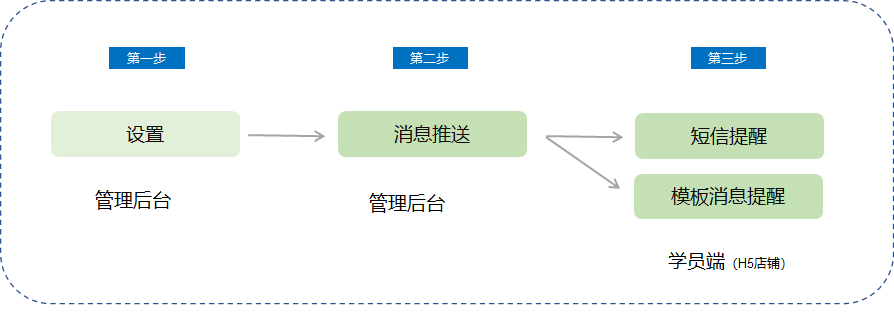
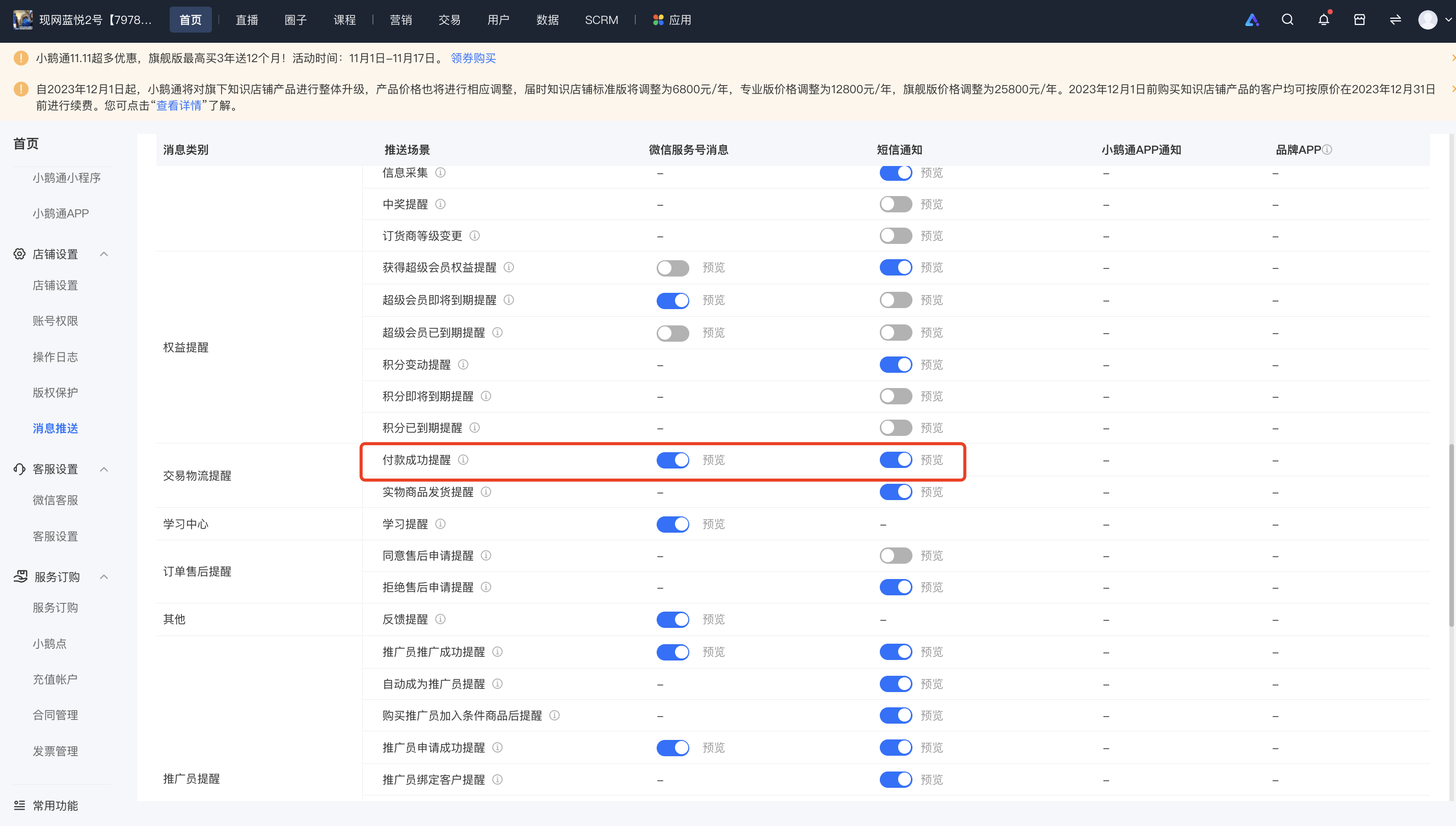
<span style="font-size:15px;">商家端：商家电脑端管理台 → 设置 →推送设置 （<span style="font-size:15px;">消息推送</span>） →开启付款成功消息提醒</span>

<span style="font-size:15px;">学员端：微信模板消息/短信 → 订单详情页 → 查看物流/查看课程/查看权益</span>

<span style="font-size:15px;">![image.png](https://wechatapppro-1252524126.file.myqcloud.com/help_document/image/ueditor/58310800_1699859953.png ".png")</span>

<span style="font-size:17px;">**四、 使用教程**</span>

**<span style="font-size:15px;">第一步 消息中心</span>**

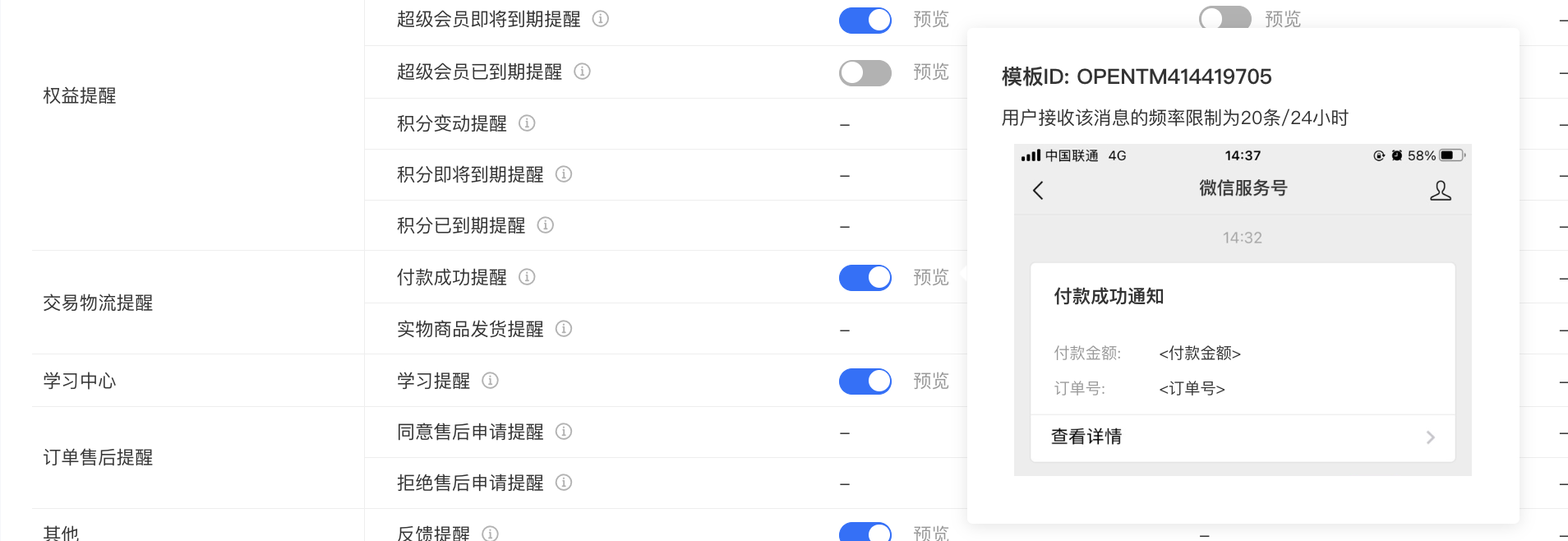
<span style="font-size:15px;">1、 消息中心-交易物流提醒-付款成功提醒，付款成功消息推送可以选择【模板消息】和【短信】两种类型提醒</span>

![image.png](https://wechatapppro-1252524126.file.myqcloud.com/help_document/image/ueditor/17310000_1699859992.png ".png")

<span style="font-size:15px;"> （管理后台） </span>

**<span style="font-size:15px;">第二步 模板消息</span>**

<span style="font-size:15px;">1、模板消息开启需要提前授权服务号，付款成功提醒不支持个人模式，只支持企业模式，商家必须认证服务号。</span>

![image.png](https://wechatapppro-1252524126.file.myqcloud.com/help_document/image/ueditor/33788200_1699860014.png ".png")

<span style="font-size:15px;"> （消息中心） </span>

<span style="font-size:15px;">  
</span>

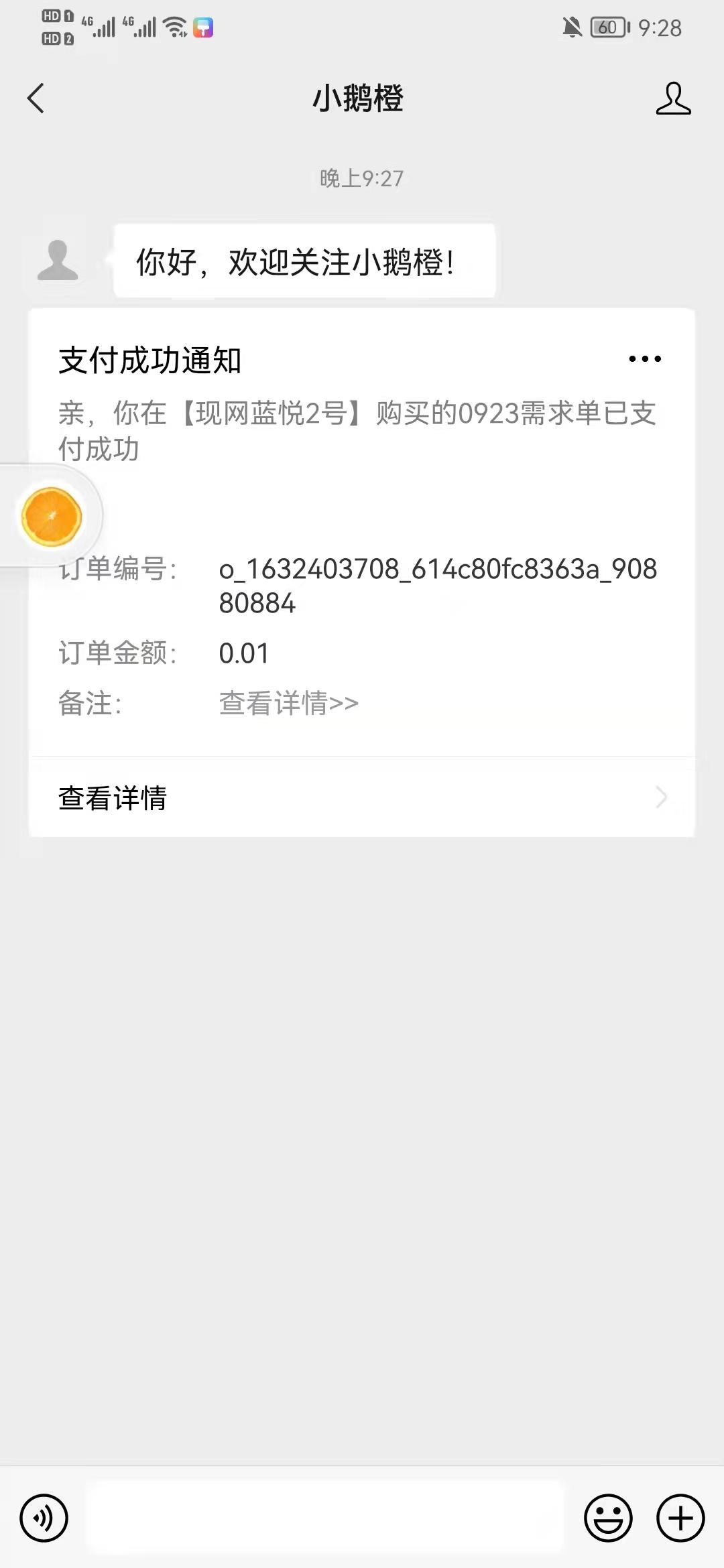
<span style="font-size:15px;">2、付款成功模板消息提醒，用户无需开启，默认支付后推送</span>

<span style="font-size:15px;">![image (2).png](https://wechatapppro-1252524126.file.myqcloud.com/help_document/image/ueditor/95755600_1699859953.png ".png")</span>

<span style="font-size:15px;"> （模板消息）</span>

<span style="font-size:15px;">  
</span>

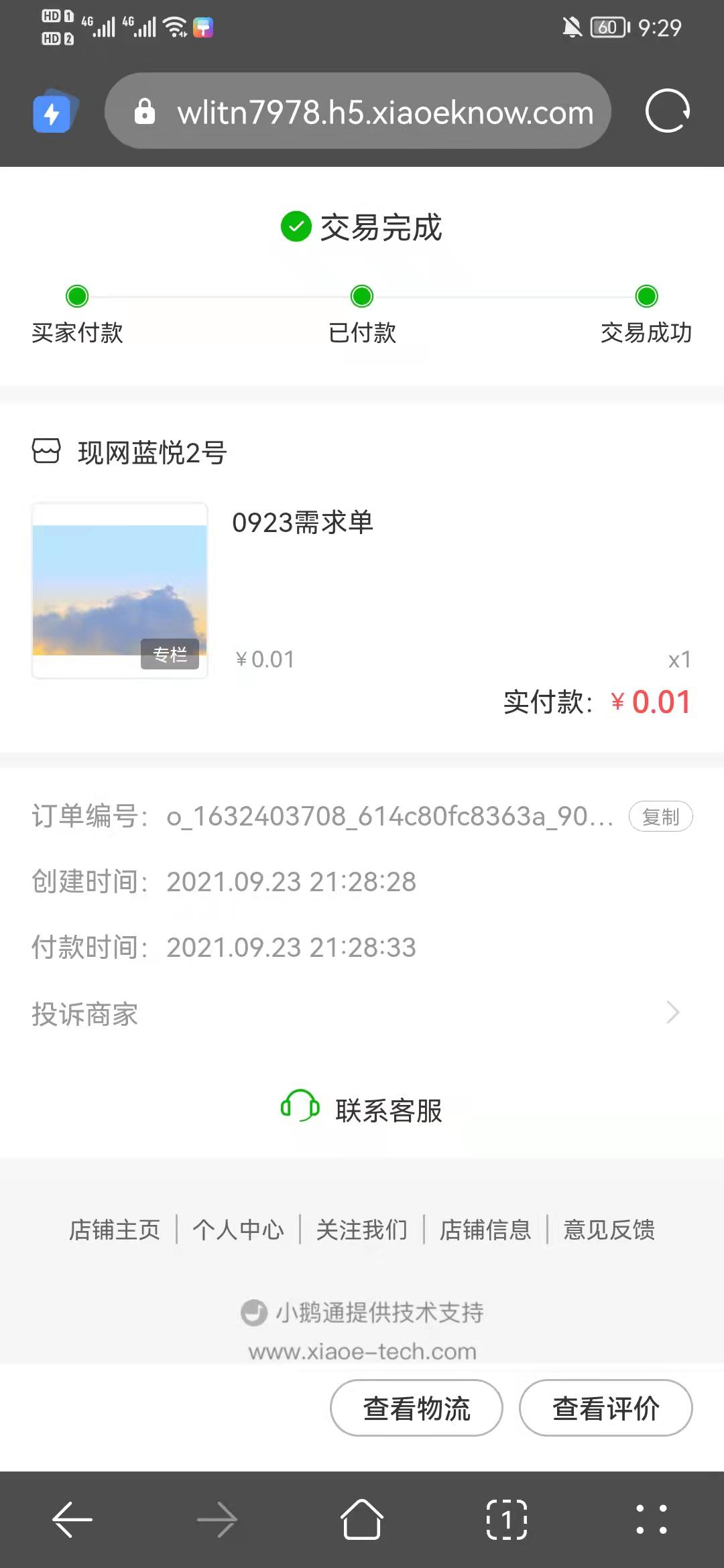
<span style="font-size:15px;">3、点击模板消息可以跳转对应订单详情页，可以通过订单详情页跳转至课程详情</span>

![image (3).png](https://wechatapppro-1252524126.file.myqcloud.com/help_document/image/ueditor/26194200_1699859954.png ".png")

<span style="font-size:15px;"> （订单详情）</span>

**<span style="font-size:15px;">第三步 短信提醒</span>**

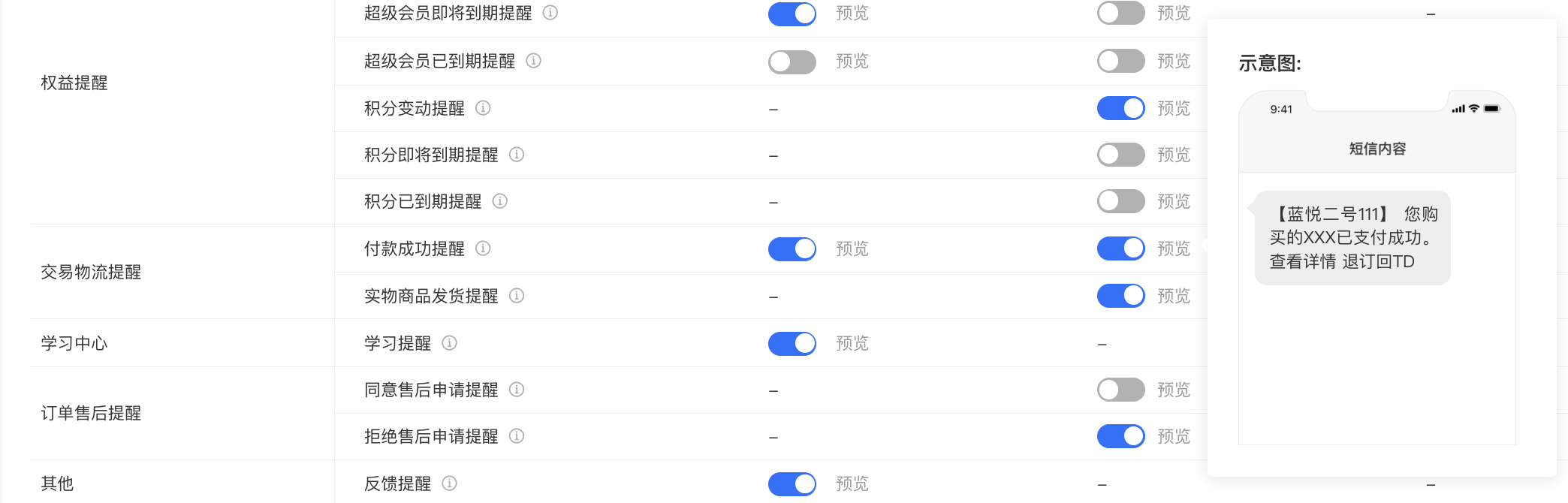
<span style="font-size:15px;">1、开启短信提醒后，会针对已经绑定账户手机号码用户推送短信</span>

<span style="font-size:15px;">![image.png](https://wechatapppro-1252524126.file.myqcloud.com/help_document/image/ueditor/8712100_1699860014.png ".png")</span>

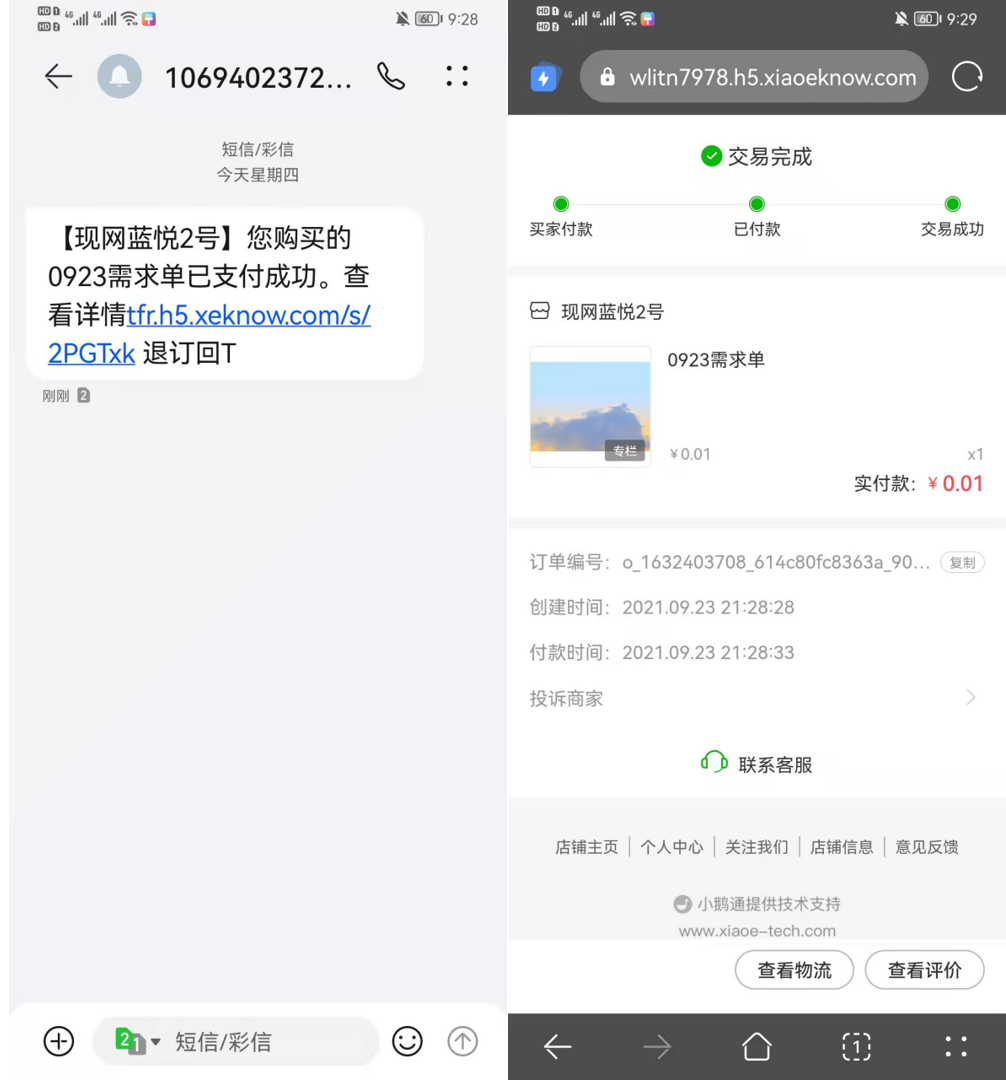
<span style="font-size:15px;">2、短信链接可以直接打开，跳转至订单详情页，实物商品订单可以通过订单详情页查看物流，知识商品订单可以跳转至课程详情。</span>

<span style="font-size:15px;">![企业微信截图_20210923221117.png](https://wechatapppro-1252524126.file.myqcloud.com/help_document/image/ueditor/62769000_1699859954.png ".png")</span>

<span style="font-size:15px;"> （短信详情） （订单详情）</span>

# 资质要求

# 售卖实物商品需要什么资质要求？

<div data-elink-language-switch="1" id="bkmrk-english" style="border:1px solid #d6d9de;border-radius:6px;padding:10px 12px;margin:0 0 18px 0;background:#f8fafc;font-size:14px;">[English](/books/transaction/page/what-qualifications-are-required-to-sell-physical-goods)</div><span style="font-size:14px;">根据国家法律法规的规定，您在经营特定行业，售卖实物商品时，需具备相应资质要求，具体可以查阅[小鹅通行业准入规则](https://admin.xiaoe-tech.com/helpCenter/problem?first_id=600&second_id=468&document_id=doc_6603f0be84c19_UfCM4)</span>

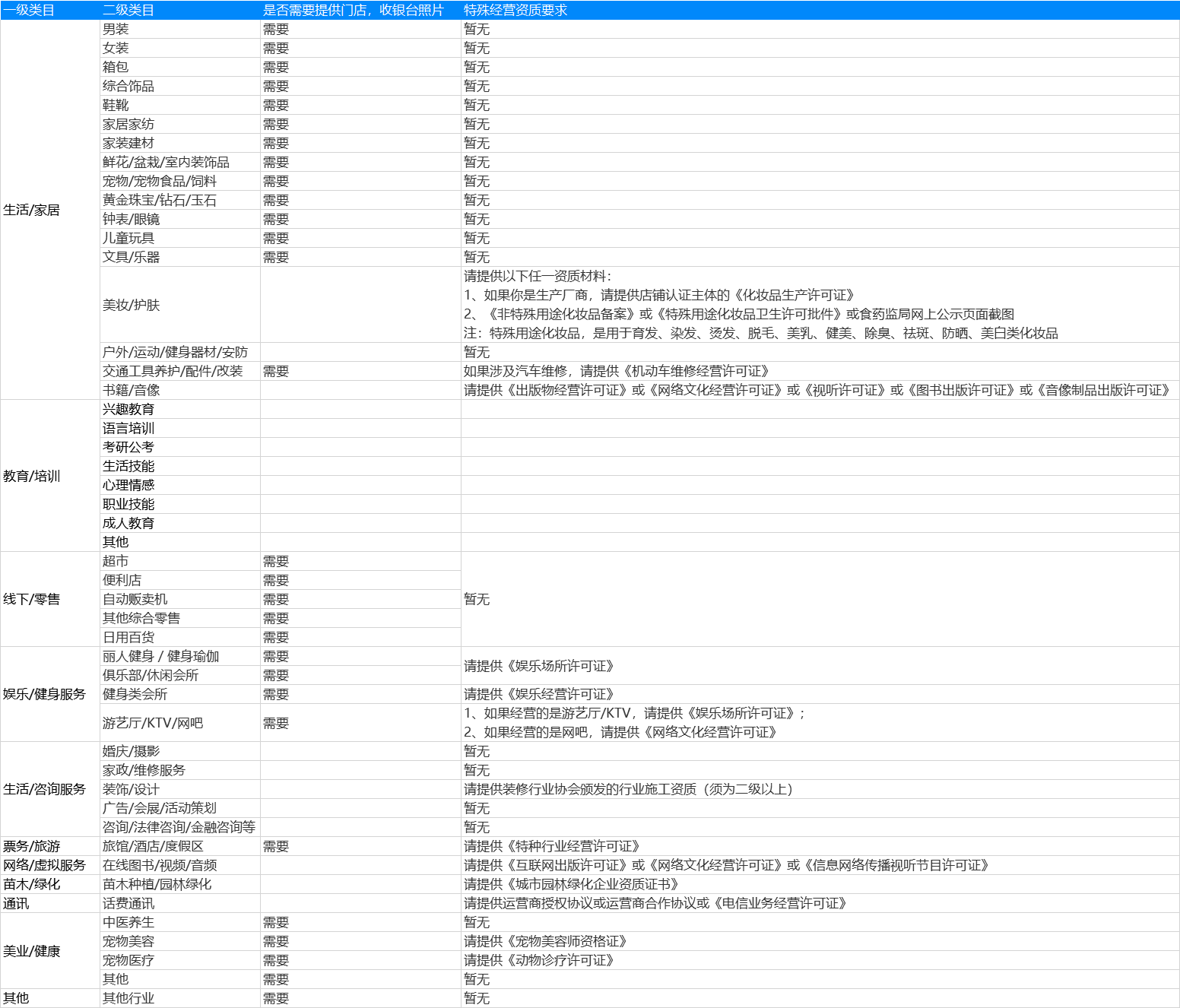
# 个体工商户主体商家可经营类目

<div data-elink-language-switch="1" id="bkmrk-english" style="border:1px solid #d6d9de;border-radius:6px;padding:10px 12px;margin:0 0 18px 0;background:#f8fafc;font-size:14px;">[English](/books/transaction/page/categories-available-for-individual-business-operators)</div>![2.png](https://wechatapppro-1252524126.file.myqcloud.com/help_document/image/ueditor/20388100_1596615806.png ".png")

# 商品管理

# 实物电商功能支持哪些营销工具？

<div data-elink-language-switch="1" id="bkmrk-english" style="border:1px solid #d6d9de;border-radius:6px;padding:10px 12px;margin:0 0 18px 0;background:#f8fafc;font-size:14px;">[English](/books/transaction/page/which-marketing-tools-are-supported-by-the-physical-product-e-commerce-function)</div><span style="color:rgb(53,53,53);background:rgb(255,255,255);letter-spacing:0pt;vertical-align:baseline;font-size:15px;">支持优惠券、优惠码、推广员、支付有礼、限时折扣、拼团、裂变海报、页面统计</span><span style="color:rgb(51,51,51);background-image:initial;background-position:initial;background-size:initial;background-repeat:initial;background-attachment:initial;letter-spacing:0pt;vertical-align:baseline;"></span>

# 如何设置商品起购数量

<div data-elink-language-switch="1" id="bkmrk-english" style="border:1px solid #d6d9de;border-radius:6px;padding:10px 12px;margin:0 0 18px 0;background:#f8fafc;font-size:14px;">[English](/books/transaction/page/how-to-set-the-minimum-purchase-quantity-for-products)</div><span style="font-size:17px;">**一、功能介绍**</span>

<span style="font-size:15px;">可设置**实物商品**或**有价优惠券**起售数量，控制用户每次购买的最低件数。  
</span>

<span style="font-size:17px;">**二、使用场景**</span>

<span style="font-size:15px;">商家所售卖的实物商品单价较低，可设置商品5件起售，从而提高销量和客单价。  
</span>

<span style="font-size:17px;">**三、操作路径**</span>

<span style="font-size:15px;">商家端：【实物商品】商家电脑端管理台 → 商品 → 商品管理 → 商品创建/编辑  
</span>

<span style="font-size:15px;">【有价优惠券】商家电脑端管理台 → 营销 → 有价优惠券 → 有价优惠券创建/编辑</span>

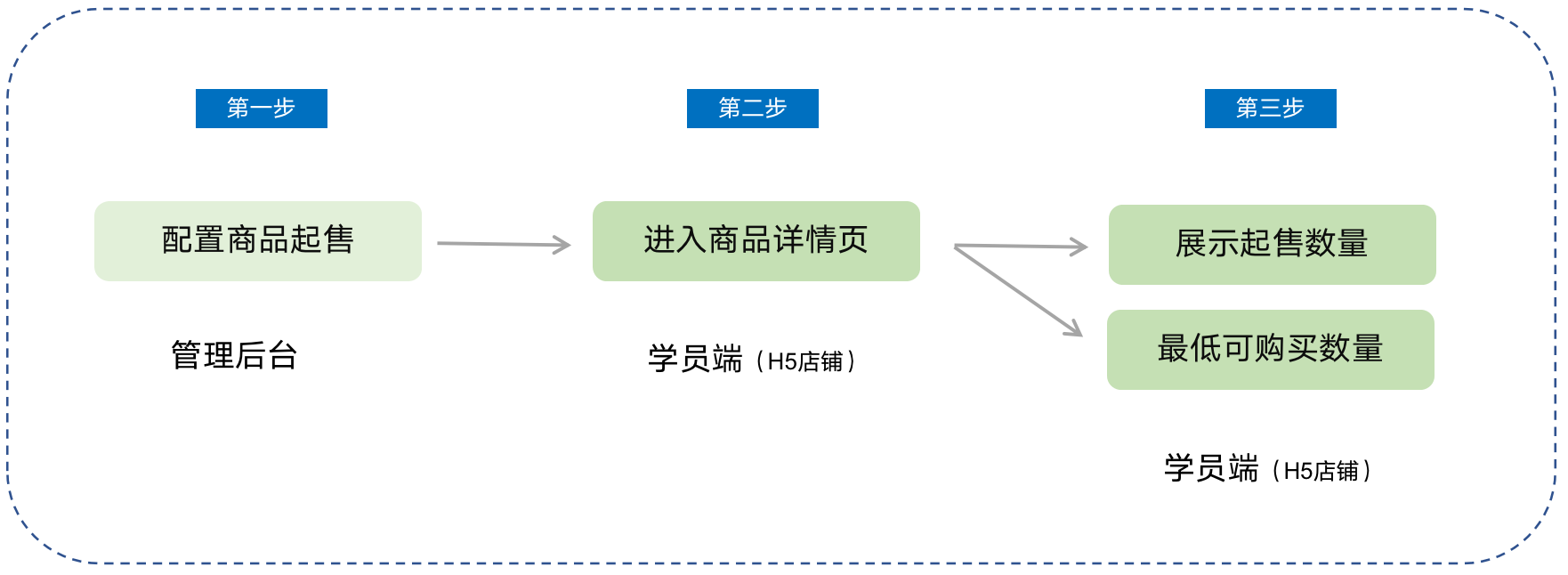
![01.png](https://wechatapppro-1252524126.file.myqcloud.com/help_document/image/ueditor/19888000_1700204412.png ".png")

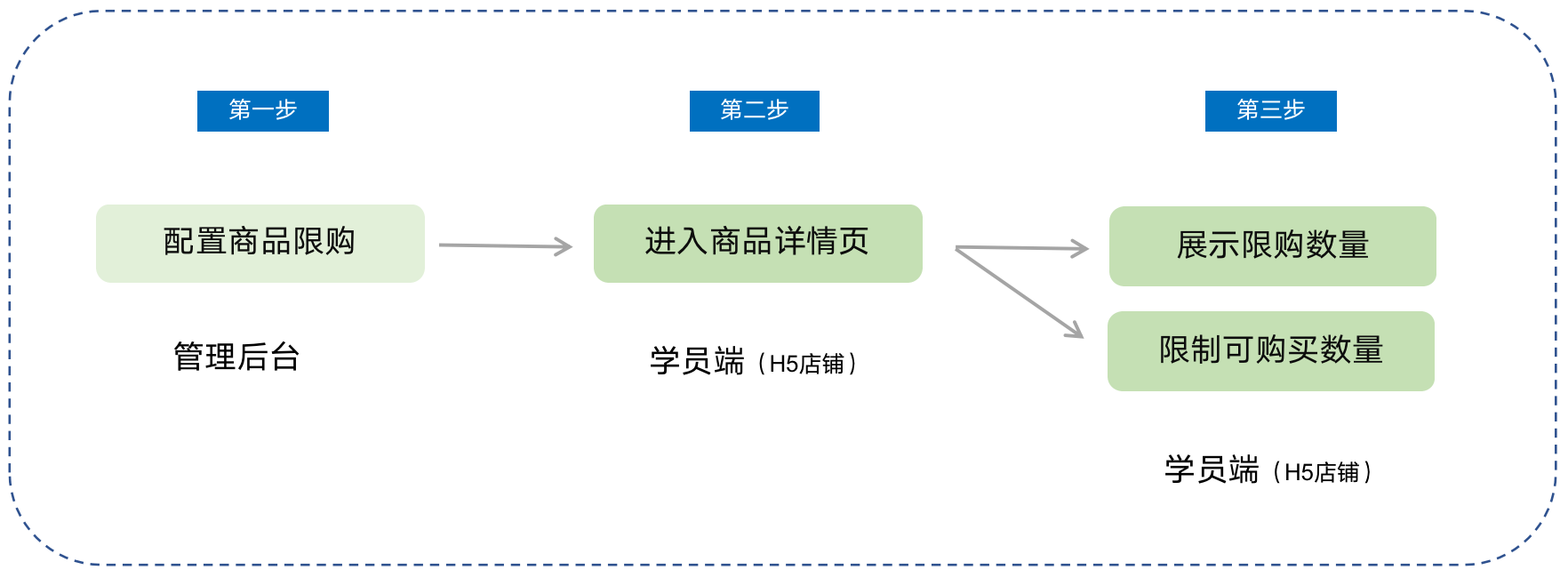
<span style="font-size:15px;">学员端：微信H5店铺 → 商品详情页 → 点击购买</span>

<span style="font-size:17px;">**四、使用教程**</span>

**<span style="font-size:15px;">第一步 配置商品起售</span>***<span style="font-size:15px;">（以实物商品为例）</span>*

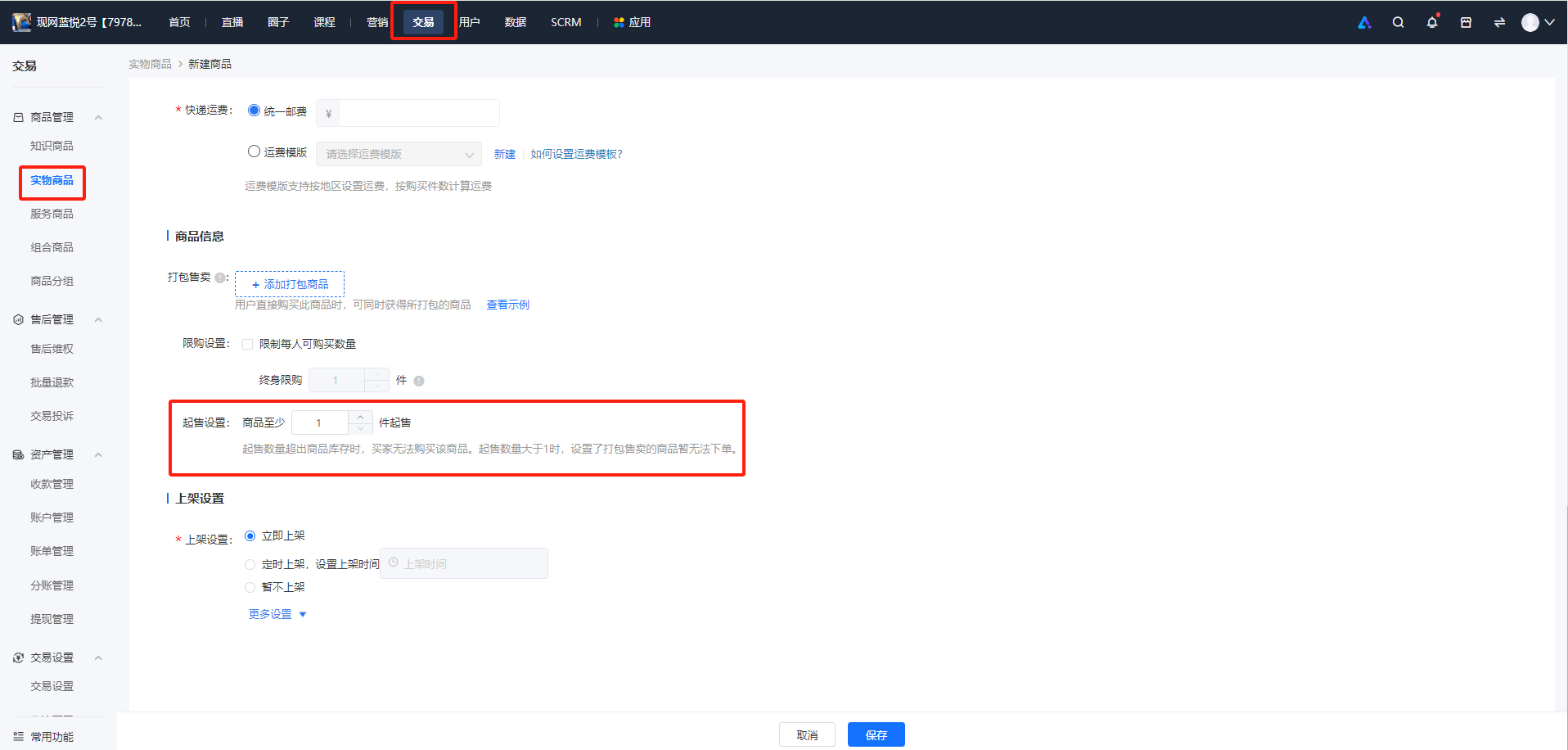
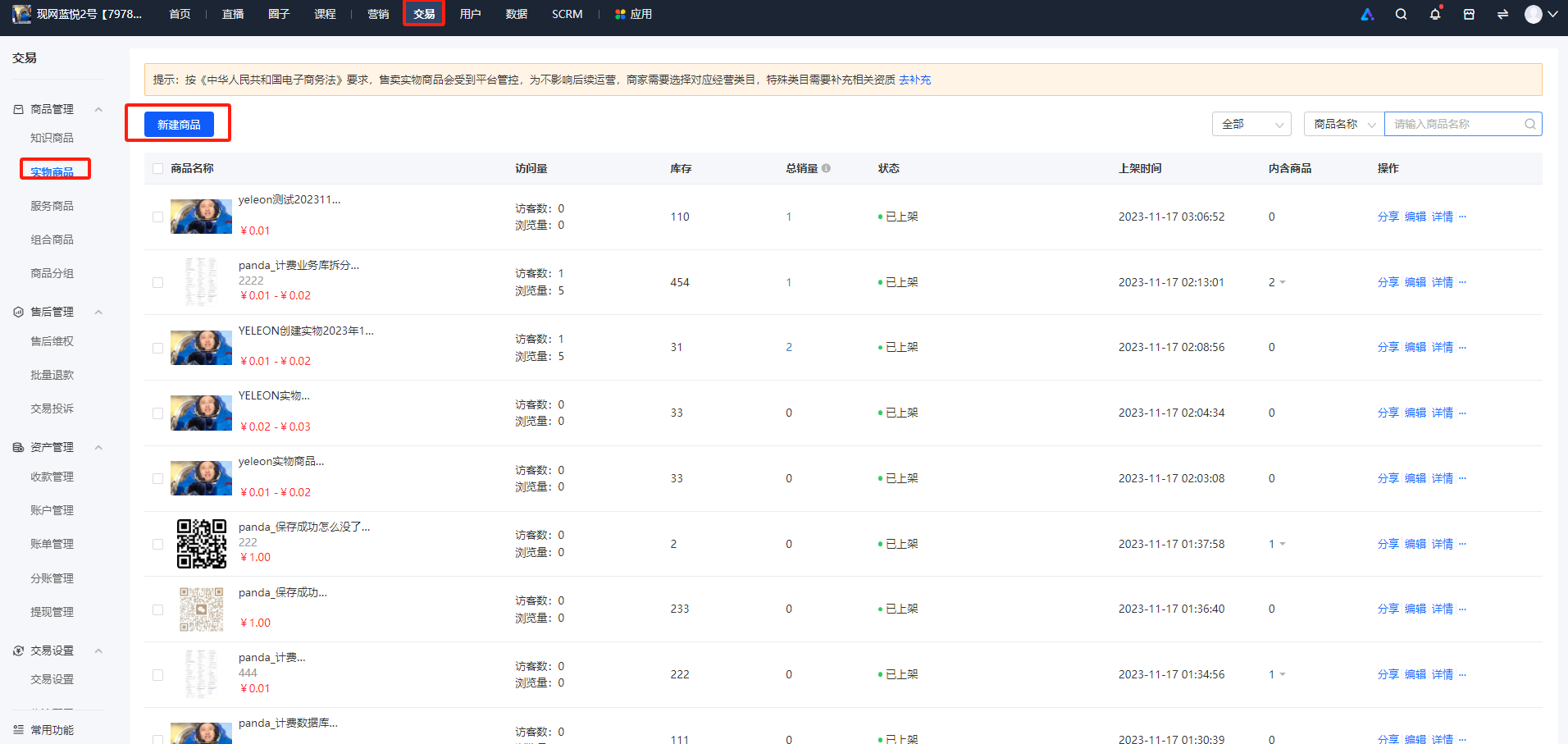
<span style="font-size:15px;">1、登录店铺管理后台，点击【交易】-【商品管理】-【实物商品】，点击【新建商品】。</span>

<span style="font-size:15px;">2、在【商品信息】部分，勾选【起售设置】并设置数量。</span>

<span style="text-decoration:underline;">**<span style="text-decoration:underline;font-size:15px;">\*\*注意：</span>**</span><span style="font-size:15px;">当起售数量超出商品库存时，用户无法购买该商品。且起售数量大于1时，关联售卖商品暂无法下单。</span>

![image.png](https://wechatapppro-1252524126.file.myqcloud.com/help_document/image/ueditor/6305100_1700204412.png ".png")

**<span style="font-size:15px;">第二步 学员端购买</span>**

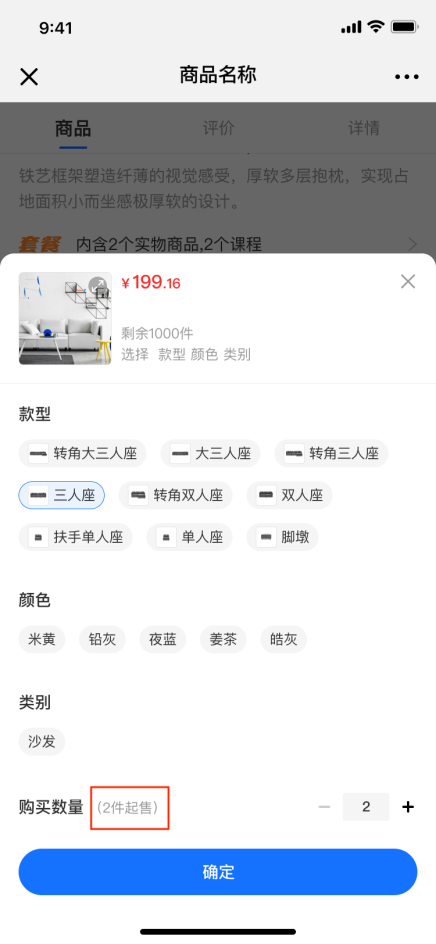
<span style="font-size:15px;">实物商品/有价优惠券商品详情页，展</span><span style="font-size:15px;">示用户最低可购买的商品数量。</span>

![03.png](https://wechatapppro-1252524126.file.myqcloud.com/help_document/image/ueditor/35944500_1700204412.png ".png")

# 商品限购常见问题

<div data-elink-language-switch="1" id="bkmrk-english" style="border:1px solid #d6d9de;border-radius:6px;padding:10px 12px;margin:0 0 18px 0;background:#f8fafc;font-size:14px;">[English](/books/transaction/page/common-questions-about-product-purchase-limits)</div><span style="font-size:15px;">**1、商品限购是怎么计算的？**</span>

<span style="font-size:15px;">A：设置限购开始时间后，限购结束时间前，用户（每账号id）下单件数算入限购数，在限购开始前用户购买的件数不算入限购数</span>

<span style="font-size:15px;">**2、限购商品下单后未完成付款（形成待支付订单），是否可以再次购买？**</span>

<span style="font-size:15px;">A：限购商品下单后未付款，也会占用限购次数，此时若没有达到限购次数即可再次下单；否则需要将待支付订单关闭，以取消占用限购次数，方可再次下单</span>

<span style="font-size:15px;">**3、购买限购商品后再退款，是否可以再次购买？**</span>

<span style="font-size:15px;">A：购买限购商品并完成付款，退款后依旧会占用限购次数，此时若达到了限购次数，则无法再次购买</span>

<span style="font-size:15px;">**4、当商家变更商品限购开启状态/数量时，系统会不会重置用户的可购数量？**</span>

<span style="font-size:15px;">A：不会；即：商家设置商品限购3件，用户在此期间购买了2件，后商家修改为限购4件，则用户还可购买2件</span>

<span style="font-size:15px;">**5、商品限购与拼团限购同时设置了，是如何处理的？**</span>

<span style="font-size:15px;">A：两者同时设置时，发起拼团的购买路径受拼团限购限制；具体场景如下：</span>

<span style="font-size:15px;">① 当商品设置限购4件，拼团未设置限购时，用户单买或是拼团一共只能买4件；</span>

<span style="font-size:15px;">② 当商品设置限购4件，拼团设置限购2件时，用户单卖最多买4件，拼团最多买只能买2件，一共只能买4件；</span>

<span style="font-size:15px;">③ 当商品未设置限购，拼团设置限购4件时，用户拼团只能买4件，单买无限制。</span>

<span style="font-size:15px;">**6、兑换场景下是否受限购配置的限制？**</span>

<span style="font-size:15px;">A：当限购商品被添加为带货（课程带货、实物带货）的商品时，将不计入商品的限购数量；</span>

<span style="font-size:15px;">当限购商品上架至积分商城（积分兑换）、邀请码、兑换码时，用户在此渠道兑换商品，将不受限购数量的限制；即限购功能仅作用在商品付费购买路径。</span>

# 商品限购使用教程

<div data-elink-language-switch="1" id="bkmrk-english" style="border:1px solid #d6d9de;border-radius:6px;padding:10px 12px;margin:0 0 18px 0;background:#f8fafc;font-size:14px;">[English](/books/transaction/page/tutorial-on-using-product-purchase-limits)</div><span style="font-size:17px;">**一、功能介绍**</span>

<span style="font-size:15px;">在低价甩卖、新品售卖等场景下，可设置商品限购，限制每个用户在某段时间内可购买的商品件数，帮助商家限制单个用户的购买行为，提高商品对用户的触达率。目前适用于【实物商品】和【有价优惠券】售卖场景。</span>

<span style="font-size:17px;">**二、使用目的**</span>

<span style="font-size:15px;">（1）进行成本控制：限购商品具有一定的价格优势，通过限购防止用户大批量购买后再倒卖；</span>

<span style="font-size:15px;">（2）制造商品紧缺感：凸显商品价值，刺激消费欲望</span>

<span style="font-size:15px;">（3）防止恶意占用库存、恶意刷单：在新品上市、特卖等场景下，可使更多用户都能买到商品，享受到福利</span>

<span style="font-size:17px;">**三、使用场景**</span>

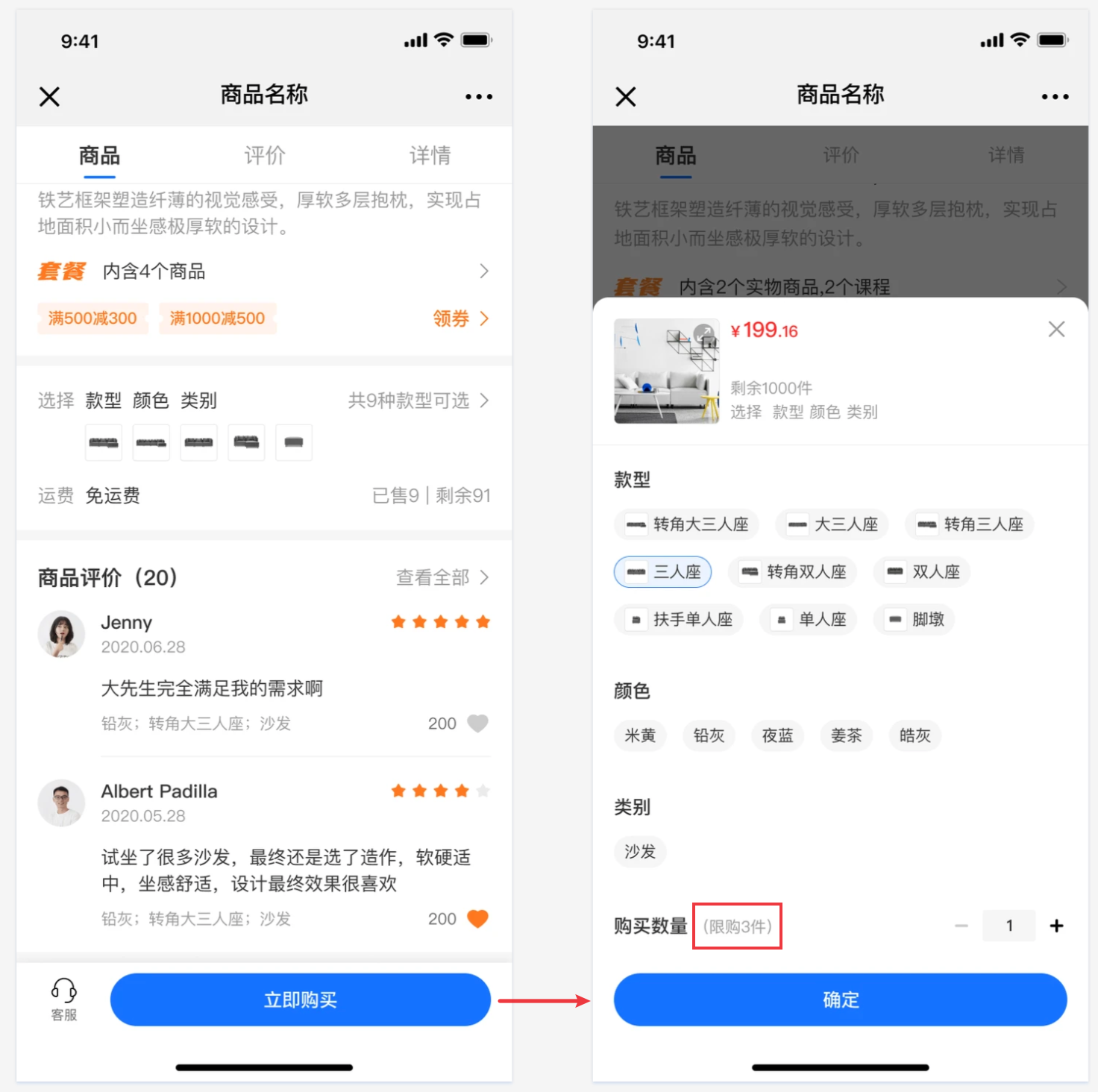
<span style="font-size:15px;">商家准备策划实物商品促销的引流活动，商品价格较低，想以此吸引更多的用户流量，此时可设置每个用户限购3件，以防止用户一次性购买大量低价商品，减少薅羊毛现象的发生。</span>

<span style="font-size:17px;">**四、操作路径**</span>

<span style="font-size:15px;">商家端：【实物商品】商家电脑端管理台 → 交易 → 商品管理 → 实物商品创建/编辑</span>

<span style="font-size:15px;">【有价优惠券】商家电脑端管理台 → 营销<span style="font-size:15px;">→ 营销玩法</span> → 有价优惠券 → 有价优惠券创建/编辑</span>

<span style="font-size:15px;">![01.png](https://wechatapppro-1252524126.file.myqcloud.com/help_document/image/ueditor/80501000_1700207085.png ".png")</span>

<span style="font-size:15px;">  
</span>

<span style="font-size:15px;">学员端：微信H5店铺 → 商品详情页 → 点击购买</span>

<span style="font-size:17px;">**五、使用教程**</span>

<span style="font-size:15px;">**第一步 配置商品限购***（以实物商品为例）*</span>

<span style="font-size:15px;"></span>

<span style="font-size:15px;">1、登录店铺管理后台，点击【交易】-【商品管理】-【实物商品】，点击【新建商品】。</span>

![image.png](https://wechatapppro-1252524126.file.myqcloud.com/help_document/image/ueditor/99046300_1700207149.png ".png")

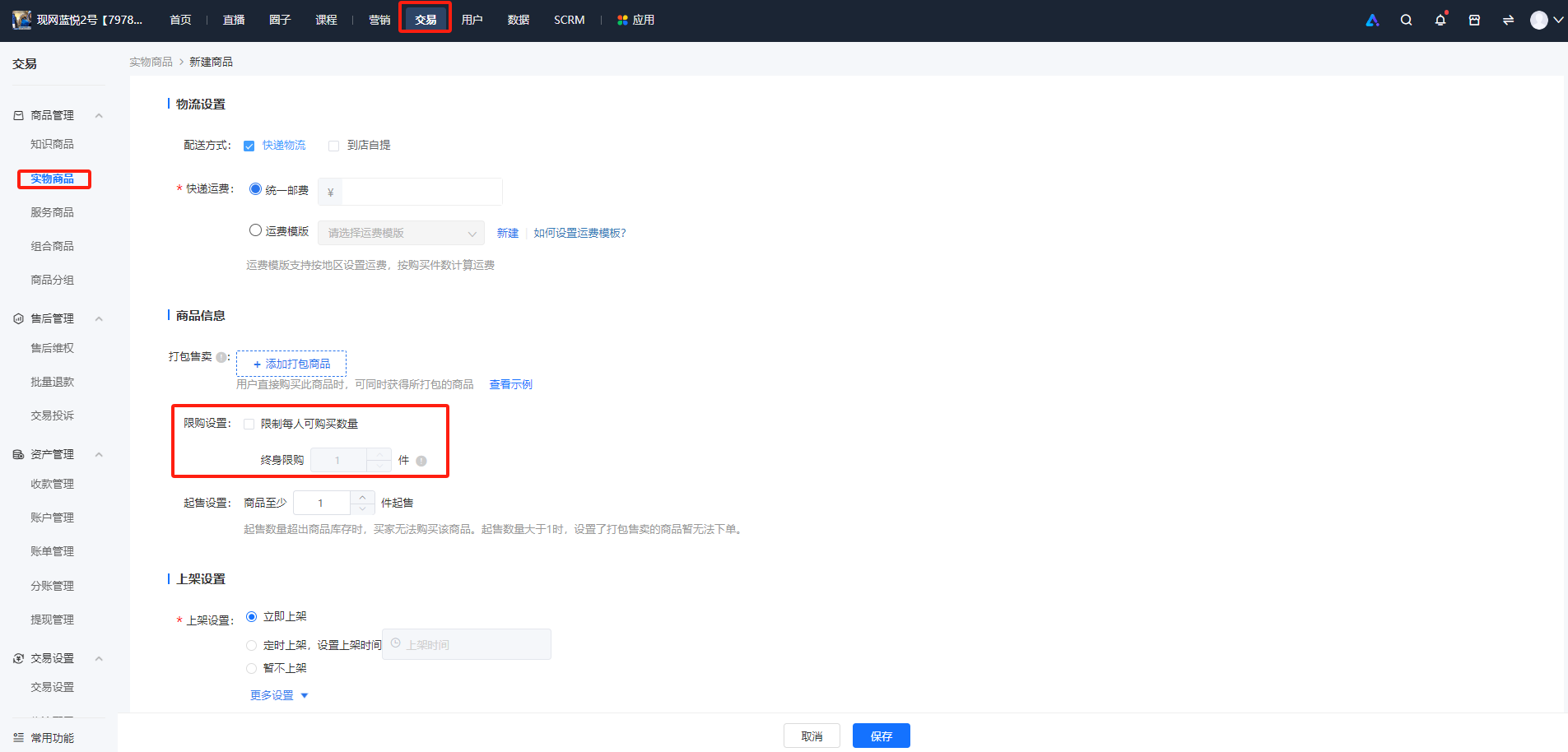
<span style="font-size:15px;">2、在【商品信息】部分，勾选【限购设置】并设置数量。目前仅支持设置终身限购，暂不支持设置周期限购。</span>

![image.png](https://wechatapppro-1252524126.file.myqcloud.com/help_document/image/ueditor/40119400_1700207150.png ".png")

**<span style="font-size:15px;">第二步 学员端购买</span>**

<span style="font-size:15px;">1、实物商品/有价优惠</span>

<span style="font-size:15px;">2、券商品详情页</span>

<span style="font-size:15px;">即可限制用户可购买的商品数量</span>

![2.png](https://wechatapppro-1252524126.file.myqcloud.com/help_document/image/ueditor/15692700_1700207086.png ".png")

# 配送管理

# 支持设置运费吗？

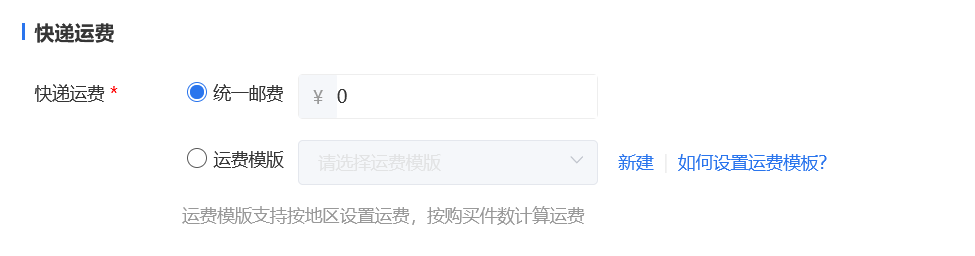
<div data-elink-language-switch="1" id="bkmrk-english" style="border:1px solid #d6d9de;border-radius:6px;padding:10px 12px;margin:0 0 18px 0;background:#f8fafc;font-size:14px;">[English](/books/transaction/page/does-it-support-setting-shipping-fees)</div>您好，现已支持对商品运费进行设置，在创建商品时即可设置。目前支持【统一邮费】【运费模板】两种类型：

![企业微信截图_20210604200214.png](https://wechatapppro-1252524126.file.myqcloud.com/help_document/image/ueditor/3229600_1622808143.png ".png")

[\*点击可查看【运费模板】使用教程](https://helpcenter.xiaoe-tech.com/#/problem/detail?document_id=doc_5fe40d86f2c76_dsX0v)

# 运费模板使用教程

<div data-elink-language-switch="1" id="bkmrk-english" style="border:1px solid #d6d9de;border-radius:6px;padding:10px 12px;margin:0 0 18px 0;background:#f8fafc;font-size:14px;">[English](/books/transaction/page/tutorial-on-using-shipping-fee-templates)</div><span style="font-size:17px;">**一、功能介绍**</span>

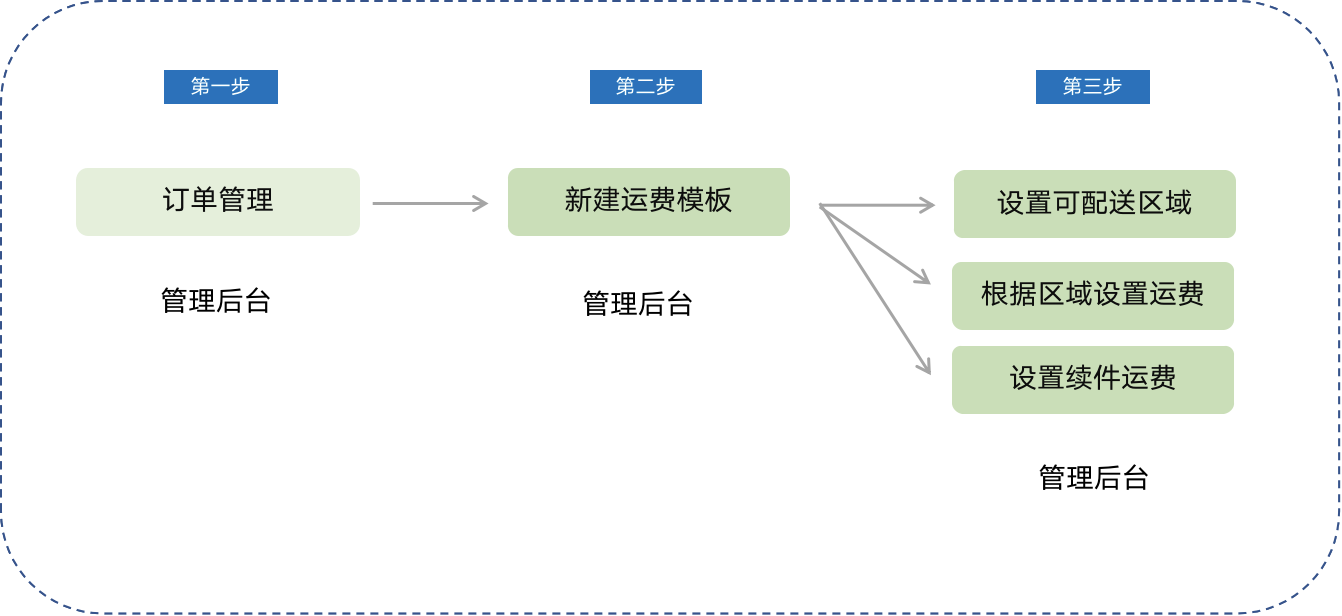
<span style="font-size:15px;">运费模板主要是解决交易成交后卖家需要频繁修改运费的一种运费工具。通过运费模板，卖家可以解决不同地区的买家购买商品时运费差异化的问题。</span>

<span style="font-size:14px;">**核心功能**</span>

<span style="font-size:15px;">**·** 支持设置可配送区域</span>

<span style="font-size:15px;">**<span style="font-size:14px;">· </span>**可灵活设置不同的配送区域运费</span>

<span style="font-size:15px;">**<span style="font-size:14px;">· </span>**支持按购买件数设置运费</span>

<span style="font-size:15px;">**<span style="font-size:14px;">· </span>**批量修改商品运费，修改运费模板后与其关联的商品运费随之修改</span>

<span style="font-size:14px;">  
</span>

<span style="font-size:17px;">**二、使用目的**</span>

<span style="font-size:15px;">1、根据配送区域自动匹配运费，解决卖家频繁修改运费问题</span>

<span style="font-size:15px;">2、提高商家设置运费的操作效率</span>

<span style="font-size:14px;">  
</span>

<span style="font-size:17px;">**三、使用场景**</span>

<span style="font-size:15px;">场景一：适用于所有售卖实物商品商家，商家可自主选择可配送区域，针对不同地区可设置不同运费；可根据商品件数设置续件运费</span>

<span style="font-size:14px;">  
</span>

<span style="font-size:17px;">**四、操作路径**</span>

<span style="font-size:15px;">商家端：商家电脑端管理后台 →交易、订单管理 → 运费模板 → 新建运费模板</span>

<span style="font-size:14px;">![o08qdw7sapjuu8dmfvndhg](https://wechatapppro-1252524126.file.myqcloud.com/help_document/image/ueditor/18321600_1699865612.com/image/o08qdw7sapjuu8dmfvndhg)</span>

<span style="font-size:14px;">  
</span>

**五、使用教程**

<span style="font-size:15px;">**第一步 新建运费模板**</span>

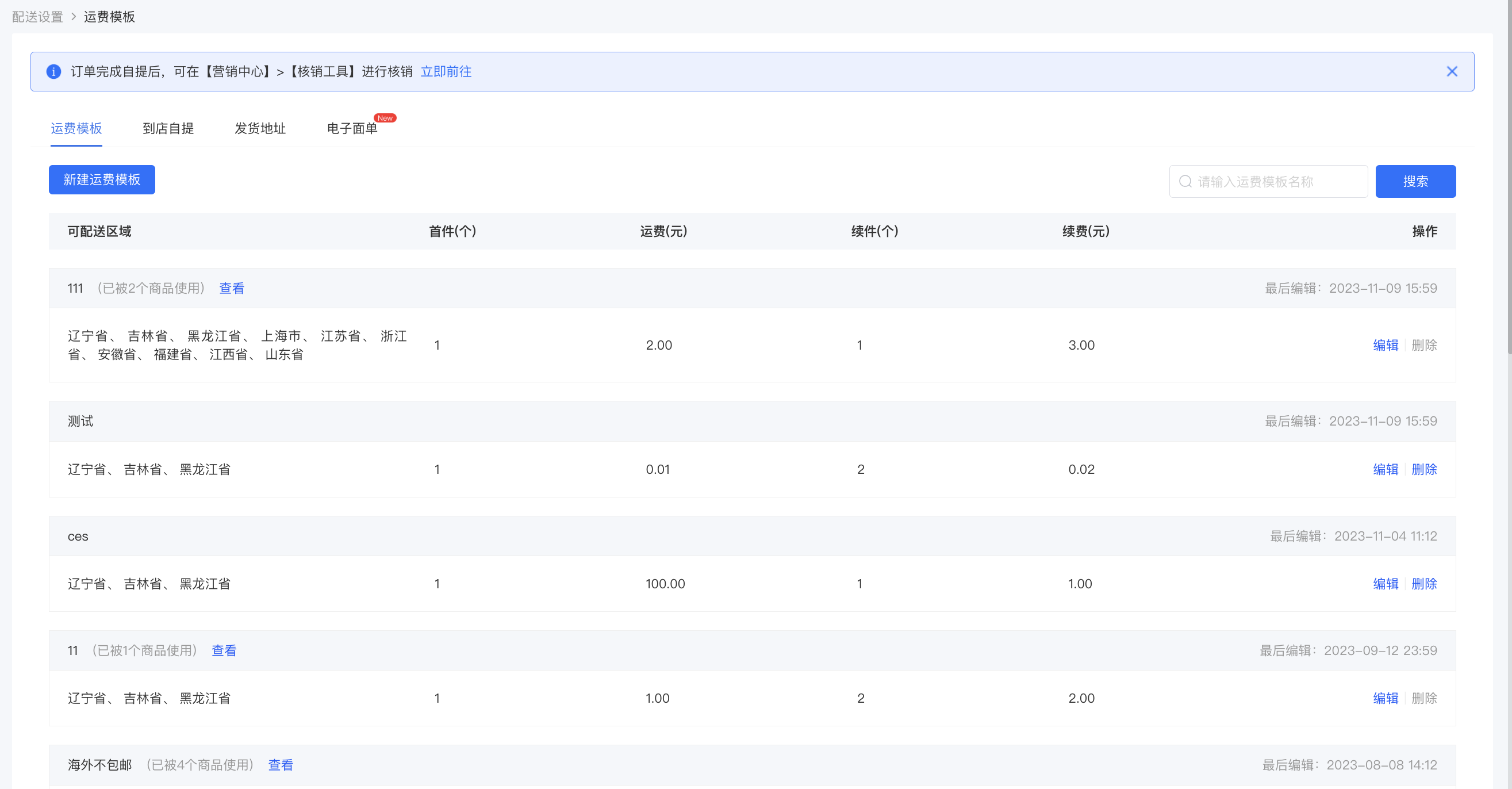
<span style="font-size:15px;">入口：交易→交易设置→配送设置</span>

<span style="font-size:15px;">**<span style="font-size:14px;">· </span>**<span style="font-size:14px;">配送管理列表页，可新建运费模板；</span></span>

<span style="font-size:15px;">**<span style="font-size:14px;">· </span>**默认有全国包邮（偏远地区除外）、不包邮、江浙沪包邮三个模板，可对模板进行「编辑」和「删除」</span>

![image.png](https://wechatapppro-1252524126.file.myqcloud.com/help_document/image/ueditor/14562500_1699865651.png ".png")

<span style="font-size:14px;">  
</span>

<span style="font-size:15px;">**·** 已被商品使用中的运费模板不支持删除</span>

![image.png](https://wechatapppro-1252524126.file.myqcloud.com/help_document/image/ueditor/82846100_1699865650.png ".png")

<span style="font-size:14px;">  
</span>

**<span style="font-size:14px;">第二步 选择可配送区域</span>**

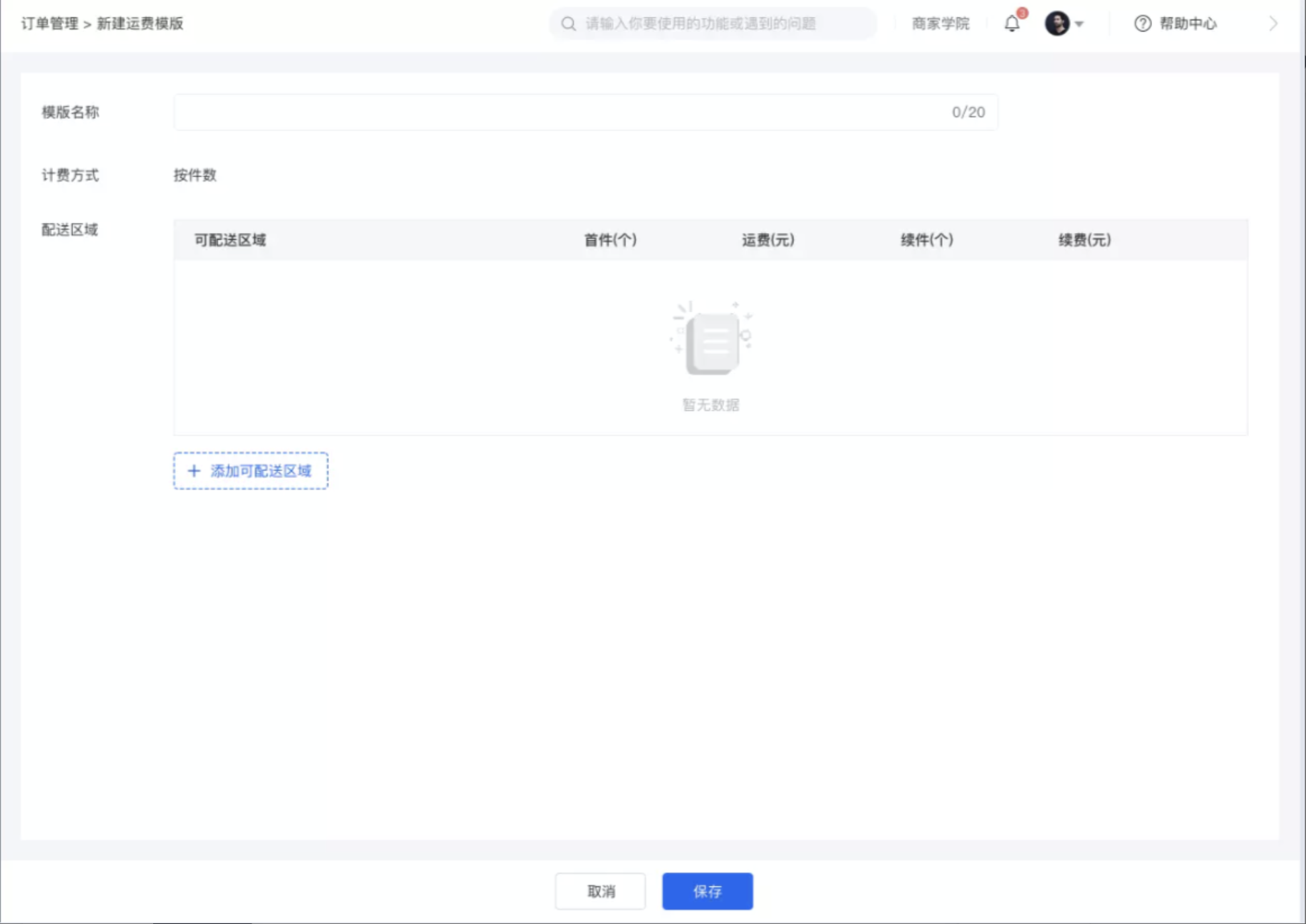
<span style="font-size:15px;">**·** 选择可配送区域，点击「取消」返回运费模板列表页面；页面内容全部为必填项，未填或少填内容无法保存</span>

![3.png](https://wechatapppro-1252524126.file.myqcloud.com/help_document/image/ueditor/64320400_1699865612.png ".png")

<span style="font-size:14px;">  
</span>

<span style="font-size:15px;">**·** 配送区域支持全选，已选的区域支持配送、未选的区域不支持配送</span>

<span style="font-size:14px;">![w46k_uf6i498hkc9hxmpnw](https://wechatapppro-1252524126.file.myqcloud.com/help_document/image/ueditor/92770400_1699865612.com/image/w46k_uf6i498hkc9hxmpnw)</span>

<span style="font-size:14px;">  
</span>

<span style="font-size:15px;">**第三步 设置运费**</span>

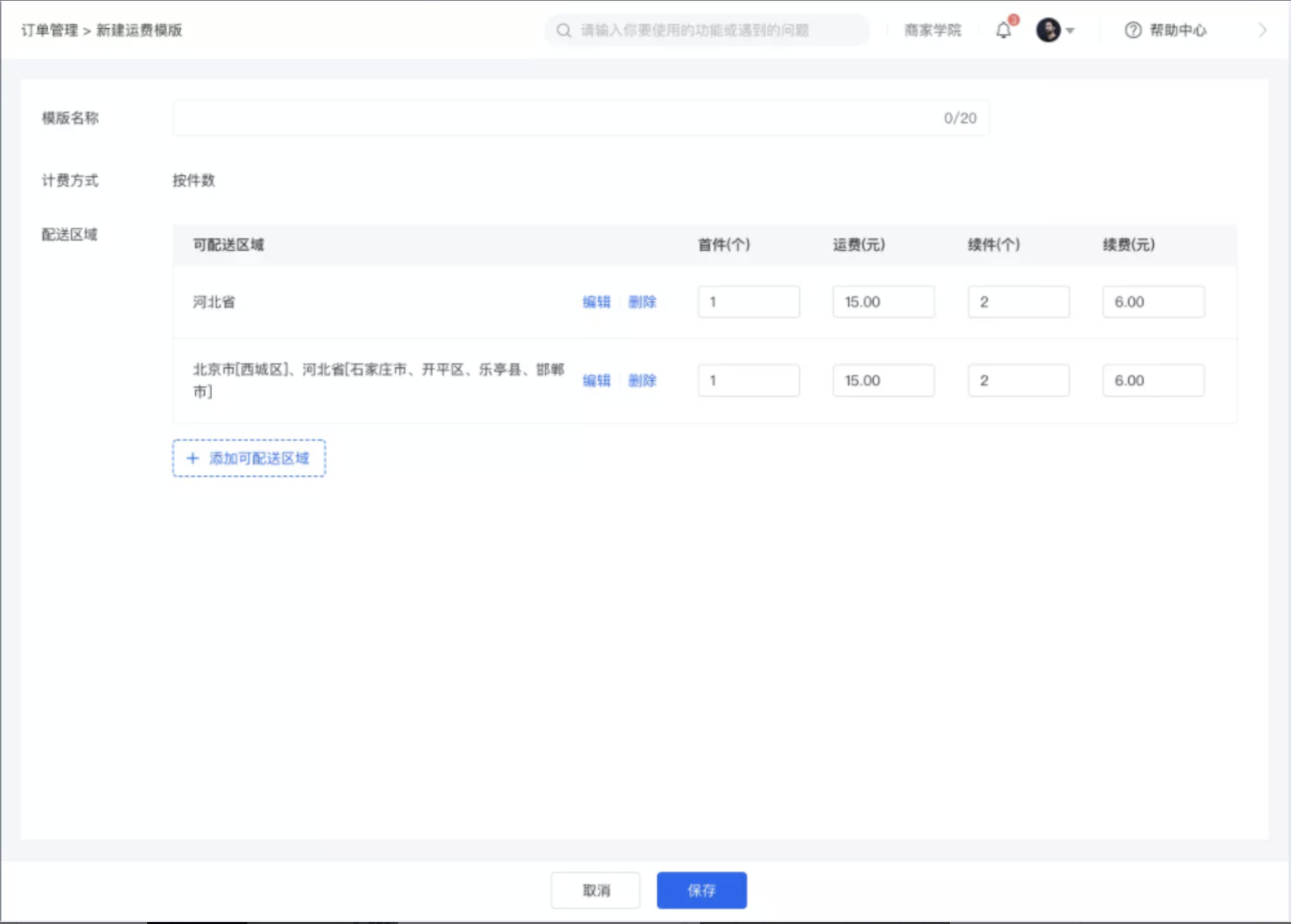
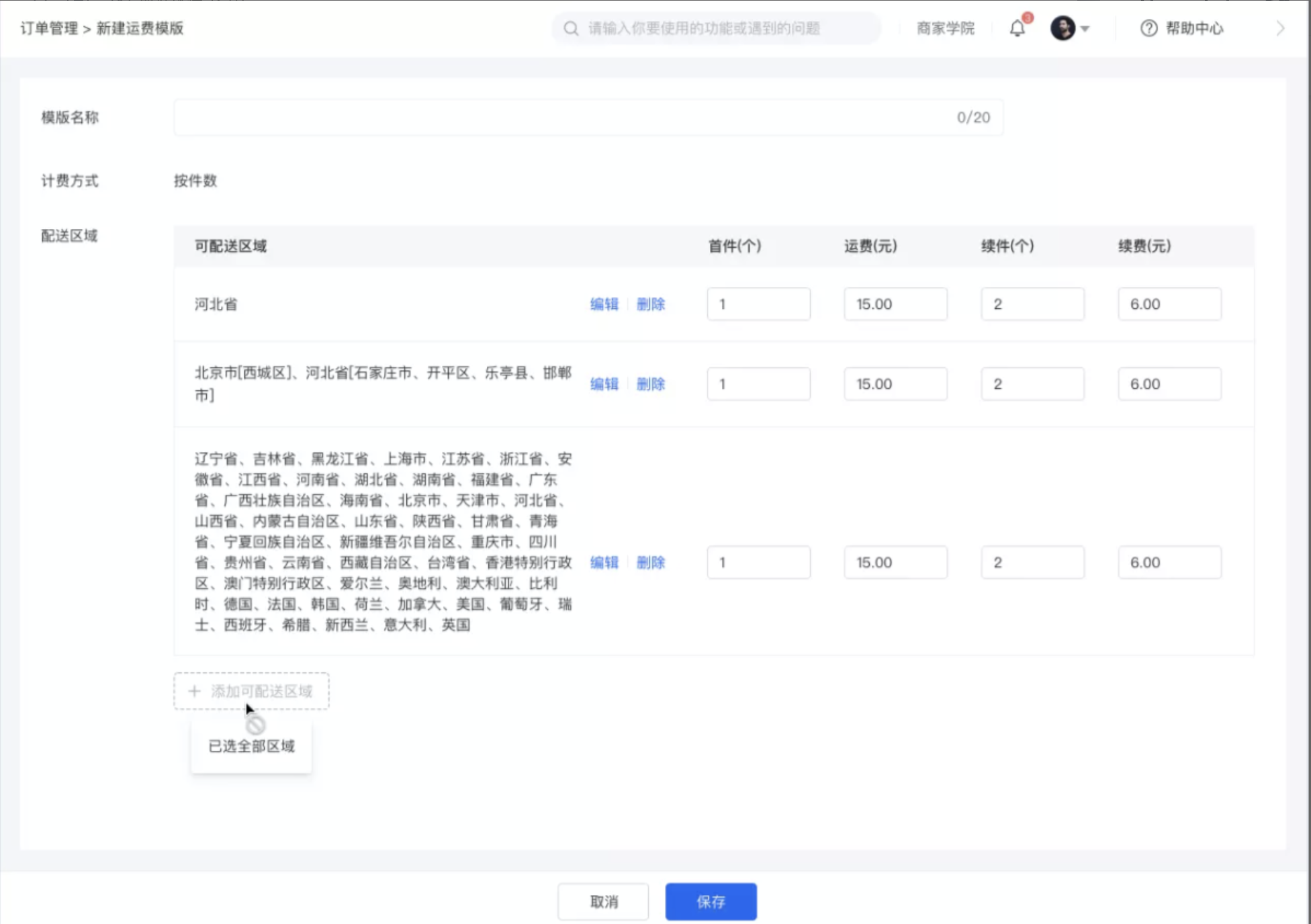
<span style="font-size:15px;">**·**<span style="font-size:14px;"> </span>可根据不同区域灵活设置运费，首件数量大于等于1</span>

<span style="font-size:15px;">**·** 运费计算规则：首件运费+续费（注：不足续件按照续件数量计算）</span>

<span style="font-size:15px;">**·** 点击「编辑」可对配送区域进行修改；</span>

![4.png](https://wechatapppro-1252524126.file.myqcloud.com/help_document/image/ueditor/12152900_1699865613.png ".png")

<span style="font-size:14px;">  
</span>

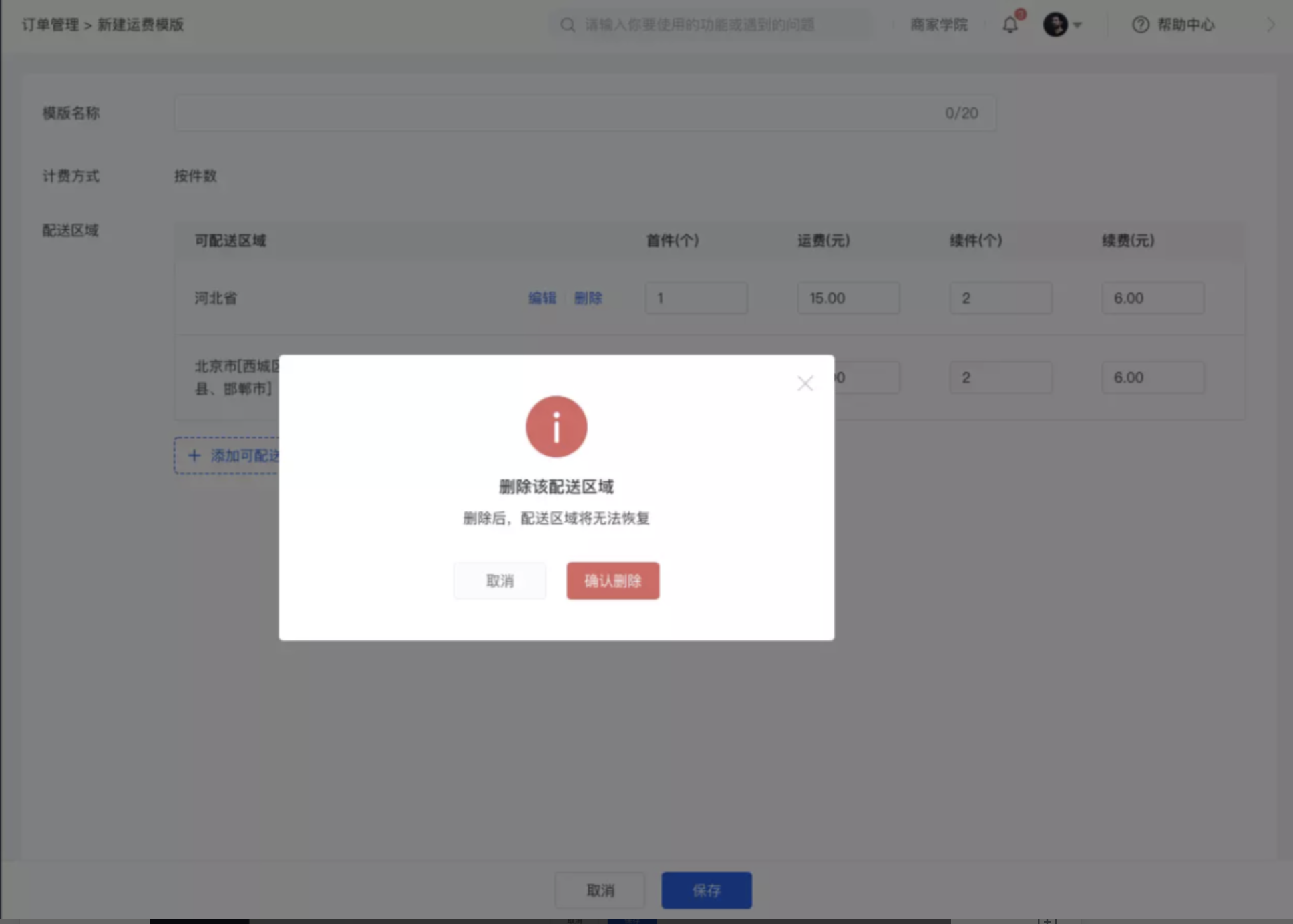
<span style="font-size:15px;">**·** 点击「删除」会删除已选区域和对应的运费，且无法恢复，需要重新编辑</span>

![5.png](https://wechatapppro-1252524126.file.myqcloud.com/help_document/image/ueditor/71770100_1699865613.png ".png")

<span style="font-size:14px;">  
</span>

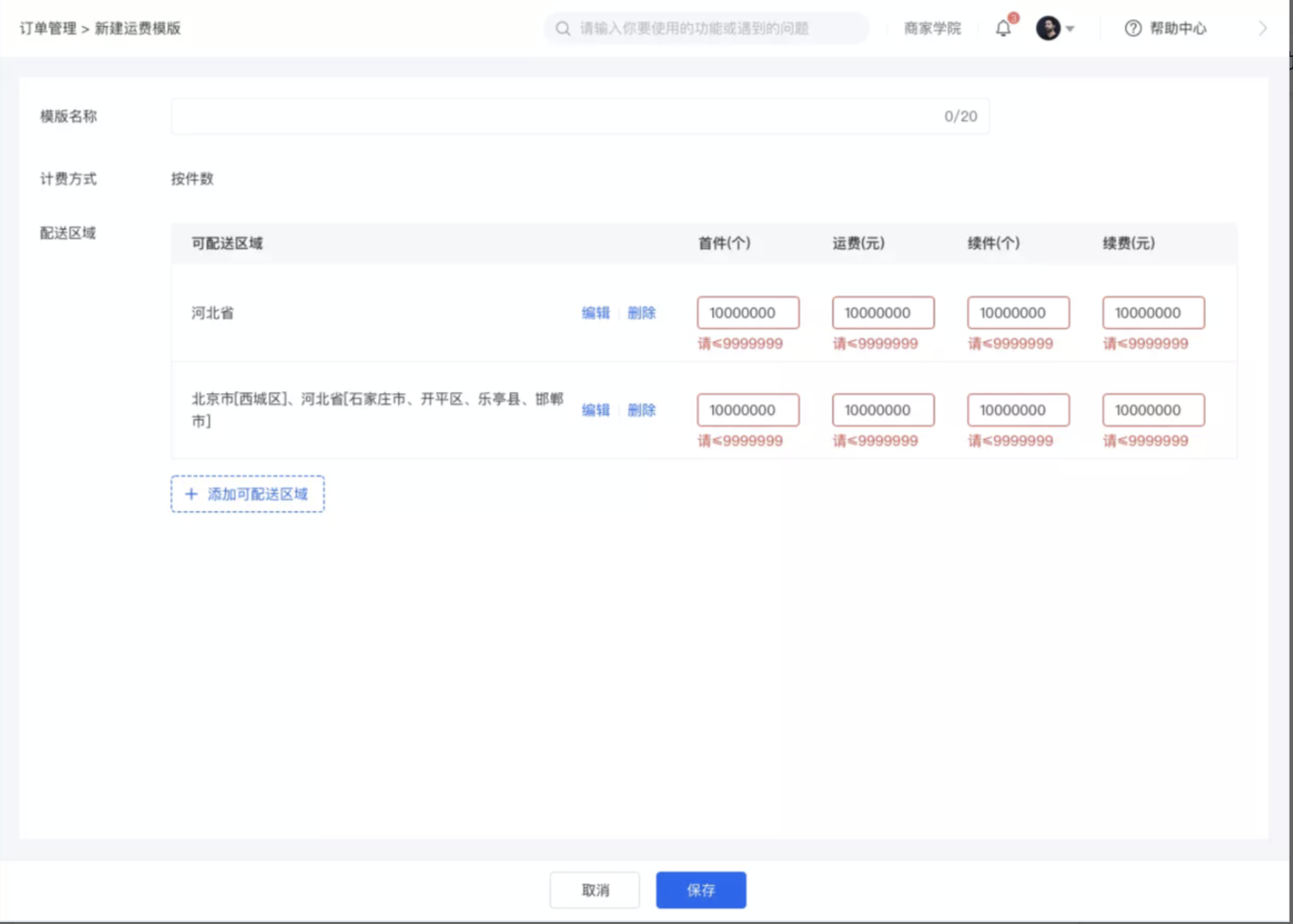
<span style="font-size:15px;">**·** 运费模板数量超限情况</span>

<span style="font-size:15px;"> **·** 首件：可输入最大单位百万（7位数：9999999）</span>

<span style="font-size:15px;"> **·** 运费：可输入最大单位百万 </span>

<span style="font-size:15px;"> **·** 续件：可输入最大单位百万</span>

<span style="font-size:15px;"> **·** 续费：可输入最大单位百万</span>

![6.png](https://wechatapppro-1252524126.file.myqcloud.com/help_document/image/ueditor/462600_1699865614.png ".png")

<span style="font-size:14px;">  
</span>

<span style="font-size:15px;">**·** 点击「添加可配送区域」可新增可配送区域，当可配送区域全部选择后，「添加可配送区域」不可点击</span>

![7.png](https://wechatapppro-1252524126.file.myqcloud.com/help_document/image/ueditor/22313600_1699865614.png ".png")

<span style="font-size:14px;">  
</span>

<span style="font-size:15px;">**第四步 使用运费模板**</span>

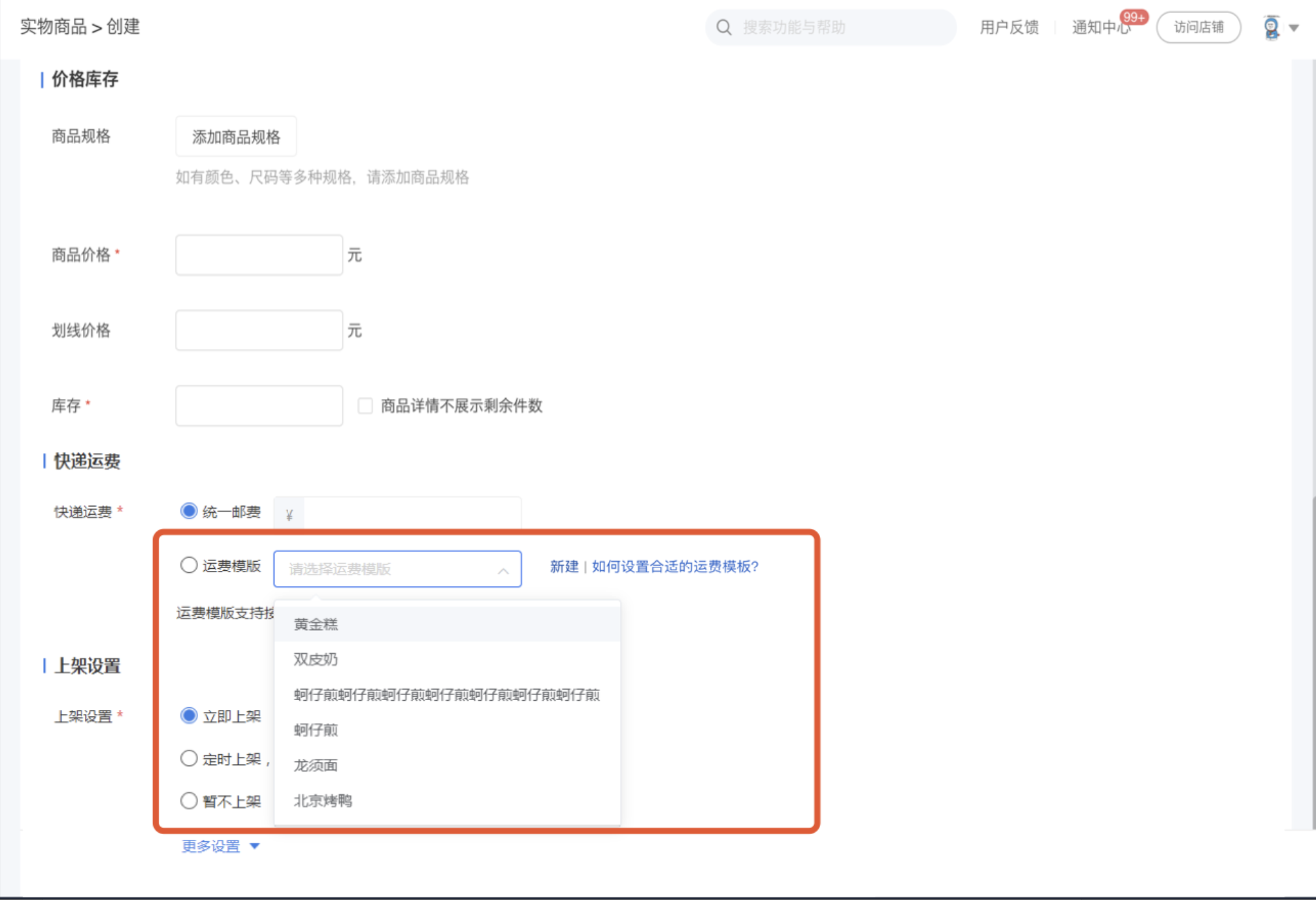
<span style="font-size:15px;">**·** 运费模板是在创建/编辑实物商品时使用</span>

<span style="font-size:15px;">**·** 点击运费模板下拉列表，选择您要设置的运费模板即可</span>

<span style="font-size:15px;">**·** 点击新建可跳转至新建运费模板</span>

<span style="font-size:15px;">![8.png](https://wechatapppro-1252524126.file.myqcloud.com/help_document/image/ueditor/42800000_1699865614.png ".png")</span>

<span style="font-size:15px;">  
</span>

<span style="font-size:15px;">**第五步 C端运费显示**</span>

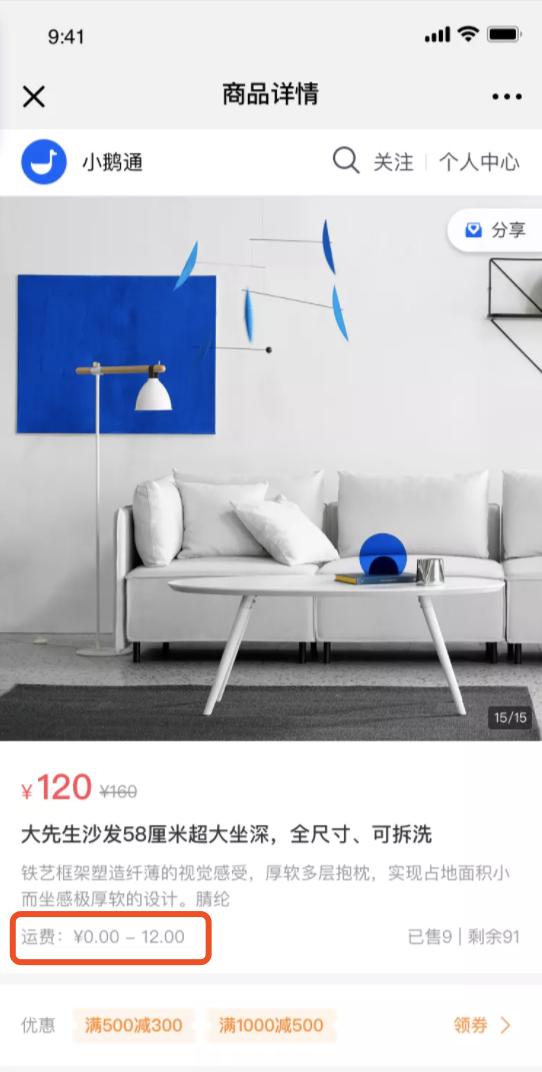
<span style="font-size:15px;">**·** 若商品使用的运费模板有多种运费规格，那运费区间为：首件运费（最低）-首件运费（最高）</span>

<span style="font-size:15px;">**·** 若商品使用的运费模板首件运费一致，则显示：首件运费</span>

<span style="font-size:14px;"> ![fbe7moh9nxqpkphl_4d7ag](https://wechatapppro-1252524126.file.myqcloud.com/help_document/image/ueditor/61996700_1699865614.com/image/fbe7moh9nxqpkphl_4d7ag)</span>

<span style="font-size:14px;">  
</span>

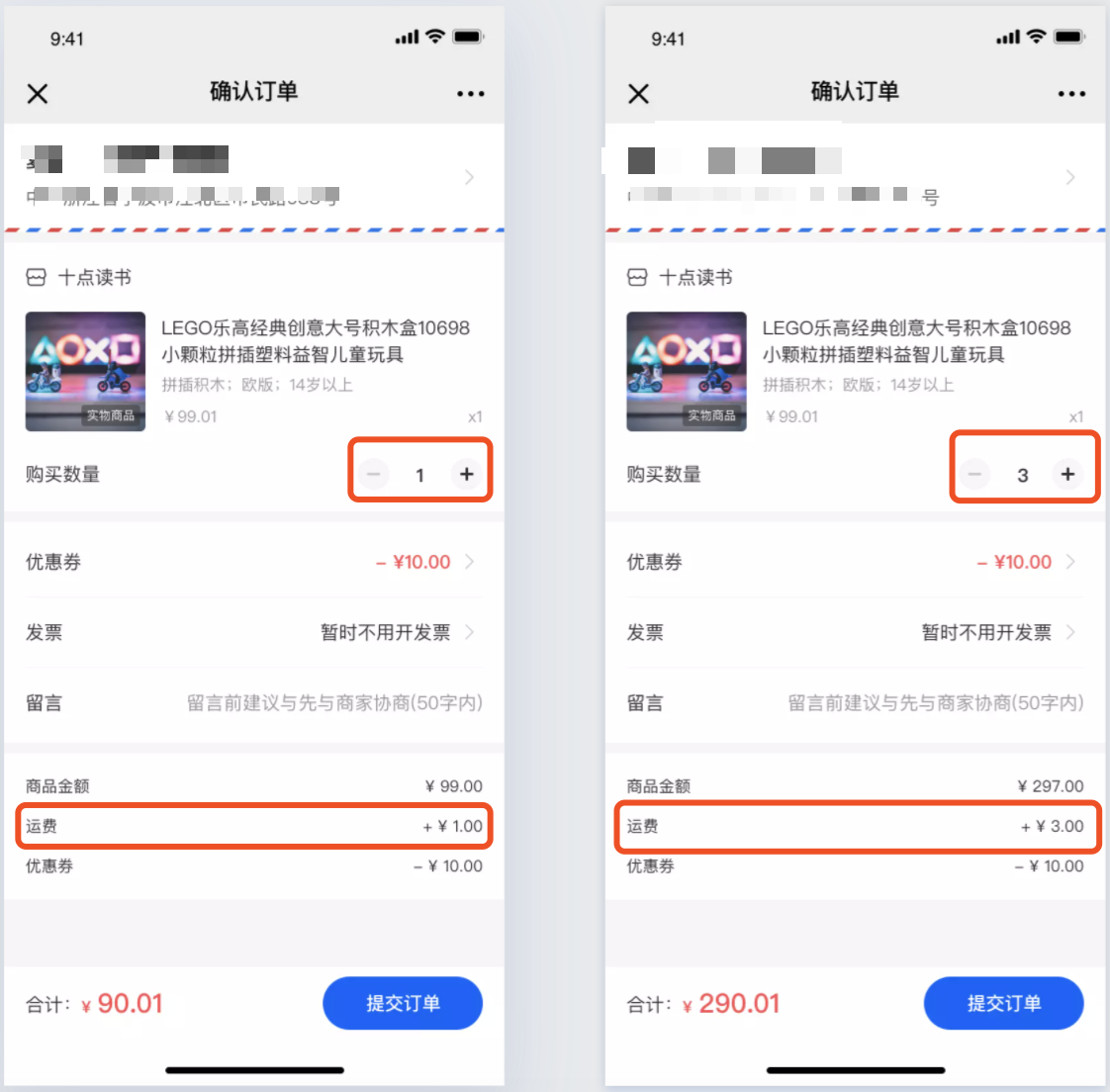
<span style="font-size:15px;">**·** 购买多件商品时，运费会根据运费模板设置的运费自动叠加</span>

![9.png](https://wechatapppro-1252524126.file.myqcloud.com/help_document/image/ueditor/87915600_1699865614.png ".png")

<span style="font-size:14px;">  
</span>

<span style="font-size:15px;">**第六步 收货地址**</span>

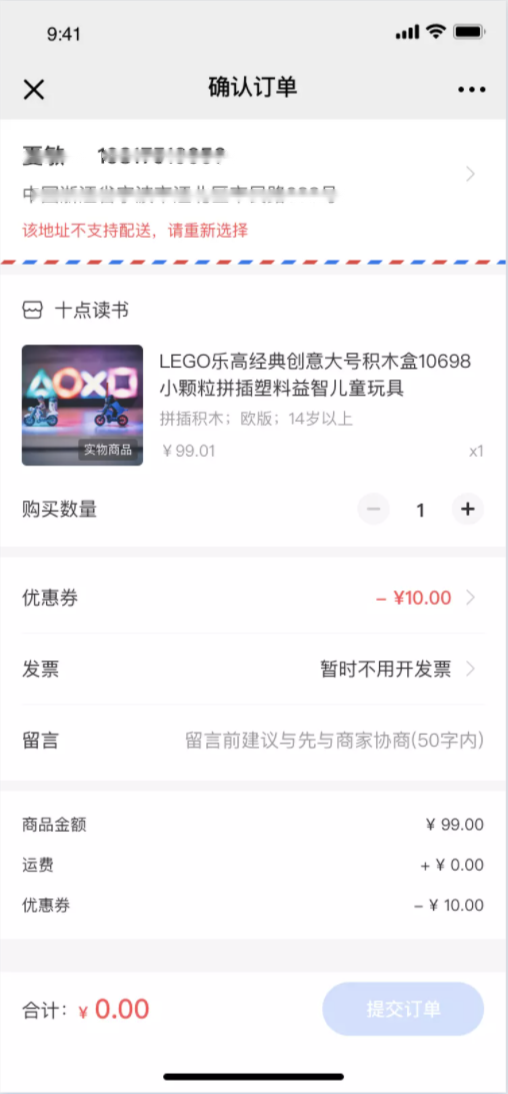
<span style="font-size:15px;">**·** 用户填写的收货地址不再商家的可配送区域内，无法提交订单，提示用户：该地址不支持配送，请重新选择</span>

![10.png](https://wechatapppro-1252524126.file.myqcloud.com/help_document/image/ueditor/16614800_1699865615.png ".png")

<span style="font-size:14px;">  
</span>

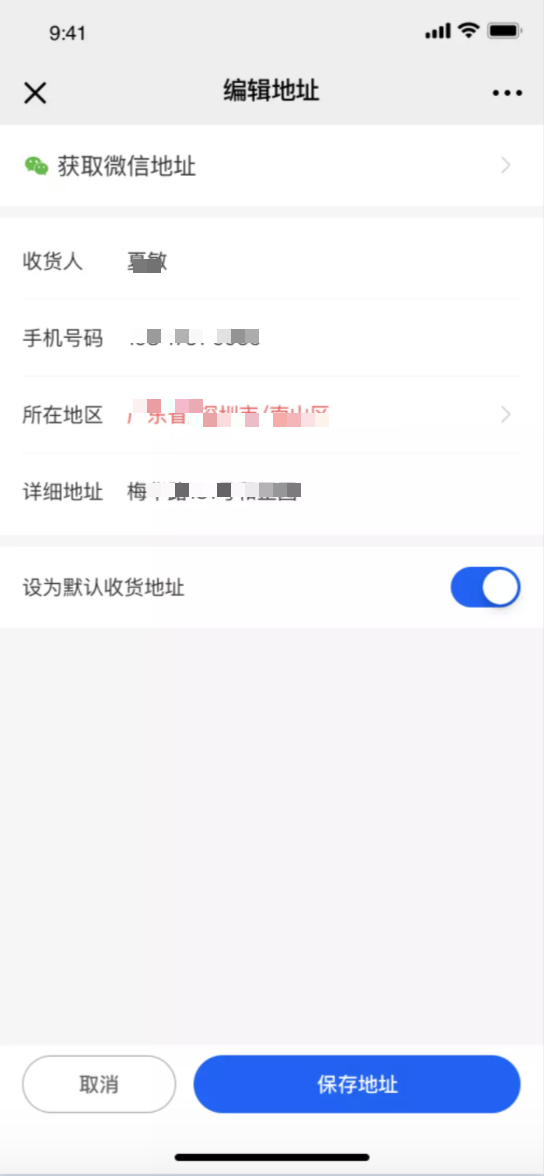
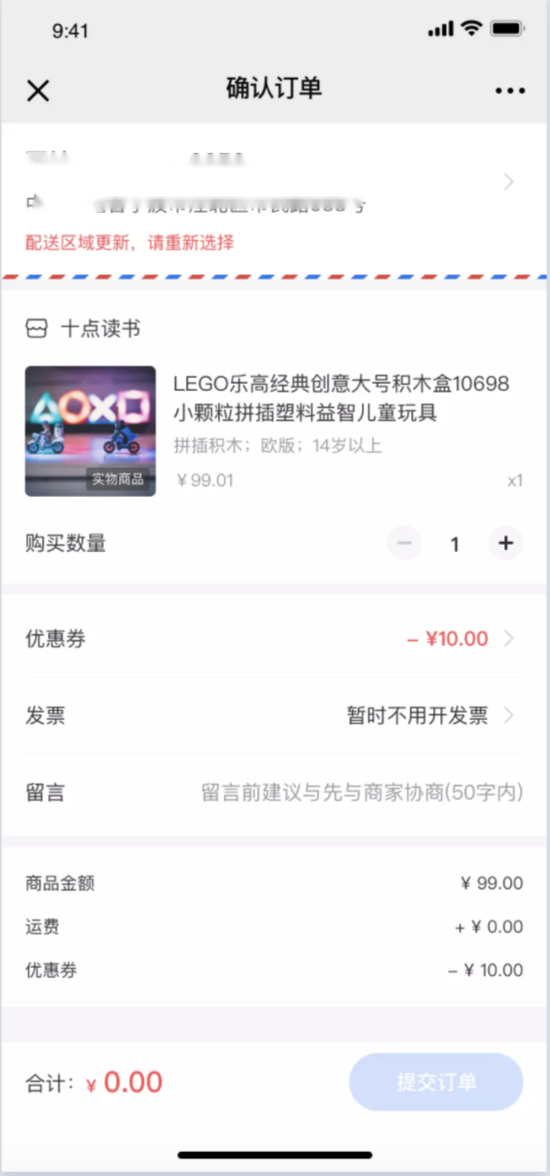
<span style="font-size:15px;">**·** 当用户旧地址与当前地址选择器内的地址不匹配时，无法提交订单，提示用户重新编辑地址</span>

<span style="font-size:14px;">![11.png](https://wechatapppro-1252524126.file.myqcloud.com/help_document/image/ueditor/78192500_1699865615.png ".png")![12.png](https://wechatapppro-1252524126.file.myqcloud.com/help_document/image/ueditor/95828500_1699865615.png ".png")</span>

<span style="font-size:14px;"></span>

<span style="font-size:17px;">**注意事项：**</span>

<span style="font-size:15px;">1、没有订单管理-&gt;配送管理权限的人员无法创建运费模板，创建实物商品的时候也无法添加，开启权限后即可正常使用</span>

<span style="font-size:15px;">2、修改已商品使用的运费模板后，修改内容会同步至使用该运费模板的商品</span>

<span style="font-size:15px;">3、未勾选的「可配送区域」，不支持配送</span>

<span style="font-size:14px;">  
</span>

# 拆单说明

<div data-elink-language-switch="1" id="bkmrk-english" style="border:1px solid #d6d9de;border-radius:6px;padding:10px 12px;margin:0 0 18px 0;background:#f8fafc;font-size:14px;">[English](/books/transaction/page/split-order-instructions)</div>##### <span style="font-size:15px;color:rgb(26,26,26);letter-spacing:0;vertical-align:baseline;">1）拆分包裹</span>

<span style="font-size:15px;color:rgb(51,51,51);letter-spacing:0;vertical-align:baseline;">a、</span><span style="font-size:15px;color:rgb(255,0,0);letter-spacing:0;vertical-align:baseline;">当一笔订单含多个不同商品或一笔订单同一商品购买多个时，支持拆分</span><span style="font-size:15px;color:rgb(51,51,51);letter-spacing:0;vertical-align:baseline;">。需选择至少一个订单才能唤起【拆分包裹】弹窗。注意若订单只含一个商品，则不支持拆分。</span>

<span style="display:inline-block;overflow:hidden;width:604.733px;height:223.07px;">![png](https://wdcdn.qpic.cn/MTY4ODg1MTA1NDA2MDA2NA_465606__k0KcCcdC2Cyh9Rq_1697685293?w=2326&h=858&type=image/png)</span>

<span style="font-size:15px;color:rgb(51,51,51);letter-spacing:0;vertical-align:baseline;">b、根据所选包裹进行分组拆分</span>

<span style="display:inline-block;overflow:hidden;width:604.733px;height:222.73px;">![png](https://wdcdn.qpic.cn/MTY4ODg1MTA1NDA2MDA2NA_421254_8oLPQ6OrKTttrfQw_1697685489?w=1906&h=702&type=image/png)</span>

<span style="font-size:15px;color:rgb(51,51,51);letter-spacing:0;vertical-align:baseline;">c、选择需要拆出去的商品，点击【拆分选中商品单独发货】，即将该商品拆成单独的包裹进行发货。拆分成功后该商品从弹窗中消失，可继续进行拆分。 注意</span><span style="font-size:15px;color:rgb(255,0,0);letter-spacing:0;vertical-align:baseline;">拆分过的包裹不支持再次合并</span><span style="font-size:15px;color:rgb(51,51,51);letter-spacing:0;vertical-align:baseline;">。</span>

<span style="display:inline-block;overflow:hidden;width:604.733px;height:223.13px;">![png](https://wdcdn.qpic.cn/MTY4ODg1MTA1NDA2MDA2NA_720120_XpezEpVwKW4Y5fw5_1697685764?w=1908&h=704&type=image/png)</span>

<span style="display:inline-block;overflow:hidden;width:604.733px;height:288.333px;">![png](https://wdcdn.qpic.cn/MTY4ODg1MTA1NDA2MDA2NA_308920_pvxnKdHsoeZEdxsV_1697685853?w=1896&h=904&type=image/png)</span>

<span style="font-size:15px;color:rgb(51,51,51);letter-spacing:0;vertical-align:baseline;">d、若一笔订单被全部拆分，则自动跳转至下一组</span>

<span style="display:inline-block;overflow:hidden;width:604.733px;height:196.507px;">![png](https://wdcdn.qpic.cn/MTY4ODg1MTA1NDA2MDA2NA_778821_X_6qCWU7O4VS0tZW_1697685960?w=1908&h=620&type=image/png)</span>

<span style="font-size:15px;color:rgb(51,51,51);letter-spacing:0;vertical-align:baseline;">e、</span><span style="font-size:15px;color:rgb(255,0,0);letter-spacing:0;vertical-align:baseline;">针对购买数量不为1的商品，拆分出去后支持再次拆分为单个包裹</span><span style="font-size:15px;color:rgb(51,51,51);letter-spacing:0;vertical-align:baseline;">。例如榴莲\*3拆分出去后，支持再次拆分为3个包裹</span>

<span style="display:inline-block;overflow:hidden;width:604.733px;height:194.788px;">![png](https://wdcdn.qpic.cn/MTY4ODg1MTA1NDA2MDA2NA_412129_xL6IiumZySWpmvYO_1697686069?w=1900&h=612&type=image/png)</span>

<span style="display:inline-block;overflow:hidden;width:604.733px;height:260.146px;">![png](https://wdcdn.qpic.cn/MTY4ODg1MTA1NDA2MDA2NA_161574_eB2TGFRZHxT-tTVy_1697686107?w=2306&h=992&type=image/png)</span>

# 合单说明

<div data-elink-language-switch="1" id="bkmrk-english" style="border:1px solid #d6d9de;border-radius:6px;padding:10px 12px;margin:0 0 18px 0;background:#f8fafc;font-size:14px;">[English](/books/transaction/page/combined-order-instructions)</div>##### <span style="font-size:15px;color:rgb(26,26,26);letter-spacing:0;vertical-align:baseline;">1）合并订单</span>

<span style="font-size:15px;color:rgb(51,51,51);letter-spacing:0;vertical-align:baseline;">a、若</span><span style="font-size:15px;font-weight:bold;color:rgb(255,0,0);letter-spacing:0;vertical-align:baseline;">收件人姓名/电话/地址</span><span style="font-size:15px;color:rgb(255,0,0);letter-spacing:0;vertical-align:baseline;">完全一致</span><span style="font-size:15px;color:rgb(51,51,51);letter-spacing:0;vertical-align:baseline;">，则可以手动勾选直接合并订单。注意需选择至少两个订单才能合并。合并后的订单会打上「合」的标签</span>

<span style="display:inline-block;overflow:hidden;width:604.733px;height:218.517px;">![png](https://wdcdn.qpic.cn/MTY4ODg1MTA1NDA2MDA2NA_801702_bPc5lpbH6gnJ9lpD_1697682379?w=2380&h=860&type=image/png)</span>

<span style="font-size:15px;letter-spacing:0;vertical-align:baseline;">b、</span><span style="font-size:15px;color:rgb(255,0,0);letter-spacing:0;vertical-align:baseline;">合并后的订单取最早的下单时间</span><span style="font-size:15px;letter-spacing:0;vertical-align:baseline;">（打单发货列表按下单时间倒序排列）</span>

<span style="font-size:15px;color:rgb(51,51,51);letter-spacing:0;vertical-align:baseline;">c、合并订单，只能合并一次，</span><span style="font-size:15px;color:rgb(255,0,0);letter-spacing:0;vertical-align:baseline;">已合订单不支持再次合并</span>

<span style="font-size:15px;color:rgb(255,0,0);letter-spacing:0;vertical-align:baseline;">  
</span>

<span style="font-size:15px;color:rgb(255,0,0);letter-spacing:0;vertical-align:baseline;"></span>

##### <span style="font-size:15px;color:rgb(26,26,26);letter-spacing:0;vertical-align:baseline;">2）取消合并</span>

<span style="font-size:15px;color:rgb(51,51,51);letter-spacing:0;vertical-align:baseline;">a、已合订单支持取消合并（有二次确认弹窗），支持同时勾选多个已合订单取消合并</span>

<span style="display:inline-block;overflow:hidden;width:604.733px;height:202.011px;">![png](https://wdcdn.qpic.cn/MTY4ODg1MTA1NDA2MDA2NA_467269_3K90bzfG_t3MqY9q_1697683671?w=2790&h=932&type=image/png)</span>

<span style="display:inline-block;overflow:hidden;width:604.733px;height:213.283px;">![png](https://wdcdn.qpic.cn/MTY4ODg1MTA1NDA2MDA2NA_226061_P0z8v7ANbJwMWnS6_1697682640?w=2342&h=826&type=image/png)</span>

<span style="letter-spacing:0px;vertical-align:baseline;"></span>

##### <span style="font-size:15px;color:rgb(26,26,26);letter-spacing:0;vertical-align:baseline;">3）一键合并</span>

<span style="font-size:15px;color:rgb(51,51,51);letter-spacing:0;vertical-align:baseline;">a、</span><span style="font-size:15px;color:rgb(255,0,0);letter-spacing:0;vertical-align:baseline;">一键合并是将打单发货列表可以合并的订单按收件人进行分组显示，每一个组别对应同一个收件人</span>

<span style="display:inline-block;overflow:hidden;width:604.733px;height:224.869px;">![png](https://wdcdn.qpic.cn/MTY4ODg1MTA1NDA2MDA2NA_780778_hSVBfEFaGFANL0oI_1697682752?w=1904&h=708&type=image/png)</span>

<span style="font-size:15px;color:rgb(51,51,51);letter-spacing:0;vertical-align:baseline;">b、针对同一个收件人，可以自由选择将该收件人的订单合并为一个包裹或多个包裹。选择需要合并的订单，点击【合并选中的订单】即可合并成功</span>

<span style="display:inline-block;overflow:hidden;width:604.733px;height:223.599px;">![png](https://wdcdn.qpic.cn/MTY4ODg1MTA1NDA2MDA2NA_972562_CxXYN9lFJetJ1d3a_1697683037?w=1904&h=704&type=image/png)</span>

<span style="font-size:15px;color:rgb(51,51,51);letter-spacing:0;vertical-align:baseline;">c、若同一收件人的订单被全部合并，则自动跳转至下一组收件人</span>

<span style="display:inline-block;overflow:hidden;width:604.733px;height:251.761px;">![png](https://wdcdn.qpic.cn/MTY4ODg1MTA1NDA2MDA2NA_193301_UpuHi8SfrTTlulXk_1697683727?w=1912&h=796&type=image/png)</span>

<span style="font-size:15px;color:rgb(51,51,51);letter-spacing:0;vertical-align:baseline;">d、注意</span><span style="font-size:15px;color:rgb(255,0,0);letter-spacing:0;vertical-align:baseline;">一键合并已剔除已合订单</span><span style="font-size:15px;color:rgb(51,51,51);letter-spacing:0;vertical-align:baseline;">（原因在于订单只能合并一次）</span>

<span style="letter-spacing:0px;vertical-align:baseline;">  
</span>

# 打单发货操作说明

<div data-elink-language-switch="1" id="bkmrk-english" style="border:1px solid #d6d9de;border-radius:6px;padding:10px 12px;margin:0 0 18px 0;background:#f8fafc;font-size:14px;">[English](/books/transaction/page/instructions-for-order-fulfillment-and-shipping)</div><span style="color:rgb(26,26,26);font-size:21px;letter-spacing:0px;">一、项目背景</span>

<span style="font-family:'等线';font-size:15px;color:rgb(51,51,51);letter-spacing:0px;vertical-align:baseline;">功能上不支持合单发货和拆单发货，导致商家只能线下手动操作，成本较高</span>

<span style="color:rgb(26,26,26);font-size:21px;letter-spacing:0px;">二、项目价值</span>

<span style="font-family:'微软雅黑';">1. </span> <span style="font-size:15px;color:rgb(51,51,51);letter-spacing:0px;vertical-align:baseline;">合单发货，</span><span style="font-size:15px;color:rgb(51,51,51);letter-spacing:0px;vertical-align:baseline;">同一用户下单多笔，可以打包成一个包裹发出，节省商家的物流成本</span>

<span style="font-family:'微软雅黑';">2. </span> <span style="font-size:15px;color:rgb(51,51,51);letter-spacing:0px;vertical-align:baseline;">拆单发货，当一笔订单购买了多个商品，支持拆分发货，灵活满足用户的需求</span>

<span style="color:rgb(26,26,26);font-size:21px;letter-spacing:0px;">三、操作路径</span>

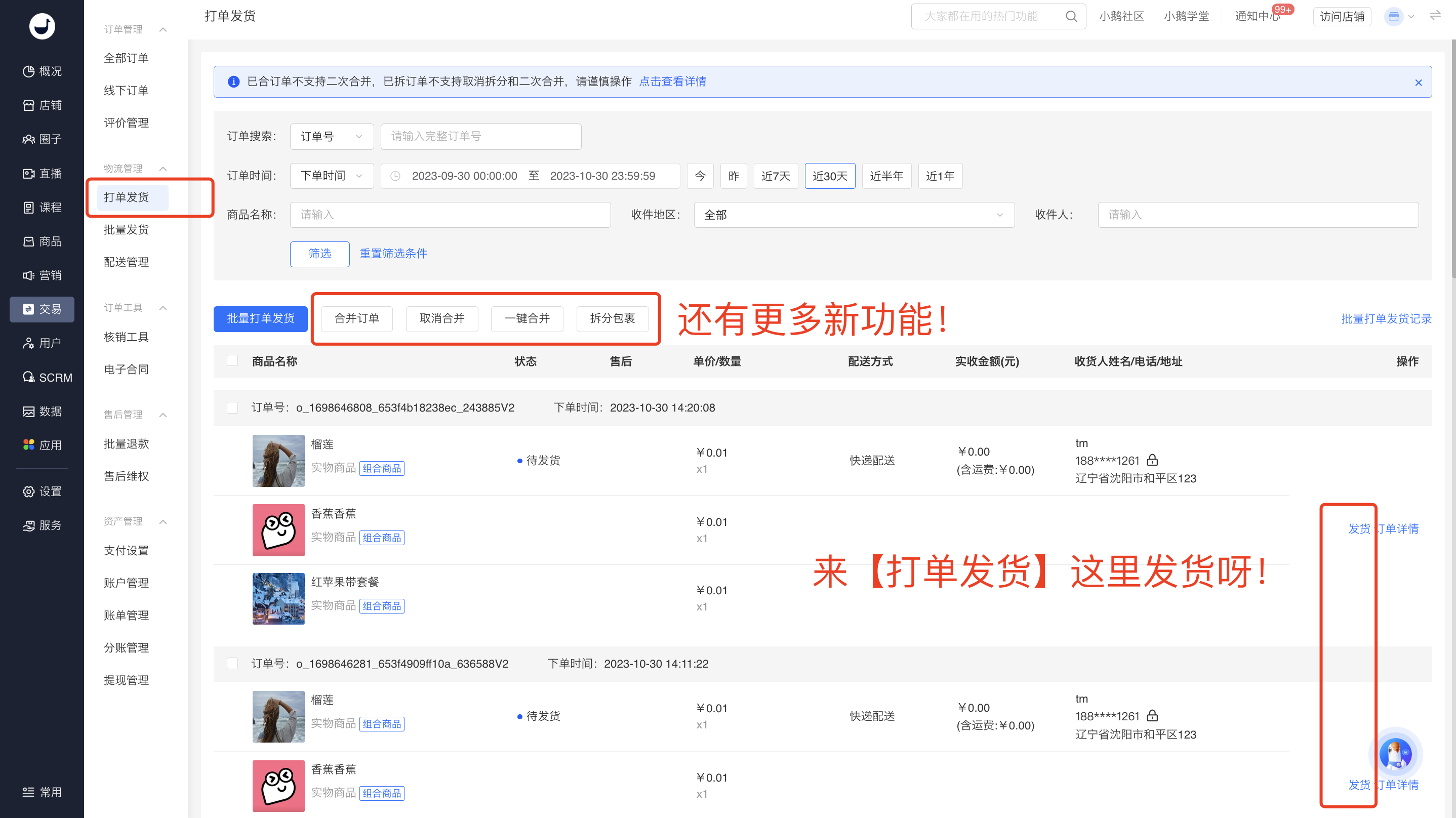
<span style="font-size:15px;color:rgb(51,51,51);letter-spacing:0;vertical-align:baseline;">新版管理台2.0：交易 - 订单管理 - 打单发货</span>

现网管理台：交易 - 物流管理 - 打单发货

<span style="font-size:15px;color:rgb(51,51,51);letter-spacing:0;vertical-align:baseline;">旧版管理台：交易能力 - 打单发货</span>

<span style="font-size:15px;color:rgb(51,51,51);letter-spacing:0;vertical-align:baseline;">  
</span>

<span style="color:rgb(26,26,26);font-size:21px;letter-spacing:0px;">四、使用说明</span>

<span style="font-family:sans-serif;font-size:16px;">1. 打单发货列表</span>

<span style="font-size:15px;color:rgb(255,0,0);letter-spacing:0;vertical-align:baseline;">所有的【发货】操作集中到新增的【打单发货】列表，仅展示实物商品</span><span style="font-size:15px;color:rgb(51,51,51);letter-spacing:0;vertical-align:baseline;">。支持按订单号、下单时间、商品名称、收件地区、收件人筛选。</span>

<span style="display:inline-block;overflow:hidden;width:604.733px;height:341.586px;">![png](https://wdcdn.qpic.cn/MTY4ODg1MTA1NDA2MDA2NA_932951_97ob06HaAQgHn8Ji_1697681631?w=2868&h=1620&type=image/png)</span>

2\. 合单发货

##### <span style="font-size:15px;color:rgb(26,26,26);letter-spacing:0;vertical-align:baseline;">  
</span>

##### <span style="font-size:15px;color:rgb(26,26,26);letter-spacing:0;vertical-align:baseline;">  
</span>

##### <span style="font-size:15px;color:rgb(26,26,26);letter-spacing:0;vertical-align:baseline;">  
</span>

##### <span style="font-size:15px;color:rgb(26,26,26);letter-spacing:0;vertical-align:baseline;">  
</span>

##### <span style="font-size:15px;color:rgb(26,26,26);letter-spacing:0;vertical-align:baseline;">  
</span>

##### <span style="font-size:15px;color:rgb(26,26,26);letter-spacing:0;vertical-align:baseline;">1）合并订单</span>

<span style="font-size:15px;color:rgb(51,51,51);letter-spacing:0;vertical-align:baseline;">a、若</span><span style="font-size:15px;font-weight:bold;color:rgb(255,0,0);letter-spacing:0;vertical-align:baseline;">收件人姓名/电话/地址</span><span style="font-size:15px;color:rgb(255,0,0);letter-spacing:0;vertical-align:baseline;">完全一致</span><span style="font-size:15px;color:rgb(51,51,51);letter-spacing:0;vertical-align:baseline;">，则可以手动勾选直接合并订单。注意需选择至少两个订单才能合并。合并后的订单会打上「合」的标签</span>

<span style="display:inline-block;overflow:hidden;width:604.733px;height:218.517px;">![png](https://wdcdn.qpic.cn/MTY4ODg1MTA1NDA2MDA2NA_801702_bPc5lpbH6gnJ9lpD_1697682379?w=2380&h=860&type=image/png)</span>

<span style="font-size:15px;letter-spacing:0;vertical-align:baseline;">b、</span><span style="font-size:15px;color:rgb(255,0,0);letter-spacing:0;vertical-align:baseline;">合并后的订单取最早的下单时间</span><span style="font-size:15px;letter-spacing:0;vertical-align:baseline;">（打单发货列表按下单时间倒序排列）</span>

<span style="font-size:15px;color:rgb(51,51,51);letter-spacing:0;vertical-align:baseline;">c、合并订单，只能合并一次，</span><span style="font-size:15px;color:rgb(255,0,0);letter-spacing:0;vertical-align:baseline;">已合订单不支持再次合并</span>

##### <span style="font-size:15px;color:rgb(26,26,26);letter-spacing:0;vertical-align:baseline;">2）取消合并</span>

<span style="font-size:15px;color:rgb(51,51,51);letter-spacing:0;vertical-align:baseline;">a、已合订单支持取消合并（有二次确认弹窗），支持同时勾选多个已合订单取消合并</span>

<span style="display:inline-block;overflow:hidden;width:604.733px;height:202.011px;">![png](https://wdcdn.qpic.cn/MTY4ODg1MTA1NDA2MDA2NA_467269_3K90bzfG_t3MqY9q_1697683671?w=2790&h=932&type=image/png)</span>

<span style="display:inline-block;overflow:hidden;width:604.733px;height:213.283px;">![png](https://wdcdn.qpic.cn/MTY4ODg1MTA1NDA2MDA2NA_226061_P0z8v7ANbJwMWnS6_1697682640?w=2342&h=826&type=image/png)</span>

##### <span style="font-size:15px;color:rgb(26,26,26);letter-spacing:0;vertical-align:baseline;">3）一键合并</span>

<span style="font-size:15px;color:rgb(51,51,51);letter-spacing:0;vertical-align:baseline;">a、</span><span style="font-size:15px;color:rgb(255,0,0);letter-spacing:0;vertical-align:baseline;">一键合并是将打单发货列表可以合并的订单按收件人进行分组显示，每一个组别对应同一个收件人</span>

<span style="display:inline-block;overflow:hidden;width:604.733px;height:224.869px;">![png](https://wdcdn.qpic.cn/MTY4ODg1MTA1NDA2MDA2NA_780778_hSVBfEFaGFANL0oI_1697682752?w=1904&h=708&type=image/png)</span>

<span style="font-size:15px;color:rgb(51,51,51);letter-spacing:0;vertical-align:baseline;">b、针对同一个收件人，可以自由选择将该收件人的订单合并为一个包裹或多个包裹。选择需要合并的订单，点击【合并选中的订单】即可合并成功</span>

<span style="display:inline-block;overflow:hidden;width:604.733px;height:223.599px;">![png](https://wdcdn.qpic.cn/MTY4ODg1MTA1NDA2MDA2NA_972562_CxXYN9lFJetJ1d3a_1697683037?w=1904&h=704&type=image/png)</span>

<span style="font-size:15px;color:rgb(51,51,51);letter-spacing:0;vertical-align:baseline;">c、若同一收件人的订单被全部合并，则自动跳转至下一组收件人</span>

<span style="display:inline-block;overflow:hidden;width:604.733px;height:251.761px;">![png](https://wdcdn.qpic.cn/MTY4ODg1MTA1NDA2MDA2NA_193301_UpuHi8SfrTTlulXk_1697683727?w=1912&h=796&type=image/png)</span>

<span style="font-size:15px;color:rgb(51,51,51);letter-spacing:0;vertical-align:baseline;">d、注意</span><span style="font-size:15px;color:rgb(255,0,0);letter-spacing:0;vertical-align:baseline;">一键合并已剔除已合订单</span><span style="font-size:15px;color:rgb(51,51,51);letter-spacing:0;vertical-align:baseline;">（原因在于订单只能合并一次）</span>

##### <span style="font-size:15px;color:rgb(26,26,26);letter-spacing:0;vertical-align:baseline;">3. 拆单发货</span>

##### <span style="font-size:15px;color:rgb(26,26,26);letter-spacing:0;vertical-align:baseline;">  
</span>

##### <span style="font-size:15px;color:rgb(26,26,26);letter-spacing:0;vertical-align:baseline;">  
</span>

##### <span style="font-size:15px;color:rgb(26,26,26);letter-spacing:0;vertical-align:baseline;">  
</span>

##### <span style="font-size:15px;color:rgb(26,26,26);letter-spacing:0;vertical-align:baseline;">  
</span>

##### <span style="font-size:15px;color:rgb(26,26,26);letter-spacing:0;vertical-align:baseline;">  
</span>

##### <span style="font-size:15px;color:rgb(26,26,26);letter-spacing:0;vertical-align:baseline;">  
</span>

##### <span style="font-size:15px;color:rgb(26,26,26);letter-spacing:0;vertical-align:baseline;">  
</span>

##### <span style="font-size:15px;color:rgb(26,26,26);letter-spacing:0;vertical-align:baseline;">  
</span>

##### <span style="font-size:15px;color:rgb(26,26,26);letter-spacing:0;vertical-align:baseline;">  
</span>

##### <span style="font-size:15px;color:rgb(26,26,26);letter-spacing:0;vertical-align:baseline;">1）拆分包裹</span>

<span style="font-size:15px;color:rgb(51,51,51);letter-spacing:0;vertical-align:baseline;">a、</span><span style="font-size:15px;color:rgb(255,0,0);letter-spacing:0;vertical-align:baseline;">当一笔订单含多个不同商品或一笔订单同一商品购买多个时，支持拆分</span><span style="font-size:15px;color:rgb(51,51,51);letter-spacing:0;vertical-align:baseline;">。需选择至少一个订单才能唤起【拆分包裹】弹窗。注意若订单只含一个商品，则不支持拆分。</span>

<span style="display:inline-block;overflow:hidden;width:604.733px;height:223.07px;">![png](https://wdcdn.qpic.cn/MTY4ODg1MTA1NDA2MDA2NA_465606__k0KcCcdC2Cyh9Rq_1697685293?w=2326&h=858&type=image/png)</span>

<span style="font-size:15px;color:rgb(51,51,51);letter-spacing:0;vertical-align:baseline;">b、根据所选包裹进行分组拆分</span>

<span style="display:inline-block;overflow:hidden;width:604.733px;height:222.73px;">![png](https://wdcdn.qpic.cn/MTY4ODg1MTA1NDA2MDA2NA_421254_8oLPQ6OrKTttrfQw_1697685489?w=1906&h=702&type=image/png)</span>

<span style="font-size:15px;color:rgb(51,51,51);letter-spacing:0;vertical-align:baseline;">c、选择需要拆出去的商品，点击【拆分选中商品单独发货】，即将该商品拆成单独的包裹进行发货。拆分成功后该商品从弹窗中消失，可继续进行拆分。 注意</span><span style="font-size:15px;color:rgb(255,0,0);letter-spacing:0;vertical-align:baseline;">拆分过的包裹不支持再次合并</span><span style="font-size:15px;color:rgb(51,51,51);letter-spacing:0;vertical-align:baseline;">。</span>

<span style="display:inline-block;overflow:hidden;width:604.733px;height:223.13px;">![png](https://wdcdn.qpic.cn/MTY4ODg1MTA1NDA2MDA2NA_720120_XpezEpVwKW4Y5fw5_1697685764?w=1908&h=704&type=image/png)</span>

<span style="display:inline-block;overflow:hidden;width:604.733px;height:288.333px;">![png](https://wdcdn.qpic.cn/MTY4ODg1MTA1NDA2MDA2NA_308920_pvxnKdHsoeZEdxsV_1697685853?w=1896&h=904&type=image/png)</span>

<span style="font-size:15px;color:rgb(51,51,51);letter-spacing:0;vertical-align:baseline;">d、若一笔订单被全部拆分，则自动跳转至下一组</span>

<span style="display:inline-block;overflow:hidden;width:604.733px;height:196.507px;">![png](https://wdcdn.qpic.cn/MTY4ODg1MTA1NDA2MDA2NA_778821_X_6qCWU7O4VS0tZW_1697685960?w=1908&h=620&type=image/png)</span>

<span style="font-size:15px;color:rgb(51,51,51);letter-spacing:0;vertical-align:baseline;">e、</span><span style="font-size:15px;color:rgb(255,0,0);letter-spacing:0;vertical-align:baseline;">针对购买数量不为1的商品，拆分出去后支持再次拆分为单个包裹</span><span style="font-size:15px;color:rgb(51,51,51);letter-spacing:0;vertical-align:baseline;">。例如榴莲\*3拆分出去后，支持再次拆分为3个包裹</span>

<span style="display:inline-block;overflow:hidden;width:604.733px;height:194.788px;">![png](https://wdcdn.qpic.cn/MTY4ODg1MTA1NDA2MDA2NA_412129_xL6IiumZySWpmvYO_1697686069?w=1900&h=612&type=image/png)</span>

<span style="display:inline-block;overflow:hidden;width:604.733px;height:260.146px;">![png](https://wdcdn.qpic.cn/MTY4ODg1MTA1NDA2MDA2NA_161574_eB2TGFRZHxT-tTVy_1697686107?w=2306&h=992&type=image/png)</span>

<span style="font-size:15px;color:rgb(51,51,51);letter-spacing:0;vertical-align:baseline;">  
</span>

# 订单列表的发货按钮怎么找不到了

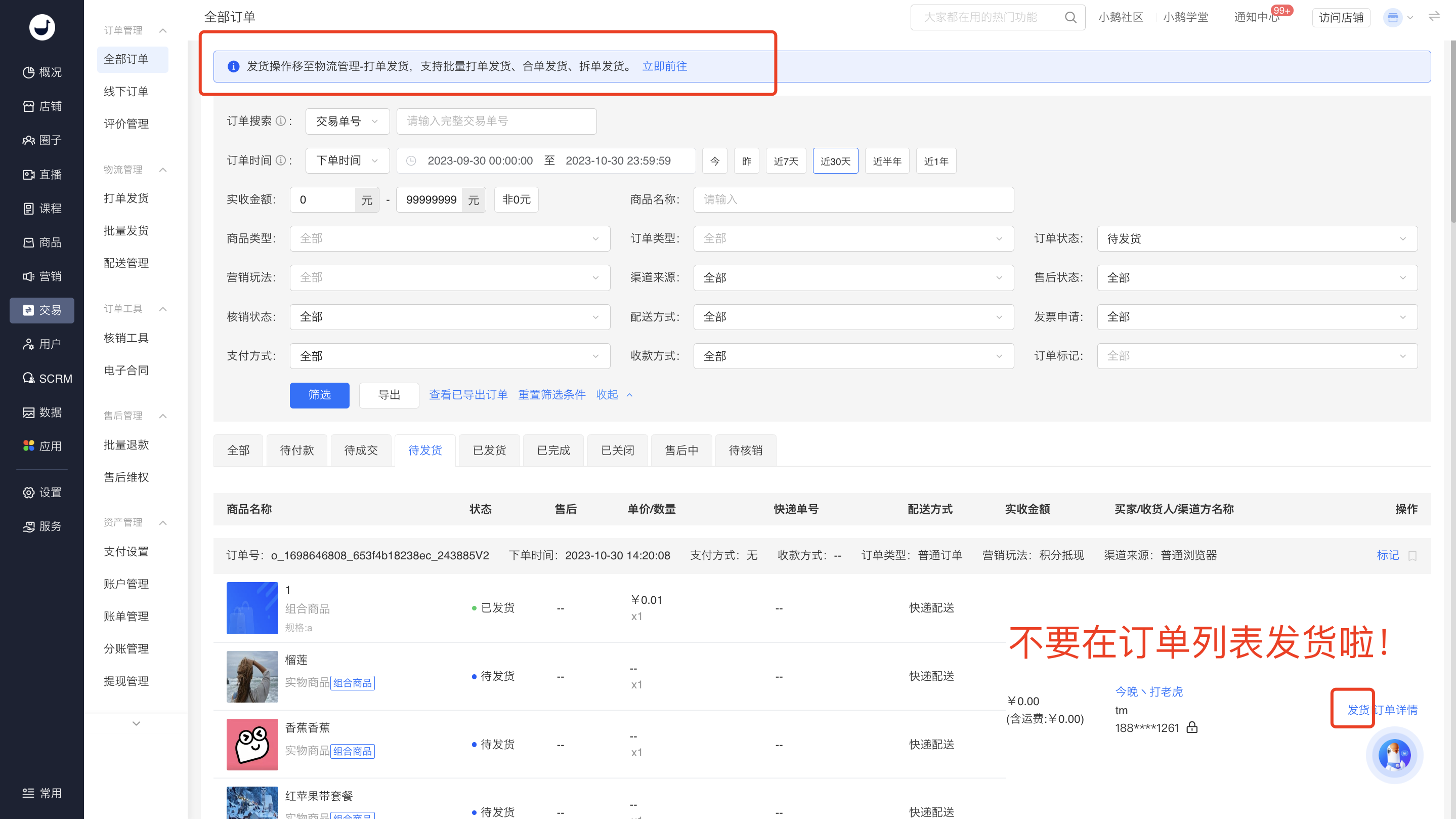
<div data-elink-language-switch="1" id="bkmrk-english" style="border:1px solid #d6d9de;border-radius:6px;padding:10px 12px;margin:0 0 18px 0;background:#f8fafc;font-size:14px;">[English](/books/transaction/page/i-cant-find-the-shipping-button-on-the-order-list-how-come)</div>为了给客户提供更好的打单发货体验，故将发货操作集中到新的模块，同时提供了合单发货、拆单发货的功能。改动如下：

<span style="color:rgb(255,0,0);">**原订单列表的【待发货】操作，移动到【打单发货】模块。后续您可以在【打单发货】列表直接进行发货操作。**</span>  
  
（注：目前处于过渡阶段，订单列表还保留发货按钮，点击跳转到打单发货，后续会将订单列表的发货按钮下掉）

![image.png](https://wechatapppro-1252524126.file.myqcloud.com/help_document/image/ueditor/16279300_1698648746.png ".png")

![image.png](https://wechatapppro-1252524126.file.myqcloud.com/help_document/image/ueditor/68367600_1698649123.png ".png")  
附：打单发货操作说明：  
https://admin.xiaoe-tech.com/helpCenter/problem?first\_id=600&amp;second\_id=416&amp;document\_id=doc\_6538c1231b8ae\_tRslw

# 用户退货支持上门取件

<div data-elink-language-switch="1" id="bkmrk-english" style="border:1px solid #d6d9de;border-radius:6px;padding:10px 12px;margin:0 0 18px 0;background:#f8fafc;font-size:14px;">[English](/books/transaction/page/users-are-supported-with-door-to-door-pick-up-service-for-returns)</div>## <span style="font-size:21px;color:rgb(26,26,26);letter-spacing:0;vertical-align:baseline;">一、项目背景</span>

<span style="font-size:15px;color:rgb(51,51,51);letter-spacing:0;vertical-align:baseline;">目前用户申请售后退货，需要自行联系快递，并填写快递单号，很不方便。</span>

## <span style="font-size:21px;color:rgb(26,26,26);letter-spacing:0;vertical-align:baseline;">二、项目价值</span>

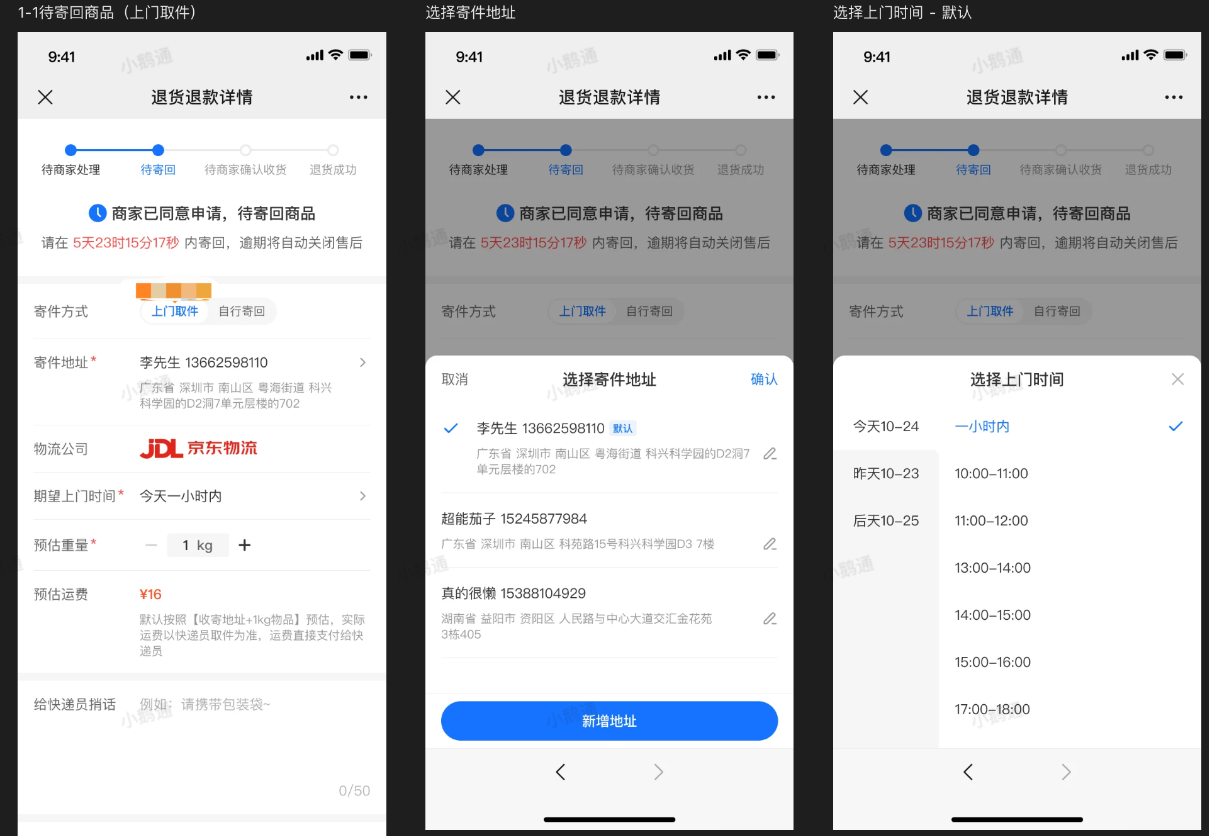
<span style="font-size:15px;color:rgb(51,51,51);letter-spacing:0;vertical-align:baseline;">支持用户在发起退货退款时同步申请上门取件，以减少用户整个售后流程的操作，提升售后效率。</span>

## <span style="font-size:21px;color:rgb(26,26,26);letter-spacing:0;vertical-align:baseline;">三、操作路径</span>

<span style="font-size:15px;color:rgb(51,51,51);letter-spacing:0;vertical-align:baseline;">C端：个人中心 - 订单-售后-查看详情-退货退款详情</span>

## <span style="font-size:21px;color:rgb(26,26,26);letter-spacing:0;vertical-align:baseline;">四、使用说明</span>

#### <span style="font-size:16px;color:rgb(26,26,26);letter-spacing:0;vertical-align:baseline;">1. 什么是上门取件</span>

<span style="font-size:14px;font-family:Helvetica;background:rgb(255,255,255);letter-spacing:0;vertical-align:baseline;">当用户购买的商品在退货时，可选择由快递公司安排快递员上门取走退货商品。</span>

#### <span style="font-size:16px;color:rgb(26,26,26);letter-spacing:0;vertical-align:baseline;">2. 上门取件支持什么快递公司</span>

<span style="font-size:14px;font-family:Helvetica;background:rgb(255,255,255);letter-spacing:0;vertical-align:baseline;">目前支持上门取件的快递公司：京东物流。</span>

#### <span style="font-size:16px;color:rgb(26,26,26);letter-spacing:0;vertical-align:baseline;">3. 上门取件怎么收费</span>

<span style="font-size:15px;color:rgb(51,51,51);letter-spacing:0;vertical-align:baseline;">用户下单时能看到预估运费，实际运费以快递员上门取件为准。用户直接付费给快递员。</span>

#### <span style="font-size:16px;color:rgb(26,26,26);letter-spacing:0;vertical-align:baseline;">4. 用户怎么操作上门取件</span>

<span style="font-size:15px;color:rgb(51,51,51);letter-spacing:0;vertical-align:baseline;">1）订单申请售后，提交退货退款请求，等待商家同意退货退款。</span>

<span style="font-size:15px;color:rgb(51,51,51);letter-spacing:0;vertical-align:baseline;">2）商家同意退货退款/换货后，买家选择“上门取件”退货方式。</span>

<span style="font-size:15px;color:rgb(51,51,51);letter-spacing:0;vertical-align:baseline;">3）买家选择上门取件，并选择时间区间上门取件，取件地址默认为下单时的收货地址，支持修改。</span>

<span style="font-size:15px;color:rgb(51,51,51);letter-spacing:0;vertical-align:baseline;">4）快递员上门取件，用户支付运费给快递员。</span>

<span style="font-size:15px;color:rgb(51,51,51);letter-spacing:0;vertical-align:baseline;">5）买家等待商家确认收货。</span>

<span style="font-size:15px;color:rgb(51,51,51);letter-spacing:0;vertical-align:baseline;">6）商家确认收货，订单退款成功。</span>

<span style="font-size:15px;color:rgb(51,51,51);letter-spacing:0;vertical-align:baseline;">![image.png](https://wechatapppro-1252524126.file.myqcloud.com/help_document/image/ueditor/42164800_1701397026.png ".png")</span>

#### <span style="font-size:16px;color:rgb(26,26,26);letter-spacing:0;vertical-align:baseline;">5. 上门取件单可以取消吗</span>

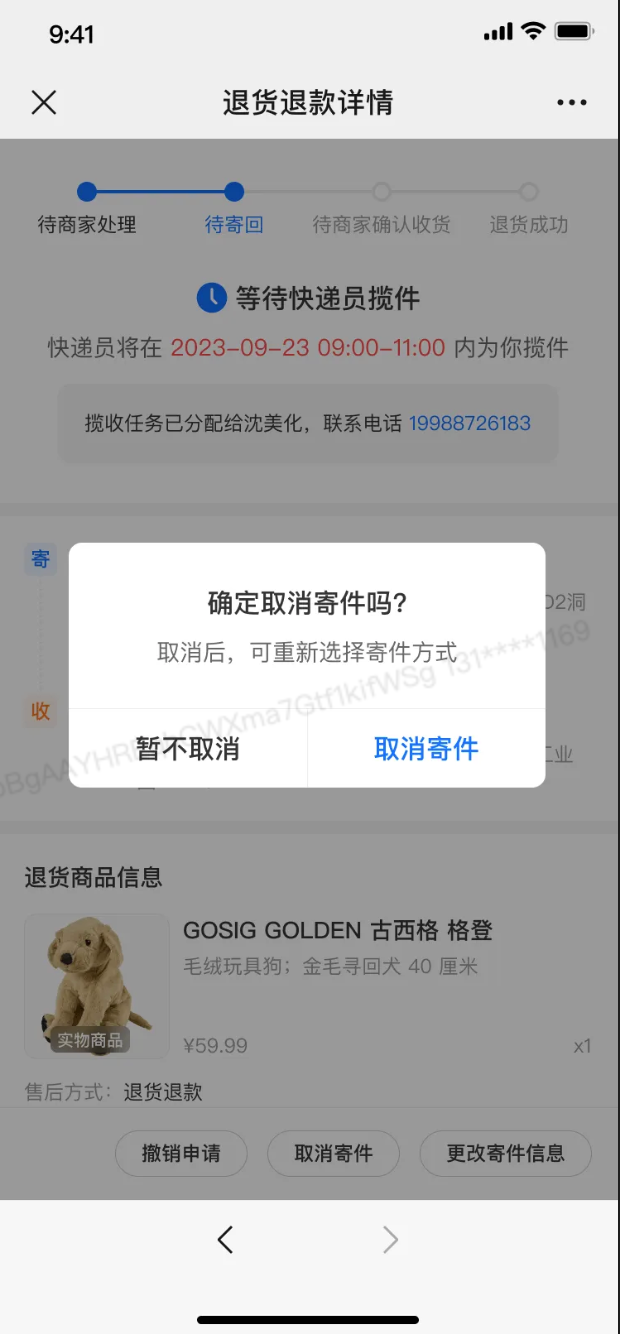
<span style="font-size:15px;color:rgb(51,51,51);letter-spacing:0;vertical-align:baseline;">快递员上门揽件前可以取消。取消后回到待寄回状态，用户可以再次选择寄回方式。</span>

<span style="font-size:15px;color:rgb(51,51,51);letter-spacing:0;vertical-align:baseline;">![image.png](https://wechatapppro-1252524126.file.myqcloud.com/help_document/image/ueditor/15717300_1701397064.png ".png")</span>

<span style="font-size:15px;color:rgb(51,51,51);letter-spacing:0;vertical-align:baseline;">  
</span>

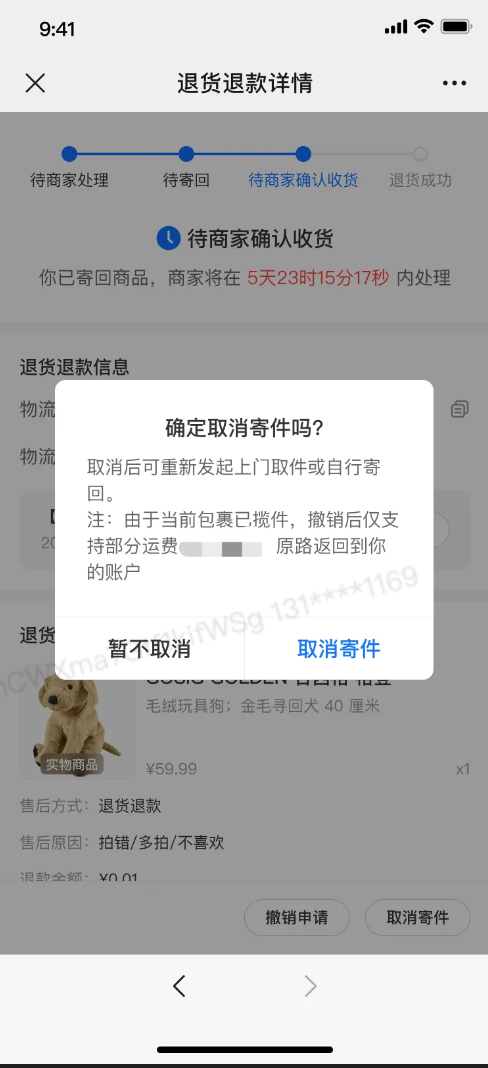
<span style="font-size:15px;color:rgb(51,51,51);letter-spacing:0;vertical-align:baseline;">快递员上门揽件后可以取消，此时由于已产生运输，取消将返回部分运费。取消后回到待寄回状态，用户可以再次选择寄回方式。</span>

<span style="display:inline-block;overflow:hidden;width:117px;height:256.058px;">![image.png](https://wechatapppro-1252524126.file.myqcloud.com/help_document/image/ueditor/2262700_1701397200.png ".png")</span>

<span style="font-size:15px;color:rgb(51,51,51);letter-spacing:0;vertical-align:baseline;">  
</span>

# 评价管理

# 商家可以回复几次评论？

<div data-elink-language-switch="1" id="bkmrk-english" style="border:1px solid #d6d9de;border-radius:6px;padding:10px 12px;margin:0 0 18px 0;background:#f8fafc;font-size:14px;">[English](/books/transaction/page/how-many-times-can-merchants-reply-to-reviews)</div><span style="color:rgb(51,51,51);font-family:'Helvetica Neue For Number', '-apple-system', 'PingFang SC', 'Microsoft YaHei', '微软雅黑', BlinkMacSystemFont, 'Hiragino Sans GB', SimSun, '宋体', sans-serif;background-color:rgb(255,255,255);font-size:15px;"> 目前每条评论仅支持回复一次。</span>

# 学员购买商品支持评论几次？

<div data-elink-language-switch="1" id="bkmrk-english" style="border:1px solid #d6d9de;border-radius:6px;padding:10px 12px;margin:0 0 18px 0;background:#f8fafc;font-size:14px;">[English](/books/transaction/page/how-many-times-can-students-leave-reviews-after-purchasing-products)</div><span style="color:rgb(51,51,51);font-family:'Helvetica Neue For Number', '-apple-system', 'PingFang SC', 'Microsoft YaHei', '微软雅黑', BlinkMacSystemFont, 'Hiragino Sans GB', SimSun, '宋体', sans-serif;background-color:rgb(255,255,255);font-size:15px;">学员每购买一次商品可针对该商品评论一次。</span>

# 商品评论是按照什么顺序展示的？

<div data-elink-language-switch="1" id="bkmrk-english" style="border:1px solid #d6d9de;border-radius:6px;padding:10px 12px;margin:0 0 18px 0;background:#f8fafc;font-size:14px;">[English](/books/transaction/page/in-what-order-are-product-reviews-displayed)</div><span style="color:rgb(51,51,51);font-family:'Helvetica Neue For Number', '-apple-system', 'PingFang SC', 'Microsoft YaHei', '微软雅黑', BlinkMacSystemFont, 'Hiragino Sans GB', SimSun, '宋体', sans-serif;background-color:rgb(255,255,255);font-size:15px;">实物商品评论的展示逻辑是按照时间倒序来的。</span>

# 实物商品评论开关在哪里设置？

<div data-elink-language-switch="1" id="bkmrk-english" style="border:1px solid #d6d9de;border-radius:6px;padding:10px 12px;margin:0 0 18px 0;background:#f8fafc;font-size:14px;">[English](/books/transaction/page/where-can-i-set-the-switch-for-reviews-of-physical-products)</div><span style="color:rgb(51,51,51);background-color:rgb(255,255,255);"></span>

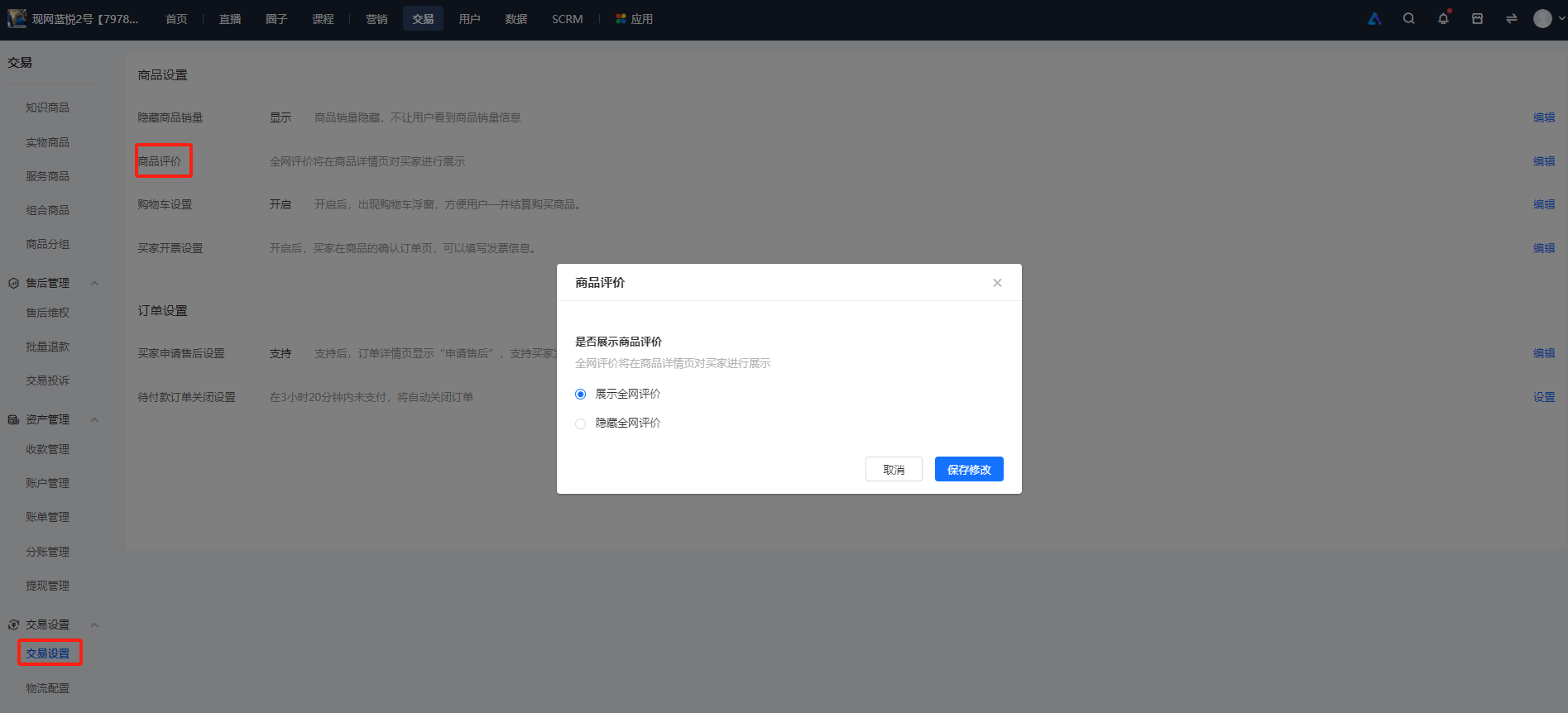
<span style="color:rgb(51,51,51);background:rgb(255,255,255);letter-spacing:0pt;vertical-align:baseline;font-size:15px;">进入知识店铺管理后台，找到【交易】-【交易设置】，在【商品设置】模块你找到【商品评价】，点击设置，开启展示。</span>

![image.png](https://wechatapppro-1252524126.file.myqcloud.com/help_document/image/ueditor/54567900_1700207658.png ".png")

# 支付设置

# 在小鹅通管理台填写支付设置

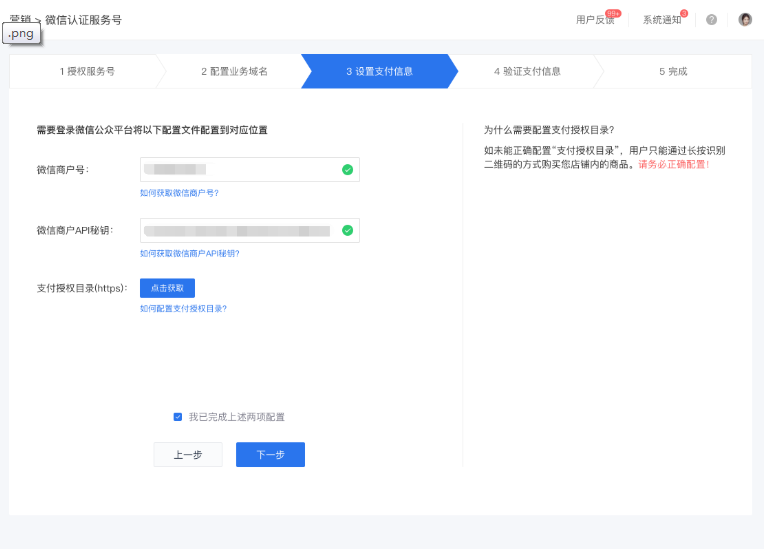
<div data-elink-language-switch="1" id="bkmrk-english" style="border:1px solid #d6d9de;border-radius:6px;padding:10px 12px;margin:0 0 18px 0;background:#f8fafc;font-size:14px;">[English](/books/transaction/page/fill-in-the-payment-settings-on-the-elink-management-console)</div><span style="font-size:16px;">Step 1：回到小鹅通管理台，直接填写之前记录下来的第三步记录的微信商户号和第四步记录的微信商户API密钥。</span>

![image.png](https://wechatapppro-1252524126.file.myqcloud.com/help_document/image/ueditor/86695200_1614162592.png ".png")

![](https://wechatapppro-1252524126.file.myqcloud.com/help_document/image/ueditor/5678900_1614162593.com/yws/public/resource/37725b49688664454f25b1616c5ca10d/xmlnote/cb065c8036a74d2a9bf729ba9520a47b/6053)

<span style="font-family:'等线';font-size:16px;"></span>

<span style="font-size:16px;">Step 2：在【支付授权目录(https)】一栏中，点击右边的【复制链接】按钮，把小鹅通店铺的支付授权目录完整地复制下来，完成此步骤之后请不要关闭小鹅通管理后台页面。</span>

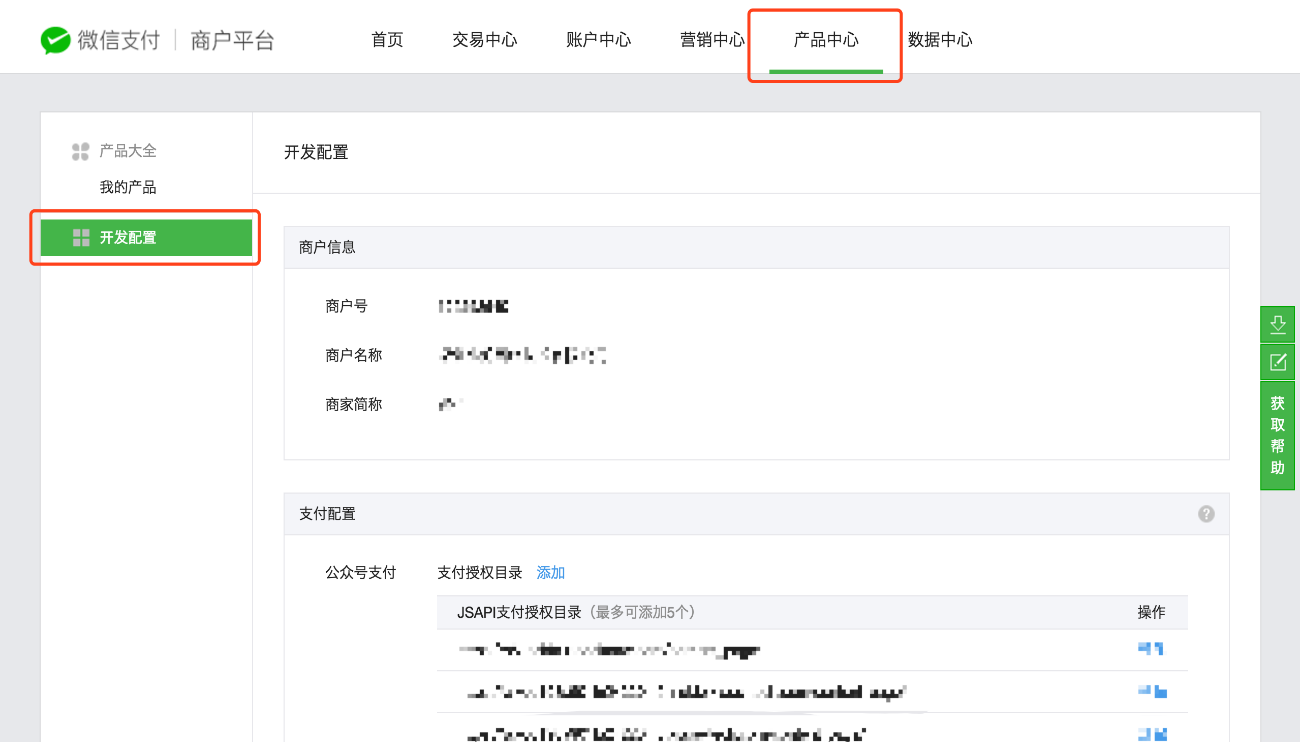
<span style="font-size:16px;">Step 3：返回您的微信支付商户平台页面，点击顶部菜单栏的【产品中心】，点击左侧边栏的【开发配置】</span>

<span style="font-family:'等线';font-size:16px;"> ![image022.png](https://wechatapppro-1252524126.file.myqcloud.com/help_document/image/ueditor/39380100_1614162593.png ".png")</span>

<span style="font-family:'等线';font-size:16px;"></span>

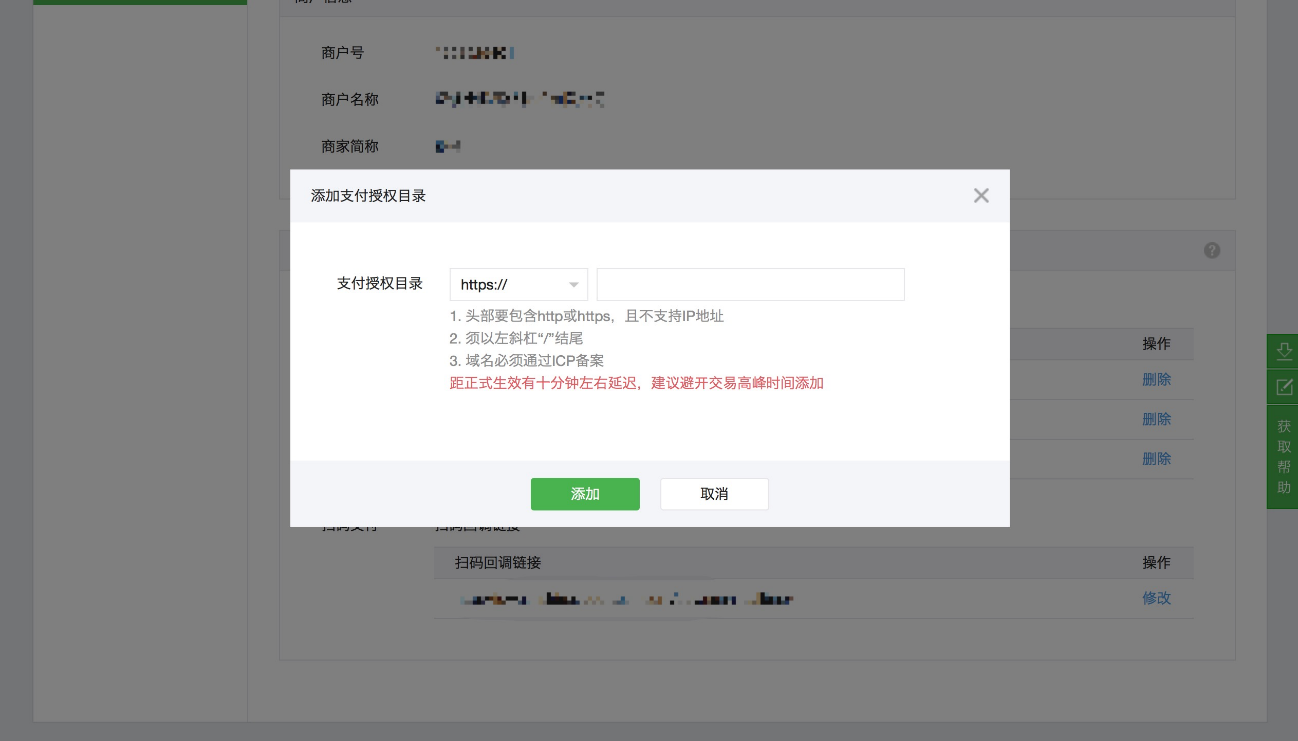
<span style="font-size:16px;">Step 4: 在【支付配置】一栏，点击【公众号支付】-【支付授权目录】旁边的【添加】按钮，浏览器自动弹出添加窗口，首先请务必在目录头部的下拉菜单中选择 https:// 类型，然后粘贴刚刚复制的小鹅通店铺的支付授权目录，点击【添加】确认。</span>

<span style="font-family:'等线';font-size:16px;"> ![image024.png](https://wechatapppro-1252524126.file.myqcloud.com/help_document/image/ueditor/48454700_1614162593.png ".png")</span>

<span style="font-family:'等线';font-size:16px;"></span>

<span style="font-size:16px;">Step 5：点击【我已完成上述两项配置】，并点击【下一步】，完成小鹅通店铺的支付设置配置流程。</span>

# 获取微信商户号

<div data-elink-language-switch="1" id="bkmrk-english" style="border:1px solid #d6d9de;border-radius:6px;padding:10px 12px;margin:0 0 18px 0;background:#f8fafc;font-size:14px;">[English](/books/transaction/page/obtain-wechat-merchant-id)</div>在本教程中，您可以通过以下方式获取微信商户号：

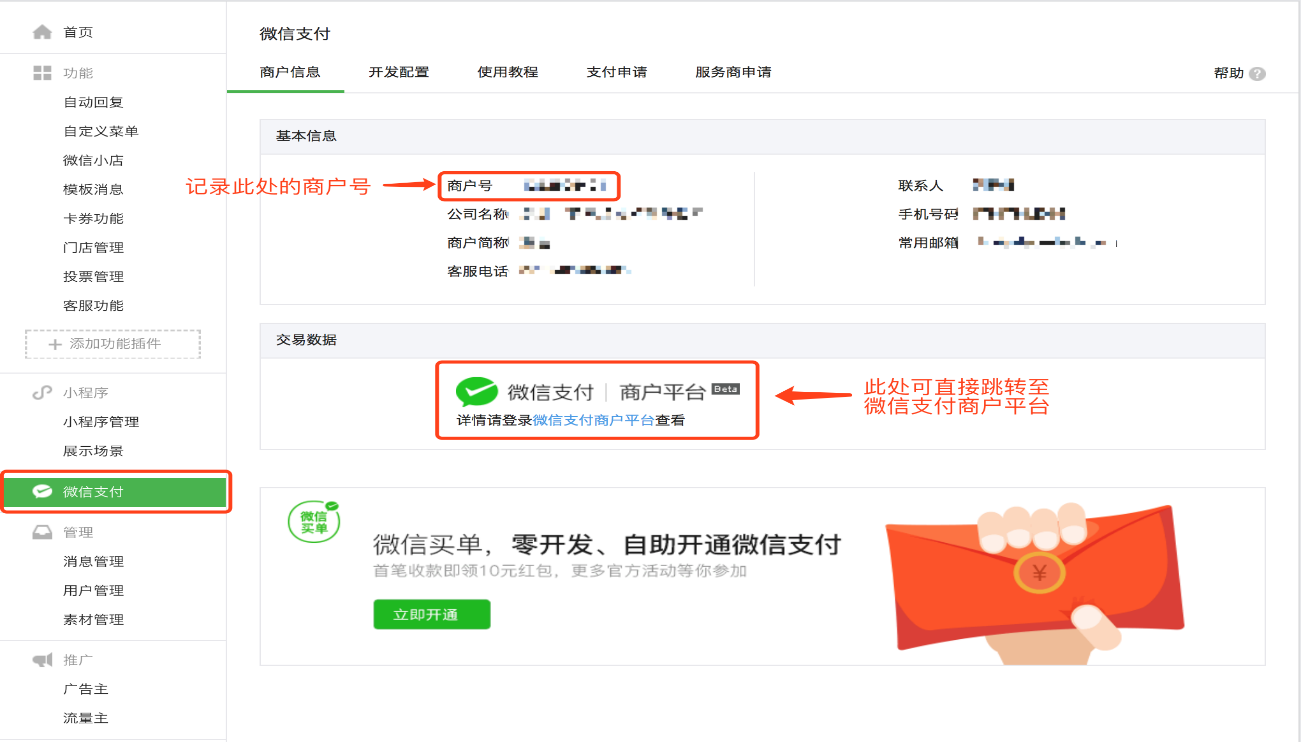
Step 1：完成上一步授权操作后，新建一个浏览器标签页，在微信公众平台登录该已授权微信服务号（登录地址：https://mp.weixin.qq.com/ ）

Step 2：点击左侧边栏的【微信支付】

● 如果您的服务号已开通微信支付的功能，则可查看到商户号及相关交易信息

● 未开通则需要在此页面申请开通

● 刚开通微信支付功能的用户，需要等待大约1天时间才会生成商户信息

Step 3：记录下商户号备用

<span style="font-size:14px;font-family:'等线';"> ![image016.png](https://wechatapppro-1252524126.file.myqcloud.com/help_document/image/ueditor/96839500_1614162367.png ".png")</span>

Step 4：点击【交易数据】一栏的【微信支付 | 商户平台】，跳转至微信支付商户平台进行下一步操作。

# 如何进行微信实名认证

<div data-elink-language-switch="1" id="bkmrk-english" style="border:1px solid #d6d9de;border-radius:6px;padding:10px 12px;margin:0 0 18px 0;background:#f8fafc;font-size:14px;">[English](/books/transaction/page/how-to-complete-real-name-authentication-on-wechat)</div><span style="font-size:14px;">当您使用小鹅通个人模式时，您销售内容商品的货款将由小鹅通代收，您可通过发起提现申请将所得收入提现至已绑定的提现微信号。</span>

<span style="color:#FF0000;font-size:14px;"></span>

<span style="font-size:14px;"><span style="font-size:14px;color:rgb(255,0,0);">根据微信支付官方限制，实名认证微信号每日能提现的上限为10万, 不支持非实名微信号提现。</span></span>

<span style="font-size:14px;"><span style="font-size:14px;color:#FF0000;"></span>因此提现前需要您在手机微信客户端查看自己的微信账户是否经过实名认证，如果未认证的话需要您进行实名认证。</span>

<span style="font-size:14px;">  
</span>

### <span style="font-size:17px;">具体操作方式如下：</span>

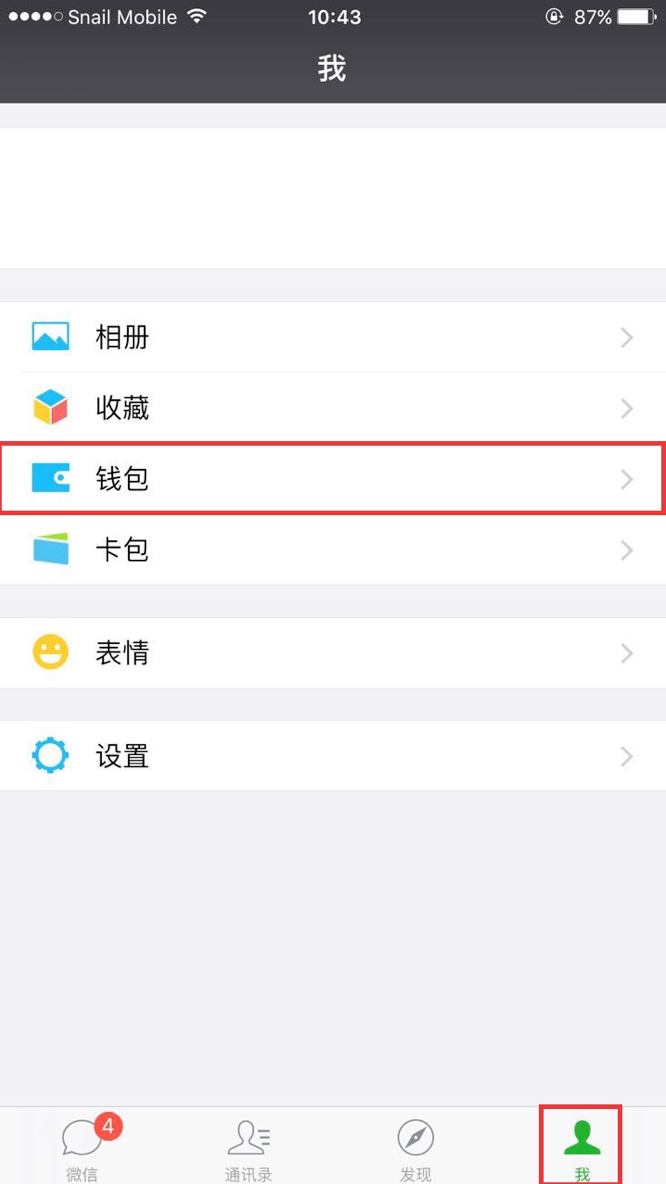
<span style="font-size:14px;">Step1：登录您的<span style="color:#FF0000;">手机微信客户端</span>，点击最下面菜单栏“<span style="color:#FF0000;">我</span>”的选项，找到“<span style="color:#FF0000;">钱包</span>”选项。</span>

![image.png](https://wechatapppro-1252524126.file.myqcloud.com/help_document/image/ueditor/80263800_1591086440.png ".png")

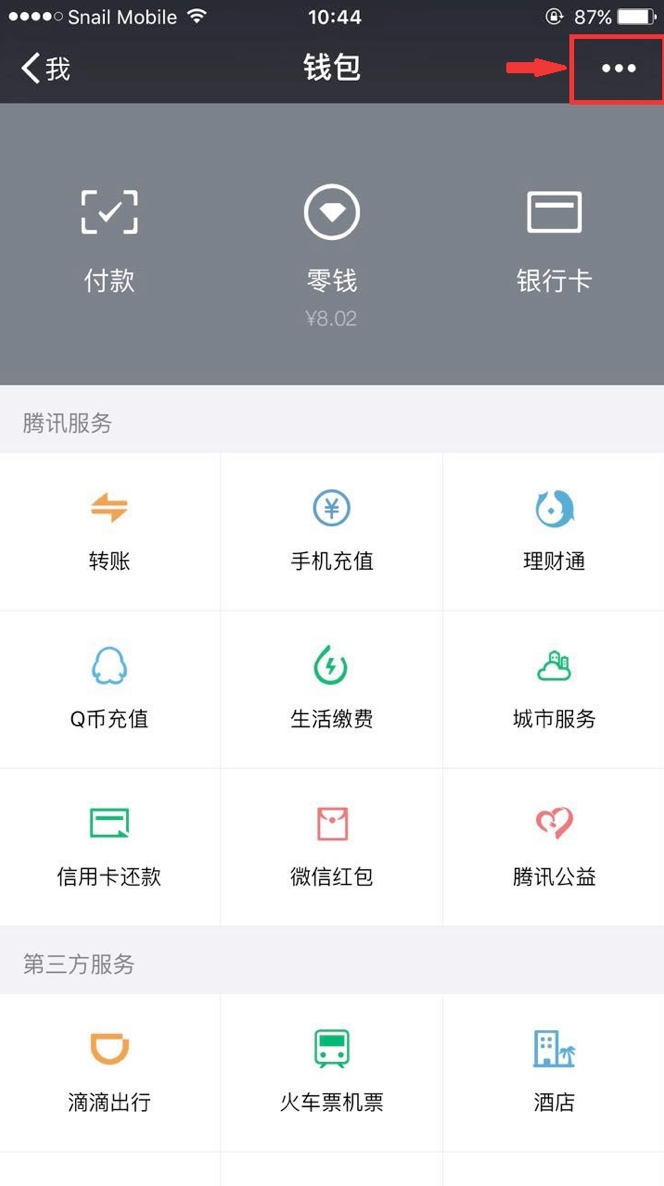
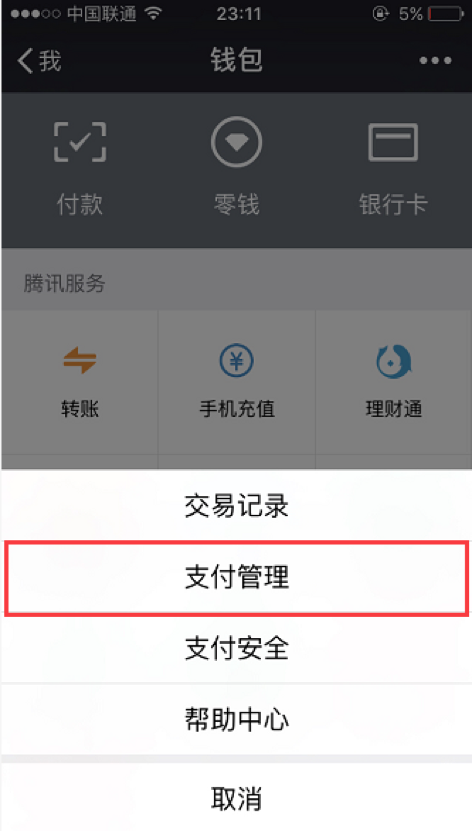
<span style="font-size:14px;">Step2：点击“钱包”选项，进入钱包页面，点击右上角“更多”选项（图标为<span>三个圆点</span>）。</span>

![image.png](https://wechatapppro-1252524126.file.myqcloud.com/help_document/image/ueditor/26873300_1591086441.png ".png")

<span style="font-size:14px;">Step3：点击“<span>支付管理</span>”选项。</span>

![image.png](https://wechatapppro-1252524126.file.myqcloud.com/help_document/image/ueditor/65452400_1591086441.png ".png")

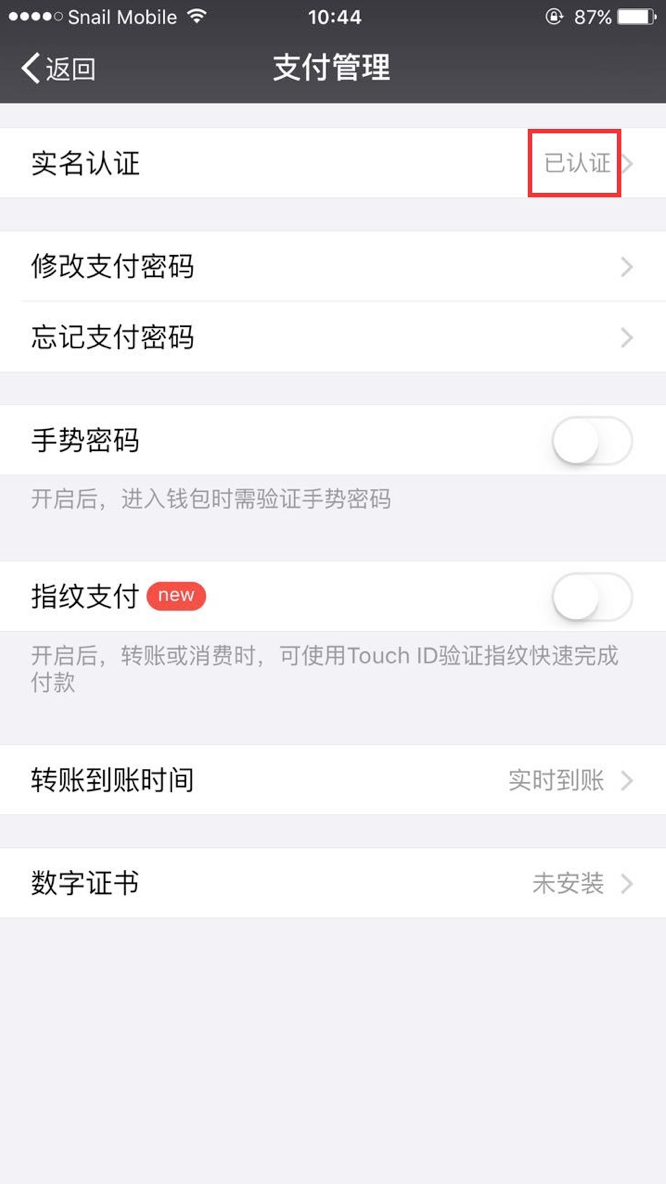
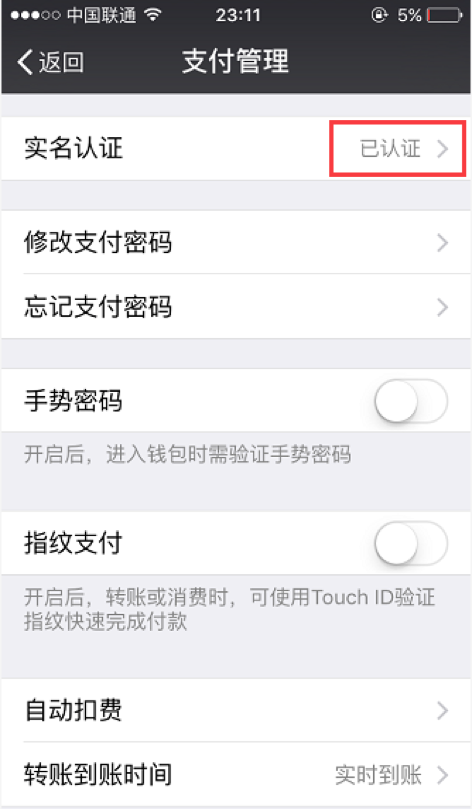
<span style="font-size:14px;">Step4：在支付管理页面查看您的账户是否已经实名认证。</span>

<span style="font-size:14px;">如果在“实名认证”栏显示您“<span style="font-size:14px;color:#FF0000;">已认证</span>”，那么您可以回到小鹅通管理后台，继续进行提现操作。</span>

![image.png](https://wechatapppro-1252524126.file.myqcloud.com/help_document/image/ueditor/8251200_1591086442.png ".png")

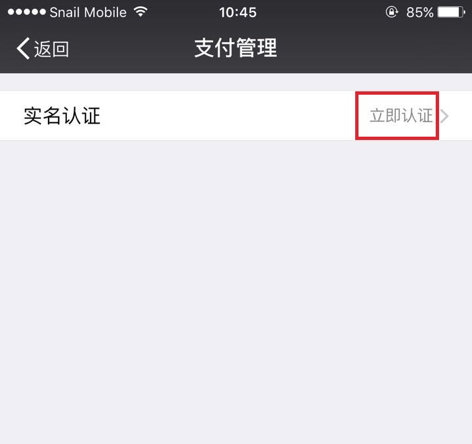
<span style="font-size:14px;">如果在“实名认证”栏显示“<span>立即认证</span>”，那么请看Step5。</span>

![image.png](https://wechatapppro-1252524126.file.myqcloud.com/help_document/image/ueditor/39200200_1591086442.png ".png")

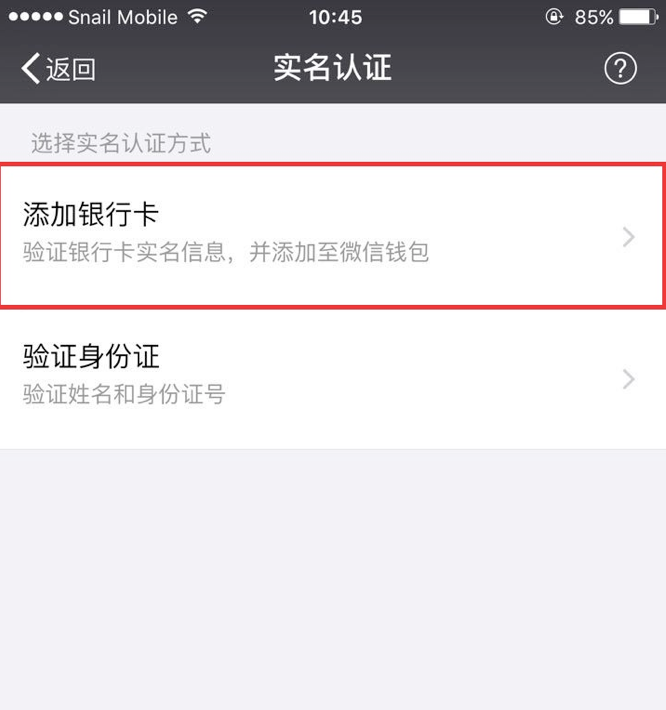
<span style="font-size:14px;">Step5：如果“实名认证”栏显示“立即认证”，说明您还没有进行实名认证，那么请您点击“<span style="color:#FF0000;">立即认证</span>”，开始进行认证。</span>

<span style="font-size:14px;">这里有2种认证方式供我们选择，我们选择“<span style="font-size:14px;color:#FF0000;">绑定银行卡</span>”认证，并填写相关认证资料。</span>

![image.png](https://wechatapppro-1252524126.file.myqcloud.com/help_document/image/ueditor/78853400_1591086442.png ".png")

<span style="font-size:14px;">Step6：填写完相关资料后点击完成，返回看到“实名认证”状态变成了“已认证”，说明您的微信实名认证已成功。</span>

![image.png](https://wechatapppro-1252524126.file.myqcloud.com/help_document/image/ueditor/11463400_1591086443.png ".png")

<span style="font-size:14px;">现在您可以回到小鹅通管理后台继续进行提现操作，<span style="color:rgb(255,0,0);">实名认证微信号每日提现金额不可超过2万</span></span>