# Practice

# Does the workbook support individual sales or can it be associated with courses?

<div data-elink-language-switch="1" id="bkmrk-%E4%B8%AD%E6%96%87" style="border:1px solid #d6d9de;border-radius:6px;padding:10px 12px;margin:0 0 18px 0;background:#f8fafc;font-size:14px;">[中文](/books/bcbe3/page/8d5e9)</div><span style="font-size:15px;">Workbooks can be sold individually (either for free or at a fee), and they can also be associated with courses. Currently, they support association with text and image courses, audio courses, video courses, live courses, columns, major columns, membership courses, and class courses.</span>

# In the store decoration, how many practice items can a practice component display at most?

<div data-elink-language-switch="1" id="bkmrk-%E4%B8%AD%E6%96%87" style="border:1px solid #d6d9de;border-radius:6px;padding:10px 12px;margin:0 0 18px 0;background:#f8fafc;font-size:14px;">[中文](/books/bcbe3/page/9461c)</div><span style="font-size:14px;"> The practice component has two display rules. You can select the appropriate rule for setting according to your needs: Default rule: By default, the first 4 latest practice contents are displayed. Manual rule: You can manually select, with a maximum of the first 10 contents displayed. The operation path is as follows: Store management → Mobile terminal → WeChat H5 → Store homepage → Build the store homepage → Learning assistance tools → Practice</span>

# What is the maximum number of questions for a single practice session?

<div data-elink-language-switch="1" id="bkmrk-%E4%B8%AD%E6%96%87" style="border:1px solid #d6d9de;border-radius:6px;padding:10px 12px;margin:0 0 18px 0;background:#f8fafc;font-size:14px;">[中文](/books/bcbe3/page/3b8a6)</div><span style="font-size:14px;">The maximum number of questions per practice session is 1,000.</span>

# How to create a new exercise?

<div data-elink-language-switch="1" id="bkmrk-%E4%B8%AD%E6%96%87" style="border:1px solid #d6d9de;border-radius:6px;padding:10px 12px;margin:0 0 18px 0;background:#f8fafc;font-size:14px;">[中文](/books/bcbe3/page/26657-lNt)</div><span style="background-color:rgb(255,255,255);color:rgb(53,53,53);font-weight:700;letter-spacing:0pt;font-size:17px;">I. Feature Introduction</span>

<span style="color:rgb(51,51,51);background-image:initial;background-position:initial;background-size:initial;background-repeat:initial;background-attachment:initial;letter-spacing:0pt;vertical-align:baseline;font-size:15px;"></span>

<span style="font-size:15px;"><span style="font-size:15px;color:rgb(53,53,53);background:rgb(255,255,255);letter-spacing:0pt;vertical-align:baseline;">The practice feature meets the merchants' need to sell existing question bank items and provides students with a self-paced question practice tool. When students click on an answer, an explanation will appear immediately. Through repeated practice, students can enhance their memory and improve their learning effectiveness.</span><span style="font-size:15px;color:rgb(51,51,51);background-image:initial;background-position:initial;background-size:initial;background-repeat:initial;background-attachment:initial;letter-spacing:0pt;vertical-align:baseline;"></span></span>

<span style="font-weight:700;color:rgb(53,53,53);background:rgb(255,255,255);letter-spacing:0pt;vertical-align:baseline;font-size:17px;">II. Purpose of Use</span><span style="font-size:15px;"><span style="font-size:15px;font-weight:700;color:rgb(53,53,53);background:rgb(255,255,255);letter-spacing:0pt;vertical-align:baseline;"></span><span style="font-size:15px;color:rgb(51,51,51);background-image:initial;background-position:initial;background-size:initial;background-repeat:initial;background-attachment:initial;letter-spacing:0pt;vertical-align:baseline;"></span></span>

<span style="font-size:15px;"><span style="font-size:15px;color:rgb(53,53,53);background:rgb(255,255,255);letter-spacing:0pt;vertical-align:baseline;">Repeatedly practicing questions can improve students' learning effectiveness. For example, if you have 100 real exam questions to sell to students each year, you can categorize these 100 questions into one or more categories in the question bank. Then, use the practice feature to associate with the question bank category, set up the relevant practice settings, and students can purchase and practice these questions on their mobile devices.</span><span style="font-size:15px;color:rgb(51,51,51);background-image:initial;background-position:initial;background-size:initial;background-repeat:initial;background-attachment:initial;letter-spacing:0pt;vertical-align:baseline;"></span></span>

<span style="font-weight:700;color:rgb(53,53,53);background:rgb(255,255,255);letter-spacing:0pt;vertical-align:baseline;font-size:17px;">III. Use Scenarios</span><span style="font-size:15px;"><span style="font-size:15px;font-weight:700;color:rgb(53,53,53);background:rgb(255,255,255);letter-spacing:0pt;vertical-align:baseline;"></span><span style="font-size:15px;color:rgb(51,51,51);background-image:initial;background-position:initial;background-size:initial;background-repeat:initial;background-attachment:initial;letter-spacing:0pt;vertical-align:baseline;"></span></span>

<span style="font-size:15px;"><span style="font-size:15px;color:rgb(53,53,53);background:rgb(255,255,255);letter-spacing:0pt;vertical-align:baseline;">Used when students need to practice questions independently.</span><span style="font-size:15px;color:rgb(51,51,51);background-image:initial;background-position:initial;background-size:initial;background-repeat:initial;background-attachment:initial;letter-spacing:0pt;vertical-align:baseline;"></span></span>

<span style="font-weight:700;color:rgb(53,53,53);background:rgb(255,255,255);letter-spacing:0pt;vertical-align:baseline;font-size:17px;">IV. Operation Path</span><span style="font-size:15px;"><span style="font-size:15px;font-weight:700;color:rgb(53,53,53);background:rgb(255,255,255);letter-spacing:0pt;vertical-align:baseline;"></span><span style="font-size:15px;color:rgb(51,51,51);background-image:initial;background-position:initial;background-size:initial;background-repeat:initial;background-attachment:initial;letter-spacing:0pt;vertical-align:baseline;"></span></span>

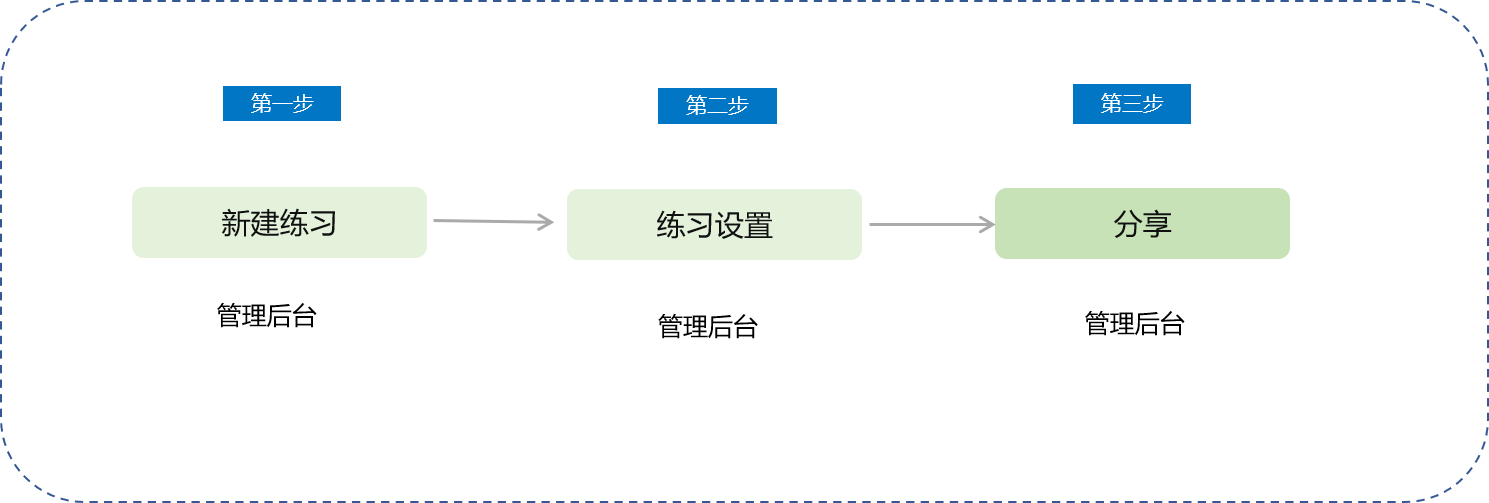
<span style="background-color:rgb(255,255,255);color:rgb(53,53,53);letter-spacing:0pt;font-size:15px;">Instructor's End (Computer Management Console): Content → Create New Practice → Share</span>

![78889100_1699003087.png](https://wechatapppro-1252524126.file.myqcloud.com/help_document/image/ueditor/78889100_1699003087.png)

<span style="font-size:15px;">   
</span>

<span style="font-family:'Helvetica Neue', Helvetica, 'PingFang SC', 'Microsoft YaHei', 'Source Han Sans SC', 'Noto Sans CJK SC', 'WenQuanYi Micro Hei', sans-serif;color:rgb(51,51,51);background-image:initial;background-position:initial;background-size:initial;background-repeat:initial;background-attachment:initial;letter-spacing:0pt;vertical-align:baseline;font-size:15px;"></span>

<span style="font-family:'Microsoft YaHei', '微软雅黑', Roboto, 'Helvetica Neue', Helvetica, 'PingFang SC', 'Microsoft YaHei', 'Source Han Sans SC', 'Noto Sans CJK SC', 'WenQuanYi Micro Hei', sans-serif;font-weight:700;color:rgb(53,53,53);background:rgb(255,255,255);letter-spacing:0pt;vertical-align:baseline;font-size:17px;">V. Operation Steps</span><span style="font-size:15px;"><span style="font-size:12pt;font-family:'Microsoft YaHei', '微软雅黑', Roboto, 'Helvetica Neue', Helvetica, 'PingFang SC', 'Microsoft YaHei', 'Source Han Sans SC', 'Noto Sans CJK SC', 'WenQuanYi Micro Hei', sans-serif;font-weight:700;color:rgb(53,53,53);background:rgb(255,255,255);letter-spacing:0pt;vertical-align:baseline;"></span><span style="font-size:12pt;font-family:'Microsoft YaHei', '微软雅黑', Roboto, 'Helvetica Neue', Helvetica, 'PingFang SC', 'Microsoft YaHei', 'Source Han Sans SC', 'Noto Sans CJK SC', 'WenQuanYi Micro Hei', sans-serif;color:rgb(51,51,51);background-image:initial;background-position:initial;background-size:initial;background-repeat:initial;background-attachment:initial;letter-spacing:0pt;vertical-align:baseline;"></span></span>

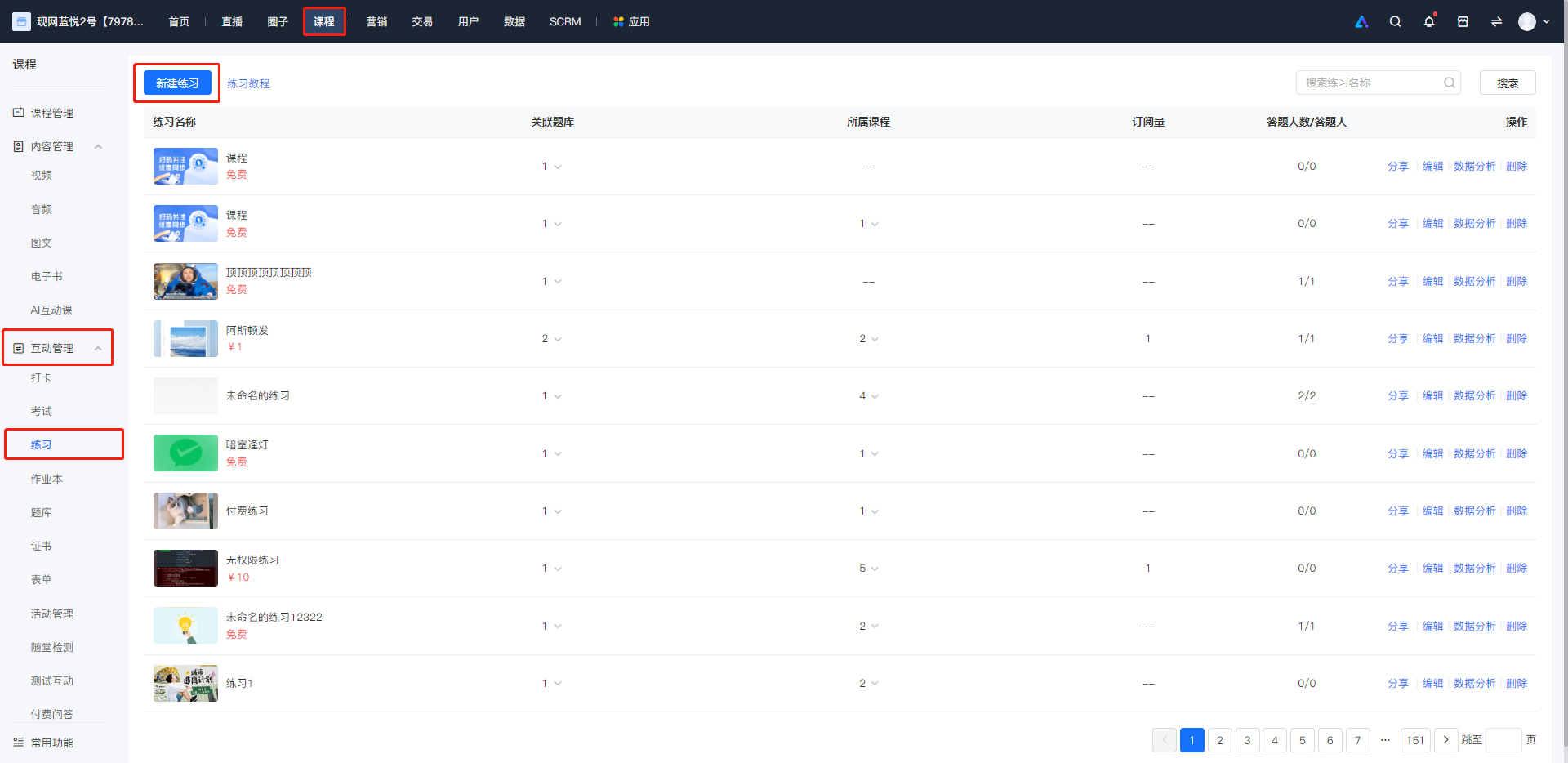
<span style="font-size:15px;">**<span style="font-family:'Microsoft YaHei', '微软雅黑', Roboto, 'Helvetica Neue', Helvetica, 'PingFang SC', 'Microsoft YaHei', 'Source Han Sans SC', 'Noto Sans CJK SC', 'WenQuanYi Micro Hei', sans-serif;color:rgb(53,53,53);background:rgb(255,255,255);letter-spacing:0pt;vertical-align:baseline;">Step 1: Enter the practice feature page and click 'Create Practice'.</span>**</span>

![image.png](https://wechatapppro-1252524126.file.myqcloud.com/help_document/image/ueditor/30948600_1699003136.png ".png")<span style="font-size:15px;"></span>

<span style="font-family:'Helvetica Neue', Helvetica, 'PingFang SC', 'Microsoft YaHei', 'Source Han Sans SC', 'Noto Sans CJK SC', 'WenQuanYi Micro Hei', sans-serif;color:rgb(51,51,51);background-image:initial;background-position:initial;background-size:initial;background-repeat:initial;background-attachment:initial;letter-spacing:0pt;vertical-align:baseline;font-size:15px;"></span>

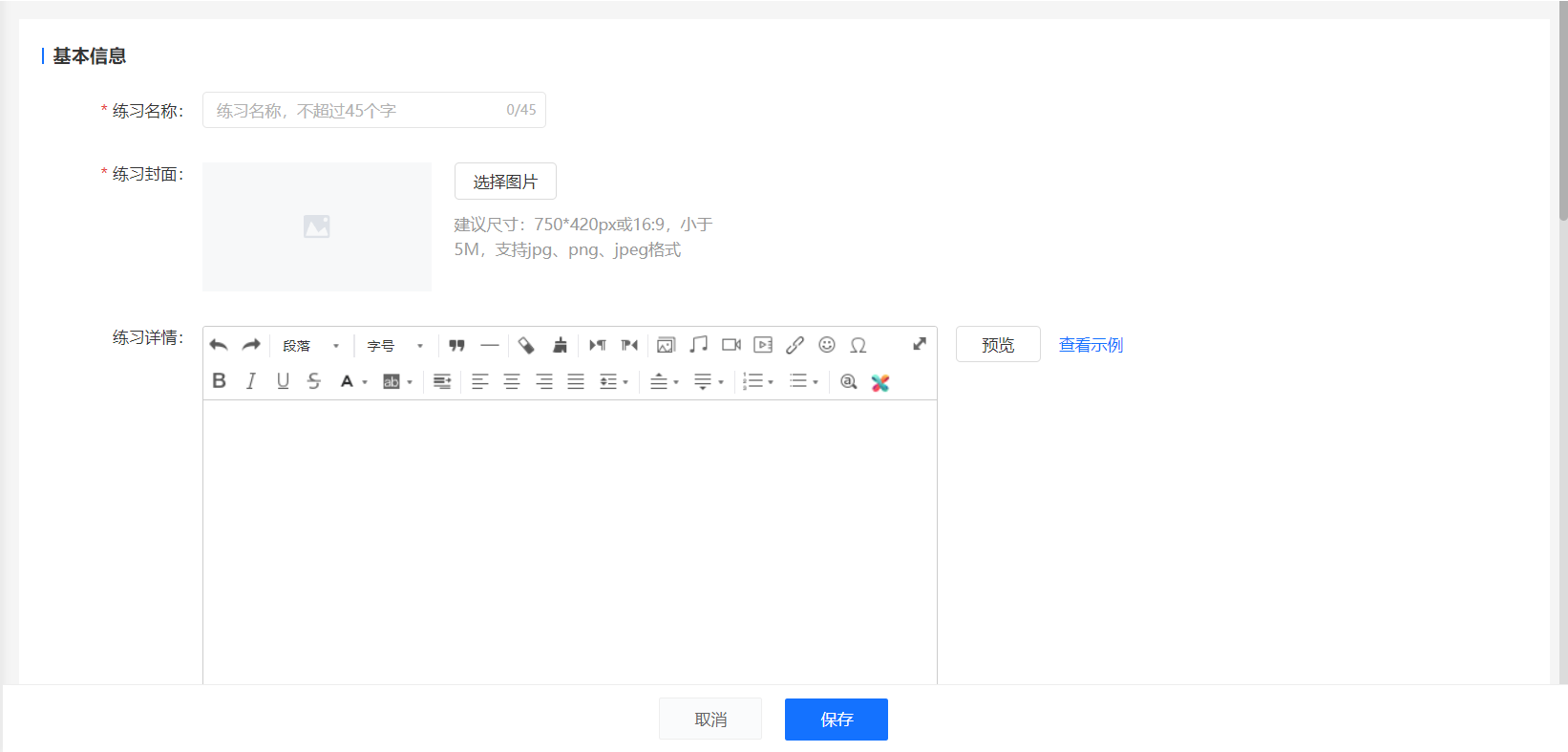
**<span style="font-size:15px;"><span style="font-family:'Microsoft YaHei', '微软雅黑', Roboto, 'Helvetica Neue', Helvetica, 'PingFang SC', 'Microsoft YaHei', 'Source Han Sans SC', 'Noto Sans CJK SC', 'WenQuanYi Micro Hei', sans-serif;font-weight:700;color:rgb(53,53,53);background:rgb(255,255,255);letter-spacing:0pt;vertical-align:baseline;">Step 2:</span><span style="font-family:'Microsoft YaHei', '微软雅黑', Roboto, 'Helvetica Neue', Helvetica, 'PingFang SC', 'Microsoft YaHei', 'Source Han Sans SC', 'Noto Sans CJK SC', 'WenQuanYi Micro Hei', sans-serif;color:rgb(53,53,53);background:rgb(255,255,255);letter-spacing:0pt;vertical-align:baseline;">Fill in the relevant settings and save.</span></span>**

<span style="font-size:15px;">![image.png](https://wechatapppro-1252524126.file.myqcloud.com/help_document/image/ueditor/95295500_1699003087.png ".png")</span>

<span style="font-size:15px;">**<span style="font-size:15px;font-family:'Microsoft YaHei', '微软雅黑', Roboto, 'Helvetica Neue', Helvetica, 'PingFang SC', 'Microsoft YaHei', 'Source Han Sans SC', 'Noto Sans CJK SC', 'WenQuanYi Micro Hei', sans-serif;color:rgb(53,53,53);background:rgb(255,255,255);letter-spacing:0pt;vertical-align:baseline;">Explanation of Relevant Settings:</span>**<span style="font-size:15px;background-color:rgb(255,255,255);"><span style="font-size:15px;font-family:'Microsoft YaHei', '微软雅黑', Roboto, 'Helvetica Neue', Helvetica, 'PingFang SC', 'Microsoft YaHei', 'Source Han Sans SC', 'Noto Sans CJK SC', 'WenQuanYi Micro Hei', sans-serif;color:rgb(53,53,53);background:rgb(255,255,255);letter-spacing:0pt;vertical-align:baseline;"></span><span style="font-size:15px;background:rgb(255,255,255);font-family:'Microsoft YaHei', '微软雅黑', Roboto, 'Helvetica Neue', Helvetica, 'PingFang SC', 'Microsoft YaHei', 'Source Han Sans SC', 'Noto Sans CJK SC', 'WenQuanYi Micro Hei', sans-serif;color:rgb(51,51,51);letter-spacing:0pt;vertical-align:baseline;"></span></span></span>

<span style="font-size:15px;">1. Practice Name: The name of the practice, such as 'Real Exam Questions for \*\* High - School Exam in 2019'. The maximum length of the practice name is 45 characters.  
2\. Practice Cover: The cover image of the practice. It is recommended to choose an image with a size of 750\*420px or a 16:9 aspect ratio.  
4\. Practice Introduction: Optional. Write a concise introduction for your practice.  
5\. Associated Question Bank: You can associate one or more categories under the question bank. Subjective questions are not supported for now, and relevant question types will be filtered out after selection.  
6\. Question Answering Settings: You can set the questions to be presented randomly or in sequence. If set to random, the specified number of questions will be randomly selected from the associated question bank. If set to sequential, the questions will be presented in the order of the associated question bank categories (if multiple question bank categories are selected, you can sort them). The specified number of questions will be cyclically selected from the question bank.  
7\. Number of Questions: The number of questions in a single practice session. For example, if set to 20, students will practice 20 questions each time. The maximum number of questions per practice session is 1000.  
8\. Difficulty Settings: Set a difficulty coefficient for your practice, which will also be displayed on the mobile device.  
9\. Sales Settings: You can set the practice to be free, paid, or associated with a single course for sale.  
10\. Display Settings: You can set whether to display or hide the practice. If you don't want the practice to be displayed in the store, you can choose to 'Hide' it. After hiding, it will not be shown in the practice list, but students who have already participated in the practice will not be affected.</span>

<span style="font-family:'Microsoft YaHei', '微软雅黑', Roboto, 'Helvetica Neue', Helvetica, 'PingFang SC', 'Microsoft YaHei', 'Source Han Sans SC', 'Noto Sans CJK SC', 'WenQuanYi Micro Hei', sans-serif;font-weight:700;color:rgb(53,53,53);background:rgb(255,255,255);letter-spacing:0pt;vertical-align:baseline;font-size:15px;">  
</span>

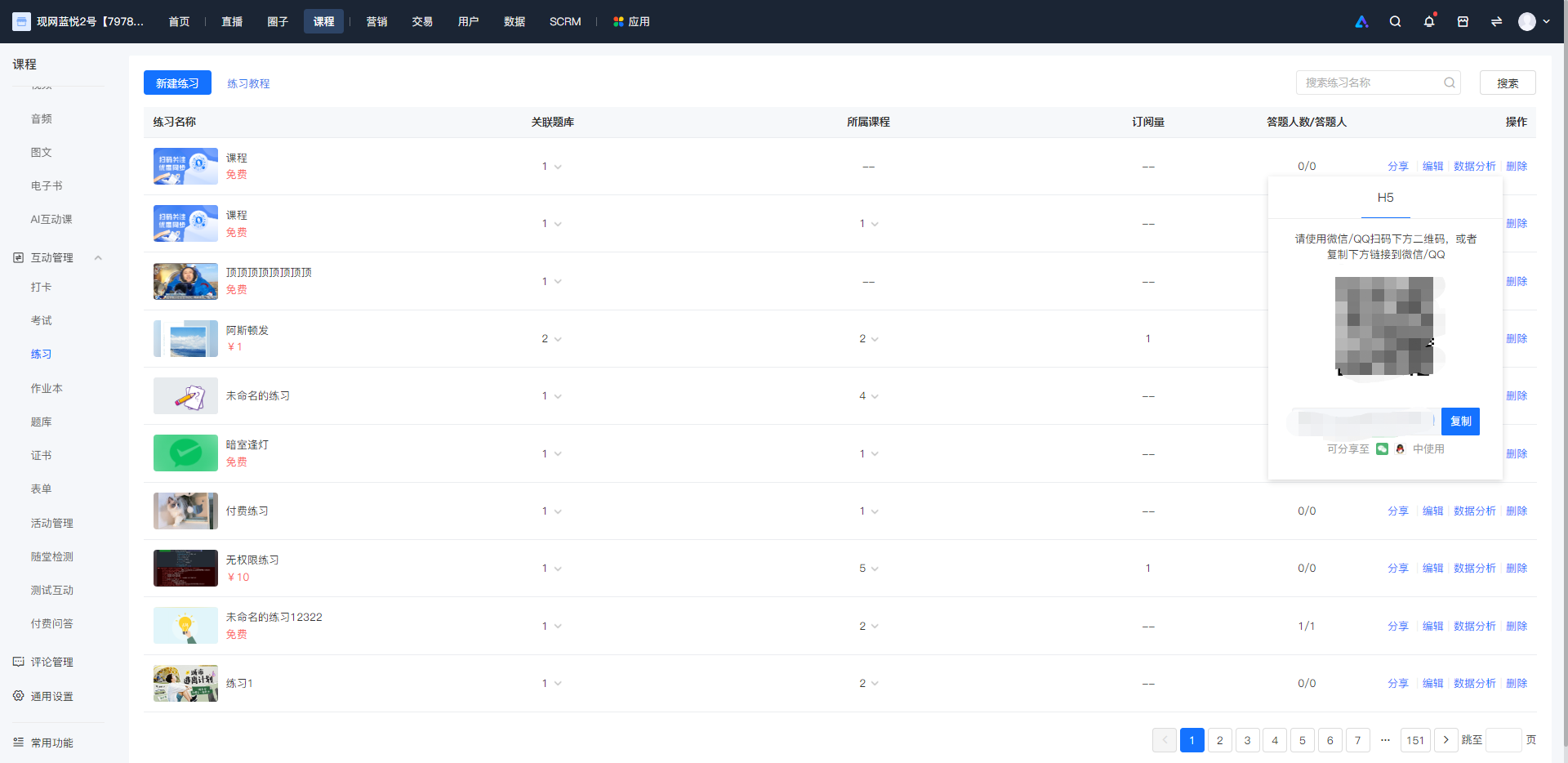
**<span style="font-size:15px;"><span style="font-family:'Microsoft YaHei', '微软雅黑', Roboto, 'Helvetica Neue', Helvetica, 'PingFang SC', 'Microsoft YaHei', 'Source Han Sans SC', 'Noto Sans CJK SC', 'WenQuanYi Micro Hei', sans-serif;font-weight:700;color:rgb(53,53,53);background:rgb(255,255,255);letter-spacing:0pt;vertical-align:baseline;">Step 3:</span><span style="font-family:'Microsoft YaHei', '微软雅黑', Roboto, 'Helvetica Neue', Helvetica, 'PingFang SC', 'Microsoft YaHei', 'Source Han Sans SC', 'Noto Sans CJK SC', 'WenQuanYi Micro Hei', sans-serif;color:rgb(53,53,53);background:rgb(255,255,255);letter-spacing:0pt;vertical-align:baseline;">Share the link to let students purchase.</span></span>**

<span style="font-size:15px;">![image.png](https://wechatapppro-1252524126.file.myqcloud.com/help_document/image/ueditor/23193500_1699003168.png ".png")</span>

<span style="font-size:15px;"><span style="font-size:10.5pt;font-family:'Microsoft YaHei', '微软雅黑', Roboto, 'Helvetica Neue', Helvetica, 'PingFang SC', 'Microsoft YaHei', 'Source Han Sans SC', 'Noto Sans CJK SC', 'WenQuanYi Micro Hei', sans-serif;color:rgb(53,53,53);background:rgb(255,255,255);letter-spacing:0pt;vertical-align:baseline;">After creating the practice, click 'Share' to get the relevant link and QR code, and then you can promote the practice to students.</span><span style="font-size:11pt;font-family:'Microsoft YaHei', '微软雅黑', Roboto, 'Helvetica Neue', Helvetica, 'PingFang SC', 'Microsoft YaHei', 'Source Han Sans SC', 'Noto Sans CJK SC', 'WenQuanYi Micro Hei', sans-serif;color:rgb(51,51,51);background-image:initial;background-position:initial;background-size:initial;background-repeat:initial;background-attachment:initial;letter-spacing:0pt;vertical-align:baseline;"></span></span>

<span style="font-size:15px;"></span>

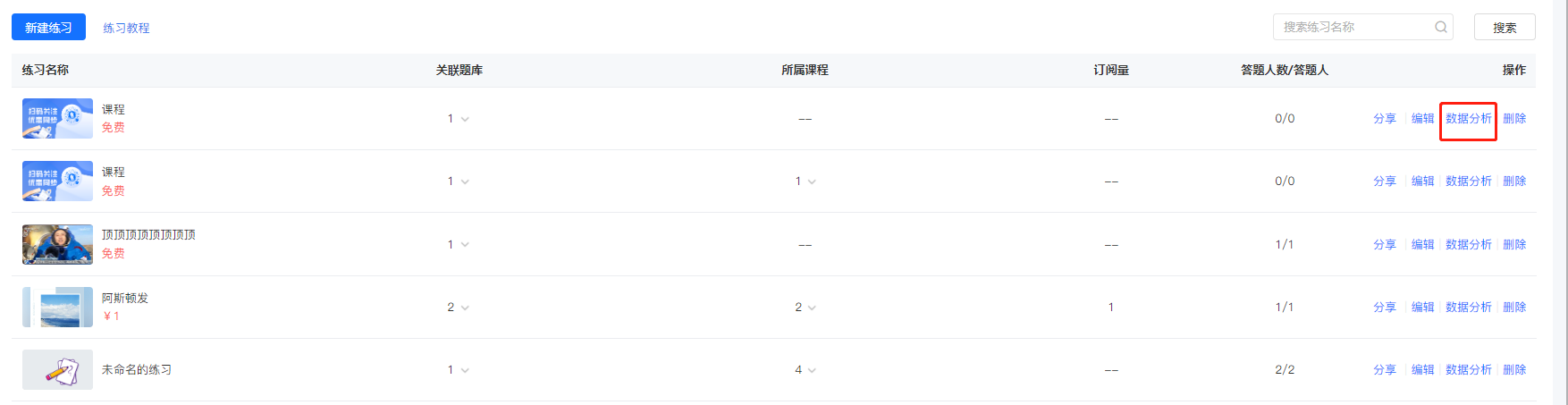
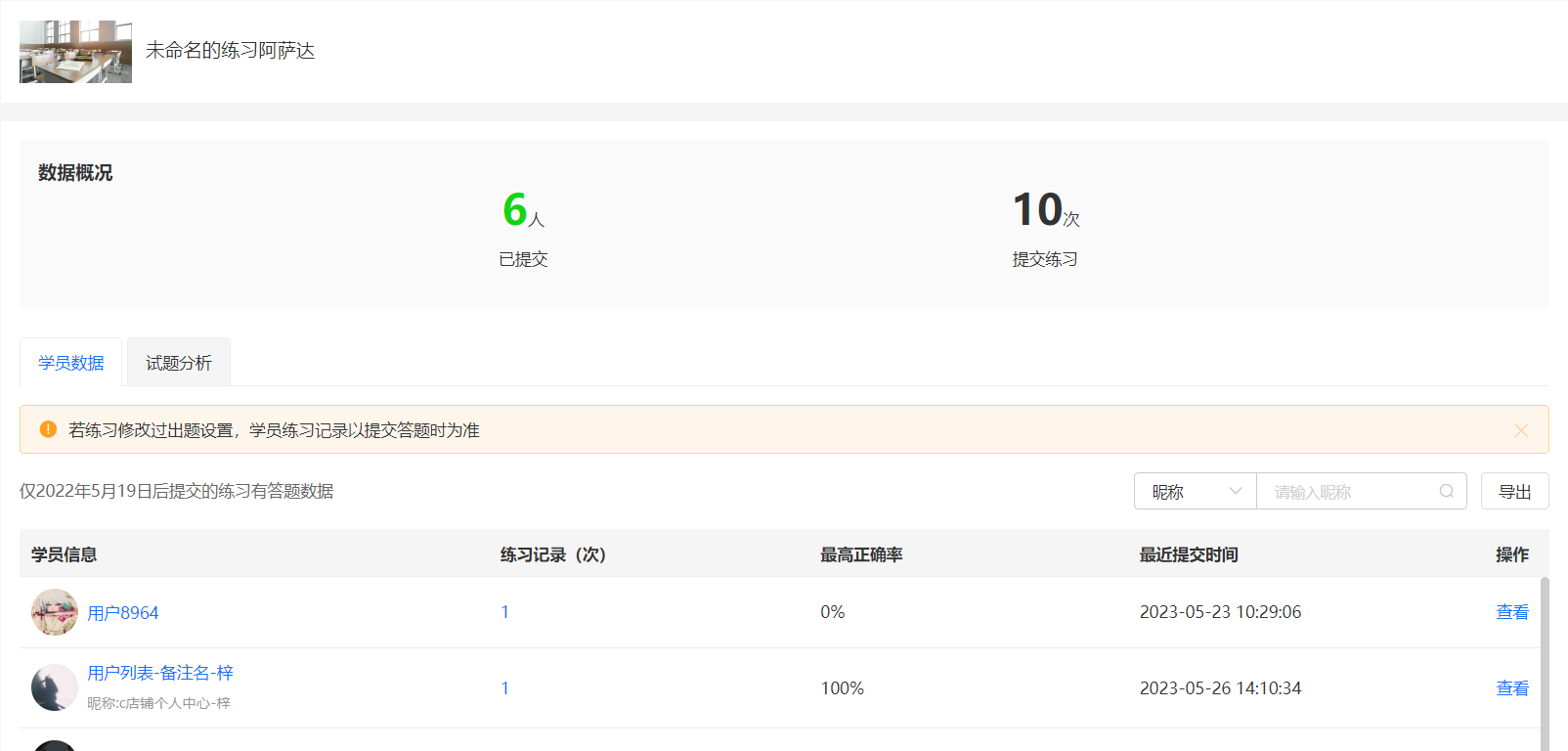
<span style="font-size:15px;">**Step 4: Click 'Data Analysis' in the practice list to view students' practice data.**</span>

<span class="image-wrapper" style="display:inline-block;overflow:hidden;width:601px;height:267px;"> ![image.png](https://wechatapppro-1252524126.file.myqcloud.com/help_document/image/ueditor/10678700_1699003168.png ".png")</span>

<span style="background-color:rgb(255,255,255);color:rgb(53,53,53);font-family:'Microsoft YaHei', '微软雅黑', Roboto, 'Helvetica Neue', Helvetica, 'PingFang SC', 'Microsoft YaHei', 'Source Han Sans SC', 'Noto Sans CJK SC', 'WenQuanYi Micro Hei', 'Helvetica Neue', Helvetica, 'PingFang SC', 'Microsoft YaHei', 'Source Han Sans SC', 'Noto Sans CJK SC', 'WenQuanYi Micro Hei', sans-serif;font-size:9pt;letter-spacing:0pt;text-align:center;"> (Practice List)</span>

<span class="image-wrapper" style="display:inline-block;overflow:hidden;width:601px;height:267px;"> ![image.png](https://wechatapppro-1252524126.file.myqcloud.com/help_document/image/ueditor/46904100_1699003088.png ".png")</span>

<span style="background-color:rgb(255,255,255);color:rgb(53,53,53);font-family:'Microsoft YaHei', '微软雅黑', Roboto, 'Helvetica Neue', Helvetica, 'PingFang SC', 'Microsoft YaHei', 'Source Han Sans SC', 'Noto Sans CJK SC', 'WenQuanYi Micro Hei', 'Helvetica Neue', Helvetica, 'PingFang SC', 'Microsoft YaHei', 'Source Han Sans SC', 'Noto Sans CJK SC', 'WenQuanYi Micro Hei', sans-serif;font-size:9pt;letter-spacing:0pt;text-align:center;"> (Practice Data Analysis)</span>

<span style="font-size:9pt;font-family:'Microsoft YaHei', '微软雅黑', Roboto, 'Helvetica Neue', Helvetica, 'PingFang SC', 'Microsoft YaHei', 'Source Han Sans SC', 'Noto Sans CJK SC', 'WenQuanYi Micro Hei', 'Helvetica Neue', Helvetica, 'PingFang SC', 'Microsoft YaHei', 'Source Han Sans SC', 'Noto Sans CJK SC', 'WenQuanYi Micro Hei', sans-serif;color:rgb(53,53,53);background:rgb(255,255,255);letter-spacing:0pt;vertical-align:baseline;"></span>

#   


<span style="font-size:15px;"> </span>

# Can I modify the practice questions after some students have already participated?

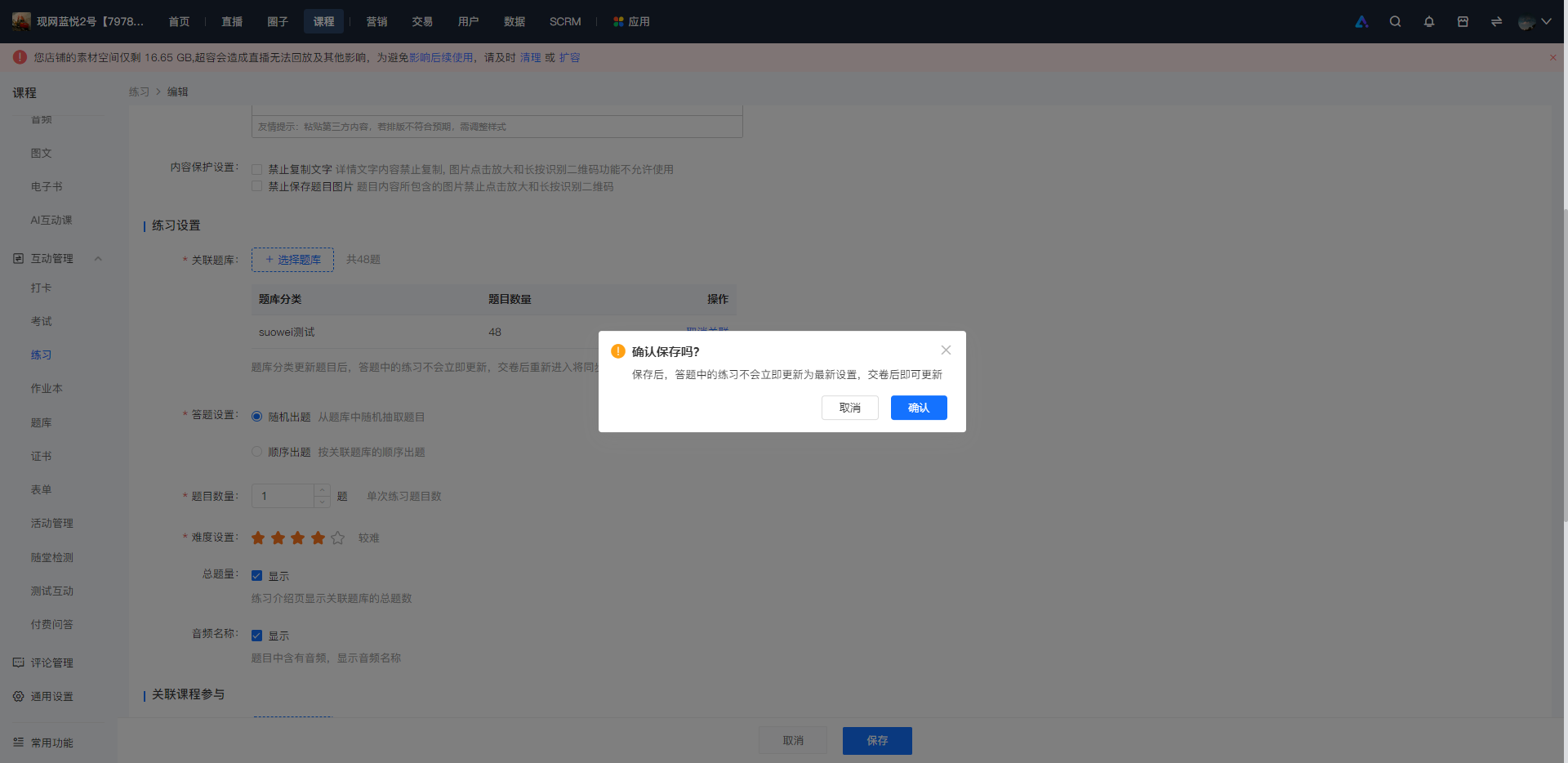
<div data-elink-language-switch="1" id="bkmrk-%E4%B8%AD%E6%96%87" style="border:1px solid #d6d9de;border-radius:6px;padding:10px 12px;margin:0 0 18px 0;background:#f8fafc;font-size:14px;">[中文](/books/bcbe3/page/b1d10)</div><span style="font-size:11pt;font-family:'Helvetica Neue', Helvetica, 'PingFang SC', 'Microsoft YaHei', 'Source Han Sans SC', 'Noto Sans CJK SC', 'WenQuanYi Micro Hei', sans-serif;color:rgb(51,51,51);background-image:initial;background-position:initial;background-size:initial;background-repeat:initial;background-attachment:initial;letter-spacing:0pt;vertical-align:baseline;">After trainees participate in the exercise, you can edit the settings under 'Exercise Settings' (including question bank selection, question order, number of questions per attempt, difficulty level, and audio name display). However, the changes will not be applied to the exercises that trainees are currently answering.<span style="color:rgb(51,51,51);font-family:'PingFang SC', 'Microsoft Yahei', Helvetica, Tahoma, Arial, 'Hiragino Sans GB', 'Hiragino Sans GB W3', STXihei, STHeiti, Heiti, SimSun, sans-serif;font-size:14px;background-color:rgb(255,255,255);">The latest settings will be applied after trainees submit their answers.</span></span><span style="font-size:11pt;font-family:'Helvetica Neue', Helvetica, 'PingFang SC', 'Microsoft YaHei', 'Source Han Sans SC', 'Noto Sans CJK SC', 'WenQuanYi Micro Hei', sans-serif;color:rgb(51,51,51);background-image:initial;background-position:initial;background-size:initial;background-repeat:initial;background-attachment:initial;letter-spacing:0pt;vertical-align:baseline;"></span>

![image.png](https://wechatapppro-1252524126.file.myqcloud.com/help_document/image/ueditor/77988600_1698717936.png ".png")