# Special Column

# How to enable the major column directory?

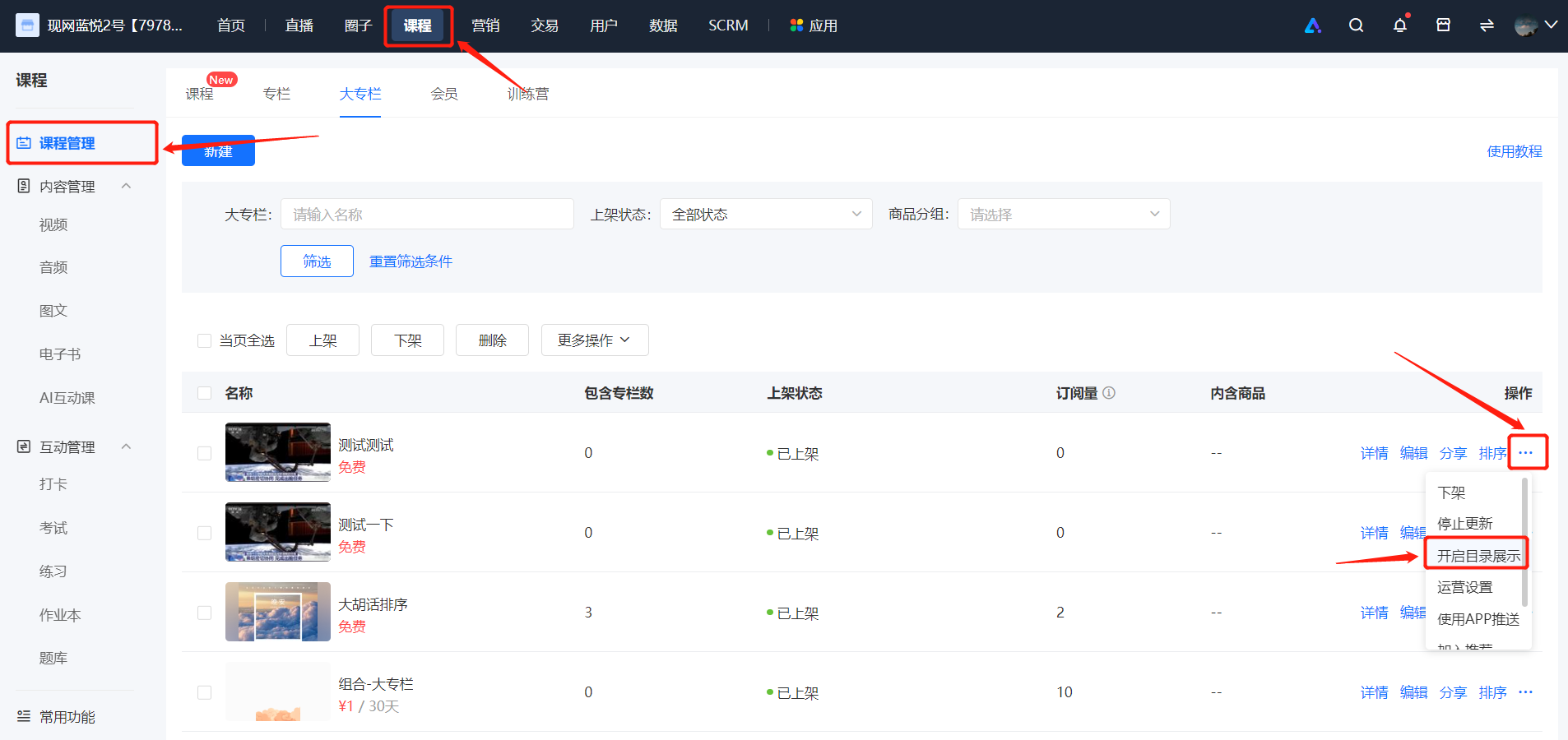
<div data-elink-language-switch="1" id="bkmrk-%E4%B8%AD%E6%96%87" style="border:1px solid #d6d9de;border-radius:6px;padding:10px 12px;margin:0 0 18px 0;background:#f8fafc;font-size:14px;">[中文](/books/250cf/page/757b5)</div><span style="font-family:'Microsoft YaHei', '微软雅黑';white-space:pre-wrap;background-color:rgb(255,255,255);color:rgb(0,0,0);font-size:15px;">1. On the list page of \[Major Columns\], find the major column that needs to be set.</span>

<span style="font-family:'Microsoft YaHei', '微软雅黑';white-space:pre-wrap;background-color:rgb(255,255,255);color:rgb(0,0,0);font-size:15px;">2. Click \[···\] - \[Enable Catalog Display\] - \[Confirm\], and users can view the Product Collections within the major column before purchase.</span>

<span style="color:rgb(0,0,0);font-size:15px;">![image.png](https://wechatapppro-1252524126.file.myqcloud.com/help_document/image/ueditor/70457700_1699241724.png ".png")</span>

# Will users be notified after the major column is updated?

<div data-elink-language-switch="1" id="bkmrk-%E4%B8%AD%E6%96%87" style="border:1px solid #d6d9de;border-radius:6px;padding:10px 12px;margin:0 0 18px 0;background:#f8fafc;font-size:14px;">[中文](/books/250cf/page/4f6ff)</div><span style="font-size:15px;">You will receive a message notification when the major column is updated. You can enable the service account notification function when updating the column course products under the major column.</span>

<span style="font-size:15px;">At the same time, students need to actively subscribe to the update prompt before the service account notification will be sent to them.</span>

<span style="font-size:15px;">![image.png](https://wechatapppro-1252524126.file.myqcloud.com/help_document/image/ueditor/80774500_1641285576.png ".png")</span>

<span style="font-size:15px;">  
</span>

<span style="font-size:15px;">![image (1).png](https://wechatapppro-1252524126.file.myqcloud.com/help_document/image/ueditor/46672100_1641285582.png ".png")</span>

<span style="font-size:15px;">  
</span>

<span style="font-size:15px;">Student subscription prompt:</span>

<span style="font-size:15px;">![image (2).png](https://wechatapppro-1252524126.file.myqcloud.com/help_document/image/ueditor/74628600_1641285591.png ".png")</span>

<span style="font-size:15px;">  
</span>

**<span style="font-size:15px;">\*\*Note:</span>**<span style="font-size:15px;">1. There will be no service account notification after updating the courses of a column that has been taken off the shelf or hidden.</span>

<span style="font-size:15px;">2. You can continue to add single products after setting the column to stop updating. You can continue to update the column content. Students can receive message reminders only after manually changing the column status to \[Start Update\] for the column update reminder.</span>

# How to add a column within a major column?

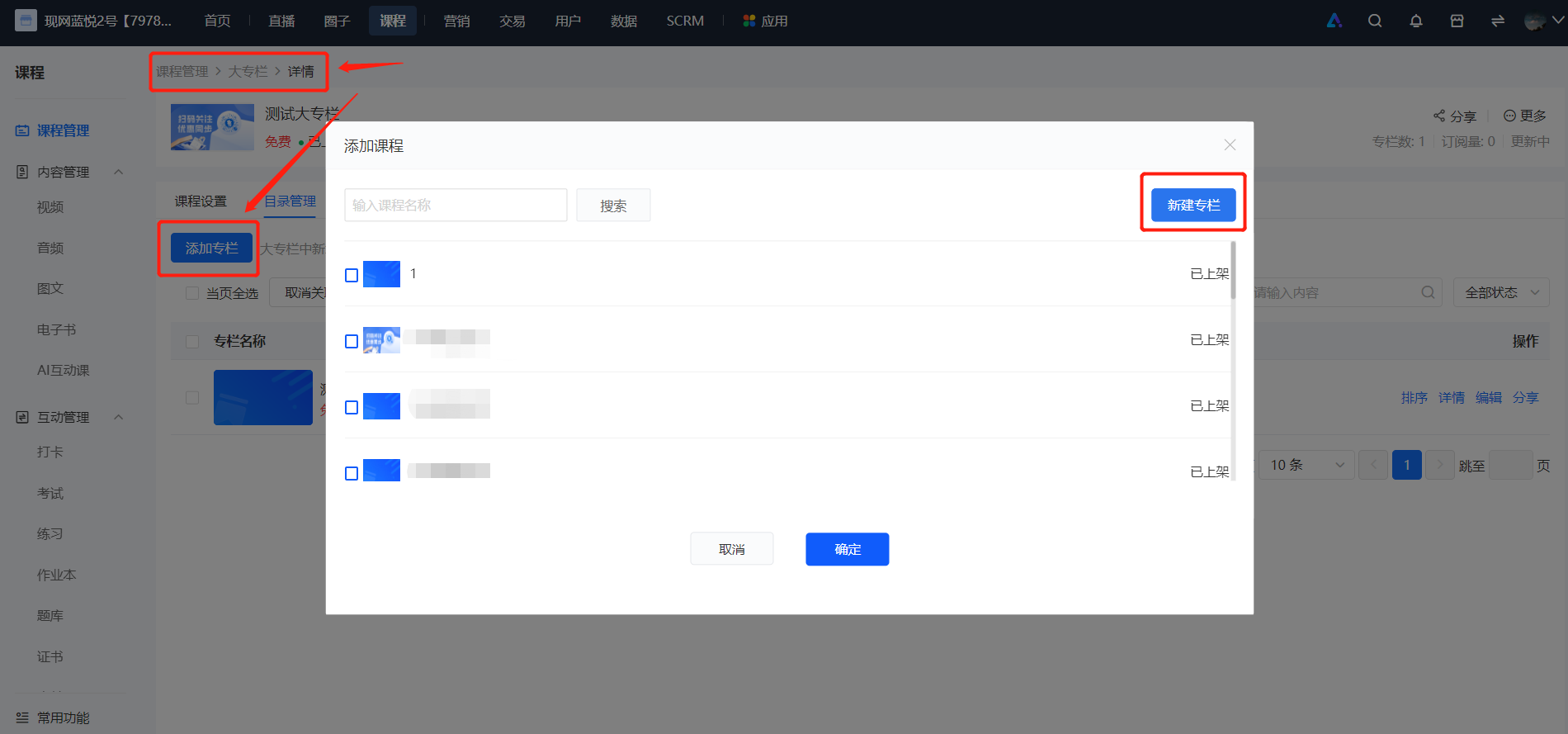
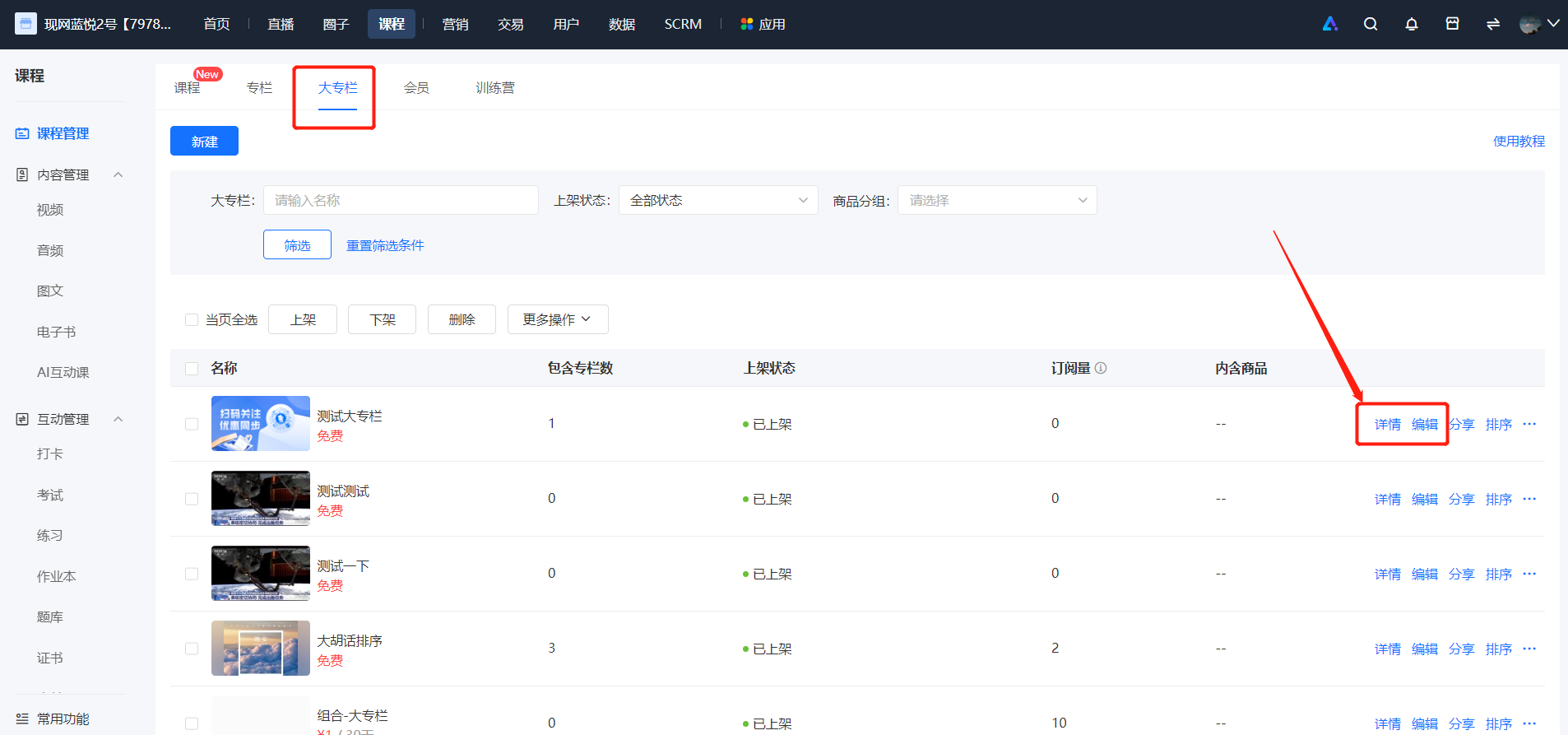
<div data-elink-language-switch="1" id="bkmrk-%E4%B8%AD%E6%96%87" style="border:1px solid #d6d9de;border-radius:6px;padding:10px 12px;margin:0 0 18px 0;background:#f8fafc;font-size:14px;">[中文](/books/250cf/page/7f6ff)</div><span style="font-size:14px;color:rgb(0,0,0);"><span style="font-size:14px;font-family:'Microsoft YaHei', '微软雅黑';white-space:pre-wrap;background-color:rgb(255,255,255);">In the major column list, click on the major column where you want to add content, then click \[Course Management\] to enter the product details page of the major column.</span>  
<span style="font-size:14px;font-family:'Microsoft YaHei', '微软雅黑';white-space:pre-wrap;background-color:rgb(255,255,255);">Enter the column details page and click \[Add Column\] to add an existing column or create a new one.</span></span>

![image.png](https://wechatapppro-1252524126.file.myqcloud.com/help_document/image/ueditor/69615200_1699326268.png ".png")![image.png](https://wechatapppro-1252524126.file.myqcloud.com/help_document/image/ueditor/66684900_1699326268.png ".png")

# How to set the preview content for the major section?

<div data-elink-language-switch="1" id="bkmrk-%E4%B8%AD%E6%96%87" style="border:1px solid #d6d9de;border-radius:6px;padding:10px 12px;margin:0 0 18px 0;background:#f8fafc;font-size:14px;">[中文](/books/250cf/page/e4a62)</div><span style="font-family:'Microsoft YaHei', '微软雅黑';white-space:pre-wrap;background-color:rgb(255,255,255);font-size:14px;color:rgb(0,0,0);">You cannot set the entire column for users to preview in the major column. However, you can set individual items in the column (this column needs to be available for separate sale) for audio/video previews.</span>