# Course

# How to set up individual sales for chapter content within a course series?

<div data-elink-language-switch="1" id="bkmrk-%E4%B8%AD%E6%96%87" style="border:1px solid #d6d9de;border-radius:6px;padding:10px 12px;margin:0 0 18px 0;background:#f8fafc;font-size:14px;">[中文](/books/250cf/page/85d8c)</div>One course series supports individual sales, and multiple chapter contents under the course series support separate sales (for specific steps, please refer to the video tutorial):

1\) Create new courses for different contents to be sold. After creating new courses, you can use the 'Import from existing courses' option in the course catalog to import the course contents to be sold separately with one click.

2\) There are three ways to display multiple courses:

① Product recommendation: On one course page, learners can click 'Related recommendations' to see other courses available for purchase.

② Combo products: On one product link, learners can select courses with different specifications for purchase.

③ Micro - page: One page supports custom decoration to display different course contents.

# Course Usage Tutorial

<div data-elink-language-switch="1" id="bkmrk-%E4%B8%AD%E6%96%87" style="border:1px solid #d6d9de;border-radius:6px;padding:10px 12px;margin:0 0 18px 0;background:#f8fafc;font-size:14px;">[中文](/books/db8e1/page/5f93f)</div><section id="bkmrk-i.-feature-introduct" style="margin:4px 0px 10px;font-family:'等线';font-size:16px;line-height:1.5em;"><span style="font-size:17px;font-family:PingFangSC;font-weight:bold;color:rgb(53,53,53);background:rgb(255,255,255);letter-spacing:0;vertical-align:baseline;">I. Feature Introduction</span></section><section id="bkmrk-%E3%80%90courses%E3%80%91-are-a-type" style="margin:4px 0px;font-family:'等线';font-size:16px;line-height:1.5em;"><span style="color:rgb(53,53,53);font-family:PingFangSC;font-size:15px;letter-spacing:0px;font-style:unset;font-weight:unset;text-decoration-line:unset;word-spacing:normal;">【Courses】 are a type of systematic courses that place more emphasis on course services and the learning outcomes of students. They provide a flexible and comprehensive solution for teaching, learning, and evaluating learning outcomes.</span></section><section id="bkmrk-" style="margin:4px 0px;font-family:'等线';font-size:16px;line-height:1.5em;"><span style="color:rgb(53,53,53);font-family:PingFangSC;font-size:15px;letter-spacing:0px;font-style:unset;font-weight:unset;text-decoration-line:unset;word-spacing:normal;">  
</span></section><section id="bkmrk-1.-course-features" style="line-height:1.5em;"><span style="color:rgb(53,53,53);font-family:PingFangSC;font-size:15px;letter-spacing:0px;font-style:unset;font-weight:unset;text-decoration-line:unset;word-spacing:normal;">1. Course Features</span></section><section id="bkmrk-%281%29-in-terms-of-cont" style="line-height:1.5em;"><span style="color:rgb(53,53,53);font-family:PingFangSC;font-size:15px;letter-spacing:0px;font-style:unset;font-weight:unset;text-decoration-line:unset;word-spacing:normal;">(1) In terms of content, it supports secondary directories, allowing for the arrangement of live streams, content, and various interactive tools, providing more diverse content combinations and learning, practice, and testing experiences.</span></section><section id="bkmrk-%282%29-in-terms-of-cour" style="line-height:1.5em;"><span style="color:rgb(53,53,53);font-family:PingFangSC;font-size:15px;letter-spacing:0px;font-style:unset;font-weight:unset;text-decoration-line:unset;word-spacing:normal;">(2) In terms of course start methods, it supports three ways of taking courses: students can learn at their own pace, start at a fixed time, or within a fixed start and end time. It also provides multiple ways to unlock directories, meeting the needs of various customized learning plans.</span></section><section id="bkmrk-%283%29-in-terms-of-cour" style="line-height:1.5em;"><span style="color:rgb(53,53,53);font-family:PingFangSC;font-size:15px;letter-spacing:0px;font-style:unset;font-weight:unset;text-decoration-line:unset;word-spacing:normal;">(3) In terms of course management, it supports the configuration of certificates, setting compulsory and optional sections, and completion conditions. It also supports data analysis at the overall course, section, and student levels, meeting more comprehensive data analysis capabilities and supervision and management needs.</span></section><section id="bkmrk--1" style="line-height:1.5em;"><span style="color:rgb(53,53,53);font-family:PingFangSC;font-size:15px;letter-spacing:0px;font-style:unset;font-weight:unset;text-decoration-line:unset;word-spacing:normal;">  
</span></section><section id="bkmrk-2.-supported-content" style="line-height:1.5em;"><span style="color:rgb(53,53,53);font-family:PingFangSC;font-size:15px;letter-spacing:0px;font-style:unset;font-weight:unset;text-decoration-line:unset;word-spacing:normal;">2. Supported Content Types</span></section><section id="bkmrk-live-streams%2C-images" style="line-height:1.5em;"><span style="color:rgb(53,53,53);font-family:PingFangSC;font-size:15px;letter-spacing:0px;font-style:unset;font-weight:unset;text-decoration-line:unset;word-spacing:normal;">Live streams, images and texts, audio, videos, documents, e - books;</span></section><section id="bkmrk--2" style="line-height:1.5em;"><span style="color:rgb(53,53,53);font-family:PingFangSC;font-size:15px;letter-spacing:0px;font-style:unset;font-weight:unset;text-decoration-line:unset;word-spacing:normal;">  
</span></section><section id="bkmrk-3.-supported-interac" style="line-height:1.5em;"><span style="color:rgb(53,53,53);font-family:PingFangSC;font-size:15px;letter-spacing:0px;font-style:unset;font-weight:unset;text-decoration-line:unset;word-spacing:normal;">3. Supported Interactive Tools</span></section><section id="bkmrk-assignments%2C-exams%2C-" style="line-height:1.5em;"><span style="color:rgb(53,53,53);font-family:PingFangSC;font-size:15px;letter-spacing:0px;font-style:unset;font-weight:unset;text-decoration-line:unset;word-spacing:normal;">Assignments, exams, exercises, check - ins, forms, interactive tests, communities, certificates.</span></section><span style="font-size:15px;font-family:PingFangSC;color:rgb(53,53,53);background:rgb(255,255,255);letter-spacing:0;vertical-align:baseline;">  
</span>

<span style="font-size:17px;font-family:PingFangSC;font-weight:bold;color:rgb(53,53,53);background:rgb(255,255,255);letter-spacing:0;vertical-align:baseline;">II. Purpose of Use</span>

<span style="font-size:15px;font-family:PingFangSC;color:rgb(53,53,53);background:rgb(255,255,255);letter-spacing:0;vertical-align:baseline;">Courses</span><span style="font-size:15px;font-family:PingFangSC;color:rgb(53,53,53);background:rgb(255,255,255);letter-spacing:0;vertical-align:baseline;">It focuses on creating systematic courses that combine learning, practice, and testing, providing students with a more excellent learning experience. Managers can conduct more refined operations on students, improve students' learning outcomes, enhance the teaching reputation of merchants, and increase sales revenue.</span>

<span style="font-size:17px;font-family:PingFangSC;font-weight:bold;color:rgb(53,53,53);background:rgb(255,255,255);letter-spacing:0;vertical-align:baseline;">III. Use Scenarios</span>

<section id="bkmrk-1.coursesadd-multi--" style="margin:4px 0px;font-family:'等线';line-height:1.5em;"><span style="font-size:15px;font-style:unset;font-weight:unset;letter-spacing:0px;text-decoration-line:unset;word-spacing:normal;font-family:PingFangSC;color:rgb(53,53,53);background-image:initial;background-position:initial;background-size:initial;background-repeat:initial;background-attachment:initial;vertical-align:baseline;">1.</span><span style="font-size:15px;font-style:unset;font-weight:unset;letter-spacing:0px;text-decoration-line:unset;word-spacing:normal;font-family:PingFangSC;color:rgb(53,53,53);background-image:initial;background-position:initial;background-size:initial;background-repeat:initial;background-attachment:initial;vertical-align:baseline;">Courses</span><span style="font-size:15px;font-style:unset;font-weight:unset;letter-spacing:0px;text-decoration-line:unset;word-spacing:normal;font-family:PingFangSC;color:rgb(53,53,53);background-image:initial;background-position:initial;background-size:initial;background-repeat:initial;background-attachment:initial;vertical-align:baseline;">Add multi - level</span><span style="font-size:15px;font-style:unset;font-weight:unset;letter-spacing:0px;text-decoration-line:unset;word-spacing:normal;font-family:PingFangSC;color:rgb(53,53,53);background-image:initial;background-position:initial;background-size:initial;background-repeat:initial;background-attachment:initial;vertical-align:baseline;">directories and combine multiple</span><span style="font-size:15px;font-style:unset;font-weight:unset;letter-spacing:0px;text-decoration-line:unset;word-spacing:normal;font-family:PingFangSC;color:rgb(53,53,53);background-image:initial;background-position:initial;background-size:initial;background-repeat:initial;background-attachment:initial;vertical-align:baseline;">live streams</span><span style="font-size:15px;font-style:unset;font-weight:unset;letter-spacing:0px;text-decoration-line:unset;word-spacing:normal;font-family:PingFangSC;color:rgb(53,53,53);background-image:initial;background-position:initial;background-size:initial;background-repeat:initial;background-attachment:initial;vertical-align:baseline;">,</span><span style="font-size:15px;font-style:unset;font-weight:unset;letter-spacing:0px;text-decoration-line:unset;word-spacing:normal;font-family:PingFangSC;color:rgb(53,53,53);background-image:initial;background-position:initial;background-size:initial;background-repeat:initial;background-attachment:initial;vertical-align:baseline;">content, etc. Students can freely learn the combined courses. For example, "Employee Management Manual".</span><span style="font-size:15px;font-style:unset;font-weight:unset;letter-spacing:0px;text-decoration-line:unset;word-spacing:normal;font-family:PingFangSC;color:rgb(53,53,53);background-image:initial;background-position:initial;background-size:initial;background-repeat:initial;background-attachment:initial;vertical-align:baseline;">2. Add content and assignments to the course, set the course start time, restrict students to enter and complete the training requirements at the same time, and manage students during a unified camp period. For example, "September Sales Improvement Class".</span></section><section id="bkmrk-3.-add-various-inter" style="margin:4px 0px;font-family:'等线';line-height:1.5em;"><span style="color:rgb(53,53,53);font-family:PingFangSC;font-size:15px;letter-spacing:0px;font-style:unset;font-weight:unset;text-decoration-line:unset;word-spacing:normal;">3. Add various interactive tools such as content, check - ins, exercises, and certificates to the course.</span></section><section id="bkmrk-coursesadd-various-i" style="margin:4px 0px;font-family:'等线';line-height:1.5em;"><span style="font-style:unset;font-weight:unset;letter-spacing:0px;text-decoration-line:unset;word-spacing:normal;font-size:15px;font-family:PingFangSC;color:rgb(53,53,53);background-image:initial;background-position:initial;background-size:initial;background-repeat:initial;background-attachment:initial;vertical-align:baseline;">Courses</span><span style="font-style:unset;font-weight:unset;letter-spacing:0px;text-decoration-line:unset;word-spacing:normal;font-size:15px;font-family:PingFangSC;color:rgb(53,53,53);background-image:initial;background-position:initial;background-size:initial;background-repeat:initial;background-attachment:initial;vertical-align:baseline;">Add various interactive tools such as content, check - ins, exercises, and certificates.</span><span style="font-style:unset;font-weight:unset;letter-spacing:0px;text-decoration-line:unset;word-spacing:normal;font-size:15px;font-family:PingFangSC;color:rgb(53,53,53);background-image:initial;background-position:initial;background-size:initial;background-repeat:initial;background-attachment:initial;vertical-align:baseline;">Set a fixed</span><span style="font-style:unset;font-weight:unset;letter-spacing:0px;text-decoration-line:unset;word-spacing:normal;font-size:15px;font-family:PingFangSC;color:rgb(53,53,53);background-image:initial;background-position:initial;background-size:initial;background-repeat:initial;background-attachment:initial;vertical-align:baseline;">start and end time</span><span style="font-style:unset;font-weight:unset;letter-spacing:0px;text-decoration-line:unset;word-spacing:normal;font-size:15px;font-family:PingFangSC;color:rgb(53,53,53);background-image:initial;background-position:initial;background-size:initial;background-repeat:initial;background-attachment:initial;vertical-align:baseline;">, set the unlocking time for each section, and require students to</span><span style="font-style:unset;font-weight:unset;letter-spacing:0px;text-decoration-line:unset;word-spacing:normal;font-size:15px;font-family:PingFangSC;color:rgb(53,53,53);background-image:initial;background-position:initial;background-size:initial;background-repeat:initial;background-attachment:initial;vertical-align:baseline;">complete the corresponding content and interactive tasks every day as required. Achieve the goal of completing learning requirements and strong learning effects within a fixed time through refined operations. For example, "</span><span style="font-style:unset;font-weight:unset;letter-spacing:0px;text-decoration-line:unset;word-spacing:normal;font-size:15px;font-family:PingFangSC;color:rgb(53,53,53);background-image:initial;background-position:initial;background-size:initial;background-repeat:initial;background-attachment:initial;vertical-align:baseline;">3 - Day New Employee Training Plan</span><span style="font-style:unset;font-weight:unset;letter-spacing:0px;text-decoration-line:unset;word-spacing:normal;font-size:15px;font-family:PingFangSC;color:rgb(53,53,53);background-image:initial;background-position:initial;background-size:initial;background-repeat:initial;background-attachment:initial;vertical-align:baseline;">", "</span><span style="font-style:unset;font-weight:unset;letter-spacing:0px;text-decoration-line:unset;word-spacing:normal;font-size:15px;font-family:PingFangSC;color:rgb(53,53,53);background-image:initial;background-position:initial;background-size:initial;background-repeat:initial;background-attachment:initial;vertical-align:baseline;">21 - Day New Store Support Plan</span><span style="font-style:unset;font-weight:unset;letter-spacing:0px;text-decoration-line:unset;word-spacing:normal;font-size:15px;font-family:PingFangSC;color:rgb(53,53,53);background-image:initial;background-position:initial;background-size:initial;background-repeat:initial;background-attachment:initial;vertical-align:baseline;">"</span></section><span style="font-size:17px;font-family:PingFangSC;font-weight:bold;color:rgb(53,53,53);background:rgb(255,255,255);letter-spacing:0;vertical-align:baseline;">IV. Operation Path</span>

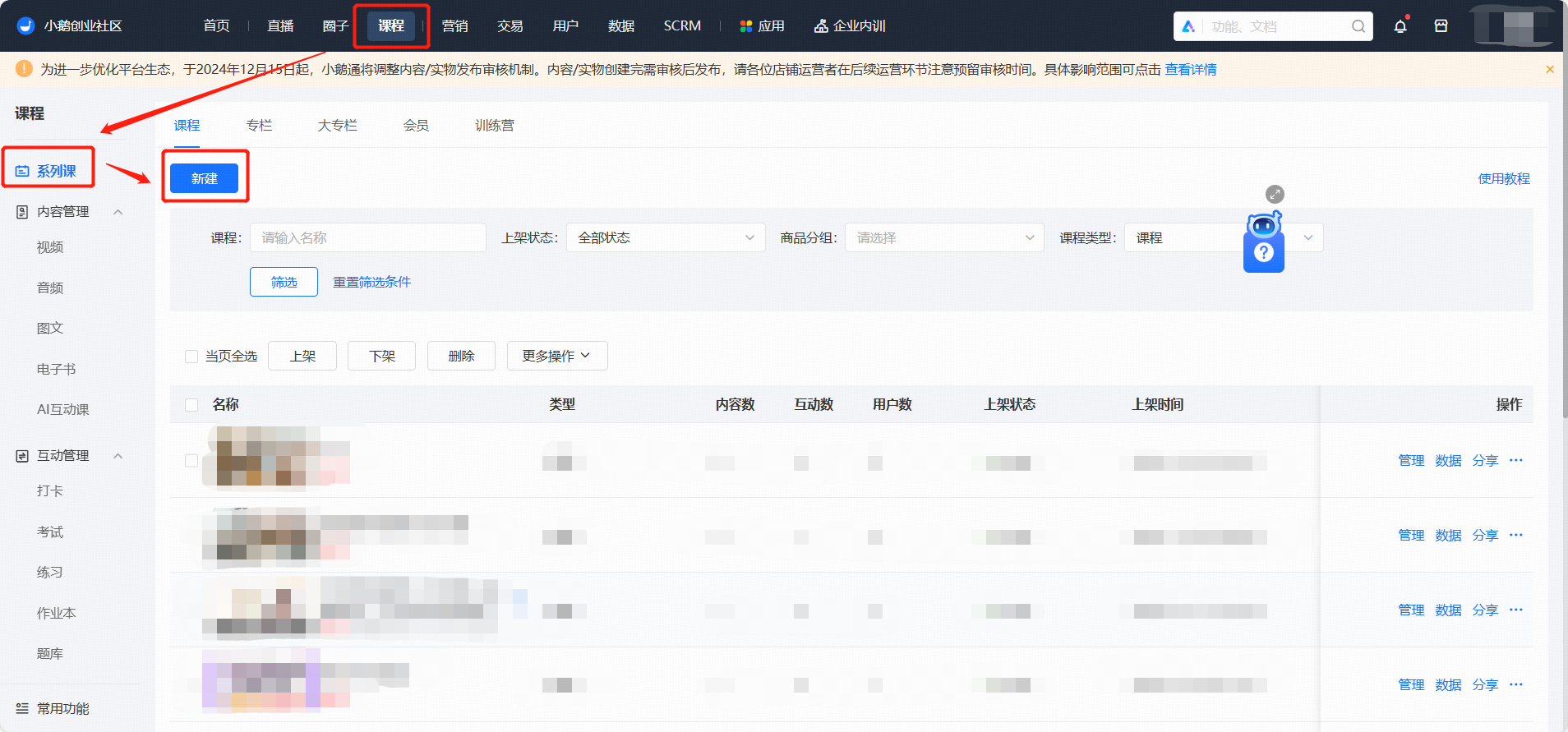
<span style="font-size:15px;font-family:PingFangSC;color:rgb(53,53,53);background:rgb(255,255,255);letter-spacing:0;vertical-align:baseline;">Merchant Side:</span><span style="font-size:15px;font-family:PingFangSC;color:rgb(53,53,53);background:rgb(255,255,255);letter-spacing:0;vertical-align:baseline;">Academy</span><span style="font-size:15px;font-family:PingFangSC;color:rgb(53,53,53);background:rgb(255,255,255);letter-spacing:0;vertical-align:baseline;">Management Console → Course Management →</span><span style="font-size:15px;font-family:PingFangSC;color:rgb(53,53,53);background:rgb(255,255,255);letter-spacing:0;vertical-align:baseline;">Series Courses</span><span style="font-size:15px;font-family:PingFangSC;color:rgb(53,53,53);background:rgb(255,255,255);letter-spacing:0;vertical-align:baseline;">→ Courses</span>

![image.png](http://wechatapppro-1252524126.file.myqcloud.com/help_document/image/ueditor/35202900_1701156465.png ".png")

<span style="font-size:17px;font-family:PingFangSC;font-weight:bold;color:rgb(53,53,53);background:rgb(255,255,255);letter-spacing:0;vertical-align:baseline;">V. Usage Tutorial</span>

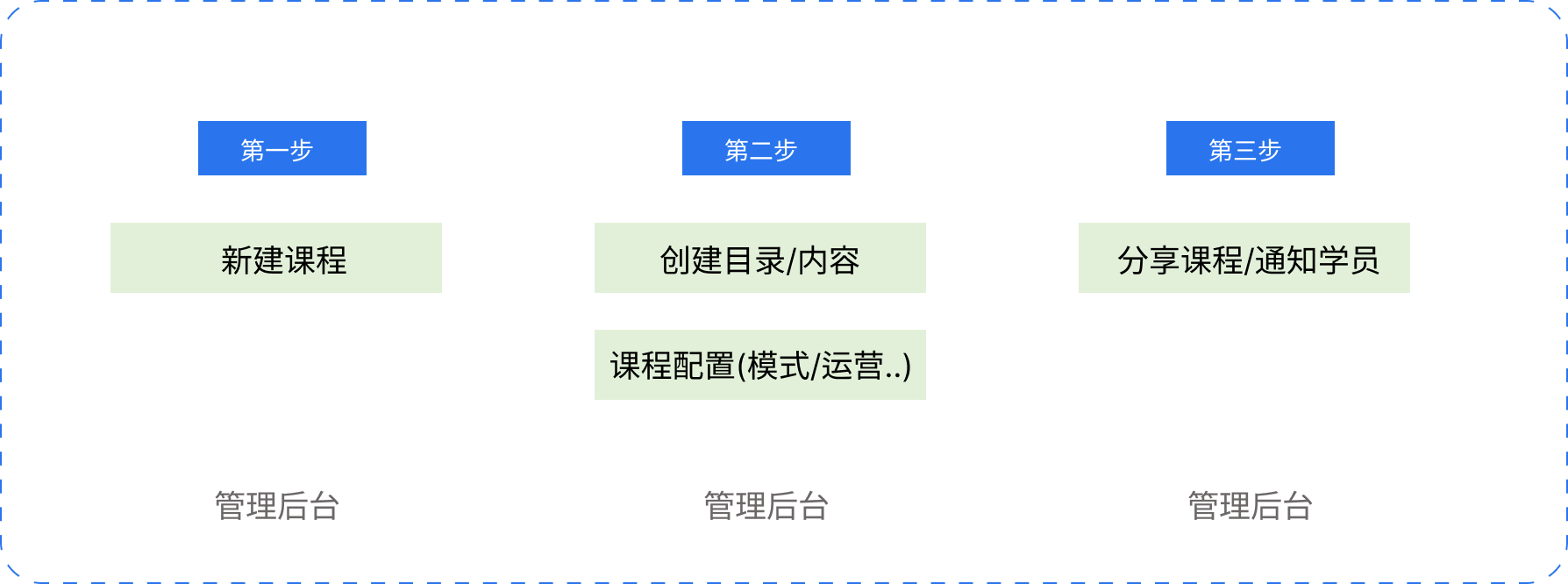
<span style="font-size:15px;font-family:PingFangSC;font-weight:bold;color:rgb(53,53,53);background:rgb(255,255,255);letter-spacing:0;vertical-align:baseline;">Step 1: Create a New Course (Management Background)</span>

<span style="font-size:15px;font-family:PingFangSC;color:rgb(53,53,53);background:rgb(255,255,255);letter-spacing:0px;vertical-align:baseline;">**1. Create a Course**</span>

<span style="font-size:15px;font-family:PingFangSC;color:rgb(53,53,53);background:rgb(255,255,255);letter-spacing:0px;vertical-align:baseline;">Log in to the elink Management Console, select 【</span><span style="font-size:15px;font-family:PingFangSC;color:rgb(53,53,53);background:rgb(255,255,255);letter-spacing:0px;vertical-align:baseline;">Series Courses</span><span style="font-size:15px;font-family:PingFangSC;color:rgb(53,53,53);background:rgb(255,255,255);letter-spacing:0px;vertical-align:baseline;">】 → 【New】 from 【Courses】;</span>

![image/png](https://wechatapppro-1252524126.file.myqcloud.com/help_center_ooo/image/help_center_ooo/noahsom4mg28gi.png "image.png")

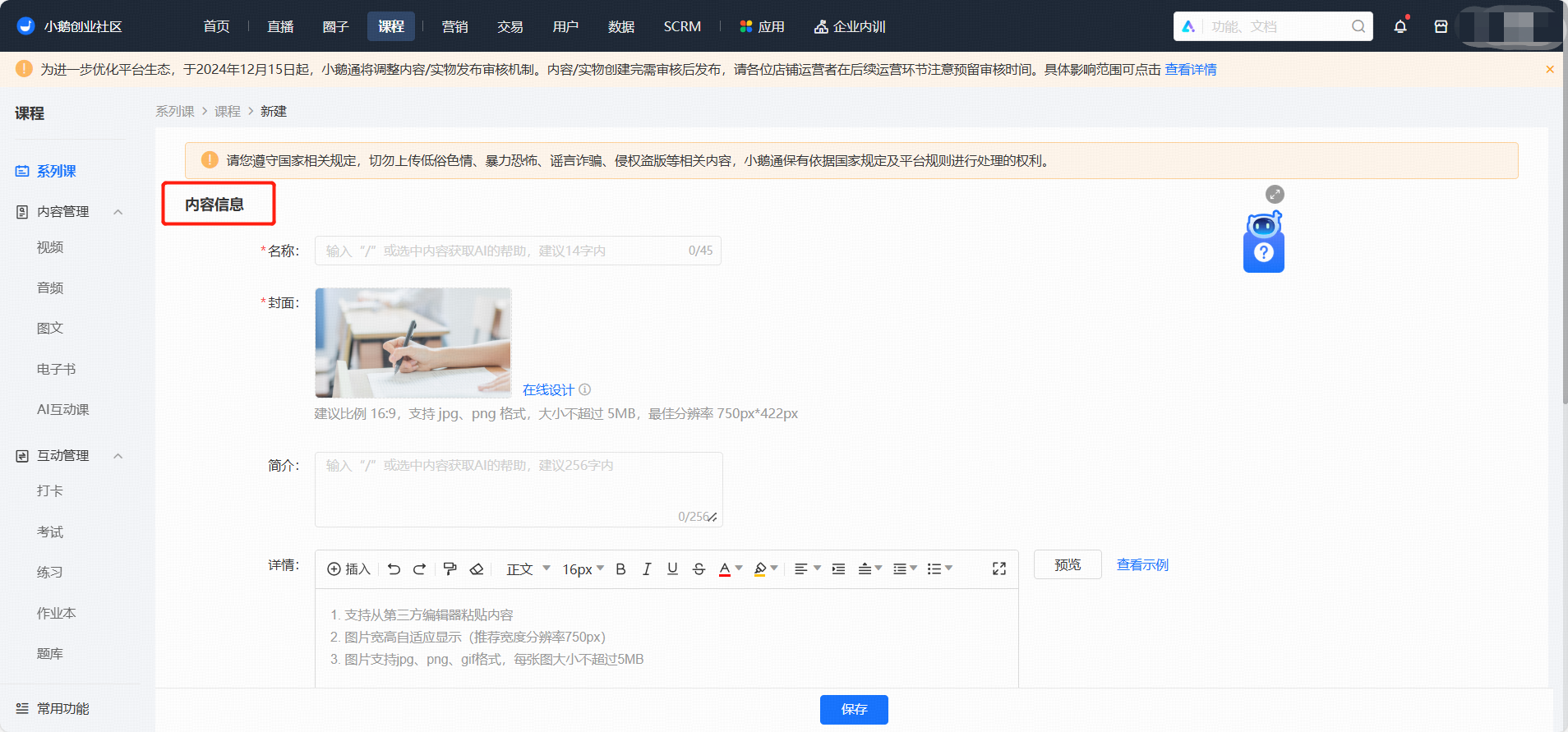
<span style="font-size:15px;font-family:PingFangSC;font-weight:bold;color:rgb(53,53,53);background:rgb(255,255,255);letter-spacing:0;vertical-align:baseline;">2. Content Information</span>

<span style="font-size:15px;font-family:PingFangSC;color:rgb(53,53,53);background:rgb(255,255,255);letter-spacing:0;vertical-align:baseline;">Fill in the course name, cover, introduction, and details</span>

<span style="font-size:15px;font-family:PingFangSC;color:rgb(53,53,53);background:rgb(255,255,255);letter-spacing:0;vertical-align:baseline;">● Name: You can enter up to 45 characters. It is recommended to enter within 14 characters.</span>

<span style="font-size:15px;font-family:PingFangSC;color:rgb(53,53,53);background:rgb(255,255,255);letter-spacing:0;vertical-align:baseline;">● Cover: It is recommended to upload a picture with a ratio of 16:9, a resolution of 750\*420px, and a size less than 5M.</span>

<span style="font-size:15px;font-family:PingFangSC;color:rgb(53,53,53);background:rgb(255,255,255);letter-spacing:0;vertical-align:baseline;">● Introduction: The maximum input is 256 characters.</span>

<span style="font-size:15px;font-family:PingFangSC;color:rgb(53,53,53);background:rgb(255,255,255);letter-spacing:0;vertical-align:baseline;"></span>

![ctr8MPU1734076210Ki.jpg](http://wechatapppro-1252524126.file.myqcloud.com/help_center_ooo/image/default/ctr8MPU1734076210Ki.jpg)

<span style="font-size:15px;font-family:PingFangSC;color:rgb(53,53,53);background:rgb(255,255,255);letter-spacing:0;vertical-align:baseline;"></span>

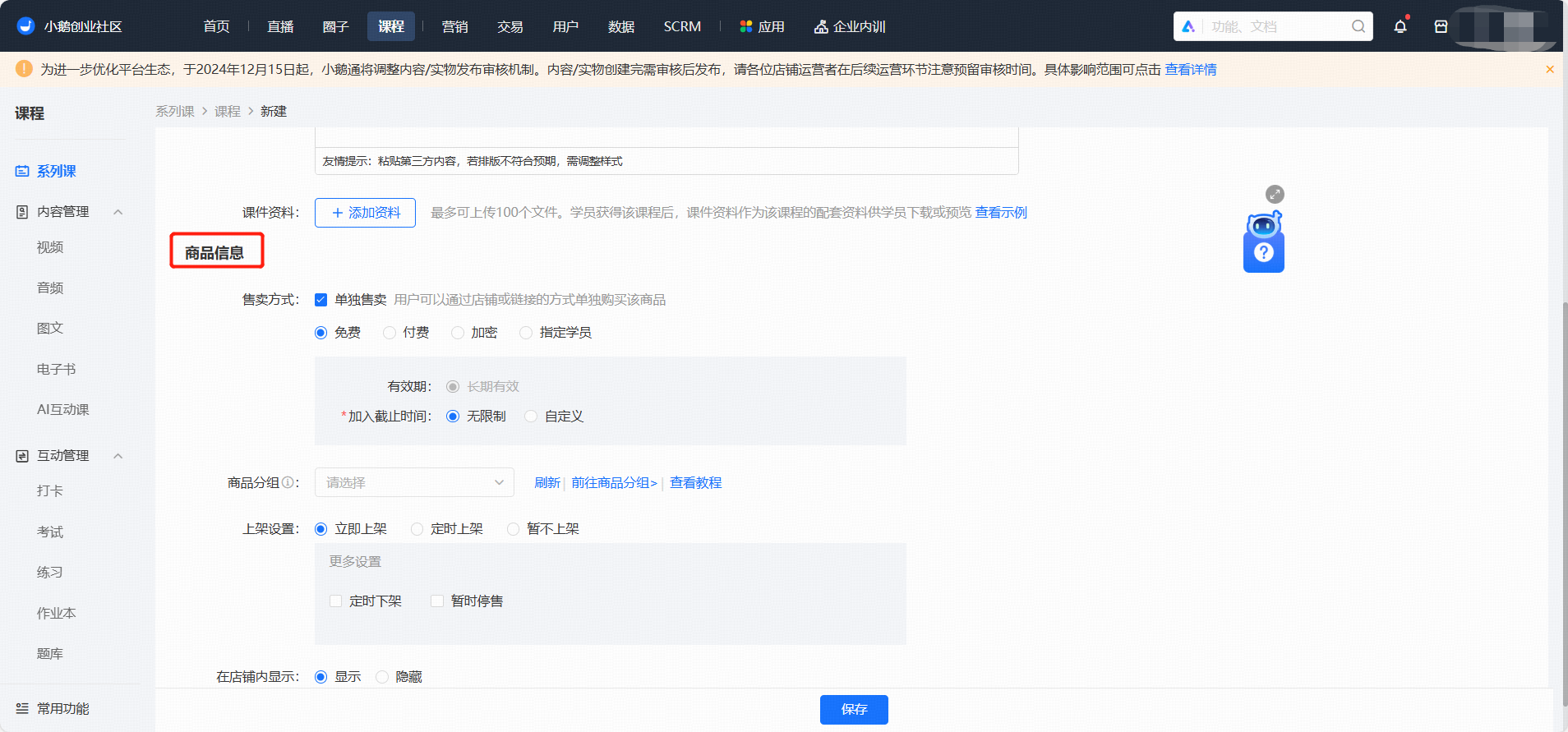
<span style="font-size:16px;font-family:'Microsoft YaHei';font-weight:bold;color:rgb(53,53,53);background:rgb(255,255,255);letter-spacing:0;vertical-align:baseline;">3. Course Information</span>

<span style="font-size:14px;font-family:'Microsoft YaHei';color:rgb(53,53,53);background:rgb(255,255,255);letter-spacing:0;vertical-align:baseline;">Fill in</span><span style="font-size:14px;font-family:'Microsoft YaHei';color:rgb(53,53,53);background:rgb(255,255,255);letter-spacing:0;vertical-align:baseline;">Product grouping, listing and delisting information<span style="color:rgb(53,53,53);font-family:'Microsoft YaHei';font-size:14px;background-color:rgb(255,255,255);">,</span><span style="letter-spacing:0px;font-size:14px;font-family:'Microsoft YaHei';color:rgb(53,53,53);background:rgb(255,255,255);vertical-align:baseline;">student visibility range</span></span>

<span style="font-size:14px;font-family:'Microsoft YaHei';color:rgb(53,53,53);background:rgb(255,255,255);letter-spacing:0;vertical-align:baseline;"><span style="letter-spacing:0px;font-size:14px;font-family:'Microsoft YaHei';color:rgb(53,53,53);background:rgb(255,255,255);vertical-align:baseline;"></span></span>

![cxddJU2173407622552.jpg](http://wechatapppro-1252524126.file.myqcloud.com/help_center_ooo/image/default/cxddJU2173407622552.jpg)

<span style="font-size:14px;font-family:'Microsoft YaHei';color:rgb(53,53,53);background:rgb(255,255,255);letter-spacing:0;vertical-align:baseline;"><span style="letter-spacing:0px;font-size:14px;font-family:'Microsoft YaHei';color:rgb(53,53,53);background:rgb(255,255,255);vertical-align:baseline;"></span></span>

<span style="font-size:15px;font-family:PingFangSC;font-weight:bold;color:rgb(53,53,53);background:rgb(255,255,255);letter-spacing:0;vertical-align:baseline;">Step 2: Add Content/Course Configuration</span><span style="font-size:15px;font-family:PingFangSC;font-style:italic;color:rgb(53,53,53);background:rgb(255,255,255);letter-spacing:0;vertical-align:baseline;">(Management Background)</span>

<span style="font-size:15px;font-family:PingFangSC;font-style:italic;color:rgb(53,53,53);background:rgb(255,255,255);letter-spacing:0;vertical-align:baseline;">  
</span>

**<span style="font-size:15px;font-family:PingFangSC;color:rgb(53,53,53);background:rgb(255,255,255);letter-spacing:0;vertical-align:baseline;">1. Directory Management</span>**

**<span style="font-size:15px;font-family:PingFangSC;color:rgb(53,53,53);background:rgb(255,255,255);letter-spacing:0;vertical-align:baseline;"></span>**

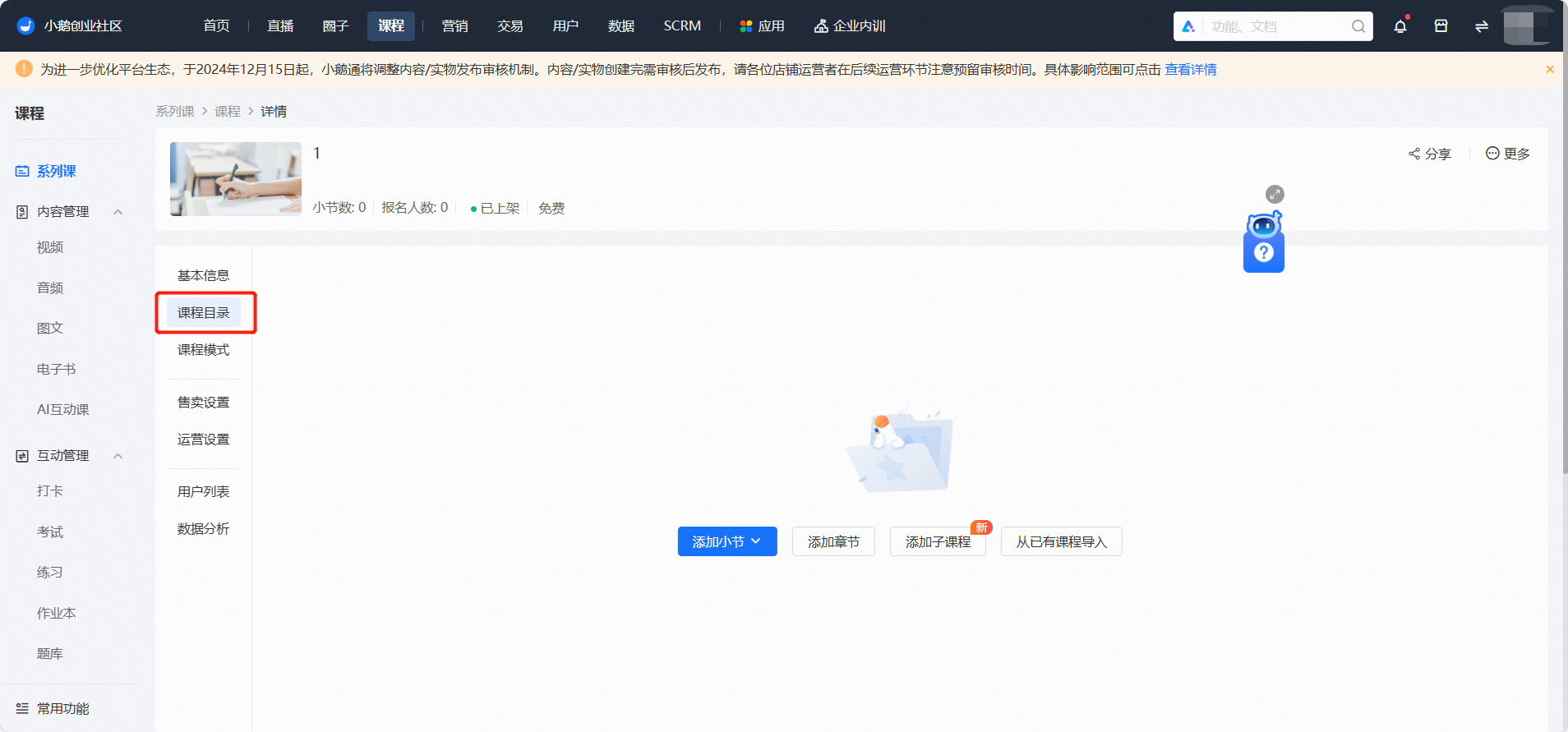
<span style="font-size:15px;font-family:PingFangSC;color:rgb(53,53,53);background:rgb(255,255,255);letter-spacing:0;vertical-align:baseline;">The directory hierarchical structure is: Course - Sub - course - Chapter - Section</span>

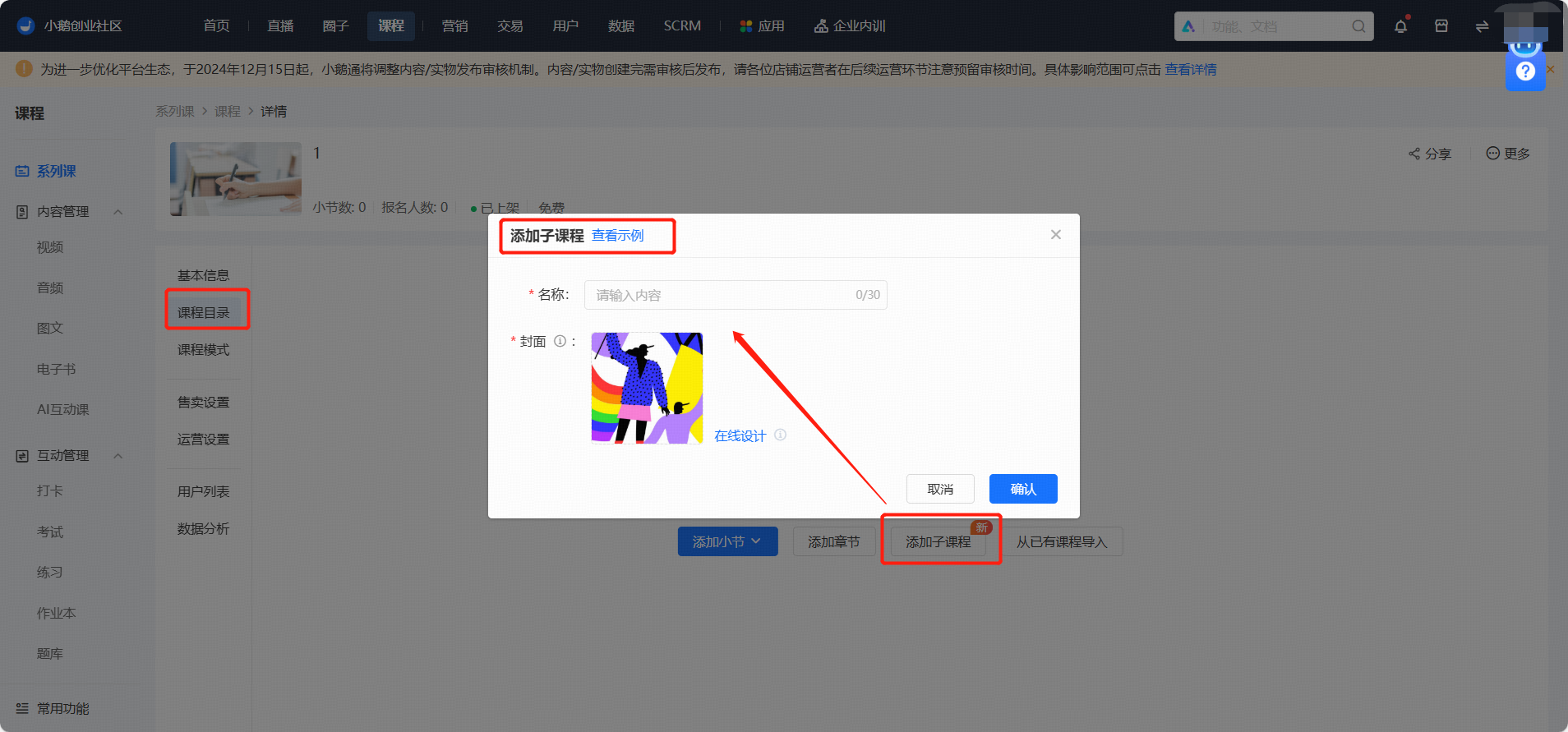
<span style="font-size:15px;font-family:PingFangSC;color:rgb(53,53,53);background:rgb(255,255,255);letter-spacing:0;vertical-align:baseline;">Click 【Add Sub - course】 to add a first - level directory</span>

![image/png](https://wechatapppro-1252524126.file.myqcloud.com/help_center_ooo/image/help_center_ooo/y6i2k9m4mga2hg.png "image.png")

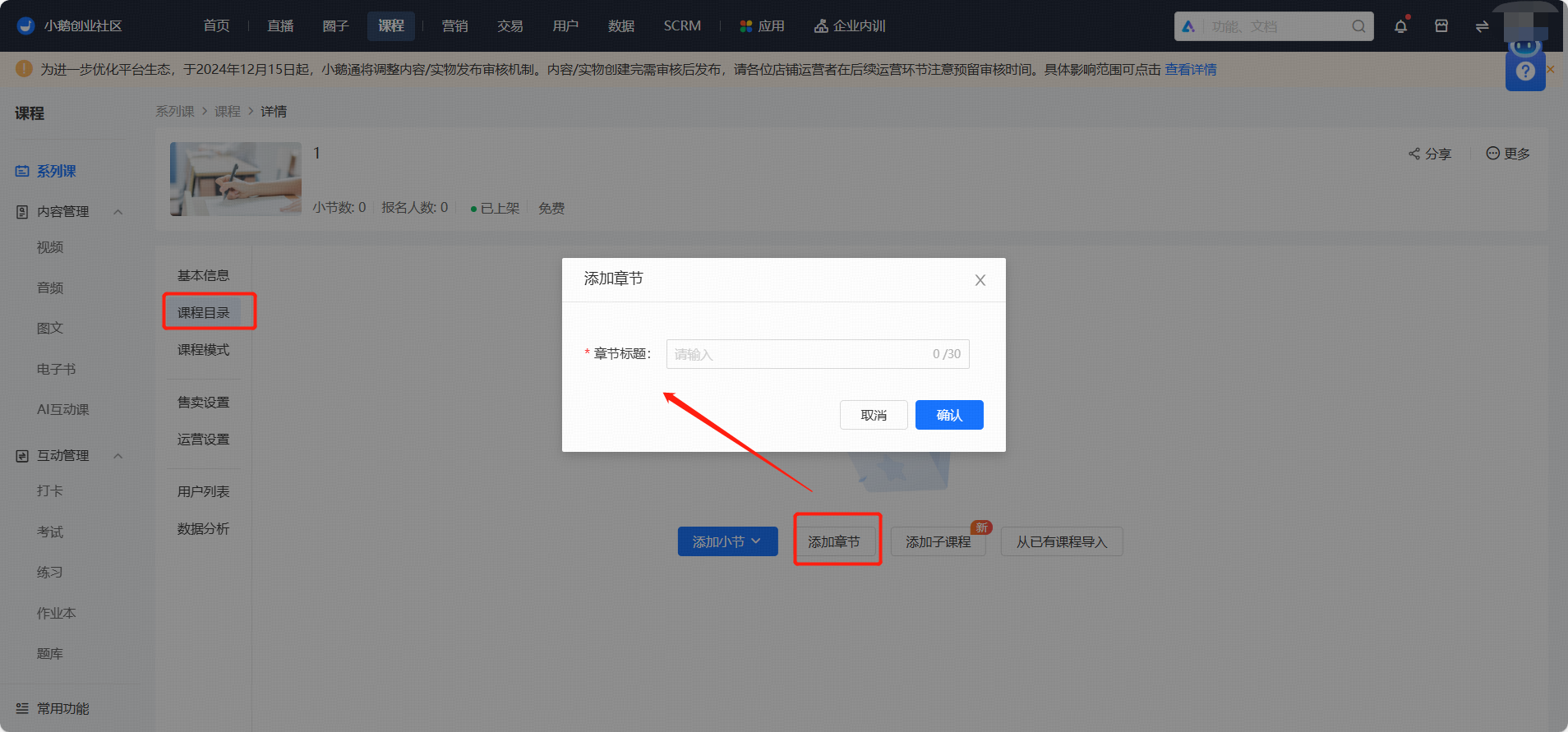
<span style="font-size:15px;font-family:PingFangSC;color:rgb(53,53,53);background:rgb(255,255,255);letter-spacing:0;vertical-align:baseline;">Click 【New Chapter】 to add a first - level directory or a second - level directory under a sub - course;</span>

![image/png](https://wechatapppro-1252524126.file.myqcloud.com/help_center_ooo/image/help_center_ooo/u1xpprm4mgbvl7.png "image.png")

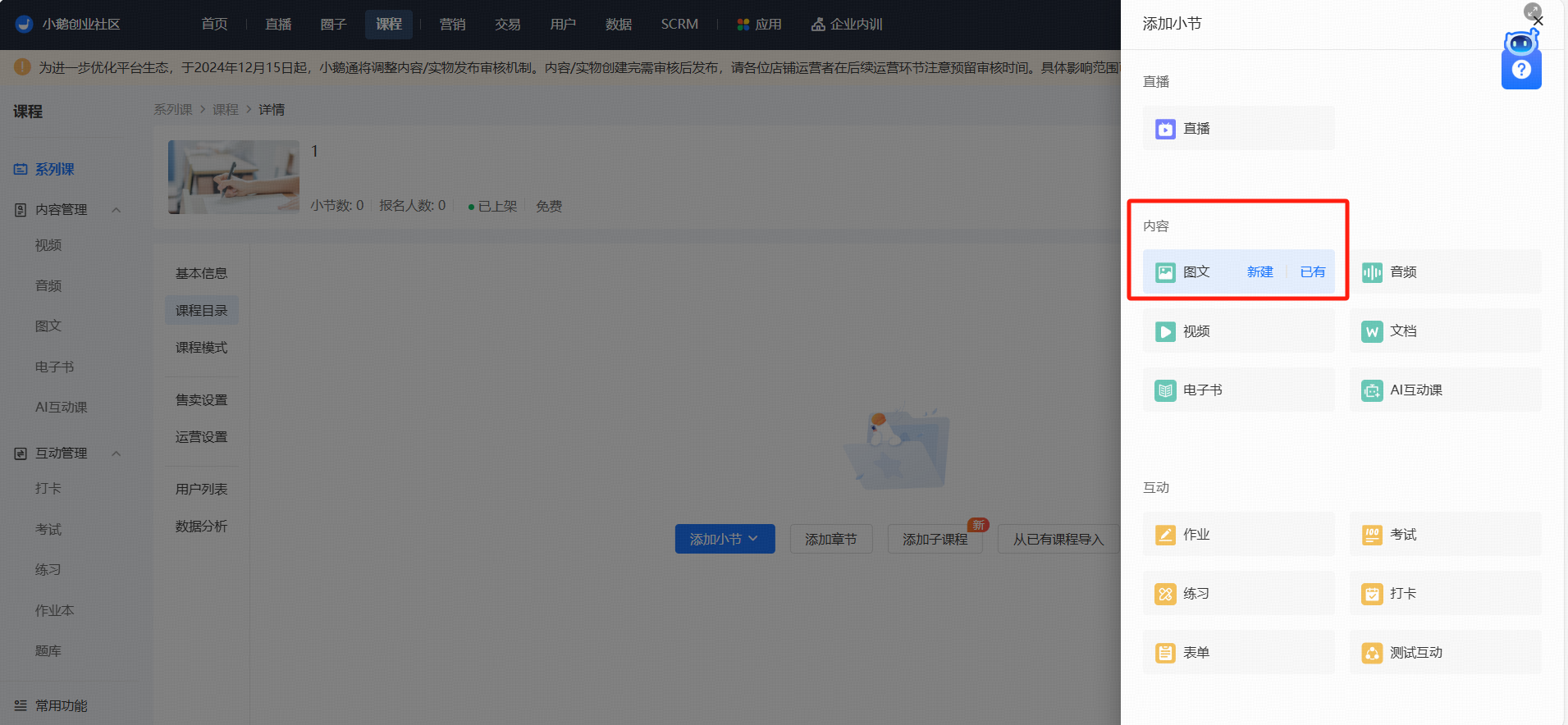
<span style="font-size:15px;font-family:PingFangSC;color:rgb(53,53,53);background:rgb(255,255,255);letter-spacing:0;vertical-align:baseline;">Click 【Add Section】 to add</span><span style="font-size:15px;font-family:PingFangSC;color:rgb(53,53,53);background:rgb(255,255,255);letter-spacing:0;vertical-align:baseline;">associated</span><span style="font-size:15px;font-family:PingFangSC;color:rgb(53,53,53);background:rgb(255,255,255);letter-spacing:0;vertical-align:baseline;">various course content, supporting live streams, images and texts, audio, videos, documents, e - books, assignments, exams, exercises, check - ins, forms,</span><span style="font-size:15px;font-family:PingFangSC;color:rgb(53,53,53);background:rgb(255,255,255);letter-spacing:0;vertical-align:baseline;">interactive tests</span><span style="font-size:15px;font-family:PingFangSC;color:rgb(53,53,53);background:rgb(255,255,255);letter-spacing:0;vertical-align:baseline;">;</span>

![image/png](https://wechatapppro-1252524126.file.myqcloud.com/help_center_ooo/image/help_center_ooo/533q3om4mgcfcl.png "image.png")

<span style="font-size:15px;font-family:PingFangSC;color:rgb(53,53,53);background:rgb(255,255,255);letter-spacing:0;vertical-align:baseline;">【</span><span style="font-size:15px;font-family:PingFangSC;color:rgb(53,53,53);background:rgb(255,255,255);letter-spacing:0;vertical-align:baseline;">Add Section</span><span style="font-size:15px;font-family:PingFangSC;color:rgb(53,53,53);background:rgb(255,255,255);letter-spacing:0;vertical-align:baseline;">】 supports creating new on the current page, and also supports associating or copying existing tasks;</span>

![image/png](https://wechatapppro-1252524126.file.myqcloud.com/help_center_ooo/image/help_center_ooo/3hxmw7m4mgczh6.png "image.png")

<span style="font-size:15px;font-family:PingFangSC;font-weight:bold;color:rgb(53,53,53);background:rgb(255,255,255);letter-spacing:0;vertical-align:baseline;">2. Course Settings</span>

<span style="font-size:15px;font-family:PingFangSC;color:rgb(53,53,53);background:rgb(255,255,255);letter-spacing:0;vertical-align:baseline;">(1) Basic Information (already filled in during creation, can be skipped)</span>

<span style="font-size:15px;font-family:PingFangSC;color:rgb(53,53,53);background:rgb(255,255,255);letter-spacing:0;vertical-align:baseline;">Fill in basic course information such as name and cover, and</span>