# WeChat Service Account

# Process for activating a WeChat Certified Service Account

<div data-elink-language-switch="1" id="bkmrk-%E4%B8%AD%E6%96%87" style="border:1px solid #d6d9de;border-radius:6px;padding:10px 12px;margin:0 0 18px 0;background:#f8fafc;font-size:14px;">[中文](/books/821fa/page/69adc)</div><span style="font-size:14px;font-family:'等线';color:rgb(43,43,43);">If you haven't applied for a service account yet, please follow the instructions below for registration and verification:</span>

<span style="font-size:13px;font-family:Symbol;">·<span style="font-size:9px;line-height:normal;font-family:'Times New Roman';"> </span></span><span style="font-size:14px;font-family:'等线';">Service account registration address:</span>[<span style="font-size:14px;font-family:'等线';color:rgb(112,177,231);">http://t.cn/RWrNbyR</span>](http://t.cn/RWrNbyR)

<span style="font-size:13px;font-family:Symbol;">·<span style="font-size:9px;line-height:normal;font-family:'Times New Roman';"> </span></span><span style="font-size:14px;font-family:'等线';">Service account registration steps:</span>[<span style="font-size:14px;font-family:'等线';color:rgb(112,177,231);">http://t.cn/RUeGaQO</span>](http://t.cn/RUeGaQO)

<span style="font-size:13px;font-family:Symbol;">·<span style="font-size:9px;line-height:normal;font-family:'Times New Roman';"> </span></span><span style="font-size:14px;font-family:'等线';">Service account verification process:</span>[<span style="font-size:14px;font-family:'等线';color:rgb(112,177,231);">http://t.cn/RljAySR</span>](http://t.cn/RljAySR)

# Explanation on the expiration of Service Account verification

<div data-elink-language-switch="1" id="bkmrk-%E4%B8%AD%E6%96%87" style="border:1px solid #d6d9de;border-radius:6px;padding:10px 12px;margin:0 0 18px 0;background:#f8fafc;font-size:14px;">[中文](/books/821fa/page/f7490)</div><span style="font-size:16px;">According to the annual review notification mechanism of the WeChat Official Account platform, reminders will be sent to the Official Account backend and the corresponding administrator's WeChat account when the certification expires in 3 months, 2 months, 1 month, 7 days, and upon expiration. If you fail to conduct the annual review in advance, you can apply for a 7-day temporary extension via the administrator's WeChat account on the expiration date.</span>

<span style="font-size:16px;">After the certification of the service account authorized by the merchant expires, WeChat will disable the payment function, authorization, and other advanced interfaces of the service account. New users may not be able to authorize and log in to your store.</span>

<span style="font-size:16px;">elink will send notifications 1 month, 7 days before the expiration of your WeChat service account and upon expiration. If your service account has expired, please go to the WeChat Official Account platform for annual review as soon as possible. You can quickly restore the service account functions through the following steps after expiration:</span>

<span style="font-size:16px;">1. Apply for a 7-day temporary extension on the administrator's WeChat account of the service account on the expiration date.</span>

<span style="font-size:16px;">![01.png](https://wechatapppro-1252524126.file.myqcloud.com/help_document/image/ueditor/14003500_1622024706.png ".png")</span>

<span style="font-size:16px;">2. Go to the WeChat Official Account platform for annual review. Enter the WeChat Official Account platform at https://mp.weixin.qq.com/, log in to the service account authorized to elink, and enter the WeChat service account management console for annual review. The review period is generally 1 - 3 days.</span>

<span style="font-size:16px;">![02.png](https://wechatapppro-1252524126.file.myqcloud.com/help_document/image/ueditor/59862100_1622024706.png ".png")</span>

<span style="font-size:16px;">3. You can use it normally after passing the review.</span>

<span style="font-size:16px;">To ensure the normal use of your store, please log in to the WeChat Official Account platform in time to complete the annual review and certification before the service account expires.</span>If you no longer renew or use your service account, please go to \[**Marketing Center - WeChat Service Account - Authorization Status\] in the management console**to revoke the authorization.

# Configure the business domain name of the Service Account

<div data-elink-language-switch="1" id="bkmrk-%E4%B8%AD%E6%96%87" style="border:1px solid #d6d9de;border-radius:6px;padding:10px 12px;margin:0 0 18px 0;background:#f8fafc;font-size:14px;">[中文](/books/821fa/page/c3e87)</div><span style="font-size:14px;font-family:'等线';color:rgb(43,43,43);">To avoid the issue of a security prompt popping up above the comment box when users leave comments, it is recommended that you complete the domain configuration for your Official Account.</span>

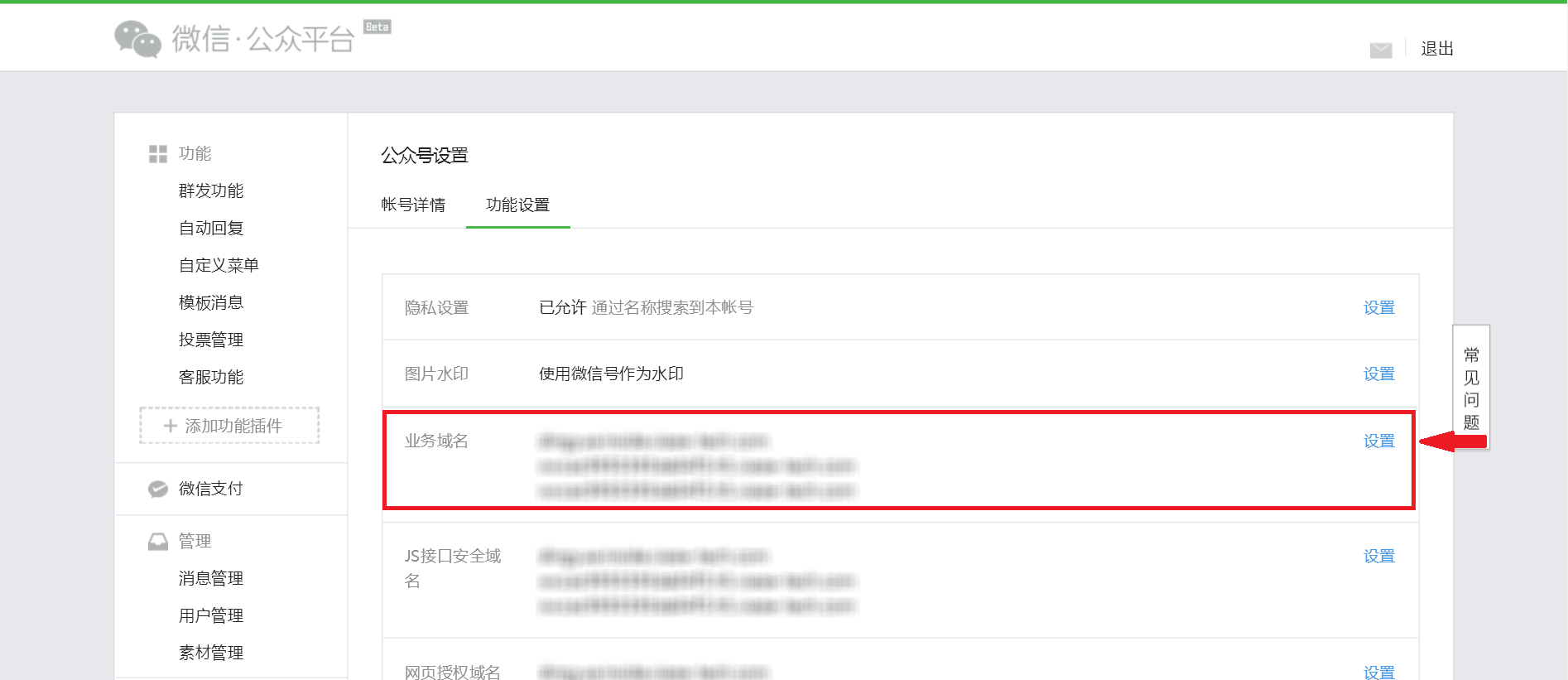
<span style="font-size:14px;font-family:'等线';color:rgb(43,43,43);">Step 1</span><span style="font-size:14px;font-family:'等线';color:rgb(43,43,43);">: Enter**WeChat Official Account Platform**</span><span style="font-size:14px;font-family:'等线';color:rgb(43,43,43);">, and click on**\[Settings\]**under**\[Official Account Settings\]**, then click on**\[Feature Settings\]**. In the**\[Business Domain Name\]**section, click on**\[Configure\]**.</span>

![image006.png](https://wechatapppro-1252524126.file.myqcloud.com/help_document/image/ueditor/13986900_1544250558.png ".png")

<span style="font-size:14px;font-family:'等线';"></span>

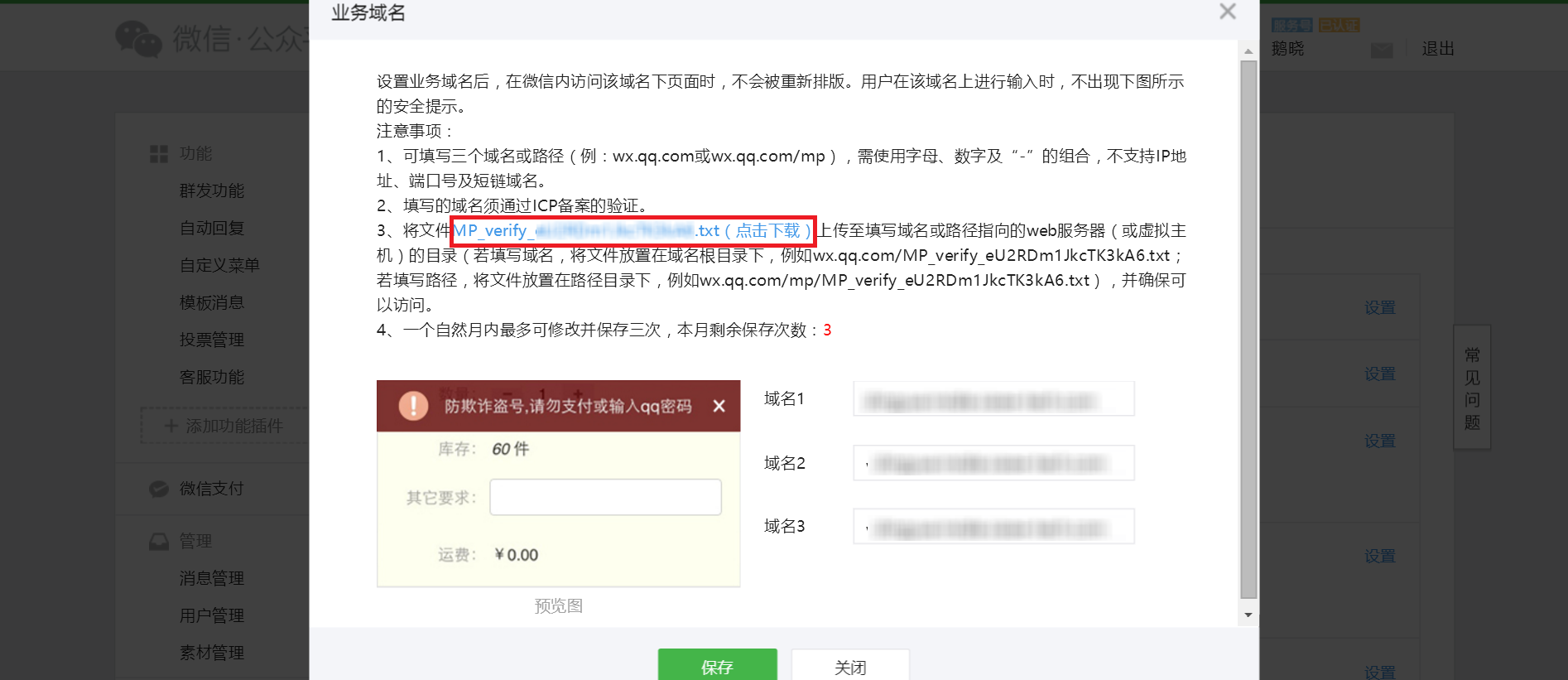
<span style="font-size:14px;font-family:'等线';color:rgb(43,43,43);">Step 2</span><span style="font-size:14px;font-family:'等线';color:rgb(43,43,43);">: Click to download the**WeChat Business Domain Name File**.**Do not close this business domain name page after completing this step.**</span>

<span style="font-size:14px;font-family:'等线';">Note: Do not download the WeChat Business Domain Name File repeatedly. Repeated downloads will automatically append number suffixes such as '-2' or '-3' to the file name, which may lead to configuration error prompts in subsequent operations due to file name mismatches.</span>

<span style="font-size:14px;font-family:'等线';"> ![image008.png](https://wechatapppro-1252524126.file.myqcloud.com/help_document/image/ueditor/38029800_1544250558.png ".png")</span>

<span style="font-family:'等线';font-size:14px;"> </span>

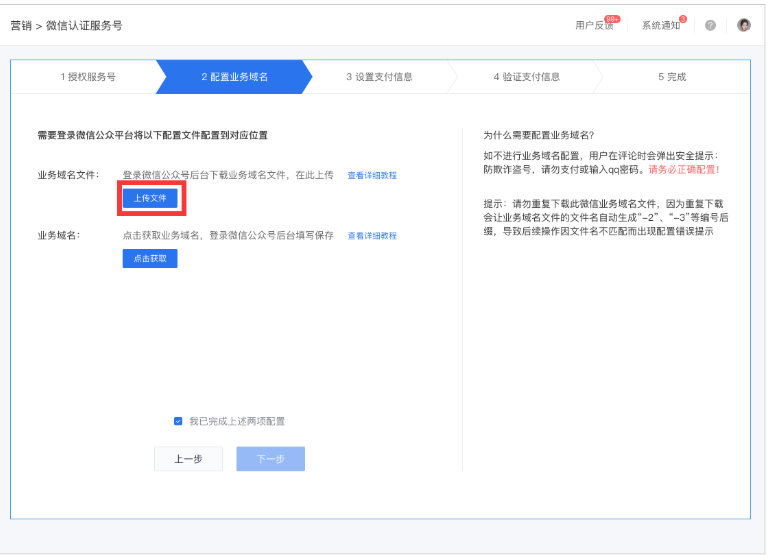
<span style="font-size:14px;font-family:'等线';color:rgb(43,43,43);">Step 3</span><span style="font-size:14px;font-family:'等线';color:rgb(43,43,43);">: Return to the**elink Management Console**. In the**\[Configure Business Domain Name\]**section, click on**\[Upload File\]**, and upload the .txt format WeChat Business Domain Name File you just downloaded (make sure there are no numbered suffixes connected by hyphens at the end of the file name). Then click on**\[Save\]**</span><span style="color:rgb(43,43,43);font-family:'等线';font-size:14px;"></span>

![](https://wechatapppro-1252524126.file.myqcloud.com/help_document/image/ueditor/55519100_1544250558.com/yws/public/resource/81ea9aa3d299b9919566978a20c2227e/xmlnote/4736dc10a81a409da002caa443a80359/6063)

<span style="font-size:14px;font-family:'等线';color:rgb(43,43,43);"></span>

<span style="font-size:14px;font-family:'等线';color:rgb(43,43,43);">Step 4</span><span style="font-size:14px;font-family:'等线';color:rgb(43,43,43);">: After the upload is complete, click on**\[Business Domain Name Configuration\]**section, click on**\[Click to Obtain\]**, and then copy the**\[Business Domain Name\]**</span>

<span style="font-family:'等线';font-size:14px;"></span>

![](http://note.youdao.com/yws/public/resource/81ea9aa3d299b9919566978a20c2227e/xmlnote/3CFF3554D16B40A8AA1D1D213E438F7A/6065)

<span style="font-family:'等线';font-size:14px;"></span>

<span style="font-family:'等线';font-size:14px;">  
</span>

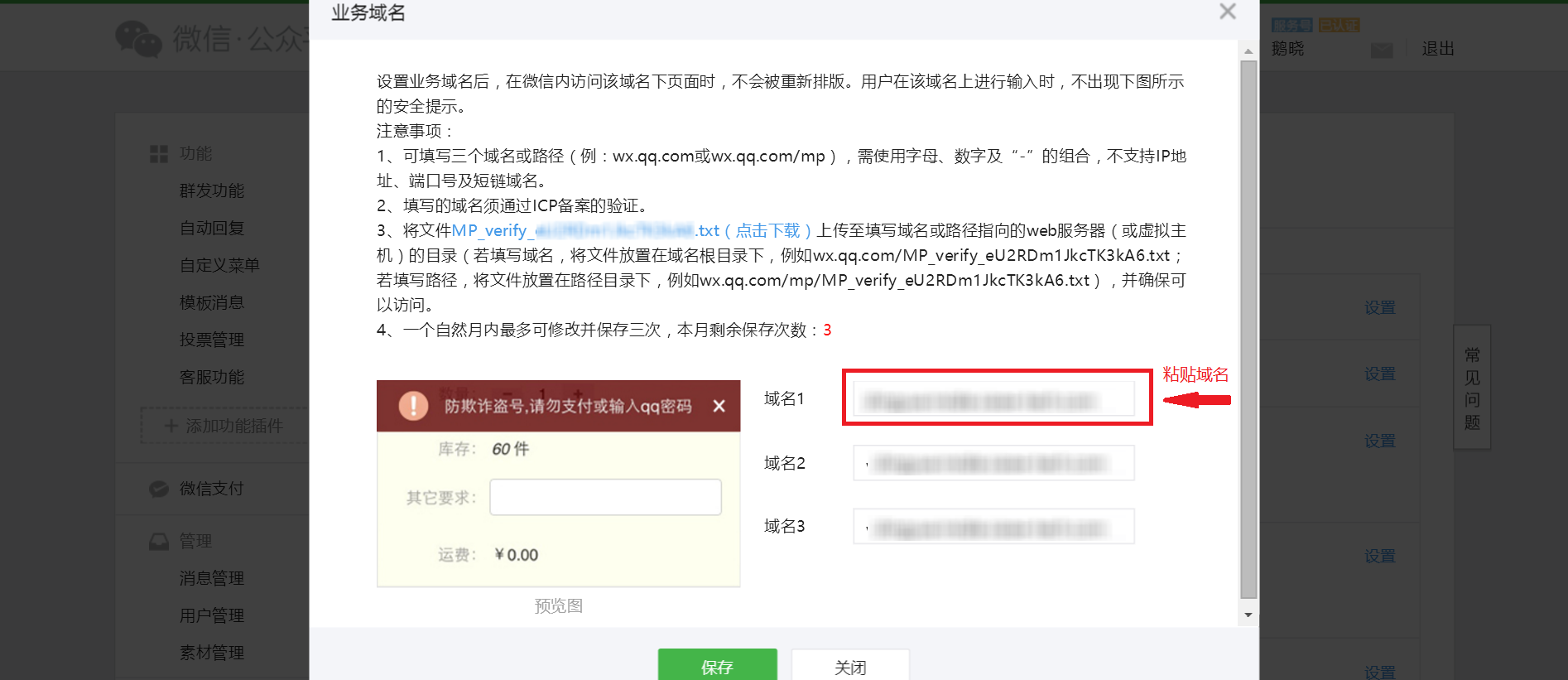
<span style="font-size:14px;font-family:'等线';color:rgb(43,43,43);">Step 5</span><span style="font-size:14px;font-family:'等线';color:rgb(43,43,43);">: Go back to the**WeChat Official Account Platform**'s**\[Business Domain Name\]**page. Paste the**elink Online Store's \[Business Domain Name\]**<a>you just copied in the domain name field (you can choose any one of the three domain name options to paste).</a></span><span style="font-size:14px;font-family:'等线';"> </span><span style="font-size:14px;font-family:'等线';color:rgb(43,43,43);">.</span>

![image014.png](https://wechatapppro-1252524126.file.myqcloud.com/help_document/image/ueditor/84232200_1544250558.png ".png")

<span style="font-size:14px;font-family:'等线';"></span>

<span style="font-size:14px;font-family:'等线';color:rgb(43,43,43);">Step 6</span><span style="font-size:14px;font-family:'等线';color:rgb(43,43,43);">: Click on**\[I have completed the above two configurations\]**, and then click \[Next\].</span>

<span style="font-size:14px;font-family:'等线';color:rgb(43,43,43);">  
</span>